

Cloudflare Workers automatically instruments platform operations like fetch calls, KV reads, and D1 queries. Custom spans let you extend this visibility into your own application logic, so you can trace custom code paths alongside the built-in instrumentation.
The custom spans API is available in two ways — both provide the same enterSpan() method and behave identically:
import { tracing } from "cloudflare:workers"— works anywhere in your codebase, including utility functions, libraries, and modules that do not have access to the handler context.ctx.tracing— available on theExecutionContextpassed to your handler, convenient when you are already working within a handler.
Custom spans require tracing to be enabled on your Worker. If you have not already done so, set observability.traces.enabled to true in your Wrangler configuration file:
{
  "$schema": "./node_modules/wrangler/config-schema.json",
  "observability": {
    "traces": {
      "enabled": true
    }
  }
}[observability.traces]
enabled = trueUse tracing.enterSpan() to wrap a section of code in a named span. The span automatically becomes a child of whichever span is currently active, and ends when the callback returns or its returned promise settles.
The following example uses both access methods — the cloudflare:workers import and ctx.tracing — to show that they are interchangeable:
import { tracing } from "cloudflare:workers";

export default {
	async fetch(request, env, ctx) {
		// Using the import
		return tracing.enterSpan("handleRequest", async (span) => {
			span.setAttribute("url.path", new URL(request.url).pathname);

			const user = await ctx.tracing.enterSpan("auth", async () => {
				// Using ctx.tracing
				return authenticate(request, env);
			});

			return buildResponse(user);
		});
	},
};import { tracing } from "cloudflare:workers";
export default {
async fetch(request: Request, env: Env, ctx: ExecutionContext) {
// Using the import
return tracing.enterSpan("handleRequest", async (span) => {
span.setAttribute("url.path", new URL(request.url).pathname);
const user = await ctx.tracing.enterSpan("auth", async () => {
// Using ctx.tracing
return authenticate(request, env);
});
return buildResponse(user);
});
},
};Creates a new span and runs callback inside it. The span is automatically ended when the callback returns (synchronous or asynchronous) or throws.
Parameters:
| Parameter | Type | Description |
|---|---|---|
name |
string |
The name of the span. This appears in trace visualizations. |
callback |
(span: Span, ...args: A) => T |
The function to execute within the span. Receives the Span object as its first argument, followed by any additional arguments passed to enterSpan. |
...args |
A |
Optional additional arguments forwarded to the callback after the span parameter. |
Returns: The return value of callback.
Behavior:
- The new span is a child of whichever span is currently active on the async context. If no span is active, it becomes a child of the request's root span.
- Nested
enterSpancalls and runtime-created spans (such asfetchor KV operations) that run inside the callback automatically become children of this span. - The span ends when the callback returns synchronously, throws synchronously, or when its returned promise fulfills or rejects.
// Synchronous callback — span ends when the function returns
const result = tracing.enterSpan("parse", (span) => {
  span.setAttribute("format", "json");
  return JSON.parse(body);
});

// Async callback — span ends when the promise settles
const data = await tracing.enterSpan("fetchData", async (span) => {
  const res = await fetch("https://api.example.com/data");
  span.setAttribute("http.response.status_code", res.status);
  return res.json();
});

// Forwarding arguments
const doubled = tracing.enterSpan("compute", (span, x) => x * 2, 21);The Span object is passed into the enterSpan callback. It provides methods to annotate the span with metadata.
Sets an attribute on the span.
| Parameter | Type | Description |
|---|---|---|
key |
string |
The attribute name. |
value |
string | number | boolean | undefined |
The attribute value. Passing undefined is a no-op. |
Attributes appear alongside the span in your traces and OpenTelemetry exports.
span.setAttribute("user.plan", "enterprise");
span.setAttribute("item.count", 42);
span.setAttribute("cache.hit", true);A readonly boolean indicating whether this invocation is being traced. When the request is not sampled (based on your head_sampling_rate), isTraced is false and enterSpan still runs the callback but does not record any telemetry.
You can use this to skip expensive attribute computation when the request is not being traced:
tracing.enterSpan("process", (span) => {
  if (span.isTraced) {
    span.setAttribute("request.body.preview", JSON.stringify(body).slice(0, 200));
  }
  return processBody(body);
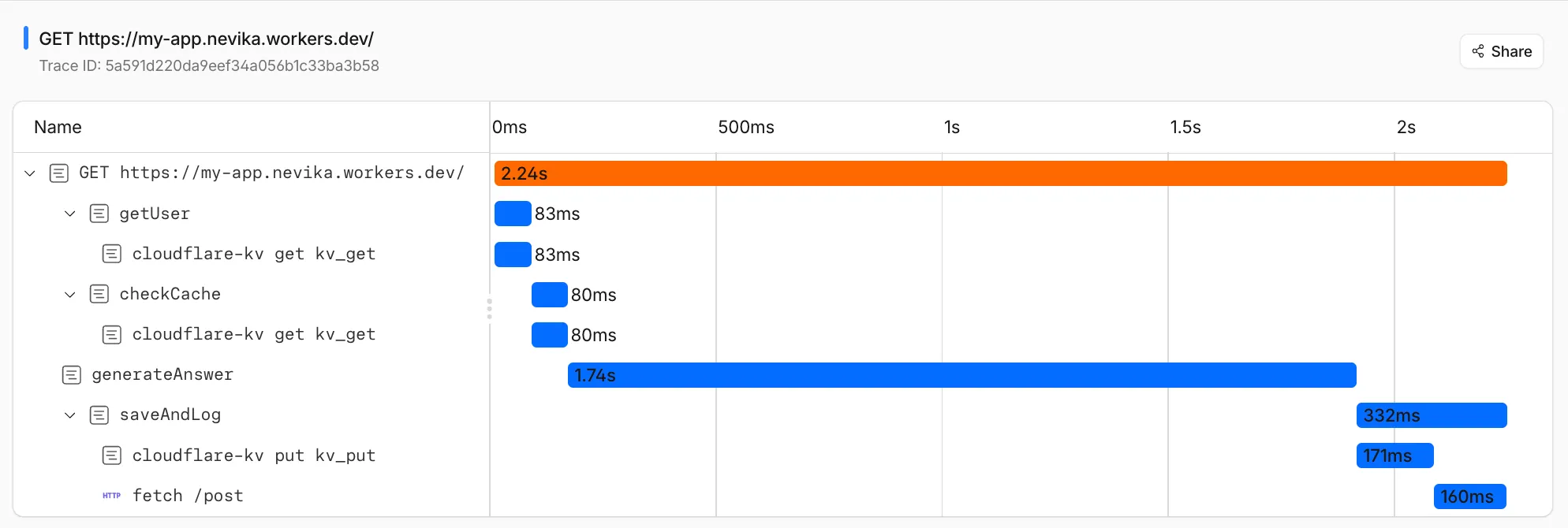
});Spans nest automatically based on the JavaScript async context. Any enterSpan call or platform operation (like fetch, env.MY_KV.get(), and so on) that runs inside a callback becomes a child of the enclosing span.
import { tracing } from "cloudflare:workers";

async function handleOrder(env, orderId) {
	return tracing.enterSpan("handleOrder", async (span) => {
		span.setAttribute("order.id", orderId);

		// This KV read is automatically a child of "handleOrder"
		const order = await env.ORDERS_KV.get(orderId, "json");

		// This nested span is also a child of "handleOrder"
		const total = tracing.enterSpan("calculateTotal", (innerSpan) => {
			innerSpan.setAttribute("item.count", order.items.length);
			return order.items.reduce((sum, item) => sum + item.price, 0);
		});

		// This fetch is a child of "handleOrder"
		await fetch("https://api.example.com/notify", {
			method: "POST",
			body: JSON.stringify({ orderId, total }),
		});

		return new Response(JSON.stringify({ orderId, total }));
	});
}import { tracing } from "cloudflare:workers";
async function handleOrder(env: Env, orderId: string) {
return tracing.enterSpan("handleOrder", async (span) => {
span.setAttribute("order.id", orderId);
// This KV read is automatically a child of "handleOrder"
const order = await env.ORDERS_KV.get(orderId, "json");
// This nested span is also a child of "handleOrder"
const total = tracing.enterSpan("calculateTotal", (innerSpan) => {
innerSpan.setAttribute("item.count", order.items.length);
return order.items.reduce((sum: number, item: any) => sum + item.price, 0);
});
// This fetch is a child of "handleOrder"
await fetch("https://api.example.com/notify", {
method: "POST",
body: JSON.stringify({ orderId, total }),
});
return new Response(JSON.stringify({ orderId, total }));
});
}
console.log() and other console methods emit log events that are automatically attributed to the currently active span. This means log output from inside an enterSpan callback is associated with that span in your traces and OpenTelemetry exports.
tracing.enterSpan("processPayment", async (span) => {
  console.log("Starting payment processing"); // attributed to "processPayment"
  const result = await chargeCard(token, amount);
  console.log("Payment complete", result.id); // also attributed to "processPayment"
});The full type declarations for the custom spans API:
declare module "cloudflare:workers" {
  namespace tracing {
    function enterSpan<T, A extends unknown[]>(
      name: string,
      callback: (span: Span, ...args: A) => T,
      ...args: A
    ): T;
  }

  class Span {
    readonly isTraced: boolean;
    setAttribute(
      key: string,
      value: string | number | boolean | undefined,
    ): void;
  }
}
The same API is available on the handler context as ctx.tracing, with the same types.
- No manual span lifetime management. Spans are always scoped to the
enterSpancallback. You cannot start a span and end it later. - No manual parent-child wiring. Parent-child relationships are determined by the JavaScript async context automatically.
- No
setAttributes(bulk set) yet. Use individualsetAttributecalls. Bulk setting is planned for a future release. - No
spanContext()(trace/span IDs) yet. Access to trace and span identifiers for manual propagation across boundaries is planned for a future release. - No
setOutcomeyet. Setting span outcome status is planned for a future release.
For other tracing limitations, refer to the known limitations page.