
The Routes page in the Cloudflare dashboard now shows the routes across all of your connectors — Cloudflare Mesh and Cloudflare Tunnel routes alongside Cloudflare WAN and Magic Transit static routes — in a single table, instead of a separate routes view per product.
From the unified Routes page you can:
Visualize your network with an interactive map that shows how your destinations flow through to your connectors — including equal-cost multi-path (ECMP) routes where the same prefix is served by several connectors. Select a node to filter the table down to the routes behind it.
See every route in one table, with its destination, type, connector, priority, and source, and filter or sort to find what you need.
Create, edit, and delete routes of any supported type without leaving the page. When adding a Cloudflare WAN or Magic Transit static route, you now pick the next hop by connector name instead of typing its IP.
Your existing routes, APIs, and configurations are unchanged — this is a dashboard experience that brings them together in one place. Learn how to add routes and manage virtual networks.
Durable Objects now supports two new location hints for Asia-Pacific: apac-ne (Northeast Asia-Pacific) and apac-se (Southeast Asia-Pacific). Use apac-ne or apac-se when you want finer-grained placement within Asia-Pacific rather than the broader apac hint.
Use the new hints the same way as any other locationHint:
If your users are spread across all of Asia-Pacific, the existing apac hint remains the right choice. Only reach for apac-ne or apac-se when your traffic is clearly concentrated in one sub-region and you want to minimize round-trip time to that audience. The default behavior and what we generally recommended is not adding a location hint unless absolutely needed, this will create the Durable Object as close to the initializing request as possible to reduce latency.
As with all location hints, these are best-effort suggestions. Cloudflare will place the Durable Object in a nearby data center, not necessarily the exact hinted location.
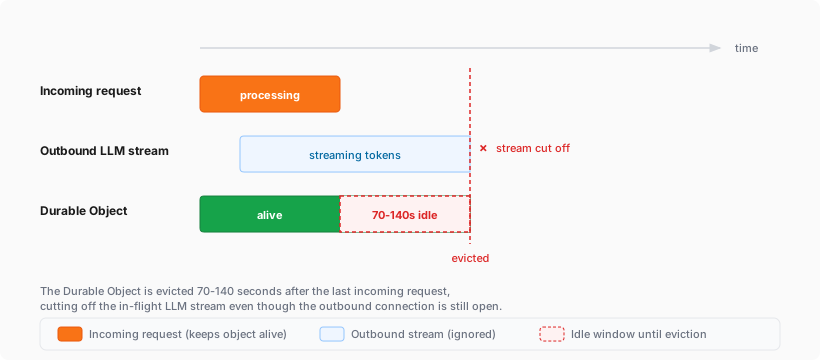
Durable Objects now remain alive for the duration of active outbound connections created via connect() or an outbound WebSocket. Previously, a Durable Object would be evicted after 70-140 seconds of no incoming traffic, even if the object had an open outbound connection, which is a common pattern when streaming responses from a large language model (LLM) over TCP or an outbound WebSocket.
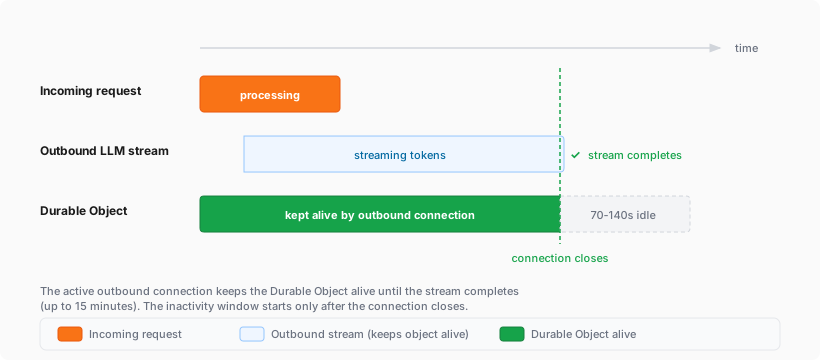
With this change, each active outbound connection prevents eviction. Once all outbound connections close, the standard 70-140 second inactivity window applies before the Durable Object is evicted.
Before: streaming connections were cut off by eviction
After: active outbound connections keep the Durable Object alive
If you are building agents on Cloudflare, this is especially relevant. An agent that streams tokens from an LLM while calling models, or that performs long-running tasks over an outbound connection, now stays alive for the duration of that connection instead of being evicted mid-stream.
Limits:
Each outbound connection keeps the Durable Object alive for a maximum of 15 minutes. After 15 minutes, the connection stops preventing eviction (the connection itself continues operating), and the standard eviction rules resume.
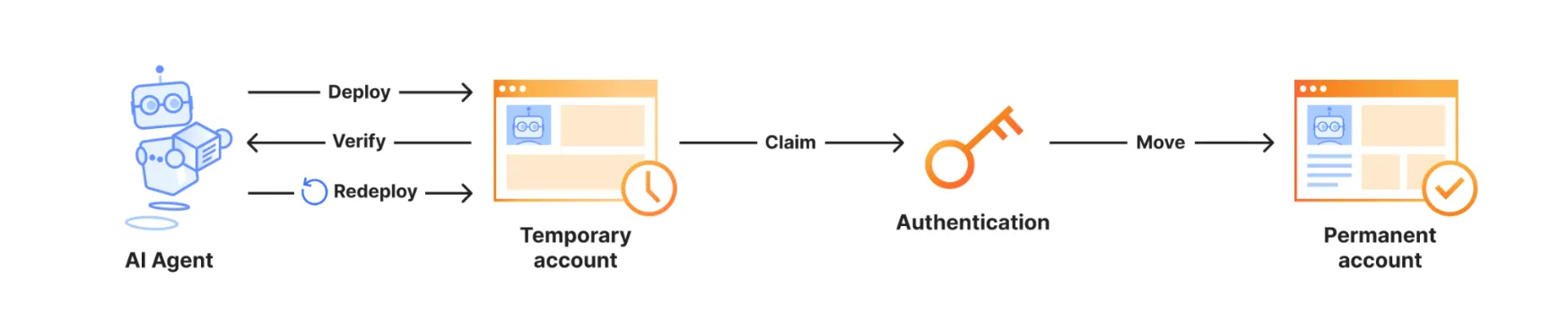
AI agents can now deploy Workers to Cloudflare without first requiring a user to sign up, open a browser-based OAuth flow, click through the dashboard, or create an API token. When an agent tries to deploy without Cloudflare credentials, Wrangler can tell it to rerun with --temporary, then deploy the Worker to a temporary preview account.
To try this with your agent, update to Wrangler 4.102.0 or later, make sure you are logged out (wrangler logout), and then ask your agent to build something and deploy it to Cloudflare. The agent should follow Wrangler's output and deploy using the --temporary flag.
wrangler deploy --temporary
The temporary deployment stays live for 60 minutes. During that window, the agent can verify the Worker, redeploy changes, and return both the live Worker URL and claim URL. Opening the claim URL lets you sign in to or create a Cloudflare account and make the temporary account permanent.
Temporary preview accounts currently support a limited set of products, including Workers, Workers Static Assets, Workers KV, D1, Durable Objects, Hyperdrive, Queues, and SSL/TLS certificates. For supported products, limits, and claim behavior, refer to Claim deployments (temporary accounts).
When you create a new Zero Trust organization, Cloudflare now adds the Cloudflare identity provider as your default login method. Previously, new organizations started with one-time PIN (OTP).
With the Cloudflare identity provider, your users authenticate using their existing Cloudflare account credentials, and authentication is restricted to members of your account. You can still add OTP or connect any third-party identity provider whenever you need to.
This change only applies to newly created accounts. Existing organizations keep the login methods they already have configured. If you would like to use the Cloudflare Identity Provider in an existing account, you must enable it.
exec() is now available for Containers. Use this.ctx.container.exec() to start processes inside a running Container, stream standard input and output, inspect exit codes, and signal each process.
Call exec() from a class extending Container, or from another Durable Object through this.ctx.container. The associated Container must already be running.
This example starts the Container when needed, then reads its Node.js version:
src/index.jsjs
import { Container } from "@cloudflare/containers";export class MyContainer extends Container { async readVersion() { if (!this.ctx.container.running) { await this.start(); } const process = await this.ctx.container.exec(["node", "--version"]); const output = await process.output(); const decoder = new TextDecoder(); return { exitCode: output.exitCode, stdout: decoder.decode(output.stdout), stderr: decoder.decode(output.stderr), }; }}
src/index.tsts
import { Container } from "@cloudflare/containers";export class MyContainer extends Container { async readVersion() { if (!this.ctx.container.running) { await this.start(); } const process = await this.ctx.container.exec(["node", "--version"]); const output = await process.output(); const decoder = new TextDecoder(); return { exitCode: output.exitCode, stdout: decoder.decode(output.stdout), stderr: decoder.decode(output.stderr), }; }}
The command array starts an executable directly, without an implicit shell. Invoke a shell explicitly for pipes, redirects, or variable expansion.
One RPC method can coordinate multiple exec() calls in one caller-to-Durable Object round trip. It can also pass byte-oriented ReadableStream input or return streamed output with flow control.
You can create PlanetScale Postgres and MySQL databases from Cloudflare and bill PlanetScale database usage through your Cloudflare account as a pay-as-you-go customer. Cloudflare contract customers will be able to add PlanetScale usage to their contract in July so reach out to your Cloudflare account team if interested.
Create a PlanetScale database from the Cloudflare dashboard to check out globally distributed Workers optimized for regional data access.
PlanetScale databases created from Cloudflare work with Workers through Hyperdrive. Hyperdrive manages database connection pools and query caching, so you can use PlanetScale as a centralized relational database for Workers applications without changing your database drivers, object-relational mapping (ORM) libraries, or SQL tooling.
PlanetScale usage appears on your Cloudflare invoice each billing period as a dollar total at PlanetScale's standard pricing ↗. You can introspect per-database billing usage via PlanetScale's dashboard ↗.
When you create a PlanetScale database from the Cloudflare dashboard, you receive the same PlanetScale developer experience, including development branches, query insights, and Model Context Protocol (MCP) server support for agents.
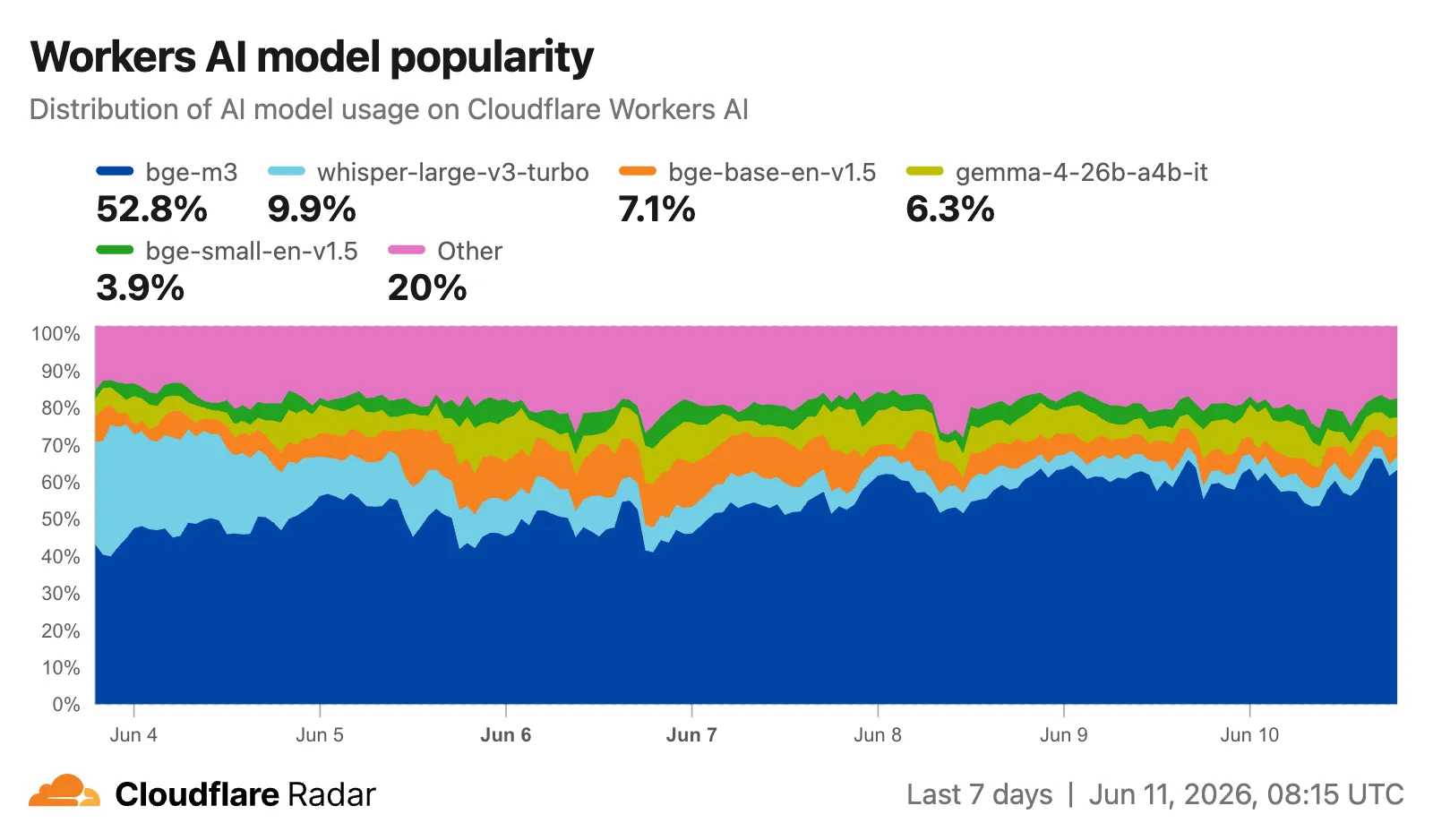
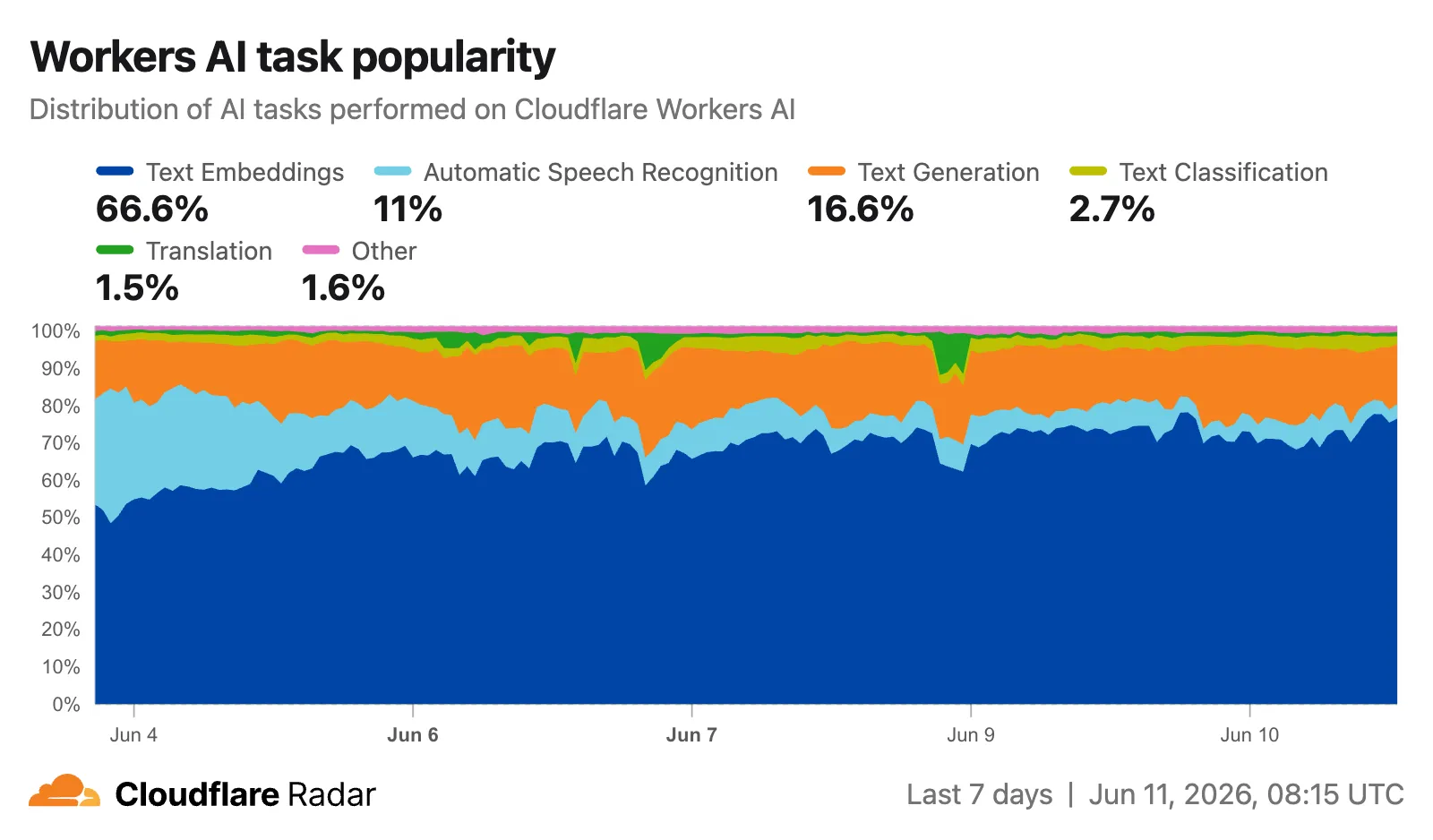
Radar has changed how it measures Workers AI model and task popularity.
Previously, popularity was based on the number of unique accounts running inferences against each model or task. It is now based on the number of inferences, giving a more representative view of actual usage volume. This change will affect all new measurements as well as historical data. As a result, the model and task distributions shown on Radar may differ from what you saw previously, and historical trends may shift accordingly.
Cloudflare Fonts now forwards /cf-fonts requests to your origin server when it encounters invalid paths or unexpected runtime errors, instead of returning 4xx or 5xx responses directly. This update also adds additional input validation to enhance security.
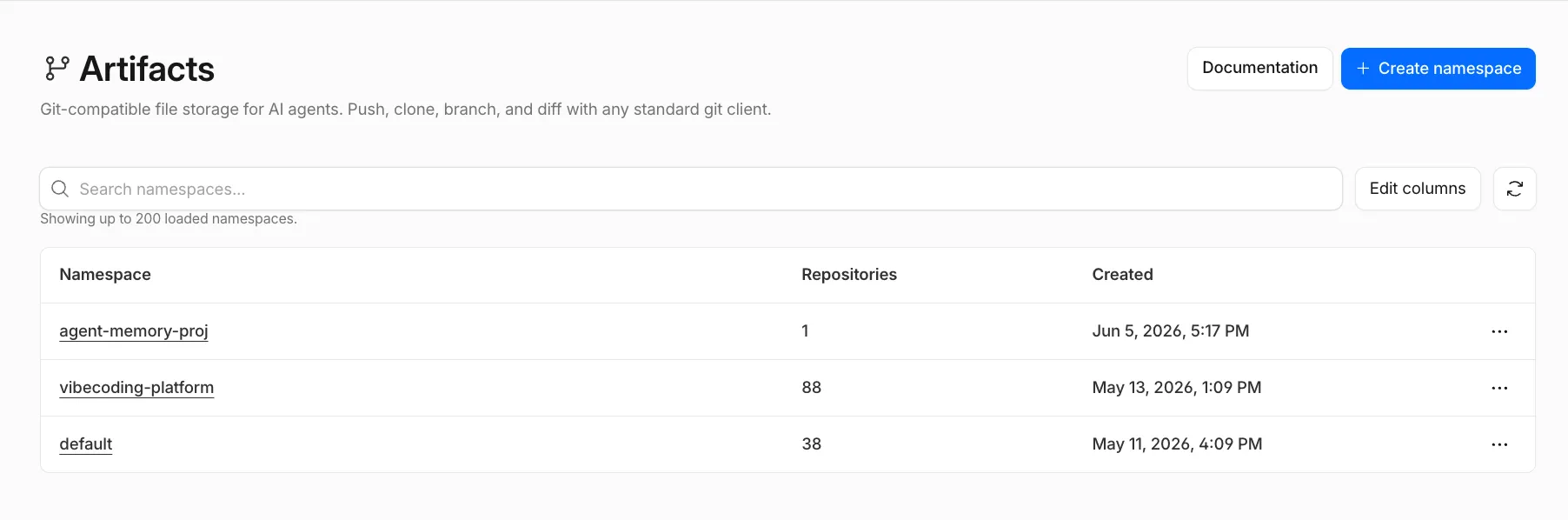
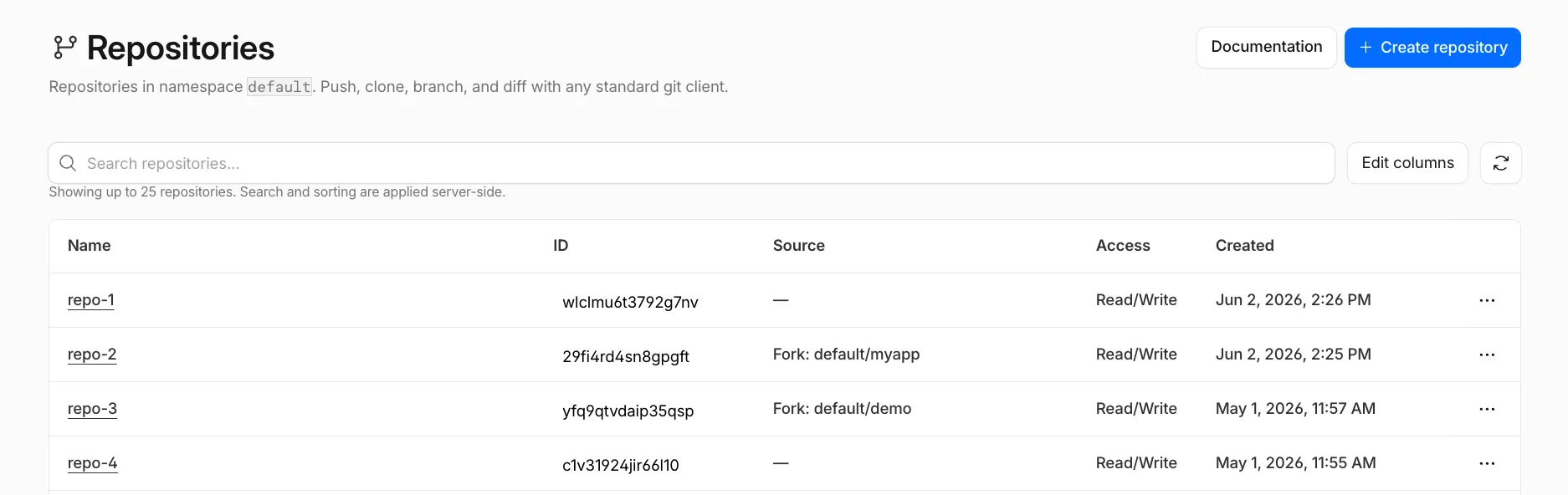
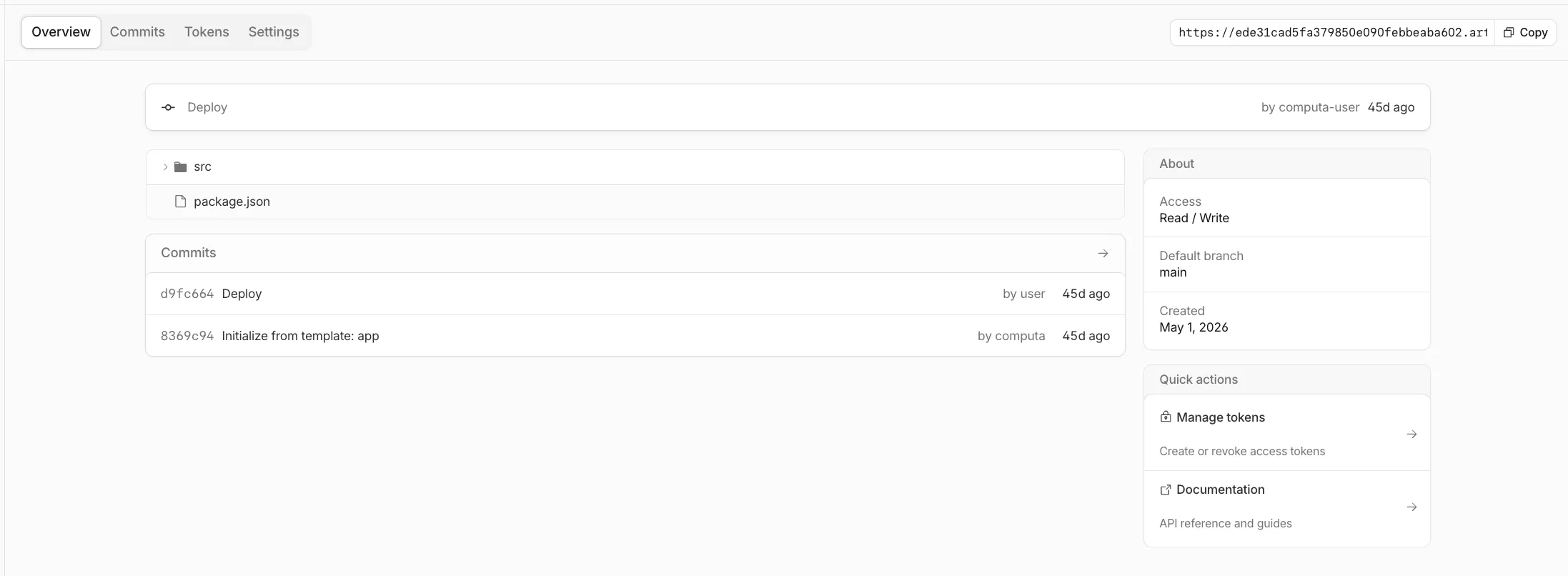
You can now configure Artifacts namespaces, repos, and tokens directly from the Cloudflare dashboard.
Artifacts is Git-compatible storage that lets you store repos on Cloudflare and interact with them using standard Git workflows.
You can view and create namespaces, which are top-level containers for repos:
You can view, create, fork, and search repos within a namespace:
You can open a repo to view its files and copy its Git remote URL.
You can also provision tokens directly from the dashboard to scope Git access to a single repo, with read tokens for clone, fetch, and pull workflows, or write tokens when a client needs to push changes.
To get started, go to the Cloudflare dashboard ↗ and select Storage & databases > Artifacts.
If you are enrolled in the Artifacts beta, you can use the dashboard to set up Artifacts. If you would like to join the beta, complete the request form ↗.
Cloudflare now accepts ML-DSA ↗ (FIPS 204) post-quantum certificates on the connection between Cloudflare's edge and your origin server. Combined with our existing X25519MLKEM768 key agreement, this lets you establish end-to-end post-quantum authentication on the Cloudflare-to-origin connection.
ML-DSA is supported in two origin-facing features:
Authenticated Origin Pulls (AOP) — upload an ML-DSA client certificate that Cloudflare will present during the mTLS handshake to your origin. Available at both zone-level and per-hostname scopes.
The latest release of the Agents SDK ↗ makes it easier to build agents that can safely interact with real systems and keep working through interruptions.
Agents can now browse websites through Browser Run, write code against external tools through Code Mode, use client-provided tools when delegating to Think sub-agents, and recover more reliably from deploys, Durable Object evictions, and connection churn.
Safer browser automation
Agents can now use Browser Run through a single durable browser_execute tool. Instead of choosing from a fixed list of actions, the model writes code against the Chrome DevTools Protocol (CDP) and can inspect pages, capture screenshots, read rendered content, debug frontend behavior, and interact with live browser sessions.
Browser sessions can be one-time, reused, or promoted from one-time to persistent during a run. This is useful when an agent needs a human to log in, complete MFA, or approve a sensitive action. The run can pause, keep the same tabs and cookies, and resume after approval.
The browser tools also add Live View URLs, optional session recording, and quick actions such as browser_markdown, browser_extract, browser_links, and browser_scrape for one-shot browsing tasks.
Resumable code execution with approvals
Code Mode now uses createCodemodeRuntime, connectors, and a durable execution log. This lets you give a model one codemode tool instead of a large prompt full of tool definitions. The model can discover the capabilities it needs, write code against typed globals, and reuse saved snippets.
When the code reaches an approval-gated action, the runtime pauses execution and returns a pending approval. After approval, completed calls replay from the durable log, the approved action runs, and the same code continues. This makes it practical to build agents that create issues, update external systems, or perform other side effects without custom pause-and-resume logic for every tool.
Better Think delegation
Think sub-agents can now use client-defined tools over the RPC chat() path. A parent agent can pass tool schemas with clientTools and resolve tool calls through onClientToolCall. This lets delegated agents use caller-provided capabilities without requiring a browser WebSocket.
Think Workflows also improve step.prompt(). A prompt step now runs a full agentic turn before returning structured output, so the agent can call tools before producing the typed result. This makes Workflow steps more useful for durable triage, research, and approval flows.
The unified Think execute tool can also include cdp.* browser capabilities alongside state.* and tools.* when Browser Run is bound.
Voice output device selection
Voice clients can route assistant audio to a specific output device. Use outputDeviceId with useVoiceAgent, or call client.setOutputDevice() from the framework-agnostic client.
We are excited to announce GLM-5.2 on Workers AI, Z.ai's flagship agentic coding model.
@cf/zai-org/glm-5.2 is a text generation model built for agentic coding workflows. With function calling and reasoning support, it can handle long codebases, multi-step planning, and tool-augmented agents.
Key features and use cases:
Agentic coding: Designed for autonomous coding tasks, long-horizon planning, and complex software engineering workflows
Large context window: GLM-5.2 supports up to a 1,048,576 token context window. Workers AI is launching the model with a 262,144 token context window and plans to increase this in the future
Function calling: Build agents that invoke tools and APIs across multiple conversation turns
Reasoning: Tackles complex problem-solving and step-by-step reasoning tasks
Use GLM-5.2 through the Workers AI binding (env.AI.run()), the REST API at /run or /v1/chat/completions, or AI Gateway.
VPC Network bindings now support the connect() Socket API for raw TCP connections to private destinations, in addition to HTTP traffic via fetch().
This means Workers can now open TCP sockets to any private service reachable through the bound Cloudflare Tunnel, Cloudflare Mesh, or Cloudflare WAN on-ramp — Redis, Memcached, MQTT, custom binary protocols, or any other TCP-based service.
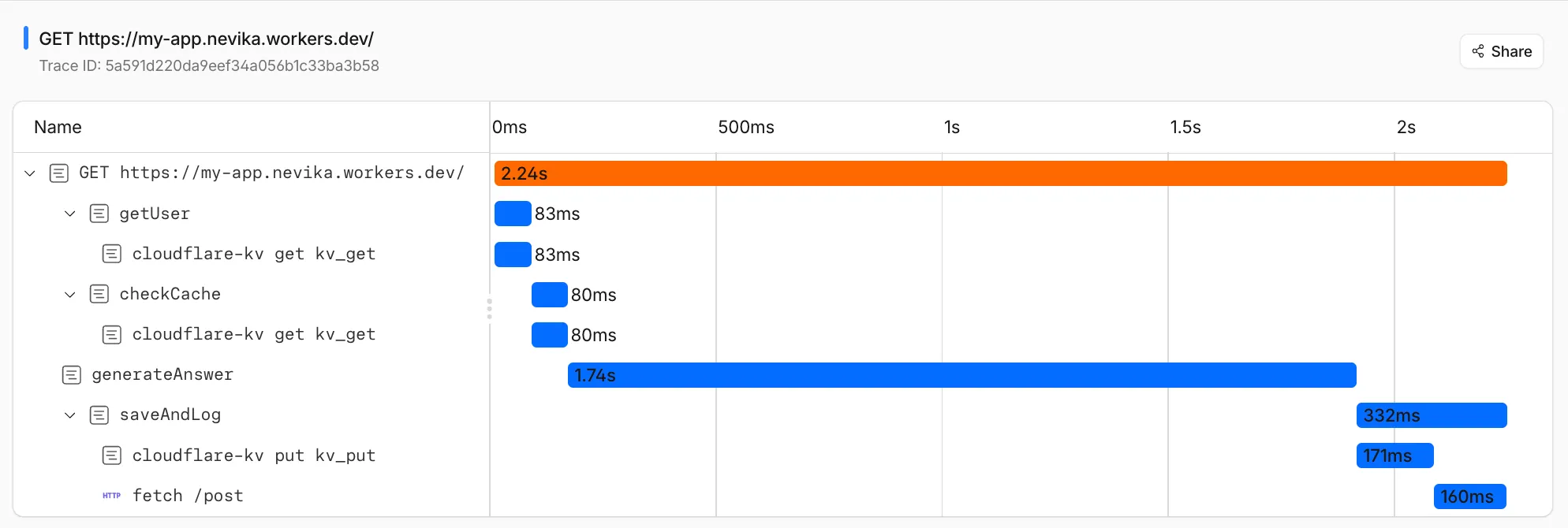
You can now create custom trace spans in your Workers code using tracing.enterSpan(). Custom spans appear alongside the automatic platform instrumentation (fetch calls, KV reads, D1 queries, and other platform operations) in your traces and OpenTelemetry exports, with correct parent-child nesting.
The API is available via import { tracing } from "cloudflare:workers" or through the handler context as ctx.tracing:
import { tracing } from "cloudflare:workers";export default { async fetch(request, env, ctx) { return tracing.enterSpan("handleRequest", async (span) => { span.setAttribute("url.path", new URL(request.url).pathname); const data = await env.MY_KV.get("key"); return new Response(data); }); },};
Spans nest automatically based on the JavaScript async context, and are auto-ended when the callback returns or its returned promise settles. The Span object provides setAttribute(key, value) for attaching metadata and an isTraced property to check whether the current request is being sampled.
You can now match incoming requests against Cloudforce One threat intelligence in your WAF rules. A new detection looks up the client IP address of each request against the threat intelligence database. If the IP was involved in threat activity in the past seven days, Cloudflare populates cf.intel.ip.* fields that you can use in custom rules and rate limiting rules.
The detection populates the following fields. Use the any() function with the [*] wildcard to match array values:
cf.intel.ip.datasets — the dataset that flagged the IP address (ddos or waf).
cf.intel.ip.target_industries — industries the IP address has targeted.
cf.intel.ip.attacker_names — known threat actors associated with the IP address.
cf.intel.ip.attacker_countries — source countries of the threat activity.
cf.intel.ip.target_countries — countries the IP address has targeted.
For example, the following custom rule expression blocks requests from IP addresses associated with DDoS activity that have targeted France:
any(cf.intel.ip.target_countries[*] == "FR") and any(cf.intel.ip.datasets[*] == "ddos")
These fields work with the Cloudflare API and Terraform. Matches are logged in Security Analytics.
The threat intelligence detection is available to customers with an active Cloudforce One subscription. For more information, refer to Threat intelligence.
This week's release introduces new managed protection to address a critical SQL injection vulnerability in Ghost CMS (CVE-2026-26980) and a new generic rule designed to identify and block sophisticated SQL Injection (SQLi) bypass attempts leveraging obfuscated boolean logic. These rules protect affected installations from unauthorized data exfiltration at the network edge.
Key Findings
CVE-2026-26980: A blind SQL injection vulnerability in the Ghost CMS Content API (versions 3.24.0 to 6.19.0) allows unauthenticated remote attackers to inject malicious SQL commands via query parameters due to improper input validation.
AI Gateway logs now capture the user agent of the client that made each request, making it easier to identify which SDK, library, or application sent the traffic flowing through your gateway. For example, you can tell apart requests coming from openai-python versus a custom application or a Cloudflare Worker.
The user agent appears alongside the other details in each log entry, and you can filter logs by user agent (equals, does not equal, or contains) in the dashboard.
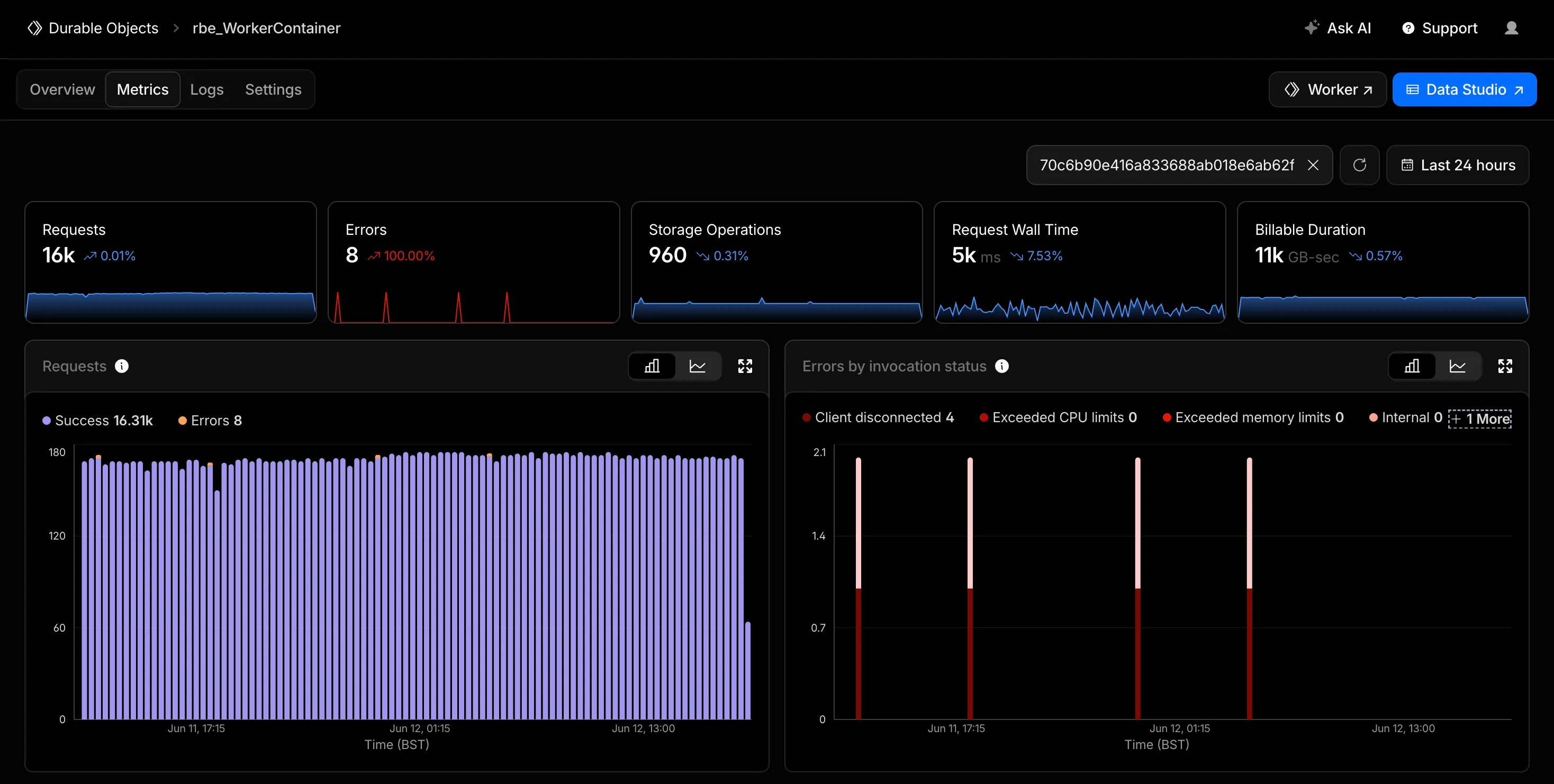
You can now filter the Metrics tab for a Durable Objects namespace by an individual Durable Object's ID or name in the Cloudflare dashboard. Previously, metrics charts only showed aggregate, namespace-level data, making it difficult to isolate the behavior of a specific object.
Start typing an ID or name into the filter and select a match from the autocomplete dropdown. The autocomplete only shows objects with invocations during the selected time range, so an object that does not appear has not been invoked in that window. This does not necessarily mean the object has been deleted. Every chart on the page updates to reflect only the selected object. This makes it easier to identify and investigate a single Durable Object when debugging a high-traffic object, an error spike, or unexpected storage usage. Clear the filter to return to namespace-level metrics.
Metrics are powered by the GraphQL Analytics API, so standard analytics behavior such as ingestion delay and sampling applies.
Cloudflare's Terraform v5 Provider makes it easy for developers to manage their Cloudflare infrastructure using a configuration as code approach. It releases every 2-3 weeks ↗ to ensure that you can always manage the latest features in the platform. This week, we launched Terraform v5.20.0, which adds 24 new resources, bumps the underlying Go SDK to cloudflare-go v7, and includes a range of bug fixes and state upgraders based on community feedback.
New resources
cloudflare_ai_search_namespace: Manage AI Search namespaces
@cf/moonshotai/kimi-k2.7-code is now available on Workers AI. Kimi K2.7 Code is a code-optimized variant of the Kimi K2 family, built on a Mixture-of-Experts architecture with 1T total parameters and 32B active per token.
Improved coding and agent performance
K2.7 Code delivers meaningful gains over K2.6 on coding and agentic benchmarks:
+21.8% on Kimi Code Bench v2
+11.0% on Program Bench
+31.5% on MLS Bench Lite
Reasoning efficiency
K2.7 Code uses 30% fewer reasoning tokens compared to K2.6, reducing overthinking and lowering inference cost for reasoning-heavy workloads.
Key capabilities
262.1k token context window for retaining full conversation history, tool definitions, and codebases across long-running agent sessions
Long-horizon coding with improved instruction following and higher end-to-end coding task success rates
Vision inputs for processing images alongside text
Thinking mode with configurable reasoning depth via chat_template_kwargs.thinking
Multi-turn tool calling for building agents that invoke tools across multiple conversation turns
Structured outputs with JSON schema support
Differences from Kimi K2.6
If you are migrating from Kimi K2.6, note the following:
K2.7 Code is optimized for coding tasks with improved benchmark performance and reasoning efficiency
Cached input token pricing is 0.19 per M tokens (vs 0.16 for K2.6)
API usage is identical — no parameter changes required
Get started
Use Kimi K2.7 Code through the Workers AI binding (env.AI.run()), the REST API at /ai/run, or the OpenAI-compatible endpoint at /v1/chat/completions. You can also use AI Gateway with any of these endpoints.
Browser Run's /snapshot endpoint now supports a formats parameter that lets you return multiple page formats in a single API call. Previously, /snapshot returned only HTML content and a screenshot. You can now also include Markdown and the accessibility tree in the same response.
These formats are particularly useful for AI agent workflows:
Markdown provides a token-efficient representation of page content that LLMs can process directly, without parsing HTML markup.
The accessibility tree provides a structured representation of a page's elements, including roles, labels, and hierarchy, helping LLMs understand page structure and navigate its contents.
The following example returns a screenshot, Markdown, and the accessibility tree in one call:
You can now define custom topics for AI prompt protection. Predefined AI prompt topics cover common content and intent categories such as PII, source code, and jailbreak attempts. Custom topics let you detect unique or proprietary concepts that are not included in predefined categories.
You describe a custom topic in natural language, and Cloudflare DLP detects whether a prompt matches that topic based on context rather than specific keywords. For example, a topic that describes confidential merger discussions matches a prompt that paraphrases the deal, even when the prompt never uses the word merger or names the companies involved. To detect literal values such as internal codenames or product identifiers, use a custom wordlist or pattern entry instead.
Custom topics run through the same application granular controls path as predefined AI prompt topics. Custom topics are available for ChatGPT, Google Gemini, Perplexity, and Claude.
Create a custom AI prompt topic
In the Cloudflare dashboard ↗, go to Zero Trust > Data loss prevention > Detection entries.
Select AI prompt topics, then select Custom Prompt Topic.
Describe the topic in natural language. Be specific about the concept you want to detect. For example, describe unreleased product roadmap details or confidential customer contract terms.
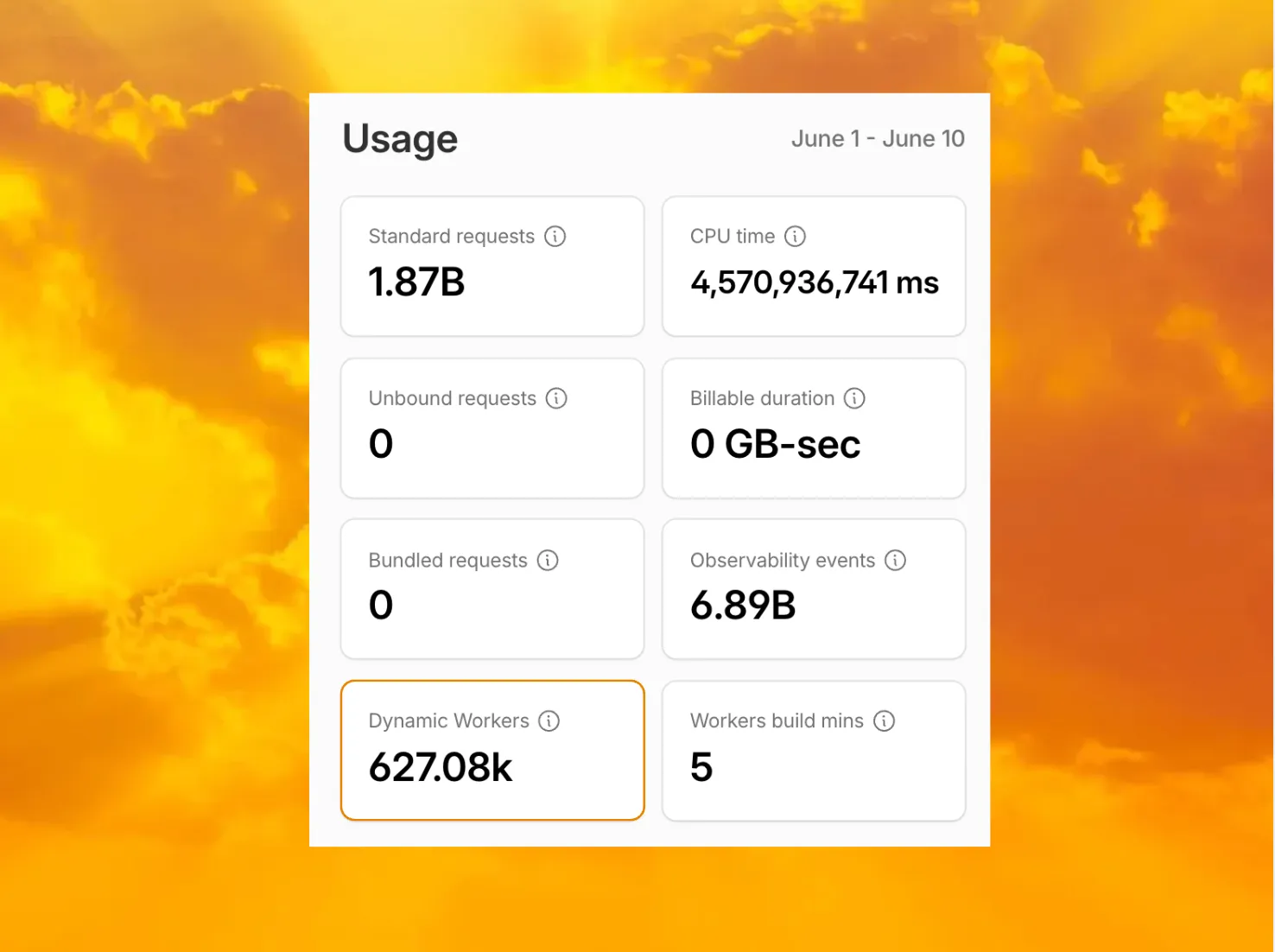
Customers can now view the number of Dynamic Workers invoked during their billing period from the Workers overview page in the Cloudflare dashboard.
This count reflects the number of Dynamic Workers that Cloudflare would bill for during the selected billing period. Dynamic Workers usage data only goes back to June 1, 2026.
You can also query this count through the GraphQL Analytics API by using workersInvocationsByOwnerAndScriptGroups and selecting distinctDynamicWorkerCount: