The Images binding is now billed per unique transformation, matching the model already used for URL-based transformations. Repeat requests for the same combination of source image and parameters within the same calendar month are counted only once.
Previously, every call to the binding counted as a separate transformation regardless of whether the image or parameters were unique. With this change, you can call the binding on hot paths without paying for each individual request.
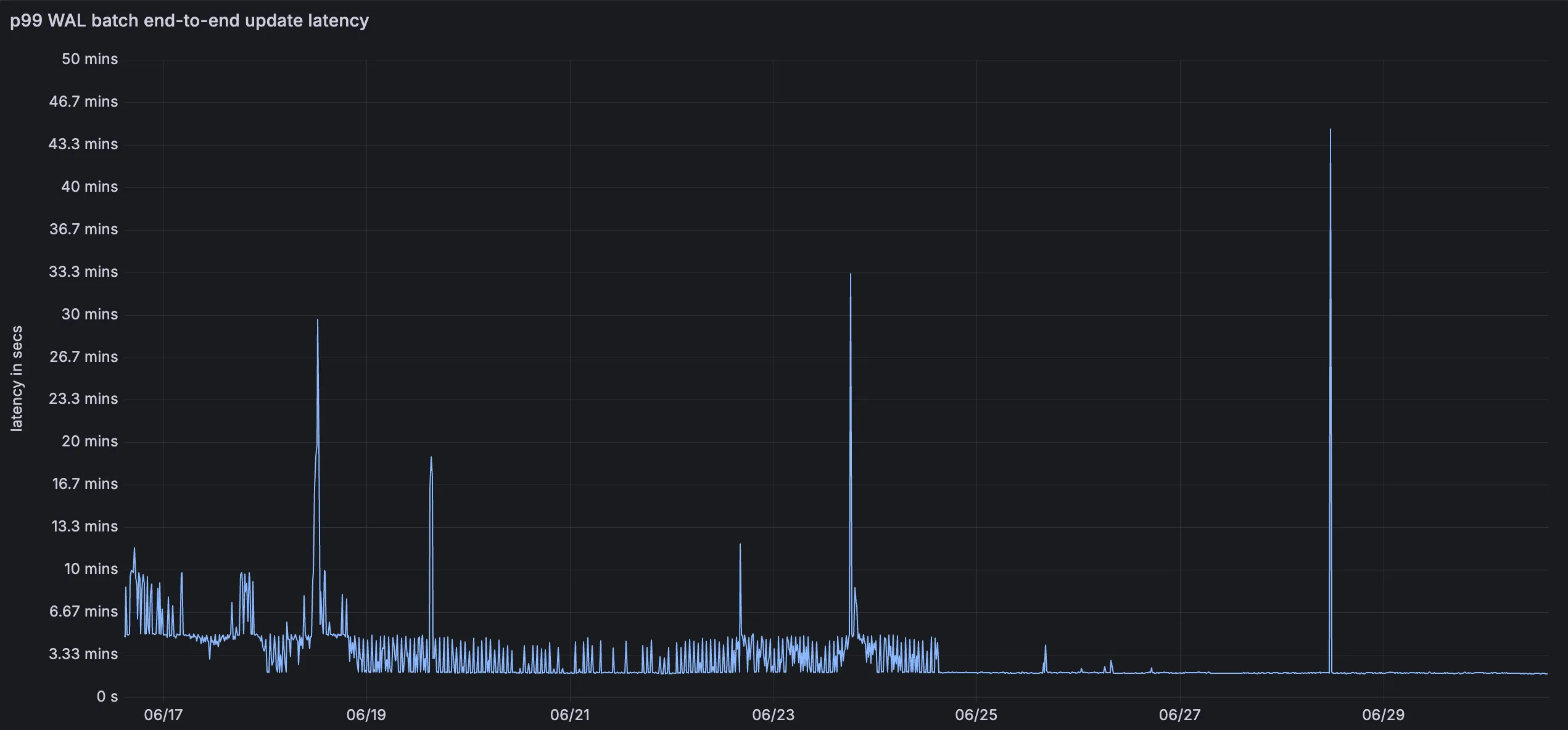
We have greatly improved the throughput of the Vectorize write-ahead log (WAL) ↗. As a result, we have significantly reduced the end-to-end latency for a vector change to become queryable: median latency has dropped from 2 minutes to under 30 seconds, and p99 latency from 5 minutes to under 2 minutes.
This means inserts, upserts, and deletes are reflected in query results faster, improving the freshness of semantic search, recommendation, and retrieval-augmented generation (RAG) workloads. You do not need to change your code or configuration to benefit from this improvement.
This release adds targeted coverage for a path traversal flaw in Fortinet FortiSandbox (CVE-2026-39813) and transitions the Anomaly:Header:User-Agent - Fake Bing or MSN Bot rule action from Block to Disabled.
Key Findings
CVE-2026-39813: A path traversal vulnerability in Fortinet FortiSandbox allows remote, unauthenticated attackers to read arbitrary files from the underlying filesystem due to insufficient validation of user-supplied input paths.
You can now assign granular, resource-scoped roles for Cloudflare Gateway firewall policies and Zero Trust lists. Administrators can delegate access to specific policy types or list management without granting account-wide or product-wide control.
Can view and edit all Gateway firewall policies, including DNS, HTTP, and Network policies.
Zero Trust Gateway DNS Policies Admin
Can view and edit Gateway DNS policies.
Zero Trust Gateway HTTP Policies Admin
Can view and edit Gateway HTTP policies.
Zero Trust Gateway Network Policies Admin
Can view and edit Gateway Network policies.
Zero Trust Gateway Egress Policies Admin
Can view and edit Gateway Egress policies.
Zero Trust Gateway Resolver Policies Admin
Can view and edit Gateway Resolver policies.
Zero Trust Gateway Policies Admin
Can view and edit all Gateway policies.
Zero Trust Gateway Policies Read
Can view all Gateway policies.
Zero Trust Gateway Read Only
Can view all Gateway resources.
Zero Trust DNS Locations Admin
Can view and edit DNS locations.
Zero Trust Proxy Endpoints Admin
Can view and edit Gateway Proxy Endpoints.
Zero Trust Account Lists Admin
Can view and edit all Gateway and Access lists.
Zero Trust Account Lists Read
Can view all Gateway and Access lists.
These roles allow you to:
Grant a network engineer write access to Network policies only, without exposing DNS or HTTP policy configuration.
Allow a security analyst to view all Gateway policies in read-only mode for auditing purposes.
Delegate list management to a team that maintains block and allow lists without giving them access to policy configuration.
You can also now assign Resource-scoped roles. These roles are complementary to existing account-level roles, and allow you to grant access to a specific resource, like an individual Gateway policy or Cloudflare One list. Existing account-level roles continue to work. A member with the Cloudflare Gateway or Cloudflare Zero Trust role retains full access to all Gateway resources. This ensures backward compatibility for existing automation and API tokens.
Cloudflare Logpush now supports firewall events as an account-scoped dataset. Configure a single Logpush job at the account level to receive firewall events for every zone in the account, instead of creating and maintaining a separate job per zone.
The dataset includes a new ZoneName field so you can identify which zone each event came from when consuming logs in your downstream pipeline.
What's available
A new account-scoped firewall_events dataset, configurable via the Logpush API or the Cloudflare dashboard.
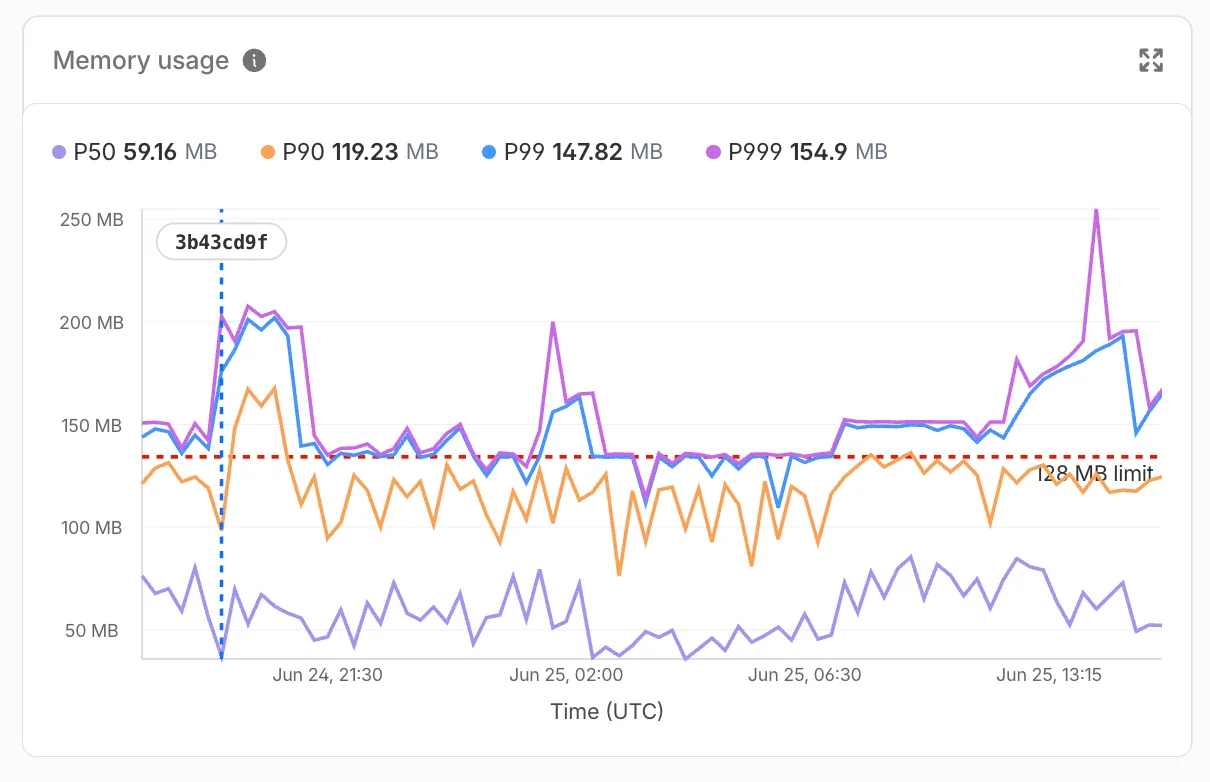
You can now monitor how much memory your Workers and Durable Objects consume across invocations with the new Memory Usage chart in the Workers Metrics tab, broken down by P50, P90, P99, and P999 percentiles.
Memory usage measures the V8 isolate memory at the time of each invocation, subject to the 128 MB per-isolate limit — a single isolate can handle many concurrent requests and shares memory across them.
Use the Memory Usage chart to:
Track memory trends — Spot gradual increases that may indicate a memory leak before they cause Exceeded Memory errors.
Correlate with deployments — Deployment markers on the chart help you identify whether a new version introduced a memory regression.
Right-size your Worker — Understand your baseline memory footprint and how much headroom you have before hitting the 128 MB limit.
For Durable Objects, memory usage reflects the in-memory state an object holds (class properties, caches, active WebSocket connections), which persists across invocations until the object is hibernated or evicted. This state is not preserved across eviction, hibernation, or a crash, so persist anything important to storage.
To view memory usage, open the Metrics tab for your Worker ↗ or Durable Object namespace ↗. For Durable Objects, you can filter by DO ID or name to drill down into memory usage for a specific object. You can also query memory usage programmatically via the GraphQL Analytics API using the workersInvocationsAdaptive dataset — the quantiles.memoryUsageBytesP50 through quantiles.memoryUsageBytesP999 fields return percentile values in bytes.
For local memory debugging, you can also profile memory with DevTools to take heap snapshots and identify specific objects causing high memory usage.
This release introduces multiple features from our previous beta release into stable release, including:
The client now applies DNS search suffixes configured in your device profile / network policy. Administrators can push a list of DNS search domains that the client appends to single-label queries, alongside any system-configured suffixes. See DNS search suffixes for details.
Added mandatory authentication. When enabled via MDM, the Cloudflare One Client blocks all Internet traffic from the moment the machine boots until the user authenticates, closing the visibility gap on newly deployed devices and during re-authentication. See the announcement blog and documentation for details.
Upgraded security of device registration to be hardware-backed. Registration tokens can now be generated in the TPM (with TPM 2.0+) whenever it is available to provide stronger protection against device impersonation. See Hardware-backed registration for details.
Added a local-file signal source for Emergency Disconnect. In addition to the existing HTTPS polling mechanism, administrators can now configure WARP to monitor for a file on disk; the presence of the file triggers an emergency disconnect even if both Cloudflare and your own infrastructure are unreachable. Either signal being asserted triggers disconnect; both must be cleared for normal operation to resume.
Added new warp-cli debug commands for interactive connection diagnosis. See Extra debug logging for details.
The local DNS proxy now supports DNSSEC passthrough. DNSSEC-signed responses are forwarded to the application intact (including DO/AD bits and RRSIG records), so applications that validate DNSSEC locally — including resolvers and the dig/drill tooling — work correctly through the client.
Added a new MDM format for organization-wide settings, including a cleaner way to configure the compliance environment (e.g. FedRAMP). The previous per-configuration approach still works, but the new format is now recommended. See the updated Cloudflare One MDM documentation for details.
Added support for dashboard-managed client version deployments. Administrators can now upgrade or downgrade the client version on enrolled devices directly from the Zero Trust dashboard. See Client version assignments for details.
Additional Changes and improvements
Starting with 2026.6.822.0, the client unifies all API requests under the api.devices.cloudflare.com SNI, where previously both zero-trust-client.cloudflareclient.com and notifications.cloudflareclient.com were used. Review Cloudflare One Client with firewall to ensure systems that rely on SNI inspection do not block the API traffic. The behavior of previous client versions is unaffected.
Client Certificate device-posture checks now support template variables (e.g. ${serial_number}, ${device_uuid}) in the Subject Alternative Name field. Previously only the Common Name field accepted variables, which broke posture rules that pinned identity to a SAN entry.
Improved accessibility by using high contrast colors and more defined color boundaries when high contrast is enabled in Windows Accessibility settings.
Path MTU Discovery (PMTUD) is now enabled by default.
The UseWebView2 registry value (HKLM\SOFTWARE\Cloudflare\CloudflareWARP\UseWebView2 = y) is once again honored by the new GUI for authentication, so administrators who prefer the embedded WebView2 browser for sign-in can opt back in. This setting was effectively ignored in the previous release; the default browser was always used. This key is now also honored for re-authentications.
Fixed a crash in the authentication browser when navigating to a site that prompts for browser permissions (microphone, camera, notifications, etc.). The same fix had previously landed for the captive-portal browser; this extends it to the auth browser.
Fixed an issue in proxy mode where hostnames containing underscores (e.g. ai_app.com) were rejected, breaking apps that depend on such hostnames (notably ChatGPT sandbox apps). The local proxy now accepts underscore-containing hostnames in CONNECT requests.
Fixed an issue where DNS queries would fail after the connection was idle, requiring users to retry.
Fixed a high CPU issue when the device wakes from sleep.
Users can now register with team names in any case format without errors.
New UI fixes
Fixed an issue where users with invalid MDM configurations were returned to the onboarding screen after successful authentication.
Added a re-auth button and banner to the home screen so users don't miss it when their session expires.
Added clear error messaging when the Cloudflare certificate needs to be installed.
Brought back support for pausing the tunnel when connected to user-specified Wi-Fi networks for consumer users.
New client UI now surfaces Split tunnel configuration and Local Domain Fallback configuration.
Added ability to configure proxy mode for consumer users.
Added back the option to quit for consumer users.
Known issues
Single sign-on in the embedded WebView2 authentication browser may fail to use the Windows primary account, prompting for an interactive sign-in.
An error indicating that Microsoft Edge can't read and write to its data directory may be displayed during captive portal login; this error is benign and can be dismissed.
In rare cases, a registration may hang at "Checking your organization configuration" due to IPC errors. A system reboot should resolve the error, allowing registration to proceed.
Windows ARM may prompt the user to close running applications while trying to install this version. Simply click "Ok" with the default highlighted option.
This release introduces multiple features from our previous beta release into stable release, including:
The client now applies DNS search suffixes configured in your device profile / network policy. Administrators can push a list of DNS search domains that the client appends to single-label queries, alongside any system-configured suffixes. See DNS search suffixes for details.
Upgraded security of device registration to be hardware-backed. Registration tokens can now be generated in the Secure Enclave whenever available to provide stronger protection against device impersonation. See Hardware-backed registration for details.
Added a local-file signal source for Emergency Disconnect. In addition to the existing HTTPS polling mechanism, administrators can now configure WARP to monitor for a file on disk; the presence of the file triggers an emergency disconnect even if both Cloudflare and your own infrastructure are unreachable. Either signal being asserted triggers disconnect; both must be cleared for normal operation to resume.
Added new warp-cli debug commands for interactive connection diagnosis. See Extra debug logging for details.
The local DNS proxy now supports DNSSEC passthrough. DNSSEC-signed responses are forwarded to the application intact (including DO/AD bits and RRSIG records), so applications that validate DNSSEC locally — including resolvers and the dig/drill tooling — work correctly through the client.
Added a new MDM format for organization-wide settings, including a cleaner way to configure the compliance environment (e.g. FedRAMP). The previous per-configuration approach still works, but the new format is now recommended. See the updated Cloudflare One MDM documentation for details.
Added support for dashboard-managed client version deployments. Administrators can now upgrade or downgrade the client version on enrolled devices directly from the Zero Trust dashboard. See Client version assignments for details.
Additional Changes and improvements
Starting with 2026.6.822.0, the client unifies all API requests under the api.devices.cloudflare.com SNI, where previously both zero-trust-client.cloudflareclient.com and notifications.cloudflareclient.com were used. Review Cloudflare One Client with firewall to ensure systems that rely on SNI inspection do not block the API traffic. The behavior of previous client versions is unaffected.
Client Certificate device-posture checks now support template variables (e.g. ${serial_number}, ${device_uuid}) in the Subject Alternative Name field. Previously only the Common Name field accepted variables, which broke posture rules that pinned identity to a SAN entry.
Improved accessibility by using high contrast colors and more defined color boundaries when high contrast is enabled in the macOS Display settings.
Path MTU Discovery (PMTUD) is now enabled by default.
Fixed the in-client captive-portal browser rendering a blank "Success" page on some airline Wi-Fi networks. The browser now more consistently loads the airline's real portal page so users can complete sign-in from inside the client instead of having to open a separate browser.
Fixed an issue in proxy mode where hostnames containing underscores (e.g. ai_app.com) were rejected, breaking apps that depend on such hostnames (notably ChatGPT sandbox apps). The local proxy now accepts underscore-containing hostnames in CONNECT requests.
Fixed an issue where DNS queries would fail after the connection was idle, requiring users to retry.
Users can now register with team names in any case format without errors.
New UI fixes
Fixed an issue where users with invalid MDM configurations were returned to the onboarding screen after successful authentication.
Added a re-auth button and banner to the home screen so users don't miss it when their session expires.
Added clear error messaging when the Cloudflare certificate needs to be installed.
Brought back support for pausing the tunnel when connected to user-specified Wi-Fi networks for consumer users.
New client UI now surfaces Split tunnel configuration and Local Domain Fallback configuration.
Added ability to configure proxy mode for consumer users.
Added back the option to quit for consumer users.
Known issues
Registration may hang at "Checking your organization configuration" due to IPC errors. A system reboot should resolve the error, allowing registration to proceed.
This release introduces multiple features from our previous beta release into stable release, including:
The client now applies DNS search suffixes configured in your device profile / network policy. Administrators can push a list of DNS search domains that the client appends to single-label queries, alongside any system-configured suffixes. See DNS search suffixes for details.
Upgraded security of device registration to be hardware-backed. Registration tokens can now be generated in the TPM (with TPM 2.0+) whenever it is available to provide stronger protection against device impersonation. See Hardware-backed registration for details.
Added a local-file signal source for Emergency Disconnect. In addition to the existing HTTPS polling mechanism, administrators can now configure WARP to monitor for a file on disk; the presence of the file triggers an emergency disconnect even if both Cloudflare and your own infrastructure are unreachable. Either signal being asserted triggers disconnect; both must be cleared for normal operation to resume.
Added new warp-cli debug commands for interactive connection diagnosis. See Extra debug logging for details.
The local DNS proxy now supports DNSSEC passthrough. DNSSEC-signed responses are forwarded to the application intact (including DO/AD bits and RRSIG records), so applications that validate DNSSEC locally — including resolvers and the dig/drill tooling — work correctly through the client.
Added a new MDM format for organization-wide settings, including a cleaner way to configure the compliance environment (e.g. FedRAMP). The previous per-configuration approach still works, but the new format is now recommended. See the updated Cloudflare One MDM documentation for details.
Additional changes and improvements
Starting with 2026.6.822.0, the client unifies all API requests under the api.devices.cloudflare.com SNI, where previously both zero-trust-client.cloudflareclient.com and notifications.cloudflareclient.com were used. Review Cloudflare One Client with firewall to ensure systems that rely on SNI inspection do not block the API traffic. The behavior of previous client versions is unaffected.
Cloudflare Mesh functionality using the Cloudflare One Client is now supported on RHEL 9 and 10.
Client Certificate device-posture checks now support template variables (e.g. ${serial_number}, ${device_uuid}) in the Subject Alternative Name field. Previously only the Common Name field accepted variables, which broke posture rules that pinned identity to a SAN entry.
Improved accessibility by using high contrast colors and more defined color boundaries when high contrast is enabled in the system display settings.
Path MTU Discovery (PMTUD) is now enabled by default.
Fixed the in-client captive-portal browser rendering a blank "Success" page on some airline Wi-Fi networks. The browser now more consistently loads the airline's real portal page so users can complete sign-in from inside the client instead of having to open a separate browser.
Fixed an issue in proxy mode where hostnames containing underscores (e.g. ai_app.com) were rejected, breaking apps that depend on such hostnames (notably ChatGPT sandbox apps). The local proxy now accepts underscore-containing hostnames in CONNECT requests.
Fixed an issue where DNS queries would fail after the connection was idle, requiring users to retry.
Fixed an issue where some Debian releases experienced inaccurate version reporting for posture checks.
Users can now register with team names in any case format without errors.
New UI fixes
Fixed an issue where users with invalid MDM configurations were returned to the onboarding screen after successful authentication.
Added a re-auth button and banner to the home screen so users don't miss it when their session expires.
Added clear error messaging when the Cloudflare certificate needs to be installed.
Brought back support for pausing the tunnel when connected to user-specified Wi-Fi networks for consumer users.
New client UI now surfaces Split tunnel configuration and Local Domain Fallback configuration.
Added ability to configure proxy mode for consumer users.
Added back the option to quit for consumer users.
For RHEL deployments, this release introduces a dependency on the Extra Packages for Enterprise Linux repository (EPEL). The EPEL repository provides packages that support the captive portal detection’s in-app browser authentication and system tray icon. See Getting started with EPEL for instructions on enabling EPEL.
Known issues
Registration may hang at "Checking your organization configuration" due to IPC errors. A system reboot should resolve the error, allowing registration to proceed.
Workers fetch() requests now support the cf.vary request option. Use cf.vary to control how Cloudflare caches origin responses with a Vary header for a single subrequest.
The latest release of the Agents SDK ↗ makes it easier to run long work in the background, drive turns through one entry point, and keep chat agents working through deploys, evictions, and reconnects.
This release adds first-class detached (background) sub-agent runs with live progress and durable milestones, a single runTurn turn-admission entry point, and a large round of recovery and reliability fixes that continue converging @cloudflare/think and @cloudflare/ai-chat onto one model.
Background sub-agents with progress and milestones
runAgentTool can now dispatch a sub-agent without blocking the calling turn. A detached run returns a handle immediately and is owned by a durable, eviction-surviving backbone instead of being abandoned when the dispatching turn ends.
Durable, exactly-once-on-the-happy-path completion via a warm fast path plus a self-scheduling reconcile backbone that survives eviction and deploys.
Bounded. An absolute maxBudgetMs ceiling (default 24h) and cancelAgentTool(runId) keep abandoned runs from holding a concurrency slot forever.
detached: { notify: true } lets a finished background run inject a message back into the chat so the model reacts to the result — no hand-wired onFinish needed.
Sub-agents can also report mid-run progress that rides their own turn stream back to the parent's connected clients:
// Inside the child sub-agent:await this.reportProgress({ fraction: 0.6, phase: "deploying", message: "Generating menu page…",});
// Inside the child sub-agent:await this.reportProgress({ fraction: 0.6, phase: "deploying", message: "Generating menu page…",});
Progress surfaces on AgentToolRunState.progress via useAgentToolEvents, so a background-runs tray can render a live bar without drilling in, and the latest snapshot is persisted for inspection after eviction. Naming a milestone promotes a signal to a durable, replayable row, and detached: { onMilestones } can surface a milestone as a synthetic chat message ("narrate" for a cheap status line, or "react" to drive a model turn).
One entry point for turns: runTurn
@cloudflare/think adds a public runTurn(options) facade that unifies turn admission behind a single mode:
stream mode accepts array and function inputs to match wait mode, and all entry points now route through a shared internal admission path that throws a clear error on nested blocking admissions that previously could deadlock.
Recovery and reliability
A large part of this release continues hardening recovery and converging @cloudflare/think and @cloudflare/ai-chat onto one model:
Stream stall watchdog.AIChatAgent can detect and recover from a hung model/transport stream via the opt-in chatStreamStallTimeoutMs watchdog. With chatRecovery enabled the stall routes into the same bounded-recovery machinery a deploy or eviction uses; otherwise it surfaces as a terminal stream error so the spinner clears.
Interrupted tool-call repair.AIChatAgent now repairs a transcript with a dead server-tool call before re-entering inference (parity with @cloudflare/think), so a recovered turn no longer fails with AI_MissingToolResultsError. An overridable repairInterruptedToolPart(part) hook lets apps customize the repaired shape.
Stuck status after reconnect. Fixed AI SDK status getting stuck when a reconnect races a turn that has been accepted but has not started streaming yet, so the UI now renders the in-flight turn instead of settling on ready.
Live "recovering…" on connect.AIChatAgent now replays the recovering status to a client that connects mid-recovery, so useAgentChat's isRecovering reflects in-progress recovery immediately instead of appearing frozen.
Terminal connection failures. The client stops reconnecting on terminal WebSocket close events and exposes them via connectionError / onConnectionError on AgentClient, useAgent, and useAgentChat.
Agent-tool child recovery. A healthy long-running sub-agent run is no longer abandoned as interrupted after a deploy (both @cloudflare/think and AIChatAgent).
Workflows from sub-agent facets. Agent Workflows can now start from sub-agent facets, with callbacks and Workflow RPC routed back to the originating facet.
Plus forward-progress crediting convergence, broadcast-first give-up ordering, an event-driven auto-continuation barrier, and structured row-size compaction in AIChatAgent.
Other improvements
Shared chat React core. A new agents/chat/react entry exposes useAgentChat, transport helpers, and shared wire types, with syncMessagesToServer for server-authoritative transcript storage. @cloudflare/think/react and @cloudflare/ai-chat/react are now thin wrappers over it.
Optional ai peer. The root agents and @cloudflare/codemode runtimes no longer reference AI SDK types, so they bundle without ai / zod installed; AI-specific entry points still require the peer when imported. just-bash likewise moves to an optional peer used only by the skills bash runner.
Code Mode. The default DynamicWorkerExecutor timeout increases from 30s to 60s, executions now dispose the dynamically-loaded Worker and its RPC stub after each run (fixing a flaky isolate-shutdown assertion), connector imports are cleaned up, and the outer MCP tool-call context is passed to openApiMcpServer request callbacks.
Voice. Voice turns now support AI SDK fullStream responses (and warn when textStream is used).
MCP.McpAgent server-to-client requests can now be sent from callbacks that do not inherit the agent's async context, including callbacks reached through Worker Loader RPC.
Experimental: server actions and channels. This release lays groundwork for guarded server actions (action() / getActions() with a durable replay ledger and approvals) and a unified channels surface (configureChannels(), deliverNotice()). Both are experimental and their APIs may change, so we don't recommend depending on them yet.
Upgrade
To update to the latest version:
									npm
									 i agents@latest @cloudflare/think@latest @cloudflare/ai-chat@latest @cloudflare/codemode@latest @cloudflare/voice@latest
You can now connect autonomous agents and bots to an MCP server portal using an Access service token. Service token sessions can reach upstream MCP servers through the portal without a browser-based OAuth flow.
To set this up:
Add a Service Auth policy that matches your service token to the portal's Access application.
Add a Service Auth policy that matches the same token to each linked MCP server's Access application.
Turn Require user auth off (on_behalf: false) for each linked server so the portal uses the admin credential instead of a per-user OAuth grant.
The bot connects with CF-Access-Client-Id and CF-Access-Client-Secret headers and sees the tools from every linked server it is authorized for. Servers that still require per-user OAuth are excluded from service token sessions because a service token cannot complete a per-user OAuth grant.
Durable Objects now supports a usjurisdiction, letting you create Durable Objects that only run and store data within the United States. Use the us jurisdiction when you need to keep a Durable Object's compute and storage inside the United States to meet data residency requirements.
Create a namespace restricted to the us jurisdiction the same way as any other jurisdiction:
Workers may still access Durable Objects constrained to the us jurisdiction from anywhere in the world. The jurisdiction constraint only controls where the Durable Object itself runs and persists data.
The @cloudflare/vitest-pool-workers package now includes evictDurableObject and evictAllDurableObjects test helpers, exported from cloudflare:test.
These helpers let you test how a Durable Object behaves across evictions, simulating the production lifecycle where an idle Durable Object can be evicted from memory.
import { evictDurableObject, evictAllDurableObjects } from "cloudflare:test";import { env } from "cloudflare:workers";const id = env.COUNTER.idFromName("my-counter");const stub = env.COUNTER.get(id);// Evict the Durable Object instance pointed to by a specific stubawait evictDurableObject(stub);// Close WebSockets instead of hibernating themawait evictDurableObject(stub, { webSockets: "close" });// Evict all currently-running Durable Objects in evictable namespacesawait evictAllDurableObjects();
These helpers are available in @cloudflare/vitest-pool-workers@0.16.20 and later.
This beta release introduces upgraded security of device registration to be hardware-backed. Registration tokens can now be generated in the Secure Enclave whenever available to provide stronger protection against device impersonation.
Additional changes and improvements
This release also introduces multiple fixes and improvements including:
Improved accessibility by using high contrast colors and more defined color boundaries when high contrast is enabled in the macOS Display settings.
Path MTU Discovery (PMTUD) is now enabled by default.
Fixed an issue where DNS queries would fail after the connection was idle, requiring users to retry.
Users can now register with team names in any case format without errors.
New UI fixes
Fixed an issue where users with invalid MDM configurations were returned to the onboarding screen after successful authentication.
Added a re-auth button and banner to the home screen so users don't miss it when their session expires.
Added clear error messaging when the Cloudflare certificate needs to be installed.
Brought back support for pausing the tunnel when connected to user-specified Wi-Fi networks for consumer users.
New client UI now surfaces Split tunnel configuration and Local Domain Fallback configuration.
Added ability to configure proxy mode for consumer users.
Added back the option to quit for consumer users.
Known issues
Registration may hang at "Checking your organization configuration" due to IPC errors. A system reboot should resolve the error, allowing registration to proceed.
AI Search now gives you more control over similarity cache freshness. Similarity cache helps reduce latency and inference cost by reusing responses for semantically similar queries.
With these updates, you can choose how long responses are eligible for reuse and clear cached responses when they may be stale.
Cache duration now defaults to 48 hours
Previously, AI Search cached responses for a fixed duration of 30 days. Cached responses now use the instance's cache_ttl setting, and the default is 48 hours.
You can set cache_ttl when creating or updating an instance to choose a cache duration from 10 minutes to 6 days.
Use a shorter TTL when your source content changes frequently and freshness is more important. Use a longer TTL when your content is stable and you want more cache reuse.
For example, set cache_ttl to 518400 to retain cached responses for 6 days:
{ "cache_ttl": 518400}
Purge cached responses
You can also purge all cached responses for an instance on demand. Purging cached responses does not delete indexed content or source files.
It prevents AI Search from reusing previous cached responses, so subsequent similar queries generate fresh answers and repopulate the cache.
curl -X POST "https://api.cloudflare.com/client/v4/accounts/$ACCOUNT_ID/ai-search/instances/$INSTANCE_NAME/purge_cache" \
  -H "Authorization: Bearer $CLOUDFLARE_API_TOKEN"
You can also purge cached responses from the instance settings page in the Cloudflare dashboard.
Refer to similarity cache for the full list of supported cache_ttl values and more details about cache behavior.
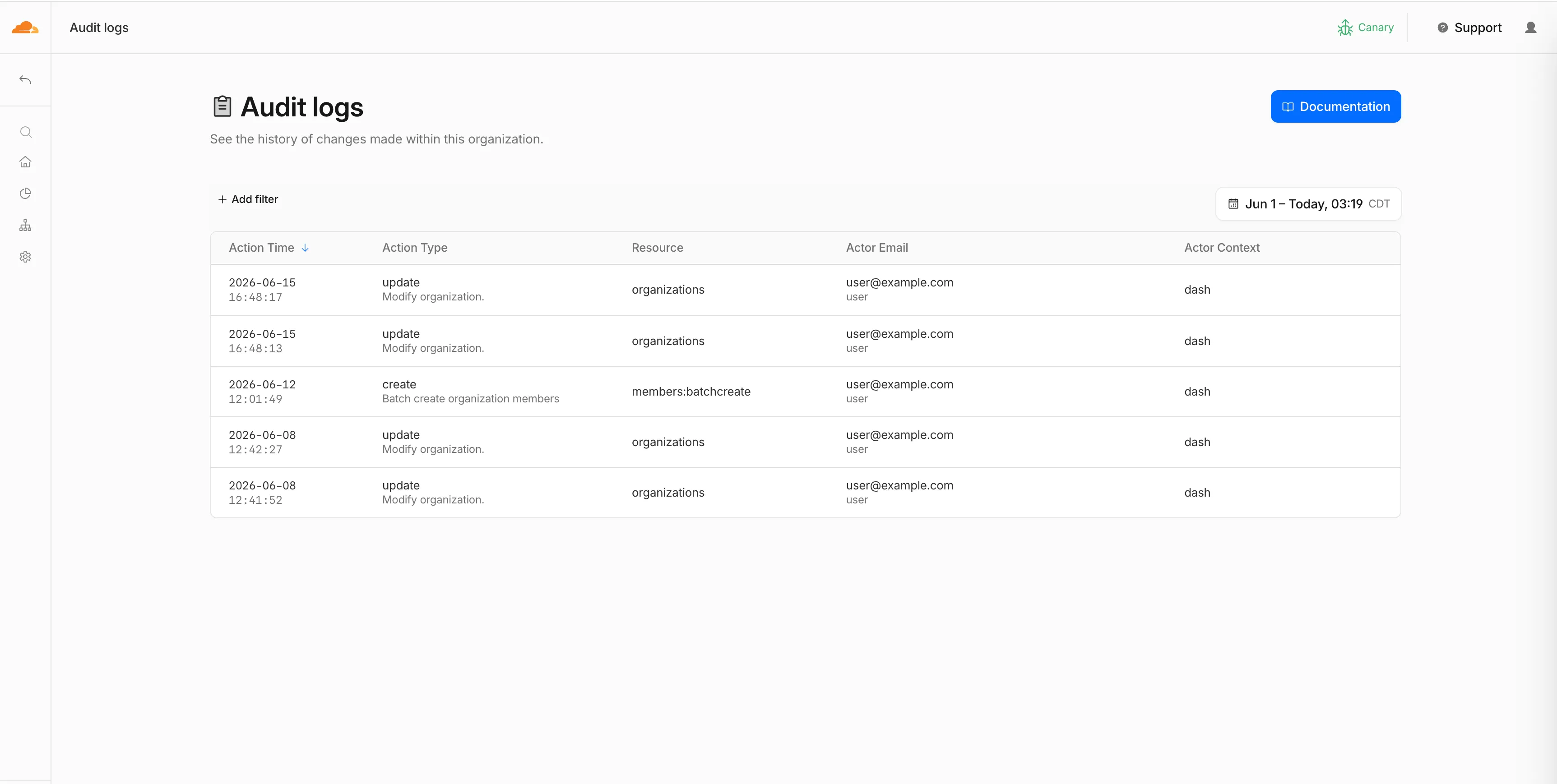
You can now, as an Organization Super Administrator, view organization-level audit logs in the Cloudflare dashboard, in addition to the existing API access.
Organization audit logs help you monitor activity across your organization. You can see who performed an action, what changed, when it happened, how it was performed, and whether it succeeded or failed.
You can filter and search logs by actor, action, result, resource, request details, and timestamp. Use these logs to troubleshoot changes, investigate unexpected access, and support security or compliance workflows.
If you are viewing account-level audit logs and the account belongs to an organization where you are an Organization Super Administrator, select View Organization Audit Logs to open the parent organization's audit logs.
To get started, go to Organizations, select your organization, then go to Manage Organization > Audit Logs.
WebSocket Analytics: A new dataset with fields including BytesReceivedClient, BytesReceivedOrigin, BytesSentClient, BytesSentOrigin, ClientASN, ClientIP, ClientRequestHost, ClientRequestPath, ClientRequestUserAgent, ColoCode, ConnectionCloseReason, ConnectionCloseSource, ConnectionID, ConnectionTransportCloseCode, EdgeEndTimestamp, EdgeStartTimestamp, and RayID.
Updated fields in existing datasets
Firewall events (added): ZoneName. The Firewall events dataset is now also available for account-scope Logpush, in addition to the existing zone scope.
Email Security Alerts (added): BCC, DKIMResult, DMARCPolicy, DMARCResult, and SPFResult.
For the complete field definitions for each dataset, refer to Logpush datasets.
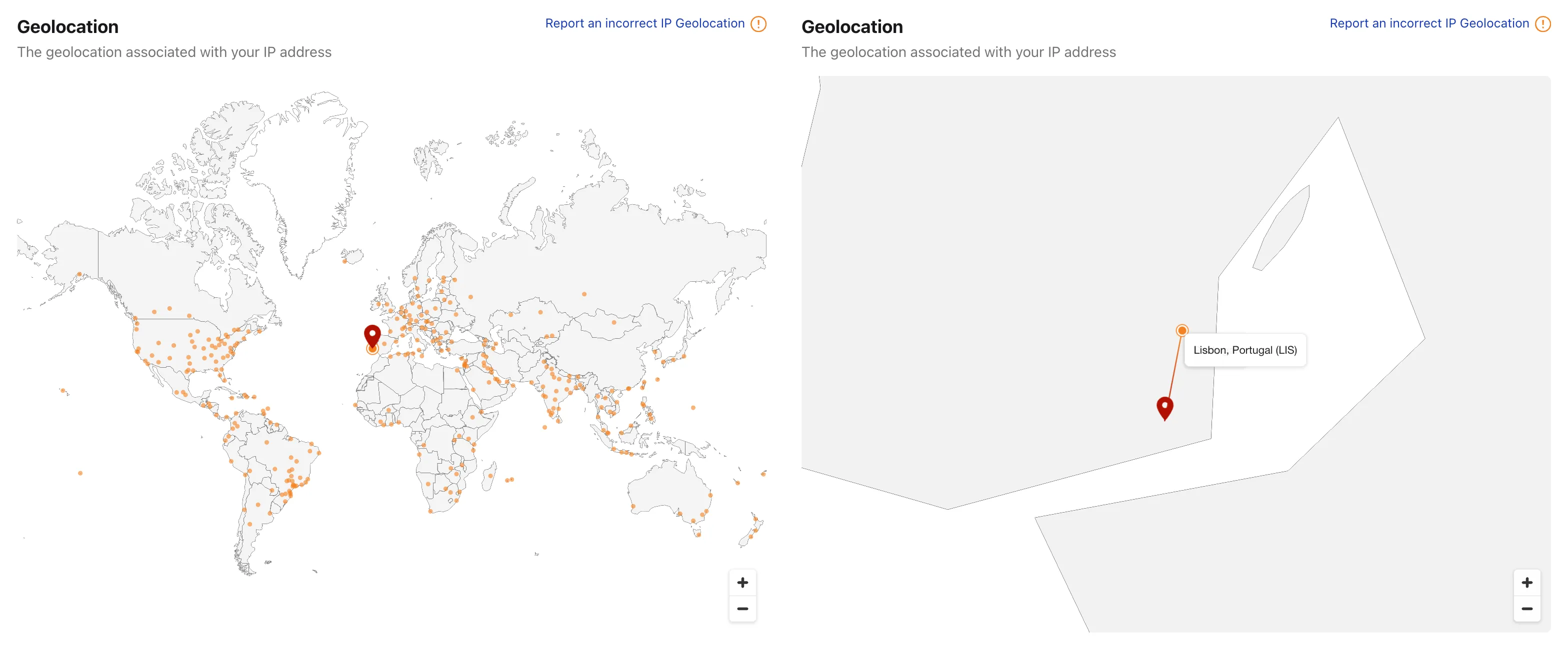
Radar now plots your IPv4 and IPv6 locations on the IP page ↗, shows the Cloudflare data centers serving your connection, and includes more detail about the autonomous system (AS) your primary IP belongs to.
Your IP location on the map
The map of your connection now shows:
IP location markers — The primary IP will show as a red marker. When both IP addresses do not geolocate to the same place, a second marker will appear in blue with a note explaining why IPv4 and IPv6 can resolve to different locations.
Cloudflare data center markers — Cloudflare data centers now show as orange dots on the map and the one you are connected to is highlighted.
Data center connectors — Each line connects your IP markers to their respective data centers.
Due to the data policies of our geolocation provider, this detailed location is only available for your own IP. Other IP addresses keep the current country-level view.
Extended AS information
The AS card on the IP page now shows additional detail about the network an IP belongs to — including alternate names, the operator website, and an estimate of the AS user population — alongside the AS number and country.
Workflows makes it easier to build reliable multi-step applications that can recover when downstream systems fail. Rollback handlers now receive the original step context via a ctx object for the step being rolled back. This includes ctx.step.name, ctx.step.count, ctx.attempt, and the step config with defaults applied.
The step configuration includes the retry and timeout settings used for that step, so you can customize your step recovery logic according to those fields.
await step.do( "create charge", async () => { const charge = await createCharge(); return { chargeId: charge.id }; }, { rollback: async ({ ctx, output, error }) => { // `output` is the value returned by the step being rolled back. const { chargeId } = output as { chargeId: string }; await refundCharge(chargeId, { // `ctx` is the original step context, including step name, count, attempt, and config. reason: `${ctx.step.name}: ${error.message}`, }); }, rollbackConfig: { // `rollbackConfig` controls retries and timeout for the rollback handler. retries: { limit: 3, delay: "30 seconds", backoff: "linear" }, timeout: "5 minutes", }, },);
Regional Services now supports Regionalized IP Bindings, letting you regionalize traffic at the IP layer for prefixes you bring to Cloudflare through Bring Your Own IP (BYOIP).
Where Regional Hostnames regionalize traffic by hostname, Regionalized IP Bindings let you bind a CIDR from one of your prefixes to a region — ideal for address-map deployments and any service you address by IP rather than hostname. Cloudflare then terminates TLS and processes traffic to those addresses only within the data centers in that region.
Regionalized IP Bindings requires the Regional Services and Regional Services for BYOIP entitlements. Contact your account team to enable them.
Cloudflare Accelerated Mobile Pages (AMP) and Signed Exchanges (SXG) support has reached end of life. The features have been disabled since October 2025, so customers who had them configured should see no change to their traffic.
Customers will no longer be able to configure AMP/SXG through API or rulesets. The Zone API will start throwing errors. Rulesets with the SXG configuration will fail to save until SXG has been removed.
This week's release introduces new managed protection to address a critical pre-authentication OS command injection vulnerability in Ivanti Sentry (CVE-2026-10520).
Key Findings
CVE-2026-10520: An OS command injection vulnerability in Ivanti Sentry allows remote, unauthenticated attackers to execute arbitrary system commands with root privileges. The flaw stems from improper sanitization of input strings parsed during internal configuration handling.
R2 SQL now supports window functions, SELECT DISTINCT, set operations, and additional aggregates, making it easier to write analytical queries without preprocessing your data elsewhere.
Window functions — ROW_NUMBER, RANK, DENSE_RANK, PERCENT_RANK, CUME_DIST, NTILE, LAG, LEAD, FIRST_VALUE, LAST_VALUE, NTH_VALUE, and aggregates with an OVER (...) clause, including PARTITION BY and explicit frames
QUALIFY — filter rows based on a window function result
DISTINCT — SELECT DISTINCT, DISTINCT ON (...), and the DISTINCT modifier on aggregates such as COUNT(DISTINCT ...)
Set operations — UNION, UNION ALL, INTERSECT, and EXCEPT
Grouping extensions — GROUPING SETS, ROLLUP, and CUBE
Exact aggregates — MEDIAN, PERCENTILE_CONT, ARRAY_AGG, and STRING_AGG
Examples
Rank rows with a window function
SELECT customer_id, region, ROW_NUMBER() OVER (PARTITION BY region ORDER BY total_amount DESC) AS rank_in_regionFROM my_namespace.sales_data
Filter with QUALIFY
SELECT customer_id, region, total_amountFROM my_namespace.sales_dataQUALIFY ROW_NUMBER() OVER (PARTITION BY region ORDER BY total_amount DESC) <= 3
Combine tables with a set operation
SELECT customer_id FROM my_namespace.sales_dataEXCEPTSELECT customer_id FROM my_namespace.archived_sales
The named WINDOW clause is not supported — inline the OVER (...) specification at each call site. For the full syntax reference, refer to the SQL reference. For supported features and performance guidance, refer to Limitations and best practices.