Pular para o conteúdo

Changelog

New updates and improvements at Cloudflare.

Preview sent emails in the Activity log

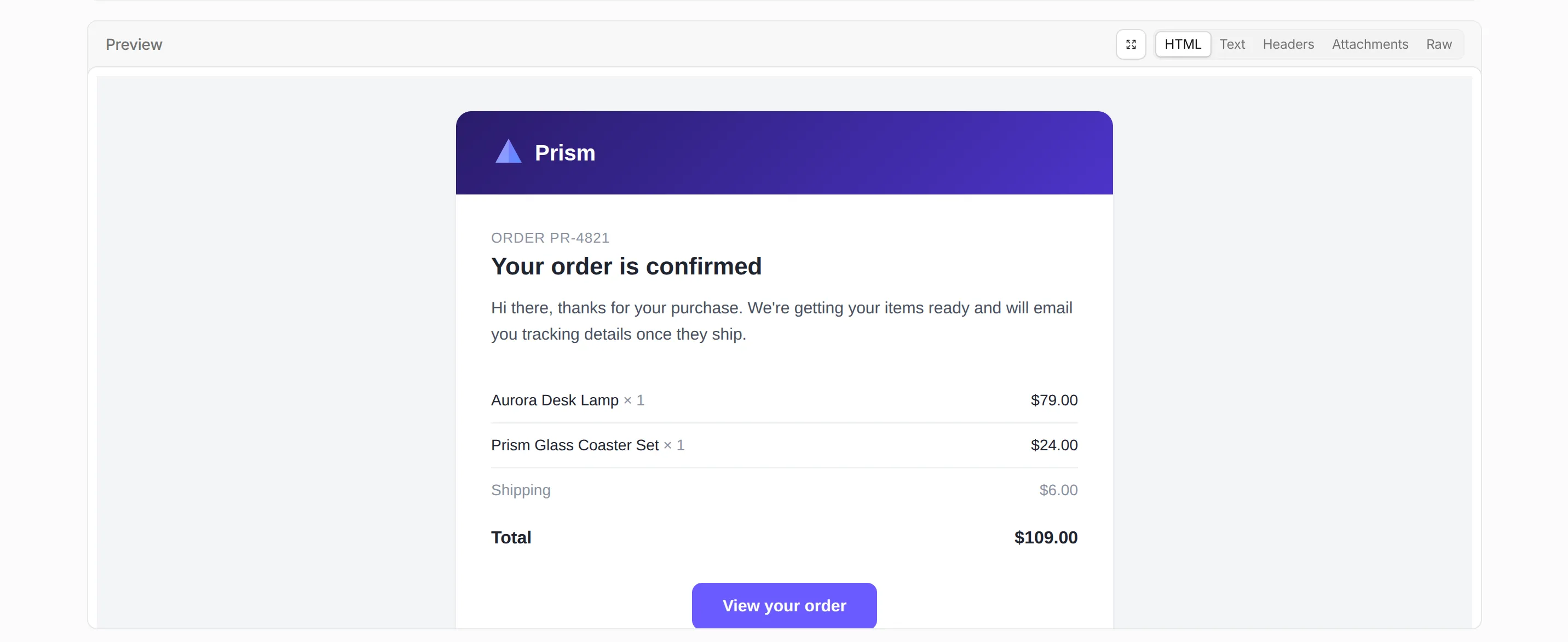
You can now preview the content of sent emails directly from the Email Service Activity log. Expand a sent email and open the new Preview section to inspect the message as it was sent, across tabs for the rendered HTML body, the Text body, the Headers, the Attachments, and the full Raw RFC 5322 source.

The rendered HTML preview of a sent email in the Email Service Activity log

Previously, the Activity log surfaced delivery and authentication metadata but not the message content, making rendering and content issues harder to debug. Message preview closes that gap.

To make messages previewable, turn on Email preview in your sending domain's settings. Previews cover messages sent while the setting is turned on and are retained for about seven days. Sending domains onboarded on or after 2026-07-02 have Email preview turned on automatically.

The Email preview setting in a sending domain's settings

Refer to Email logs for more information.
WAF Release - 2026-07-17 - Emergency

This emergency release adds a new managed rule to block active exploitation of a critical remote code execution (RCE) and SQL injection (SQLi) vulnerability found in popular web frameworks.

Key Findings

  • Generic Frameworks - Unauthenticated RCE: Attackers can execute arbitrary system commands with web server privileges by sending malicious input containing invalid path sequences during request processing.

  • Generic Frameworks - SQLi: Attackers can execute unauthorized database queries due to a failure to sanitize input values within request parameters.

RulesetRule IDLegacy Rule IDDescriptionPrevious ActionNew ActionComments
Cloudflare Managed Ruleset N/AGeneric Rules - Unauthenticated RCEN/ABlockThis is a new detection.
Cloudflare Managed Ruleset N/AGeneric Rules - SQLi N/ABlockThis is a new detection.
Cloudflare Free Ruleset N/AGeneric Rules - Unauthenticated RCE N/ABlockThis is a new detection.
Cloudflare Free Ruleset N/AGeneric Rules - SQLi N/ABlockThis is a new detection.

Manage Flagship from the command line with Wrangler

Wrangler now includes wrangler flagship, a command suite for managing Flagship apps and feature flags from your terminal.

Create an app and, if you use it from a Worker, add it to your wrangler.json or wrangler.jsonc file as a binding:

wrangler flagship apps create "My Worker App" \
  --binding FLAGS \
  --update-config

Then create flags for the behavior you want to control. Flags can be booleans, strings, numbers, or JSON values:

wrangler flagship flags create <APP_ID> new-checkout

wrangler flagship flags create <APP_ID> checkout-flow \
  --variation control=old-checkout \
  --variation treatment=new-checkout \
  --default control \
  --type string

After a flag exists, change its default variation or use enable and disable commands as kill switches. Existing targeting rules continue to apply unless you change or clear them explicitly:

wrangler flagship flags update <APP_ID> checkout-flow --default treatment
wrangler flagship flags disable <APP_ID> checkout-flow
wrangler flagship flags enable <APP_ID> checkout-flow

For release workflows, use rollout, split, and rules to change exposure without redeploying your Worker:

wrangler flagship flags rollout <APP_ID> new-checkout \
  --to on \
  --percentage 25 \
  --by user_id

wrangler flagship flags split <APP_ID> checkout-flow \
  --weight control=80 \
  --weight treatment=20 \
  --by user_id

wrangler flagship flags rules update <APP_ID> checkout-flow \
  --priority 1 \
  --when "country equals US"

These commands can also be used from CI/CD pipelines, scripts, and AI agents to inspect Flagship state, update flag behavior, or roll back changes through Wrangler.

Refer to the wrangler flagship command reference for the full command guide.

Internal DNS is now generally available

Internal DNS is now generally available. Internal DNS provides authoritative and recursive DNS for private networks on the same global network and control plane you already use for public DNS, Zero Trust, and application services.

Why it matters

  • Consolidate DNS operations. Public and private DNS run on one platform, with one API, one audit trail, and one place to set policy.
  • Simplify split-horizon DNS. Internal and external resolution are defined as separate views over shared zones, managed from a single control plane — so there is no drift to chase down.
  • Extend Zero Trust to DNS. Resolver policies decide which users and devices resolve against which view, enforced by the same Gateway that already governs the rest of your traffic.

Setting up Internal DNS takes three steps: create a zone, create a view, and define a resolver policy.

POST /zones
{
  "account": {
    "id": "<ACCOUNT_ID>"
  },
  "name": "corp.internal",
  "type": "internal"
}

Internal DNS is included with Cloudflare Gateway for Enterprise customers. To get started, refer to the Internal DNS documentation.

Subscribe to Email Sending events with Queues

You can now subscribe to Email Sending events through Queues event subscriptions and receive outbound transactional email lifecycle events on a queue. Each subscription is scoped to one sending domain — either the zone apex, such as example.com, or a verified sending subdomain, such as send.example.com.

Six event types are published: message.delivered, message.deferred, message.bounced, message.failed, message.rejected, and message.complained. Use them to track deliverability, react to bounces and complaints, and drive suppression or retry logic. Email Routing events are not published on this source.

Each event includes the message details, delivery status, and SMTP response:

{
	"type": "cf.email.sending.message.delivered",
	"source": {
		"type": "email.sending",
		"zoneId": "023e105f4ecef8ad9ca31a8372d0c353",
		"domain": "example.com"
	},
	"payload": {
		"messageId": "0101018f7d0c4d9a-msg-deadbeef",
		"recipient": "user@example.net",
		"terminal": true,
		"delivery": {
			"status": "delivered",
			"smtpStatusCode": "250"
		}
	}
}

Refer to Event subscriptions to see all event types and example payloads.

Deprecate legacy Workers KV namespace API routes

The legacy Workers KV API routes under /accounts/{account_id}/workers/namespaces/* are deprecated as of July 15, 2026, and will stop working on October 15, 2026. Migrate to the documented Workers KV API routes under /accounts/{account_id}/storage/kv/namespaces/* before that date.

The legacy and replacement routes are interchangeable. They accept the same request parameters and return the same response payloads. To migrate, update the URL path from /workers/namespaces/ to /storage/kv/namespaces/.

What you need to do

Update any integration that calls a route under /accounts/{account_id}/workers/namespaces/ to use the equivalent route under /accounts/{account_id}/storage/kv/namespaces/. The migration is a direct URL path substitution — request parameters and response payloads are identical:

  • GET and POST /accounts/{account_id}/workers/namespacesGET and POST /accounts/{account_id}/storage/kv/namespaces
  • GET, PUT, and DELETE /accounts/{account_id}/workers/namespaces/{namespace_id}GET, PUT, and DELETE /accounts/{account_id}/storage/kv/namespaces/{namespace_id}
  • GET /accounts/{account_id}/workers/namespaces/{namespace_id}/keysGET /accounts/{account_id}/storage/kv/namespaces/{namespace_id}/keys
  • GET /accounts/{account_id}/workers/namespaces/{namespace_id}/metadata/{key_name}GET /accounts/{account_id}/storage/kv/namespaces/{namespace_id}/metadata/{key_name}
  • GET, PUT, and DELETE /accounts/{account_id}/workers/namespaces/{namespace_id}/values/{key_name}GET, PUT, and DELETE /accounts/{account_id}/storage/kv/namespaces/{namespace_id}/values/{key_name}

For more information about the deprecation timeline, refer to API deprecations.

WAF Release - 2026-07-14

This release introduces new rules targeting critical infrastructure vulnerabilities. These include an unauthenticated memory disclosure flaw in Citrix NetScaler ADC and Gateway (CVE-2026-8451) and a high-severity pre-authentication remote code execution (RCE) vulnerability in Progress Kemp LoadMaster (CVE-2026-8037).

Key Findings

  • CVE-2026-8451: An insufficient input validation vulnerability affects Citrix NetScaler ADC and NetScaler Gateway appliances configured as a SAML Identity Provider (IdP). Remote, unauthenticated attackers can exploit this flaw by sending malformed requests to trigger a memory overread, allowing them to leak chunks of sensitive data from adjacent appliance memory.

  • CVE-2026-8037: A critical OS command injection vulnerability in Progress Kemp LoadMaster load balancers allows unauthenticated remote attackers to achieve remote code execution (RCE).

RulesetRule IDLegacy Rule IDDescriptionPrevious ActionNew ActionComments
Cloudflare Managed Ruleset N/ACitrix Netscaler ADC - Insufficient Input Validation - CVE:CVE-2026-8451LogBlock

This is a new detection.

Cloudflare Managed Ruleset N/AProgress Kemp LoadMaster - Remote Code Execution - CVE:CVE-2026-8037LogBlock

This is a new detection.

WAF Release - Scheduled changes for 2026-07-20

Announcement DateRelease DateRelease BehaviorLegacy Rule IDRule IDDescriptionComments
2026-07-122026-07-20LogN/A SSRF - Restricted Protocol

This is a new detection.

2026-07-122026-07-20LogN/A SSRF - Obfuscated Host

This is a new detection.

2026-07-122026-07-20LogN/A LFI - Path Traversal

This is a new detection.

2026-07-142026-07-20LogN/A Adobe ColdFusion - File Upload Path Traversal - CVE:CVE-2026-48276

This is a new detection.

2026-07-142026-07-20LogN/A Adobe ColdFusion - Path Traversal - CVE:CVE-2026-48282

This is a new detection.

2026-07-142026-07-20LogN/A XSS — JS Bracket Concat Obfuscation - Body

This is a new detection.

2026-07-142026-07-20LogN/A XSS — JS Bracket Concat Obfuscation - Headers

This is a new detection.

2026-07-142026-07-20LogN/A XSS — JS Bracket Concat Obfuscation - URI

This is a new detection.

Improved reliability for account-wide Web Analytics dashboards

Cloudflare Web Analytics (Real User Monitoring) has rolled out performance optimizations to significantly improve the stability and loading speed of account-wide dashboards.

For larger accounts (with >100 Web Analytics sites), loading the aggregate account-wide view would often fail, running into timeouts or unexpected interface errors due to the massive scale of parallel query processing. This update optimizes how high-volume multi-site data is queried to reduce errors and provide a snappier dashboard experience.

Accounts with up to 1,000 sites will now be able to load this account-wide aggregate view without experiencing misleading errors.

If you have an account with over 1,000 sites, we cannot currently aggregate over this volume due to processing constraints but you will now be presented with a clear error and instruction to filter to the relevant site(s) you wish to see the data for.

Platforms can now create Temporary Accounts via the Cloudflare API

Platforms can now create temporary preview accounts through the Cloudflare REST API. This lets your platform deploy a live Worker before the user signs in to Cloudflare.

With the Temporary Accounts API, coding agents, AI app builders, and other platforms can build a similar flow for generated Workers and supported resources.

Your platform can keep users in its onboarding flow while they generate, deploy, and test an application. Users do not need an existing Cloudflare account, and your platform does not need write access to one.

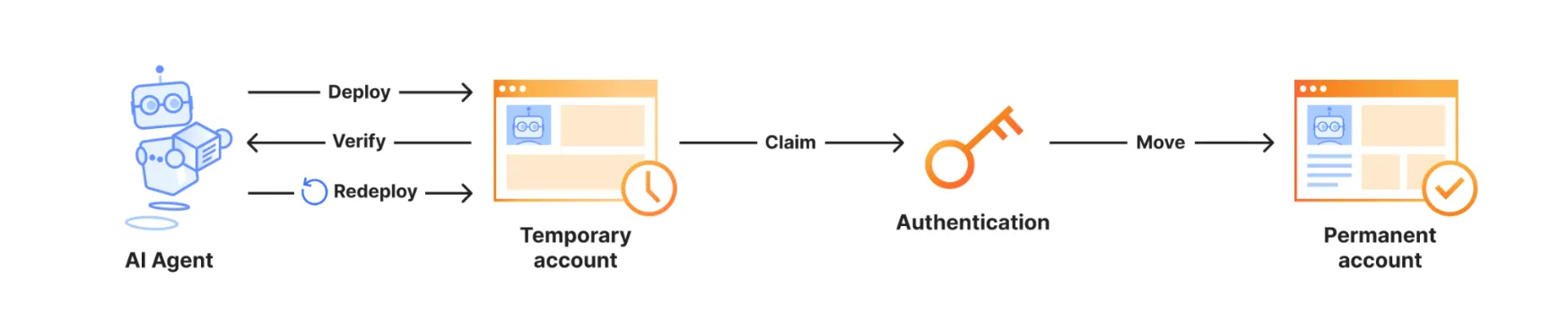
Diagram showing an AI agent deploying, verifying, and redeploying a Worker in a temporary account, then a user authenticating and claiming the account to keep its resources

The API returns a claim URL that lets the user make the temporary account and its resources permanent.

Cloudflare Drop demonstrates this preview-and-claim pattern for static sites. Someone can upload a site, test and share it for one hour, then sign in or create an account only when they want to keep it.

This API expands the flow first introduced with wrangler deploy --temporary. Your backend now controls the provisioning and deployment experience directly:

  1. Show Cloudflare's Terms of Service and Privacy Policy in your product, and require the user to accept them.
  2. Request and solve a proof-of-work challenge.
  3. Create a temporary preview account.
  4. Deploy with the returned temporary account ID and API token.
  5. Show the deployed Worker URL and claim URL to the user.
curl "https://api.cloudflare.com/client/v4/provisioning/previews/challenge" \
  -X POST \
  -H "Content-Type: application/json" \
  --data '{}'

curl "https://api.cloudflare.com/client/v4/provisioning/previews" \
  -X POST \
  -H "Content-Type: application/json" \
  --data '{
    "termsOfService": "https://www.cloudflare.com/terms/",
    "privacyPolicy": "https://www.cloudflare.com/privacypolicy/",
    "acceptTermsOfService": "yes",
    "challengeToken": "<CHALLENGE_TOKEN>",
    "solution": {
      "checkpoints": "<BASE64_CHECKPOINTS>"
    }
  }'

For the complete API flow, proof-of-work requirements, supported products, and limits, refer to Claim deployments (temporary accounts). For the background and design goals behind this flow, refer to Temporary Cloudflare Accounts for AI agents.

Agents can respond to MCP elicitation requests

Agents connected to Model Context Protocol (MCP) servers with addMcpServer can now handle elicitation requests.

Elicitation lets an MCP server request user input while it handles a tool call. Form mode collects structured, non-sensitive data. URL mode asks for consent before opening an out-of-band flow, such as third-party authorization or payment.

sequenceDiagram
    participant User
    participant Agent as Agent (MCP client)
    participant Server as MCP server
    participant Browser

    Server->>Agent: elicitation/create
    Agent->>User: Show server, reason, and input or URL
    User->>Agent: Submit, open, decline, or cancel
    Agent->>Browser: Open URL after consent (URL mode)
    Agent->>Server: accept, decline, or cancel
    Server-->>Agent: Optional URL completion notification

Register a handler for each mode your Agent supports in onStart():

import { Agent } from "agents";

export class MyAgent extends Agent {
	onStart() {
		this.mcp.configureElicitationHandlers({
			form: (request, serverId) => this.forwardToUser(request, serverId),
			url: (request, serverId) => this.forwardToUser(request, serverId),
		});
	}

	forwardToUser(request, serverId) {
		// Show the request in your UI and resolve after the user responds.
		throw new Error(
			`Implement elicitation for ${serverId}: ${request.params.message}`,
		);
	}
}
import { Agent } from "agents";
import type { ElicitRequest, ElicitResult } from "agents/mcp";

export class MyAgent extends Agent<Env> {
	onStart() {
		this.mcp.configureElicitationHandlers({
			form: (request, serverId) => this.forwardToUser(request, serverId),
			url: (request, serverId) => this.forwardToUser(request, serverId),
		});
	}

	private forwardToUser(
		request: ElicitRequest,
		serverId: string,
	): Promise<ElicitResult> {
		// Show the request in your UI and resolve after the user responds.
		throw new Error(
			`Implement elicitation for ${serverId}: ${request.params.message}`,
		);
	}
}

Connections advertise only the modes with configured handlers. An Agent without handlers advertises no elicitation capability, which lets the server use its fallback. The SDK stores the advertised modes with each MCP server registration so they survive Durable Object hibernation. Callback functions remain in memory and reattach when onStart() runs.

For implementation details and a browser forwarding pattern, refer to MCP client elicitation. The mcp-client and mcp-elicitation examples implement both sides.

Upgrade

To update to this release:


									npm
									 i agents@latest


Precursor introduces session-based bot detection

Precursor is rolling out to all customers starting today. Precursor is client-side JavaScript that enables session-based bot detection.

You can read the announcement blog for background on why we built Precursor and how session-level behavioral detection works.

With Precursor enabled, Cloudflare can:

  • Continuously evaluate behavioral signals across a session
  • Re-validate challenge clearance as behavior changes
  • Update bot scores with session context
  • Provide client-side visibility where none previously existed

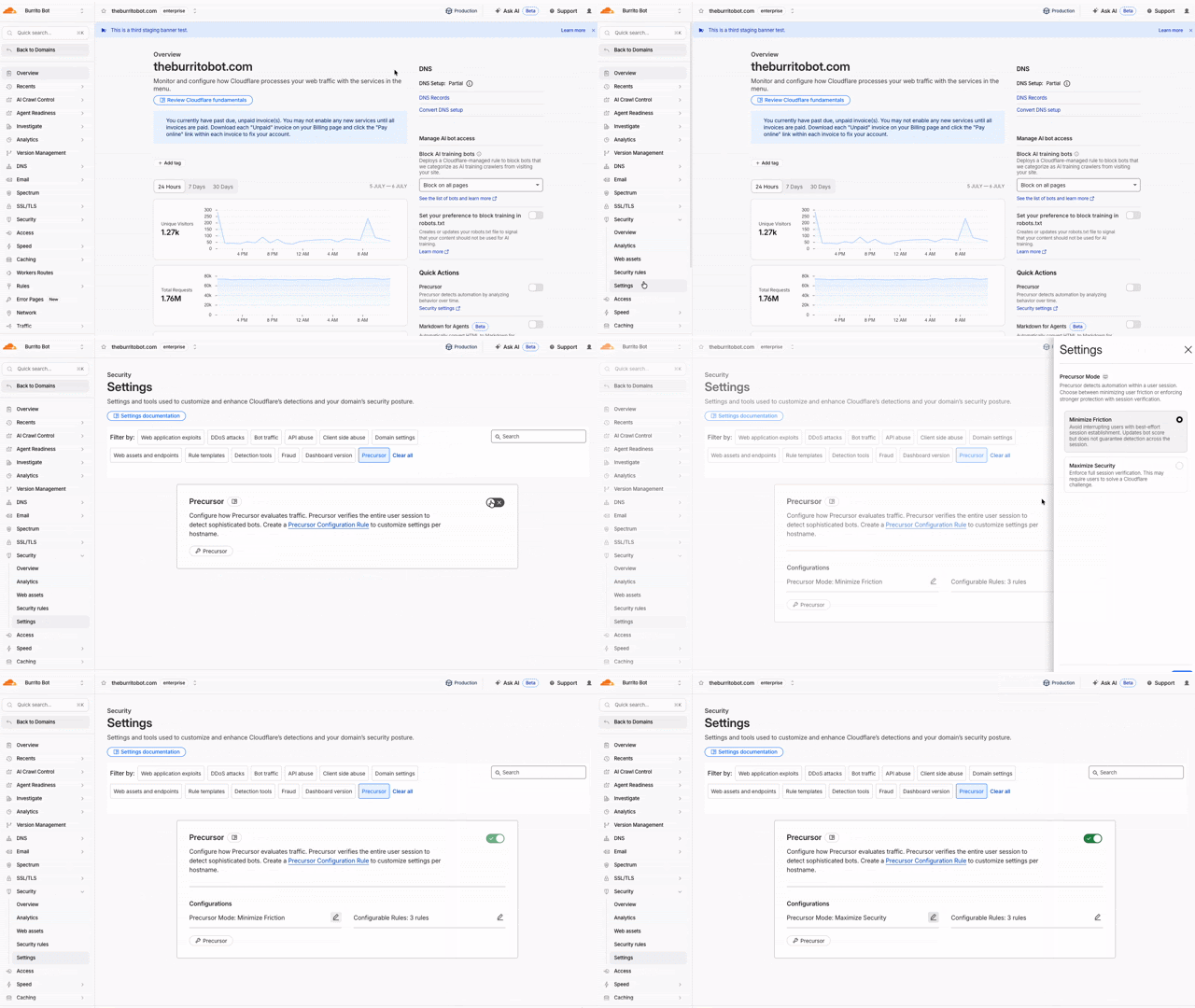
It integrates with existing protections, including Security Rules, and can be enabled directly from the Cloudflare dashboard with configurable modes to balance security and user experience.

Animated walkthrough of enabling Precursor in the Cloudflare dashboard

To learn more, refer to the Precursor documentation.

Origin Content Signals for Markdown for Agents

Markdown for Agents now preserves security- and cache-relevant response headers from your origin when converting HTML to Markdown:

  • Markdown for Agents preserves security headers such as Strict-Transport-Security (HSTS), Content-Security-Policy (CSP), X-Frame-Options, Set-Cookie, and CORS headers (for example, Access-Control-Allow-Origin) on the converted response.
  • Caching headers (Cache-Control, Expires, Age) continue to pass through.

Your origin's Content Signals policy is now authoritative. If your origin sets a content-signal header, Markdown for Agents preserves it. When the origin does not send one, Cloudflare adds the default Content-Signal: ai-train=yes, search=yes, ai-input=yes.

This release also fixes relative link resolution for directory-style base URLs (those ending in a trailing slash). Previously, relative links such as ../page/ could resolve one path segment too high and return a 404. Links are now resolved correctly per RFC 3986.

Refer to our developer documentation for more details.

R2 Data Catalog now supports read-only API tokens

R2 Data Catalog now accepts read-only API tokens, so query engines and clients that only read data no longer need a read-write token. Previously, every catalog operation required an Admin Read & Write token, which meant read-only clients were granted more access than they needed.

You can now authenticate your Iceberg engine based on your workload:

  • Read-only operations (such as listing namespaces, loading tables, and querying data) work with an Admin Read only token (R2 Data Catalog read and R2 storage read).
  • Write operations (such as creating or dropping tables and committing transactions) continue to require an Admin Read & Write token.

This lets you follow the principle of least privilege — for example, using a read-write token for the pipeline that writes to your tables and read-only tokens for engines like R2 SQL, DuckDB, or PyIceberg that query them.

Note that credentials vended by the catalog inherit the R2 storage permissions of the token used to authenticate. To ensure read-only access to your underlying data, scope the R2 storage permission to read-only as well.

For details on choosing and creating the right token, refer to Authenticate your Iceberg engine.

R2 Data Catalog compaction now optimizes manifest files

R2 Data Catalog, a managed Apache Iceberg catalog built into R2, now automatically optimizes manifest files as part of compaction.

Manifest files track the data files that make up an Iceberg table. As a table accumulates many small or fragmented manifests, query engines must read more metadata during query planning, which slows down queries even before any data is scanned.

When compaction runs, R2 Data Catalog now rewrites and clusters manifest files by partition as a best-effort pre-step. This consolidates fragmented manifests, reduces the number of manifests a query engine must open, and lowers metadata I/O overhead. Tables that are already well-clustered are skipped, so the operation only runs when it provides a benefit.

This happens automatically for tables with compaction enabled — no configuration changes are required.

For more information, refer to Table maintenance.

Source code detection improvements

Data Loss Prevention (DLP) source code detection now focuses on identifying whole source code file uploads and downloads. Previously, source code detection performed partial scans resulting in a higher rate of false positives. Since only whole source code files are evaluated, code embedded in other content — such as chat messages, documentation, or code samples — is no longer flagged as source code, removing a common source of false positives.

Source code detection requires a minimum of 500 characters to evaluate a file. Files below this threshold are not flagged to reduce noise. This threshold filters out small fragments that lack enough context for reliable classification.

Enable and set confidence levels to tune match sensitivity. A higher confidence level reduces false positives by requiring stronger signals that the content is truly source code. A lower confidence level catches more files at the cost of additional noise.

Source code detection applies to standalone source code files in Gateway HTTP policies. It does not detect source code embedded within other file types or payloads, such as .docx files or chat messages.

For more information, refer to Source Code predefined profiles.

Plain text output for Markdown Conversion

The Markdown Conversion service now supports a new output conversion option that controls the format of the converted content.

Set output.format to text to receive plain text with Markdown syntax removed. The default value is markdown, so existing conversions are unchanged.

Use the env.AI binding:

await env.AI.toMarkdown(
	{ name: "page.html", blob: new Blob([html]) },
	{
		conversionOptions: {
			output: { format: "text" },
		},
	},
);
await env.AI.toMarkdown(
	{ name: "page.html", blob: new Blob([html]) },
	{
		conversionOptions: {
			output: { format: "text" },
		},
	},
);

Or call the REST API:

curl https://api.cloudflare.com/client/v4/accounts/{ACCOUNT_ID}/ai/tomarkdown \
  -H 'Authorization: Bearer {API_TOKEN}' \
  -F 'files=@index.html' \
  -F 'conversionOptions={"output": {"format": "text"}}'

When you request text output, the format field of each result is set to text. For more details, refer to Conversion Options.

Workflows now supports delay functions when retrying

With Workflows, you can configure built-in retry behavior for each step. Previously, you could configure step retries with fixed delay durations, such as seconds, minutes, or hours, and backoff strategies such as constant, linear, or exponential.

Step retries now support dynamic delay functions. Instead of choosing only a base delay and backoff strategy, pass a function to retries.delay and calculate the next delay from the failed attempt and thrown error.

This is useful when retries should depend on the failure. Your Workflow may need to wait longer after a rate-limit error, but retry sooner after a short network failure. The delay function can also accommodate provider guidance if, for example, a downstream API returns a Retry-After value in its error messaging.

await step.do(
	"sync customer",
	{
		retries: {
			limit: 5,
			delay: ({ ctx, error }) => {
				if (error.message.includes("rate limit")) {
					return `${ctx.attempt * 30} seconds`;
				}

				return "10 seconds";
			},
		},
	},
	async () => {
		await syncCustomer();
	},
);
await step.do(
	"sync customer",
	{
		retries: {
			limit: 5,
			delay: ({ ctx, error }) => {
				if (error.message.includes("rate limit")) {
					return `${ctx.attempt * 30} seconds`;
				}

				return "10 seconds";
			},
		},
	},
	async () => {
		await syncCustomer();
	},
);

Dynamic delay functions can return a duration string, a number, or a promise that resolves to a duration. Use them to add adaptive retry behavior without writing separate queue or scheduling logic. For more information, refer to Sleeping and retrying.

New DNS Firewall UX with more dashboard settings

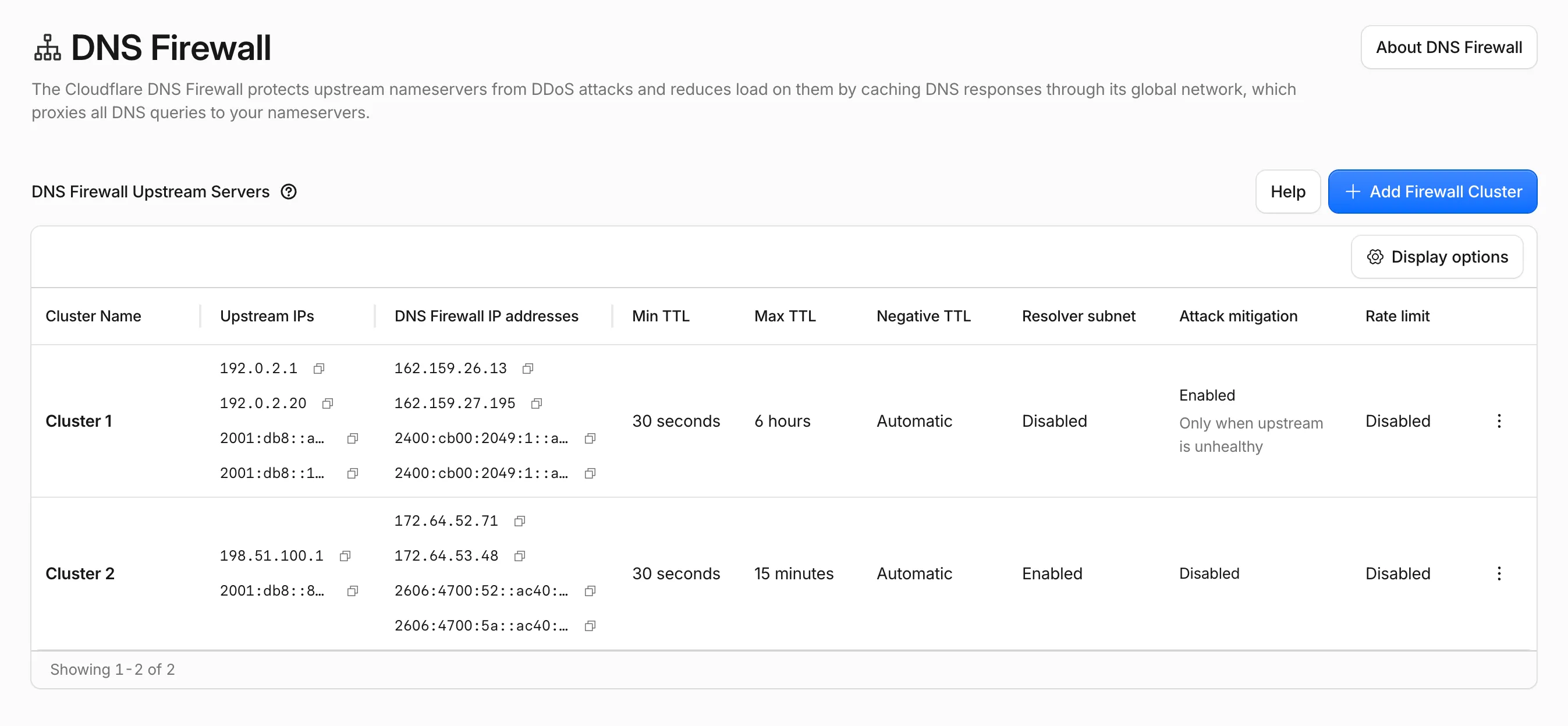
The DNS Firewall page in the Cloudflare dashboard has been refreshed, bringing several settings that were previously API-only into the UI and modernizing how you view and manage your DNS Firewall clusters.

New DNS Firewall UX

What is new

  • More settings in the dashboard: cluster options that were previously only configurable through the API — such as attack mitigation, rate limiting, negative TTL, and resolver subnet — are now available directly in the dashboard.
  • Better table experience: the DNS Firewall cluster table has been revised to surface cluster details at a glance, with resizable columns and the option to show or hide columns to tailor the view to your workflow.
  • New create and edit UX: adding and editing clusters now uses a modernized form that groups related settings together, making configuration faster and clearer.

Availability

Available to all DNS Firewall customers as part of their existing subscription.

Where to find it

In the Cloudflare dashboard, go to the DNS Firewall page.

Go to Clusters ↗

For more information, refer to DNS Firewall.

New Durable Object namespaces must use the SQLite storage backend

If your account does not already have a key-value (KV) backed Durable Object namespace, you can no longer create new ones. New Durable Object namespaces must use the SQLite storage backend, which has been recommended for all new Durable Objects since it became generally available in 2024.

Create a new class with a new_sqlite_classes migration:

{
  "$schema": "./node_modules/wrangler/config-schema.json",
  "migrations": [
    {
      "tag": "v1",
      "new_sqlite_classes": [
        "MyDurableObject"
      ]
    }
  ]
}
[[migrations]]
tag = "v1"
new_sqlite_classes = ["MyDurableObject"]

SQLite-backed Durable Objects have feature parity with the key-value backend — including the key-value storage API — and additionally support relational SQL queries and point-in-time recovery to restore an object's storage to any point in the past 30 days.

If you attempt to create a new key-value backed namespace (a new_classes migration) on an affected account, the deployment fails with the following error:

Creating new key-value backed Durable Object namespaces is no longer supported on this account. Please create a namespace using a `new_sqlite_classes` migration instead.

This change only affects accounts that are not already using the key-value storage backend. Accounts with at least one existing key-value backed namespace can still create new ones for now, and the Workers Free plan has only ever supported SQLite-backed Durable Objects. It is part of a broader move toward SQLite as the single storage backend for Durable Objects, ahead of a future migration path for existing key-value backed objects.

For more information, refer to Durable Objects migrations.

Zero Trust Networks route endpoints and Cloudflare Tunnel connections field retiring on October 5, 2026

On October 5, 2026, two changes take effect across the Zero Trust Networks API and Cloudflare Tunnel API: the CIDR-encoded route endpoints are removed, and tunnel list and get responses no longer include the connections field. If you manage private network routes or read tunnel connection details through the API, cloudflared, Terraform, or another integration, review the changes in the following sections and migrate before the removal date.

Route endpoints

The CIDR-encoded route endpoints are deprecated in favor of the standard, route_id-based endpoints that already exist today. Both sets of endpoints route a private network through Cloudflare Tunnel or Cloudflare Mesh (the API still refers to Mesh nodes as warp_connector) — only the request shape changes.

Deprecated endpoints (removed October 5, 2026):

Replacement endpoints:

What is changing

Deprecated (CIDR-encoded path) Replacement
Route identifier URL-encoded CIDR in the path (/network/{ip_network_encoded}) route_id in the path (network moves to the request body on create)
Create POST .../teamnet/routes/network/{ip_network_encoded} POST .../teamnet/routes with network and tunnel_id in the body
Update PATCH .../teamnet/routes/network/{ip_network_encoded} PATCH .../teamnet/routes/{route_id}
Delete DELETE .../teamnet/routes/network/{ip_network_encoded} DELETE .../teamnet/routes/{route_id}

Action required

  1. Capture each route's route_id by calling List tunnel routes, or read it from the response the first time you create a route with the replacement endpoint.
  2. Update any scripts, backend services, or CI/CD pipelines that call the CIDR-encoded endpoints directly.
  3. If you manage routes with the cloudflared tunnel route ip add | delete commands, upgrade cloudflared to the latest version.
  4. If you manage routes with Terraform, make sure you are on a current version of the cloudflare_zero_trust_tunnel_cloudflared_route resource and the Cloudflare Terraform provider.
# Before: create a route by URL-encoding the CIDR into the path
curl https://api.cloudflare.com/client/v4/accounts/$ACCOUNT_ID/teamnet/routes/network/172.16.0.0%2F16 \
     -H 'Content-Type: application/json' \
     -H "Authorization: Bearer $CLOUDFLARE_API_TOKEN" \
     -d '{"tunnel_id": "'$TUNNEL_ID'", "comment": "Example comment for this route."}'

# After: create a route with the network in the request body
curl https://api.cloudflare.com/client/v4/accounts/$ACCOUNT_ID/teamnet/routes \
     -H 'Content-Type: application/json' \
     -H "Authorization: Bearer $CLOUDFLARE_API_TOKEN" \
     -d '{"network": "172.16.0.0/16", "tunnel_id": "'$TUNNEL_ID'", "comment": "Example comment for this route."}'

# After: update or delete a route using its route_id
curl -X PATCH https://api.cloudflare.com/client/v4/accounts/$ACCOUNT_ID/teamnet/routes/$ROUTE_ID \
     -H 'Content-Type: application/json' \
     -H "Authorization: Bearer $CLOUDFLARE_API_TOKEN" \
     -d '{"comment": "Updated comment for this route."}'

curl -X DELETE https://api.cloudflare.com/client/v4/accounts/$ACCOUNT_ID/teamnet/routes/$ROUTE_ID \
     -H "Authorization: Bearer $CLOUDFLARE_API_TOKEN"

Cloudflare Tunnel and Cloudflare Mesh connections

Starting the same day, the connections array is removed from list and get responses for Cloudflare Tunnel and Cloudflare Mesh nodes (the cfd_tunnel and warp_connector API resources). Query the dedicated connections endpoint instead of reading the field off the tunnel or node object.

This affects:

Action required

Fetch connection details from the tunnel-specific connections endpoint instead of parsing it off the list or get response. For Cloudflare Tunnel, call GET /accounts/{account_id}/cfd_tunnel/{tunnel_id}/connections. For Cloudflare Mesh, call GET /accounts/{account_id}/warp_connector/{tunnel_id}/connections.

# Before: read connections off the tunnel object
curl https://api.cloudflare.com/client/v4/accounts/$ACCOUNT_ID/cfd_tunnel/$TUNNEL_ID \
     -H "Authorization: Bearer $CLOUDFLARE_API_TOKEN"

# After: query connections directly
curl https://api.cloudflare.com/client/v4/accounts/$ACCOUNT_ID/cfd_tunnel/$TUNNEL_ID/connections \
     -H "Authorization: Bearer $CLOUDFLARE_API_TOKEN"

Update any dashboards, monitoring scripts, or automation that parses connections from the tunnel list or get response. cloudflared and the Cloudflare Terraform provider do not read this field, so no changes are required on their side for this part of the update.

Why we are making these changes

  • Smaller, faster responses. Cloudflare Tunnel and Cloudflare Mesh nodes with many connections no longer inflate every list and get call — connection detail is only fetched when you need it.
  • A single way to identify a route. Consolidating on route_id removes the need to URL-encode CIDR ranges into the path and matches how every other resource in the Zero Trust Networks API is addressed.
  • Consistency across the API. Both changes align these endpoints with Cloudflare's standard REST conventions for resource identifiers and nested detail endpoints.

To learn more, refer to the Zero Trust Networks API, the Cloudflare Tunnel API, and Routes documentation.

Send npm package dependency metadata with Worker uploads

Wrangler now collects npm package dependency information from your project's package.json during wrangler deploy and wrangler versions upload, and includes it in the upload metadata sent to the Cloudflare API. This data, each dependency's name, declared version range, and exact installed version, enables dependency analytics and future supply chain security features such as vulnerability alerting.

To opt out, set dependencies_instrumentation.enabled to false in your Wrangler configuration file:

{
	"dependencies_instrumentation": {
		"enabled": false
	}
}
[dependencies_instrumentation]
enabled = false

For more details, refer to Wrangler configuration.

Filter AI Search list items by exact object key

In AI Search, you can upload files to an instance, or connect a data source such as an R2 bucket, to make your content searchable with natural language. Each file becomes an item identified by an object key (its filename or path). The list items endpoint returns the items in an instance.

That endpoint now accepts a key query parameter, so you can look up a single item by its exact object key without paging through the full list. This complements the existing item_id filter for when you know the key but not the ID.

curl "https://api.cloudflare.com/client/v4/accounts/<ACCOUNT_ID>/ai-search/instances/<INSTANCE_NAME>/items?key=docs/readme.md" \
  -H "Authorization: Bearer <API_TOKEN>"

Keys are unique per data source, so combine key with source (for example, source=builtin) to disambiguate when the same key exists across multiple sources.

For more information, refer to managing items.

Workers AI toMarkdown and AI Search now supports GIF and BMP image conversion

Workers AI Markdown conversion (toMarkdown) now supports .gif and .bmp image files, in addition to the JPEG, PNG, WebP, and SVG formats already supported.

GIF and BMP files run through the same image pipeline as other formats. Each image is resized if needed (and for animated GIFs, only the first frame is used), then passed to an object-detection model to identify what it contains. Those detected objects prompt a vision model that writes a natural-language description of the image, which becomes searchable, machine-readable Markdown.

AI Search uses toMarkdown automatically to process the files it ingests, so any .gif and .bmp files are included the next time your index syncs, with no configuration changes required. This helps when your content mixes formats, for example a support knowledge base full of screenshots or an archive of BMP scans.

Learn more about Markdown conversion and the full list of AI Search's supported file types.