

This page lists the configuration flags for the cloudflared tunnel run command. For a remotely-managed tunnel, add these flags to the tunnel service. If you are using a locally-managed tunnel, add these flags to your configuration file as key/value pairs.
Remotely-managed tunnels run as a service on your OS. To add run parameters to the tunnel service file:
On Linux, Cloudflare Tunnel installs itself as a system service using systemctl. By default, the service will be named cloudflared.service. To configure your tunnel on Linux:
-
Open
cloudflared.service.sudo systemctl edit --full cloudflared.service -
Modify the
cloudflared tunnel runcommand with the desired configuration flag. For example,[Unit] Description=Cloudflare Tunnel After=network.target [Service] TimeoutStartSec=0 Type=notify ExecStart=/usr/local/bin/cloudflared tunnel --loglevel info --logfile /var/log/cloudflared/cloudflared.log run --token <TOKEN VALUE> Restart=on-failure RestartSec=5s [Install] WantedBy=multi-user.target -
Restart
cloudflared.service:sudo systemctl restart cloudflared -
To verify the new configuration, check the service status:
sudo systemctl status cloudflared● cloudflared.service - cloudflared Loaded: loaded (/etc/systemd/system/cloudflared.service; enabled; preset: enabled) Active: active (running) since Wed 2024-10-09 20:02:59 UTC; 2s ago Main PID: 2157 (cloudflared) Tasks: 8 (limit: 1136) Memory: 16.3M CPU: 136ms CGroup: /system.slice/cloudflared.service └─2157 /usr/bin/cloudflared tunnel --loglevel info --logfile /var/log/cloudflared/cloudflared.log run --token eyJhIjoi...
On macOS, Cloudflare Tunnel installs itself as a launch agent using launchctl. By default, the agent will be called com.cloudflare.cloudflared. To configure your tunnel on macOS:
-
Stop the
cloudflaredservice.sudo launchctl stop com.cloudflare.cloudflared -
Unload the configuration file.
sudo launchctl unload /Library/LaunchDaemons/com.cloudflare.cloudflared.plist -
Open
/Library/LaunchDaemons/com.cloudflare.cloudflared.plistin a text editor. -
Modify the
ProgramArgumentskey with the desired configuration flag. For example,<plist version="1.0"> <dict> <key>Label</key> <string>com.cloudflare.cloudflared</string> <key>ProgramArguments</key> <array> <string>/opt/homebrew/bin/cloudflared</string> <string>tunnel</string> <string>--logfile</string> <string><PATH></string> <string>--loglevel</string> <string>debug</string> <string>run</string> <string>--token</string> <string><TOKEN VALUE> </string> </array> -
Load the updated configuration file.
sudo launchctl load /Library/LaunchDaemons/com.cloudflare.cloudflared.plist -
Start the
cloudflaredservice.sudo launchctl start com.cloudflare.cloudflared
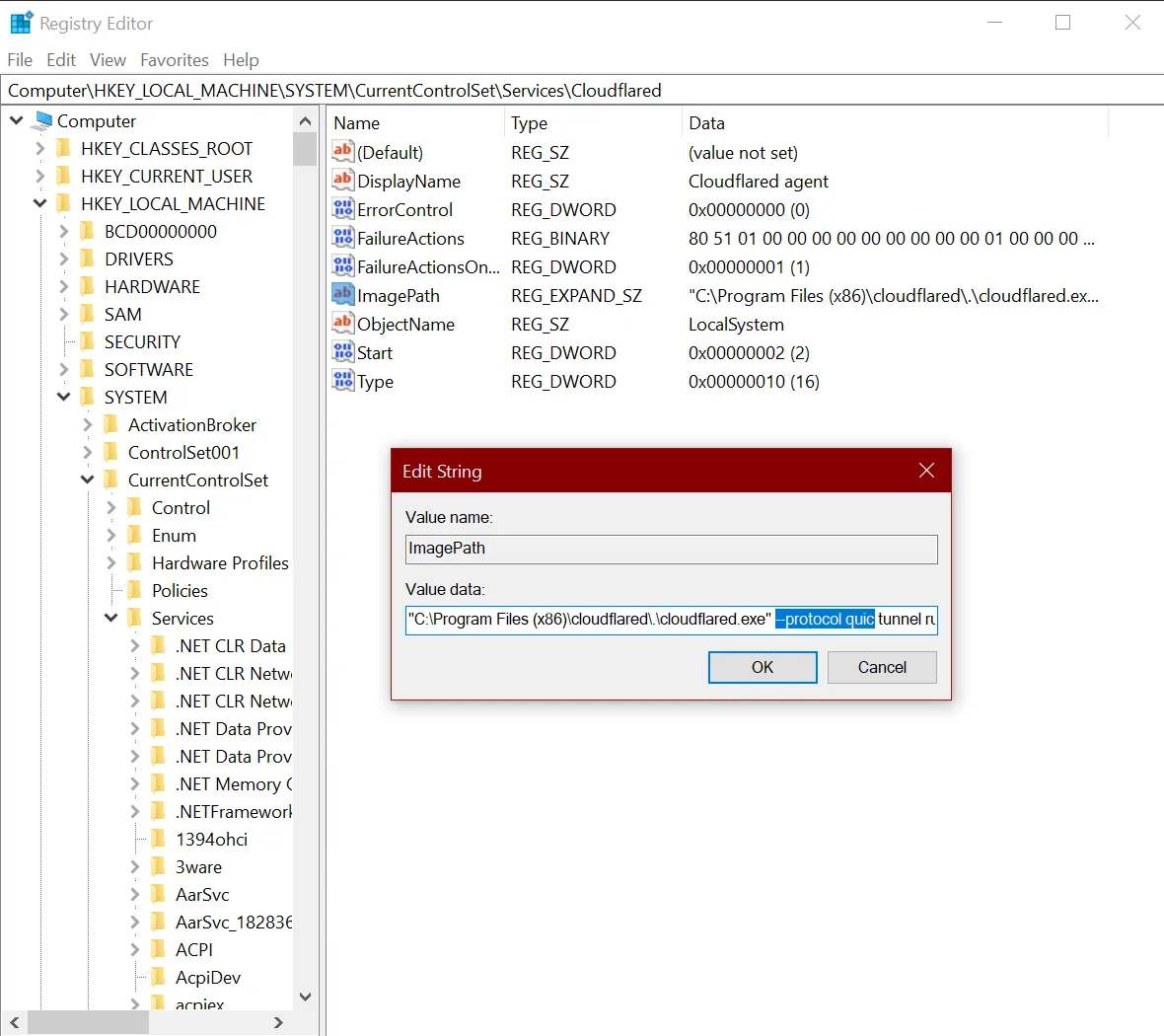
On Windows, Cloudflare Tunnel installs itself as a system service using the Registry Editor. By default, the service will be named cloudflared. To configure your tunnel on Windows:
-
Open the Registry Editor.
-
Go to HKEY_LOCAL_MACHINE > SYSTEM > CurrentControlSet > Services > cloudflared.
-
Double-click ImagePath.
-
Modify Value data with the desired configuration flag. For example,
C:\Program Files (x86)\cloudflared\.\cloudflared.exe tunnel --loglevel info --logfile <PATH> run --token <TOKEN VALUE>
| Syntax | Default |
|---|---|
cloudflared tunnel --autoupdate-freq <FREQ> run <UUID or NAME> |
24h |
Configures the frequency of cloudflared updates.
By default, cloudflared will periodically check for updates and restart with the new version. Restarts are performed by spawning a new process that connects to the Cloudflare global network. On successful connection, the old process will gracefully shut down after handling all outstanding requests. See also: no-autoupdate.
| Syntax | Default |
|---|---|
cloudflared tunnel --config <PATH> run <UUID or NAME> |
~/.cloudflared/config.yml |
Specifies the path to a configuration file in YAML format.
| Syntax | Environment Variable |
|---|---|
cloudflared tunnel run --dns-resolver-addrs <IP:PORT> <UUID or NAME> |
TUNNEL_DNS_RESOLVER_ADDRS |
Specifies custom DNS resolver addresses for cloudflared to use instead of the host machine's default resolvers. Each address must be in ip:port format — providing an IP address without a port will cause cloudflared to fail to start. You can specify multiple resolvers by repeating the flag. For example,
cloudflared tunnel run --dns-resolver-addrs 1.1.1.1:53 --dns-resolver-addrs 1.0.0.1:53 <UUID or NAME>When multiple resolvers are specified, cloudflared randomly selects one for each DNS request. A maximum of 10 resolver addresses are allowed.
| Syntax | Environment Variable |
|---|---|
cloudflared tunnel --edge-bind-address <IP> run <UUID or NAME> |
TUNNEL_EDGE_BIND_ADDRESS |
Specifies the outgoing IP address used to establish a connection between cloudflared and the Cloudflare global network.
By default, cloudflared lets the operating system decide which IP address to use. This option is useful if you have multiple network interfaces available and want to prefer a specific interface.
The IP version of edge-bind-address will override edge-ip-version (if provided). For example, if you enter an IPv6 source address, cloudflared will always connect to an IPv6 destination.
| Syntax | Default | Environment Variable |
|---|---|---|
cloudflared tunnel --edge-ip-version <VERSION> run <UUID or NAME> |
4 |
TUNNEL_EDGE_IP_VERSION |
Specifies the IP address version (IPv4 or IPv6) used to establish a connection between cloudflared and the Cloudflare global network. Available values are auto, 4, and 6.
The value auto relies on the host operating system to determine which IP version to select. The first IP version returned from the DNS resolution of the region lookup will be used as the primary set. In dual IPv6 and IPv4 network setups, cloudflared will separate the IP versions into two address sets that will be used to fallback in connectivity failure scenarios.
| Syntax | Default | Environment Variable |
|---|---|---|
cloudflared tunnel --grace-period <PERIOD> run <UUID or NAME> |
30s |
TUNNEL_GRACE_PERIOD |
When cloudflared receives SIGINT/SIGTERM it will stop accepting new requests, wait for in-progress requests to terminate, then shut down. Waiting for in-progress requests will timeout after this grace period, or when a second SIGTERM/SIGINT is received.
| Syntax | Environment Variable |
|---|---|
cloudflared tunnel --logfile <PATH> run <UUID or NAME> |
TUNNEL_LOGFILE |
Saves application log to this file. Mainly useful for reporting issues. For more details on what information you need when contacting Cloudflare support, refer to this guide.
| Syntax | Default | Environment Variable |
|---|---|---|
cloudflared tunnel --loglevel <VALUE> run <UUID or NAME> |
info |
TUNNEL_LOGLEVEL |
Specifies the verbosity of logging for the local cloudflared instance. Available values are debug, info (default), warn, error, and fatal. At the debug level, cloudflared will log and display the request URL, method, protocol, content length, as well as all request and response headers. However, note that this can expose sensitive information in your logs.
| Syntax | Default | Environment Variable |
|---|---|---|
cloudflared tunnel --metrics <IP:PORT> run <UUID or NAME> |
Refer to Tunnel metrics | TUNNEL_METRICS |
Exposes a Prometheus endpoint on the specified IP address and port, which you can then query for usage metrics.
| Syntax | Environment Variable |
|---|---|
cloudflared tunnel --no-autoupdate run <UUID or NAME> |
NO_AUTOUPDATE |
Disables automatic cloudflared updates. See also: autoupdate-freq.
| Syntax | Default | Environment Variable |
|---|---|---|
cloudflared tunnel --origincert <PATH> run <UUID or NAME> |
~/.cloudflared/cert.pem |
TUNNEL_ORIGIN_CERT |
Specifies the account certificate for one of your zones, authorizing the client to serve as an origin for that zone. You can obtain a certificate by using the cloudflared tunnel login command or by visiting https://dash.cloudflare.com/argotunnel.
| Syntax | Environment Variable |
|---|---|
cloudflared tunnel --pidfile <PATH> run <UUID or NAME> |
TUNNEL_PIDFILE |
Writes the application's process identifier (PID) to this file after the first successful connection. Mainly useful for scripting and service integration.
| Syntax | Environment Variable |
|---|---|
cloudflared tunnel run --post-quantum <UUID or NAME> |
TUNNEL_POST_QUANTUM |
By default, Cloudflare Tunnel connections over quic are encrypted using post-quantum cryptography (PQC) but will fall back to non-PQ if there are issues connecting. If the --post-quantum flag is provided, quic connections are only allowed to use PQ key agreements, with no fallback to non-PQ.
Post-quantum key agreements are not supported when using http2 protocol.
| Syntax | Default | Environment Variable |
|---|---|---|
cloudflared tunnel --protocol <VALUE> run <UUID or NAME> |
auto |
TUNNEL_TRANSPORT_PROTOCOL |
Specifies the protocol used to establish a connection between cloudflared and the Cloudflare global network. Available values are auto, http2, and quic.
The auto value will automatically configure the quic protocol. If cloudflared is unable to establish UDP connections, it will fallback to using the http2 protocol.
| Syntax | Environment Variable |
|---|---|
cloudflared tunnel --region <VALUE> run <UUID or NAME> |
TUNNEL_REGION |
Allows you to choose the regions to which connections are established. Currently the only available value is us, which routes all connections through data centers in the United States. Omit or leave empty to connect to the global region.
When the region is set to us, cloudflared uses different US-specific hostnames and IPs. Refer to Tunnel with firewall for details.
| Syntax | Default | Environment Variable |
|---|---|---|
cloudflared tunnel --retries <VALUE> run <UUID or NAME> |
5 |
TUNNEL_RETRIES |
Specifies the maximum number of retries for connection/protocol errors. Retries use exponential backoff (retrying at 1, 2, 4, 8, 16 seconds by default), so it is not recommended that you increase this value significantly.
| Syntax | Environment Variable |
|---|---|
cloudflared tunnel --tag <KEY=VAL> run <UUID or NAME> |
TUNNEL_TAG |
Specifies custom tags used to identify this tunnel. Multiple tags may be specified by adding additional --tag <KEY=VAL> flags to the command. If entering multiple tags into a configuration file, delimit with commas: tag: {KEY1=VALUE1, KEY2=VALUE2}.
| Syntax | Environment Variable |
|---|---|
cloudflared tunnel run --token <TUNNEL_TOKEN> |
TUNNEL_TOKEN |
Associates the cloudflared instance with a specific tunnel. The tunnel's token is shown in the dashboard when you first create the tunnel. You can also retrieve the token using the API.
| Syntax | Environment Variable |
|---|---|
cloudflared tunnel run --token-file <PATH> |
TUNNEL_TOKEN_FILE |
Associates the cloudflared instance with a specific tunnel using a file which contains the token.