Workers, including those using Durable Objects and Browser Rendering, may now process WebSocket messages up to 32 MiB in size. Previously, this limit was 1 MiB.
This change allows Workers to handle use cases requiring large message sizes, such as processing Chrome Devtools Protocol messages.
Instance creation rate increased from 100 workflow instances per 10 seconds to 100 instances per second
Concurrency limit increased from 4,500 to 10,000 workflow instances per account
These increases mean you can create new instances up to 10x faster, and have more workflow instances concurrently executing. To learn more and get started with Workflows, refer to the getting started guide.
Previously, if you wanted to develop or deploy a worker with attached resources, you'd have to first manually create the desired resources. Now, if your Wrangler configuration file includes a KV namespace, D1 database, or R2 bucket that does not yet exist on your account, you can develop locally and deploy your application seamlessly, without having to run additional commands.
Automatic provisioning is launching as an open beta, and we'd love to hear your feedback to help us make improvements! It currently works for KV, R2, and D1 bindings. You can disable the feature using the --no-x-provision flag.
To use this feature, update to wrangler@4.45.0 and add bindings to your config file without resource IDs e.g.:
wrangler dev will then automatically create these resources for you locally, and on your next run of wrangler deploy, Wrangler will call the Cloudflare API to create the requested resources and link them to your Worker.
Though resource IDs will be automatically written back to your Wrangler config file after resource creation, resources will stay linked across future deploys even without adding the resource IDs to the config file. This is especially useful for shared templates, which now no longer need to include account-specific resource IDs when adding a binding.
									bun
									 create cloudflare@latest my-tanstack-start-app --framework=tanstack-start
Existing projects
Migrate an existing TanStack Start project to use the Cloudflare Vite plugin:
Install @cloudflare/vite-plugin and wrangler
									npm
									 i -D @cloudflare/vite-plugin wrangler
									yarn
									 add -D @cloudflare/vite-plugin wrangler
									pnpm
									 add -D @cloudflare/vite-plugin wrangler
									bun
									 add -d @cloudflare/vite-plugin wrangler
Add the Cloudflare plugin to your Vite config
vite.config.tsts
import { defineConfig } from "vite";import { tanstackStart } from "@tanstack/react-start/plugin/vite";import viteReact from "@vitejs/plugin-react";import { cloudflare } from "@cloudflare/vite-plugin";export default defineConfig({ plugins: [ cloudflare({ viteEnvironment: { name: "ssr" } }), tanstackStart(), viteReact(), ],});
Add your Worker config file
{ "$schema": "./node_modules/wrangler/config-schema.json", "name": "my-tanstack-start-app", // Set this to today's date "compatibility_date": "2026-07-20", "compatibility_flags": [ "nodejs_compat" ], "main": "@tanstack/react-start/server-entry"}
"$schema" = "./node_modules/wrangler/config-schema.json"name = "my-tanstack-start-app"# Set this to today's datecompatibility_date = "2026-07-20"compatibility_flags = [ "nodejs_compat" ]main = "@tanstack/react-start/server-entry"
We have updated the default behavior for Cloudflare Workers Preview URLs. Going forward, if a preview URL setting is not explicitly configured during deployment, its default behavior will automatically match the setting of your workers.dev subdomain.
This change is intended to provide a more intuitive and secure experience by aligning your preview URL's default state with your workers.dev configuration to prevent cases where a preview URL might remain public even after you disabled your workers.dev route.
What this means for you:
If neither setting is configured: both the workers.dev route and the preview URL will default to enabled
If your workers.dev route is enabled and you do not explicitly set Preview URLs to enabled or disabled: Preview URLs will default to enabled
If your workers.dev route is disabled and you do not explicitly set Preview URLs to enabled or disabled: Preview URLs will default to disabled
You can override the default setting by explicitly enabling or disabling the preview URL in your Worker's configuration through the API, Dashboard, or Wrangler.
Wrangler Version Behavior
The default behavior depends on the version of Wrangler you are using. This new logic applies to the latest version. Here is a summary of the behavior across different versions:
Before v4.34.0: Preview URLs defaulted to enabled, regardless of the workers.dev setting.
v4.34.0 up to (but not including) v4.44.0: Preview URLs defaulted to disabled, regardless of the workers.dev setting.
v4.44.0 or later: Preview URLs now default to matching your workers.dev setting.
Why we’re making this change
In July, we introduced preview URLs to Workers, which let you preview code changes before deploying to production. This made disabling your Worker’s workers.dev URL an ambiguous action — the preview URL, served as a subdomain of workers.dev (ex: preview-id-worker-name.account-name.workers.dev) would still be live even if you had disabled your Worker’s workers.dev route. If you misinterpreted what it meant to disable your workers.dev route, you might unintentionally leave preview URLs enabled when you didn’t mean to, and expose them to the public Internet.
To address this, we made a one-time update to disable preview URLs on existing Workers that had their workers.dev route disabled and changed the default behavior to be disabled for all new deployments where a preview URL setting was not explicitly configured.
While this change helped secure many customers, it was disruptive for customers who keep their workers.dev route enabled and actively use the preview functionality, as it now required them to explicitly enable preview URLs on every redeployment.This new, more intuitive behavior ensures that your preview URL settings align with your workers.dev configuration by default, providing a more secure and predictable experience.
Securing access to workers.dev and preview URL endpoints
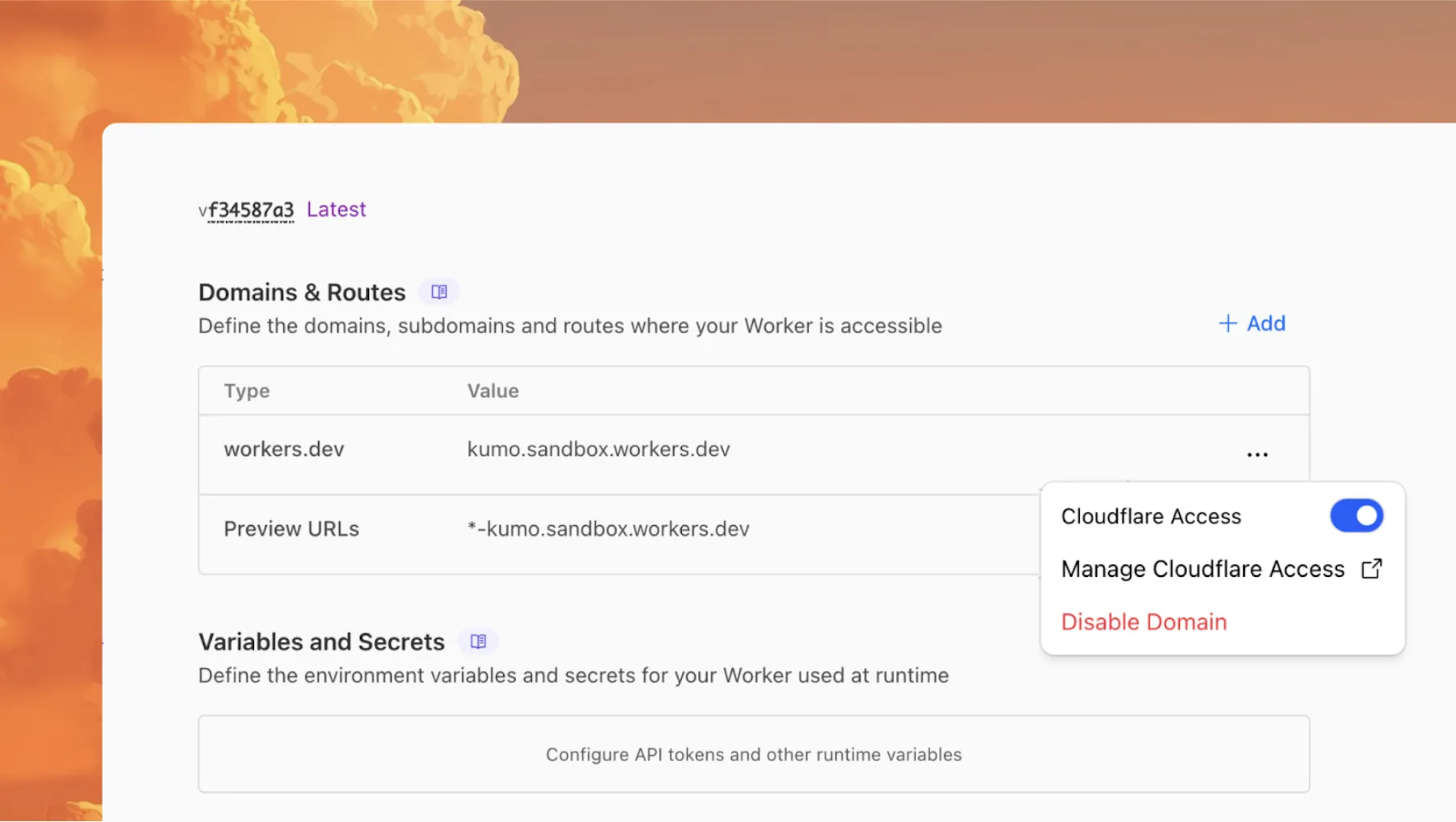
To further secure your workers.dev subdomain and preview URL, you can enable Cloudflare Access with a single click in your Worker's settings to limit access to specific users or groups.
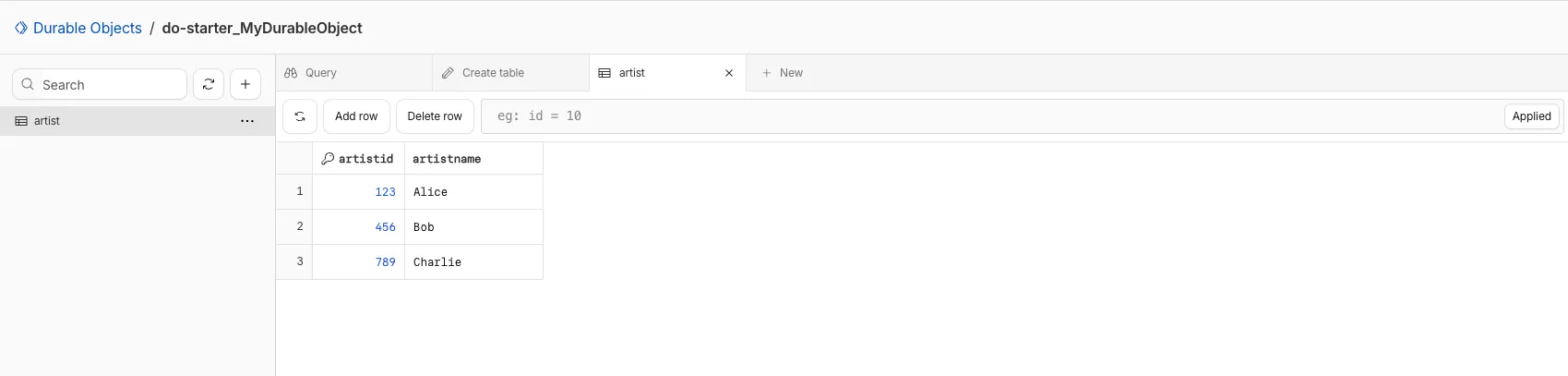
You can now view and write to each Durable Object's storage using a UI editor on the Cloudflare dashboard. Only Durable Objects using SQLite storage can use Data Studio.
Data Studio unlocks easier data access with Durable Objects for prototyping application data models to debugging production storage usage. Before, querying your Durable Objects data required deploying a Worker.
To access a Durable Object, you can provide an object's unique name or ID generated by Cloudflare. Data Studio requires you to have at least the Workers Platform Admin role, and all queries are captured with audit logging for your security and compliance needs. Queries executed by Data Studio send requests to your remote, deployed objects and incur normal usage billing.
To learn more, visit the Data Studio documentation. If you have feedback or suggestions for the new Data Studio, please share your experience on Discord ↗
Now, you simply define the directory where your assets are built, and we handle the rest. Check out the examples for what this looks like in Terraform configuration.
# This tracks the existence of your Worker, so that you# can upload code and assets separately from tracking Worker state.resource "cloudflare_worker" "my_app" { account_id = var.account_id name = "my-app"}resource "cloudflare_worker_version" "my_app_version" { account_id = var.account_id worker_id = cloudflare_worker.my_app.id # Just point to your assets directory - that's it! assets = { directory = "./dist/static" } modules = [{ name = "index.js" content_file = "./dist/worker/index.js" content_type = "application/javascript+module" }]}resource "cloudflare_workers_deployment" "my_app_deployment" { account_id = var.account_id script_name = cloudflare_worker.my_app.name strategy = "percentage" versions = [{ version_id = cloudflare_worker_version.my_app_version.id percentage = 100 }]}
What's changed
Under the hood, the Cloudflare Terraform provider now handles the same logic that Wrangler uses for static asset uploads. This includes scanning your assets directory, computing hashes for each file, generating a manifest with file metadata, and calling the Cloudflare API to upload any missing files in chunks. We support large directories with parallel uploads and chunking, and when the asset manifest hash changes, we detect what's changed and trigger an upload for only those changed files.
You can now create and manage Workflows using Terraform, now supported in the Cloudflare Terraform provider v5.11.0 ↗. Workflows allow you to build durable, multi-step applications -- without needing to worry about retrying failed tasks or managing infrastructure.
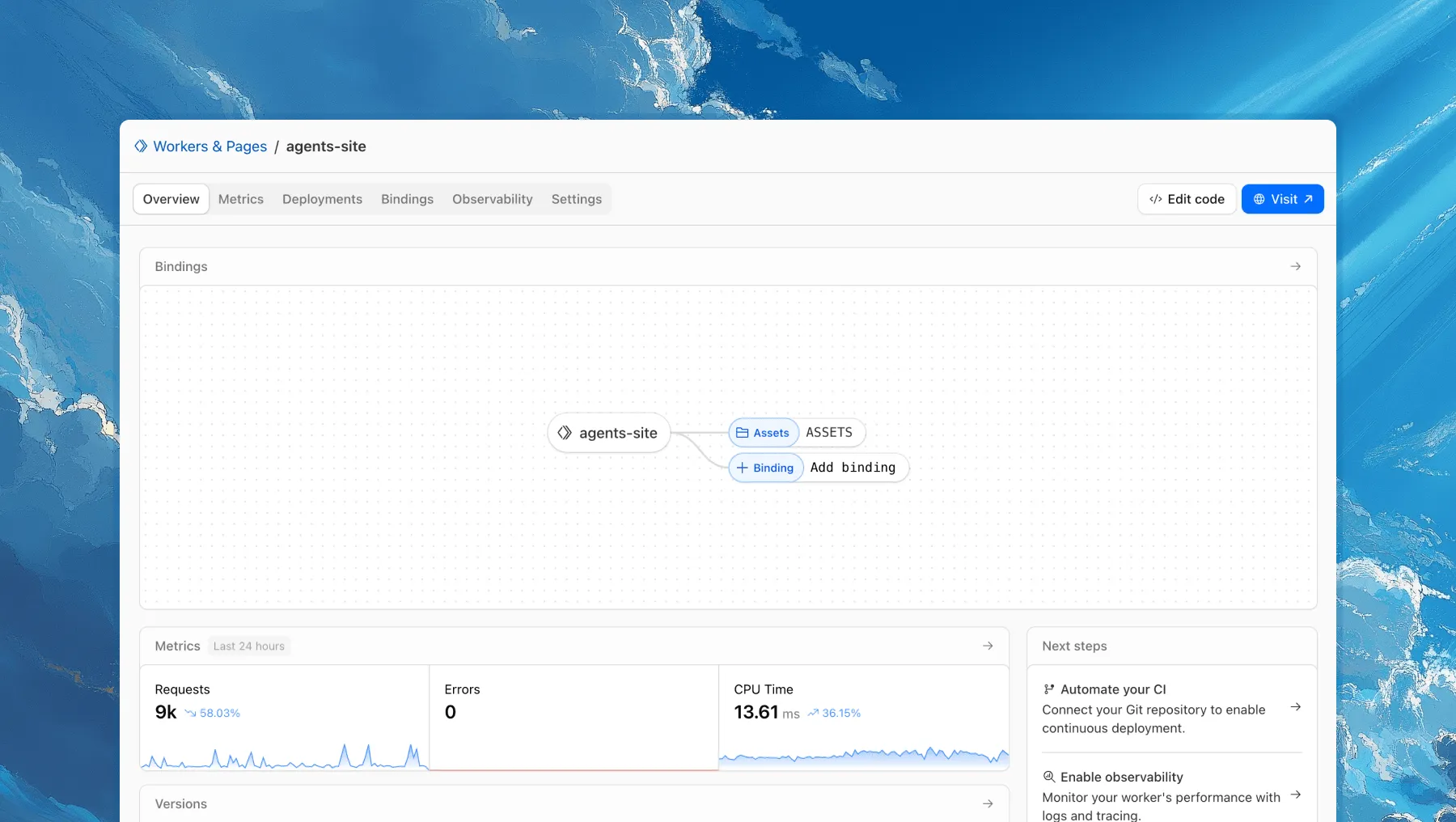
Each of your Workers now has a new overview page in the Cloudflare dashboard.
The goal is to make it easier to understand your Worker without digging through multiple tabs. Think of it as a new home base, a place to get a high-level overview on what's going on.
It's the first place you land when you open a Worker in the dashboard, and it gives you an immediate view of what’s going on. You can see requests, errors, and CPU time at a glance. You can view and add bindings, and see recent versions of your app, including who published them.
Navigation is also simpler, with visually distinct tabs at the top of the page. At the bottom right you'll find guided steps for what to do next that are based on the state of your Worker, such as adding a binding or connecting a custom domain.
We plan to add more here over time. Better insights, more controls, and ways to manage your Worker from one page.
If you have feedback or suggestions for the new Overview page or your Cloudflare Workers experience in general, we'd love to hear from you. Join the Cloudflare developer community on Discord ↗.
Access allows you to limit access to your Workers to specific users or groups. You can limit access to yourself, your teammates, your organization, or anyone else you specify in your Access policy.
To enable Cloudflare Access:
In the Cloudflare dashboard, go to the Workers & Pages page.
For workers.dev or Preview URLs, click Enable Cloudflare Access.
Optionally, to configure the Access application, click Manage Cloudflare Access. There, you can change the email addresses you want to authorize. View Access policies to learn about configuring alternate rules.
To fully secure your application, it is important that you validate the JWT that Cloudflare Access adds to the Cf-Access-Jwt-Assertion header on the incoming request.
Both of these appear in the modal that appears when you enable Cloudflare Access.
You can set these variables by adding them to your Worker's Wrangler configuration file, or via the Cloudflare dashboard under Workers & Pages > your-worker > Settings > Environment Variables.
You can now perform more powerful queries directly in Workers Analytics Engine ↗ with a major expansion of our SQL function library.
Workers Analytics Engine allows you to ingest and store high-cardinality data at scale (such as custom analytics) and query your data through a simple SQL API.
Today, we've expanded Workers Analytics Engine's SQL capabilities with several new functions:
toUInt8() - Converts any numeric expression, or expression resulting in a string representation of a decimal, into an unsigned 8 bit integer
Ready to get started?
Whether you're building usage-based billing systems, customer analytics dashboards, or other custom analytics, these functions let you get the most out of your data. Get started with Workers Analytics Engine and explore all available functions in our SQL reference documentation.
The ctx.exports API contains automatically-configured bindings corresponding to your Worker's top-level exports. For each top-level export extending WorkerEntrypoint, ctx.exports will contain a Service Binding by the same name, and for each export extending DurableObject (and for which storage has been configured via a migration), ctx.exports will contain a Durable Object namespace binding. This means you no longer have to configure these bindings explicitly in wrangler.jsonc/wrangler.toml.
Example:
import { WorkerEntrypoint } from "cloudflare:workers";export class Greeter extends WorkerEntrypoint { greet(name) { return `Hello, ${name}!`; }}export default { async fetch(request, env, ctx) { let greeting = await ctx.exports.Greeter.greet("World") return new Response(greeting); }}
You can run multiple Workers in a single dev command by passing multiple config files to wrangler dev:
wrangler dev --config ./web/wrangler.jsonc --config ./api/wrangler.jsonc
Previously, if you ran the command above and then also ran wrangler dev for a different Worker, the Workers running in separate wrangler dev sessions could not communicate with each other. This prevented you from being able to use Service Bindings ↗ and Tail Workers ↗ in local development, when running separate wrangler dev sessions.
Now, the following works as expected:
# Terminal 1: Run your application that includes both Web and API workerswrangler dev --config ./web/wrangler.jsonc --config ./api/wrangler.jsonc# Terminal 2: Run your auth worker separatelywrangler dev --config ./auth/wrangler.jsonc
These Workers can now communicate with each other across separate dev commands, regardless of your development setup.
./api/src/index.tsjs
export default { async fetch(request, env) { // This service binding call now works across dev commands const authorized = await env.AUTH.isAuthorized(request); if (!authorized) { return new Response("Unauthorized", { status: 401 }); } return new Response("Hello from API Worker!", { status: 200 }); },};
The ratelimit binding is now stable and recommended for all production workloads. Existing deployments using the unsafe binding will continue to function to allow for a smooth transition.
In workers-rs ↗, Rust panics were previously non-recoverable. A panic would put the Worker into an invalid state, and further function calls could result in memory overflows or exceptions.
Now, when a panic occurs, in-flight requests will throw 500 errors, but the Worker will automatically and instantly recover for future requests.
This ensures more reliable deployments. Automatic panic recovery is enabled for all new workers-rs deployments as of version 0.6.5, with no configuration required.
Fixing Rust Panics with Wasm Bindgen
Rust Workers are built with Wasm Bindgen, which treats panics as non-recoverable. After a panic, the entire Wasm application is considered to be in an invalid state.
This function clears all internal state related to the Wasm VM, and updates all function bindings in place to reference the new WebAssembly instance.
One other necessary change here was associating Wasm-created JS objects with an instance identity. If a JS object created by an earlier instance is then passed into a new instance later on, a new "stale object" error is specially thrown when using this feature.
Layered Solution
Building on this new Wasm Bindgen feature, layered with our new default panic handler, we also added a proxy wrapper to ensure all top-level exported class instantiations (such as for Rust Durable Objects) are tracked and fully reinitialized when resetting the Wasm instance. This was necessary because
the workerd runtime will instantiate exported classes, which would then be associated with the Wasm instance.
This approach now provides full panic recovery for Rust Workers on subsequent requests.
Of course, we never want panics, but when they do happen they are isolated and can be investigated further from the error logs - avoiding broader service disruption.
WebAssembly Exception Handling
In the future, full support for recoverable panics could be implemented without needing reinitialization at all, utilizing the WebAssembly Exception Handling ↗
proposal, part of the newly announced WebAssembly 3.0 ↗ specification. This would allow unwinding panics as normal JS errors, and concurrent requests would no longer fail.
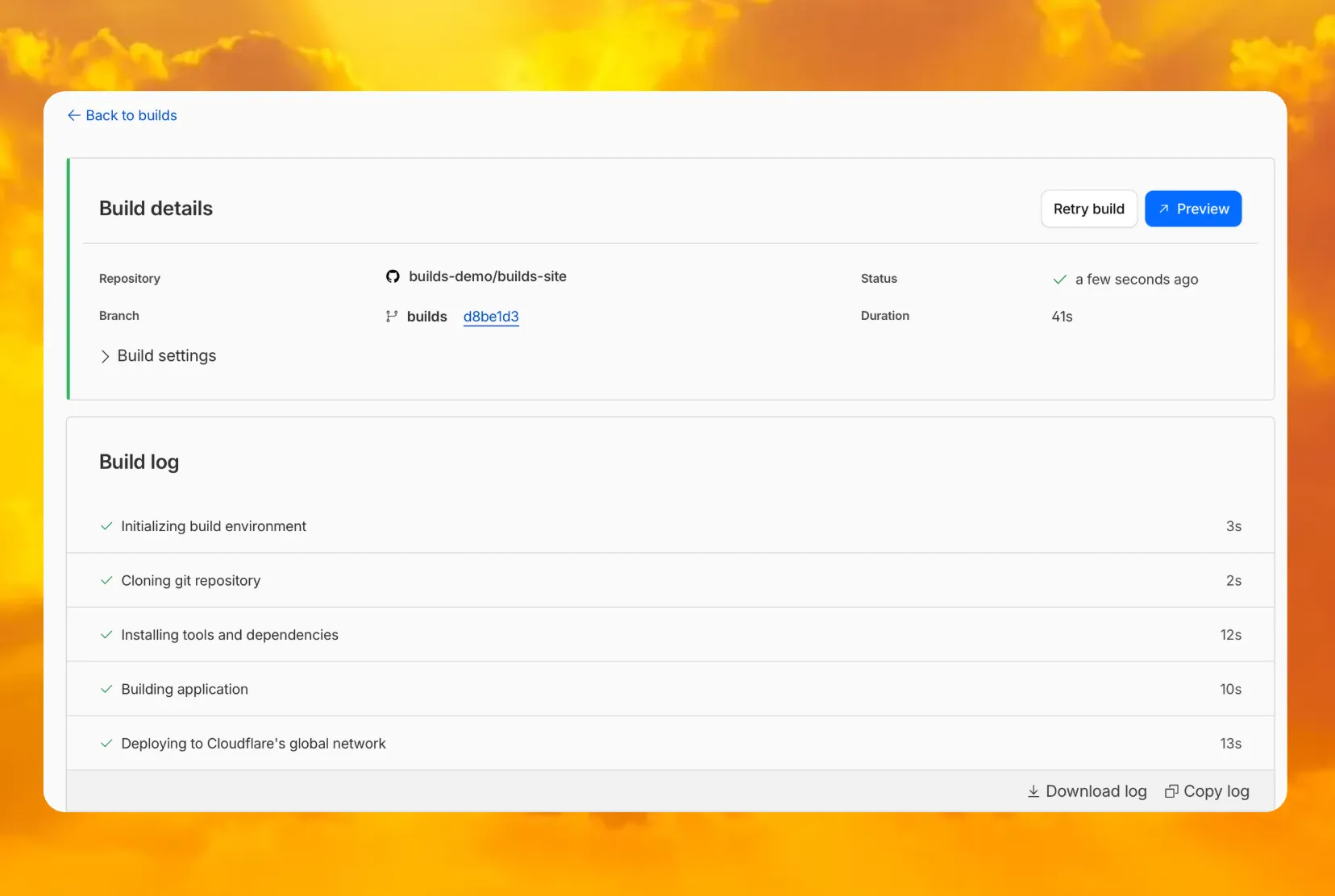
We recently increased the available disk space from 8 GB to 20 GB for all plans. Building on that improvement, we’re now doubling the CPU power available for paid plans — from 2 vCPU to 4 vCPU.
These changes continue our focus on making Workers Builds faster and more reliable.
Metric
Free Plan
Paid Plans
CPU
2 vCPU
4 vCPU
Performance Improvements
Fast build times: Even single-threaded workloads benefit from having more vCPUs
2x faster multi-threaded builds: Tools like esbuild ↗ and webpack ↗ can now utilize additional cores, delivering near-linear performance scaling
All other build limits — including memory, build minutes, and timeout remain unchanged.
To prevent the accidental exposure of applications, we've updated how Worker preview URLs (<PREVIEW>-<WORKER_NAME>.<SUBDOMAIN>.workers.dev) are handled. We made this change to ensure preview URLs are only active when intentionally configured, improving the default security posture of your Workers.
One-Time Update for Workers with workers.dev Disabled
We performed a one-time update to disable preview URLs for existing Workers where the workers.dev subdomain was also disabled.
Because preview URLs were historically enabled by default, users who had intentionally disabled their workers.dev route may not have realized their Worker was still accessible at a separate preview URL. This update was performed to ensure that using a preview URL is always an intentional, opt-in choice.
If your Worker was affected, its preview URL (<PREVIEW>-<WORKER_NAME>.<SUBDOMAIN>.workers.dev) will now direct to an informational page explaining this change.
How to Re-enable Your Preview URL
If your preview URL was disabled, you can re-enable it via the Cloudflare dashboard by navigating to your Worker's Settings page and toggling on the Preview URL.
Alternatively, you can use Wrangler by adding the preview_urls = true setting to your Wrangler file and redeploying the Worker.
{ "preview_urls": true}
preview_urls = true
Note: You can set preview_urls = true with any Wrangler version that supports the preview URL flag (v3.91.0+). However, we recommend updating to v4.34.0 or newer, as this version defaults preview_urls to false, ensuring preview URLs are always enabled by explicit choice.
Three months ago we announced the public beta of remote bindings for local development. Now, we're excited to say that it's available for everyone in Wrangler, Vite, and Vitest without using an experimental flag!
With remote bindings, you can now connect to deployed resources like R2 buckets and D1 databases while running Worker code on your local machine. This means you can test your local code changes against real data and services, without the overhead of deploying for each iteration.
Example configuration
To enable remote bindings, add "remote" : true to each binding that you want to rely on a remote resource running on Cloudflare:
{ "name": "my-worker", // Set this to today's date "compatibility_date": "2026-07-20", "r2_buckets": [ { "bucket_name": "screenshots-bucket", "binding": "screenshots_bucket", "remote": true, }, ],}
name = "my-worker"# Set this to today's datecompatibility_date = "2026-07-20"[[r2_buckets]]bucket_name = "screenshots-bucket"binding = "screenshots_bucket"remote = true
When remote bindings are configured, your Worker still executes locally, but all binding calls are proxied to the deployed resource that runs on Cloudflare's network.
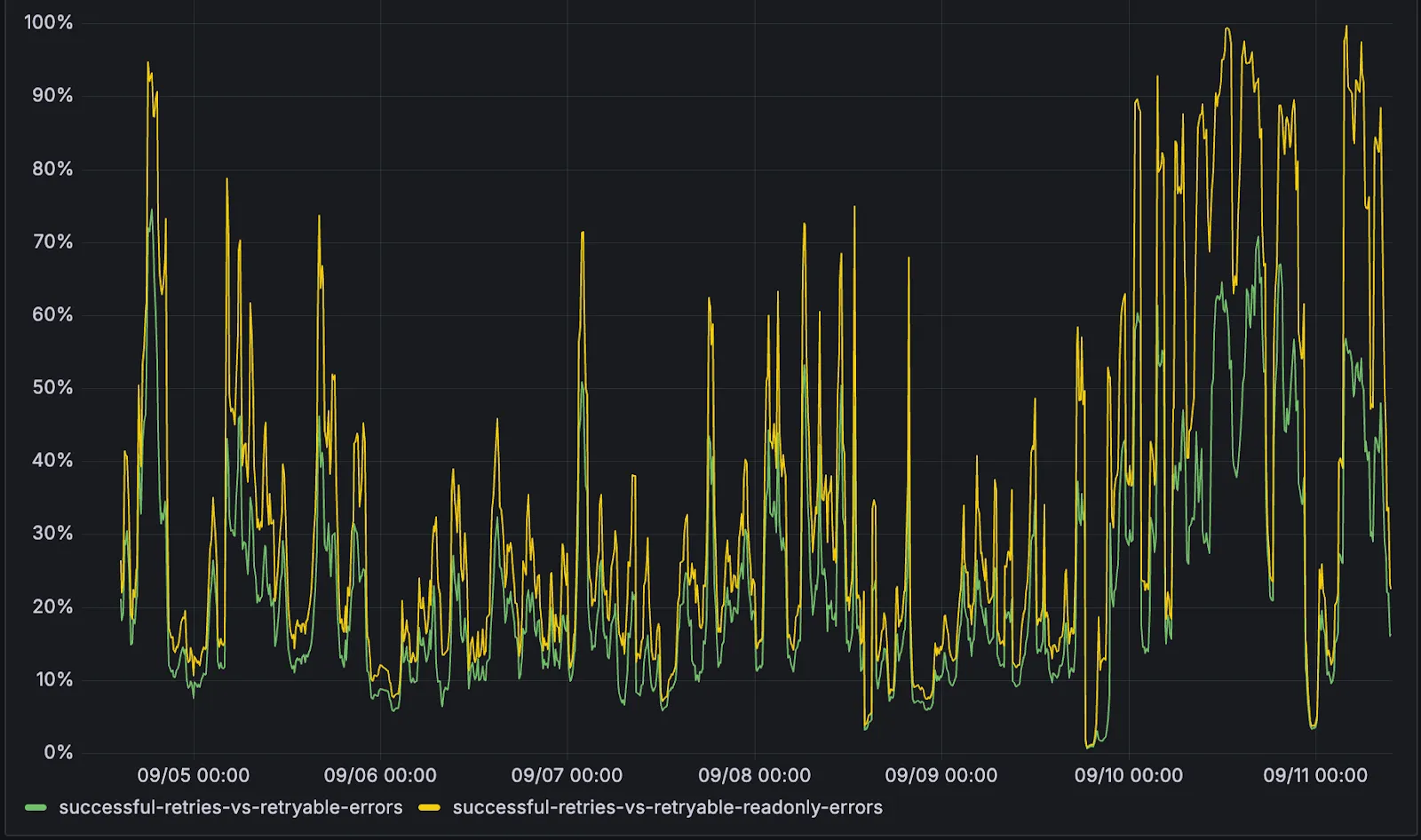
D1 now detects read-only queries and automatically attempts up to two retries to execute those queries in the event of failures with retryable errors. You can access the number of execution attempts in the returned response metadata property total_attempts.
At the moment, only read-only queries are retried, that is, queries containing only the following SQLite keywords: SELECT, EXPLAIN, WITH. Queries containing any SQLite keyword ↗ that leads to database writes are not retried.
The retry success ratio among read-only retryable errors varies from 5% all the way up to 95%, depending on the underlying error and its duration (like network errors or other internal errors).
The retry success ratio among all retryable errors is lower, indicating that there are write-queries that could be retried. Therefore, we recommend D1 users to continue applying retries in their own code for queries that are not read-only but are idempotent according to the business logic of the application.
D1 ensures that any retry attempt does not cause database writes, making the automatic retries safe from side-effects, even if a query causing changes slips through the read-only detection. D1 achieves this by checking for modifications after every query execution, and if any write occurred due to a retry attempt, the query is rolled back.
The read-only query detection heuristics are simple for now, and there is room for improvement to capture more cases of queries that can be retried, so this is just the beginning.
We've shipped a new release for the Agents SDK ↗ bringing full compatibility with AI SDK v5 ↗ and introducing automatic message migration that handles all legacy formats transparently.
This release includes improved streaming and tool support, tool confirmation detection (for "human in the loop" systems), enhanced React hooks with automatic tool resolution, improved error handling for streaming responses, and seamless migration utilities that work behind the scenes.
This makes it ideal for building production AI chat interfaces with Cloudflare Workers AI models, agent workflows, human-in-the-loop systems, or any application requiring reliable message handling across SDK versions — all while maintaining backward compatibility.
Additionally, we've updated workers-ai-provider v2.0.0, the official provider for Cloudflare Workers AI models, to be compatible with AI SDK v5.
useAgentChat(options)
Creates a new chat interface with enhanced v5 capabilities.
Seamless integration with Cloudflare Workers AI models through the updated workers-ai-provider v2.0.0.
Model Setup with Workers AI
Use Cloudflare Workers AI models directly in your agent workflows:
import { createWorkersAI } from "workers-ai-provider";import { useAgentChat } from "agents/ai-react";// Create Workers AI model (v2.0.0 - same API, enhanced v5 internals)const model = createWorkersAI({ binding: env.AI,})("@cf/meta/llama-3.2-3b-instruct");
Enhanced File and Image Support
Workers AI models now support v5 file handling with automatic conversion:
// Send images and files to Workers AI modelssendMessage({ role: "user", parts: [ { type: "text", text: "Analyze this image:" }, { type: "file", data: imageBuffer, mediaType: "image/jpeg", }, ],});// Workers AI provider automatically converts to proper format
Streaming with Workers AI
Enhanced streaming support with automatic warning detection:
// Streaming with Workers AI modelsconst result = await streamText({ model: createWorkersAI({ binding: env.AI })("@cf/meta/llama-3.2-3b-instruct"), messages, onChunk: (chunk) => { // Enhanced streaming with warning handling console.log(chunk); },});
Import Updates
Update your imports to use the new v5 types:
// Before (AI SDK v4)import type { Message } from "ai";import { useChat } from "ai/react";// After (AI SDK v5)import type { UIMessage } from "ai";// or alias for compatibilityimport type { UIMessage as Message } from "ai";import { useChat } from "@ai-sdk/react";
We've updated our "Built with Cloudflare" button to make it easier to share that you're building on Cloudflare with the world. Embed it in your project's README, blog post, or wherever you want to let people know.