New Magic Transit and Cloudflare WAN accounts are now assigned a single IPv4 anycast address by default.
Cloudflare handles failures on its network automatically by advertising your endpoint IP from multiple nodes across many globally distributed data centers. To handle failures on your network, configure two tunnels from separate routers.
To request additional anycast IP addresses for your account, contact your account team.
SSH through Wrangler is now enabled by default for Containers. Previously, you had to set ssh.enabled to true in your Container configuration before you could connect.
This change does not expose any publicly accessible ports on your Container. The SSH service is reachable only through wrangler containers ssh, which authenticates against your Cloudflare account. You also need to add an ssh-ed25519 public key to authorized_keys before anyone can connect, so enabling SSH alone does not grant access.
To connect, add a public key to your Container configuration and run wrangler containers ssh <INSTANCE_ID>:
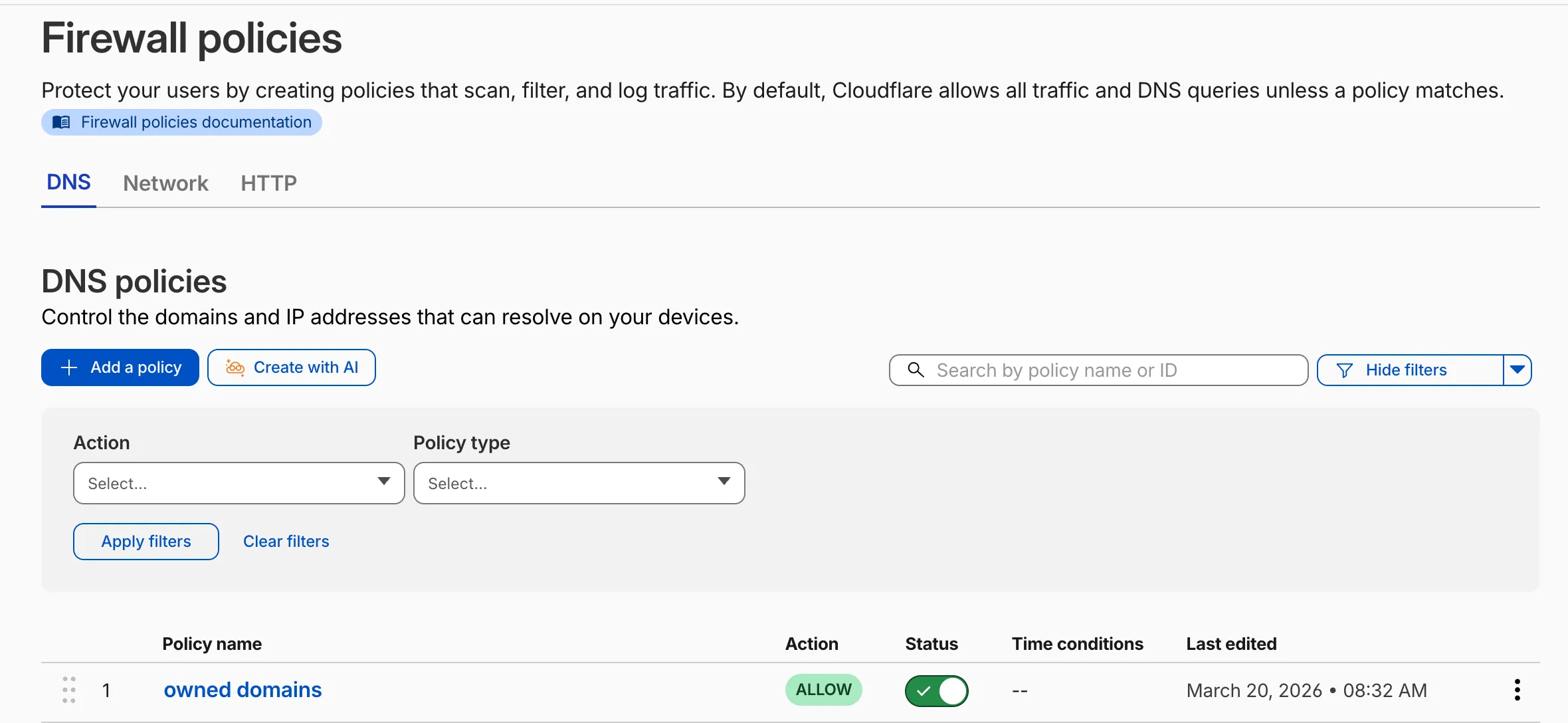
Cloudflare Gateway now supports natural language policy creation for DNS, HTTP, and Network firewall policies. Administrators can describe the outcome they want in plain language, and Cloudflare will generate a complete policy rule that populates the policy builder form.
To create a policy with natural language, select Create with AI on any Gateway firewall policy tab. Choose a policy type, describe what the policy should do, and a fully configured rule will appear in the policy builder for review. You can edit any field before saving, or re-generate with a different prompt.
The generated policy incorporates your account context - including lists, DLP profiles, applications, and device posture checks - so that references to your existing resources resolve automatically.
A built-in feedback mechanism allows you to rate each generated policy and provide optional comments, which Cloudflare uses to improve output quality over time.
R2 Data Catalog is a managed Apache Iceberg data catalog built directly into your R2 bucket that allows you to connect query engines like R2 SQL, Spark, Snowflake, and DuckDB to your data in R2.
You can now query analytics for your R2 Data Catalog warehouses via Cloudflare's GraphQL Analytics API. Two new datasets are available:
r2CatalogDataOperationsAdaptiveGroups tracks Iceberg REST API requests made to your catalog, including operation type, request duration, HTTP status, and request body bytes. Use this to monitor request volume and latency across warehouses, namespaces, and tables.
r2CatalogTableMaintenanceAdaptiveGroups tracks table maintenance jobs such as compaction and snapshot expiration. Use this to monitor job success rates, files processed, bytes read and written, and job duration.
Both datasets support filtering by warehouse name, namespace, table name, and time range. They also include percentile aggregations for duration metrics.
We’ve added a new Agent Readiness tab to URL Scanner reports accessible via the Cloudflare dashboard. This feature evaluates your site against emerging AI standards and provides six specialized scores to help you optimize for the next generation of AI agents and automated discovery.
The Internet is shifting from a human-read web to a machine-read web. AI agents now browse, interact with, and even perform transactions on websites. If a site isn't "agent-ready," these bots may consume excessive bandwidth, fail to find critical information, or be unable to navigate your services efficiently.
This update provides material value by breaking down readiness into six actionable categories:
Basic Web Presence
Discoverability
Content Accessibility
Bot Access Control
Protocol Discovery
Commerce
Accessing the report
You can view these scores for any scanned URL directly in the dashboard or via our API.
Dashboard: Go to Protect & Connect > Application Security > Investigate. After running a scan, select the Agent Readiness tab in the report.
API: Use the URL Scanner API ↗ to programmatically retrieve these scores for your infrastructure.
To learn more about the methodology behind these scores, refer to the blogpost ↗.
This release introduces the new Cloudflare One Client UI for Windows! You can expect a cleaner and more intuitive design as well as easier access to common actions and information. Here are some of the many things we have found our users appreciate:
Right click context menu to access the most common client actions quickly
Built-in captive portal login experience
Additional Changes and improvements
Added a new CLI command: warp-cli mdm refresh. This command executes an immediate refresh of the Mobile Device Management (MDM) configuration file.
Known issues
Registration authentication for devices via the integrated WebView2 browser is unavailable in this version as a temporary measure. As a result, the client will utilize the default browser on the device to complete the authentication process.
An error indicating that Microsoft Edge can't read and write to its data directory may be displayed during captive portal login; this error is benign and can be dismissed.
Registration may hang at "Checking your organization configuration" due to IPC errors. A system reboot should resolve the error, allowing registration to proceed.
Split tunnel list configuration is not available in the new UI. Management of Split Tunnel entries is currently only possible via warp-cli tunnel ip and warp-cli tunnel host. UI support will be added in a future release.
Windows ARM may prompt the user to close running applications while trying to install this version. Simply click “Ok” with the default highlighted option.
DNS resolution may be broken when the following conditions are all true:
The client is in Secure Web Gateway without DNS filtering (tunnel-only) mode.
A custom DNS server address is configured on the primary network adapter.
The custom DNS server address on the primary network adapter is changed while the client is connected. To work around this issue, please reconnect the client by selecting "disconnect" and then "connect" in the client user interface.
This release introduces the new Cloudflare One Client UI for macOS! You can expect a cleaner and more intuitive design as well as easier access to common actions and information. Here are some of the many things we have found our users appreciate:
Right click context menu to access the most common client actions quickly
Built-in captive portal login experience
Additional Changes and improvements
Added a new CLI command: warp-cli mdm refresh. This command executes an immediate refresh of the Mobile Device Management (MDM) configuration file.
Known issues
Registration may hang at "Checking your organization configuration" due to IPC errors. A system reboot should resolve the error, allowing registration to proceed.
Split tunnel list configuration is not available in the new UI. Management of split tunnel entries is currently only possible via warp-cli tunnel ip and warp-cli tunnel host. UI support will be added in a future release.
This release introduces the new Cloudflare One Client UI for Linux! You can expect a cleaner and more intuitive design as well as easier access to common actions and information. Here are some of the many things we have found our users appreciate:
Right click context menu to access the most common client actions quickly
Built-in captive portal login experience
Changes and improvements
Added a new CLI command: warp-cli mdm refresh. This command executes an immediate refresh of the Mobile Device Management (MDM) configuration file.
Official support for RHEL 9 has been added for Cloudflare Mesh nodes. To install the RHEL 9 package, the Extra Packages for Enterprise Linux (EPEL) repository must be active, as it contains dependencies required for the tray icon and captive portal webview.
Known issues
Registration may hang at "Checking your organization configuration" due to IPC errors. A system reboot should resolve the error, allowing registration to proceed.
Split tunnel list configuration is not available in the new UI. Management of split tunnel entries is currently only possible via warp-cli tunnel ip and warp-cli tunnel host. UI support will be added in a future release.
Cloudflare IPsec now supports the standard NAT traversal (NAT-T) flow, where IKE begins on UDP port 500 and switches to UDP port 4500 after NAT is detected.
Previously, devices behind NAT had to be configured to initiate IKE on UDP port 4500 directly. Devices that started on UDP port 500 could not complete the IKE handshake when NAT was in the path. This required custom configuration on devices such as VeloCloud SD-WAN edges, Cisco IOS-XE routers, and Juniper SRX firewalls, and was not possible on every platform.
What changed:
Devices behind NAT can now initiate IKE on either UDP port 500 or UDP port 4500.
Devices that start IKE on UDP port 500 and switch to UDP port 4500 after NAT detection now complete the handshake successfully.
No configuration change is required on Cloudflare. The change is available for all IPsec tunnels on Cloudflare WAN and Magic Transit.
This change does not affect existing tunnels:
Tunnels using UDP port 500 with no NAT detected continue to operate as before.
Tunnels configured to start IKE on UDP port 4500 continue to operate as before.
Existing rule enhancements have been deployed to improve detection resilience against broad classes of web attacks and strengthen behavioral coverage.
Continuous Rule Improvements
We are continuously refining our managed rules to provide more resilient protection and deeper insights into attack patterns. To ensure an optimal security posture, we recommend consistently monitoring the Security Events dashboard and adjusting rule actions as these enhancements are deployed.
Ruleset
Rule ID
Legacy Rule ID
Description
Previous Action
New Action
Comments
Cloudflare Managed Ruleset
N/A
Remote Code Execution - Java Deserialization - Body - Beta
Block
Disabled
This is a new detection. This rule is merged into the original rule
"Remote Code Execution - Java Deserialization" (ID: ).
We are refreshing the Workers AI model catalog to make room for newer releases. Please update your apps to remove references to the models listed below before the deprecation date.
Recommended replacements
@cf/zai-org/glm-4.7-flash — fast multilingual model with multi-turn tool calling and coding capabilities.
We originally stated Kimi K2.5 would be deprecated on May 10, 2026, however we have extended the deprecation date to May 30, 2026. Requests will be automatically aliased to Kimi K2.6 on May 30, 2026, which has a higher price. Please review the @cf/moonshotai/kimi-k2.6 pricing and model capabilities prior to May 30, 2026 to ensure that the model suits your needs.
The -fast and -lora variants of models will remain active, including:
@cf/meta/llama-3.3-70b-instruct-fp8-fast
@cf/meta/llama-3.1-8b-instruct-fast
@cf/google/gemma-7b-it-lora
@cf/google/gemma-2b-it-lora
@cf/mistral/mistral-7b-instruct-v0.2-lora
@cf/meta-llama/llama-2-7b-chat-hf-lora
LoRA models may be deprecated in the future. We will be adding more LoRA capabilities to the catalog, and will communicate when new LoRA models come online to give users time to train new LoRAs before we deprecate old ones.
Multiple security vulnerabilities were disclosed by the React team and Vercel affecting React Server Components and Next.js. These include denial of service, middleware and proxy bypass, server-side request forgery, cross-site scripting, and cache poisoning issues across a range of severity levels.
We strongly recommend updating your application and its dependencies immediately. Patched versions are available for React (react-server-dom-webpack, react-server-dom-parcel, and react-server-dom-turbopack19.0.6, 19.1.7, and 19.2.6) and Next.js (15.5.16 and 16.2.5).
WAF protections
Cloudflare WAF rules deployed in response to prior React Server Component CVEs (CVE-2025-55184 ↗ and CVE-2026-23864 ↗) already provide coverage for the newly disclosed denial-of-service vulnerabilities. These rules are enabled by default with a Block action for all customers using the Cloudflare Managed Ruleset, including Free plan customers using the Free Managed Ruleset.
The existing rules detect the underlying attack patterns generically. As a result, they apply to the new CVE-2026-23870 ↗ denial-of-service vulnerability in Server Components and the corresponding Next.js advisory GHSA-8h8q-6873-q5fj ↗.
Cloudflare is investigating whether WAF rules can be safely and effectively deployed for three of the high-severity advisories: CVE-2026-23870 ↗ / GHSA-8h8q-6873-q5fj ↗, GHSA-267c-6grr-h53f ↗, and GHSA-mg66-mrh9-m8jx ↗. If it is possible to create a managed WAF rule that mitigates these CVEs and does not potentially break application behavior, Cloudflare will add additional managed WAF rules. These rules will be announced through the WAF changelog. Because these vulnerabilities were shared with Cloudflare with minimal advance notice, we are still investigating what WAF mitigations are possible.
Several of the disclosed vulnerabilities are not possible to block in WAF. We strongly recommend updating your applications so they are not purely reliant on WAF mitigations.
Vinext:Vinext ↗ is a Vite plugin that reimplements the Next.js API surface. Vinext's latest release is not vulnerable to any of the disclosed CVEs. Vinext's architecture differs from stock Next.js in ways that sidestep the affected code paths. For example, it does not implement the PPR resume protocol, does not expose Pages Router data-route endpoints, and strips internal headers such as x-nextjs-data at request boundaries. As an extra layer of defense, we added a React 19.2.6 or later requirement when running vinext init (PR #1118 ↗, PR #1112 ↗) to prevent accidentally running a vulnerable version of React with Vinext.
OpenNext on Cloudflare: OpenNext is an adapter that lets you deploy Next.js apps to the Cloudflare Workers platform. OpenNext itself is not directly vulnerable to the React denial-of-service CVE, but users must update the Next.js version in their application. The OpenNext team has updated the adapter to further harden against these vectors and released a new version of the Cloudflare adapter. Test fixtures and examples have been updated to use patched versions (PR #1255 ↗).
When the Cloudflare One Appliance is acting as the DHCP server for a LAN, you can now configure custom DHCP options on the leases it issues. This unlocks workflows such as PXE / iPXE boot, VoIP phone provisioning, and vendor-specific client configuration.
Each option is defined by option_number, value, and one of four value types: text, integer, hex, or ip. Configurations are validated on the appliance before being applied — invalid configurations are rejected and the underlying error is returned to the API caller, so a bad option will not disrupt the live DHCP service.
Breakout and traffic prioritization rules on the Cloudflare One Appliance can now match by source in addition to destination application. You can pin breakout or priority behavior to:
A source LAN interface — VLANs attached to that LAN are included automatically.
A source IP address, range, or CIDR block.
This is the natural way to break out a guest VLAN to the local Internet, or to prioritize traffic from a specific subnet, without enumerating destination applications.
You can now create, rotate, and delete Cloudflare One Virtual Appliance instances and their license keys directly via the API and Terraform.
Create a virtual appliance and receive a license key: POST /accounts/{account_id}/magic/connectors with device.provision_license: true.
Rotate the license key for an existing virtual appliance: PATCH /accounts/{account_id}/magic/connectors/{connector_id} with provision_license: true. The previous key is immediately and irrevocably revoked.
Delete a virtual appliance to release the associated licensed device.
The license key is returned in the response only once, at create or rotate time. Copy and store it securely.
You can now export your Requests for Information (RFI) history to a CSV document and customize your dashboard view by choosing how many RFI records to load per page.
Why this matters
These quality-of-life updates focus on data portability and dashboard performance, allowing power users to manage high volumes of requests more efficiently:
The new CSV export allows you to move RFI data into external tools for custom reporting, internal auditing, or cross-referencing with other security projects without manual data entry
With adjustable page density, you can now choose to load more records at once (10, 25 or 50) to scan through history faster
You can now interact with your Stream video library using new bindings for Workers! This allows customers to upload content to Stream, provision direct uploads, manage videos, and generate signed URLs from a Worker without making authenticated API calls. We're excited to bring Stream and Workers closer together to empower more programmatic pipelines, tighter integrations, and support generative AI and inference workloads.
Use the Stream binding when you want to:
Upload videos from URLs or create basic direct upload links for end users
Generate signed playback tokens without managing signing keys
Manage video metadata, captions, downloads, and watermarks
Build video pipelines entirely within Workers
To get started, add the Stream binding to your Wrangler configuration:
Generate a video with AI and upload directly to Stream or send a URL of a file you already have:
const aiResponse = await env.AI.run( "google/veo-3.1", { prompt: "A dog walking next to a river", duration: "10s", aspect_ratio: "16:9", resolution: "1080p", generate_audio: true, }, { gateway: { id: "experiments" }, },);// Veo will return a URL of the generated asset.const videoUrl = aiResponse.result.video;// Alternative option: a video of the Austin Office mobile// const videoUrl = 'https://pub-d9fcbc1abcd244c1821f38b99017347f.r2.dev/aus-mobile.mp4';// Upload to Stream by providing a URLconst streamVideo = await env.STREAM.upload(videoUrl);// The streamVideo response will include the video ID, playback and manifest// URLs, and other information, just like the REST API.
const aiResponse = await env.AI.run( 'google/veo-3.1', { prompt: 'A dog walking next to a river', duration: '10s', aspect_ratio: '16:9', resolution: '1080p', generate_audio: true, }, { gateway: { id: 'experiments' }, },);// Veo will return a URL of the generated asset.const videoUrl = aiResponse.result.video;// Alternative option: a video of the Austin Office mobile// const videoUrl = 'https://pub-d9fcbc1abcd244c1821f38b99017347f.r2.dev/aus-mobile.mp4';// Upload to Stream by providing a URLconst streamVideo = await env.STREAM.upload(videoUrl);// The streamVideo response will include the video ID, playback and manifest// URLs, and other information, just like the REST API.
Generate a signed URL without using a signing key or an API call:
const video_id = "ce800be43a9772f4bb02f35b860fb516";const token = await env.STREAM.video(video_id).generateToken();// Use the "token" in an iframe embed code, manifest URL, or thumbnail:const embedUrl = `https://customer-igynxd2rwhmuoxw8.cloudflarestream.com/${token}/iframe`;
const video_id = 'ce800be43a9772f4bb02f35b860fb516';const token = await env.STREAM.video(video_id).generateToken();// Use the "token" in an iframe embed code, manifest URL, or thumbnail:const embedUrl = `https://customer-igynxd2rwhmuoxw8.cloudflarestream.com/${token}/iframe`;
For setup instructions and the full API reference, refer to Bind to Workers API.
Get started with your Agent
Add a binding for Cloudflare Stream (env.STREAM). On the watch page, use the
Stream binding to get info based on the ID, and leverage video.meta.name as
the page title.
This emergency release introduces a new rule to detect Next.js App Router middleware and proxy bypass attempts via segment-prefetch routes (CVE-2026-44575).
Key Findings
CVE-2026-44575: Next.js Middleware / Proxy Bypass in App Router Applications via Segment-Prefetch Routes
Successful exploitation allows unauthenticated attackers to bypass middleware or proxy-based authorization checks in affected Next.js App Router applications. This leads to unauthorized access to protected content, potential exposure of sensitive application data, and compromise of application security boundaries.
We strongly recommend upgrading to Next.js 15.5.16 or 16.2.5 (or later) immediately to address the underlying vulnerability. If you cannot upgrade immediately, enforce authorization in the underlying route or page logic instead of relying solely on middleware.
Ruleset
Rule ID
Legacy Rule ID
Description
Previous Action
New Action
Comments
Cloudflare Managed Ruleset
N/A
Next.js - Middleware Bypass via Invalid RSC Header - CVE:CVE-2026-44575
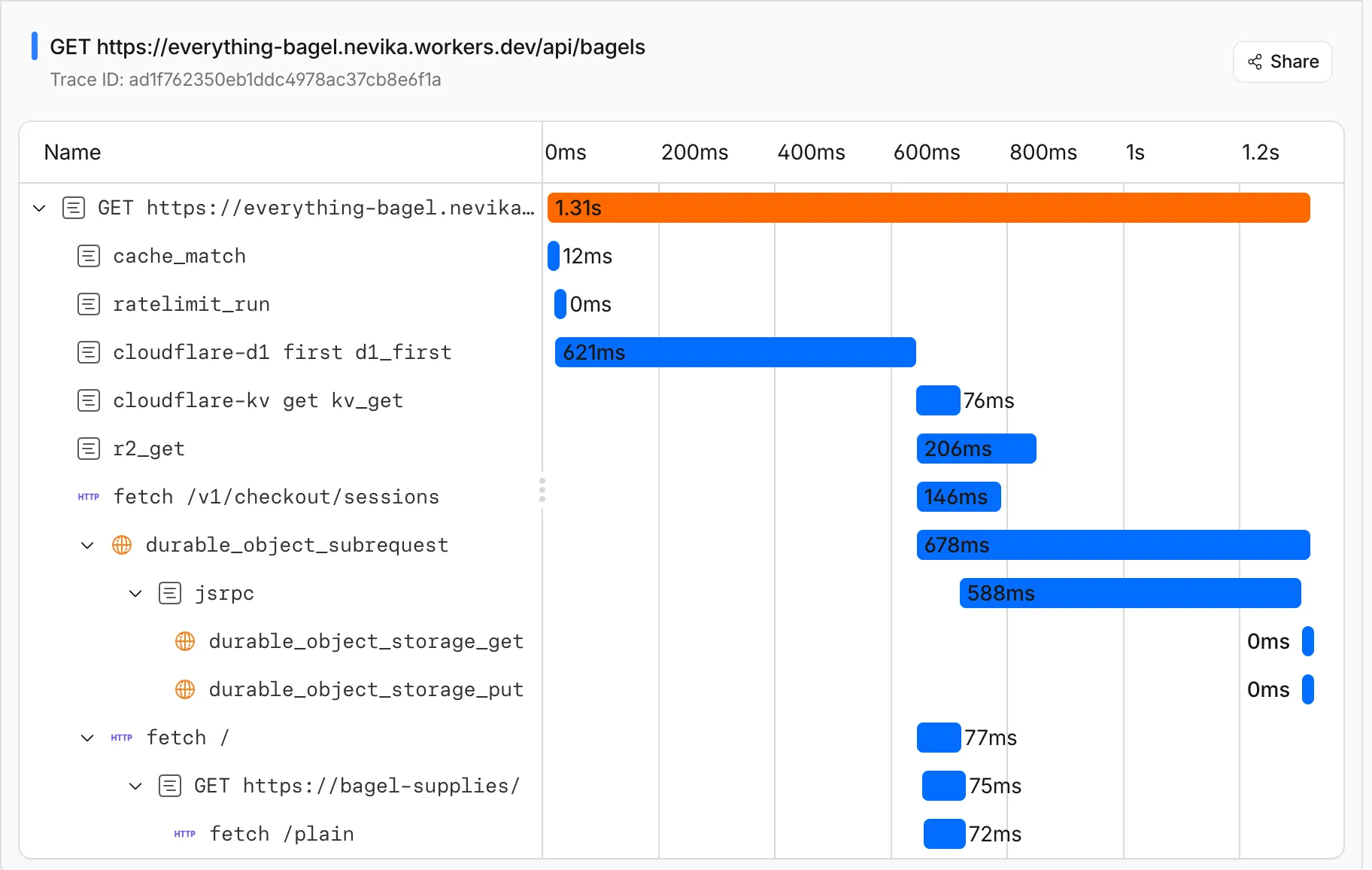
You can now get a single unified trace across Worker-to-Worker subrequests, with trace context propagating automatically. Previously, automatic tracing produced disconnected traces when a Worker called another Worker through a service binding or Durable Object.
This means you can:
Follow a request through your entire Worker architecture in one trace view
See service binding and Durable Object calls as nested child spans instead of separate traces
Debug cross-Worker request flows in the Cloudflare dashboard or in an external observability platform via OpenTelemetry
Up next, we are working on external trace context propagation using W3C Trace Context standards ↗, which will allow traces from your Workers to link with traces from services outside of Cloudflare.
PhishNet users can now access Cloudy summaries directly within the email investigation experience. When reviewing a message in PhishNet, users will see an AI-generated summary that provides additional context and key details about the email.
These summaries help users quickly understand the nature of a message without needing to manually parse through headers, body content, and detection signals. Cloudy surfaces the most relevant information so users can make faster, more informed decisions about suspicious emails.
These summaries are not trained on customer data. They are generated using the outputs of our existing detection models and analysis systems.
This feature is available for PhishNet with Office 365. Support for Gmail will be available by the end of the quarter.
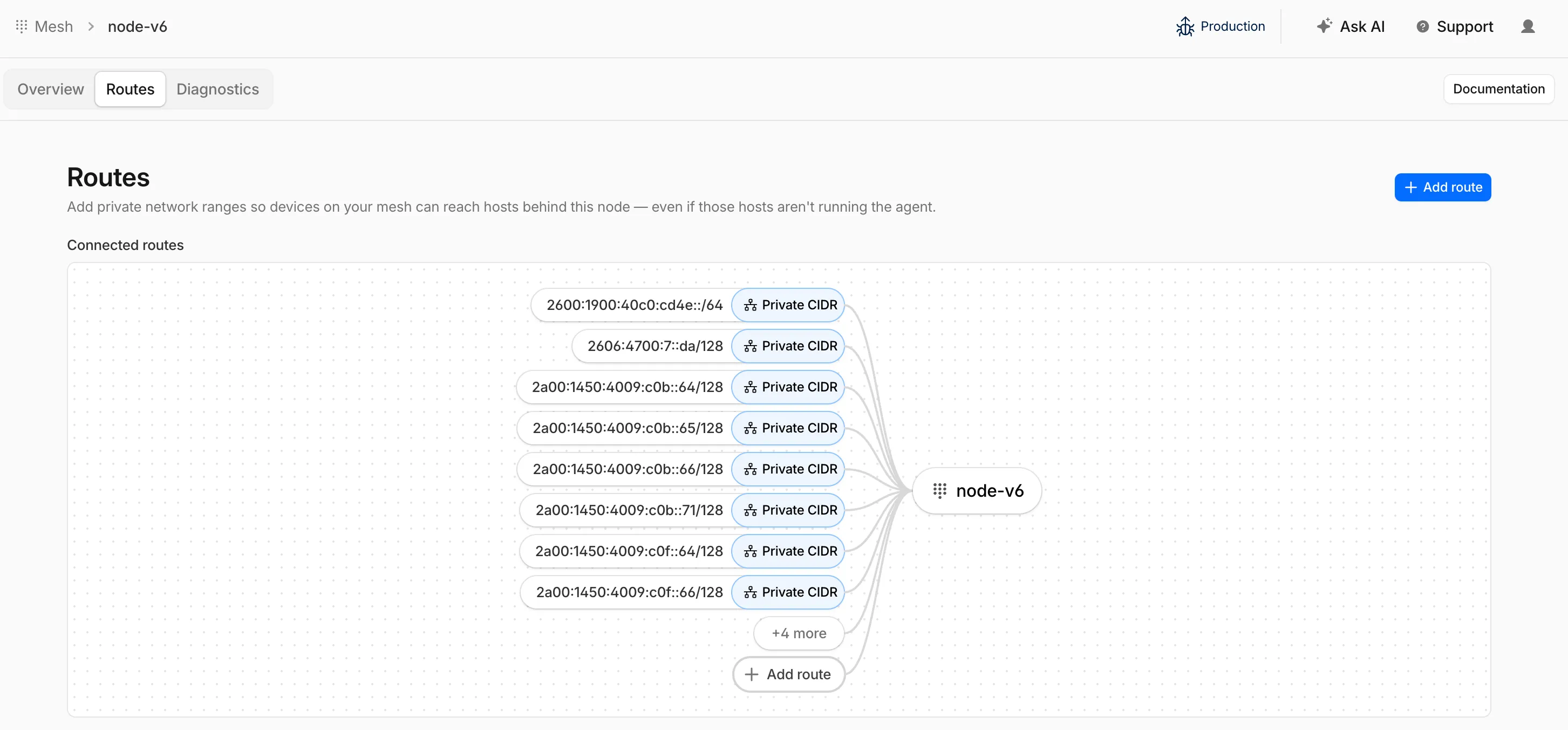
Cloudflare Mesh nodes now support IPv6 CIDR routes. You can advertise both IPv4 and IPv6 subnets through your Mesh nodes, making IPv6-only or dual-stack private networks reachable from any enrolled device.
To add an IPv6 route, follow the same steps as adding an IPv4 route — enter the IPv6 CIDR (for example, fd00::/64) when configuring the route in the dashboard ↗ or via the API.
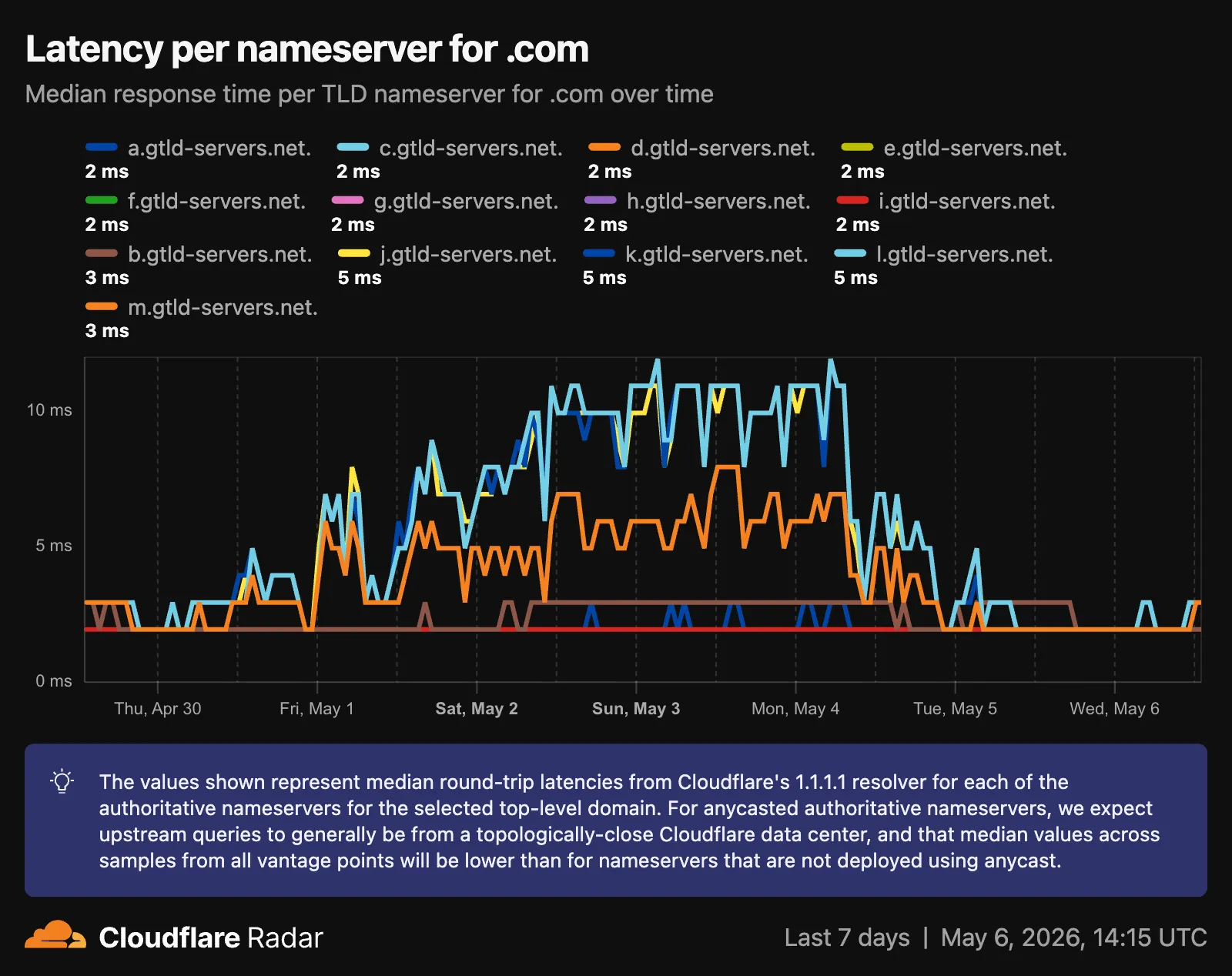
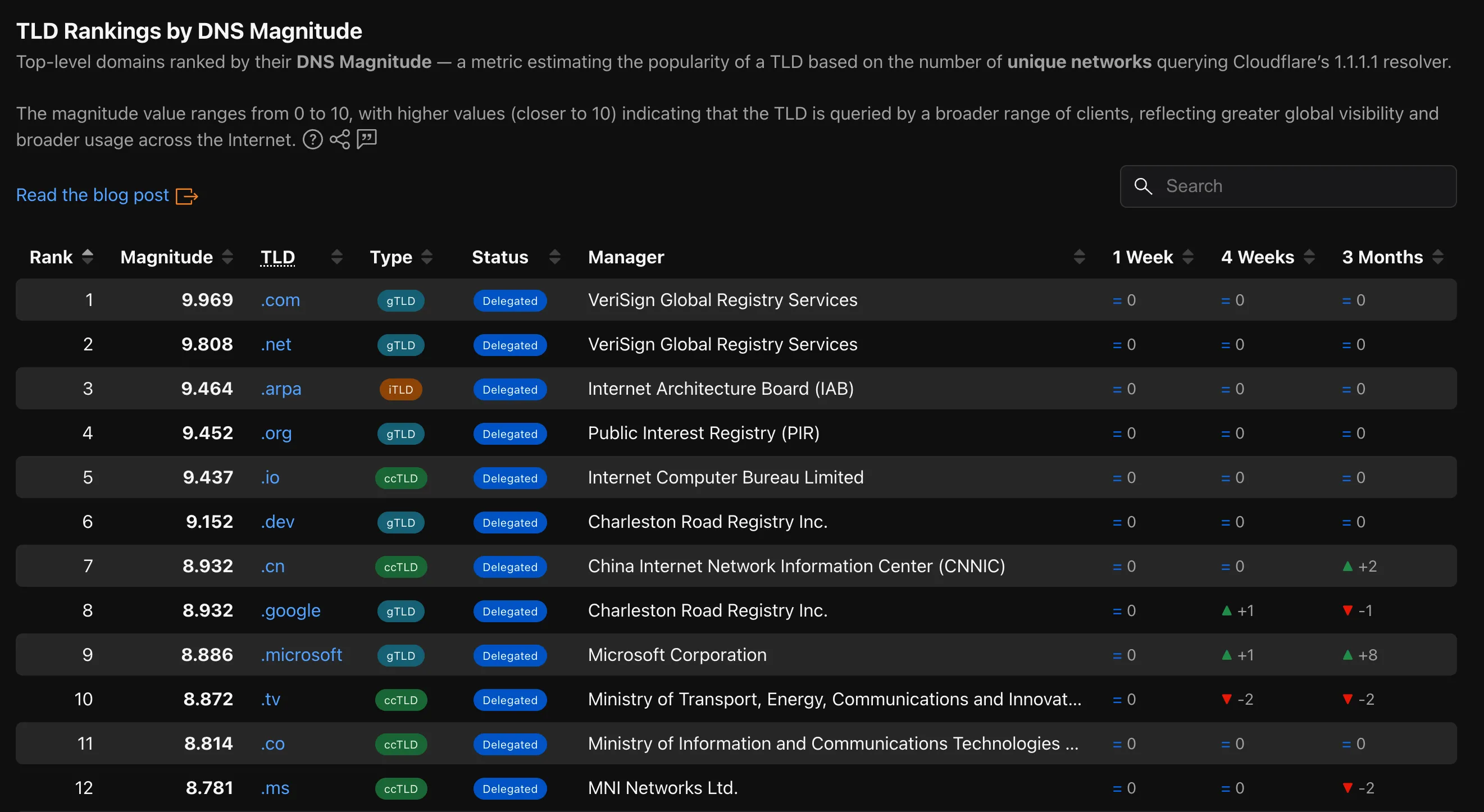
Radar now provides TLD authoritative nameserver performance insights, measuring response time (latency) as observed from Cloudflare's 1.1.1.1 resolver infrastructure when forwarding queries upstream to TLD nameservers.
The Cloudforce One Threat Events API now supports TAXII ↗ as an output format, enabling standardized, automated sharing of cyber threat intelligence with your existing security stack.
Why this matters
You can now ingest Cloudforce One threat data directly into your SIEM, TIP or SOAR tools that prefer TAXII-formatted streams without needing custom translation scripts.
By supporting the TAXII format parameter in our API, security teams can automate the synchronization of indicator data, reducing the manual overhead of updating blocklists and detection rules.
This alignment with industry standards ensures that your threat data remains consistent across different security ecosystems and partner integrations.
How to use it
When calling the Threat Events API, you can now specify taxii in the format query parameter:
GET /accounts/{account_id}/cloudforce_one/threat_events?format=taxii
Cloudflare's cache now runs on a new proxy built on Pingora ↗, the Rust-based framework that already serves a significant portion of Cloudflare's network traffic. The new proxy is faster, more memory-safe, and designed to evolve our cache architecture. It delivers immediate performance improvements and enables new caching capabilities.
What this brings
Lower latency: The new proxy reduces per-request overhead through improved connection reuse.
Foundation for future features: The new architecture enables upcoming improvements to cache functionality and efficiency.
New features
Asynchronous stale-while-revalidate: Every request returns stale content immediately while revalidation happens in the background, instead of the first request after expiry blocking on the origin. Refer to the asynchronous stale-while-revalidate changelog for details.
Unbuffered bypass by default: Responses that bypass cache are streamed directly to the client without buffering, reducing time-to-first-byte for uncacheable content.
Behavioral changes
The new architecture introduces the following behavioral changes to improve RFC compliance and correctness:
Vary: * results in cache bypass: According to RFC 9110 Section 12.5.5 ↗, a Vary header value of * indicates the response varies on factors beyond request headers and must not be served from cache. Cloudflare now bypasses cache for these responses instead of storing them.
Set-Cookie stripped on MISS and EXPIRED: For cacheable assets, Set-Cookie is now stripped on MISS and EXPIRED responses, not only on HITs.
Floating-point TTL values: Floating-point time-to-live values (for example, max-age=1.5) are rounded down to the nearest integer instead of being rejected as invalid.
What's next
A deeper look at the new cache proxy is coming soon to the Cloudflare blog ↗. For background on the underlying framework, read:
You can now navigate, switch context, and take common actions in the Cloudflare dashboard without leaving your keyboard. Press ? anywhere to see the full list. Keyboard shortcuts can be disabled by visiting your profile settings ↗.
Navigate
Shortcut
Action
g h
Go to Home
g a
Go to account overview
g z
Go to zone overview
g p
Go to your profile
g w
Go to Workers & Pages
g o
Go to Zero Trust
g b
Go to billing
g 1 – g 5
Go to a recent or pinned item (by position in sidebar)