This release introduces the new Cloudflare One Client UI for Linux! You can expect a cleaner and more intuitive design as well as easier access to common actions and information. Here are some of the many things we have found our users appreciate:
Right click context menu to access the most common client actions quickly
Built-in captive portal login experience
Changes and improvements
Added a new CLI command: warp-cli mdm refresh. This command executes an immediate refresh of the Mobile Device Management (MDM) configuration file.
Official support for RHEL 9 has been added for Cloudflare Mesh nodes. To install the RHEL 9 package, the Extra Packages for Enterprise Linux (EPEL) repository must be active, as it contains dependencies required for the tray icon and captive portal webview.
Fixed a proxy mode connection stall issue.
Known issues
Registration may hang at "Checking your organization configuration" due to IPC errors. A system reboot should resolve the error, allowing registration to proceed.
Split tunnel list configuration is not available in the new UI. Management of split tunnel entries is currently only possible via warp-cli tunnel ip and warp-cli tunnel host. UI support will be added in a future release.
Cloudflare now returns a BYPASScache status whenever a response is not cacheable, instead of the previous mix of BYPASS and MISS that depended on why Cloudflare chose not to cache the response.
There are multiple reasons Cloudflare may refuse to cache a response — for example, the response exceeds the maximum cacheable file size for your plan, the origin sends Cache-Control: no-cache, private, or max-age=0, the response includes a Set-Cookie header, or the request includes an Authorization header.
Previously, only some of these conditions returned BYPASS. Others — such as responses exceeding the maximum cacheable file size — returned MISS on every request, regardless of whether Origin Cache Control was on or off. Because the response could never be cached, every subsequent request also returned MISS, which looked indistinguishable from a broken cache and made it hard to tell whether Cloudflare was trying and failing to cache the asset or had deliberately chosen not to cache it.
BYPASS now consistently signals that Cloudflare refused to cache the response, regardless of the reason. MISS is reserved for cacheable responses that simply were not in the local cache at request time.
What to expect in your analytics
After this change rolls out, you should see:
MISS rate decreases: Uncacheable responses no longer count as cache misses.
BYPASS rate increases: These same responses are now reported as bypasses.
Cache hit ratio increases: Hit ratio calculations no longer include uncacheable traffic that could never have been cached, giving you a more accurate view of cache effectiveness.
Your total request volume and origin traffic are unchanged — only the cache status label is different.
Browser cache TTL behavior is preserved
The cache status label is the only thing changing — browser cache TTL handling for any given response is identical to what it was before:
Responses that historically returned MISS because Cloudflare refused to cache them (for example, responses over the maximum cacheable file size) now return BYPASS, but continue to have browser cache TTL applied — exactly as they did when they were labeled MISS.
Responses that historically returned BYPASS and skipped browser cache TTL continue to skip browser cache TTL.
In both cases, the decision to apply browser cache TTL depends on the underlying reason Cloudflare did not cache the response, not on the new BYPASS label.
Flagship is now in public beta. Evaluate feature flags directly from Cloudflare Workers with no outbound HTTP calls, using globally distributed flag configuration backed by Workers KV and Durable Objects. Flagship supports typed flag values, targeting rules, percentage rollouts, audit history, and OpenFeature-compatible SDKs.
Evaluate a flag from a Worker in a few lines of code:
AI Gateway now uses the AI REST API on api.cloudflare.com. You can call any model — whether from OpenAI, Anthropic, Google, or hosted on Workers AI — through one unified API, using the same endpoints and authentication regardless of provider. Four endpoints are available:
POST /ai/run — universal endpoint for all models and modalities
POST /ai/v1/chat/completions — OpenAI SDK compatible
POST /ai/v1/responses — OpenAI Responses API compatible
All AI Gateway features — logging, caching, rate limiting, and guardrails — are applied automatically. Third-party models are billed through Unified Billing, so you do not need to manage separate provider API keys.
Third-party model requests are routed through your account's default gateway, which is created automatically on first use. To route requests through a specific gateway, add the cf-aig-gateway-id header.
If you are already calling Workers AI models through the existing REST API, that path (/ai/run/@cf/{model}) continues to work. To call Workers AI models through AI Gateway, use the @cf/ model prefix (for example, @cf/moonshotai/kimi-k2.6) and include the cf-aig-gateway-id header to specify which gateway to route through.
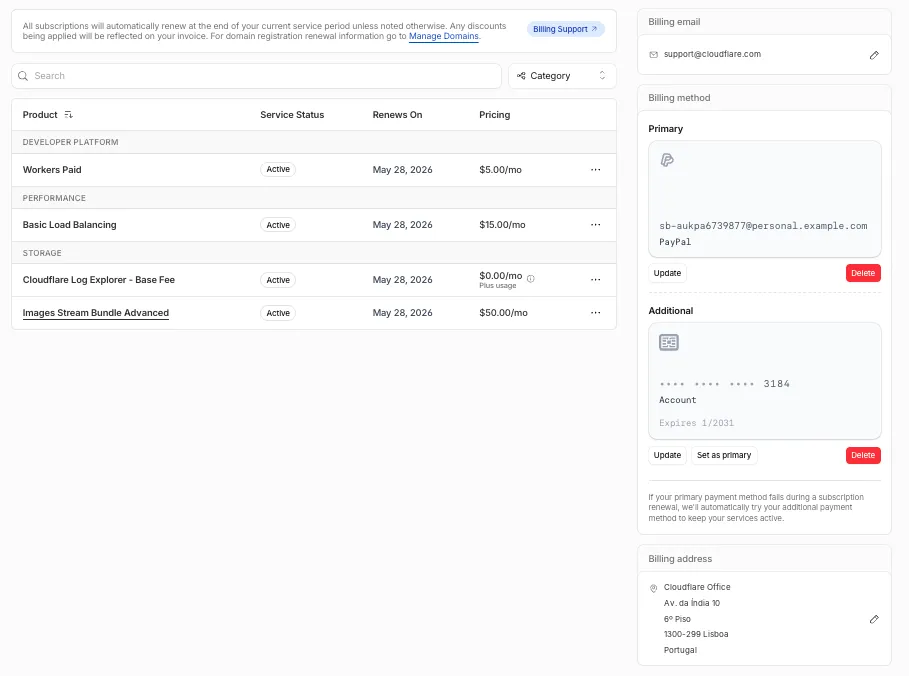
The Billing Profile now has a modern UI and a single space that unifies billing information, payment method management and an enhanced subscriptions view under a single Subscriptions tab.
What changed
The Subscriptions tab brings billing information, payment method management, and your subscriptions together in one place. The payment management and Pay overdue balances flows now use the latest checkout as product purchase flows, so you can pay with Apple Pay, Google Pay, Link, and Instant Bank Payments via Link alongside cards and PayPal.
New cards complete 3D Secure authentication when the issuer requires it — for example, the EU under PSD2 and India under RBI.
For details, refer to the Billing Home documentation.
You can now scope Cloudflare permissions to individual Cloudflare Tunnel instances and Cloudflare Mesh nodes. Administrators can delegate access to specific Tunnels or Mesh nodes without granting account-wide control over private networking.
Grant a read-only role on a single Cloudflare Tunnel instance to a support operator for log streaming and diagnostics — without exposing other Tunnels or destructive actions.
Grant a write role on a specific Cloudflare Mesh node to an application team — without giving them access to the rest of your private network.
Scope a single policy to one or many Tunnels and Mesh nodes at once.
How it works
Granular permissions are a parallel layer to existing account-level roles — they do not replace them.
Existing account-level roles continue to work. A member with Cloudflare Access or Cloudflare Zero Trust retains write access to every Tunnel and Mesh node in the account. This ensures backward compatibility for existing automation and tokens.
Granular permissions are additive. For any API request on a specific Tunnel or Mesh node, access is granted if the principal has either the account-level role or a granular permission for that resource.
Resource enumeration is authorization-aware. Listing endpoints (GET /accounts/{id}/cfd_tunnel, GET /accounts/{id}/warp_connector) return only the resources the principal has at least read access to.
Subnet routes and hostname routes announced through Cloudflare Tunnel or Cloudflare Mesh
Destinations connected through Cloudflare WAN on-ramps — GRE, IPsec, and CNI
This means a single VPC Network binding can route Worker requests to private services regardless of how those services are connected to Cloudflare: through a Cloudflare Tunnel from a cloud VPC, a Mesh node on a private subnet, or a Cloudflare WAN on-ramp from your data center or branch site.
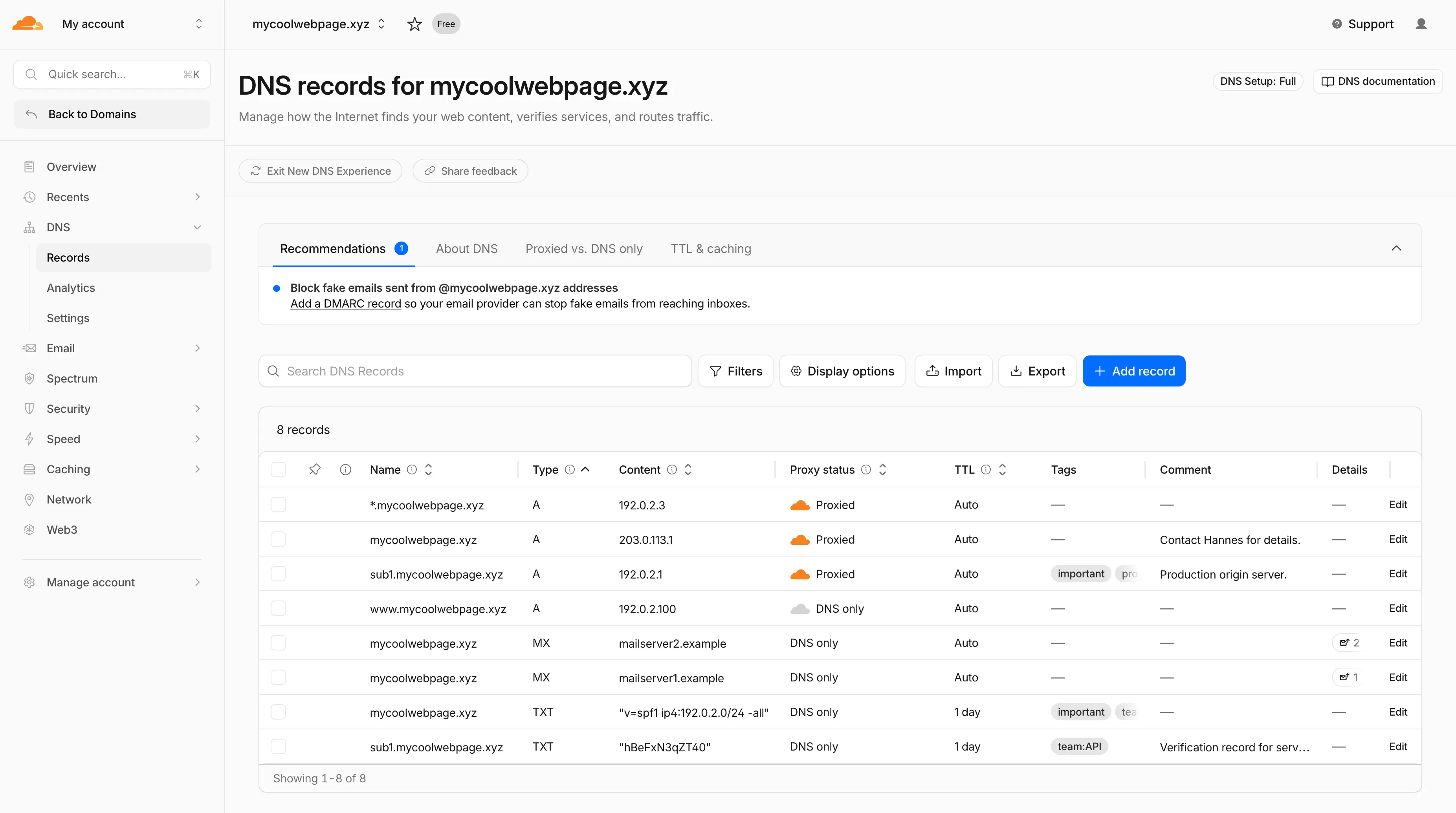
Starting today, everyone can opt in to a refreshed DNS records page in the Cloudflare dashboard. Over the coming weeks, the new experience will become the default for Free plan users first, followed by paid plans.
What is new

Better table experience: resizable and hideable columns, row pinning, advanced filters with logical operators (AND/OR), configurable pagination, and expanded input fields so long values are no longer cut off.
First-class mobile experience: responsive layout with a touch-friendly, card-based UI and compact controls for small screens.
DNS quick reference: bite-sized explainers for DNS, proxy status, and TTL, available directly in the product to help users configure records without leaving the page.
Modern frontend: a refactor onto Cloudflare's new UI framework that improves performance and lays the foundation for future improvements.
Rollout plan
Dates are subject to change based on feedback received during the rollout.
20 May - 05 June: ramped rollout to Free, then Pro and Business plans.
08 June - 03 July: ramped rollout to Enterprise plans.
Share your feedback
Once the new experience is turned on for your account, look for the feedback link at the top of the DNS records page in the Cloudflare dashboard and let us know what you think. Your input helps us prioritize the next round of improvements.
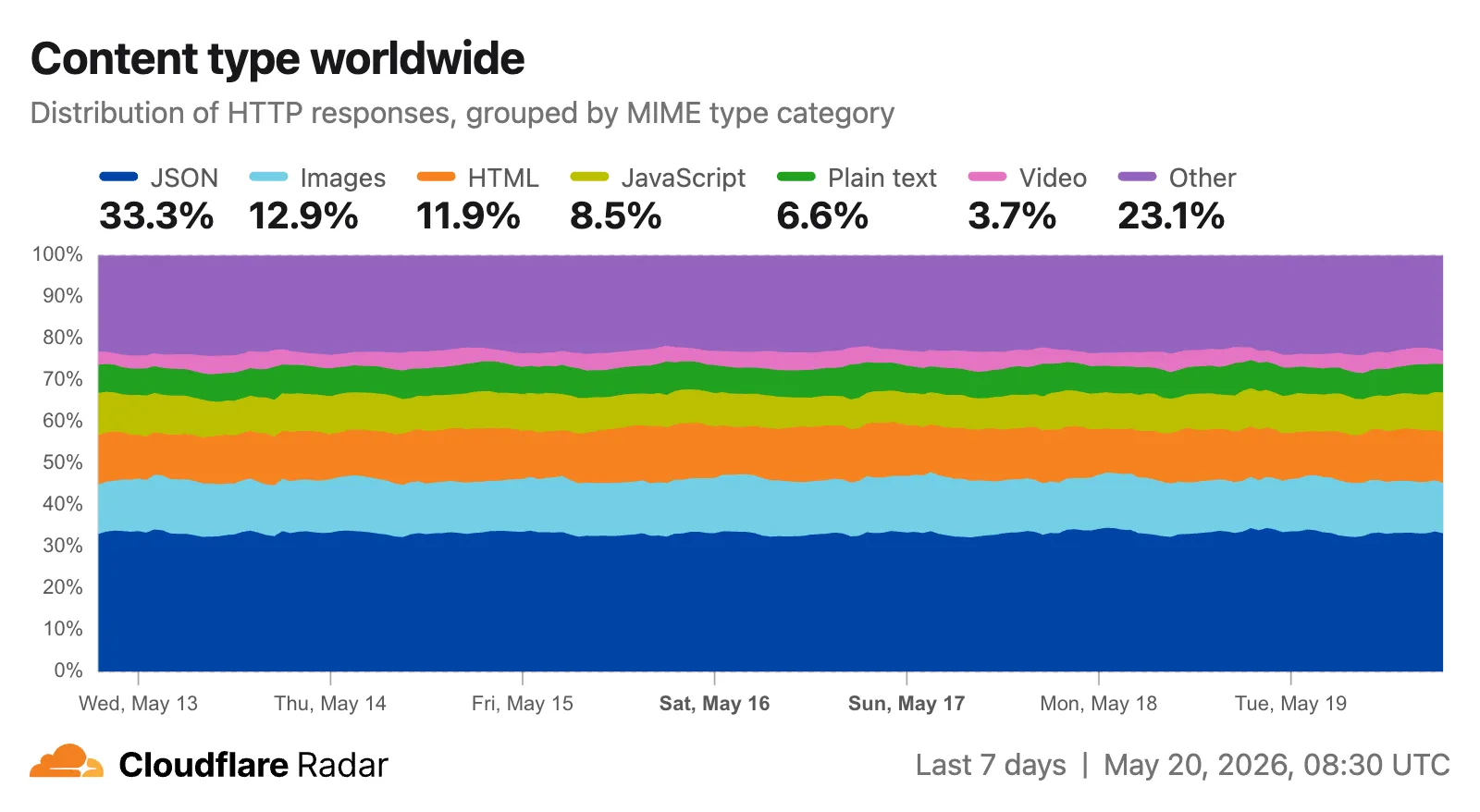
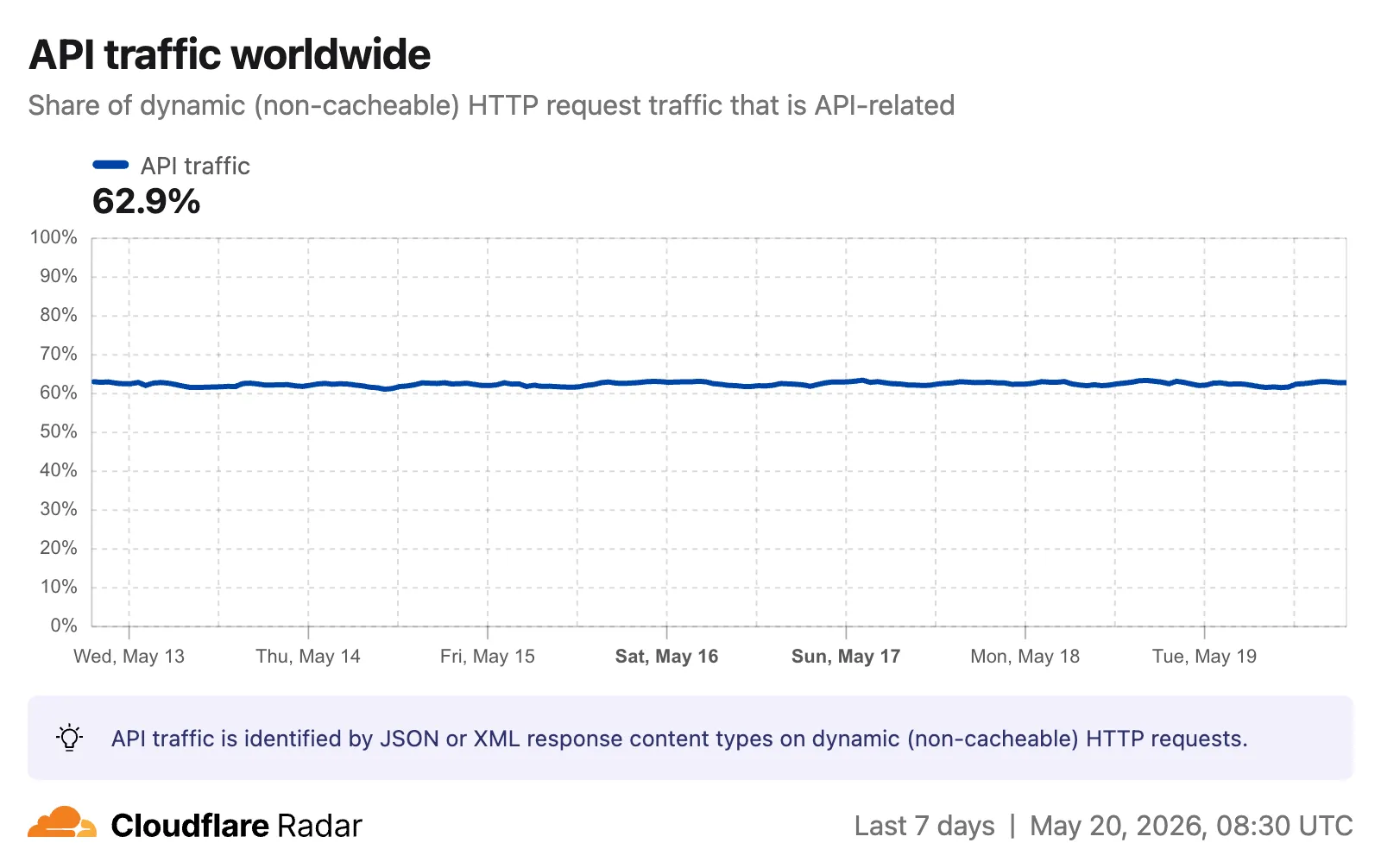
Radar now includes two new charts on the traffic page ↗ that provide deeper insights into the composition of HTTP traffic: a content type distribution chart and an API traffic share chart.
Content type distribution
The new Content type ↗ chart displays the distribution of HTTP response content types, grouped into high-level categories. A traffic type selector allows filtering by human, bot, or all traffic. The existing Bot vs. Human ↗ chart also gained a content type category filter, allowing users to see the bot/human split for specific content categories.
Content type categories:
HTML — Web pages (text/html)
Images — All image formats (image/*)
JSON — JSON data and API responses (application/json, *+json)
The new API traffic ↗ chart shows the percentage of dynamic (non-cacheable) HTTP request traffic that is API-related. API traffic is identified by JSON or XML response content types (application/json, application/xml, text/xml) on HTTP requests that returned a 200 status code. A traffic type selector allows switching between human traffic, bot traffic, or all traffic.
The API_TRAFFIC dimension is available on the existing HTTP summary and timeseries groups endpoints. An apiTraffic filter (API or NON_API) can also be applied to HTTP timeseries requests to retrieve raw request counts for API-only or non-API traffic.
Existing rule enhancements have been deployed to improve detection resilience against broad classes of web attacks and strengthen behavioral coverage.
Continuous Rule Improvements
We are continuously refining our managed rules to provide more resilient protection and deeper insights into attack patterns. To ensure an optimal security posture, we recommend consistently monitoring the Security Events dashboard and adjusting rule actions as these enhancements are deployed.
Cloudflare Access now supports using Cloudflare itself as an identity provider. If you publish an Access application and select Cloudflare as the login method, users can sign in with their existing Cloudflare account — no one-time PINs, no third-party IdP configuration, and no shared email inboxes. Authentication is backed by Cloudflare's own account security (including multi-factor authentication), making it both simpler to set up and more secure than OTP-based login for most use cases.
Cloudflare is now the default identity provider for all newly created Zero Trust accounts, replacing One-time PIN.
This also enables two new capabilities:
Cloudflare Account Member selector — A new policy selector that matches users based on their membership in a Cloudflare account. You can target the current account or specify a different account ID for cross-account access scenarios.
Restrict to account members — An identity provider configuration option that limits authentication to users who are members of your Cloudflare account.
To get started, add Cloudflare as an identity provider in your Zero Trust settings.
Cloudflare CASB now integrates with the Claude Compliance API ↗. This enhancement gives security teams visibility into Claude usage patterns, admin activity, and compliance-relevant events across their organization.
The Claude Compliance API provides structured access to audit logs and administrative actions within Claude Enterprise and Claude Platform. Cloudflare CASB ingests this data to surface security findings that help organizations enhance their security posture and enforce AI governance.
Key capabilities
Starting today, security teams can scan for security findings across the following assets:
Public projects — Projects set to public visibility
Project attachment — Files and documents added to projects that violate DLP policies
Chat files — User-uploaded and provider-generated files that violate DLP policies
Chat messages — User prompts and provider responses that violate DLP policies
Artifacts — Provider-generated documents and files that violate DLP policies
Learn more
This integration is available to all Cloudflare One customers. New Cloudflare customers can sign up and start with their first two integrations for free. Existing customers can enable the integration directly in the dashboard. The integration begins scanning immediately and surfaces findings in the dashboard within minutes.
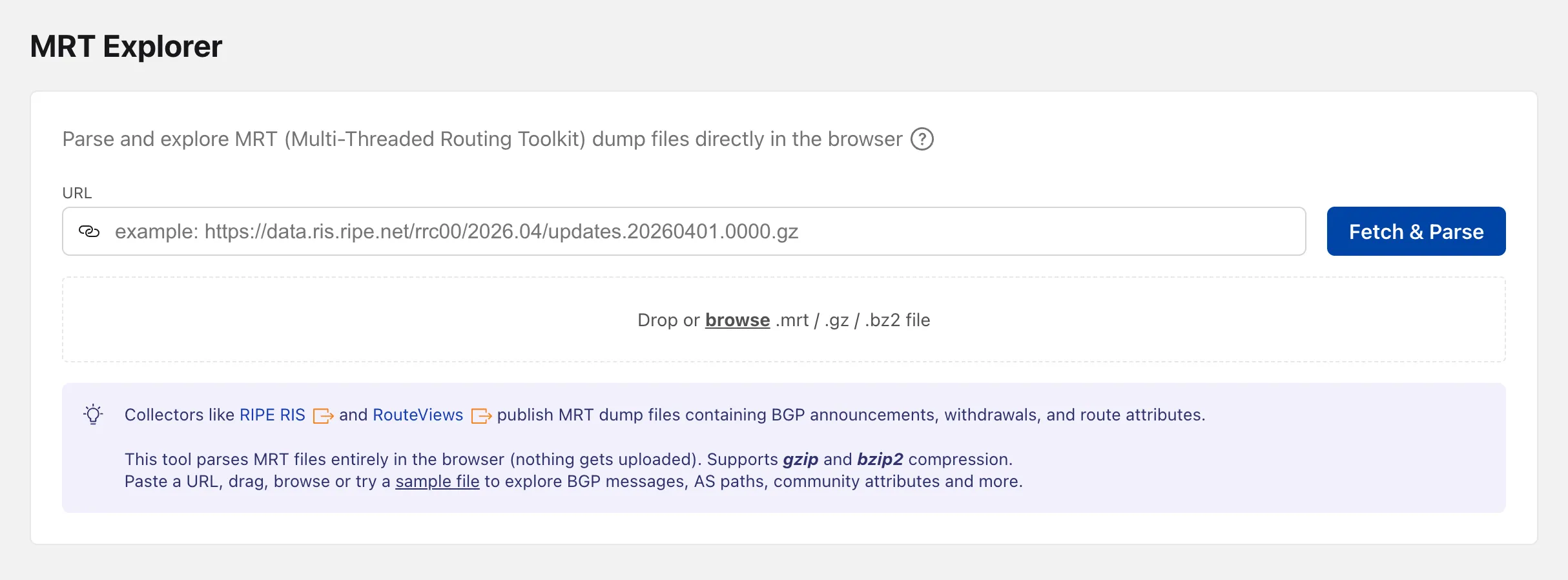
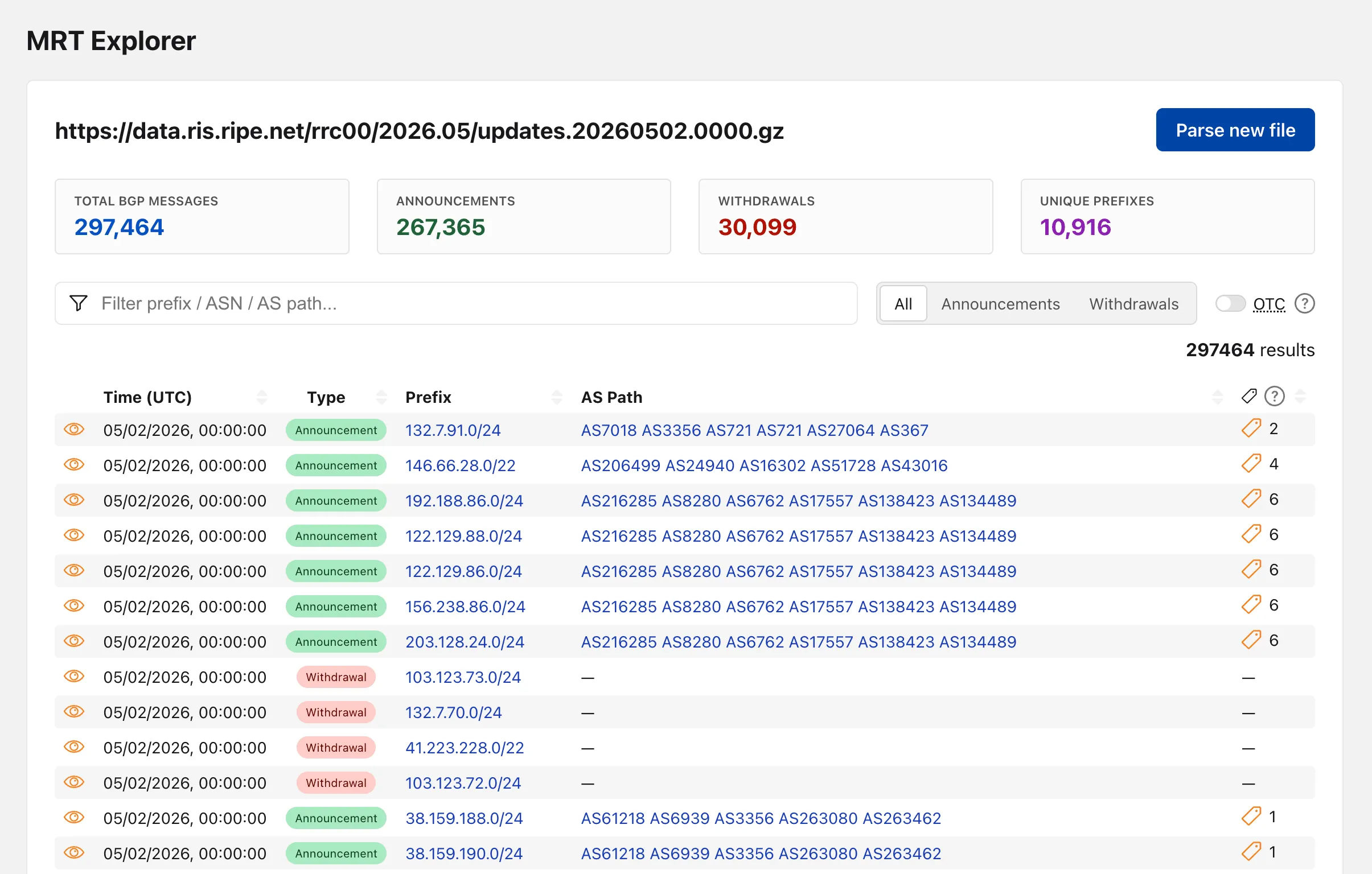
Radar now includes an MRT Explorer ↗ tool in the Routing section. Route collectors like RIPE RIS and RouteViews publish MRT (Multi-Threaded Routing Toolkit) dump files containing BGP announcements, withdrawals, and route attributes. The new tool parses these files entirely in the browser — nothing gets uploaded.
Loading a file
Paste a URL to fetch an MRT file remotely, drag and drop one onto the page, or browse for a local file. Gzip and bzip2 compressed files are supported. A sample file is also available to get started right away.
Inspecting events
Once parsed, the tool lists every BGP event with its timestamp, prefix, AS path, OTC (Only to Customer), and community attributes.
Event details
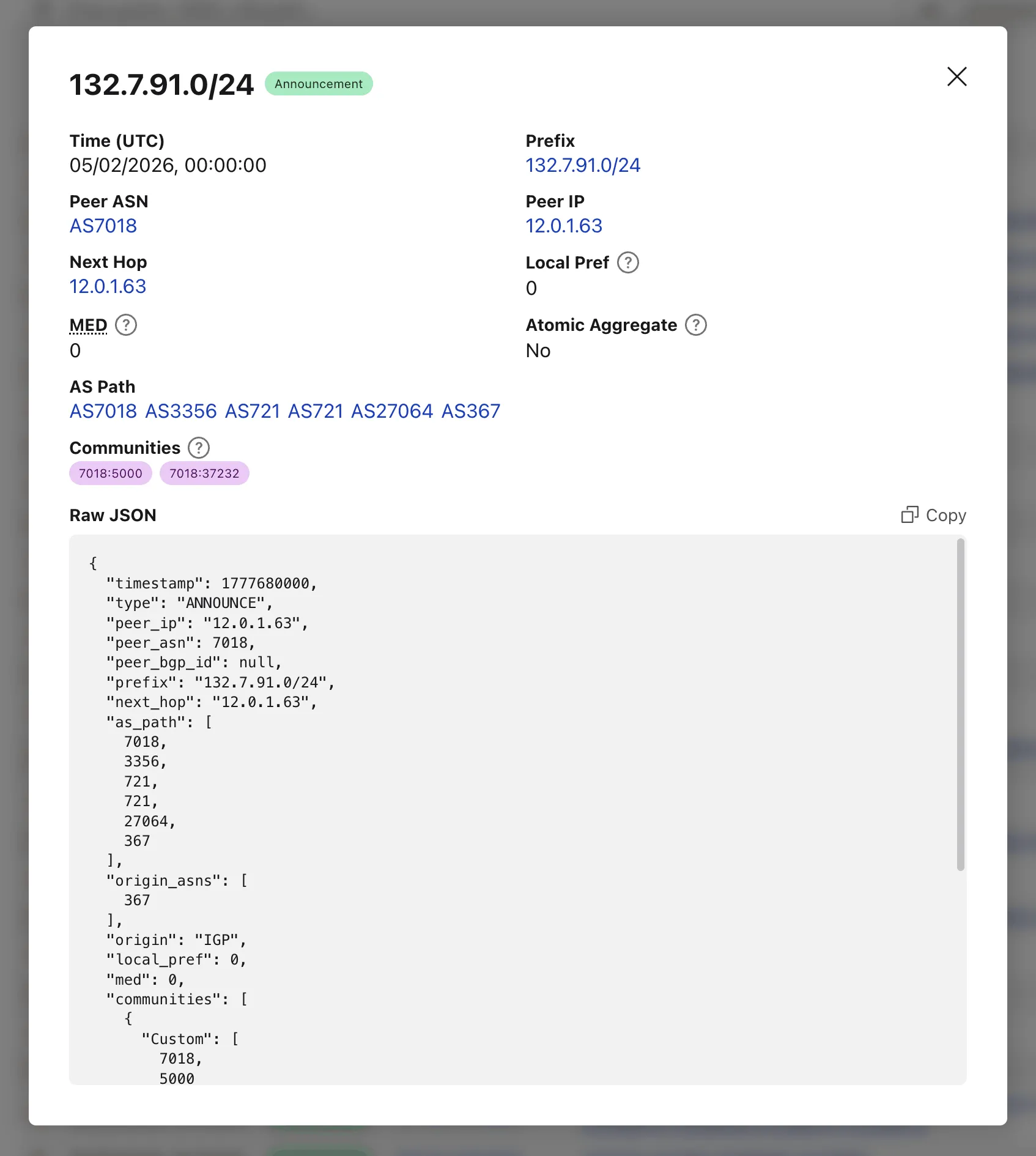
Clicking on the "View details" action opens a modal with additional properties and the full event JSON.
Shareable URLs
When loading a file by URL, the query string captures the source so the link can be shared directly — the recipient's browser immediately fetches and parses the same file.
Network Analytics is now fully supported for accounts using Unified Routing mode. Traffic that traverses Unified Routing onramps and offramps is now visible in Network Analytics with the same dimensions and filters as traffic on the standard data plane.
This closes a parity gap for customers who had moved tunnels onto Unified Routing and lost visibility into their dataplane traffic in the Network Analytics dashboard. No configuration change is required — analytics data is collected automatically for all accounts with Unified Routing enabled.
You can now share local dev sessions through Cloudflare Tunnel and get a public URL when using either Wrangler or the Cloudflare Vite plugin. This is useful when you need to share a preview, test a webhook, or access your app from another device.
This lets you either:
start a temporary Quick tunnel with a random *.trycloudflare.com hostname, or
To start a tunnel, press t in Wrangler or t + Enter in Vite while your dev server is running. For details on setting up a named tunnel, refer to Share a local dev server.
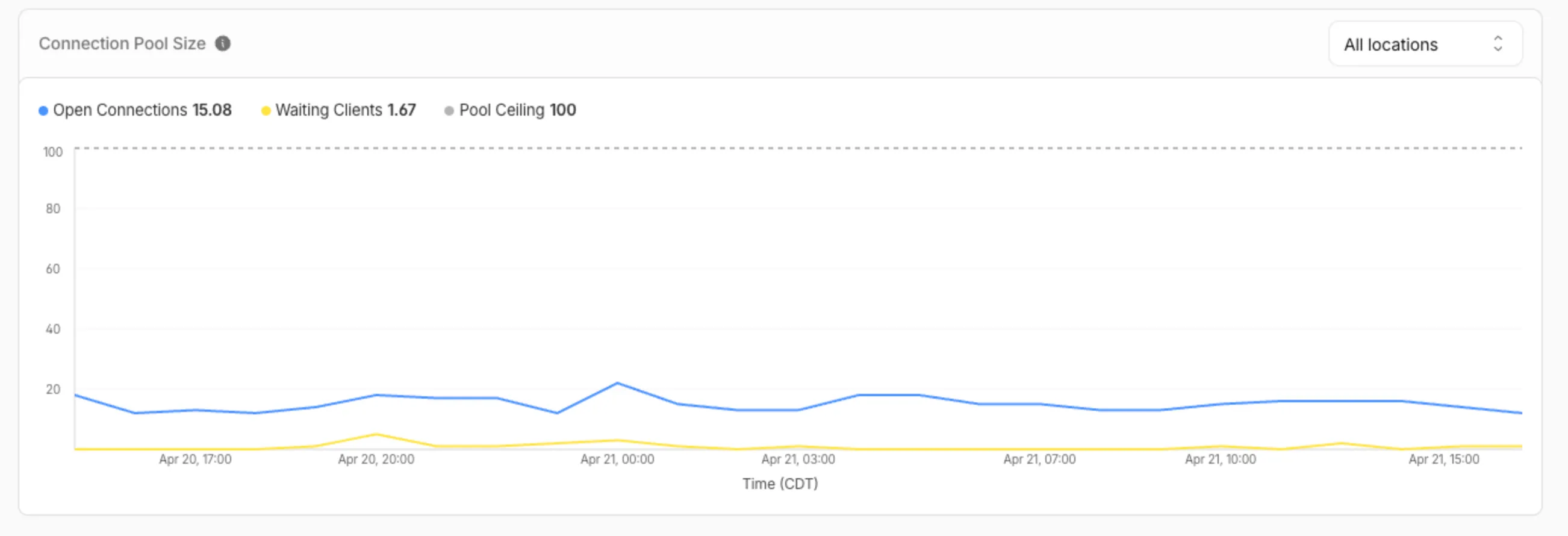
You can now view the size of your Hyperdrive database connection pools, giving you the ability to self-diagnose connection issues. Using the Cloudflare dashboard or the hyperdrivePoolSizesAdaptiveGroups dataset in the GraphQL Analytics API, you can see waitingClients, currentPoolSize, availablePoolSlots, and maxPoolSize for each of your configurations.
A new Pool connections chart has been added to the Metrics tab of each Hyperdrive configuration in the Cloudflare dashboard ↗. You can use the location selector to drill down into specific locations hosting your connection pool by airport code.
The chart shows:
Waiting clients: Client requests waiting for an available connection.
Open connections: Active connections to your database.
Pool size maximum: Your configured origin connection limit.
Connection contention appears as a spike in waiting clients, or when open connections consistently approach the pool size maximum. If your open connections regularly approach this limit, consider contacting Cloudflare to increase your Hyperdrive connection limit.
Pool size metrics
The hyperdrivePoolSizesAdaptiveGroups dataset in the GraphQL Analytics API exposes the following key connection pool metrics for each Hyperdrive configuration:
Under avg:
currentPoolSize — Average number of connections currently open in the pool.
availablePoolSlots — Average number of pool connections available for checkout.
waitingClients — Average number of clients waiting for a connection from the pool.
Under max:
maxPoolSize — Configured maximum size of the connection pool.
currentPoolSize — Peak number of connections open in the pool.
waitingClients — Peak number of clients waiting for a connection from the pool.
R2 SQL is Cloudflare's serverless, distributed SQL engine for querying Apache Iceberg ↗ tables stored in R2 Data Catalog. R2 SQL runs directly on Cloudflare's global network with no infrastructure to manage, so you can analyze data in R2 without exporting it to an external warehouse.
R2 SQL now supports joining multiple Iceberg tables in a single query. You can combine tables with JOINs, filter with subqueries, and define multi-table CTEs to build complex analytical queries.
New capabilities
JOINs — INNER JOIN, LEFT JOIN, RIGHT JOIN, FULL OUTER JOIN, CROSS JOIN, and implicit joins (comma-separated FROM with conditions in WHERE)
Subqueries — IN / NOT IN, EXISTS / NOT EXISTS, scalar subqueries in SELECT / WHERE / HAVING, and derived tables (subqueries in FROM)
Multi-table CTEs — WITH clauses can reference different tables and include JOINs
Self-joins — join a table with itself using different aliases
Multi-way joins — join three or more tables in a single query
Examples
Two-table JOIN with aggregation
SELECT z.domain, z.plan, COUNT(*) AS request_countFROM my_namespace.zones zINNER JOIN my_namespace.http_requests h ON z.zone_id = h.zone_idWHERE z.plan = 'enterprise'GROUP BY z.domain, z.planORDER BY request_count DESCLIMIT 20
EXISTS subquery
SELECT z.domain, z.planFROM my_namespace.zones zWHERE EXISTS ( SELECT 1 FROM my_namespace.firewall_events f WHERE f.zone_id = z.zone_id AND f.action = 'block')ORDER BY z.domainLIMIT 20
Multi-table CTE with JOIN
WITH top_zones AS ( SELECT zone_id, COUNT(*) AS req_count FROM my_namespace.http_requests GROUP BY zone_id ORDER BY req_count DESC LIMIT 50),zone_threats AS ( SELECT zone_id, COUNT(*) AS threat_count FROM my_namespace.firewall_events WHERE risk_score > 0.5 GROUP BY zone_id)SELECT tz.zone_id, tz.req_count, COALESCE(zt.threat_count, 0) AS threat_countFROM top_zones tzLEFT JOIN zone_threats zt ON tz.zone_id = zt.zone_idORDER BY tz.req_count DESCLIMIT 20
This emergency release introduces two new rules to detect nginx heap buffer overflow and heap spray exploitation attempts targeting the rewrite module's is_args stale-state bug (CVE-2026-42945).
Key Findings
CVE-2026-42945: nginx Heap Buffer Overflow via Stale is_args in Rewrite Module
Successful exploitation allows remote attackers to trigger a heap buffer overflow in nginx's rewrite module by sending crafted URIs containing escapable characters. A length/copy pass mismatch in ngx_http_script_copy_capture_code() causes the copy pass to write escaped data into an undersized buffer, leading to heap corruption. This enables denial of service (worker process crash) and, with heap feng shui techniques, potential remote code execution.
We strongly recommend upgrading to nginx 1.30.1 (or later) immediately to address the underlying vulnerability. If you cannot upgrade immediately, avoid rewrite directives with ? in the replacement string followed by set or if referencing capture groups.
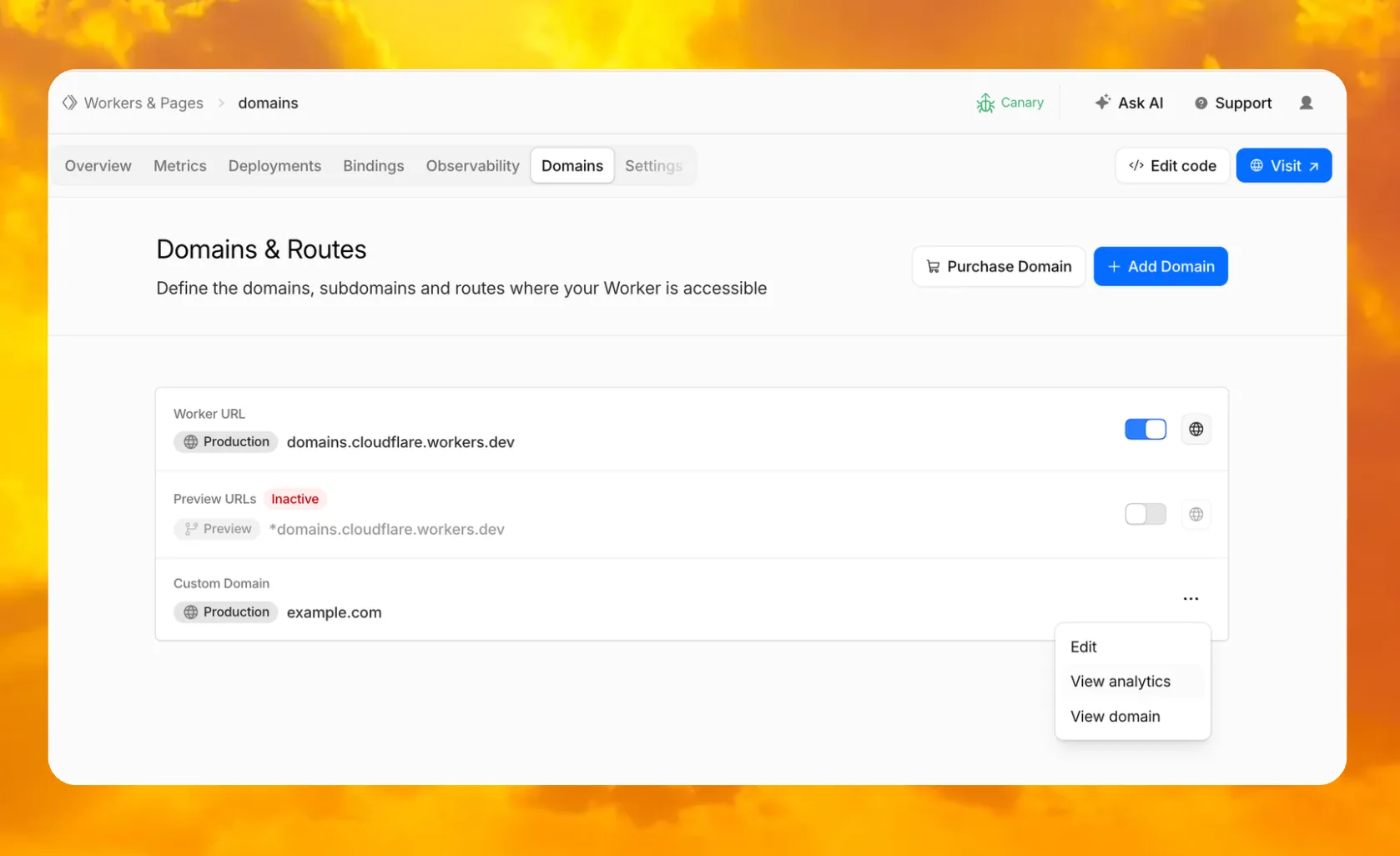
In your Worker's dashboard, there is now a dedicated Domains tab where you can purchase a new domain through Cloudflare Registrar and have it automatically connected, add an existing domain, and manage all of your Worker's routing in one place.
The latest release of the Agents SDK ↗ brings more reliable chat recovery, fixes Agent state synchronization during reconnects, adds durable submissions for Think, exposes routing retry configuration, and adds connection control for Voice agents.
Chat recovery improvements
@cloudflare/ai-chat now keeps server turns running when a browser or client stream is interrupted. This is useful for long-running AI responses where users refresh the page, close a tab, or temporarily lose connection. Calling stop() still cancels the server turn.
Set cancelOnClientAbort: true if browser or client aborts should also cancel the server turn:
Chat stream resume negotiation no longer throws when replay races with a closed WebSocket connection.
Recovered chat continuations no longer leave useAgentChat stuck in a streaming state when the original socket disconnects before a terminal response.
Approval auto-continuation preserves reasoning parts and persists continuation reasoning in the final message.
isServerStreaming now resets correctly when a resumed stream moves from the fallback observer path to a transport-owned stream.
Agent state and routing fixes
agents@0.12.4 prevents duplicate initial state frames during WebSocket connection setup. This avoids stale initial state messages overwriting state updates already sent by the client.
Agent recovery is also more reliable when tool calls span a Durable Object restart. Recovery now defers user finish hooks until after agent startup and isolates hook failures, so one failed hook does not block other recovered runs from finalizing.
getAgentByName() now supports routingRetry for transient Durable Object routing failures:
@cloudflare/think now supports durable programmatic submissions. submitMessages() provides durable acceptance, idempotent retries, status inspection, cancellation, and cleanup for server-driven turns that should continue after the caller returns.
Think.chat() RPC turns now run inside chat recovery fibers and persist their stream chunks. Interrupted sub-agent turns can recover partial output instead of starting over.
ChatOptions.tools has been removed from the TypeScript API. Define durable tools on the child agent or use agent tools for orchestration. Runtime options.tools values passed by legacy callers are ignored with a warning.
Think message pruning behavior change
@cloudflare/think no longer applies pruneMessages({ toolCalls: "before-last-2-messages" }) to model context by default. The previous default could strip client-side tool results from longer multi-turn flows.
truncateOlderMessages still runs as before, so context cost remains bounded. Subclasses that relied on the old aggressive pruning can opt back in from beforeTurn:
import { Think } from "@cloudflare/think";import { pruneMessages } from "ai";export class MyAgent extends Think { beforeTurn(ctx) { return { messages: pruneMessages({ messages: ctx.messages, toolCalls: "before-last-2-messages", }), }; }}
import { Think } from "@cloudflare/think";import { pruneMessages } from "ai";export class MyAgent extends Think<Env> { beforeTurn(ctx) { return { messages: pruneMessages({ messages: ctx.messages, toolCalls: "before-last-2-messages", }), }; }}
Voice agent connection control
@cloudflare/voice adds an enabled option to useVoiceAgent. React apps can now delay creating and connecting a VoiceClient until prerequisites such as capability tokens are ready.
This release also fixes Workers AI speech-to-text session edge cases and withVoice text streaming from AI SDK textStream responses.
Other improvements
Streamable HTTP routing — Server-to-client requests now route through the originating POST stream when no standalone SSE stream is available.
Structured tool output — Tool output shapes are preserved when truncating older messages or oversized persisted rows.
Non-chat Think tool steps — Think agent-tool children can complete without emitting assistant text and can return structured output through getAgentToolOutput.
Sub-agent schedules — Stale sub-agent schedule rows are pruned when their owning facet registry entry no longer exists.
@cloudflare/codemode — Adds a browser-safe export with an iframe sandbox executor and resolves OpenAPI specs inside the sandbox to avoid Worker Loader RPC size limits.
Upgrade
To update to the latest version:
npm i agents@latest @cloudflare/ai-chat@latest @cloudflare/think@latest @cloudflare/voice@latest
The /cdn-cgi/rum beacon endpoint now returns 405 Method Not Allowed for non-POST requests instead of 404 Not Found. The response includes an Allow: POST, OPTIONS header per RFC 9110 §15.5.6 ↗.
Previously, sending a GET or other non-POST request to this endpoint returned a 404, which was misleading because it suggested the endpoint did not exist. The new 405 response clearly indicates that the endpoint exists but only accepts POST requests.
The Web Analytics beacon (beacon.min.js) already uses POST for all metric submissions, so this change does not affect normal beacon operation. OPTIONS requests for CORS preflight continue to work as before.
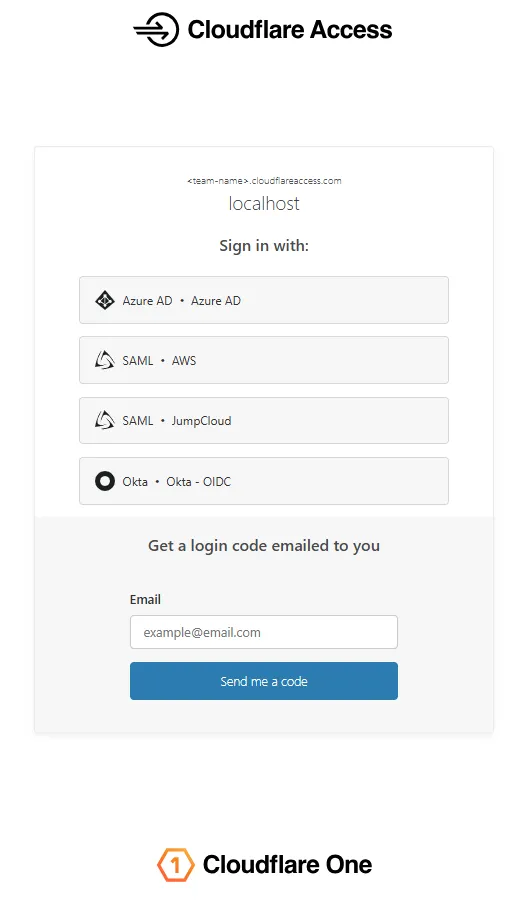
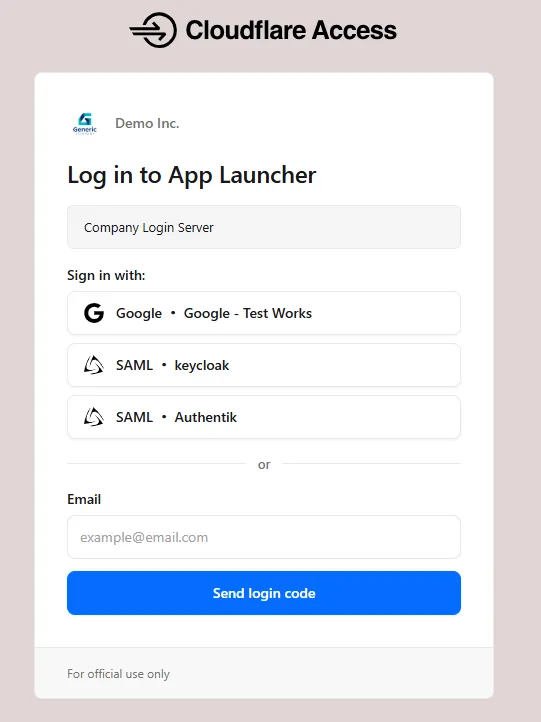
Unified authentication card - All sign-in options (identity provider buttons, email input, OTP) now appear in a single card with consistent styling, replacing the previous multi-section layout.
Consistent button styling - Identity provider buttons use a uniform size and layout for easier scanning and selection.
Better mobile experience - Responsive layout improvements ensure the login page renders correctly on phones and tablets.
Dark mode support - The login page now supports dark mode.