Pular para o conteúdo

Changelog

New updates and improvements at Cloudflare.

WAF Release - 2025-11-10

This week’s release introduces new detections for Prototype Pollution across three common vectors: URI, Body, and Header/Form.

Key Findings

  • These attacks can affect both API and web applications by altering normal behavior or bypassing security controls.

Impact

Exploitation may allow attackers to change internal logic or cause unexpected behavior in applications using JavaScript or Node.js frameworks. Developers should sanitize input keys and avoid merging untrusted data structures.

RulesetRule IDLegacy Rule IDDescriptionPrevious ActionNew ActionComments
Cloudflare Managed Ruleset N/AGeneric Rules - Prototype Pollution - URILogDisabledThis is a new detection
Cloudflare Managed Ruleset N/AGeneric Rules - Prototype Pollution - BodyLogDisabledThis is a new detection
Cloudflare Managed Ruleset N/AGeneric Rules - Prototype Pollution - Header - FormLogDisabledThis is a new detection

Select Wrangler environments using the CLOUDFLARE_ENV environment variable

Wrangler now supports using the CLOUDFLARE_ENV environment variable to select the active environment for your Worker commands. This provides a more flexible way to manage environments, especially when working with build tools and CI/CD pipelines.

What's new

Environment selection via environment variable:

  • Set CLOUDFLARE_ENV to specify which environment to use for Wrangler commands
  • Works with all Wrangler commands that support the --env flag
  • The --env command line argument takes precedence over the CLOUDFLARE_ENV environment variable

Example usage

# Deploy to the production environment using CLOUDFLARE_ENV
CLOUDFLARE_ENV=production wrangler deploy

# Upload a version to the staging environment
CLOUDFLARE_ENV=staging wrangler versions upload

# The --env flag takes precedence over CLOUDFLARE_ENV
CLOUDFLARE_ENV=dev wrangler deploy --env production
# This will deploy to production, not dev

Use with build tools

The CLOUDFLARE_ENV environment variable is particularly useful when working with build tools like Vite. You can set the environment once during the build process, and it will be used for both building and deploying your Worker:

# Set the environment for both build and deploy
CLOUDFLARE_ENV=production npm run build & wrangler deploy

When using @cloudflare/vite-plugin, the build process generates a "redirected deploy config" that is flattened to only contain the active environment. Wrangler will validate that the environment specified matches the environment used during the build to prevent accidentally deploying a Worker built for one environment to a different environment.

Learn more

Inspect Cache Keys with Cloudflare Trace

You can now see the exact cache key generated for any request directly in Cloudflare Trace. This visibility helps you troubleshoot cache hits and misses, and verify that your Custom Cache Keys — configured via Cache Rules or Page Rules — are working as intended.

Previously, diagnosing caching behavior required inferring the key from configuration settings. Now, you can confirm that your custom logic for headers, query strings, and device types is correctly applied.

Access Trace via the dashboard or API, either manually for ad-hoc debugging or automated as part of your quality-of-service monitoring.

Example scenario

If you have a Cache Rule that segments content based on a specific cookie (for example, user_region), run a Trace with that cookie present to confirm the user_region value appears in the resulting cache key.

The Trace response includes the cache key in the cache object:

{
  "step_name": "request",
  "type": "cache",
  "matched": true,
  "public_name": "Cache Parameters",
  "cache": {
    "key": {
      "zone_id": "023e105f4ecef8ad9ca31a8372d0c353",
      "scheme": "https",
      "host": "example.com",
      "uri": "/images/hero.jpg"
    },
    "key_string": "023e105f4ecef8ad9ca31a8372d0c353::::https://example.com/images/hero.jpg:::::"
  }
}

Get started

To learn more, refer to the Trace documentation and our guide on Custom Cache Keys.

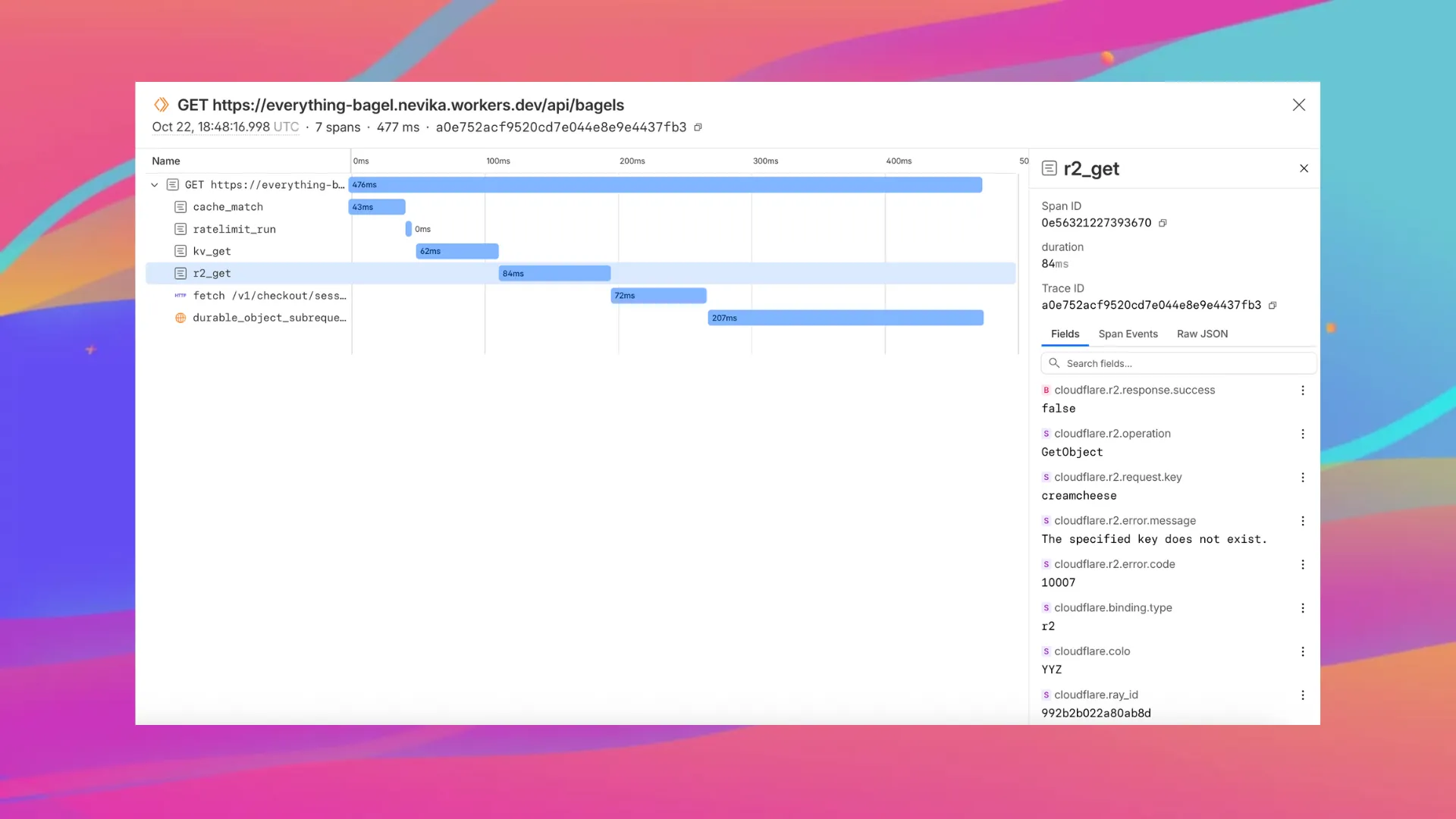
Workers automatic tracing, now in open beta

Enable automatic tracing on your Workers, giving you detailed metadata and timing information for every operation your Worker performs.

Tracing example

Tracing helps you identify performance bottlenecks, resolve errors, and understand how your Worker interacts with other services on the Workers platform. You can now answer questions like:

  • Which calls are slowing down my application?
  • Which queries to my database take the longest?
  • What happened within a request that resulted in an error?

You can now:

To get started, set:

{
	"observability": {
		"traces": {
			"enabled": true,
		},
	},
}

Want to learn more?

Automatic Return Routing (Beta)

Magic WAN now supports Automatic Return Routing (ARR), allowing customers to configure Magic on-ramps (IPsec/GRE/CNI) to learn the return path for traffic flows without requiring static routes.

Key benefits:

  • Route-less mode: Static or dynamic routes are optional when using ARR.
  • Overlapping IP space support: Traffic originating from customer sites can use overlapping private IP ranges.
  • Symmetric routing: Return traffic is guaranteed to use the same connection as the original on-ramp.

This feature is currently in beta and requires the new Unified Routing mode (beta).

For configuration details, refer to Configure Automatic Return Routing.

Designate WAN link for breakout traffic

Magic WAN Connector now allows you to designate a specific WAN port for breakout traffic, giving you deterministic control over the egress path for latency-sensitive applications.

With this feature, you can:

  • Pin breakout traffic for specific applications to a preferred WAN port.
  • Ensure critical traffic (such as Zoom or Teams) always uses your fastest or most reliable connection.
  • Benefit from automatic failover to standard WAN port priority if the preferred port goes down.

This is useful for organizations with multiple ISP uplinks who need predictable egress behavior for performance-sensitive traffic.

For configuration details, refer to Designate WAN ports for breakout apps.

Applications to be remapped to the new categories

We have previously added new application categories to better reflect their content and improve HTTP traffic management: refer to Changelog. While the new categories are live now, we want to ensure you have ample time to review and adjust any existing rules you have configured against old categories. The remapping of existing applications into these new categories will be completed by January 30, 2026. This timeline allows you a dedicated period to:

  • Review the new category structure.
  • Identify any policies you have that target the older categories.
  • Adjust your rules to reference the new, more precise categories before the old mappings change. Once the applications have been fully remapped by January 30, 2026, you might observe some changes in the traffic being mitigated or allowed by your existing policies. We encourage you to use the intervening time to prepare for a smooth transition.

Applications being remappedd

Application Name Existing Category New Category
Google Photos File Sharing Photography & Graphic Design
Flickr File Sharing Photography & Graphic Design
ADP Human Resources Business
Greenhouse Human Resources Business
myCigna Human Resources Health & Fitness
UnitedHealthcare Human Resources Health & Fitness
ZipRecruiter Human Resources Business
Amazon Business Human Resources Business
Jobcenter Human Resources Business
Jobsuche Human Resources Business
Zenjob Human Resources Business
DocuSign Legal Business
Postident Legal Business
Adobe Creative Cloud Productivity Photography & Graphic Design
Airtable Productivity Development
Autodesk Fusion360 Productivity IT Management
Coursera Productivity Education
Microsoft Power BI Productivity Business
Tableau Productivity Business
Duolingo Productivity Education
Adobe Reader Productivity Business
AnpiReport Productivity Travel
ビズリーチ Productivity Business
doda (デューダ) Productivity Business
求人ボックス Productivity Business
マイナビ2026 Productivity Business
Power Apps Productivity Business
RECRUIT AGENT Productivity Business
シフトボード Productivity Business
スタンバイ Productivity Business
Doctolib Productivity Health & Fitness
Miro Productivity Photography & Graphic Design
MyFitnessPal Productivity Health & Fitness
Sentry Mobile Productivity Travel
Slido Productivity Photography & Graphic Design
Arista Networks Productivity IT Management
Atlassian Productivity Business
CoderPad Productivity Business
eAgreements Productivity Business
Vmware Productivity IT Management
Vmware Vcenter Productivity IT Management
AWS Skill Builder Productivity Education
Microsoft Office 365 (GCC) Productivity Business
Microsoft Exchange Online (GCC) Productivity Business
Canva Sales & Marketing Photography & Graphic Design
Instacart Shopping Food & Drink
Wawa Shopping Food & Drink
McDonald's Shopping Food & Drink
Vrbo Shopping Travel
American Airlines Shopping Travel
Booking.com Shopping Travel
Ticketmaster Shopping Entertainment & Events
Airbnb Shopping Travel
DoorDash Shopping Food & Drink
Expedia Shopping Travel
EasyPark Shopping Travel
UEFA Tickets Shopping Entertainment & Events
DHL Express Shopping Business
UPS Shopping Business

For more information on creating HTTP policies, refer to Applications and app types.

D1 can restrict data localization with jurisdictions

You can now set a jurisdiction when creating a D1 database to guarantee where your database runs and stores data. Jurisdictions can help you comply with data localization regulations such as GDPR. Supported jurisdictions include eu and fedramp.

A jurisdiction can only be set at database creation time via wrangler, REST API or the UI and cannot be added/updated after the database already exists.

npx wrangler@latest d1 create db-with-jurisdiction --jurisdiction eu
curl -X POST "https://api.cloudflare.com/client/v4/accounts/<account_id>/d1/database" \
     -H "Authorization: Bearer $TOKEN" \
     -H "Content-Type: application/json" \
     --data '{"name": "db-with-jurisdiction", "jurisdiction": "eu" }'

To learn more, visit D1's data location documentation.

Logpush Permission Update for Zero Trust Datasets

Permissions for managing Logpush jobs related to Zero Trust datasets (Access, Gateway, and DEX) have been updated to improve data security and enforce appropriate access controls.

To view, create, update, or delete Logpush jobs for Zero Trust datasets, users must now have both of the following permissions:

  • Logs Edit
  • Zero Trust: PII Read

WAF Release - 2025-11-05 - Emergency

This week’s emergency release introduces a new detection signature that enhances coverage for a critical vulnerability in the React Native Metro Development Server, tracked as CVE-2025-11953.

Key Findings

The Metro Development Server exposes an HTTP endpoint that is vulnerable to OS command injection (CWE-78). An unauthenticated network attacker can send a crafted request to this endpoint and execute arbitrary commands on the host running Metro. The vulnerability affects Metro/cli-server-api builds used by React Native Community CLI in pre-patch development releases.

Impact

Successful exploitation of CVE-2025-11953 may result in remote command execution on developer workstations or CI/build agents, leading to credential and secret exposure, source tampering, and potential lateral movement into internal networks. Administrators and developers are strongly advised to apply the vendor's patches and restrict Metro’s network exposure to reduce this risk.

RulesetRule IDLegacy Rule IDDescriptionPrevious ActionNew ActionComments
Cloudflare Managed Ruleset N/AReact Native Metro - Command Injection - CVE:CVE-2025-11953N/ABlockThis is a New Detection

Announcing Workers VPC Services (Beta)

Workers VPC Services is now available, enabling your Workers to securely access resources in your private networks, without having to expose them on the public Internet.

What's new

  • VPC Services: Create secure connections to internal APIs, databases, and services using familiar Worker binding syntax
  • Multi-cloud Support: Connect to resources in private networks in any external cloud (AWS, Azure, GCP, etc.) or on-premise using Cloudflare Tunnels
export default {
	async fetch(request, env, ctx) {
		// Perform application logic in Workers here

		// Sample call to an internal API running on ECS in AWS using the binding
		const response = await env.AWS_VPC_ECS_API.fetch("https://internal-host.example.com");

		// Additional application logic in Workers
		return new Response();
	},
};

Getting started

Set up a Cloudflare Tunnel, create a VPC Service, add service bindings to your Worker, and access private resources securely. Refer to the documentation to get started.

Log Explorer now supports query cancellation

We're excited to announce that Log Explorer users can now cancel queries that are currently running.

This new feature addresses a common pain point: waiting for a long, unintended, or misconfigured query to complete before you can submit a new, correct one. With query cancellation, you can immediately stop the execution of any undesirable query, allowing you to quickly craft and submit a new query, significantly improving your investigative workflow and productivity within Log Explorer.

Log Explorer now shows query result distribution

We're excited to announce a new feature in Log Explorer that significantly enhances how you analyze query results: the Query results distribution chart.

This new chart provides a graphical distribution of your results over the time window of the query. Immediately after running a query, you will see the distribution chart above your result table. This visualization allows Log Explorer users to quickly spot trends, identify anomalies, and understand the temporal concentration of log events that match their criteria. For example, you can visually confirm if a spike in traffic or errors occurred at a specific time, allowing you to focus your investigation efforts more effectively. This feature makes it faster and easier to extract meaningful insights from your vast log data.

The chart will dynamically update to reflect the logs matching your current query.

WAF Release - 2025-11-03

This week highlights enhancements to detection signatures improving coverage for vulnerabilities in Adobe Commerce and Magento Open Source, linked to CVE-2025-54236.

Key Findings

This vulnerability allows unauthenticated attackers to take over customer accounts through the Commerce REST API and, in certain configurations, may lead to remote code execution. The latest update provides enhanced detection logic for resilient protection against exploitation attempts.

Impact

  • Adobe Commerce (CVE-2025-54236): Exploitation may allow attackers to hijack sessions, execute arbitrary commands, steal data, and disrupt storefronts, resulting in confidentiality and integrity risks for merchants. Administrators are strongly encouraged to apply vendor patches without delay.
RulesetRule IDLegacy Rule IDDescriptionPrevious ActionNew ActionComments
Cloudflare Managed Ruleset 100774CAdobe Commerce - Remote Code Execution - CVE:CVE-2025-54236LogBlockThis is an improved detection.

Capture Wrangler command output in structured format

You can now capture Wrangler command output in a structured ND-JSON format by setting the WRANGLER_OUTPUT_FILE_PATH or WRANGLER_OUTPUT_FILE_DIRECTORY environment variables. This feature is particularly useful for CI/CD pipelines and automation tools that need programmatic access to deployment information such as worker names, version IDs, deployment URLs, and error details. Commands that support this feature include wrangler deploy, wrangler versions upload, wrangler versions deploy, and wrangler pages deploy.

Report logo misuse to Cloudflare directly from the Brand Protection dashboard

The Brand Protection logo query dashboard now allows you to use the Report to Cloudflare button to submit an Abuse report directly from the Brand Protection logo queries dashboard. While you could previously report new domains that were impersonating your brand before, now you can do the same for websites found to be using your logo without your permission. The abuse reports will be prefilled and you will only need to validate a few fields before you can click the submit button, after which our team process your request.

Ready to start? Check out the Brand Protection docs.

Increased Workflows instance and concurrency limits

We've raised the Cloudflare Workflows account-level limits for all accounts on the Workers paid plan:

  • Instance creation rate increased from 100 workflow instances per 10 seconds to 100 instances per second
  • Concurrency limit increased from 4,500 to 10,000 workflow instances per account

These increases mean you can create new instances up to 10x faster, and have more workflow instances concurrently executing. To learn more and get started with Workflows, refer to the getting started guide.

If your application requires a higher limit, fill out the Limit Increase Request Form or contact your account team. Please refer to Workflows pricing for more information.

Introducing email two-factor authentication

Two-factor authentication (2FA) is one of the best ways to protect your account from the risk of account takeover. Cloudflare has offered phishing resistant 2FA options including hardware based keys (for example, a Yubikey) and app based TOTP (time-based one-time password) options which use apps like Google or Microsoft's Authenticator app. Unfortunately, while these solutions are very secure, they can be lost if you misplace the hardware based key, or lose the phone which includes that app. The result is that users sometimes get locked out of their accounts and need to contact support.

Today, we are announcing the addition of email as a 2FA factor for all Cloudflare accounts. Email 2FA is in wide use across the industry as a least common denominator for 2FA because it is low friction, loss resistant, and still improves security over username/password login only. We also know that most commercial email providers already require 2FA, so your email address is usually well protected already.

You can now enable email 2FA on the Cloudflare dashboard:

  1. Go to Profile at the top right corner.
  2. Select Authentication.
  3. Under Two-Factor Authentication, select Set up.

Sign-in security best practices

Cloudflare is critical infrastructure, and you should protect it as such. Review the following best practices and make sure you are doing your part to secure your account:

  • Use a unique password for every website, including Cloudflare, and store it in a password manager like 1Password or Keeper. These services are cross-platform and simplify the process of managing secure passwords.
  • Use 2FA to make it harder for an attacker to get into your account in the event your password is leaked.
  • Store your backup codes securely. A password manager is the best place since it keeps the backup codes encrypted, but you can also print them and put them somewhere safe in your home.
  • If you use an app to manage your 2FA keys, enable cloud backup, so that you don't lose your keys in the event you lose your phone.
  • If you use a custom email domain to sign in, configure SSO.
  • If you use a public email domain like Gmail or Hotmail, you can also use social login with Apple, GitHub, or Google to sign in.
  • If you manage a Cloudflare account for work:
    • Have at least two administrators in case one of them unexpectedly leaves your company.
    • Use SCIM to automate permissions management for members in your Cloudflare account.


Revamped Member Management UI

As Cloudflare's platform has grown, so has the need for precise, role-based access control. We’ve redesigned the Member Management experience in the Dashboard to help administrators more easily discover, assign, and refine permissions for specific principals.

What's New

Refreshed member invite flow

We overhauled the Invite Members UI to simplify inviting users and assigning permissions.

Updated Invite Flow UX

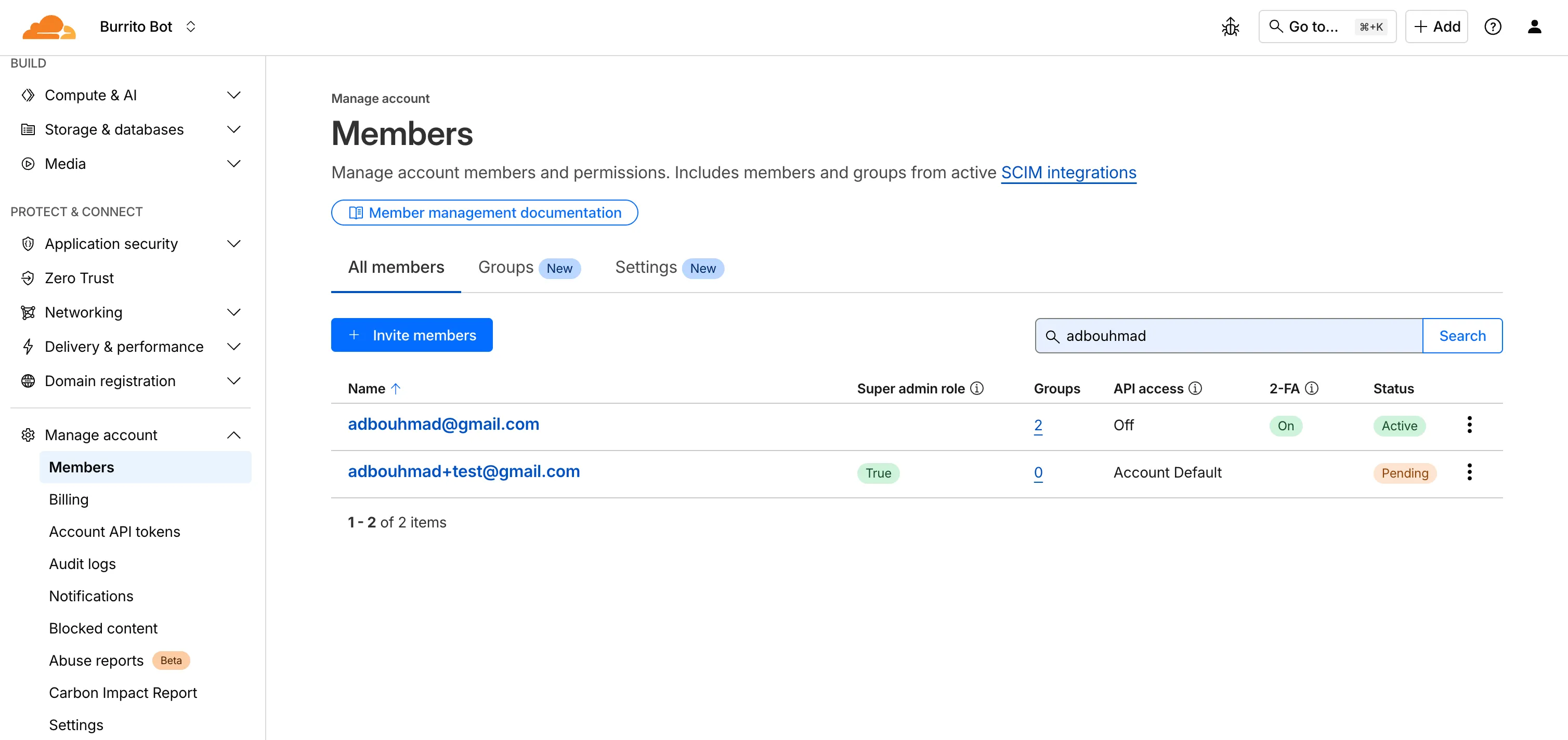

Refreshed Members Overview Page

We've updated the Members Overview Page to clearly display:

  • Member 2FA status
  • Which members hold Super Admin privileges
  • API access settings per member
  • Member onboarding state (accepted vs pending invite)
Updated Member Management Overview

New Member Permission Policies Details View

We've created a new member details screen that shows all permission policies associated with a member; including policies inherited from group associations to make it easier for members to understand the effective permissions they have.

Updated Permission Policies Details Screen

Improved Member Permission Workflow

We redesigned the permission management experience to make it faster and easier for administrators to review roles and grant access.

Updated Member Permission Management UX

Account-scoped Policies Restrictions Relaxed

Previously, customers could only associate a single account-scoped policy with a member. We've relaxed this restriction, and now Administrators can now assign multiple account-scoped policies to the same member; bringing policy assignment behavior in-line with user-groups and providing greater flexibility in managing member permissions.

New TCP-based fields available in Rulesets

Build rules based on TCP transport and latency

Cloudflare now provides two new request fields in the Ruleset engine that let you make decisions based on whether a request used TCP and the measured TCP round-trip time between the client and Cloudflare. These fields help you understand protocol usage across your traffic and build policies that respond to network performance. For example, you can distinguish TCP from QUIC traffic or route high latency requests to alternative origins when needed.


New fields

Field Type Description
cf.edge.client_tcp Boolean Indicates whether the request used TCP. A value of true means the client connected using TCP instead of QUIC.
cf.timings.client_tcp_rtt_msec Number Reports the smoothed TCP round-trip time between the client and Cloudflare in milliseconds. For example, a value of 20 indicates roughly twenty milliseconds of RTT.

Example filter expression:

cf.edge.client_tcp && cf.timings.client_tcp_rtt_msec < 100

More information can be found in the Rules language fields reference.

WAF Release - 2025-10-30 - Emergency

This week’s release introduces a new detection signature that enhances coverage for a critical vulnerability in Oracle E-Business Suite, tracked as CVE-2025-61884.

Key Findings

The flaw is easily exploitable and allows an unauthenticated attacker with network access to compromise Oracle Configurator, which can grant access to sensitive resources and configuration data. The affected versions include 12.2.3 through 12.2.14.

Impact

Successful exploitation of CVE-2025-61884 may result in unauthorized access to critical business data or full exposure of information accessible through Oracle Configurator. Administrators are strongly advised to apply vendor's patches and recommended mitigations to reduce this exposure.

RulesetRule IDLegacy Rule IDDescriptionPrevious ActionNew ActionComments
Cloudflare Managed Ruleset N/AOracle E-Business Suite - SSRF - CVE:CVE-2025-61884N/ABlockThis is a New Detection

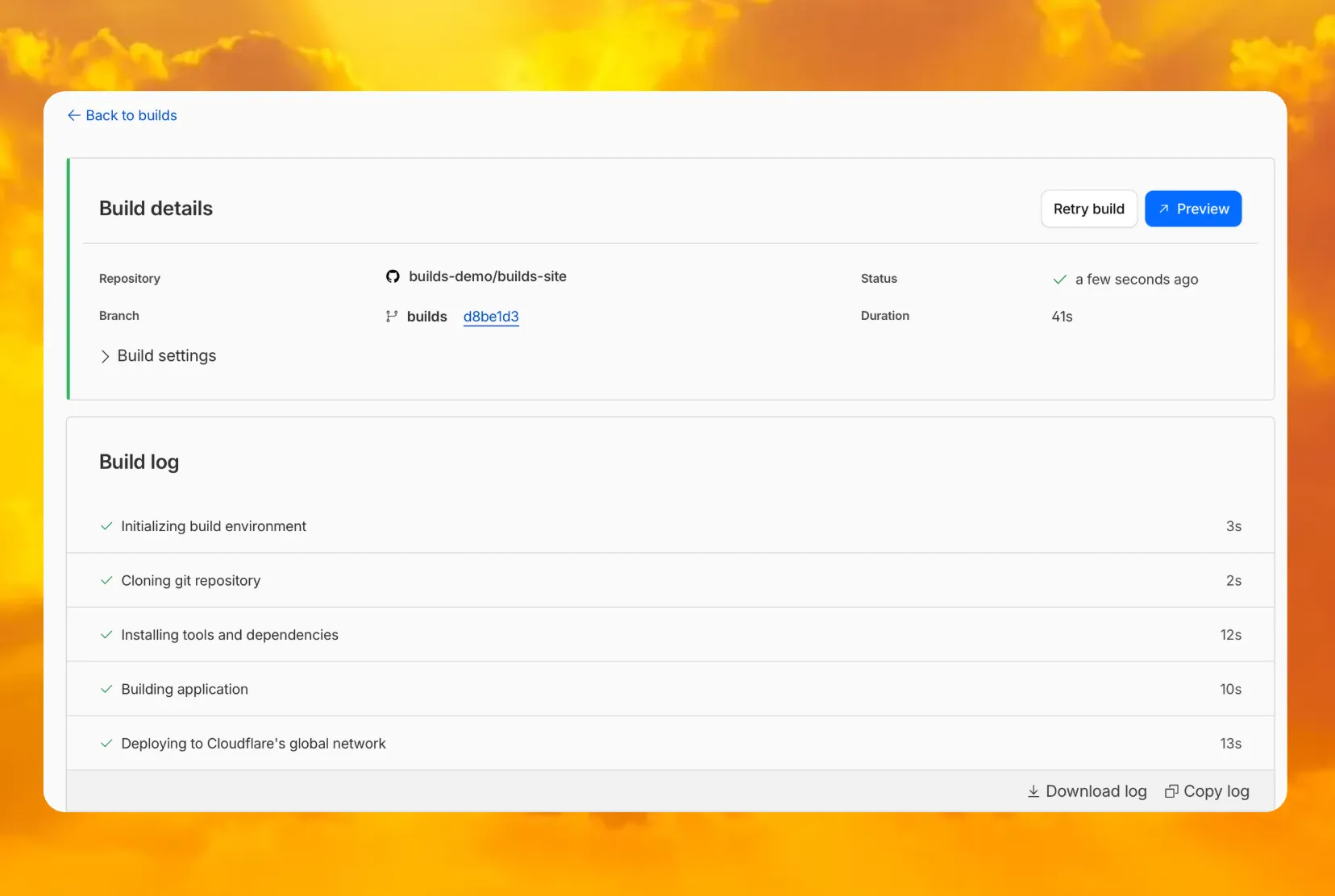
Access Workers preview URLs from the Build details page

You can now access preview URLs directly from the build details page, making it easier to test your changes when reviewing builds in the dashboard.

preview button

What's new

  • A Preview button now appears in the top-right corner of the build details page for successful builds
  • Click it to instantly open the latest preview URL
  • Matches the same experience you're familiar with from Pages

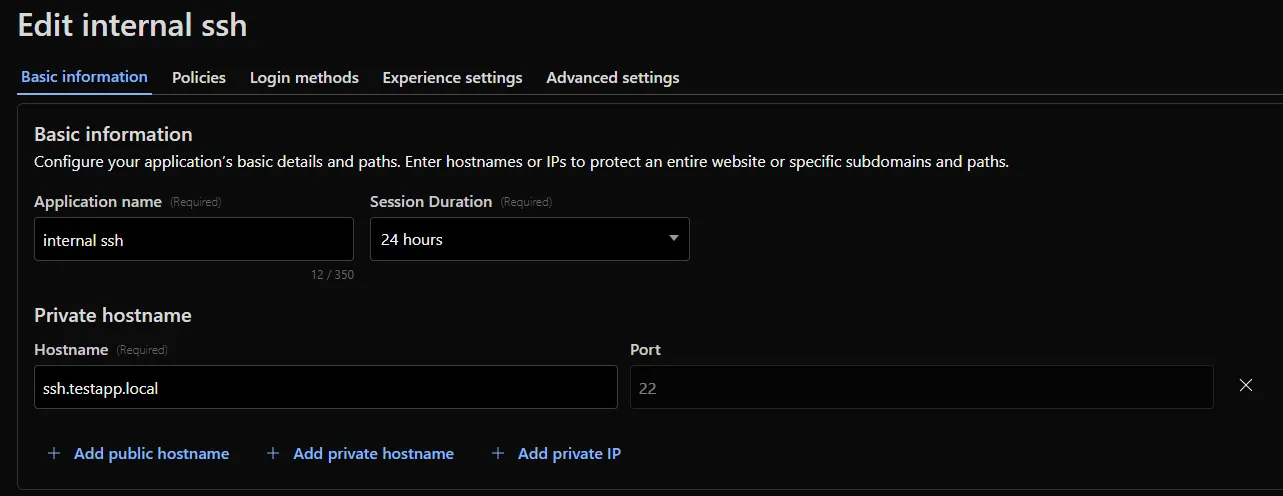
Access private hostname applications support all ports/protocols

Cloudflare Access for private hostname applications can now secure traffic on all ports and protocols.

Previously, applying Zero Trust policies to private applications required the application to use HTTPS on port 443 and support Server Name Indicator (SNI).

This update removes that limitation. As long as the application is reachable via a Cloudflare off-ramp, you can now enforce your critical security controls — like single sign-on (SSO), MFA, device posture, and variable session lengths — to any private application. This allows you to extend Zero Trust security to services like SSH, RDP, internal databases, and other non-HTTPS applications.

Example private application on non-443 port

For example, you can now create a self-hosted application in Access for ssh.testapp.local running on port 22. You can then build a policy that only allows engineers in your organization to connect after they pass an SSO/MFA check and are using a corporate device.

This feature is generally available across all plans.

Reranking and API-based system prompt configuration in AI Search

AI Search now supports reranking for improved retrieval quality and allows you to set the system prompt directly in your API requests.

Rerank for more relevant results

You can now enable reranking to reorder retrieved documents based on their semantic relevance to the user’s query. Reranking helps improve accuracy, especially for large or noisy datasets where vector similarity alone may not produce the optimal ordering.

You can enable and configure reranking in the dashboard or directly in your API requests:

const answer = await env.AI.autorag("my-autorag").aiSearch({
	query: "How do I train a llama to deliver coffee?",
	model: "@cf/meta/llama-3.3-70b-instruct-fp8-fast",
	reranking: {
		enabled: true,
		model: "@cf/baai/bge-reranker-base",
	},
});

Set system prompts in API

Previously, system prompts could only be configured in the dashboard. You can now define them directly in your API requests, giving you per-query control over behavior. For example:

// Dynamically set query and system prompt in AI Search
async function getAnswer(query, tone) {
	const systemPrompt = `You are a ${tone} assistant.`;

	const response = await env.AI.autorag("my-autorag").aiSearch({
		query: query,
		system_prompt: systemPrompt,
	});

	return response;
}

// Example usage
const query = "What is Cloudflare?";
const tone = "friendly";

const answer = await getAnswer(query, tone);
console.log(answer);

Learn more about Reranking and System Prompt in AI Search.