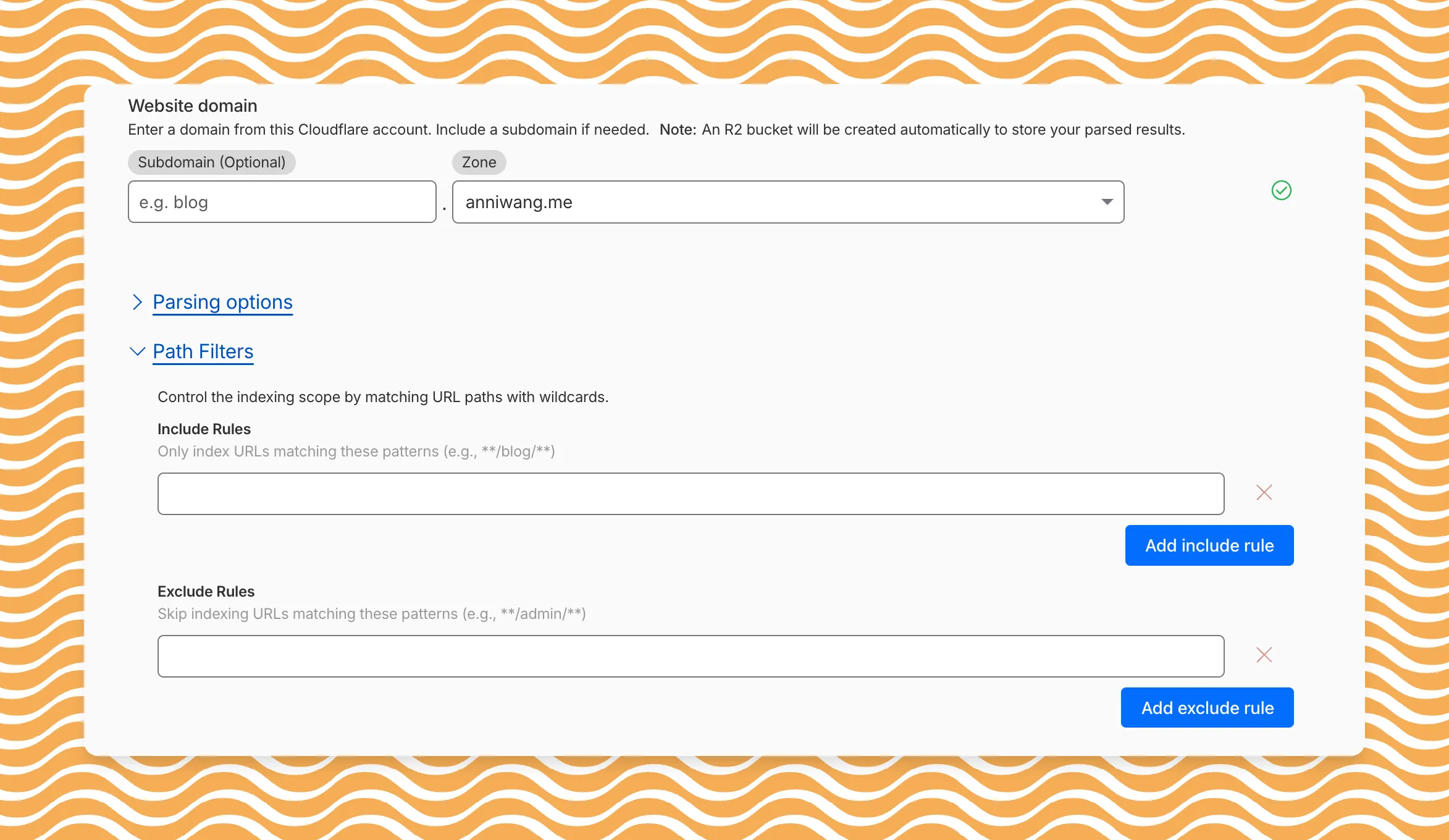
AI Search now includes path filtering for both website and R2 data sources. You can now control which content gets indexed by defining include and exclude rules for paths.
By controlling what gets indexed, you can improve the relevance and quality of your search results. You can also use path filtering to split a single data source across multiple AI Search instances for specialized search experiences.
Path filtering uses micromatch ↗ patterns, so you can use * to match within a directory and ** to match across directories.
Use case
Include
Exclude
Index docs but skip drafts
**/docs/**
**/docs/drafts/**
Keep admin pages out of results
—
**/admin/**
Index only English content
**/en/**
—
Configure path filters when creating a new instance or update them anytime from Settings. Check out path filtering to learn more.
You can now create AI Search instances programmatically using the API. For example, use the API to create instances for each customer in a multi-tenant application or manage AI Search alongside your other infrastructure.
If you have created an AI Search instance via the dashboard before, you already have a service API token registered and can start creating instances programmatically right away. If not, follow the API guide to set up your first instance.
For example, you can now create separate search instances for each language on your website:
for lang in en fr es de; do curl -X POST "https://api.cloudflare.com/client/v4/accounts/$ACCOUNT_ID/ai-search/instances" \ -H "Authorization: Bearer $API_TOKEN" \ -H "Content-Type: application/json" \ --data '{ "id": "docs-'"$lang"'", "type": "web-crawler", "source": "example.com", "source_params": { "path_include": ["**/'"$lang"'/**"] } }'done
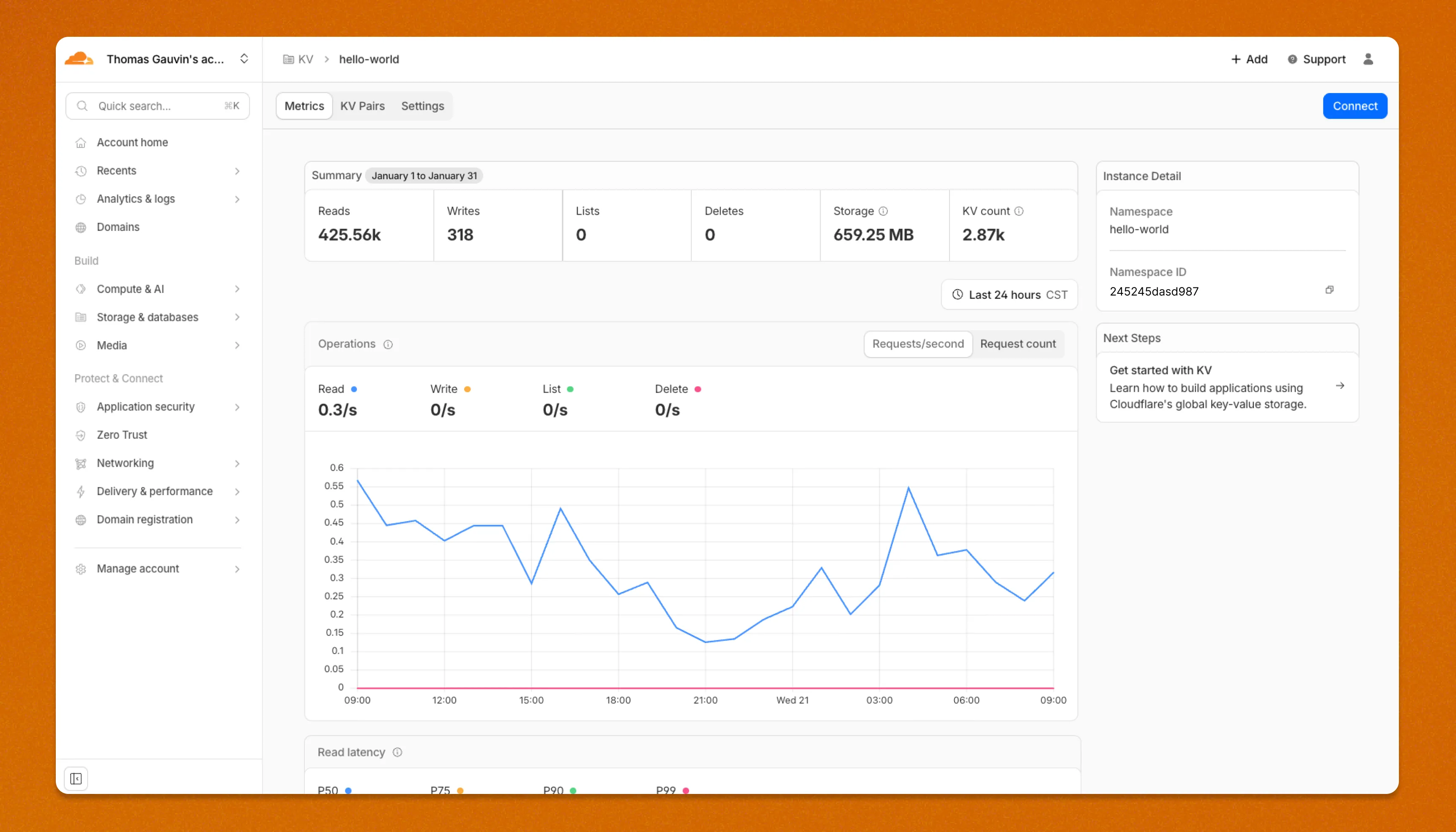
Workers KV has an updated dashboard UI with new dashboard styling that makes it easier to navigate and see analytics and settings for a KV namespace.
The new dashboard features a streamlined homepage for easy access to your namespaces and key operations, with consistent design with the rest of the dashboard UI updates. It also provides an improved analytics view.
The updated dashboard is now available for all Workers KV users. Log in to the Cloudflare Dashboard ↗ to start exploring the new interface.
Cloudflare Rulesets now include new functions that enable advanced expression logic for evaluating arrays and maps. These functions allow you to build rules that match against lists of values in request or response headers, enabling use cases like country-based blocking using custom headers.
New functions
Function
Description
split(source, delimiter)
Splits a string into an array of strings using the specified delimiter.
join(array, delimiter)
Joins an array of strings into a single string using the specified delimiter.
has_key(map, key)
Returns true if the specified key exists in the map.
has_value(map, value)
Returns true if the specified value exists in the map.
In this release, you'll see a large number of breaking changes. This is primarily due to a change in OpenAPI definitions, which our libraries are based off of, and codegen updates that we rely on to read those OpenAPI definitions and produce our SDK libraries. As the codegen is always evolving and improving, so are our code bases.
Some breaking changes were introduced due to bug fixes, also listed below.
Please ensure you read through the list of changes below before moving to this version - this will help you understand any down or upstream issues it may cause to your environments.
In January 2025, we announced the launch of the new Terraform v5 Provider. We greatly appreciate the proactive engagement and valuable feedback from the Cloudflare community following the v5 release. In response, we've established a consistent and rapid 2-3 week cadence ↗ for releasing targeted improvements, demonstrating our commitment to stability and reliability.
With the help of the community, we have a growing number of resources that we have marked as stable ↗, with that list continuing to grow with every release. The most used resources ↗ are on track to be stable by the end of March 2026, when we will also be releasing a new migration tool to you migrate from v4 to v5 with ease.
Thank you for continuing to raise issues. They make our provider stronger and help us build products that reflect your needs.
This release includes bug fixes, the stabilization of even more popular resources, and more.
Features
custom_pages: add "waf_challenge" as new supported error page type identifier in both resource and data source schemas
list: enhance CIDR validator to check for normalized CIDR notation requiring network address for IPv4 and IPv6
magic_wan_gre_tunnel: add automatic_return_routing attribute for automatic routing control
magic_wan_gre_tunnel: add BGP configuration support with new BGP model attribute
magic_wan_gre_tunnel: add bgp_status computed attribute for BGP connection status information
magic_wan_gre_tunnel: enhance schema with BGP-related attributes and validators
magic_wan_ipsec_tunnel: add automatic_return_routing attribute for automatic routing control
magic_wan_ipsec_tunnel: add BGP configuration support with new BGP model attribute
magic_wan_ipsec_tunnel: add bgp_status computed attribute for BGP connection status information
magic_wan_ipsec_tunnel: add custom_remote_identities attribute for custom identity configuration
magic_wan_ipsec_tunnel: enhance schema with BGP and identity-related attributes
ruleset: add request body buffering support
ruleset: enhance ruleset data source with additional configuration options
workers_script: add observability logs attributes to list data source model
workers_script: enhance list data source schema with additional configuration options
Bug Fixes
account_member: fix resource importability issues
dns_record: remove unnecessary fmt.Sprintf wrapper around LoadTestCase call in test configuration helper function
load_balancer: fix session_affinity_ttl type expectations to match Float64 in initial creation and Int64 after migration
workers_kv: handle special characters correctly in URL encoding
Documentation
account_subscription: update schema description for rate_plan.sets attribute to clarify it returns an array of strings
api_shield: add resource-level description for API Shield management of auth ID characteristics
api_shield: enhance auth_id_characteristics.name attribute description to include JWT token configuration format requirements
api_shield: specify JSONPath expression format for JWT claim locations
hyperdrive_config: add description attribute to name attribute explaining its purpose in dashboard and API identification
hyperdrive_config: apply description improvements across resource, data source, and list data source schemas
hyperdrive_config: improve schema descriptions for cache settings to clarify default values
hyperdrive_config: update port description to clarify defaults for different database types
Auxiliary Workers are now fully supported when using full-stack frameworks, such as React Router and TanStack Start, that integrate with the Cloudflare Vite plugin.
They are included alongside the framework's build output in the build output directory.
Note that this feature requires Vite 7 or above.
Auxiliary Workers are additional Workers that can be called via service bindings from your main (entry) Worker.
They are defined in the plugin config, as in the example below:
The .sql file extension is now automatically configured to be importable in your Worker code when using Wrangler or the Cloudflare Vite plugin.
This is particular useful for importing migrations in Durable Objects and means you no longer need to configure custom rules when using Drizzle ↗.
SQL files are imported as JavaScript strings:
// `example` will be a JavaScript stringimport example from "./example.sql";
Cloudflare now provides more accurate visibility into HTTP/3 client request cancellations, giving you better insight into real client behavior and reducing unnecessary load on your origins.
Previously, when an HTTP/3 client cancelled a request, the cancellation was not always actioned immediately. This meant requests could continue through the CDN — potentially all the way to your origin — even after the client had abandoned them. In these cases, logs would show the upstream response status (such as 200 or a timeout-related code) rather than reflecting the client cancellation.
Now, Cloudflare terminates cancelled HTTP/3 requests immediately and accurately logs them with a 499 status code.
Better observability for client behavior
When HTTP/3 clients cancel requests, Cloudflare now immediately reflects this in your logs with a 499 status code. This gives you:
More accurate traffic analysis: Understand exactly when and how often clients cancel requests.
Clearer debugging: Distinguish between true errors and intentional client cancellations.
Better availability metrics: Separate client-initiated cancellations from server-side issues.
Reduced origin load
Cloudflare now terminates cancelled requests faster, which means:
Less wasted compute: Your origin no longer processes requests that clients have already abandoned.
Lower bandwidth usage: Responses are no longer generated and transmitted for cancelled requests.
Improved efficiency: Resources are freed up to handle active requests.
What to expect in your logs
You may notice an increase in 499 status codes for HTTP/3 traffic. For HTTP/3, a 499 indicates the client cancelled the request stream ↗ before receiving a complete response — the underlying connection may remain open. This is a normal part of web traffic.
Tip: If you use 499 codes in availability calculations, consider whether client-initiated cancellations should be excluded from error rates. These typically represent normal user behavior — such as closing a browser, navigating away from a page, mobile network drops, or cancelling a download — rather than service issues.
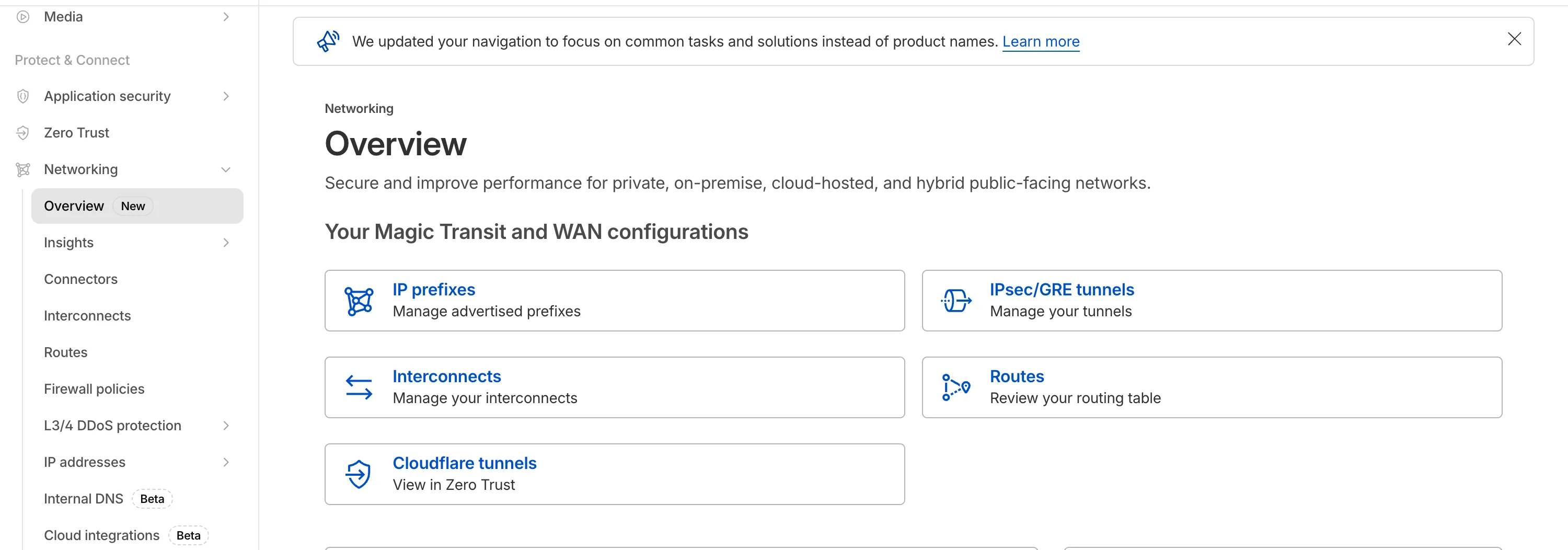
The Network Services menu structure in Cloudflare's dashboard has been updated to reflect solutions and capabilities instead of product names. This will make it easier for you to find what you need and better reflects how our services work together.
Your existing configurations will remain the same, and you will have access to all of the same features and functionality.
A new Overview page provides access to the most common tasks across Magic Transit and Magic WAN.
Product names have been removed from top-level navigation.
Magic Transit and Magic WAN configuration is now organized under Routes and Connectors. For example, you will find IP Prefixes under Routes, and your GRE/IPsec Tunnels under Connectors.
Magic Firewall policies are now called Firewall Policies.
Magic WAN Connectors and Connector On-Ramps are now referenced in the dashboard as Appliances and Appliance profiles. They can be found under Connectors > Appliances.
Network analytics, network health, and real-time analytics are now available under Insights.
Packet Captures are found under Insights > Diagnostics.
You can manage your Sites from Insights > Network health.
You can find Magic Network Monitoring under Insights > Network flow.
If you would like to provide feedback, complete this form ↗. You can also find these details in the January 7, 2026 email titled [FYI] Upcoming Network Services Dashboard Navigation Update.
Cloudflare One has expanded its [User Risk Scoring] (/cloudflare-one/insights/risk-score/) capabilities by introducing two new behaviors for organizations using the [CrowdStrike integration] (/cloudflare-one/integrations/service-providers/crowdstrike/).
Administrators can now automatically escalate the risk score of a user if their device matches specific CrowdStrike Zero Trust Assessment (ZTA) score ranges. This allows for more granular security policies that respond dynamically to the health of the endpoint.
New risk behaviors
The following risk scoring behaviors are now available:
CrowdStrike low device score: Automatically increases a user's risk score when the connected device reports a "Low" score from CrowdStrike.
CrowdStrike medium device score: Automatically increases a user's risk score when the connected device reports a "Medium" score from CrowdStrike.
These scores are derived from [CrowdStrike device posture attributes] (/cloudflare-one/integrations/service-providers/crowdstrike/#device-posture-attributes), including OS signals and sensor configurations.
You can now ping the WARP Connector host directly on its LAN IP address immediately after installation. This provides a fast, familiar way to confirm that the Connector is online and reachable within your network before testing access to downstream services.
Starting with version 2025.10.186.0, WARP Connector responds to traffic addressed to its own LAN IP, giving you immediate visibility into Connector reachability.
We've partnered with Black Forest Labs (BFL) again to bring their optimized FLUX.2 [klein] 4B model to Workers AI! This distilled model offers faster generation and cost-effective pricing, while maintaining great output quality. With a fixed 4-step inference process, Klein 4B is ideal for rapid prototyping and real-time applications where speed matters.
The model hosted on Workers AI is optimized for speed with a fixed 4-step inference process and supports up to 4 image inputs. Since this is a distilled model, the steps parameter is fixed at 4 and cannot be adjusted. Like FLUX.2 [dev], this image model uses multipart form data inputs, even if you just have a prompt.
With the REST API, the multipart form data input looks like this:
curl --request POST \
  --url 'https://api.cloudflare.com/client/v4/accounts/{ACCOUNT}/ai/run/@cf/black-forest-labs/flux-2-klein-4b' \
  --header 'Authorization: Bearer {TOKEN}' \
  --header 'Content-Type: multipart/form-data' \
  --form 'prompt=a sunset at the alps' \
  --form width=1024 \
  --form height=1024
With the Workers AI binding, you can use it as such:
const form = new FormData();form.append("prompt", "a sunset with a dog");form.append("width", "1024");form.append("height", "1024");// FormData doesn't expose its serialized body or boundary. Passing it to a// Request (or Response) constructor serializes it and generates the Content-Type// header with the boundary, which is required for the server to parse the multipart fields.const formResponse = new Response(form);const formStream = formResponse.body;const formContentType = formResponse.headers.get('content-type');const resp = await env.AI.run("@cf/black-forest-labs/flux-2-klein-4b", { multipart: { body: formStream, contentType: formContentType, },});
The parameters you can send to the model are detailed here:
JSON Schema for ModelRequired Parameters
prompt (string) - Text description of the image to generate
Optional Parameters
input_image_0 (string) - Binary image
input_image_1 (string) - Binary image
input_image_2 (string) - Binary image
input_image_3 (string) - Binary image
guidance (float) - Guidance scale for generation. Higher values follow the prompt more closely
width (integer) - Width of the image, default 1024 Range: 256-1920
height (integer) - Height of the image, default 768 Range: 256-1920
seed (integer) - Seed for reproducibility
Note: Since this is a distilled model, the steps parameter is fixed at 4 and cannot be adjusted.
## Multi-Reference ImagesThe FLUX.2 klein-4b model supports generating images based on reference images, just like FLUX.2 [dev]. You can use this feature to apply the style of one image to another, add a new character to an image, or iterate on past generated images. You would use it with the same multipart form data structure, with the input images in binary. The model supports up to 4 input images.For the prompt, you can reference the images based on the index, like `take the subject of image 1 and style it like image 0` or even use natural language like `place the dog beside the woman`.Note: you have to name the input parameter as `input_image_0`, `input_image_1`, `input_image_2`, `input_image_3` for it to work correctly. All input images must be smaller than 512x512.```bashcurl --request POST \ --url 'https://api.cloudflare.com/client/v4/accounts/{ACCOUNT}/ai/run/@cf/black-forest-labs/flux-2-klein-4b' \ --header 'Authorization: Bearer {TOKEN}' \ --header 'Content-Type: multipart/form-data' \ --form 'prompt=take the subject of image 1 and style it like image 0' \ --form input_image_0=@/Users/johndoe/Desktop/icedoutkeanu.png \ --form input_image_1=@/Users/johndoe/Desktop/me.png \ --form width=1024 \ --form height=1024
Through Workers AI Binding:
//helper function to convert ReadableStream to Blobasync function streamToBlob(stream: ReadableStream, contentType: string): Promise<Blob> { const reader = stream.getReader(); const chunks = []; while (true) { const { done, value } = await reader.read(); if (done) break; chunks.push(value); } return new Blob(chunks, { type: contentType });}const image0 = await fetch("http://image-url");const image1 = await fetch("http://image-url");const form = new FormData();const image_blob0 = await streamToBlob(image0.body, "image/png");const image_blob1 = await streamToBlob(image1.body, "image/png");form.append('input_image_0', image_blob0)form.append('input_image_1', image_blob1)form.append('prompt', 'take the subject of image 1 and style it like image 0')// FormData doesn't expose its serialized body or boundary. Passing it to a// Request (or Response) constructor serializes it and generates the Content-Type// header with the boundary, which is required for the server to parse the multipart fields.const formResponse = new Response(form);const formStream = formResponse.body;const formContentType = formResponse.headers.get('content-type');const resp = await env.AI.run("@cf/black-forest-labs/flux-2-klein-4b", { multipart: { body: formStream, contentType: formContentType }})
We have expanded the reporting capabilities of the Cloudflare URL Scanner. In addition to existing JSON and HAR exports, users can now generate and download a PDF report directly from the Cloudflare dashboard.
This update streamlines how security analysts can share findings with stakeholders who may not have access to the Cloudflare dashboard or specialized tools to parse JSON and HAR files.
Key Benefits:
Consolidate scan results, including screenshots, security signatures, and metadata, into a single, portable document
Easily share professional-grade summaries with non-technical stakeholders or legal teams for faster incident response
What’s new:
PDF Export Button: A new download option is available in the URL Scanner results page within the Cloudflare dashboard
Unified Documentation: Access all scan details—from high-level summaries to specific security flags—in one offline-friendly file
This release contains minor fixes, improvements, and new features. New features include the ability to manage WARP client connectivity for all devices in your fleet using an external signal, and a new WARP client device posture check for Antivirus.
Changes and improvements
Added a new feature to manage WARP client connectivity for all devices using an external signal. This feature allows administrators to send a global signal from an on-premises HTTPS endpoint that force disconnects or reconnects all WARP clients in an account based on configuration set on the endpoint.
Fixed an issue that caused occasional audio degradation and increased CPU usage on Windows by optimizing route configurations for large domain-based split tunnel rules.
The Local Domain Fallback feature has been fixed for devices running WARP client version 2025.4.929.0 and newer. Previously, these devices could experience failures with Local Domain Fallback unless a fallback server was explicitly configured. This configuration is no longer a requirement for the feature to function correctly.
Proxy mode now supports transparent HTTP proxying in addition to CONNECT-based proxying.
Fixed an issue where sending large messages to the daemon by Inter-Process Communication (IPC) could cause the daemon to fail and result in service interruptions.
Added support for a new WARP client device posture check for Antivirus. The check confirms the presence of an antivirus program on a Windows device with the option to check if the antivirus is up to date.
Known issues
For Windows 11 24H2 users, Microsoft has confirmed a regression that may lead to performance issues like mouse lag, audio cracking, or other slowdowns. Cloudflare recommends users experiencing these issues upgrade to a minimum Windows 11 24H2 KB5062553 or higher for resolution.
Devices with KB5055523 installed may receive a warning about Win32/ClickFix.ABA being present in the installer. To resolve this false positive, update Microsoft Security Intelligence to version 1.429.19.0 or later.
DNS resolution may be broken when the following conditions are all true:
WARP is in Secure Web Gateway without DNS filtering (tunnel-only) mode.
A custom DNS server address is configured on the primary network adapter.
The custom DNS server address on the primary network adapter is changed while WARP is connected.
To work around this issue, reconnect the WARP client by toggling off and back on.
This release contains minor fixes, improvements, and new features, including the ability to manage WARP client connectivity for all devices in your fleet using an external signal.
Changes and improvements
The Local Domain Fallback feature has been fixed for devices running WARP client version 2025.4.929.0 and newer. Previously, these devices could experience failures with Local Domain Fallback unless a fallback server was explicitly configured. This configuration is no longer a requirement for the feature to function correctly.
Proxy mode now supports transparent HTTP proxying in addition to CONNECT-based proxying.
Added a new feature to manage WARP client connectivity for all devices using an external signal. This feature allows administrators to send a global signal from an on-premises HTTPS endpoint that force disconnects or reconnects all WARP clients in an account based on configuration set on the endpoint.
This release contains minor fixes, improvements, and new features, including the ability to manage WARP client connectivity for all devices in your fleet using an external signal.
WARP client version 2025.8.779.0 introduced an updated public key for Linux packages. The public key must be updated if it was installed before September 12, 2025 to ensure the repository remains functional after December 4, 2025. Instructions to make this update are available at pkg.cloudflareclient.com.
Changes and improvements
The Local Domain Fallback feature has been fixed for devices running WARP client version 2025.4.929.0 and newer. Previously, these devices could experience failures with Local Domain Fallback unless a fallback server was explicitly configured. This configuration is no longer a requirement for the feature to function correctly.
Proxy mode now supports transparent HTTP proxying in addition to CONNECT-based proxying.
Fixed an issue where the GUI becomes unresponsive when the Re-Authenticate in browser button is clicked.
Added a new feature to manage WARP client connectivity for all devices using an external signal. This feature allows administrators to send a global signal from an on-premises HTTPS endpoint that force disconnects or reconnects all WARP clients in an account based on configuration set on the endpoint.
The wrangler types command now generates TypeScript types for bindings from all environments defined in your Wrangler configuration file by default.
Previously, wrangler types only generated types for bindings in the top-level configuration (or a single environment when using the --env flag). This meant that if you had environment-specific bindings — for example, a KV namespace only in production or an R2 bucket only in staging — those bindings would be missing from your generated types, causing TypeScript errors when accessing them.
Now, running wrangler types collects bindings from all environments and includes them in the generated Env type. This ensures your types are complete regardless of which environment you deploy to.
Generating types for a specific environment
If you want the previous behavior of generating types for only a specific environment, you can use the --env flag:
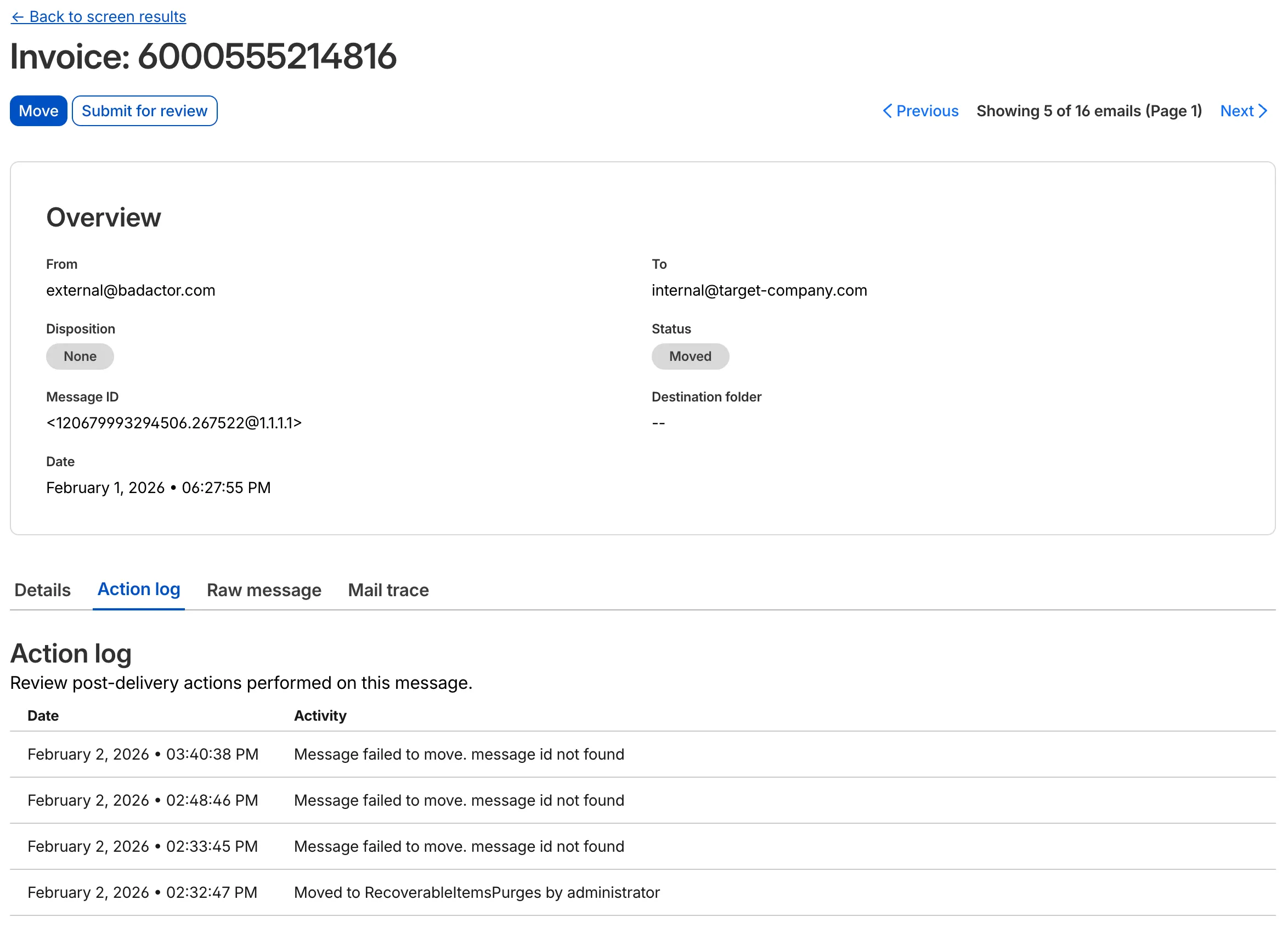
The Action Log now provides enriched data for post-delivery actions to improve troubleshooting. In addition to success confirmations, failed actions now display the targeted Destination folder and a specific failure reason within the Activity field.
This update allows you to see the full lifecycle of a failed action. For instance, if an administrator tries to move an email that has already been deleted or moved manually, the log will now show the multiple retry attempts and the specific destination error.
The ip.src.metro_code field in the Ruleset Engine is now populated with DMA (Designated Market Area) data.
You can use this field to build rules that target traffic based on geographic market areas, enabling more granular location-based policies for your applications.
Field details
Field
Type
Description
ip.src.metro_code
String | null
The metro code (DMA) of the incoming request's IP address. Returns the designated market area code for the client's location.
We are excited to announce that Cloudflare Threat Events now supports the STIX2 (Structured Threat Information Expression) format. This was a highly requested feature designed to streamline how security teams consume and act upon our threat intelligence.
By adopting this industry-standard format, you can now integrate Cloudflare's threat events data more effectively into your existing security ecosystem.
Key benefits
Eliminate the need for custom parsers, as STIX2 allows for "out of the box" ingestion into major Threat Intel Platforms (TIPs), SIEMs, and SOAR tools.
STIX2 provides a standardized way to represent relationships between indicators, sightings, and threat actors, giving your analysts a clearer picture of the threat landscape.