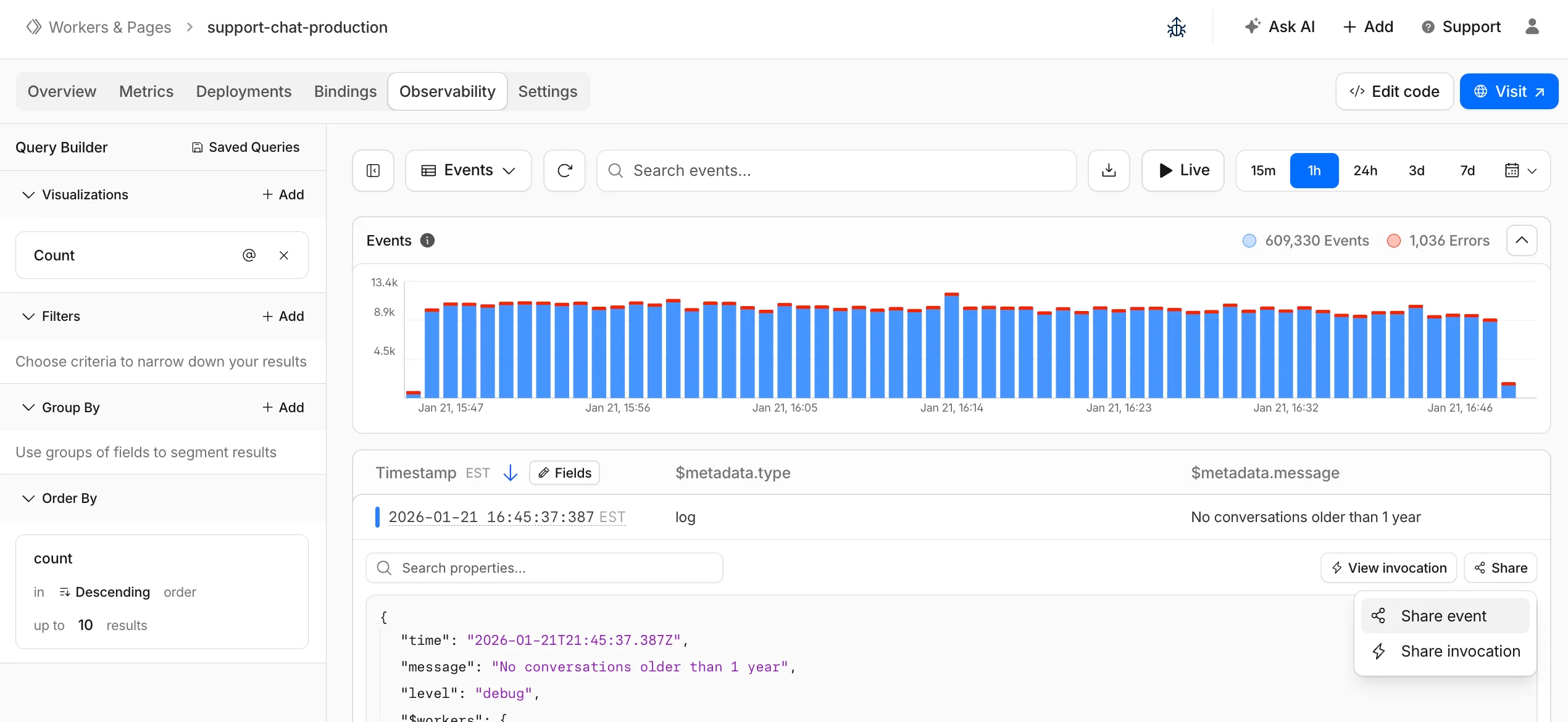
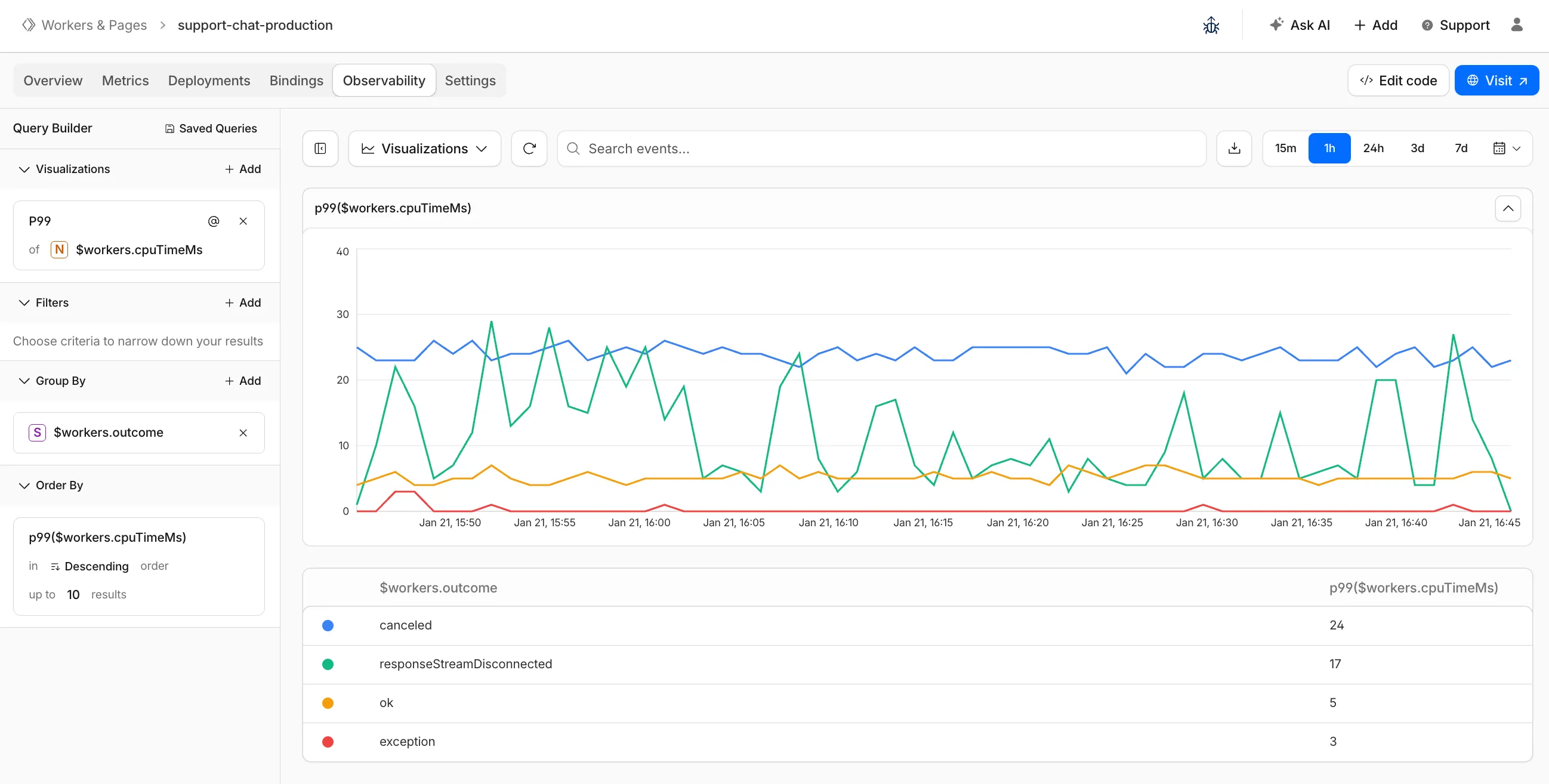
The Workers Observability dashboard ↗ has some major updates to make it easier to debug your application's issues and share findings with your team.
You can now:
Create visualizations — Build charts from your Worker data directly in a Worker's Observability tab
Export data as JSON or CSV — Download logs and traces for offline analysis or to share with teammates
Share events and traces — Generate direct URLs to specific events, invocations, and traces that open standalone pages with full context
Customize table columns — Improved field picker to add, remove, and reorder columns in the events table
Expandable event details — Expand events inline to view full details without leaving the table
Keyboard shortcuts — Navigate the dashboard with hotkey support
These updates are now live in the Cloudflare dashboard, both in a Worker's Observability tab and in the account-level Observability dashboard for a unified experience. To get started, go to Workers & Pages > select your Worker > Observability.
New reference documentation is now available for AI Crawl Control:
GraphQL API reference — Query examples for crawler requests, top paths, referral traffic, and data transfer. Includes key filters for detection IDs, user agents, and referrer domains.
Bot reference — Detection IDs and user agents for major AI crawlers from OpenAI, Anthropic, Google, Meta, and others.
Worker templates — Deploy the x402 Payment-Gated Proxy to monetize crawler access or charge bots while letting humans through free.
Cloudflare Queues is now part of the Workers free plan, offering guaranteed message delivery across up to 10,000 queues to either Cloudflare Workers or HTTP pull consumers. Every Cloudflare account now includes 10,000 operations per day across reads, writes, and deletes. For more details on how each operation is defined, refer to Queues pricing ↗.
All features of the existing Queues functionality are available on the free plan, including unlimited event subscriptions. Note that the maximum retention period on the free tier, however, is 24 hours rather than 14 days.
If you are new to Cloudflare Queues, follow this guide ↗ or try one of our tutorials to get started.
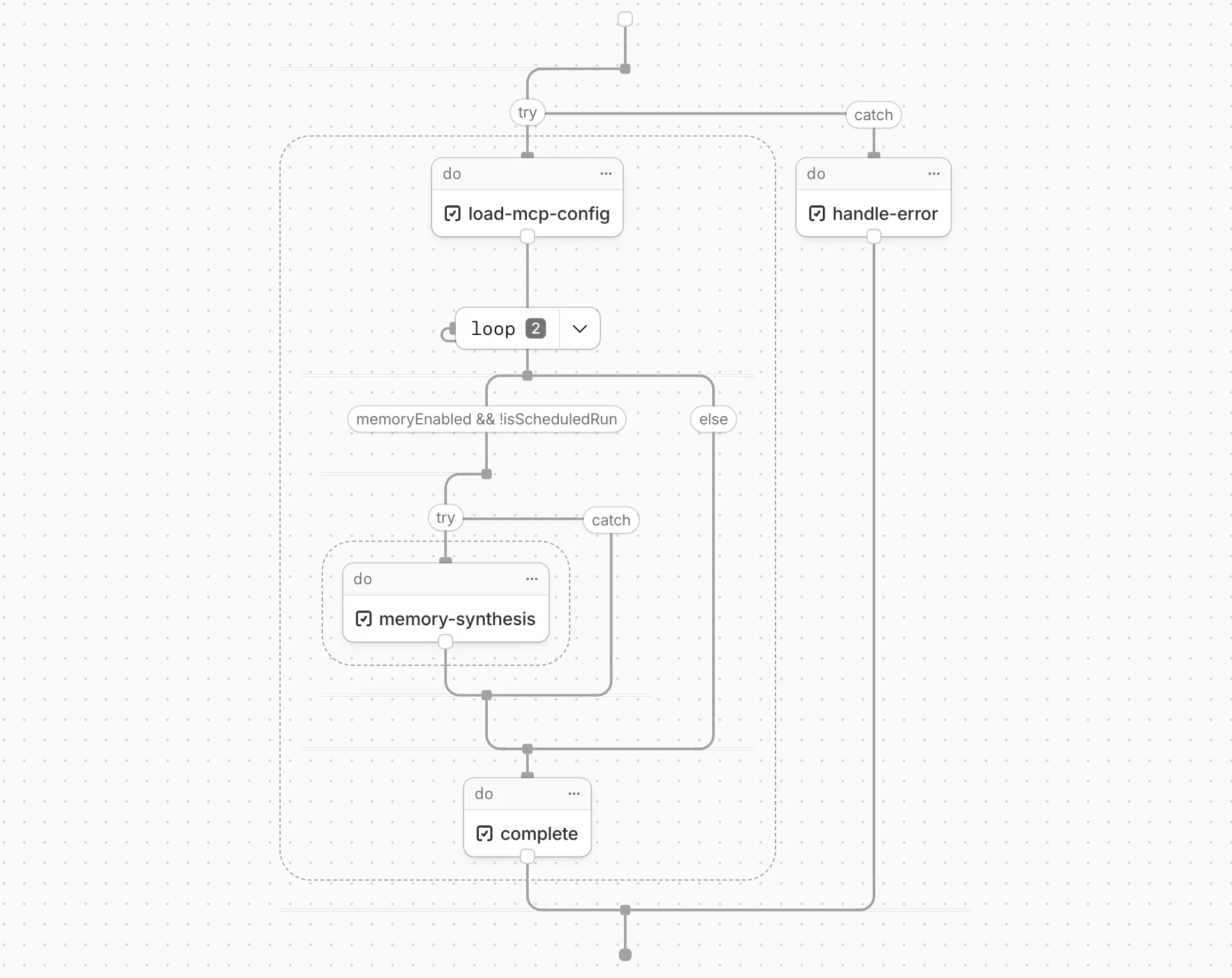
Cloudflare Workflows now automatically generates visual diagrams from your code
Your Workflow is parsed to provide a visual map of the Workflow structure, allowing you to:
Understand how steps connect and execute
Visualize loops and nested logic
Follow branching paths for conditional logic
You can collapse loops and nested logic to see the high-level flow, or expand them to see every step.
Workflow diagrams are available in beta for all JavaScript and TypeScript Workflows. Find your Workflows in the Cloudflare dashboard ↗ to see their diagrams.
The latest release of the Agents SDK ↗ brings first-class support for Cloudflare Workflows, synchronous state management, and new scheduling capabilities.
Cloudflare Workflows integration
Agents excel at real-time communication and state management. Workflows excel at durable execution. Together, they enable powerful patterns where Agents handle WebSocket connections while Workflows handle long-running tasks, retries, and human-in-the-loop flows.
Use the new AgentWorkflow class to define workflows with typed access to your Agent:
Secure email reply routing — Email replies are now secured with HMAC-SHA256 signed headers, preventing unauthorized routing of emails to agent instances.
Routing improvements:
basePath option to bypass default URL construction for custom routing
Server-sent identity — Agents send name and agent type on connect
New onIdentity and onIdentityChange callbacks on the client
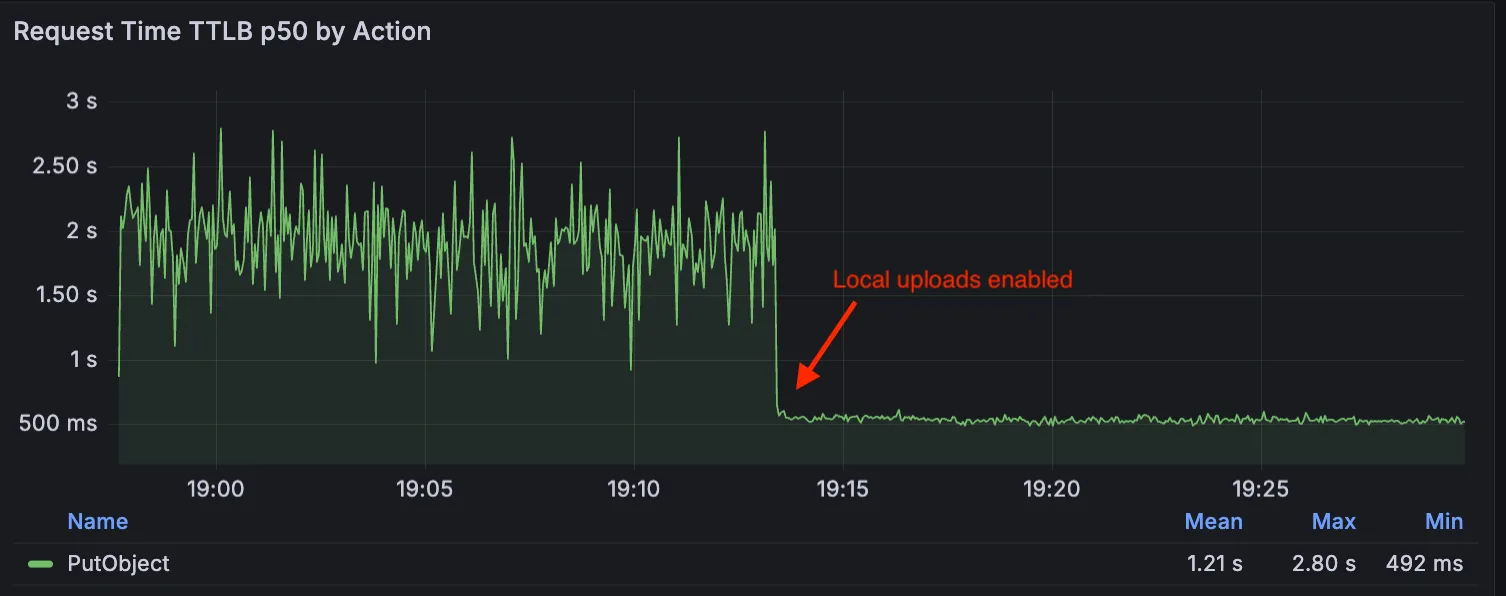
Local Uploads is now available in open beta. Enable it on your R2 bucket to improve upload performance when clients upload data from a different region than your bucket. With Local Uploads enabled, object data is written to storage infrastructure near the client, then asynchronously replicated to your bucket. The object is immediately accessible and remains strongly consistent throughout. Refer to How R2 works for details on how data is written to your bucket.
In our tests, we observed up to 75% reduction in Time to Last Byte (TTLB) for upload requests when Local Uploads is enabled.
This feature is ideal when:
Your users are globally distributed
Upload performance and reliability is critical to your application
You want to optimize write performance without changing your bucket's primary location
To enable Local Uploads on your bucket, find Local Uploads in your bucket settings in the Cloudflare Dashboard ↗, or run:
Enabling Local Uploads on a bucket is seamless: existing uploads will complete as expected and there’s no interruption to traffic. There is no additional cost to enable Local Uploads. Upload requests incur the standard Class A operation costs same as upload requests made without Local Uploads.
Identifying threat actors can be challenging, because naming conventions often vary across the security industry. To simplify your research, Cloudflare Threat Events now include an Also known as field, providing a list of common aliases and industry-standard names for the groups we track.
This new field is available in both the Cloudflare dashboard and via the API. In the dashboard, you can view these aliases by expanding the event details side panel (under the Attacker field) or by adding it as a column in your configurable table view.
Key benefits
Easily map Cloudflare-tracked actors to the naming conventions used by other vendors without manual cross-referencing.
Quickly identify if a detected threat actor matches a group your team is already monitoring via other intelligence feeds.
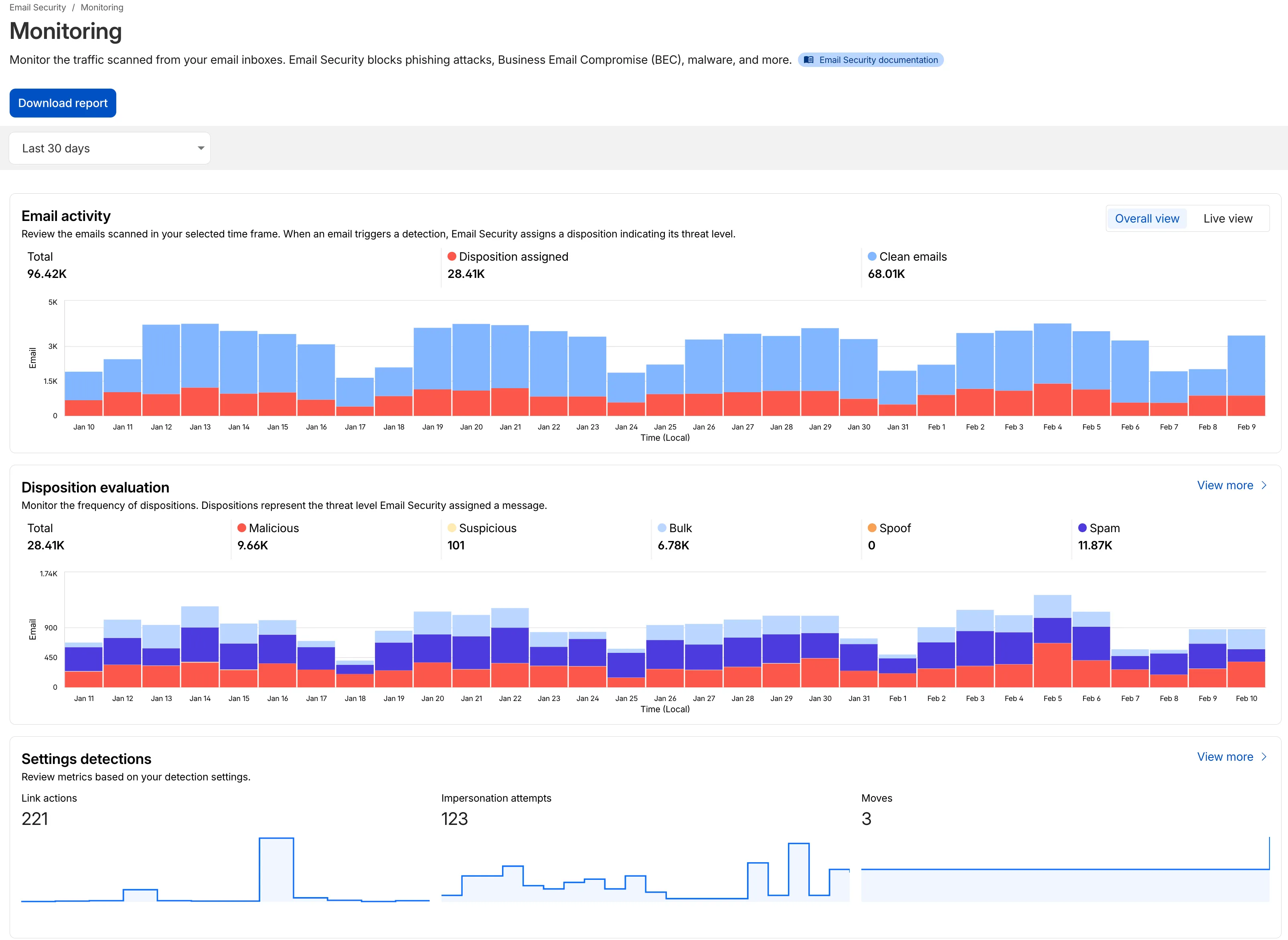
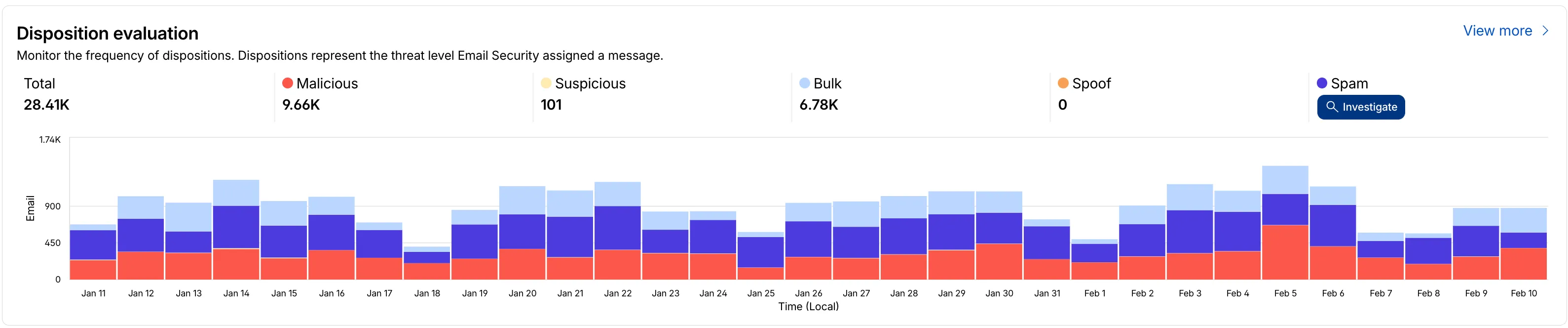
We have updated the Monitoring page to provide a more streamlined and insightful experience for administrators, improving both data visualization and dashboard accessibility.
Enhanced Visual Layout: Optimized contrast and the introduction of stacked bar charts for clearer data visualization and trend analysis.
Improved Accessibility & Usability:
Widget Search: Added search functionality to multiple widgets, including Policies, Submitters, and Impersonation.
Actionable UI: All available actions are now accessible via dedicated buttons.
State Indicators: Improved UI states to clearly communicate loading, empty datasets, and error conditions.
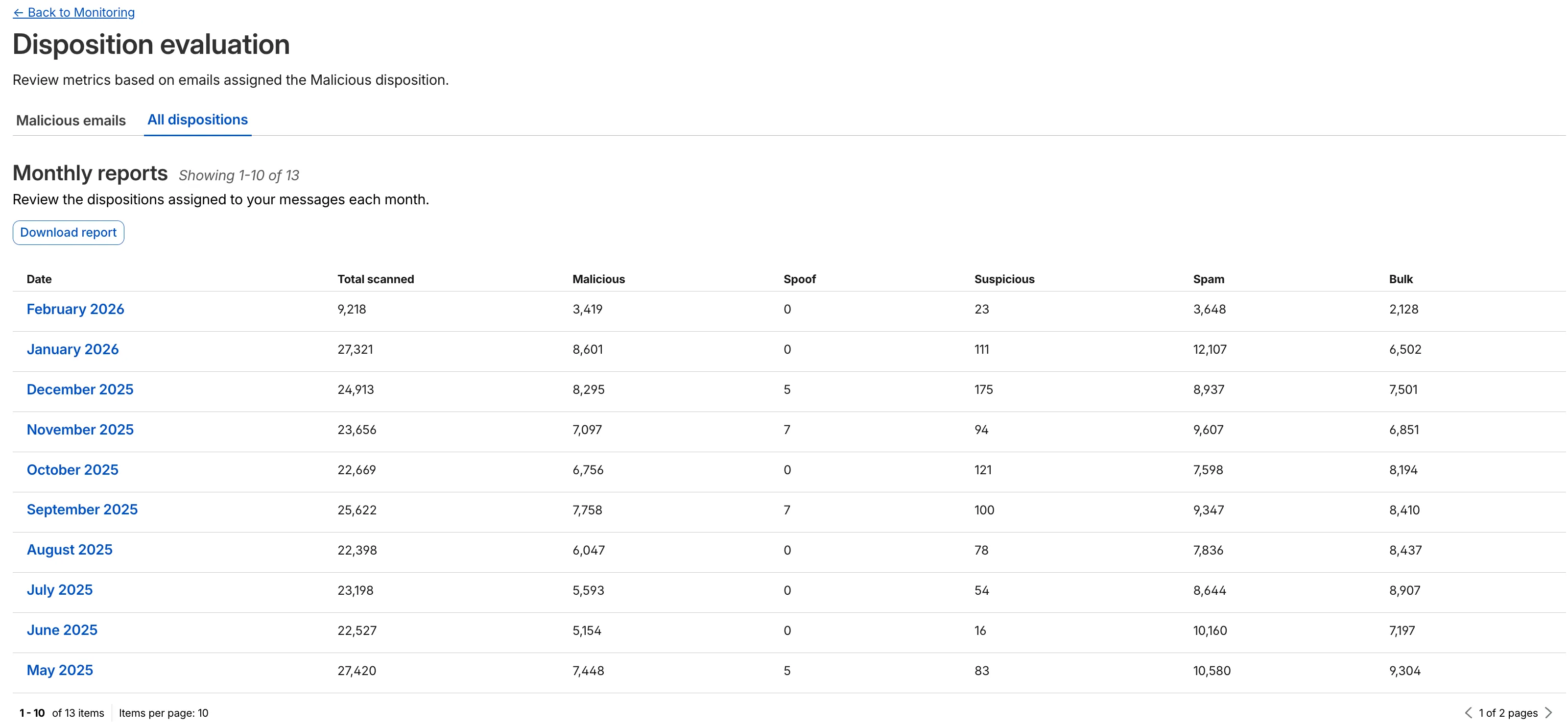
Granular Data Breakdowns: New views for dispositions by month, malicious email details, link actions, and impersonations.
This week’s release introduces new detections for CVE-2025-64459 and CVE-2025-24893.
Key Findings
CVE-2025-64459: Django versions prior to 5.1.14, 5.2.8, and 4.2.26 are vulnerable to SQL injection via crafted dictionaries passed to QuerySet methods and the Q() class.
CVE-2025-24893: XWiki allows unauthenticated remote code execution through crafted requests to the SolrSearch endpoint, affecting the entire installation.
The minimum cacheTtl parameter for Workers KV has been reduced from 60 seconds to 30 seconds. This change applies to both get() and getWithMetadata() methods.
This reduction allows you to maintain more up-to-date cached data and have finer-grained control over cache behavior. Applications requiring faster data refresh rates can now configure cache durations as low as 30 seconds instead of the previous 60-second minimum.
The cacheTtl parameter defines how long a KV result is cached at the global network location it is accessed from:
// Read with custom cache TTLconst value = await env.NAMESPACE.get("my-key", { cacheTtl: 30, // Cache for minimum 30 seconds (previously 60)});// getWithMetadata also supports the reduced cache TTLconst valueWithMetadata = await env.NAMESPACE.getWithMetadata("my-key", { cacheTtl: 30, // Cache for minimum 30 seconds});
The default cache TTL remains unchanged at 60 seconds. Upgrade to the latest version of Wrangler to be able to use 30 seconds cacheTtl.
Magic WAN and Magic Transit customers can use the Cloudflare dashboard to configure and manage BGP peering between their networks and their Magic routing table when using IPsec and GRE tunnel on-ramps (beta).
Using BGP peering allows customers to:
Automate the process of adding or removing networks and subnets.
Take advantage of failure detection and session recovery features.
With this functionality, customers can:
Establish an eBGP session between their devices and the Magic WAN / Magic Transit service when connected via IPsec and GRE tunnel on-ramps.
Secure the session by MD5 authentication to prevent misconfigurations.
Exchange routes dynamically between their devices and their Magic routing table.
We have partnered with Black Forest Labs (BFL) again to bring their optimized FLUX.2 [klein] 9B model to Workers AI. This distilled model offers enhanced quality compared to the 4B variant, while maintaining cost-effective pricing. With a fixed 4-step inference process, Klein 9B is ideal for rapid prototyping and real-time applications where both speed and quality matter.
The model hosted on Workers AI is optimized for speed with a fixed 4-step inference process and supports up to 4 image inputs. Since this is a distilled model, the steps parameter is fixed at 4 and cannot be adjusted. Like FLUX.2 [dev] and FLUX.2 [klein] 4B, this image model uses multipart form data inputs, even if you just have a prompt.
With the REST API, the multipart form data input looks like this:
curl --request POST \
  --url 'https://api.cloudflare.com/client/v4/accounts/{ACCOUNT}/ai/run/@cf/black-forest-labs/flux-2-klein-9b' \
  --header 'Authorization: Bearer {TOKEN}' \
  --header 'Content-Type: multipart/form-data' \
  --form 'prompt=a sunset at the alps' \
  --form width=1024 \
  --form height=1024
With the Workers AI binding, you can use it as such:
const form = new FormData();form.append("prompt", "a sunset with a dog");form.append("width", "1024");form.append("height", "1024");// FormData doesn't expose its serialized body or boundary. Passing it to a// Request (or Response) constructor serializes it and generates the Content-Type// header with the boundary, which is required for the server to parse the multipart fields.const formResponse = new Response(form);const formStream = formResponse.body;const formContentType = formResponse.headers.get('content-type');const resp = await env.AI.run("@cf/black-forest-labs/flux-2-klein-9b", { multipart: { body: formStream, contentType: formContentType, },});
The parameters you can send to the model are detailed here:
JSON Schema for ModelRequired Parameters
prompt (string) - Text description of the image to generate
Optional Parameters
input_image_0 (string) - Binary image
input_image_1 (string) - Binary image
input_image_2 (string) - Binary image
input_image_3 (string) - Binary image
guidance (float) - Guidance scale for generation. Higher values follow the prompt more closely
width (integer) - Width of the image, default 1024 Range: 256-1920
height (integer) - Height of the image, default 768 Range: 256-1920
seed (integer) - Seed for reproducibility
Note: Since this is a distilled model, the steps parameter is fixed at 4 and cannot be adjusted.
Multi-reference images
The FLUX.2 klein-9b model supports generating images based on reference images, just like FLUX.2 [dev] and FLUX.2 [klein] 4B. You can use this feature to apply the style of one image to another, add a new character to an image, or iterate on past generated images. You would use it with the same multipart form data structure, with the input images in binary. The model supports up to 4 input images.
For the prompt, you can reference the images based on the index, like take the subject of image 1 and style it like image 0 or even use natural language like place the dog beside the woman.
You must name the input parameter as input_image_0, input_image_1, input_image_2, input_image_3 for it to work correctly. All input images must be smaller than 512x512.
curl --request POST \
  --url 'https://api.cloudflare.com/client/v4/accounts/{ACCOUNT}/ai/run/@cf/black-forest-labs/flux-2-klein-9b' \
  --header 'Authorization: Bearer {TOKEN}' \
  --header 'Content-Type: multipart/form-data' \
  --form 'prompt=take the subject of image 1 and style it like image 0' \
  --form input_image_0=@/Users/johndoe/Desktop/icedoutkeanu.png \
  --form input_image_1=@/Users/johndoe/Desktop/me.png \
  --form width=1024 \
  --form height=1024
Through Workers AI Binding:
//helper function to convert ReadableStream to Blobasync function streamToBlob(stream: ReadableStream, contentType: string): Promise<Blob> { const reader = stream.getReader(); const chunks = []; while (true) { const { done, value } = await reader.read(); if (done) break; chunks.push(value); } return new Blob(chunks, { type: contentType });}const image0 = await fetch("http://image-url");const image1 = await fetch("http://image-url");const form = new FormData();const image_blob0 = await streamToBlob(image0.body, "image/png");const image_blob1 = await streamToBlob(image1.body, "image/png");form.append('input_image_0', image_blob0)form.append('input_image_1', image_blob1)form.append('prompt', 'take the subject of image 1 and style it like image 0')// FormData doesn't expose its serialized body or boundary. Passing it to a// Request (or Response) constructor serializes it and generates the Content-Type// header with the boundary, which is required for the server to parse the multipart fields.const formResponse = new Response(form);const formStream = formResponse.body;const formContentType = formResponse.headers.get('content-type');const resp = await env.AI.run("@cf/black-forest-labs/flux-2-klein-9b", { multipart: { body: formStream, contentType: formContentType }})
This release contains minor fixes, improvements, and new features.
Changes and improvements
Improvements to multi-user mode. Fixed an issue where when switching from a pre-login registration to a user registration, Mobile Device Management (MDM) configuration association could be lost.
Added a new feature to manage NetBIOS over TCP/IP functionality on the Windows client. NetBIOS over TCP/IP on the Windows client is now disabled by default and can be enabled in device profile settings.
Fixed an issue causing failure of the local network exclusion feature when configured with a timeout of 0.
Improvement for the Windows client certificate posture check to ensure logged results are from checks that run once users log in.
Improvement for more accurate reporting of device colocation information in the Cloudflare One dashboard.
Known issues
For Windows 11 24H2 users, Microsoft has confirmed a regression that may lead to performance issues like mouse lag, audio cracking, or other slowdowns. Cloudflare recommends users experiencing these issues upgrade to a minimum Windows 11 24H2 KB5062553 or higher for resolution.
Devices with KB5055523 installed may receive a warning about Win32/ClickFix.ABA being present in the installer. To resolve this false positive, update Microsoft Security Intelligence to version 1.429.19.0 or later.
DNS resolution may be broken when the following conditions are all true:
WARP is in Secure Web Gateway without DNS filtering (tunnel-only) mode.
A custom DNS server address is configured on the primary network adapter.
The custom DNS server address on the primary network adapter is changed while WARP is connected.
To work around this issue, reconnect the WARP client by toggling off and back on.
Cloudflare source IPs are the IP addresses used by Cloudflare services (such as Load Balancing, Gateway, and Browser Isolation) when sending traffic to your private networks.
For customers using legacy mode routing, traffic to private networks is sourced from public Cloudflare IPs, which may cause IP conflicts. For customers using Unified Routing mode (beta), traffic to private networks is sourced from dedicated, non-Internet-routable private IPv4 range to ensure:
Symmetric routing over private network connections
Proper firewall state preservation
Private traffic stays on secure paths
Key details:
IPv4: Sourced from 100.64.0.0/12 by default, configurable to any /12 CIDR
IPv6: Sourced from 2606:4700:cf1:5000::/64 (not configurable)
Affected connectors: GRE, IPsec, CNI, WARP Connector, and WARP Client (Cloudflare Tunnel is not affected)
Configuring Cloudflare source IPs requires Unified Routing (beta) and the Cloudflare One Networks Write permission.
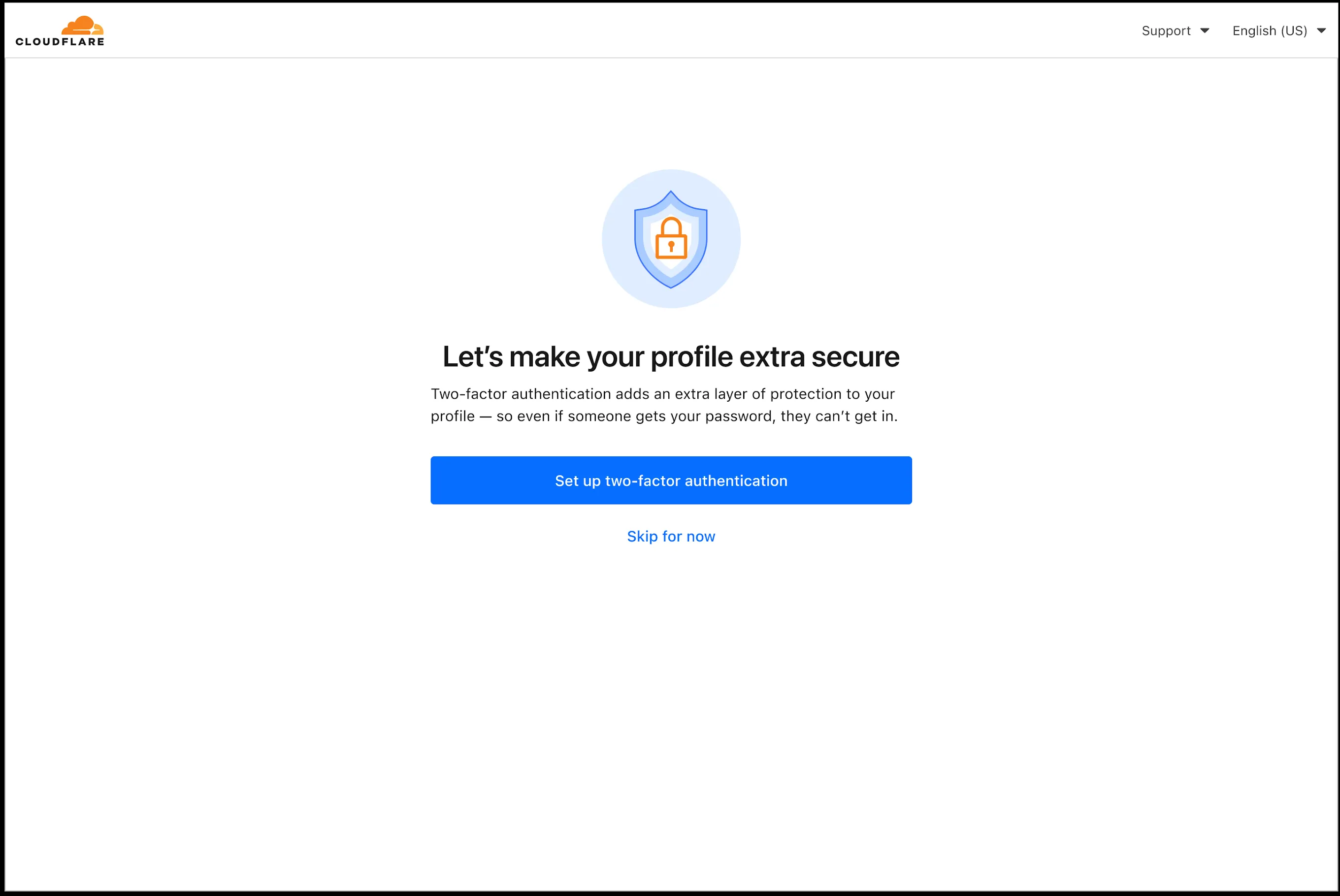
In an effort to improve overall user security, users without 2FA will be prompted upon login to enroll in email 2FA. This will improve user security posture while minimizing friction. Users without email 2FA enabled will see a prompt to secure their account with additional factors upon logging in. Enrolling in 2FA remains optional, but strongly encouraged as it is the best way to prevent account takeovers.
We also made changes to existing 2FA screens to improve the user experience. Now we have distinct experiences for each 2FA factor type, reflective of the way that factor works.
You can now store up to 10 million vectors in a single Vectorize index, doubling the previous limit of 5 million vectors. This enables larger-scale semantic search, recommendation systems, and retrieval-augmented generation (RAG) applications without splitting data across multiple indexes.
Vectorize continues to support indexes with up to 1,536 dimensions per vector at 32-bit precision. Refer to the Vectorize limits documentation for complete details.
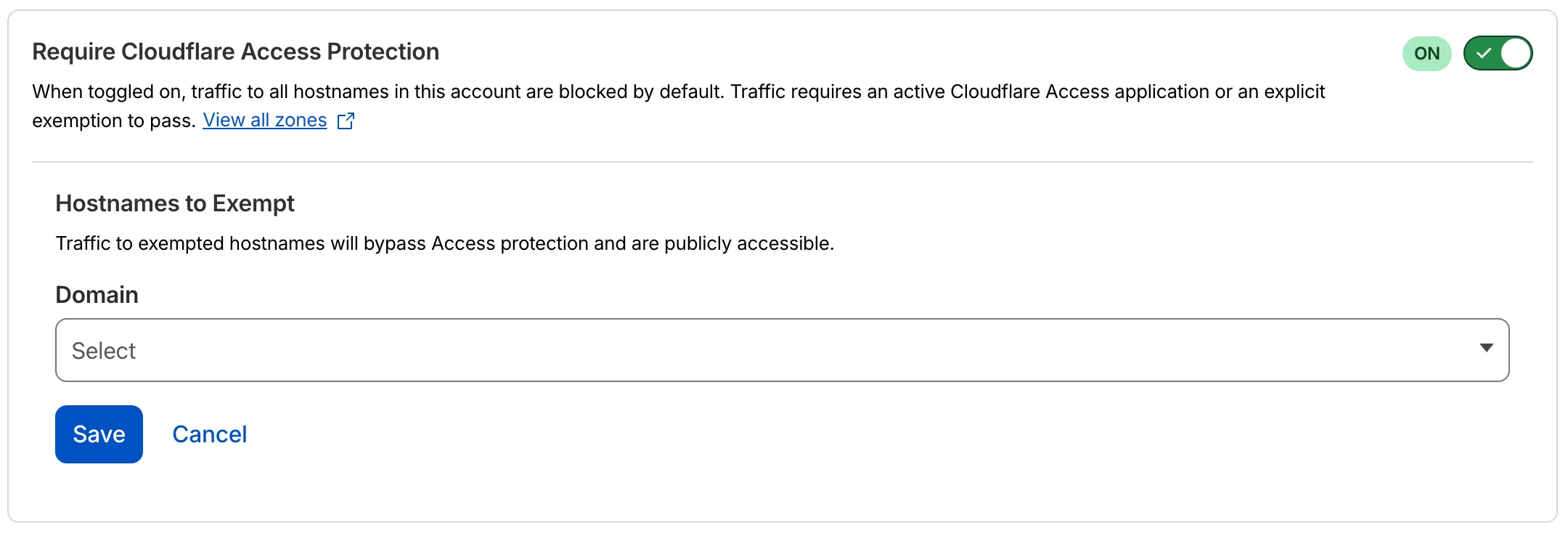
You can now require Cloudflare Access protection for all hostnames in your account. When enabled, traffic to any hostname that does not have a matching Access application is automatically blocked.
This deny-by-default approach prevents accidental exposure of internal resources to the public Internet. If a developer deploys a new application or creates a DNS record without configuring an Access application, the traffic is blocked rather than exposed.
How it works
Blocked by default: Traffic to all hostnames in the account is blocked unless an Access application exists for that hostname.
Explicit access required: To allow traffic, create an Access application with an Allow or Bypass policy.
Hostname exemptions: You can exempt specific hostnames from this requirement.
Three new API token permissions are available for Cloudflare Access, giving you finer-grained control when building automations and integrations:
Access: Organizations Revoke — Grants the ability to revoke user sessions in a Zero Trust organization. Use this permission when you need a token that can terminate active sessions without broader write access to organization settings.
Access: Population Read — Grants read access to the SCIM users and groups synced from an identity provider to Cloudflare Access. Use this permission for tokens that only need to read synced user and group data.
Access: Population Write — Grants write access to the SCIM users and groups synced from an identity provider to Cloudflare Access. Use this permission for tokens that need to create or modify synced user and group data.
These permissions are scoped at the account level and can be combined with existing Access permissions.
Cloudflare Rulesets now includes encode_base64() and sha256() functions, enabling you to generate signed request headers directly in rule expressions. These functions support common patterns like constructing a canonical string from request attributes, computing a SHA256 digest, and Base64-encoding the result.
New functions
Function
Description
Availability
encode_base64(input, flags)
Encodes a string to Base64 format. Optional flags parameter: u for URL-safe encoding, p for padding (adds = characters to make the output length a multiple of 4, as required by some systems). By default, output is standard Base64 without padding.
All plans (in header transform rules)
sha256(input)
Computes a SHA256 hash of the input string.
Requires enablement
Examples
Encode a string to Base64 format:
encode_base64("hello world")
Returns: aGVsbG8gd29ybGQ
Encode a string to Base64 format with padding:
encode_base64("hello world", "p")
Returns: aGVsbG8gd29ybGQ=
Perform a URL-safe Base64 encoding of a string:
encode_base64("hello world", "u")
Returns: aGVsbG8gd29ybGQ
Compute the SHA256 hash of a secret token:
sha256("my-token")
Returns a hash that your origin can validate to authenticate requests.
Compute the SHA256 hash of a string and encode the result to Base64 format:
encode_base64(sha256("my-token"))
Combines hashing and encoding for systems that expect Base64-encoded signatures.
You can now configure Workers to run close to infrastructure in legacy cloud regions to minimize latency to existing services and databases. This is most useful when your Worker makes multiple round trips.
To set a placement hint, set the placement.region property in your Wrangler configuration file:
{ "placement": { "region": "aws:us-east-1", },}
[placement]region = "aws:us-east-1"
Placement hints support Amazon Web Services (AWS), Google Cloud Platform (GCP), and Microsoft Azure region identifiers. Workers run in the Cloudflare data center ↗ with the lowest latency to the specified cloud region.
If your existing infrastructure is not in these cloud providers, expose it to placement probes with placement.host for layer 4 checks or placement.hostname for layer 7 checks. These probes are designed to locate single-homed infrastructure and are not suitable for anycasted or multicasted resources.
This is an extension of Smart Placement, which automatically places your Workers closer to back-end APIs based on measured latency. When you do not know the location of your back-end APIs or have multiple back-end APIs, set mode: "smart":