We are updating naming related to some of our Networking products to better clarify their place in the Zero Trust and Secure Access Service Edge (SASE) journey.
We are retiring some older brand names in favor of names that describe exactly what the products do within your network. We are doing this to help customers build better, clearer mental models for comprehensive SASE architecture delivered on Cloudflare.
What's changing
Magic WAN → Cloudflare WAN
Magic WAN IPsec → Cloudflare IPsec
Magic WAN GRE → Cloudflare GRE
Magic WAN Connector → Cloudflare One Appliance
Magic Firewall → Cloudflare Network Firewall
Magic Network Monitoring → Network Flow
Magic Cloud Networking → Cloudflare One Multi-cloud Networking
No action is required by you — all functionality, existing configurations, and billing will remain exactly the same.
Sandboxes and Containers now support running Docker for "Docker-in-Docker" setups. This is particularly useful when your end users or agents want to run a full sandboxed development environment.
This allows you to:
Develop containerized applications with your Sandbox
Run isolated test environments for images
Build container images as part of CI/CD workflows
Deploy arbitrary images supplied at runtime within a container
When AI systems request pages from any website that uses Cloudflare and has Markdown for Agents enabled, they can express the preference for text/markdown in the request: our network will automatically and efficiently convert the HTML to markdown, when possible, on the fly.
This release adds the following improvements:
The origin response limit was raised from 1 MB to 2 MB (2,097,152 bytes).
We no longer require the origin to send the content-length header.
We now support content encoded responses from the origin.
If you haven’t enabled automatic Markdown conversion yet, visit the AI Crawl Control ↗ section of the Cloudflare dashboard and enable Markdown for Agents.
This week’s release introduces new detections for CVE-2025-68645 and CVE-2025-31125.
Key Findings
CVE-2025-68645: A Local File Inclusion (LFI) vulnerability in the Webmail Classic UI of Zimbra Collaboration Suite (ZCS) 10.0 and 10.1 allows unauthenticated remote attackers to craft requests to the /h/rest endpoint, improperly influence internal dispatching, and include arbitrary files from the WebRoot directory.
CVE-2025-31125: Vite, the JavaScript frontend tooling framework, exposes content of non-allowed files via ?inline&import when its development server is network-exposed, enabling unauthorized attackers to read arbitrary files and potentially leak sensitive information.
Ruleset
Rule ID
Legacy Rule ID
Description
Previous Action
New Action
Comments
Cloudflare Managed Ruleset
N/A
Zimbra - Local File Inclusion - CVE:CVE-2025-68645
Log
Block
This is a new detection.
Cloudflare Managed Ruleset
N/A
Vite - WASM Import Path Traversal - CVE:CVE-2025-31125
Cloudflare has deprecated the Workers Quick Editor dev tools inspector and replaced it with a lightweight log viewer.
This aligns our logging with wrangler tail and gives us the opportunity to focus our efforts on bringing benefits from the work we have invested in observability, which would not be possible otherwise.
We have made improvements to this logging viewer based on your feedback such that you can log object and array types, and easily clear the list of logs. This does not include class instances. Limitations are documented in the Workers Playground docs.
If you do need to develop your Worker with a remote inspector, you can still do this using Wrangler locally. Cloning a project from your quick editor to your computer for local development can be done with the wrangler init --from-dash command. For more information, refer to Wrangler commands.
A new Workers Best Practices guide provides opinionated recommendations for building fast, reliable, observable, and secure Workers. The guide draws on production patterns, Cloudflare internal usage, and best practices observed from developers building on Workers.
Key guidance includes:
Keep your compatibility date current and enable nodejs_compat — Ensure you have access to the latest runtime features and Node.js built-in modules.
{ "name": "my-worker", "main": "src/index.ts", // Set this to today's date "compatibility_date": "2026-07-20", "compatibility_flags": ["nodejs_compat"],}
name = "my-worker"main = "src/index.ts"# Set this to today's datecompatibility_date = "2026-07-20"compatibility_flags = [ "nodejs_compat" ]
Generate binding types with wrangler types — Never hand-write your Env interface. Let Wrangler generate it from your actual configuration to catch mismatches at compile time.
Stream request and response bodies — Avoid buffering large payloads in memory. Use TransformStream and pipeTo to stay within the 128 MB memory limit and improve time-to-first-byte.
Use bindings, not REST APIs — Bindings to KV, R2, D1, Queues, and other Cloudflare services are direct, in-process references with no network hop and no authentication overhead.
Use Queues and Workflows for background work — Move long-running or retriable tasks out of the critical request path. Use Queues for simple fan-out and buffering, and Workflows for multi-step durable processes.
Enable Workers Logs and Traces — Configure observability before deploying to production so you have data when you need to debug.
Avoid global mutable state — Workers reuse isolates across requests. Storing request-scoped data in module-level variables causes cross-request data leaks.
Always await or waitUntil your Promises — Floating promises cause silent bugs and dropped work.
Use Web Crypto for secure token generation — Never use Math.random() for security-sensitive operations.
Fine-grained permissions for Access policies and Access service tokens are available. These new resource-scoped roles expand the existing RBAC model, enabling administrators to grant permissions scoped to individual resources.
New roles
Cloudflare Access policy admin: Can edit a specific Access policy in an account.
Cloudflare Access service token admin: Can edit a specific Access service token in an account.
These roles complement the existing resource-scoped roles for Access applications, identity providers, and infrastructure targets.
In this release, you'll see a large number of breaking changes. This is primarily due to a change in OpenAPI definitions,
which our libraries are based off of, and codegen updates that we rely on to read those OpenAPI definitions and produce
our SDK libraries. As the codegen is always evolving and improving, so are our code bases.
There may be changes that are not captured in this changelog. Feel free to open an issue to report any inaccuracies, and we will make sure it gets into the changelog before the v5.0.0 release.
Most of the breaking changes below are caused by improvements to the accuracy of the base OpenAPI schemas, which
sometimes translates to breaking changes in downstream clients that depend on those schemas.
Please ensure you read through the list of changes below and the migration guide before moving to this version - this
will help you understand any down or upstream issues it may cause to your environments.
Breaking Changes
The following resources have breaking changes. See the v5 Migration Guide ↗ for detailed migration instructions.
We're excited to announce GLM-4.7-Flash on Workers AI, a fast and efficient text generation model optimized for multilingual dialogue and instruction-following tasks, along with the brand-new @cloudflare/tanstack-ai ↗ package and workers-ai-provider v3.1.1 ↗.
You can now run AI agents entirely on Cloudflare. With GLM-4.7-Flash's multi-turn tool calling support, plus full compatibility with TanStack AI and the Vercel AI SDK, you have everything you need to build agentic applications that run completely at the edge.
GLM-4.7-Flash — Multilingual Text Generation Model
@cf/zai-org/glm-4.7-flash is a multilingual model with a 131,072 token context window, making it ideal for long-form content generation, complex reasoning tasks, and multilingual applications.
Key Features and Use Cases:
Multi-turn Tool Calling for Agents: Build AI agents that can call functions and tools across multiple conversation turns
Multilingual Support: Built to handle content generation in multiple languages effectively
Large Context Window: 131,072 tokens for long-form writing, complex reasoning, and processing long documents
Fast Inference: Optimized for low-latency responses in chatbots and virtual assistants
Instruction Following: Excellent at following complex instructions for code generation and structured tasks
@cloudflare/tanstack-ai v0.1.1 — TanStack AI adapters for Workers AI and AI Gateway
We've released @cloudflare/tanstack-ai, a new package that brings Workers AI and AI Gateway support to TanStack AI ↗. This provides a framework-agnostic alternative for developers who prefer TanStack's approach to building AI applications.
Workers AI adapters support four configuration modes — plain binding (env.AI), plain REST, AI Gateway binding (env.AI.gateway(id)), and AI Gateway REST — across all capabilities:
Chat (createWorkersAiChat) — Streaming chat completions with tool calling, structured output, and reasoning text streaming.
Summarization (createWorkersAiSummarize) — Text summarization.
AI Gateway adapters route requests from third-party providers — OpenAI, Anthropic, Gemini, Grok, and OpenRouter — through Cloudflare AI Gateway for caching, rate limiting, and unified billing.
To get started:
npm install @cloudflare/tanstack-ai @tanstack/ai
workers-ai-provider v3.1.1 — transcription, speech, reranking, and reliability
The Workers AI provider for the Vercel AI SDK ↗ now supports three new capabilities beyond chat and image generation:
Transcription (provider.transcription(model)) — Speech-to-text with automatic handling of model-specific input formats across binding and REST paths.
Text-to-speech (provider.speech(model)) — Audio generation with support for voice and speed options.
Reranking (provider.reranking(model)) — Document reranking for RAG pipelines and search result ordering.
import { createWorkersAI } from "workers-ai-provider";import { experimental_transcribe, experimental_generateSpeech, rerank,} from "ai";const workersai = createWorkersAI({ binding: env.AI });const transcript = await experimental_transcribe({ model: workersai.transcription("@cf/openai/whisper-large-v3-turbo"), audio: audioData, mediaType: "audio/wav",});const speech = await experimental_generateSpeech({ model: workersai.speech("@cf/deepgram/aura-1"), text: "Hello world", voice: "asteria",});const ranked = await rerank({ model: workersai.reranking("@cf/baai/bge-reranker-base"), query: "What is machine learning?", documents: ["ML is a branch of AI.", "The weather is sunny."],});
This release also includes a comprehensive reliability overhaul (v3.0.5):
Fixed streaming — Responses now stream token-by-token instead of buffering all chunks, using a proper TransformStream pipeline with backpressure.
Fixed tool calling — Resolved issues with tool call ID sanitization, conversation history preservation, and a heuristic that silently fell back to non-streaming mode when tools were defined.
Premature stream termination detection — Streams that end unexpectedly now report finishReason: "error" instead of silently reporting "stop".
AI Search support — Added createAISearch as the canonical export (renamed from AutoRAG). createAutoRAG still works with a deprecation warning.
Workers VPC now supports Cloudflare Origin CA certificates when connecting to your private services over HTTPS. Previously, Workers VPC only trusted certificates issued by publicly trusted certificate authorities (for example, Let's Encrypt, DigiCert).
With this change, you can use free Cloudflare Origin CA certificates on your origin servers within private networks and connect to them from Workers VPC using the https scheme. This is useful for encrypting traffic between the tunnel and your service without needing to provision certificates from a public CA.
Cloudflare WAN now displays your Anycast IP addresses directly in the dashboard when you configure IPsec or GRE tunnels.
Previously, customers received their Anycast IPs during onboarding or had to retrieve them with an API call. The dashboard now pre-loads these addresses, reducing setup friction and preventing configuration errors.
No action is required. All Cloudflare WAN customers can see their Anycast IPs in the tunnel configuration form automatically.
Cloudflare's network now supports real-time content conversion at the source, for enabled zones using content negotiation ↗ headers. When AI systems request pages from any website that uses Cloudflare and has Markdown for Agents enabled, they can express the preference for text/markdown in the request: our network will automatically and efficiently convert the HTML to markdown, when possible, on the fly.
Here is a curl example with the Accept negotiation header requesting this page from our developer documentation:
The response to this request is now formatted in markdown:
HTTP/2 200date: Wed, 11 Feb 2026 11:44:48 GMTcontent-type: text/markdown; charset=utf-8content-length: 2899vary: acceptx-markdown-tokens: 725content-signal: ai-train=yes, search=yes, ai-input=yes---title: Markdown for Agents · Cloudflare Agents docs---## What is Markdown for AgentsMarkdown has quickly become the lingua franca for agents and AI systemsas a whole. The format’s explicit structure makes it ideal for AI processing,ultimately resulting in better results while minimizing token waste....
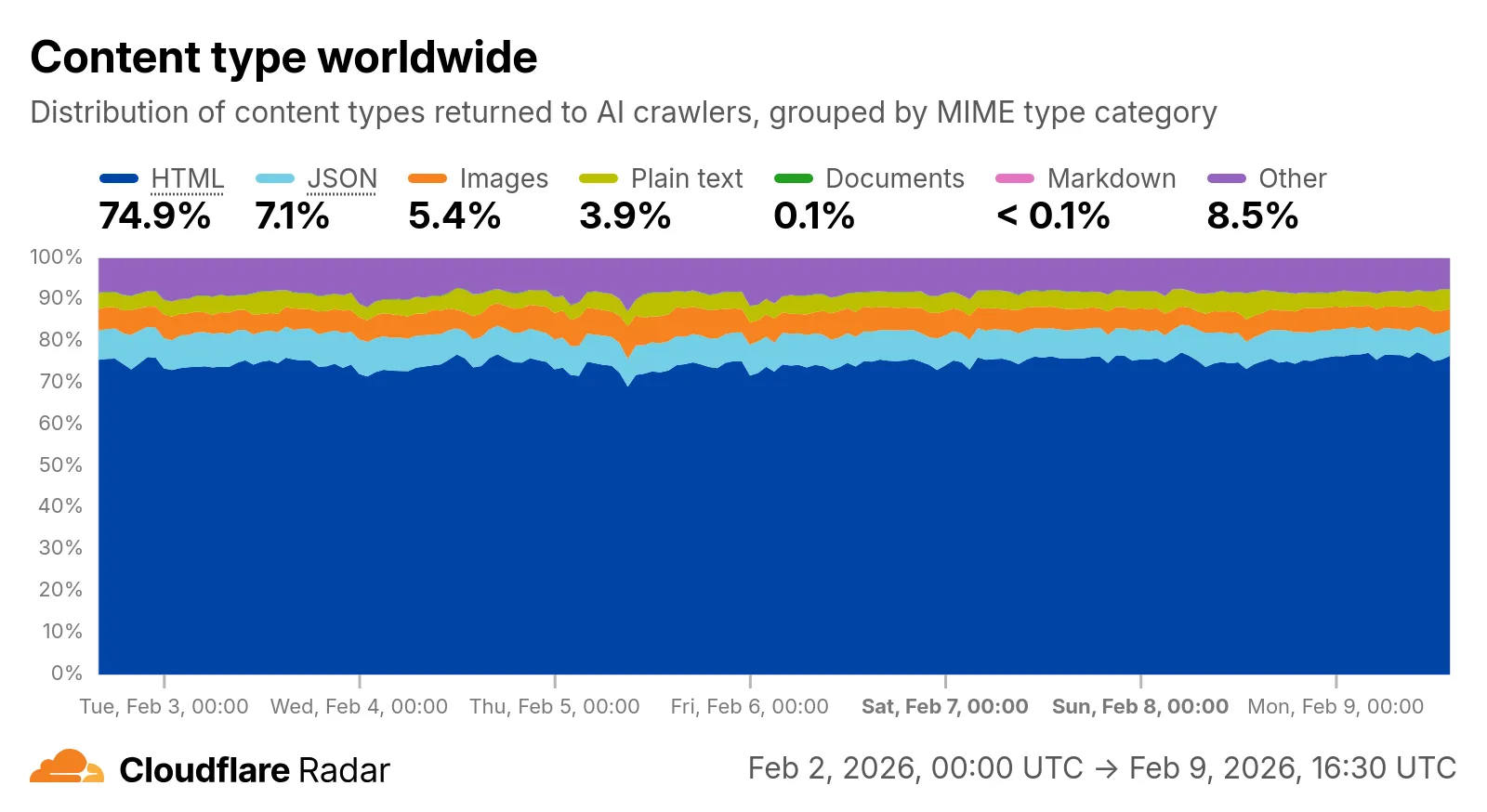
Radar now includes content type insights for AI bot and crawler traffic. The new content_type dimension and filter shows the distribution of content types returned to AI crawlers, grouped by MIME type category.
The content type dimension and filter are available via the following API endpoints:
Serialization - Binary API formats (application/protobuf, application/grpc, application/msgpack)
Other - All other content types
Additionally, individual bot information pages ↗ now display content type distribution for AI crawlers that exist in both the Verified Bots and AI Bots datasets.
We have significantly upgraded our Logo Matching capabilities within Brand Protection. While previously limited to approximately 100% matches, users can now detect a wider range of brand assets through a redesigned matching model and UI.
What's new
Configurable match thresholds: Users can set a minimum match score (starting at 75%) when creating a logo query to capture subtle variations or high-quality impersonations.
Visual match scores: Allow users to see the exact percentage of the match directly in the results table, highlighted with color-coded lozenges to indicate severity.
Direct logo previews: Available in the Cloudflare dashboard — similar to string matches — to verify infringements at a glance.
Key benefits
Expose sophisticated impersonators who use slightly altered logos to bypass basic detection filters.
Faster triage of the most relevant threats immediately using visual indicators, reducing the time spent manually reviewing matches.
In January 2025, we announced the launch of the new Terraform v5 Provider. We
greatly appreciate the proactive engagement and valuable feedback from the
Cloudflare community following the v5 release. In response, we have established
a consistent and rapid 2-3 week cadence ↗ for releasing targeted improvements,
demonstrating our commitment to stability and reliability.
With the help of the community, we have a growing number of resources that we
have marked as stable ↗, with that list continuing to grow with every release.
The most used resources ↗ are on track to be stable by the end of March 2026,
when we will also be releasing a new migration tool to help you migrate from v4
to v5 with ease.
This release brings new capabilities for AI Search, enhanced Workers Script
placement controls, and numerous bug fixes based on community feedback. We also
begun laying foundational work for improving the v4 to v5 migration process.
Stay tuned for more details as we approach the March 2026 release timeline.
Thank you for continuing to raise issues. They make our provider stronger and
help us build products that reflect your needs.
Features
ai_search_instance: add data source for querying AI Search instances
ai_search_token: add data source for querying AI Search tokens
account: add support for tenant unit management with new unit field
account: add automatic mapping from managed_by.parent_org_id to unit.id
authenticated_origin_pulls_certificate: add data source for querying authenticated origin pull certificates
authenticated_origin_pulls_hostname_certificate: add data source for querying hostname-specific authenticated origin pull certificates
authenticated_origin_pulls_settings: add data source for querying authenticated origin pull settings
workers_kv: add value field to data source to retrieve KV values directly
workers_script: add script field to data source to retrieve script content
workers_script: add support for simple rate limit binding
workers_script: add support for targeted placement mode with placement.target array for specifying placement targets (region, hostname, host)
workers_script: add placement_mode and placement_status computed fields
zero_trust_dex_test: add data source with filter support for finding specific tests
zero_trust_dlp_predefined_profile: add enabled_entries field for flexible entry management
Bug Fixes
account: map managed_by.parent_org_id to unit.id in unmarshall and add acceptance tests
authenticated_origin_pulls_certificate: add certificate normalization to prevent drift
authenticated_origin_pulls: handle array response and implement full lifecycle
authenticated_origin_pulls_hostname_certificate: fix resource and tests
cloudforce_one_request_message: use correct request_id field instead of id in API calls
dns_zone_transfers_incoming: use correct zone_id field instead of id in API calls
dns_zone_transfers_outgoing: use correct zone_id field instead of id in API calls
email_routing_settings: use correct zone_id field instead of id in API calls
hyperdrive_config: add proper handling for write-only fields to prevent state drift
hyperdrive_config: add normalization for empty mtls objects to prevent unnecessary diffs
magic_network_monitoring_rule: use correct account_id field instead of id in API calls
mtls_certificates: fix resource and test
pages_project: revert build_config to computed optional
stream_key: use correct account_id field instead of id in API calls
total_tls: use upsert pattern for singleton zone setting
waiting_room_rules: use correct waiting_room_id field instead of id in API calls
workers_script: add support for placement mode/status
zero_trust_access_application: update v4 version on migration tests
zero_trust_device_posture_rule: update tests to match API
zero_trust_dlp_integration_entry: use correct entry_id field instead of id in API calls
zero_trust_dlp_predefined_entry: use correct entry_id field instead of id in API calls
zero_trust_organization: fix plan issues
Chores
add state upgraders to 95+ resources to lay the foundation for replacing Grit
(still under active development)
certificate_pack: add state migration handler for SDKv2 to Framework conversion
custom_hostname_fallback_origin: add comprehensive lifecycle test and migration support
dns_record: add state migration handler for SDKv2 to Framework conversion
leaked_credential_check: add import functionality and tests
load_balancer_pool: add state migration handler with detection for v4 vs v5 format
pages_project: add state migration handlers
tiered_cache: add state migration handlers
zero_trust_dlp_predefined_profile: deprecate entries field in favor of enabled_entries
Cloudflare One Appliance version 2026.2.0 adds post-quantum encryption support using hybrid ML-KEM (Module-Lattice-Based Key-Encapsulation Mechanism).
The appliance now uses TLS 1.3 with hybrid ML-KEM for its connection to the Cloudflare edge. During the TLS handshake, the appliance and the edge share a symmetric secret over the TLS connection and inject it into the ESP layer of IPsec. This protects IPsec data plane traffic against harvest-now, decrypt-later attacks.
This upgrade deploys automatically to all appliances during their configured interrupt windows with no manual action required.
Workers no longer have a limit of 1000 subrequests per invocation, allowing you to make more fetch() calls or requests
to Cloudflare services on every incoming request. This is especially important for long-running Workers requests, such as
open websockets on Durable Objects or long-running Workflows, as these could often exceed this limit and error.
By default, Workers on paid plans are now limited to 10,000 subrequests per invocation, but this
limit can be increased up to 10 million by setting the new subrequests limit in your Wrangler configuration file.
{ "limits": { "subrequests": 50000, },}
[limits]subrequests = 50_000
Workers on the free plan remain limited to 50 external subrequests and 1000 subrequests to Cloudflare services per invocation.
To protect against runaway code or unexpected costs, you can also set a lower limit for both subrequests and CPU usage.
A childEnvironments option has been added to the plugin config to enable using multiple environments within a single Worker.
The parent environment can then import modules from a child environment in order to access a separate module graph.
For a typical RSC use case, the plugin might be configured as in the following example:
@vitejs/plugin-rsc provides the lower level functionality that frameworks, such as React Router ↗, build upon.
The GitHub repository includes a basic Cloudflare example ↗.
The latest release of the Agents SDK ↗ brings readonly connections, MCP protocol and security improvements, x402 payment protocol v2 migration, and the ability to customize OAuth for MCP server connections.
Readonly connections
Agents can now restrict WebSocket clients to read-only access, preventing them from modifying agent state. This is useful for dashboards, spectator views, or any scenario where clients should observe but not mutate.
New hooks: shouldConnectionBeReadonly, setConnectionReadonly, isConnectionReadonly. Readonly connections block both client-side setState() and mutating @callable() methods, and the readonly flag survives hibernation.
class MyAgent extends Agent { shouldConnectionBeReadonly(connection) { // Make spectators readonly return connection.url.includes("spectator"); }}
class MyAgent extends Agent { shouldConnectionBeReadonly(connection) { // Make spectators readonly return connection.url.includes("spectator"); }}
Custom MCP OAuth providers
The new createMcpOAuthProvider method on the Agent class allows subclasses to override the default OAuth provider used when connecting to MCP servers. This enables custom authentication strategies such as pre-registered client credentials or mTLS, beyond the built-in dynamic client registration.
class MyAgent extends Agent { createMcpOAuthProvider(callbackUrl) { return new MyCustomOAuthProvider(this.ctx.storage, this.name, callbackUrl); }}
class MyAgent extends Agent { createMcpOAuthProvider(callbackUrl: string): AgentMcpOAuthProvider { return new MyCustomOAuthProvider(this.ctx.storage, this.name, callbackUrl); }}
MCP SDK upgrade to 1.26.0
Upgraded the MCP SDK to 1.26.0 to prevent cross-client response leakage. Stateless MCP Servers should now create a new McpServer instance per request instead of sharing a single instance. A guard is added in this version of the MCP SDK which will prevent connection to a Server instance that has already been connected to a transport. Developers will need to modify their code if they declare their McpServer instance as a global variable.
MCP OAuth callback URL security fix
Added callbackPath option to addMcpServer to prevent instance name leakage in MCP OAuth callback URLs. When sendIdentityOnConnect is false, callbackPath is now required — the default callback URL would expose the instance name, undermining the security intent. Also fixes callback request detection to match via the state parameter instead of a loose /callback URL substring check, enabling custom callback paths.
Deprecate onStateUpdate in favor of onStateChanged
onStateChanged is a drop-in rename of onStateUpdate (same signature, same behavior). onStateUpdate still works but emits a one-time console warning per class. validateStateChange rejections now propagate a CF_AGENT_STATE_ERROR message back to the client.
x402 v2 migration
Migrated the x402 MCP payment integration from the legacy x402 package to @x402/core and @x402/evm v2.
Breaking changes for x402 users:
Peer dependencies changed: replace x402 with @x402/core and @x402/evm
PaymentRequirements type now uses v2 fields (e.g. amount instead of maxAmountRequired)
X402ClientConfig.account type changed from viem.Account to ClientEvmSigner (structurally compatible with privateKeyToAccount())
Each session can have its own terminal with an isolated working directory and environment, so users can run separate shells side-by-side in the same container.
// Multiple isolated terminals in the same sandboxconst dev = await sandbox.getSession("dev");return dev.terminal(request);
// Multiple isolated terminals in the same sandboxconst dev = await sandbox.getSession("dev");return dev.terminal(request);
xterm.js addon
The new @cloudflare/sandbox/xterm export provides a SandboxAddon for xterm.js ↗ with automatic reconnection (exponential backoff + jitter), buffered output replay, and resize forwarding.
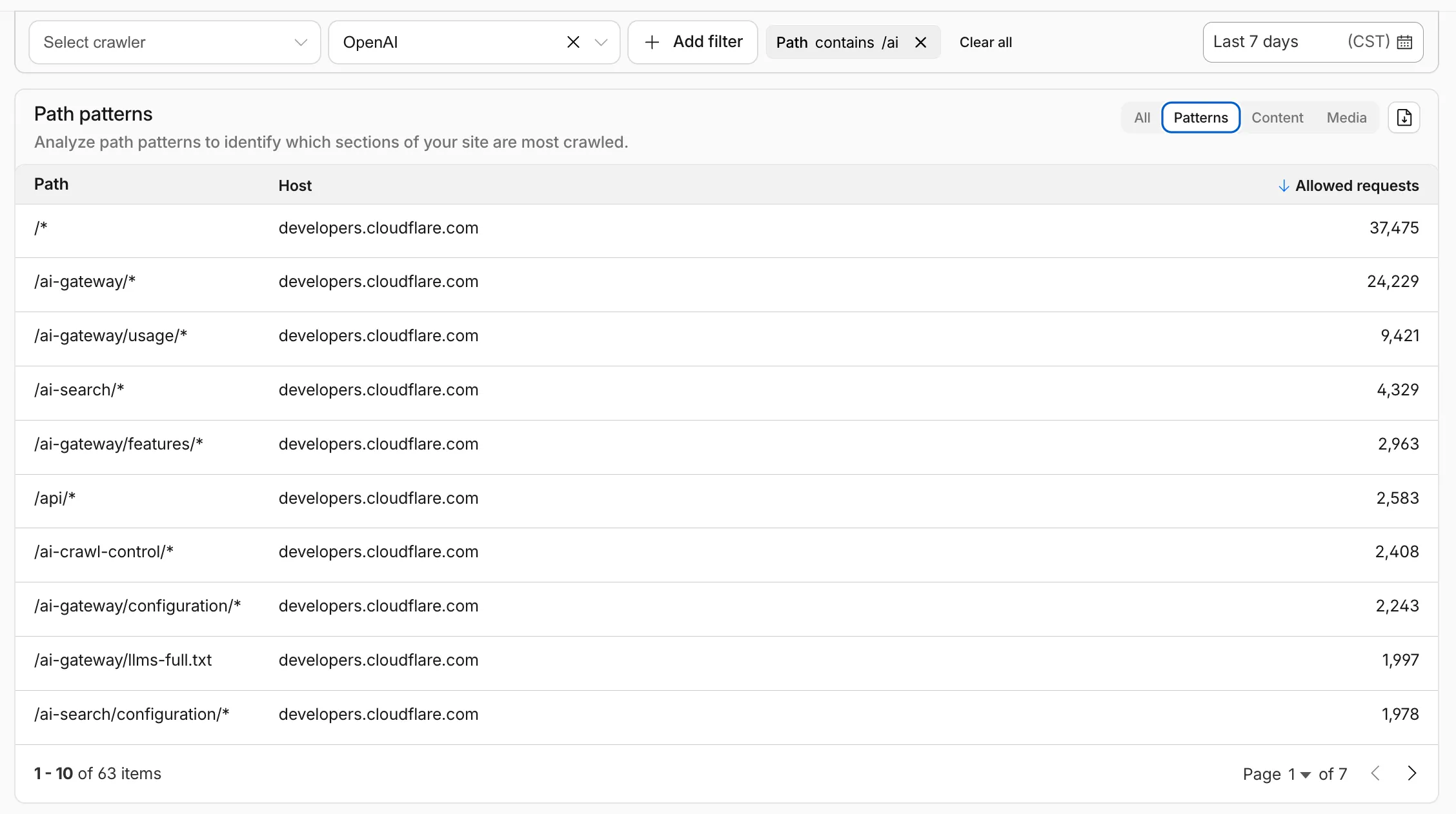
AI Crawl Control metrics have been enhanced with new views, improved filtering, and better data visualization.
Path pattern grouping
In the Metrics tab > Most popular paths table, use the new Patterns tab that groups requests by URI pattern (/blog/*, /api/v1/*, /docs/*) to identify which site areas crawlers target most. Refer to the screenshot above.
Enhanced referral analytics
Destination patterns show which site areas receive AI-driven referral traffic.
In the Metrics tab, a new Referrals over time chart shows trends by operator or source.
Data transfer metrics
In the Metrics tab > Allowed requests over time chart, toggle Bytes to show bandwidth consumption.
In the Crawlers tab, a new Bytes Transferred column shows bandwidth per crawler.
Image exports
Export charts and tables as images for reports and presentations.
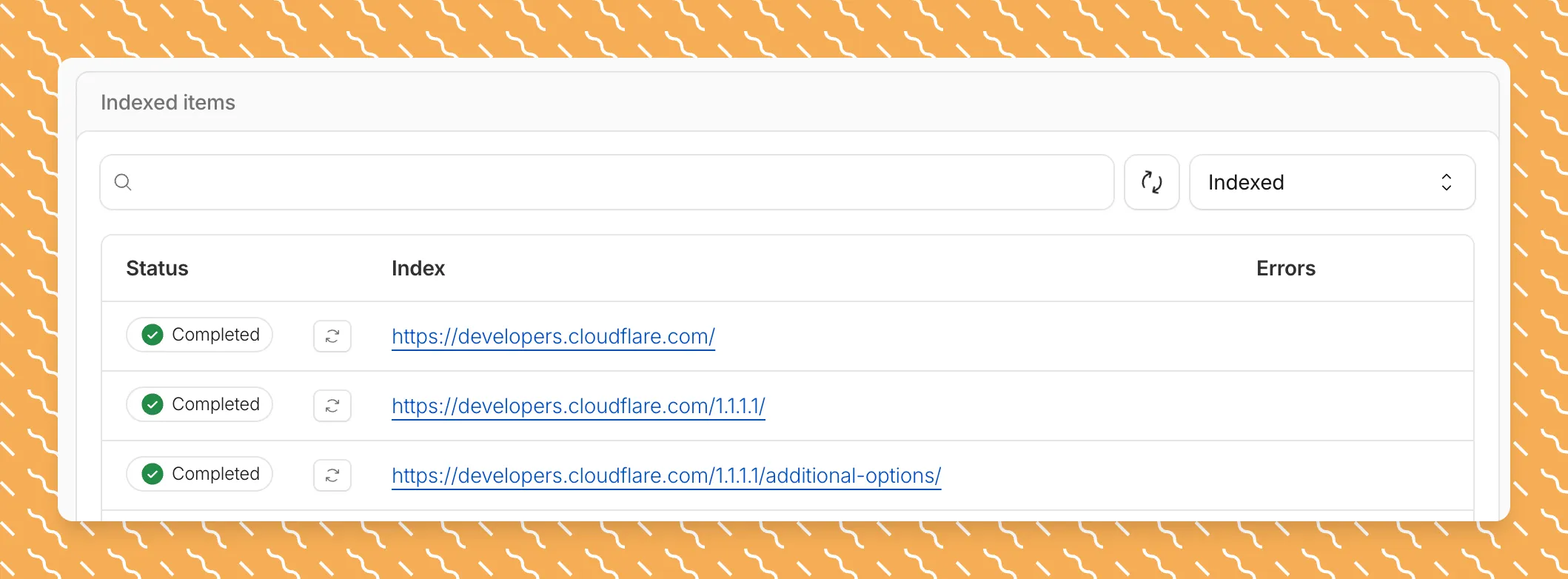
Get your content updates into AI Search faster and avoid a full rescan when you do not need it.
Reindex individual files without a full sync
Updated a file or need to retry one that errored? When you know exactly which file changed, you can now reindex it directly instead of rescanning your entire data source.
Go to Overview > Indexed Items and select the sync icon next to any file to reindex it immediately.
Crawl only the sitemap you need
By default, AI Search crawls all sitemaps listed in your robots.txt, up to the maximum files per index limit. If your site has multiple sitemaps but you only want to index a specific set, you can now specify a single sitemap URL to limit what the crawler visits.
For example, if your robots.txt lists both blog-sitemap.xml and docs-sitemap.xml, you can specify just https://example.com/docs-sitemap.xml to index only your documentation.
Configure your selection anytime in Settings > Parsing options > Specific sitemaps, then trigger a sync to apply the changes.
Log Explorer now supports multiple concurrent queries with the new Tabs feature. Work with multiple queries simultaneously and pivot between datasets to investigate malicious activity more effectively.
Key capabilities
Multiple tabs: Open and switch between multiple query tabs to compare results across different datasets.
Quick filtering: Select the filter button from query results to add a value as a filter to your current query.
Pivot to new tab: Use Cmd + click on the filter button to start a new query tab with that filter applied.
Preserved progress: Your query progress is preserved on each tab if you navigate away and return.
R2 SQL now supports five approximate aggregation functions for fast analysis of large datasets. These functions trade minor precision for improved performance on high-cardinality data.
New functions
APPROX_PERCENTILE_CONT(column, percentile) — Returns the approximate value at a given percentile (0.0 to 1.0). Works on integer and decimal columns.
APPROX_PERCENTILE_CONT_WITH_WEIGHT(column, weight, percentile) — Weighted percentile calculation where each row contributes proportionally to its weight column value.
APPROX_MEDIAN(column) — Returns the approximate median. Equivalent to APPROX_PERCENTILE_CONT(column, 0.5).
APPROX_DISTINCT(column) — Returns the approximate number of distinct values. Works on any column type.
APPROX_TOP_K(column, k) — Returns the k most frequent values with their counts as a JSON array.
All functions support WHERE filters. All except APPROX_TOP_K support GROUP BY.
-- Median per departmentSELECT department, approx_median(total_amount)FROM my_namespace.sales_dataGROUP BY department
-- Approximate distinct customers by regionSELECT region, approx_distinct(customer_id)FROM my_namespace.sales_dataGROUP BY region
-- Top 5 most frequent departmentsSELECT approx_top_k(department, 5)FROM my_namespace.sales_data
-- Combine approximate and standard aggregationsSELECT COUNT(*), AVG(total_amount), approx_percentile_cont(total_amount, 0.5), approx_distinct(customer_id)FROM my_namespace.sales_dataWHERE region = 'North'
For the full syntax and additional examples, refer to the SQL reference.