Wrangler now supports a --check flag for the wrangler types command. This flag validates that your generated types are up to date without writing any changes to disk.
This is useful in CI/CD pipelines where you want to ensure that developers have regenerated their types after making changes to their Wrangler configuration. If the types are out of date, the command will exit with a non-zero status code.
npx wrangler types --check
If your types are up to date, the command will succeed silently. If they are out of date, you'll see an error message indicating which files need to be regenerated.
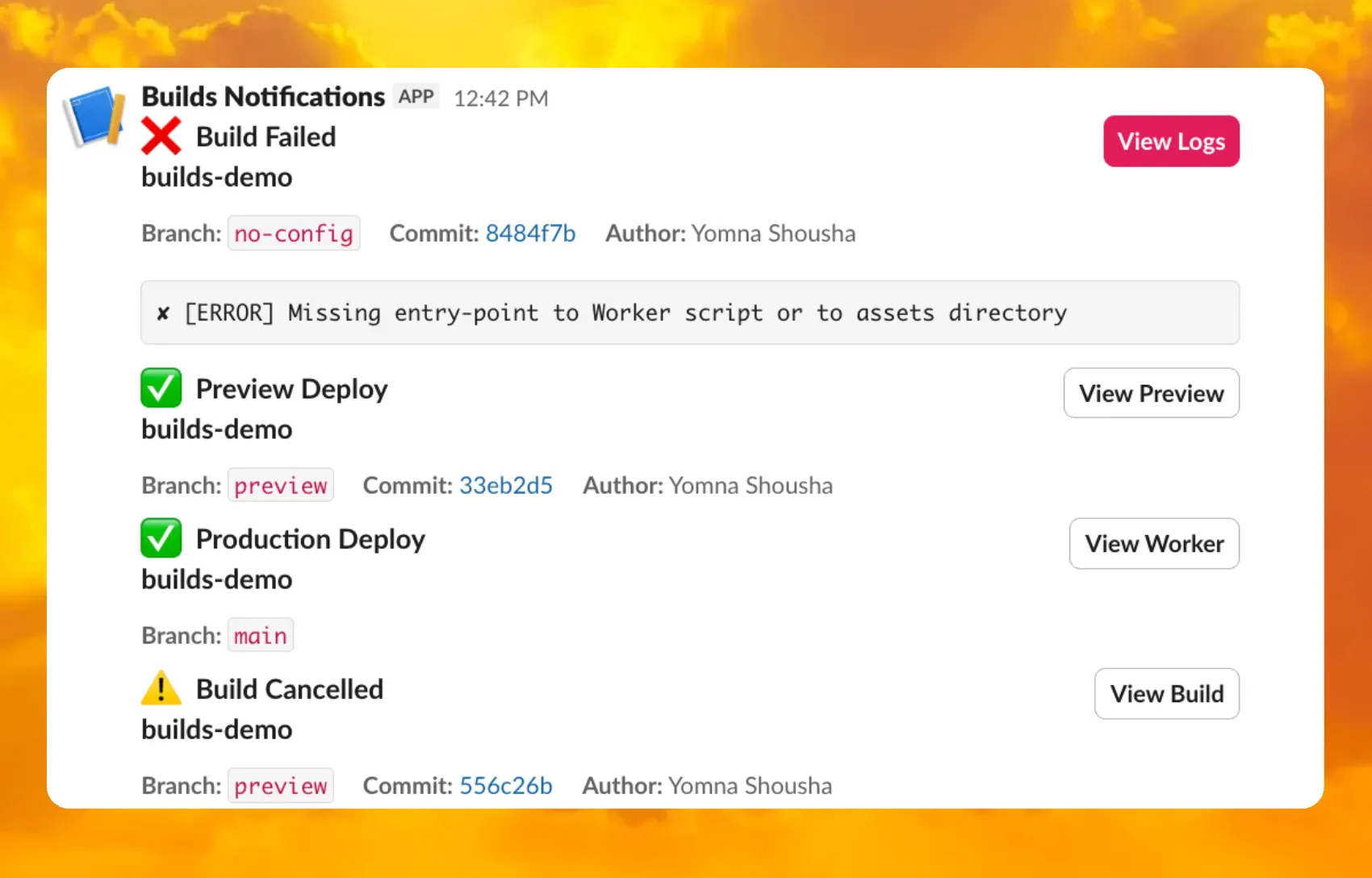
You can now receive notifications when your Workers' builds start, succeed, fail, or get cancelled using Event Subscriptions.
Workers Builds publishes events to a Queue that your Worker can read messages from, and then send notifications wherever you need — Slack, Discord, email, or any webhook endpoint.
You can deploy this Worker ↗ to your own Cloudflare account to send build notifications to Slack:
The template includes:
Build status with Preview/Live URLs for successful deployments
Wrangler now includes built-in shell tab completion support, making it faster and easier to navigate commands without memorizing every option. Press Tab as you type to autocomplete commands, subcommands, flags, and even option values like log levels.
Tab completions are supported for Bash, Zsh, Fish, and PowerShell.
Setup
Generate the completion script for your shell and add it to your configuration file:
After adding the script, restart your terminal or source your configuration file for the changes to take effect. Then you can simply press Tab to see available completions:
Tab completions are dynamically generated from Wrangler's command registry, so they stay up-to-date as new commands and options are added. This feature is powered by @bomb.sh/tab ↗.
Workers Analytics Engine allows you to ingest and store high-cardinality data at scale and query your data through a simple SQL API.
Filtering using HAVING
The HAVING clause complements the WHERE clause by enabling you to filter groups based on aggregate values. While WHERE filters rows before aggregation, HAVING filters groups after aggregation is complete.
You can use HAVING to filter groups where the average exceeds a threshold:
SELECT blob1 AS probe_name, avg(double1) AS average_tempFROM temperature_readingsGROUP BY probe_nameHAVING average_temp > 10
You can also filter groups based on aggregates such as the number of items in the group:
SELECT blob1 AS probe_name, count() AS num_readingsFROM temperature_readingsGROUP BY probe_nameHAVING num_readings > 100
Pattern matching using LIKE
The new pattern matching operators enable you to search for strings that match specific patterns using wildcard characters:
LIKE - case-sensitive pattern matching
NOT LIKE - case-sensitive pattern exclusion
ILIKE - case-insensitive pattern matching
NOT ILIKE - case-insensitive pattern exclusion
Pattern matching supports two wildcard characters: % (matches zero or more characters) and _ (matches exactly one character).
You can match strings starting with a prefix:
SELECT *FROM logsWHERE blob1 LIKE 'error%'
You can also match file extensions (case-insensitive):
SELECT *FROM requestsWHERE blob2 ILIKE '%.jpg'
Another example is excluding strings containing specific text:
SELECT *FROM eventsWHERE blob3 NOT ILIKE '%debug%'
Custom instance types are now enabled for all Cloudflare Containers users. You can now specify specific vCPU, memory, and disk amounts, rather than being limited to pre-defined instance types. Previously, only select Enterprise customers were able to customize their instance type.
To use a custom instance type, specify the instance_type property as an object with vcpu, memory_mib, and disk_mb fields in your Wrangler configuration:
Individual limits for custom instance types are based on the standard-4 instance type (4 vCPU, 12 GiB memory, 20 GB disk). You must allocate at least 1 vCPU for custom instance types. For workloads requiring less than 1 vCPU, use the predefined instance types like lite or basic.
You can now deploy microfrontends to Cloudflare, splitting a single application into smaller, independently deployable units that render as one cohesive application. This lets different teams using different frameworks develop, test, and deploy each microfrontend without coordinating releases.
Microfrontends solve several challenges for large-scale applications:
Independent deployments: Teams deploy updates on their own schedule without redeploying the entire application
Framework flexibility: Build multi-framework applications (for example, Astro, Remix, and Next.js in one app)
Gradual migration: Migrate from a monolith to a distributed architecture incrementally
Create a microfrontend project:
This template automatically creates a router worker with pre-configured routing logic, and lets you configure Service bindings to Workers you have already deployed to your Cloudflare account. The router Worker analyzes incoming requests, matches them against configured routes, and forwards requests to the appropriate microfrontend via service bindings. The router automatically rewrites HTML, CSS, and headers to ensure assets load correctly from each microfrontend's mount path. The router includes advanced features like preloading for faster navigation between microfrontends, smooth page transitions using the View Transitions API, and automatic path rewriting for assets, redirects, and cookies.
Each microfrontend can be a full-framework application, a static site with Workers Static Assets, or any other Worker-based application.
Magic WAN Connector now exports NetFlow data for breakout traffic to Magic Network Monitoring (MNM), providing visibility into traffic that bypasses Cloudflare's security filtering.
This feature allows you to:
Monitor breakout traffic statistics in the Cloudflare dashboard.
View traffic patterns for applications configured to bypass Cloudflare.
Maintain visibility across all traffic passing through your Magic WAN Connector.
We've shipped a new release for the Agents SDK ↗ v0.3.0 bringing full compatibility with AI SDK v6 ↗ and introducing the unified tool pattern, dynamic tool approval, and enhanced React hooks with improved tool handling.
This release includes improved streaming and tool support, dynamic tool approval (for "human in the loop" systems), enhanced React hooks with onToolCall callback, improved error handling for streaming responses, and seamless migration from v5 patterns.
This makes it ideal for building production AI chat interfaces with Cloudflare Workers AI models, agent workflows, human-in-the-loop systems, or any application requiring reliable tool execution and approval workflows.
Additionally, we've updated workers-ai-provider v3.0.0, the official provider for Cloudflare Workers AI models, and ai-gateway-provider v3.0.0, the provider for Cloudflare AI Gateway, to be compatible with AI SDK v6.
Agents SDK v0.3.0
Unified Tool Pattern
AI SDK v6 introduces a unified tool pattern where all tools are defined on the server using the tool() function. This replaces the previous client-side AITool pattern.
Server-Side Tool Definition
import { tool } from "ai";import { z } from "zod";// Server: Define ALL tools on the serverconst tools = { // Server-executed tool getWeather: tool({ description: "Get weather for a city", inputSchema: z.object({ city: z.string() }), execute: async ({ city }) => fetchWeather(city) }), // Client-executed tool (no execute = client handles via onToolCall) getLocation: tool({ description: "Get user location from browser", inputSchema: z.object({}) // No execute function }), // Tool requiring approval (dynamic based on input) processPayment: tool({ description: "Process a payment", inputSchema: z.object({ amount: z.number() }), needsApproval: async ({ amount }) => amount > 100, execute: async ({ amount }) => charge(amount) })};
If you need the v5 behavior (static-only checks), use the new functions:
import { isStaticToolUIPart, getStaticToolName } from "ai";
convertToModelMessages() is now async
The convertToModelMessages() function is now asynchronous. Update all calls to await the result:
import { convertToModelMessages } from "ai";const result = streamText({ messages: await convertToModelMessages(this.messages), model: openai("gpt-4o")});
ModelMessage type
The CoreMessage type has been removed. Use ModelMessage instead:
import { convertToModelMessages, type ModelMessage } from "ai";const modelMessages: ModelMessage[] = await convertToModelMessages(messages);
generateObject mode option removed
The mode option for generateObject has been removed:
// Before (v5)const result = await generateObject({ mode: "json", model, schema, prompt});// After (v6)const result = await generateObject({ model, schema, prompt});
Structured Output with generateText
While generateObject and streamObject are still functional, the recommended approach is to use generateText/streamText with the Output.object() helper:
Note: When using structured output with generateText, you must configure multiple steps with stopWhen because generating the structured output is itself a step.
workers-ai-provider v3.0.0
Seamless integration with Cloudflare Workers AI models through the updated workers-ai-provider v3.0.0 with AI SDK v6 support.
Model Setup with Workers AI
Use Cloudflare Workers AI models directly in your agent workflows:
import { createWorkersAI } from "workers-ai-provider";import { useAgentChat } from "agents/ai-react";// Create Workers AI model (v3.0.0 - enhanced v6 internals)const model = createWorkersAI({ binding: env.AI,})("@cf/meta/llama-3.2-3b-instruct");
Enhanced File and Image Support
Workers AI models now support v6 file handling with automatic conversion:
// Send images and files to Workers AI modelssendMessage({ role: "user", parts: [ { type: "text", text: "Analyze this image:" }, { type: "file", data: imageBuffer, mediaType: "image/jpeg", }, ],});// Workers AI provider automatically converts to proper format
Streaming with Workers AI
Enhanced streaming support with automatic warning detection:
// Streaming with Workers AI modelsconst result = await streamText({ model: createWorkersAI({ binding: env.AI })("@cf/meta/llama-3.2-3b-instruct"), messages: await convertToModelMessages(messages), onChunk: (chunk) => { // Enhanced streaming with warning handling console.log(chunk); },});
ai-gateway-provider v3.0.0
The ai-gateway-provider v3.0.0 now supports AI SDK v6, enabling you to use Cloudflare AI Gateway with multiple AI providers including Anthropic, Azure, AWS Bedrock, Google Vertex, and Perplexity.
AI Gateway Setup
Use Cloudflare AI Gateway to add analytics, caching, and rate limiting to your AI applications:
import { createAIGateway } from "ai-gateway-provider";// Create AI Gateway provider (v3.0.0 - enhanced v6 internals)const model = createAIGateway({ gatewayUrl: "https://gateway.ai.cloudflare.com/v1/your-account-id/gateway", headers: { "Authorization": `Bearer ${env.AI_GATEWAY_TOKEN}` }})({ provider: "openai", model: "gpt-4o"});
Migration from v5
Deprecated APIs
The following APIs are deprecated in favor of the unified tool pattern:
Deprecated
Replacement
AITool type
Use AI SDK's tool() function on server
extractClientToolSchemas()
Define tools on server, no client schemas needed
createToolsFromClientSchemas()
Define tools on server with tool()
toolsRequiringConfirmation option
Use needsApproval on server tools
experimental_automaticToolResolution
Use onToolCall callback
tools option in useAgentChat
Use onToolCall for client-side execution
addToolResult()
Use addToolOutput()
Breaking Changes Summary
Unified Tool Pattern: All tools must be defined on the server using tool()
convertToModelMessages() is async: Add await to all calls
CoreMessage removed: Use ModelMessage instead
generateObject mode removed: Remove mode option
isToolUIPart behavior changed: Now checks both static and dynamic tool parts
Installation
Update your dependencies to use the latest versions:
Earlier this year, we announced the launch of the new Terraform v5 Provider. We are aware of the high number of issues reported by the Cloudflare community related to the v5 release. We have committed to releasing improvements on a 2-3 week cadence ↗ to ensure its stability and reliability, including the v5.15 release. We have also pivoted from an issue-to-issue approach to a resource-per-resource approach ↗ - we will be focusing on specific resources to not only stabilize the resource but also ensure it is migration-friendly for those migrating from v4 to v5.
Thank you for continuing to raise issues. They make our provider stronger and help us build products that reflect your needs.
This release includes bug fixes, the stabilization of even more popular resources, and more.
certificate_pack: Ensure proper Terraform resource ID handling for path parameters in API calls (081f32a ↗)
worker_version: Support startup_time_ms (286ab55 ↗)
zero_trust_dlp_custom_entry: Support upload_status (7dc0fe3 ↗)
zero_trust_dlp_entry: Support upload_status (7dc0fe3 ↗)
zero_trust_dlp_integration_entry: Support upload_status (7dc0fe3 ↗)
zero_trust_dlp_predefined_entry: Support upload_status (7dc0fe3 ↗)
zero_trust_gateway_policy: Support forensic_copy (5741fd0 ↗)
zero_trust_list: Support additional types (category, location, device) (5741fd0 ↗)
Bug fixes
access_rules: Add validation to prevent state drift. Ideally, we'd use Semantic Equality but since that isn't an option, this will remove a foot-gun. (4457791 ↗)
We suggest waiting to migrate to v5 while we work on stabilization. This helps with avoiding any blocking issues while the Terraform resources are actively being stabilized ↗. We will be releasing a new migration tool in March 2026 to help support v4 to v5 transitions for our most popular resources.
TanStack Start ↗ apps can now prerender routes to static HTML at build time with access to build time environment variables
and bindings, and serve them as static assets. To enable prerendering, configure the prerender option of the TanStack Start plugin in your Vite config:
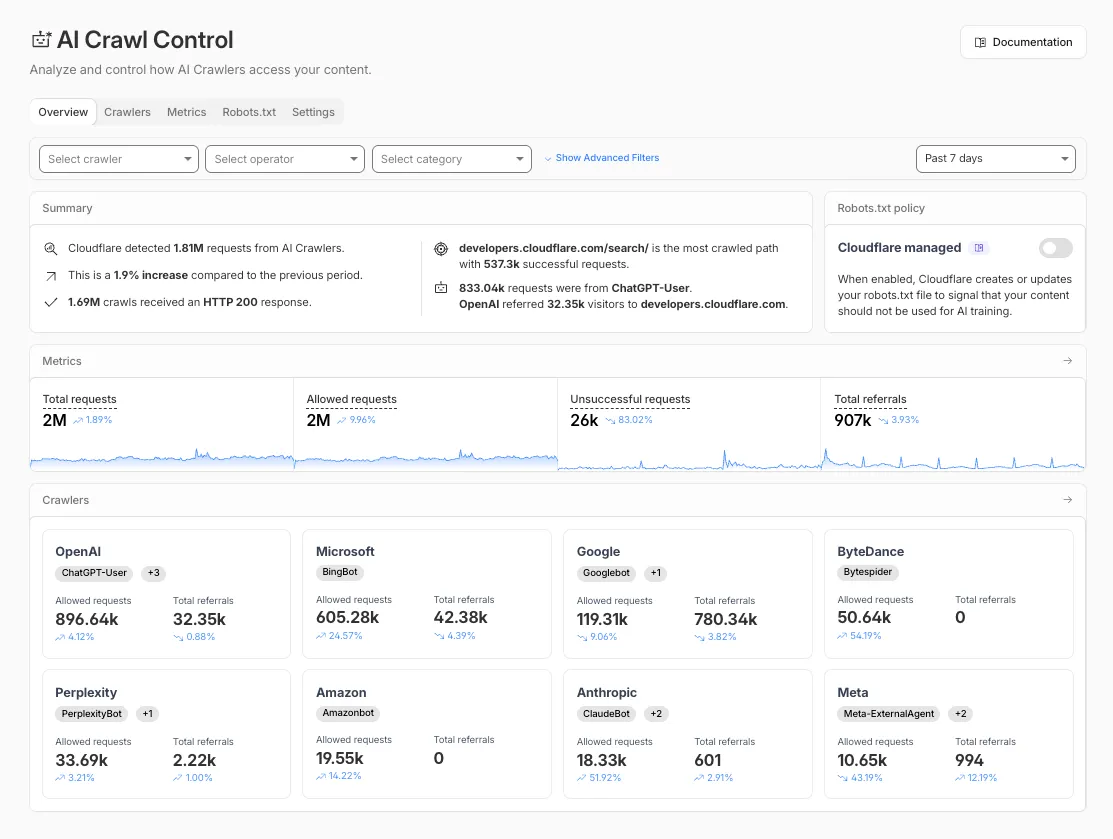
The Overview tab is now the default view in AI Crawl Control. The previous default view with controls for individual AI crawlers is available in the Crawlers tab.
What's new
Executive summary — Monitor total requests, volume change, most common status code, most popular path, and high-volume activity
Operator grouping — Track crawlers by their operating companies (OpenAI, Microsoft, Google, ByteDance, Anthropic, Meta)
Customizable filters — Filter your snapshot by date range, crawler, operator, hostname, or path
Get started
Log in to the Cloudflare dashboard and select your account and domain.
Go to AI Crawl Control, where the Overview tab opens by default with your activity snapshot.
Use filters to customize your view by date range, crawler, operator, hostname, or path.
Navigate to the Crawlers tab to manage controls for individual crawlers.
The cached/uncached classification logic used in Zone Overview analytics has been updated to improve accuracy.
Previously, requests were classified as "cached" based on an overly broad condition that included blocked 403 responses, Snippets requests, and other non-cache request types. This caused inflated cache hit ratios — in some cases showing near-100% cached — and affected approximately 15% of requests classified as cached in rollups.
The condition has been removed from the Zone Overview page. Cached/uncached classification now aligns with the heuristics used in HTTP Analytics, so only requests genuinely served from cache are counted as cached.
What changed:
Zone Overview — Cache ratios now reflect actual cache performance.
HTTP Analytics — No change. HTTP Analytics already used the correct classification logic.
Historical data — This fix applies to new requests only. Previously logged data is not retroactively updated.
R2 Data Catalog now supports automatic snapshot expiration for Apache Iceberg tables.
In Apache Iceberg, a snapshot is metadata that represents the state of a table at a given point in time. Every mutation creates a new snapshot which enable powerful features like time travel queries and rollback capabilities but will accumulate over time.
Without regular cleanup, these accumulated snapshots can lead to:
Metadata overhead
Slower table operations
Increased storage costs.
Snapshot expiration in R2 Data Catalog automatically removes old table snapshots based on your configured retention policy, improving performance and storage costs.
Snapshot expiration uses two parameters to determine which snapshots to remove:
--older-than-days: age threshold in days
--retain-last: minimum snapshot count to retain
Both conditions must be met before a snapshot is expired, ensuring you always retain recent snapshots even if they exceed the age threshold.
This feature complements automatic compaction, which optimizes query performance by combining small data files into larger ones. Together, these automatic maintenance operations keep your Iceberg tables performant and cost-efficient without manual intervention.
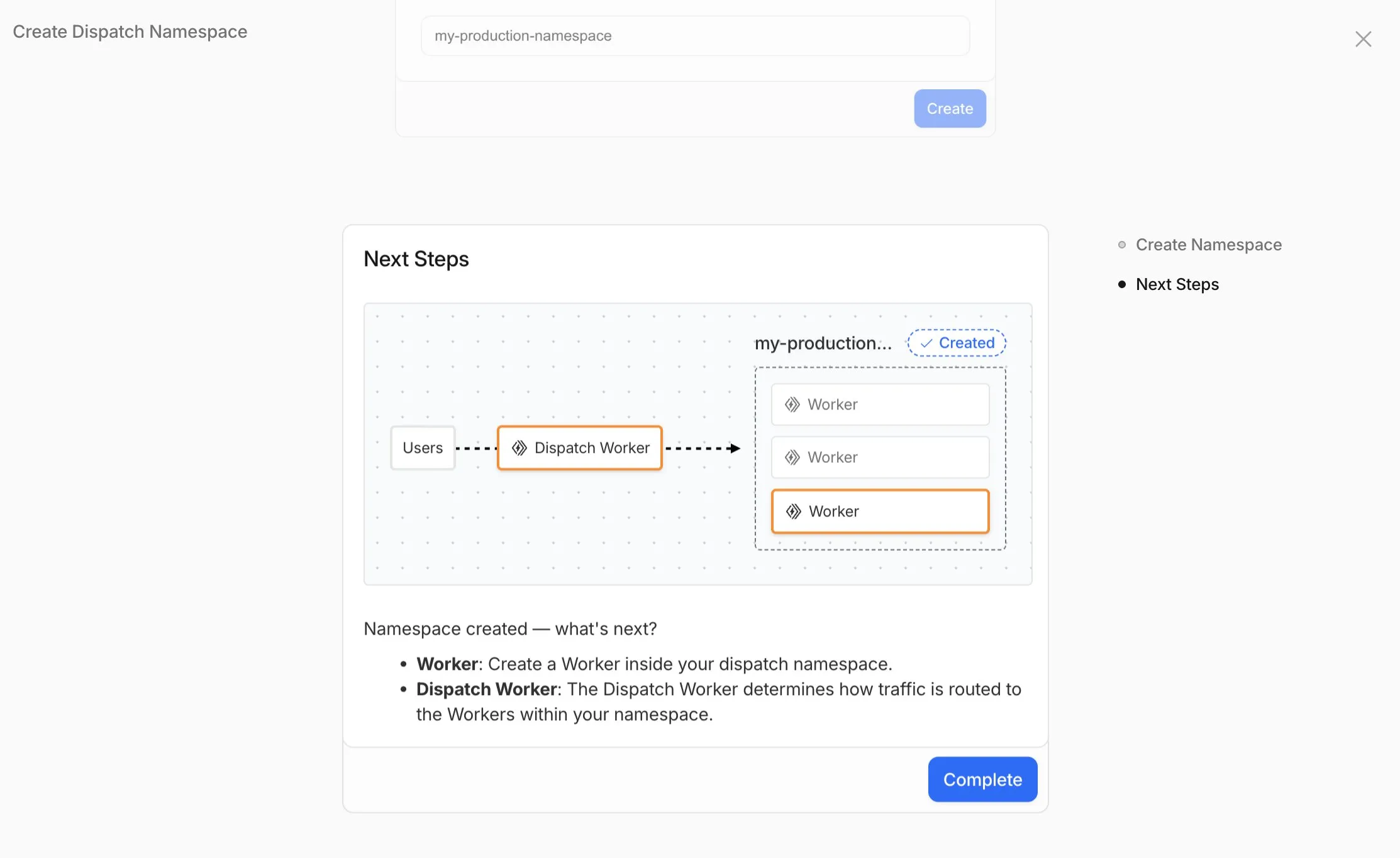
Workers for Platforms lets you build multi-tenant platforms on Cloudflare Workers, allowing your end users to deploy and run their own code on your platform. It's designed for anyone building an AI vibe coding platform, e-commerce platform, website builder, or any product that needs to securely execute user-generated code at scale.
Previously, setting up Workers for Platforms required using the API. Now, the Workers for Platforms UI supports namespace creation, dispatch worker templates, and tag management, making it easier for Workers for Platforms customers to build and manage multi-tenant platforms directly from the Cloudflare dashboard.
Key improvements
Namespace Management: You can now create and configure dispatch namespaces directly within the dashboard to start a new platform setup.
Dispatch Worker Templates: New Dispatch Worker templates allow you to quickly define how traffic is routed to individual Workers within your namespace. Refer to the Dynamic Dispatch documentation for more examples.
Tag Management: You can now set and update tags on User Workers, making it easier to group and manage your Workers.
Binding Visibility:Bindings attached to User Workers are now visible directly within the User Worker view.
Deploy Vibe Coding Platform in one-click: Deploy a reference implementation of an AI vibe coding platform directly from the dashboard. Powered by the Cloudflare's VibeSDK ↗, this starter kit integrates with Workers for Platforms to handle the deployment of AI-generated projects at scale.
To get started, go to Workers for Platforms under Compute & AI in the Cloudflare dashboard ↗.
Minor version updates: We typically update preinstalled software to the latest available minor version without notice. For tools that don't follow semantic versioning (e.g., Bun or Hugo), we provide 3 months’ notice.
Major version updates: Before preinstalled software reaches end-of-life, we update to the next stable LTS version with 3 months’ notice.
Build image version deprecation (Pages only): We provide 6 months’ notice before deprecation. Projects on v1 or v2 will be automatically moved to v3 on their specified deprecation dates.
Wrangler now includes a new wrangler auth token command that retrieves your current authentication token or credentials for use with other tools and scripts.
wrangler auth token
The command returns whichever authentication method is currently configured, in priority order: API token from CLOUDFLARE_API_TOKEN, or OAuth token from wrangler login (automatically refreshed if expired).
Use the --json flag to get structured output including the token type:
wrangler auth token --json
The JSON output includes the authentication type:
// API token{ "type": "api_token", "token": "..." }// OAuth token{ "type": "oauth", "token": "..." }// API key/email (only available with --json){ "type": "api_key", "key": "...", "email": "..." }
API key/email credentials from CLOUDFLARE_API_KEY and CLOUDFLARE_EMAIL require the --json flag since this method uses two values instead of a single token.
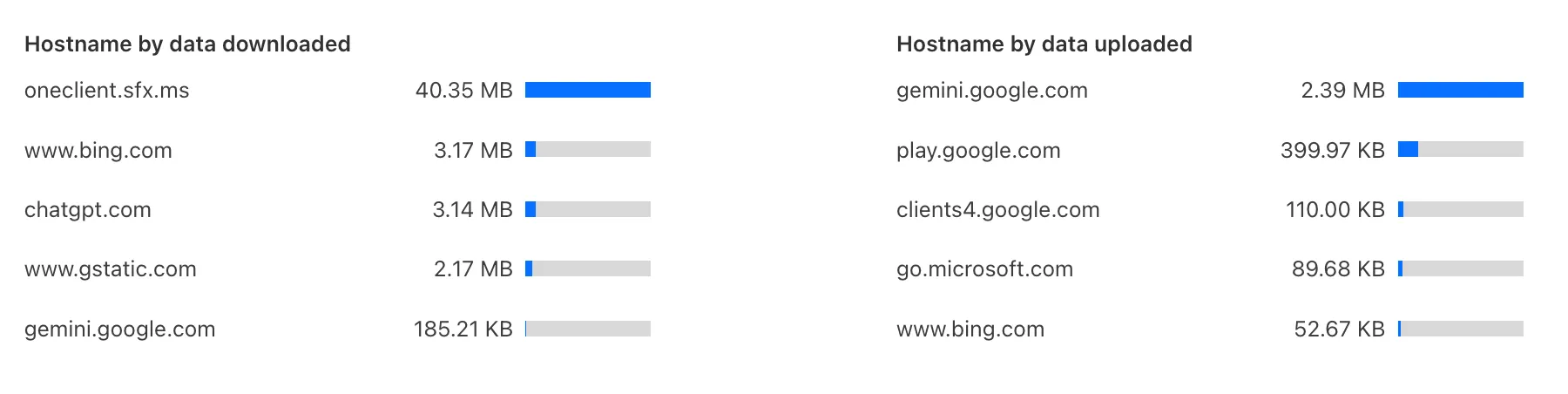
Zero Trust has again upgraded its Shadow IT analytics, providing you with unprecedented visibility into your organizations use of SaaS tools. With this dashboard, you can review who is using an application and volumes of data transfer to the application.
With this update, you can review data transfer metrics at the domain level, rather than just the application level, providing more granular insight into your data transfer patterns.
These metrics can be filtered by all available filters on the dashboard, including user, application, or content category.
Both the analytics and policies are accessible in the Cloudflare Zero Trust dashboard ↗, empowering organizations with better visibility and control.
You can now duplicate specific Cloudflare One resources with a single click from the dashboard.
Initially supported resources:
Access Applications
Access Policies
Gateway Policies
To try this out, simply click on the overflow menu (⋮) from the resource table and click Duplicate. We will continue to add the Duplicate action for resources throughout 2026.
Wrangler now supports automatic configuration for popular web frameworks in experimental mode, making it even easier to deploy to Cloudflare Workers.
Previously, if you wanted to deploy an application using a popular web framework like Next.js or Astro, you had to follow tutorials to set up your application for deployment to Cloudflare Workers. This usually involved creating a Wrangler file, installing adapters, or changing configuration options.
Now wrangler deploy does this for you. Starting with Wrangler 4.55, you can use npx wrangler deploy --x-autoconfig in the directory of any web application using one of the supported frameworks. Wrangler will then proceed to configure and deploy it to your Cloudflare account.
You can also configure your application without deploying it by using the new npx wrangler setup command. This enables you to easily review what changes we are making so your application is ready for Cloudflare Workers.
The following application frameworks are supported starting today:
Next.js
Astro
Nuxt
TanStack Start
SolidStart
React Router
SvelteKit
Docusaurus
Qwik
Analog
Automatic configuration also supports static sites by detecting the assets directory and build command. From a single index.html file to the output of a generator like Jekyll or Hugo, you can just run npx wrangler deploy --x-autoconfig to upload to Cloudflare.
We're really excited to bring you automatic configuration so you can do more with Workers. Please let us know if you run into challenges using this experimentally. We’ve opened a GitHub discussion ↗ and would love to hear your feedback.
A new Rules of Durable Objects guide is now available, providing opinionated best practices for building effective Durable Objects applications. This guide covers design patterns, storage strategies, concurrency, and common anti-patterns to avoid.
Key guidance includes:
Design around your "atom" of coordination — Create one Durable Object per logical unit (chat room, game session, user) instead of a global singleton that becomes a bottleneck.
Use SQLite storage with RPC methods — SQLite-backed Durable Objects with typed RPC methods provide the best developer experience and performance.
Understand input and output gates — Learn how Cloudflare's runtime prevents data races by default, how write coalescing works, and when to use blockConcurrencyWhile().
Leverage Hibernatable WebSockets — Reduce costs for real-time applications by allowing Durable Objects to sleep while maintaining WebSocket connections.
The testing documentation has also been updated with modern patterns using @cloudflare/vitest-pool-workers, including examples for testing SQLite storage, alarms, and direct instance access:
test/counter.test.jsjs
import { env, runDurableObjectAlarm } from "cloudflare:test";import { it, expect } from "vitest";it("can test Durable Objects with isolated storage", async () => { const stub = env.COUNTER.getByName("test"); // Call RPC methods directly on the stub await stub.increment(); expect(await stub.getCount()).toBe(1); // Trigger alarms immediately without waiting await runDurableObjectAlarm(stub);});
test/counter.test.tsts
import { env, runDurableObjectAlarm } from "cloudflare:test";import { it, expect } from "vitest";it("can test Durable Objects with isolated storage", async () => { const stub = env.COUNTER.getByName("test"); // Call RPC methods directly on the stub await stub.increment(); expect(await stub.getCount()).toBe(1); // Trigger alarms immediately without waiting await runDurableObjectAlarm(stub);});
If you do not want to incur costs, please take action such as optimizing queries or deleting unnecessary stored data in order to reduce your SQLite storage usage ahead of the January 7th target. Only usage on and after the billing target date will incur charges.
Developers on the Workers Paid plan with Durable Object's SQLite storage usage beyond included limits will incur charges according to SQLite storage pricing announced in September 2024 with the public beta ↗. Developers on the Workers Free plan will not be charged.
Compute billing for SQLite-backed Durable Objects has been enabled since the initial public beta. SQLite-backed Durable Objects currently incur charges for requests and duration, and no changes are being made to compute billing.
R2 SQL now supports aggregation functions, GROUP BY, HAVING, along with schema discovery commands to make it easy to explore your data catalog.
Aggregation Functions
You can now perform aggregations on Apache Iceberg tables in R2 Data Catalog using standard SQL functions including COUNT(*), SUM(), AVG(), MIN(), and MAX(). Combine these with GROUP BY to analyze data across dimensions, and use HAVING to filter aggregated results.
-- Calculate average transaction amounts by departmentSELECT department, COUNT(*), AVG(total_amount)FROM my_namespace.sales_dataWHERE region = 'North'GROUP BY departmentHAVING COUNT(*) > 50ORDER BY AVG(total_amount) DESC
New metadata commands make it easy to explore your data catalog and understand table structures:
SHOW DATABASES or SHOW NAMESPACES - List all available namespaces
SHOW TABLES IN namespace_name - List tables within a namespace
DESCRIBE namespace_name.table_name - View table schema and column types
❯ npx wrangler r2 sql query "{ACCOUNT_ID}_{BUCKET_NAME}" "DESCRIBE default.sales_data;" ⛅️ wrangler 4.54.0─────────────────────────────────────────────┌──────────────────┬────────────────┬──────────┬─────────────────┬───────────────┬───────────────────────────────────────────────────────────────────────────────────────────────────┐│ column_name │ type │ required │ initial_default │ write_default │ doc │├──────────────────┼────────────────┼──────────┼─────────────────┼───────────────┼───────────────────────────────────────────────────────────────────────────────────────────────────┤│ sale_id │ BIGINT │ false │ │ │ Unique identifier for each sales transaction │├──────────────────┼────────────────┼──────────┼─────────────────┼───────────────┼───────────────────────────────────────────────────────────────────────────────────────────────────┤│ sale_timestamp │ TIMESTAMPTZ │ false │ │ │ Exact date and time when the sale occurred (used for partitioning) │├──────────────────┼────────────────┼──────────┼─────────────────┼───────────────┼───────────────────────────────────────────────────────────────────────────────────────────────────┤│ department │ TEXT │ false │ │ │ Product department (8 categories: Electronics, Beauty, Home, Toys, Sports, Food, Clothing, Books) │├──────────────────┼────────────────┼──────────┼─────────────────┼───────────────┼───────────────────────────────────────────────────────────────────────────────────────────────────┤│ category │ TEXT │ false │ │ │ Product category grouping (4 categories: Premium, Standard, Budget, Clearance) │├──────────────────┼────────────────┼──────────┼─────────────────┼───────────────┼───────────────────────────────────────────────────────────────────────────────────────────────────┤│ region │ TEXT │ false │ │ │ Geographic sales region (5 regions: North, South, East, West, Central) │├──────────────────┼────────────────┼──────────┼─────────────────┼───────────────┼───────────────────────────────────────────────────────────────────────────────────────────────────┤│ product_id │ INT │ false │ │ │ Unique identifier for the product sold │├──────────────────┼────────────────┼──────────┼─────────────────┼───────────────┼───────────────────────────────────────────────────────────────────────────────────────────────────┤│ quantity │ INT │ false │ │ │ Number of units sold in this transaction (range: 1-50) │├──────────────────┼────────────────┼──────────┼─────────────────┼───────────────┼───────────────────────────────────────────────────────────────────────────────────────────────────┤│ unit_price │ DECIMAL(10, 2) │ false │ │ │ Price per unit in dollars (range: $5.00-$500.00) │├──────────────────┼────────────────┼──────────┼─────────────────┼───────────────┼───────────────────────────────────────────────────────────────────────────────────────────────────┤│ total_amount │ DECIMAL(10, 2) │ false │ │ │ Total sale amount before tax (quantity × unit_price with discounts applied) │├──────────────────┼────────────────┼──────────┼─────────────────┼───────────────┼───────────────────────────────────────────────────────────────────────────────────────────────────┤│ discount_percent │ INT │ false │ │ │ Discount percentage applied to this sale (0-50%) │├──────────────────┼────────────────┼──────────┼─────────────────┼───────────────┼───────────────────────────────────────────────────────────────────────────────────────────────────┤│ tax_amount │ DECIMAL(10, 2) │ false │ │ │ Tax amount collected on this sale │├──────────────────┼────────────────┼──────────┼─────────────────┼───────────────┼───────────────────────────────────────────────────────────────────────────────────────────────────┤│ profit_margin │ DECIMAL(10, 2) │ false │ │ │ Profit margin on this sale as a decimal percentage │├──────────────────┼────────────────┼──────────┼─────────────────┼───────────────┼───────────────────────────────────────────────────────────────────────────────────────────────────┤│ customer_id │ INT │ false │ │ │ Unique identifier for the customer who made the purchase │├──────────────────┼────────────────┼──────────┼─────────────────┼───────────────┼───────────────────────────────────────────────────────────────────────────────────────────────────┤│ is_online_sale │ BOOLEAN │ false │ │ │ Boolean flag indicating if sale was made online (true) or in-store (false) │├──────────────────┼────────────────┼──────────┼─────────────────┼───────────────┼───────────────────────────────────────────────────────────────────────────────────────────────────┤│ sale_date │ DATE │ false │ │ │ Calendar date of the sale (extracted from sale_timestamp) │└──────────────────┴────────────────┴──────────┴─────────────────┴───────────────┴───────────────────────────────────────────────────────────────────────────────────────────────────┘Read 0 B across 0 files from R2On average, 0 B / s
To learn more about the new aggregation capabilities and schema discovery commands, check out the SQL reference. If you're new to R2 SQL, visit our getting started guide to begin querying your data.