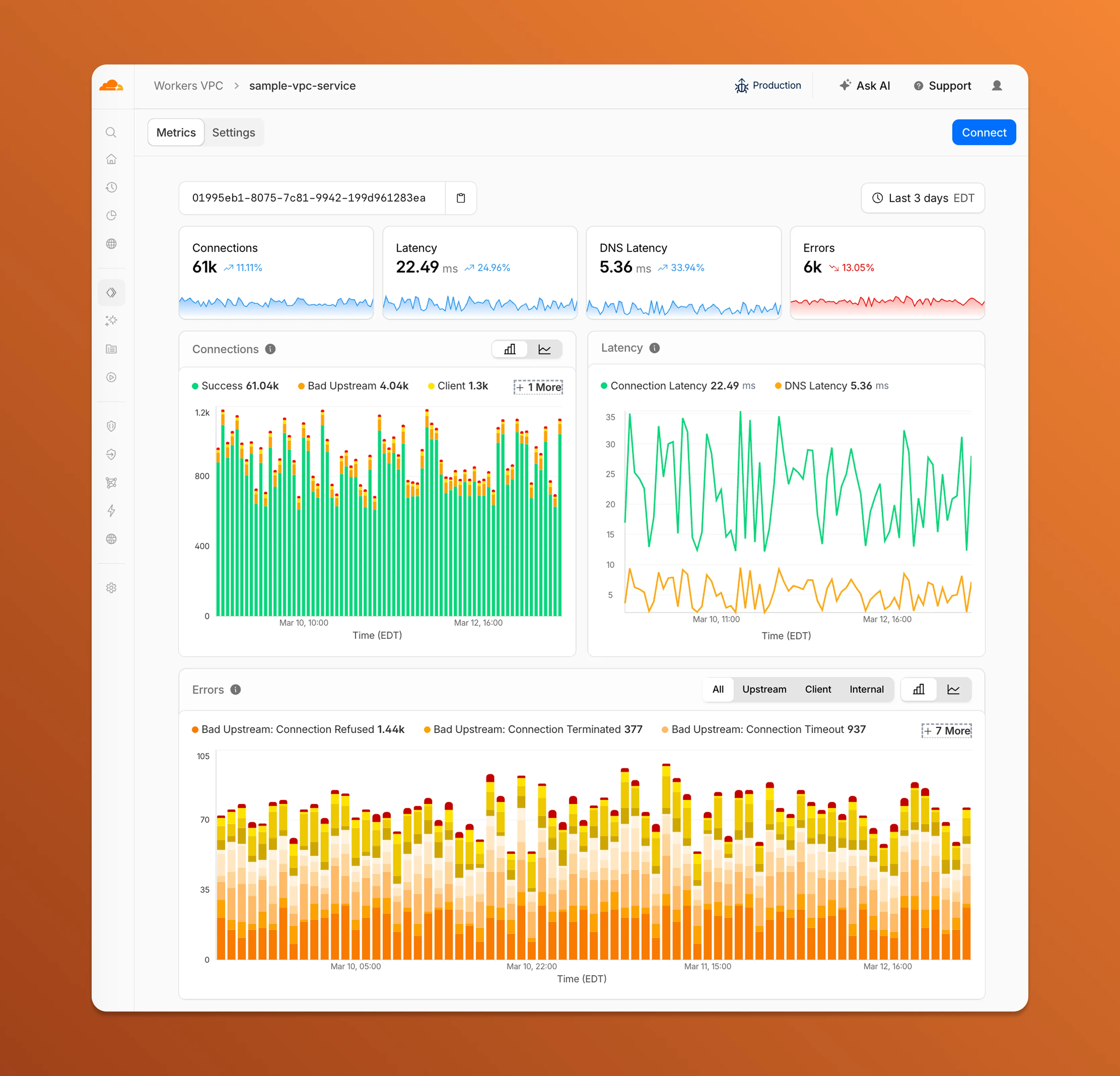
Each VPC Service now has a Metrics tab so you can monitor connection health and debug failures without leaving the dashboard.
Connections — See successful and failed connections over time, broken down by what is responsible: your origin (Bad Upstream), your configuration (Client), or Cloudflare (Internal).
Latency — Track connection and DNS resolution latency trends.
Errors — Drill into specific error codes grouped by category, with filters to isolate upstream, client, or internal failures.
You can also view and edit your VPC Service configuration, host details, and port assignments from the Settings tab.
For a full list of error codes and what they mean, refer to Troubleshooting.
Hyperdrive now supports custom TLS/SSL certificates for MySQL databases, bringing the same certificate options previously available for PostgreSQL to MySQL connections.
You can now configure:
Server certificate verification with VERIFY_CA or VERIFY_IDENTITY SSL modes to verify that your MySQL database server's certificate is signed by the expected certificate authority (CA).
Client certificates (mTLS) for Hyperdrive to authenticate itself to your MySQL database with credentials beyond username and password.
Create a Hyperdrive configuration with custom certificates for MySQL:
# Upload a CA certificatenpx wrangler cert upload certificate-authority --ca-cert your-ca-cert.pem --name your-custom-ca-name# Create a Hyperdrive with VERIFY_IDENTITY modenpx wrangler hyperdrive create your-hyperdrive-config \ --connection-string="mysql://user:password@hostname:port/database" \ --ca-certificate-id <CA_CERT_ID> \ --sslmode VERIFY_IDENTITY
You can now manage Cloudflare Tunnels directly from Wrangler, the CLI for the Cloudflare Developer Platform. The new wrangler tunnel commands let you create, run, and manage tunnels without leaving your terminal.
Available commands:
wrangler tunnel create — Create a new remotely managed tunnel.
wrangler tunnel list — List all tunnels in your account.
wrangler tunnel info — Display details about a specific tunnel.
wrangler tunnel delete — Delete a tunnel.
wrangler tunnel run — Run a tunnel using the cloudflared daemon.
wrangler tunnel quick-start — Start a free, temporary tunnel without an account using Quick Tunnels.
Wrangler handles downloading and managing the cloudflared binary automatically. On first use, you will be prompted to download cloudflared to a local cache directory.
These commands are currently experimental and may change without notice.
Workers AI is officially in the big models game. @cf/moonshotai/kimi-k2.5 is the first frontier-scale open-source model on our AI inference platform — a large model with a full 256k context window, multi-turn tool calling, vision inputs, and structured outputs. By bringing a frontier-scale model directly onto the Cloudflare Developer Platform, you can now run the entire agent lifecycle on a single, unified platform.
The model has proven to be a fast, efficient alternative to larger proprietary models without sacrificing quality. As AI adoption increases, the volume of inference is skyrocketing — now you can access frontier intelligence at a fraction of the cost.
Key capabilities
256,000 token context window for retaining full conversation history, tool definitions, and entire codebases across long-running agent sessions
Multi-turn tool calling for building agents that invoke tools across multiple conversation turns
Vision inputs for processing images alongside text
Structured outputs with JSON mode and JSON Schema support for reliable downstream parsing
Function calling for integrating external tools and APIs into agent workflows
Prefix caching and session affinity
When an agent sends a new prompt, it resends all previous prompts, tools, and context from the session. The delta between consecutive requests is usually just a few new lines of input. Prefix caching avoids reprocessing the shared context, saving time and compute from the prefill stage. This means faster Time to First Token (TTFT) and higher Tokens Per Second (TPS) throughput.
Workers AI has done prefix caching, but we are now surfacing cached tokens as a usage metric and offering a discount on cached tokens compared to input tokens (pricing is listed on the model page).
curl -X POST \
  "https://api.cloudflare.com/client/v4/accounts/{account_id}/ai/run/@cf/moonshotai/kimi-k2.5" \
  -H "Authorization: Bearer {api_token}" \
  -H "Content-Type: application/json" \
  -H "x-session-affinity: ses_12345678" \
  -d '{
    "messages": [
      {
        "role": "system",
        "content": "You are a helpful assistant."
      },
      {
        "role": "user",
        "content": "What is prefix caching and why does it matter?"
      }
    ],
    "max_tokens": 2400,
    "stream": true
  }'
Some clients like OpenCode ↗ implement session affinity automatically. The Agents SDK ↗ starter also sets up the wiring for you.
Redesigned asynchronous API
For volumes of requests that exceed synchronous rate limits, you can submit batches of inferences to be completed asynchronously. We have revamped the Asynchronous Batch API with a pull-based system that processes queued requests as soon as capacity is available. With internal testing, async requests usually execute within 5 minutes, but this depends on live traffic.
The async API is the best way to avoid capacity errors in durable workflows. It is ideal for use cases that are not real-time, such as code scanning agents or research agents.
To use the asynchronous API, pass queueRequest: true:
// 1. Push a batch of requests into the queueconst res = await env.AI.run( "@cf/moonshotai/kimi-k2.5", { requests: [ { messages: [{ role: "user", content: "Tell me a joke" }], }, { messages: [{ role: "user", content: "Explain the Pythagoras theorem" }], }, ], }, { queueRequest: true },);// 2. Grab the request IDconst requestId = res.request_id;// 3. Poll for the resultconst result = await env.AI.run("@cf/moonshotai/kimi-k2.5", { request_id: requestId,});if (result.status === "queued" || result.status === "running") { // Retry by polling again} else { return Response.json(result);}
You can also set up event notifications to know when inference is complete instead of polling.
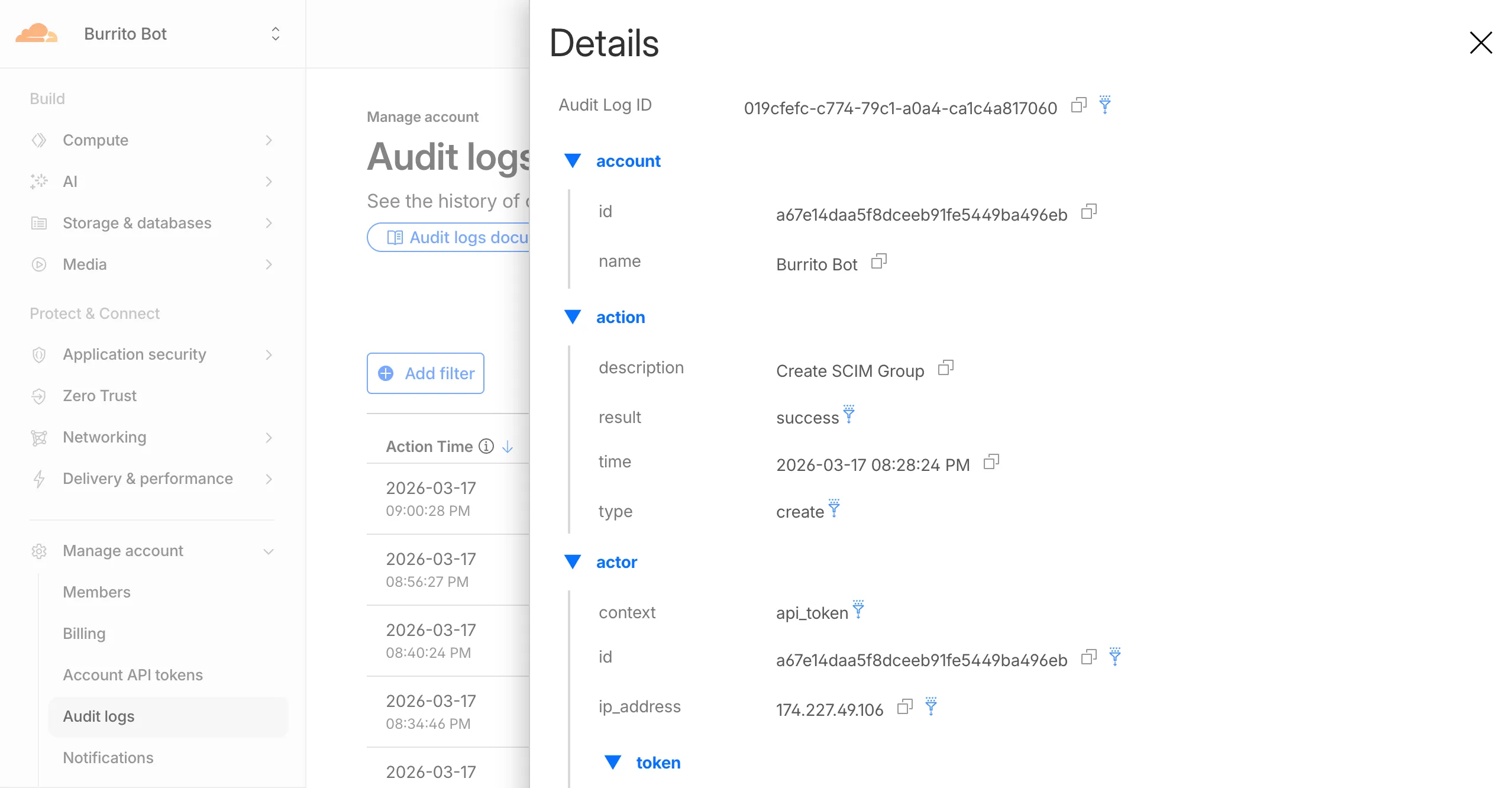
Cloudflare dashboard SCIM provisioning now supports Authentik ↗ as an identity provider, joining Okta and Microsoft Entra ID as explicitly supported providers.
Customers can now sync users and group information from Authentik to Cloudflare, apply Permission Policies to those groups, and manage the lifecycle of users & groups directly from your Authentik Identity Provider.
Cloudflare dashboard SCIM provisioning operations are now captured in Audit Logs v2, giving you visibility into user and group changes made by your identity provider.
The cf.timings.worker_msec field is now available in the Ruleset Engine. This field reports the wall-clock time that a Cloudflare Worker spent handling a request, measured in milliseconds.
You can use this field to identify slow Worker executions, detect performance regressions, or build rules that respond differently based on Worker processing time, such as logging requests that exceed a latency threshold.
Field details
Field
Type
Description
cf.timings.worker_msec
Integer
The time spent executing a Cloudflare Worker in milliseconds. Returns 0 if no Worker was invoked.
We are introducing Logo Match Preview, bringing the same pre-save visibility to visual assets that was previously only available for string-based queries. This update allows you to fine-tune your brand detection strategy before committing to a live monitor.
What’s new:
Upload your brand logo and immediately see a sample of potential matches from recently detected sites before finalizing the query
Adjust your similarity score (from 75% to 100%) and watch the results refresh in real-time to find the balance between broad detection and noise reduction
Review the specific logos triggered by your current settings to ensure your query is capturing the right level of brand infringement
You can now use a Workers binding to transform videos with Media Transformations. This allows you to resize, crop, extract frames, and extract audio from videos stored anywhere, even in private locations like R2 buckets.
The Media Transformations binding is useful when you want to:
Transform videos stored in private or protected sources
Optimize videos and store the output directly back to R2 for re-use
Extract still frames for classification or description with Workers AI
Extract audio tracks for transcription using Workers AI
To get started, add the Media binding to your Wrangler configuration:
The latest releases of @cloudflare/codemode ↗ add a new MCP barrel export, remove ai and zod as required peer dependencies from the main entry point, and give you more control over the sandbox.
New @cloudflare/codemode/mcp export
A new @cloudflare/codemode/mcp entry point provides two functions that wrap MCP servers with Code Mode:
codeMcpServer({ server, executor }) — wraps an existing MCP server with a single code tool where each upstream tool becomes a typed codemode.* method.
openApiMcpServer({ spec, executor, request }) — creates search and execute MCP tools from an OpenAPI spec with host-side request proxying and automatic $ref resolution.
import { codeMcpServer } from "@cloudflare/codemode/mcp";import { DynamicWorkerExecutor } from "@cloudflare/codemode";const executor = new DynamicWorkerExecutor({ loader: env.LOADER });// Wrap an existing MCP server — all its tools become// typed methods the LLM can call from generated codeconst server = await codeMcpServer({ server: upstreamMcp, executor });
import { codeMcpServer } from "@cloudflare/codemode/mcp";import { DynamicWorkerExecutor } from "@cloudflare/codemode";const executor = new DynamicWorkerExecutor({ loader: env.LOADER });// Wrap an existing MCP server — all its tools become// typed methods the LLM can call from generated codeconst server = await codeMcpServer({ server: upstreamMcp, executor });
Zero-dependency main entry point
Breaking change in v0.2.0:generateTypes and the ToolDescriptor / ToolDescriptors types have moved to @cloudflare/codemode/ai:
// Beforeimport { generateTypes } from "@cloudflare/codemode";// Afterimport { generateTypes } from "@cloudflare/codemode/ai";
// Beforeimport { generateTypes } from "@cloudflare/codemode";// Afterimport { generateTypes } from "@cloudflare/codemode/ai";
The main entry point (@cloudflare/codemode) no longer requires the ai or zod peer dependencies. It now exports:
Export
Description
sanitizeToolName
Sanitize tool names into valid JS identifiers
normalizeCode
Normalize LLM-generated code into async arrow functions
generateTypesFromJsonSchema
Generate TypeScript type definitions from plain JSON Schema
jsonSchemaToType
Convert a single JSON Schema to a TypeScript type string
DynamicWorkerExecutor
Sandboxed code execution via Dynamic Worker Loader
ToolDispatcher
RPC target for dispatching tool calls from sandbox to host
The ai and zod peer dependencies are now optional — only required when importing from @cloudflare/codemode/ai.
Custom sandbox modules
DynamicWorkerExecutor now accepts an optional modules option to inject custom ES modules into the sandbox:
const executor = new DynamicWorkerExecutor({ loader: env.LOADER, modules: { "utils.js": `export function add(a, b) { return a + b; }`, },});// Sandbox code can then: import { add } from "utils.js"
const executor = new DynamicWorkerExecutor({ loader: env.LOADER, modules: { "utils.js": `export function add(a, b) { return a + b; }`, },});// Sandbox code can then: import { add } from "utils.js"
Internal normalization and sanitization
DynamicWorkerExecutor now normalizes code and sanitizes tool names internally. You no longer need to call normalizeCode() or sanitizeToolName() before passing code and functions to execute().
AI Gateway now supports the cf-aig-collect-log-payload header, which controls whether request and response bodies are stored in logs. By default, this header is set to true and payloads are stored alongside metadata. Set this header to false to skip payload storage while still logging metadata such as token counts, model, provider, status code, cost, and duration.
This is useful when you need usage metrics but do not want to persist sensitive prompt or response data.
curl https://gateway.ai.cloudflare.com/v1/$ACCOUNT_ID/$GATEWAY_ID/openai/chat/completions \
  --header "Authorization: Bearer $TOKEN" \
  --header 'Content-Type: application/json' \
  --header 'cf-aig-collect-log-payload: false' \
  --data '{
    "model": "gpt-4o-mini",
    "messages": [
      {
        "role": "user",
        "content": "What is the email address and phone number of user123?"
      }
    ]
  }'
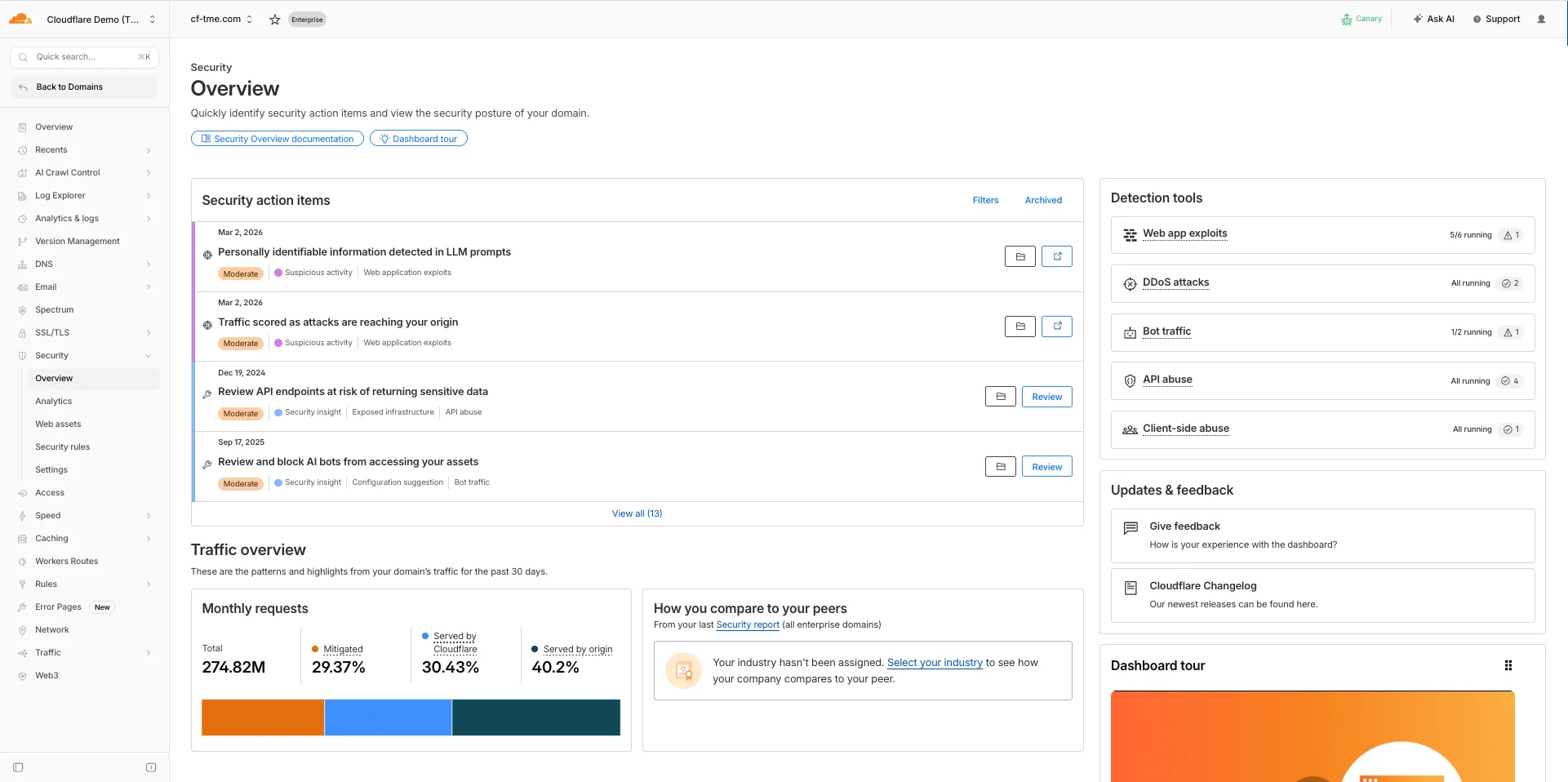
The Security Overview has been updated to provide Application Security customers with more actionable insights and a clearer view of their security posture.
Key improvements include:
Criticality for all Insights: Every insight now includes a criticality rating, allowing you to prioritize the most impactful security action items first.
Detection Tools Section: A new section displays the security detection tools available to you, indicating which are currently enabled and which can be activated to strengthen your defenses.
Industry Peer Comparison (Enterprise customers): A new module from Security Reports benchmarks your security posture against industry peers, highlighting relative strengths and areas for improvement.
You can now set topK up to 50 when a Vectorize query returns values or full metadata. This raises the previous limit of 20 for queries that use returnValues: true or returnMetadata: "all".
Use the higher limit when you need more matches in a single query response without dropping values or metadata. Refer to the Vectorize API reference for query options and current topK limits.
Investigations now support unlimited result paging in both the dashboard and the API, removing the previous 1,000-record cap. Security teams can page through complete result sets when searching across large mail volumes, giving SOC analysts and automated workflows deeper visibility for forensics and threat hunting.
In the dashboard, infinite paging is now supported in the Investigations view. The 1,000-record ceiling has been removed, so you can navigate through the full result set directly in the UI. The Investigations API now returns up to 10,000 records per page (up from 1,000), with no cap on total result volume across pages.
For high-volume use cases, we recommend:
Logpush to a SIEM for full-fidelity datasets and long-term retention.
SOAR playbooks against the async bulk action API for large-scale remediation. Bulk actions initiated from the dashboard remain capped at 1,000 messages per action.
The Investigations API for report exports larger than 1,000 results, which is the dashboard download cap.
When your Worker accesses a Durable Object via idFromName() or getByName(), the same name is now available on ctx.id.name inside the object — no need to pass it through method arguments or persist it in storage. This brings the runtime behavior in line with the Workers runtime types.
This is especially useful for alarms, where there is no calling client to pass the name as an argument. When an alarm handler runs, ctx.id.name will hold the same name the object was originally accessed with.
import { DurableObject } from "cloudflare:workers";export class ChatRoom extends DurableObject { async getRoomName() { // ctx.id.name returns the name passed to getByName() or idFromName() return this.ctx.id.name; }}// Workerexport default { async fetch(request, env) { const stub = env.CHAT_ROOM.getByName("general"); const roomName = await stub.getRoomName(); return new Response(`Welcome to ${roomName}!`); },};
ctx.id.name is undefined in the following cases:
For Durable Objects created with newUniqueId().
When accessed via idFromString(), even if the ID was originally created from a name.
This works the same way in local development with wrangler dev as it does in production. Run npm update wrangler to ensure you are on a version with this support.
You can now SSH into running Container instances using Wrangler. This is useful for debugging, inspecting running processes, or executing one-off commands inside a Container.
To connect, enable wrangler_ssh in your Container configuration and add your ssh-ed25519 public key to authorized_keys:
A new wrangler containers instances command lists all instances for a given Container application. This mirrors the instances view in the Cloudflare dashboard.
The command displays each instance's ID, name, state, location, version, and creation time:
wrangler containers instances <APPLICATION_ID>
Use the --json flag for machine-readable output, which is also the default format in non-interactive environments such as CI pipelines.
Cloudflare-generated 1xxx error responses now include a standard Retry-After HTTP header when the error is retryable. Agents and HTTP clients can read the recommended wait time from response headers alone — no body parsing required.
Changes
Seven retryable error codes now emit Retry-After:
Error code
Retry-After (seconds)
Error name
1004
120
DNS resolution error
1005
120
Banned zone
1015
30
Rate limited
1033
120
Argo Tunnel error
1038
60
HTTP headers limit exceeded
1200
60
Cache connection limit
1205
5
Too many redirects
The header value matches the existing retry_after body field in JSON and Markdown responses.
If a WAF rate limiting rule has already set a dynamic Retry-After value on the response, that value takes precedence.
This week's release introduces new detections for vulnerabilities in Ivanti Endpoint Manager Mobile (CVE-2026-1281 and CVE-2026-1340), alongside a new generic detection rule designed to identify and block Cross-Site Scripting (XSS) injection attempts within the Content-Security-Policy (CSP) HTTP request header.
Key Findings
CVE-2026-1281 & CVE-2026-1340: Ivanti Endpoint Manager Mobile processes HTTP requests through Apache RevwriteMap directives that pass user-controlled input to Bash scripts (/mi/bin/map-appstore-url and /mi/bin/map-aft-store-url). Bash scripts do not sanitize user input and are vulnerable to shell arithmetic expansion thereby allowing attackers to achieve unauthenticated remote code execution.
Generic XSS in CSP Header: This rule identifies malicious payloads embedded within the request's Content-Security-Policy header. It specifically targets scenarios where web frameworks or applications trust and extract values directly from the CSP header in the incoming request without sufficient validation. Attackers can provide crafted header values to inject scripts or malicious directives that are subsequently processed by the server.
Impact
Successful exploitation of Ivanti EPMM vulnerability allows unauthenticated remote code execution and generic XSS in CSP header allows attackers to inject malicious scripts during page rendering. In environments using server-side caching, this poisoned XSS content can subsequently be cached and automatically served to all visitors.
Cloudflare-generated 1xxx errors now return structured JSON when clients send Accept: application/json or Accept: application/problem+json. JSON responses follow RFC 9457 (Problem Details for HTTP APIs) ↗, so any HTTP client that understands Problem Details can parse the base members without Cloudflare-specific code.
Breaking change
The Markdown frontmatter field http_status has been renamed to status. Agents consuming Markdown frontmatter should update parsers accordingly.
Changes
JSON format. Clients sending Accept: application/json or Accept: application/problem+json now receive a structured JSON object with the same operational fields as Markdown frontmatter, plus RFC 9457 standard members.
RFC 9457 standard members (JSON only):
type — URI pointing to Cloudflare documentation for the specific error code
status — HTTP status code (matching the response status)
title — short, human-readable summary
detail — human-readable explanation specific to this occurrence
instance — Ray ID identifying this specific error occurrence
Field renames:
http_status -> status (JSON and Markdown)
what_happened -> detail (JSON only — Markdown prose sections are unchanged)
Content-Type mirroring. Clients sending Accept: application/problem+json receive Content-Type: application/problem+json; charset=utf-8 back; Accept: application/json receives application/json; charset=utf-8. Same body in both cases.
Negotiation behavior
Request header sent
Response format
Accept: application/json
JSON (application/json content type)
Accept: application/problem+json
JSON (application/problem+json content type)
Accept: application/json, text/markdown;q=0.9
JSON
Accept: text/markdown
Markdown
Accept: text/markdown, application/json
Markdown (equal q, first-listed wins)
Accept: */*
HTML (default)
Availability
Available now for Cloudflare-generated 1xxx errors.
Cloudflare Log Explorer now allows you to customize exactly which data fields are ingested and stored when enabling or managing log datasets.
Previously, ingesting logs often meant taking an "all or nothing" approach to data fields. With Ingest Field Selection, you can now choose from a list of available and recommended fields for each dataset. This allows you to reduce noise, focus on the metrics that matter most to your security and performance analysis, and manage your data footprint more effectively.
Key capabilities
Granular control: Select only the specific fields you need when enabling a new dataset.
Dynamic updates: Update fields for existing, already enabled logstreams at any time.
Historical consistency: Even if you disable a field later, you can still query and receive results for that field for the period it was captured.
Data integrity: Core fields, such as Timestamp, are automatically retained to ensure your logs remain searchable and chronologically accurate.
Example configuration
When configuring a dataset via the dashboard or API, you can define a specific set of fields. The Timestamp field remains mandatory to ensure data indexability.
We're excited to partner with NVIDIA to bring @cf/nvidia/nemotron-3-120b-a12b to Workers AI. NVIDIA Nemotron 3 Super is a Mixture-of-Experts (MoE) model with a hybrid Mamba-transformer architecture, 120B total parameters, and 12B active parameters per forward pass.
The model is optimized for running many collaborating agents per application. It delivers high accuracy for reasoning, tool calling, and instruction following across complex multi-step tasks.
Key capabilities:
Hybrid Mamba-transformer architecture delivers over 50% higher token generation throughput compared to leading open models, reducing latency for real-world applications
Tool calling support for building AI agents that invoke tools across multiple conversation turns
Multi-Token Prediction (MTP) accelerates long-form text generation by predicting several future tokens simultaneously in a single forward pass
32,000 token context window for retaining conversation history and plan states across multi-step agent workflows
This release contains minor fixes and introduces a brand new visual style for the client interface. The new Cloudflare One Client interface changes connectivity management from a toggle to a button and brings useful connectivity settings to the home screen. The redesign also introduces a collapsible navigation bar. When expanded, more client information can be accessed including connectivity, settings, and device profile information. If you have any feedback or questions, visit the Cloudflare Community forum and let us know.
Changes and improvements
Empty MDM files are now rejected instead of being incorrectly accepted as a single MDM config.
Fixed an issue in proxy mode where the client could become unresponsive due to upstream connection timeouts.
Fixed emergency disconnect state from a previous organization incorrectly persisting after switching organizations.
Consumer-only CLI commands are now clearly distinguished from Zero Trust commands.
Added detailed QUIC connection metrics to diagnostic logs for better troubleshooting.
Added monitoring for tunnel statistics collection timeouts.
Switched tunnel congestion control algorithm to Cubic for improved reliability across platforms.
Fixed initiating managed network detection checks when no network is available, which caused device profile flapping.
Known issues
The client may become stuck in a Connecting state. To resolve this issue, reconnect the client by selecting Disconnect and then Connect in the client user interface. Alternatively, change the client's operation mode.
The client may display an empty white screen upon the device waking from sleep. To resolve this issue, exit and then open the client to re-launch it.
Canceling login during a single MDM configuration setup results in an empty page with no way to resume authentication. To work around this issue, exit and relaunch the client.
This release contains minor fixes and introduces a brand new visual style for the client interface. The new Cloudflare One Client interface changes connectivity management from a toggle to a button and brings useful connectivity settings to the home screen. The redesign also introduces a collapsible navigation bar. When expanded, more client information can be accessed including connectivity, settings, and device profile information. If you have any feedback or questions, visit the Cloudflare Community forum and let us know.
Changes and improvements
Consumer-only CLI commands are now clearly distinguished from Zero Trust commands.
Added detailed QUIC connection metrics to diagnostic logs for better troubleshooting.
Added monitoring for tunnel statistics collection timeouts.
Switched tunnel congestion control algorithm to Cubic for improved reliability across platforms.
Fixed packet capture failing on tunnel interface when the tunnel interface is renamed by SCCM VPN boundary support.
Fixed unnecessary registration deletion caused by RDP connections in multi-user mode.
Fixed increased tunnel interface start-up time due to a race between duplicate address detection (DAD) and disabling NetBT.
Fixed tunnel failing to connect when the system DNS search list contains unexpected characters.
Empty MDM files are now rejected instead of being incorrectly accepted as a single MDM config.
Fixed an issue in proxy mode where the client could become unresponsive due to upstream connection timeouts.
Fixed emergency disconnect state from a previous organization incorrectly persisting after switching organizations.
Fixed initiating managed network detection checks when no network is available, which caused device profile flapping.
Known issues
The client may unexpectedly terminate during captive portal login. To work around this issue, use a web browser to authenticate with the captive portal and then re-launch the client.
An error indicating that Microsoft Edge can't read and write to its data directory may be displayed during captive portal login; this error is benign and can be dismissed.
The client may become stuck in a Connecting state. To resolve this issue, reconnect the client by selecting Disconnect and then Connect in the client user interface. Alternatively, change the client's operation mode.
The client may display an empty white screen upon the device waking from sleep. To resolve this issue, exit and then open the client to re-launch it.
Canceling login during a single MDM configuration setup results in an empty page with no way to resume authentication. To work around this issue, exit and relaunch the client.
For Windows 11 24H2 users, Microsoft has confirmed a regression that may lead to performance issues like mouse lag, audio cracking, or other slowdowns. Cloudflare recommends users experiencing these issues upgrade to a minimum Windows 11 24H2 version KB5062553 or higher for resolution.
Devices with KB5055523 installed may receive a warning about Win32/ClickFix.ABA being present in the installer. To resolve this false positive, update Microsoft Security Intelligence to version 1.429.19.0 or later. This warning will be omitted from future release notes. This Microsoft Security Intelligence update was released in May 2025.
DNS resolution may be broken when the following conditions are all true:
The client is in Secure Web Gateway without DNS filtering (tunnel-only) mode.
A custom DNS server address is configured on the primary network adapter.
The custom DNS server address on the primary network adapter is changed while the client is connected.
To work around this issue, reconnect the client by selecting Disconnect and then Connect in the client user interface.