Pular para o conteúdo

Changelog

New updates and improvements at Cloudflare.

Easy Python package management with Pywrangler

We are introducing a brand new tool called Pywrangler, which simplifies package management in Python Workers by automatically installing Workers-compatible Python packages into your project.

With Pywrangler, you specify your Worker's Python dependencies in your pyproject.toml file:

[project]
name = "python-beautifulsoup-worker"
version = "0.1.0"
description = "A simple Worker using beautifulsoup4"
requires-python = ">=3.12"
dependencies = [
    "beautifulsoup4"
]

[dependency-groups]
dev = [
  "workers-py",
  "workers-runtime-sdk"
]

You can then develop and deploy your Worker using the following commands:

uv run pywrangler dev
uv run pywrangler deploy

Pywrangler automatically downloads and vendors the necessary packages for your Worker, and these packages are bundled with the Worker when you deploy.

Consult the Python packages documentation for full details on Pywrangler and Python package management in Workers.
Wrangler config is optional when using Vite plugin

When using the Cloudflare Vite plugin to build and deploy Workers, a Wrangler configuration file is now optional for assets-only (static) sites. If no wrangler.toml, wrangler.json, or wrangler.jsonc file is found, the plugin generates sensible defaults for an assets-only site. The name is based on the package.json or the project directory name, and the compatibility_date uses the latest date supported by your installed Miniflare version.

This allows easier setup for static sites using Vite. Note that SPAs will still need to set assets.not_found_handling to single-page-application in order to function correctly.

Configure Workers programmatically using the Vite plugin

The Cloudflare Vite plugin now supports programmatic configuration of Workers without a Wrangler configuration file. You can use the config option to define Worker settings directly in your Vite configuration, or to modify existing configuration loaded from a Wrangler config file. This is particularly useful when integrating with other build tools or frameworks, as it allows them to control Worker configuration without needing users to manage a separate config file.

The config option

The Vite plugin's new config option accepts either a partial configuration object or a function that receives the current configuration and returns overrides. This option is applied after any config file is loaded, allowing the plugin to override specific values or define Worker configuration entirely in code.

Example usage

Setting config to an object to provide configuration values that merge with defaults and config file settings:

vite.config.tsts
import { defineConfig } from "vite";
import { cloudflare } from "@cloudflare/vite-plugin";

export default defineConfig({
	plugins: [
		cloudflare({
			config: {
				name: "my-worker",
				compatibility_flags: ["nodejs_compat"],
				send_email: [
					{
						name: "EMAIL",
					},
				],
			},
		}),
	],
});

Use a function to modify the existing configuration:

vite.config.tsts
import { defineConfig } from "vite";
import { cloudflare } from "@cloudflare/vite-plugin";
export default defineConfig({
	plugins: [
		cloudflare({
			config: (userConfig) => {
				delete userConfig.compatibility_flags;
			},
		}),
	],
});

Return an object with values to merge:

vite.config.tsts
import { defineConfig } from "vite";
import { cloudflare } from "@cloudflare/vite-plugin";

export default defineConfig({
	plugins: [
		cloudflare({
			config: (userConfig) => {
				if (!userConfig.compatibility_flags.includes("no_nodejs_compat")) {
					return { compatibility_flags: ["nodejs_compat"] };
				}
			},
		}),
	],
});

Auxiliary Workers

Auxiliary Workers also support the config option, enabling multi-Worker architectures without config files.

Define auxiliary Workers without config files using config inside the auxiliaryWorkers array:

vite.config.tsts
import { defineConfig } from "vite";
import { cloudflare } from "@cloudflare/vite-plugin";

export default defineConfig({
	plugins: [
		cloudflare({
			config: {
				name: "entry-worker",
				main: "./src/entry.ts",
				services: [{ binding: "API", service: "api-worker" }],
			},
			auxiliaryWorkers: [
				{
					config: {
						name: "api-worker",
						main: "./src/api.ts",
					},
				},
			],
		}),
	],
});

For more details and examples, see Programmatic configuration.

Terraform v5.14.0 now available

Earlier this year, we announced the launch of the new Terraform v5 Provider. We are aware of the high number of issues reported by the Cloudflare community related to the v5 release. We have committed to releasing improvements on a 2-3 week cadence to ensure its stability and reliability, including the v5.14 release. We have also pivoted from an issue-to-issue approach to a resource-per-resource approach - we will be focusing on specific resources to not only stabilize the resource but also ensure it is migration-friendly for those migrating from v4 to v5.

Thank you for continuing to raise issues. They make our provider stronger and help us build products that reflect your needs.

This release includes bug fixes, the stabilization of even more popular resources, and more.

Deprecation notice

Resource affected: api_shield_discovery_operation

Cloudflare continuously discovers and updates API endpoints and web assets of your web applications. To improve the maintainability of these dynamic resources, we are working on reducing the need to actively engage with discovered operations.

The corresponding public API endpoint of discovered operations is not affected and will continue to be supported.

Features

  • pages_project: Add v4 -> v5 migration tests (#6506)

Bug fixes

  • account_members: Makes member policies a set (#6488)
  • pages_project: Ensures non empty refresh plans (#6515)
  • R2: Improves sweeper (#6512)
  • workers_kv: Ignores value import state for verify (#6521)
  • workers_script: No longer treats the migrations attribute as WriteOnly (#6489)
  • workers_script: Resolves resource drift when worker has unmanaged secret (#6504)
  • zero_trust_device_posture_rule: Preserves input.version and other fields (#6500) and (#6503)
  • zero_trust_dlp_custom_profile: Adds sweepers for dlp_custom_profile
  • zone_subscription|account_subscription: Adds partners_ent as valid enum for rate_plan.id (#6505)
  • zone: Ensures datasource model schema parity (#6487)
  • subscription: Updates import signature to accept account_id/subscription_id to import account subscription (#6510)

Upgrade to newer version

We suggest waiting to migrate to v5 while we work on stabilization. This helps with avoiding any blocking issues while the Terraform resources are actively being stabilized. We will be releasing a new migration tool in March 2026 to help support v4 to v5 transitions for our most popular resources.

For more information

Connect to remote databases during local development with wrangler dev

You can now connect directly to remote databases and databases requiring TLS with wrangler dev. This lets you run your Worker code locally while connecting to remote databases, without needing to use wrangler dev --remote.

The localConnectionString field and CLOUDFLARE_HYPERDRIVE_LOCAL_CONNECTION_STRING_<BINDING_NAME> environment variable can be used to configure the connection string used by wrangler dev.

{
  "hyperdrive": [
    {
      "binding": "HYPERDRIVE",
      "id": "your-hyperdrive-id",
      "localConnectionString": "postgres://user:password@remote-host.example.com:5432/database?sslmode=require"
    }
  ]
}

Learn more about local development with Hyperdrive.

One-click Access protection for Workers now creates reusable Cloudflare Access policies

Workers applications now use reusable Cloudflare Access policies to reduce duplication and simplify access management across multiple Workers.

Previously, enabling Cloudflare Access on a Worker created per-application policies, unique to each application. Now, we create reusable policies that can be shared across applications:

  • Preview URLs: All Workers preview URLs share a single "Cloudflare Workers Preview URLs" policy across your account. This policy is automatically created the first time you enable Access on any preview URL. By sharing a single policy across all preview URLs, you can configure access rules once and have them apply company-wide to all Workers which protect preview URLs. This makes it much easier to manage who can access preview environments without having to update individual policies for each Worker.

  • Production workers.dev URLs: When enabled, each Worker gets its own reusable policy (named <worker-name> - Production) by default. We recognize production services often have different access requirements and having individual policies here makes it easier to configure service-to-service authentication or protect internal dashboards or applications with specific user groups. Keeping these policies separate gives you the flexibility to configure exactly the right access rules for each production service. When you disable Access on a production Worker, the associated policy is automatically cleaned up if it's not being used by other applications.

This change reduces policy duplication, simplifies cross-company access management for preview environments, and provides the flexibility needed for production services. You can still customize access rules by editing the reusable policies in the Zero Trust dashboard.

To enable Cloudflare Access on your Worker:

  1. In the Cloudflare dashboard, go to Workers & Pages.
  2. Select your Worker.
  3. Go to Settings > Domains & Routes.
  4. For workers.dev or Preview URLs, click Enable Cloudflare Access.
  5. Optionally, click Manage Cloudflare Access to customize the policy.

For more information on configuring Cloudflare Access for Workers, refer to the Workers Access documentation.

Agents SDK v0.2.24 with resumable streaming, MCP improvements, and schedule fixes

The latest release of @cloudflare/agents brings resumable streaming, significant MCP client improvements, and critical fixes for schedules and Durable Object lifecycle management.

Resumable streaming

AIChatAgent now supports resumable streaming, allowing clients to reconnect and continue receiving streamed responses without losing data. This is useful for:

  • Long-running AI responses
  • Users on unreliable networks
  • Users switching between devices mid-conversation
  • Background tasks where users navigate away and return
  • Real-time collaboration where multiple clients need to stay in sync

Streams are maintained across page refreshes, broken connections, and syncing across open tabs and devices.

Other improvements

  • Default JSON schema validator added to MCP client
  • Schedules can now safely destroy the agent

MCP client API improvements

The MCPClientManager API has been redesigned for better clarity and control:

  • New registerServer() method: Register MCP servers without immediately connecting
  • New connectToServer() method: Establish connections to registered servers
  • Improved reconnect logic: restoreConnectionsFromStorage() now properly handles failed connections
// Register a server to Agent
const { id } = await this.mcp.registerServer({
	name: "my-server",
	url: "https://my-mcp-server.example.com",
});

// Connect when ready
await this.mcp.connectToServer(id);

// Discover tools, prompts and resources
await this.mcp.discoverIfConnected(id);

The SDK now includes a formalized MCPConnectionState enum with states: idle, connecting, authenticating, connected, discovering, and ready.

Enhanced MCP discovery

MCP discovery fetches the available tools, prompts, and resources from an MCP server so your agent knows what capabilities are available. The MCPClientConnection class now includes a dedicated discover() method with improved reliability:

  • Supports cancellation via AbortController
  • Configurable timeout (default 15s)
  • Discovery failures now throw errors immediately instead of silently continuing

Bug fixes

  • Fixed a bug where schedules meant to fire immediately with this.schedule(0, ...) or this.schedule(new Date(), ...) would not fire
  • Fixed an issue where schedules that took longer than 30 seconds would occasionally time out
  • Fixed SSE transport now properly forwards session IDs and request headers
  • Fixed AI SDK stream events conversion to UIMessageStreamPart

Upgrade

To update to the latest version:

npm i agents@latest

Launching FLUX.2 [dev] on Workers AI

We've partnered with Black Forest Labs (BFL) to bring their latest FLUX.2 [dev] model to Workers AI! This model excels in generating high-fidelity images with physical world grounding, multi-language support, and digital asset creation. You can also create specific super images with granular controls like JSON prompting.

Read the BFL blog to learn more about the model itself. Read our Cloudflare blog to see the model in action, or try it out yourself on our multi modal playground.

Pricing documentation is available on the model page or pricing page. Note, we expect to drop pricing in the next few days after iterating on the model performance.

Workers AI Platform specifics

The model hosted on Workers AI is able to support up to 4 image inputs (512x512 per input image). Note, this image model is one of the most powerful in the catalog and is expected to be slower than the other image models we currently support. One catch to look out for is that this model takes multipart form data inputs, even if you just have a prompt.

With the REST API, the multipart form data input looks like this:

curl --request POST \
  --url 'https://api.cloudflare.com/client/v4/accounts/{ACCOUNT}/ai/run/@cf/black-forest-labs/flux-2-dev' \
  --header 'Authorization: Bearer {TOKEN}' \
  --header 'Content-Type: multipart/form-data' \
  --form 'prompt=a sunset at the alps' \
  --form steps=25
  --form width=1024
  --form height=1024

With the Workers AI binding, you can use it as such:


const form = new FormData();
form.append('prompt', 'a sunset with a dog');
form.append('width', '1024');
form.append('height', '1024');

//this dummy request is temporary hack
//we're pushing a change to address this soon
const formRequest = new Request('http://dummy', {
  method: 'POST',
  body: form
});
const formStream = formRequest.body;
const formContentType = formRequest.headers.get('content-type') || 'multipart/form-data';

const resp = await env.AI.run("@cf/black-forest-labs/flux-2-dev", {
  multipart: {
    body: formStream,
    contentType: formContentType
  }
});

The parameters you can send to the model are detailed here:

JSON Schema for Model Required Parameters

  • prompt (string) - Text description of the image to generate

Optional Parameters

  • input_image_0 (string) - Binary image
  • input_image_1 (string) - Binary image
  • input_image_2 (string) - Binary image
  • input_image_3 (string) - Binary image
  • steps (integer) - Number of inference steps. Higher values may improve quality but increase generation time
  • guidance (float) - Guidance scale for generation. Higher values follow the prompt more closely
  • width (integer) - Width of the image, default 1024 Range: 256-1920
  • height (integer) - Height of the image, default 768 Range: 256-1920
  • seed (integer) - Seed for reproducibility

## Multi-Reference Images

The FLUX.2 model is great at generating images based on reference images. You can use this feature to apply the style of one image to another, add a new character to an image, or iterate on past generate images. You would use it with the same multipart form data structure, with the input images in binary.

For the prompt, you can reference the images based on the index, like `take the subject of image 1 and style it like image 0` or even use natural language like `place the dog beside the woman`.

Note: you have to name the input parameter as `input_image_0`, `input_image_1`, `input_image_2` for it to work correctly. All input images must be smaller than 512x512.

```bash
curl --request POST \
  --url 'https://api.cloudflare.com/client/v4/accounts/{ACCOUNT}/ai/run/@cf/black-forest-labs/flux-2-dev' \
  --header 'Authorization: Bearer {TOKEN}' \
  --header 'Content-Type: multipart/form-data' \
  --form 'prompt=take the subject of image 1 and style it like image 0' \
  --form input_image_0=@/Users/johndoe/Desktop/icedoutkeanu.png \
  --form input_image_1=@/Users/johndoe/Desktop/me.png \
  --form steps=25
  --form width=1024
  --form height=1024

Through Workers AI Binding:


//helper function to convert ReadableStream to Blob
async function streamToBlob(stream: ReadableStream, contentType: string): Promise<Blob> {
  const reader = stream.getReader();
  const chunks = [];

  while (true) {
    const { done, value } = await reader.read();
    if (done) break;
    chunks.push(value);
  }

  return new Blob(chunks, { type: contentType });
}

const image0 = await fetch("http://image-url");
const image1 = await fetch("http://image-url");
const form = new FormData();

const image_blob0 = await streamToBlob(image0.body, "image/png");
const image_blob1 = await streamToBlob(image1.body, "image/png");
form.append('input_image_0', image_blob0)
form.append('input_image_1', image_blob1)
form.append('prompt', 'take the subject of image 1and style it like image 0')

//this dummy request is temporary hack
//we're pushing a change to address this soon
const formRequest = new Request('http://dummy', {
  method: 'POST',
  body: form
});
const formStream = formRequest.body;
const formContentType = formRequest.headers.get('content-type') || 'multipart/form-data';

const resp = await env.AI.run("@cf/black-forest-labs/flux-2-dev", {
    multipart: {
        body: form,
        contentType: "multipart/form-data"
    }
})

JSON Prompting

The model supports prompting in JSON to get more granular control over images. You would pass the JSON as the value of the 'prompt' field in the multipart form data. See the JSON schema below on the base parameters you can pass to the model.

JSON Prompting Schema
{
  "type": "object",
  "properties": {
    "scene": {
      "type": "string",
      "description": "Overall scene setting or location"
    },
    "subjects": {
      "type": "array",
      "items": {
        "type": "object",
        "properties": {
          "type": { 
            "type": "string", 
            "description": "Type of subject (e.g., desert nomad, blacksmith, DJ, falcon)" 
          },
          "description": { 
            "type": "string", 
            "description": "Physical attributes, clothing, accessories" 
          },
          "pose": { 
            "type": "string", 
            "description": "Action or stance" 
          },
          "position": { 
            "type": "string",
            "enum": ["foreground", "midground", "background"],
            "description": "Depth placement in scene"
          }
        },
        "required": ["type", "description", "pose", "position"]
      }
    },
    "style": {
      "type": "string",
      "description": "Artistic rendering style (e.g., digital painting, photorealistic, pixel art, noir sci-fi, lifestyle photo, wabi-sabi photo)"
    },
    "color_palette": {
      "type": "array",
      "items": { "type": "string" },
      "minItems": 3,
      "maxItems": 3,
      "description": "Exactly 3 main colors for the scene (e.g., ['navy', 'neon yellow', 'magenta'])"
    },
    "lighting": {
      "type": "string",
      "description": "Lighting condition and direction (e.g., fog-filtered sun, moonlight with star glints, dappled sunlight)"
    },
    "mood": {
      "type": "string",
      "description": "Emotional atmosphere (e.g., harsh and determined, playful and modern, peaceful and dreamy)"
    },
    "background": {
      "type": "string",
      "description": "Background environment details"
    },
    "composition": {
      "type": "string",
      "enum": [
        "rule of thirds",
        "circular arrangement",
        "framed by foreground",
        "minimalist negative space",
        "S-curve",
        "vanishing point center",
        "dynamic off-center",
        "leading leads",
        "golden spiral",
        "diagonal energy",
        "strong verticals",
        "triangular arrangement"
      ],
      "description": "Compositional technique"
    },
    "camera": {
      "type": "object",
      "properties": {
        "angle": { 
          "type": "string",
          "enum": ["eye level", "low angle", "slightly low", "bird's-eye", "worm's-eye", "over-the-shoulder", "isometric"],
          "description": "Camera perspective"
        },
        "distance": { 
          "type": "string",
          "enum": ["close-up", "medium close-up", "medium shot", "medium wide", "wide shot", "extreme wide"],
          "description": "Framing distance"
        },
        "focus": { 
          "type": "string",
          "enum": ["deep focus", "macro focus", "selective focus", "sharp on subject", "soft background"],
          "description": "Focus type"
        },
        "lens": { 
          "type": "string",
          "enum": ["14mm", "24mm", "35mm", "50mm", "70mm", "85mm"],
          "description": "Focal length (wide to telephoto)"
        },
        "f-number": { 
          "type": "string", 
          "description": "Aperture (e.g., f/2.8, the smaller the number the more blurry the background)" 
        },
        "ISO": { 
          "type": "number", 
          "description": "Light sensitivity value (comfortable range between 100 & 6400, lower = less sensitivity)" 
        }
      }
    },
    "effects": {
      "type": "array",
      "items": { "type": "string" },
      "description": "Post-processing effects (e.g., 'lens flare small', 'subtle film grain', 'soft bloom', 'god rays', 'chromatic aberration mild')"
    }
  },
  "required": ["scene", "subjects"]
}

Other features to try

  • The model also supports the most common latin and non-latin character languages
  • You can prompt the model with specific hex codes like #2ECC71
  • Try creating digital assets like landing pages, comic strips, infographics too!

Mount R2 buckets in Containers

Containers now support mounting R2 buckets as FUSE (Filesystem in Userspace) volumes, allowing applications to interact with R2 using standard filesystem operations.

Common use cases include:

  • Bootstrapping containers with datasets, models, or dependencies for sandboxes and agent environments
  • Persisting user configuration or application state without managing downloads
  • Accessing large static files without bloating container images or downloading at startup

FUSE adapters like tigrisfs, s3fs, and gcsfuse can be installed in your container image and configured to mount buckets at startup.

FROM alpine:3.20

# Install FUSE and dependencies
RUN apk update && \
    apk add --no-cache ca-certificates fuse curl bash

# Install tigrisfs
RUN ARCH=$(uname -m) && \
    if [ "$ARCH" = "x86_64" ]; then ARCH="amd64"; fi && \
    if [ "$ARCH" = "aarch64" ]; then ARCH="arm64"; fi && \
    VERSION=$(curl -s https://api.github.com/repos/tigrisdata/tigrisfs/releases/latest | grep -o '"tag_name": "[^"]*' | cut -d'"' -f4) && \
    curl -L "https://github.com/tigrisdata/tigrisfs/releases/download/${VERSION}/tigrisfs_${VERSION#v}_linux_${ARCH}.tar.gz" -o /tmp/tigrisfs.tar.gz && \
    tar -xzf /tmp/tigrisfs.tar.gz -C /usr/local/bin/ && \
    rm /tmp/tigrisfs.tar.gz && \
    chmod +x /usr/local/bin/tigrisfs

# Create startup script that mounts bucket
RUN printf '#!/bin/sh\n\
    set -e\n\
    mkdir -p /mnt/r2\n\
    R2_ENDPOINT="https://${R2_ACCOUNT_ID}.r2.cloudflarestorage.com"\n\
    /usr/local/bin/tigrisfs --endpoint "${R2_ENDPOINT}" -f "${BUCKET_NAME}" /mnt/r2 &\n\
    sleep 3\n\
    ls -lah /mnt/r2\n\
    ' > /startup.sh && chmod +x /startup.sh

CMD ["/startup.sh"]

See the Mount R2 buckets with FUSE example for a complete guide on mounting R2 buckets and/or other S3-compatible storage buckets within your containers.

New CPU Pricing for Containers and Sandboxes

Containers and Sandboxes pricing for CPU time is now based on active usage only, instead of provisioned resources.

This means that you now pay less for Containers and Sandboxes.

An Example Before and After

Imagine running the standard-2 instance type for one hour, which can use up to 1 vCPU, but on average you use only 20% of your CPU capacity.

CPU-time is priced at $0.00002 per vCPU-second.

Previously, you would be charged for the CPU allocated to the instance multiplied by the time it was active, in this case 1 hour.

CPU cost would have been: **0.072** — 1 vCPU * 3600 seconds * 0.00002

Now, since you are only using 20% of your CPU capacity, your CPU cost is cut to 20% of the previous amount.

CPU cost is now: **0.0144** — 1 vCPU * 3600 seconds * 0.00002 * 20% utilization

This can significantly reduce costs for Containers and Sandboxes.

See the documentation to learn more about Containers, Sandboxes, and associated pricing.

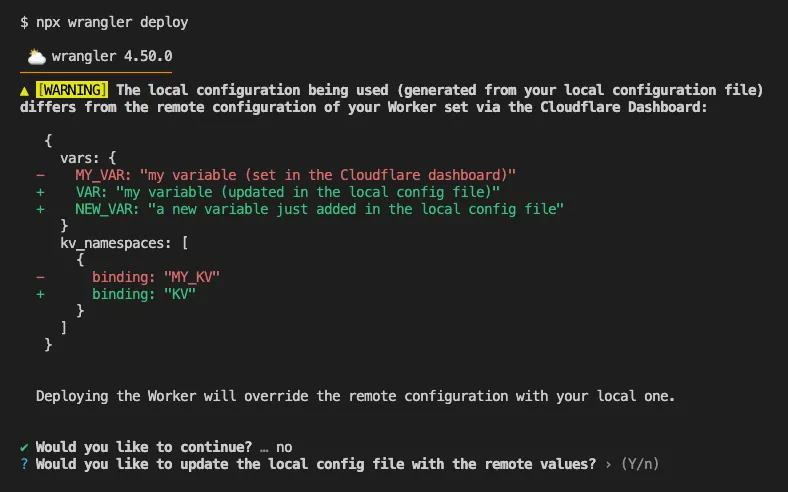
Better local deployment flow for Cloudflare Workers

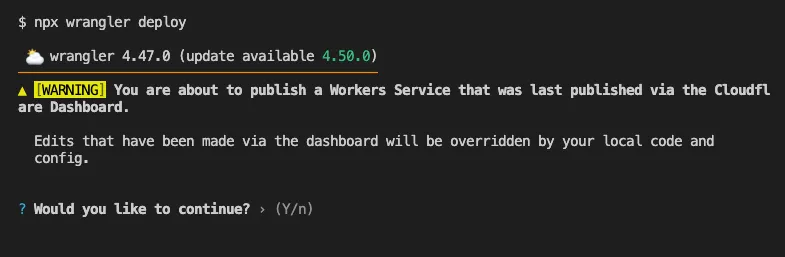
Until now, if a Worker had been previously deployed via the Cloudflare Dashboard, a subsequent deployment done via the Cloudflare Workers CLI, Wrangler (through the deploy command), would allow the user to override the Worker's dashboard settings without providing details on what dashboard settings would be lost.

Now instead, wrangler deploy presents a helpful representation of the differences between the local configuration and the remote dashboard settings, and offers to update your local configuration file for you.

See example below showing a before and after for wrangler deploy when a local configuration is expected to override a Worker's dashboard settings:

Before

wrangler deploy run before the improved workflow

After

wrangler deploy run after the improved workflow

Also, if instead Wrangler detects that a deployment would override remote dashboard settings but in an additive way, without modifying or removing any of them, it will simply proceed with the deployment without requesting any user interaction.

Update to Wrangler v4.50.0 or greater to take advantage of this improved deploy flow.

Terraform v5.13.0 now available

Earlier this year, we announced the launch of the new Terraform v5 Provider. We are aware of the high number of issues reported by the Cloudflare community related to the v5 release. We have committed to releasing improvements on a 2-3 week cadence to ensure its stability and reliability, including the v5.13 release. We have also pivoted from an issue-to-issue approach to a resource-per-resource approach - we will be focusing on specific resources to not only stabilize the resource but also ensure it is migration-friendly for those migrating from v4 to v5.

Thank you for continuing to raise issues. They make our provider stronger and help us build products that reflect your needs.

This release includes new features, new resources and data sources, bug fixes, updates to our Developer Documentation, and more.

Breaking Change

Please be aware that there are breaking changes for the cloudflare_api_token and cloudflare_account_token resources. These changes eliminate configuration drift caused by policy ordering differences in the Cloudflare API.

For more specific information about the changes or the actions required, please see the detailed Repository changelog.

Features

  • New resources and data sources added
    • cloudflare_connectivity_directory
    • cloudflare_sso_connector
    • cloudflare_universal_ssl_setting
  • api_token+account_tokens: state upgrader and schema bump (#6472)
  • docs: make docs explicit when a resource does not have import support
  • magic_transit_connector: support self-serve license key (#6398)
  • worker_version: add content_base64 support
  • worker_version: boolean support for run_worker_first (#6407)
  • workers_script_subdomains: add import support (#6375)
  • zero_trust_access_application: add proxy_endpoint for ZT Access Application (#6453)
  • zero_trust_dlp_predefined_profile: Switch DLP Predefined Profile endpoints, introduce enabled_entries attribute

Bug Fixes

  • account_token: token policy order and nested resources (#6440)
  • allow r2_bucket_event_notification to be applied twice without failing (#6419)
  • cloudflare_worker+cloudflare_worker_version: import for the resources (#6357)
  • dns_record: inconsistent apply error (#6452)
  • pages_domain: resource tests (#6338)
  • pages_project: unintended resource state drift (#6377)
  • queue_consumer: id population (#6181)
  • workers_kv: multipart request (#6367)
  • workers_kv: updating workers metadata attribute to be read from endpoint (#6386)
  • workers_script_subdomain: add note to cloudflare_workers_script_subdomain about redundancy with cloudflare_worker (#6383)
  • workers_script: allow config.run_worker_first to accept list input
  • zero_trust_device_custom_profile_local_domain_fallback: drift issues (#6365)
  • zero_trust_device_custom_profile: resolve drift issues (#6364)
  • zero_trust_dex_test: correct configurability for 'targeted' attribute to fix drift
  • zero_trust_tunnel_cloudflared_config: remove warp_routing from cloudflared_config (#6471)

Upgrading

We suggest holding off on migration to v5 while we work on stabilization. This help will you avoid any blocking issues while the Terraform resources are actively being stabilized. We will be releasing a new migration tool in March 2026 to help support v4 to v5 transitions for our most popular resources.

For more info

AI Search support for crawling login protected website content

AI Search now supports custom HTTP headers for website crawling, solving a common problem where valuable content behind authentication or access controls could not be indexed.

Previously, AI Search could only crawl publicly accessible pages, leaving knowledge bases, documentation, and other protected content out of your search results. With custom headers support, you can now include authentication credentials that allow the crawler to access this protected content.

This is particularly useful for indexing content like:

  • Internal documentation behind corporate login systems
  • Premium content that requires users to provide access to unlock
  • Sites protected by Cloudflare Access using service tokens

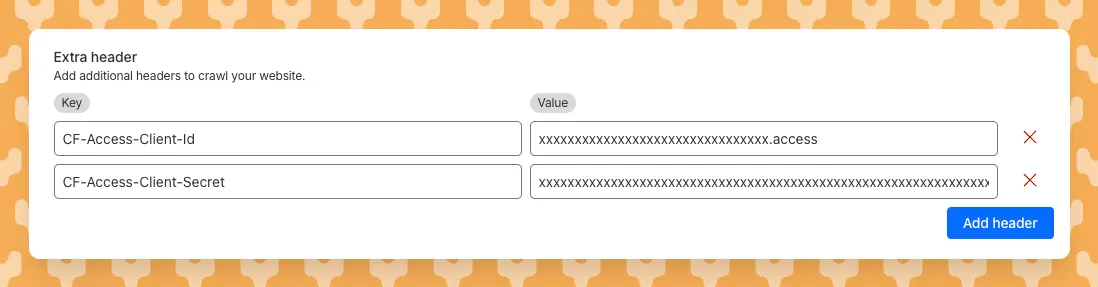
To add custom headers when creating an AI Search instance, select Parse options. In the Extra headers section, you can add up to five custom headers per Website data source.

Custom headers configuration in AI Search

For example, to crawl a site protected by Cloudflare Access, you can add service token credentials as custom headers:

CF-Access-Client-Id: your-token-id.access
CF-Access-Client-Secret: your-token-secret

The crawler will automatically include these headers in all requests, allowing it to access protected pages that would otherwise be blocked.

Learn more about configuring custom headers for website crawling in AI Search.

More SQL aggregate, date and time functions available in Workers Analytics Engine

You can now perform more powerful queries directly in Workers Analytics Engine with a major expansion of our SQL function library.

Workers Analytics Engine allows you to ingest and store high-cardinality data at scale (such as custom analytics) and query your data through a simple SQL API.

Today, we've expanded Workers Analytics Engine's SQL capabilities with several new functions:

New aggregate functions:

  • countIf() - count the number of rows which satisfy a provided condition
  • sumIf() - calculate a sum from rows which satisfy a provided condition
  • avgIf() - calculate an average from rows which satisfy a provided condition

New date and time functions:

  • toYear()
  • toMonth()
  • toDayOfMonth()
  • toDayOfWeek()
  • toHour()
  • toMinute()
  • toSecond()
  • toStartOfYear()
  • toStartOfMonth()
  • toStartOfWeek()
  • toStartOfDay()
  • toStartOfHour()
  • toStartOfFifteenMinutes()
  • toStartOfTenMinutes()
  • toStartOfFiveMinutes()
  • toStartOfMinute()
  • today()
  • toYYYYMM()

Ready to get started?

Whether you're building usage-based billing systems, customer analytics dashboards, or other custom analytics, these functions let you get the most out of your data. Get started with Workers Analytics Engine and explore all available functions in our SQL reference documentation.

cloudflared proxy-dns command will be removed starting February 2, 2026

Starting February 2, 2026, the cloudflared proxy-dns command will be removed from all new cloudflared releases.

This change is being made to enhance security and address a potential vulnerability in an underlying DNS library. This vulnerability is specific to the proxy-dns command and does not affect any other cloudflared features, such as the core Cloudflare Tunnel service.

The proxy-dns command, which runs a client-side DNS-over-HTTPS (DoH) proxy, has been an officially undocumented feature for several years. This functionality is fully and securely supported by our actively developed products.

Versions of cloudflared released before this date will not be affected and will continue to operate. However, note that our official support policy for any cloudflared release is one year from its release date.

Migration paths

We strongly advise users of this undocumented feature to migrate to one of the following officially supported solutions before February 2, 2026, to continue benefiting from secure DNS-over-HTTPS.

End-user devices

The preferred method for enabling DNS-over-HTTPS on user devices is the Cloudflare WARP client. The WARP client automatically secures and proxies all DNS traffic from your device, integrating it with your organization's Zero Trust policies and posture checks.

Servers, routers, and IoT devices

For scenarios where installing a client on every device is not possible (such as servers, routers, or IoT devices), we recommend using the WARP Connector.

Instead of running cloudflared proxy-dns on a machine, you can install the WARP Connector on a single Linux host within your private network. This connector will act as a gateway, securely routing all DNS and network traffic from your entire subnet to Cloudflare for filtering and logging.

Select Wrangler environments using the CLOUDFLARE_ENV environment variable

Wrangler now supports using the CLOUDFLARE_ENV environment variable to select the active environment for your Worker commands. This provides a more flexible way to manage environments, especially when working with build tools and CI/CD pipelines.

What's new

Environment selection via environment variable:

  • Set CLOUDFLARE_ENV to specify which environment to use for Wrangler commands
  • Works with all Wrangler commands that support the --env flag
  • The --env command line argument takes precedence over the CLOUDFLARE_ENV environment variable

Example usage

# Deploy to the production environment using CLOUDFLARE_ENV
CLOUDFLARE_ENV=production wrangler deploy

# Upload a version to the staging environment
CLOUDFLARE_ENV=staging wrangler versions upload

# The --env flag takes precedence over CLOUDFLARE_ENV
CLOUDFLARE_ENV=dev wrangler deploy --env production
# This will deploy to production, not dev

Use with build tools

The CLOUDFLARE_ENV environment variable is particularly useful when working with build tools like Vite. You can set the environment once during the build process, and it will be used for both building and deploying your Worker:

# Set the environment for both build and deploy
CLOUDFLARE_ENV=production npm run build & wrangler deploy

When using @cloudflare/vite-plugin, the build process generates a "redirected deploy config" that is flattened to only contain the active environment. Wrangler will validate that the environment specified matches the environment used during the build to prevent accidentally deploying a Worker built for one environment to a different environment.

Learn more

Workers automatic tracing, now in open beta

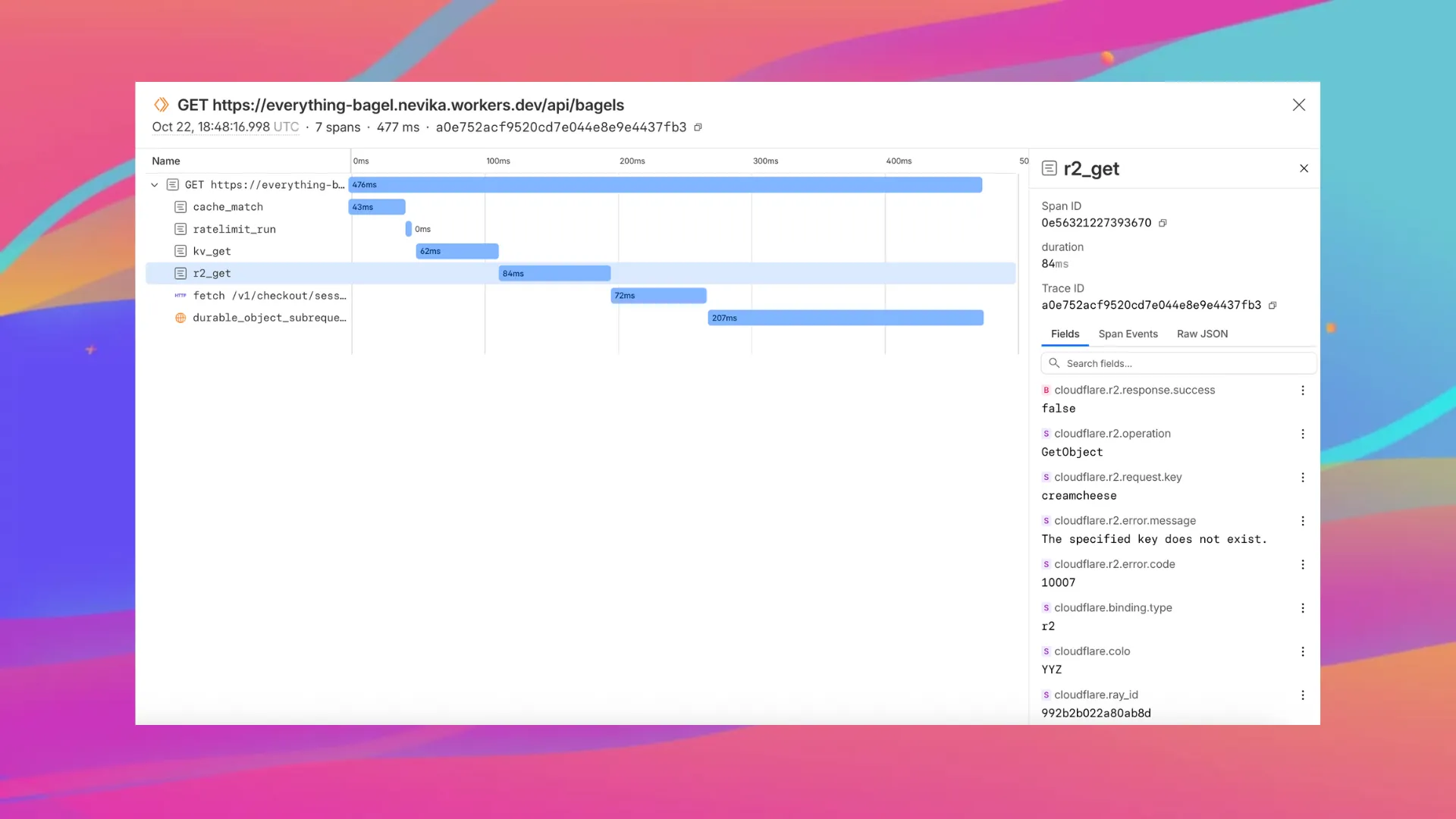
Enable automatic tracing on your Workers, giving you detailed metadata and timing information for every operation your Worker performs.

Tracing example

Tracing helps you identify performance bottlenecks, resolve errors, and understand how your Worker interacts with other services on the Workers platform. You can now answer questions like:

  • Which calls are slowing down my application?
  • Which queries to my database take the longest?
  • What happened within a request that resulted in an error?

You can now:

To get started, set:

{
	"observability": {
		"traces": {
			"enabled": true,
		},
	},
}

Want to learn more?

D1 can restrict data localization with jurisdictions

You can now set a jurisdiction when creating a D1 database to guarantee where your database runs and stores data. Jurisdictions can help you comply with data localization regulations such as GDPR. Supported jurisdictions include eu and fedramp.

A jurisdiction can only be set at database creation time via wrangler, REST API or the UI and cannot be added/updated after the database already exists.

npx wrangler@latest d1 create db-with-jurisdiction --jurisdiction eu
curl -X POST "https://api.cloudflare.com/client/v4/accounts/<account_id>/d1/database" \
     -H "Authorization: Bearer $TOKEN" \
     -H "Content-Type: application/json" \
     --data '{"name": "db-with-jurisdiction", "jurisdiction": "eu" }'

To learn more, visit D1's data location documentation.

Announcing Workers VPC Services (Beta)

Workers VPC Services is now available, enabling your Workers to securely access resources in your private networks, without having to expose them on the public Internet.

What's new

  • VPC Services: Create secure connections to internal APIs, databases, and services using familiar Worker binding syntax
  • Multi-cloud Support: Connect to resources in private networks in any external cloud (AWS, Azure, GCP, etc.) or on-premise using Cloudflare Tunnels
export default {
	async fetch(request, env, ctx) {
		// Perform application logic in Workers here

		// Sample call to an internal API running on ECS in AWS using the binding
		const response = await env.AWS_VPC_ECS_API.fetch("https://internal-host.example.com");

		// Additional application logic in Workers
		return new Response();
	},
};

Getting started

Set up a Cloudflare Tunnel, create a VPC Service, add service bindings to your Worker, and access private resources securely. Refer to the documentation to get started.

Capture Wrangler command output in structured format

You can now capture Wrangler command output in a structured ND-JSON format by setting the WRANGLER_OUTPUT_FILE_PATH or WRANGLER_OUTPUT_FILE_DIRECTORY environment variables. This feature is particularly useful for CI/CD pipelines and automation tools that need programmatic access to deployment information such as worker names, version IDs, deployment URLs, and error details. Commands that support this feature include wrangler deploy, wrangler versions upload, wrangler versions deploy, and wrangler pages deploy.

Increased Workflows instance and concurrency limits

We've raised the Cloudflare Workflows account-level limits for all accounts on the Workers paid plan:

  • Instance creation rate increased from 100 workflow instances per 10 seconds to 100 instances per second
  • Concurrency limit increased from 4,500 to 10,000 workflow instances per account

These increases mean you can create new instances up to 10x faster, and have more workflow instances concurrently executing. To learn more and get started with Workflows, refer to the getting started guide.

If your application requires a higher limit, fill out the Limit Increase Request Form or contact your account team. Please refer to Workflows pricing for more information.

Access Workers preview URLs from the Build details page

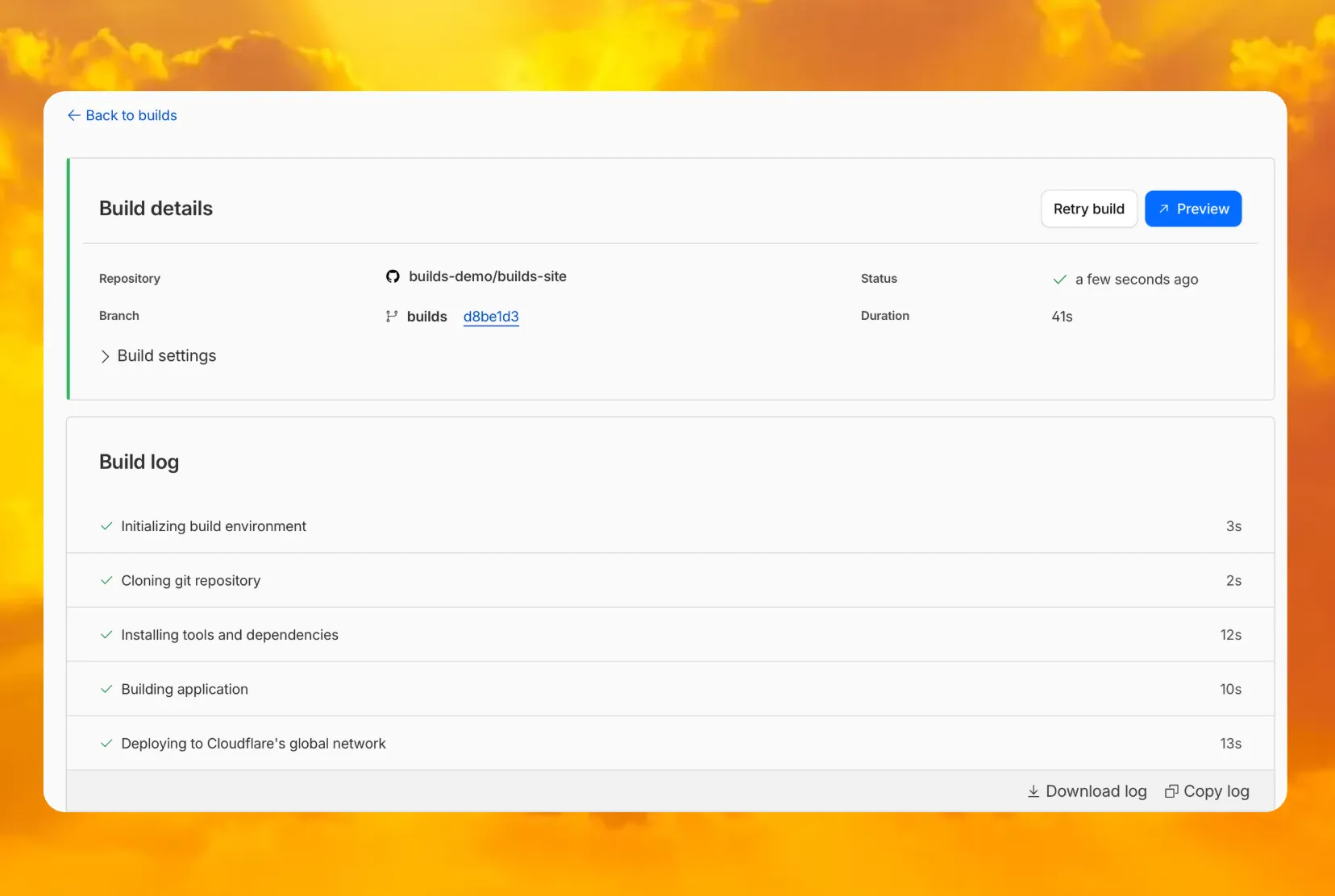
You can now access preview URLs directly from the build details page, making it easier to test your changes when reviewing builds in the dashboard.

preview button

What's new

  • A Preview button now appears in the top-right corner of the build details page for successful builds
  • Click it to instantly open the latest preview URL
  • Matches the same experience you're familiar with from Pages

Reranking and API-based system prompt configuration in AI Search

AI Search now supports reranking for improved retrieval quality and allows you to set the system prompt directly in your API requests.

Rerank for more relevant results

You can now enable reranking to reorder retrieved documents based on their semantic relevance to the user’s query. Reranking helps improve accuracy, especially for large or noisy datasets where vector similarity alone may not produce the optimal ordering.

You can enable and configure reranking in the dashboard or directly in your API requests:

const answer = await env.AI.autorag("my-autorag").aiSearch({
	query: "How do I train a llama to deliver coffee?",
	model: "@cf/meta/llama-3.3-70b-instruct-fp8-fast",
	reranking: {
		enabled: true,
		model: "@cf/baai/bge-reranker-base",
	},
});

Set system prompts in API

Previously, system prompts could only be configured in the dashboard. You can now define them directly in your API requests, giving you per-query control over behavior. For example:

// Dynamically set query and system prompt in AI Search
async function getAnswer(query, tone) {
	const systemPrompt = `You are a ${tone} assistant.`;

	const response = await env.AI.autorag("my-autorag").aiSearch({
		query: query,
		system_prompt: systemPrompt,
	});

	return response;
}

// Example usage
const query = "What is Cloudflare?";
const tone = "friendly";

const answer = await getAnswer(query, tone);
console.log(answer);

Learn more about Reranking and System Prompt in AI Search.