Users using Cloudflare's REST API to query their D1 database can see lower end-to-end request latency now that D1 authentication is performed at the closest Cloudflare network data center that received the request. Previously, authentication required D1 REST API requests to proxy to Cloudflare's core, centralized data centers, which added network round trips and latency.
Latency improvements range from 50-500 ms depending on request location and database location and only apply to the REST API. REST API requests and databases outside the United States see a bigger benefit since Cloudflare's primary core data centers reside in the United States.
D1 query endpoints like /query and /raw have the most noticeable improvements since they no longer access Cloudflare's core data centers. D1 control plane endpoints such as those to create and delete databases see smaller improvements, since they still require access to Cloudflare's core data centers for other control plane metadata.
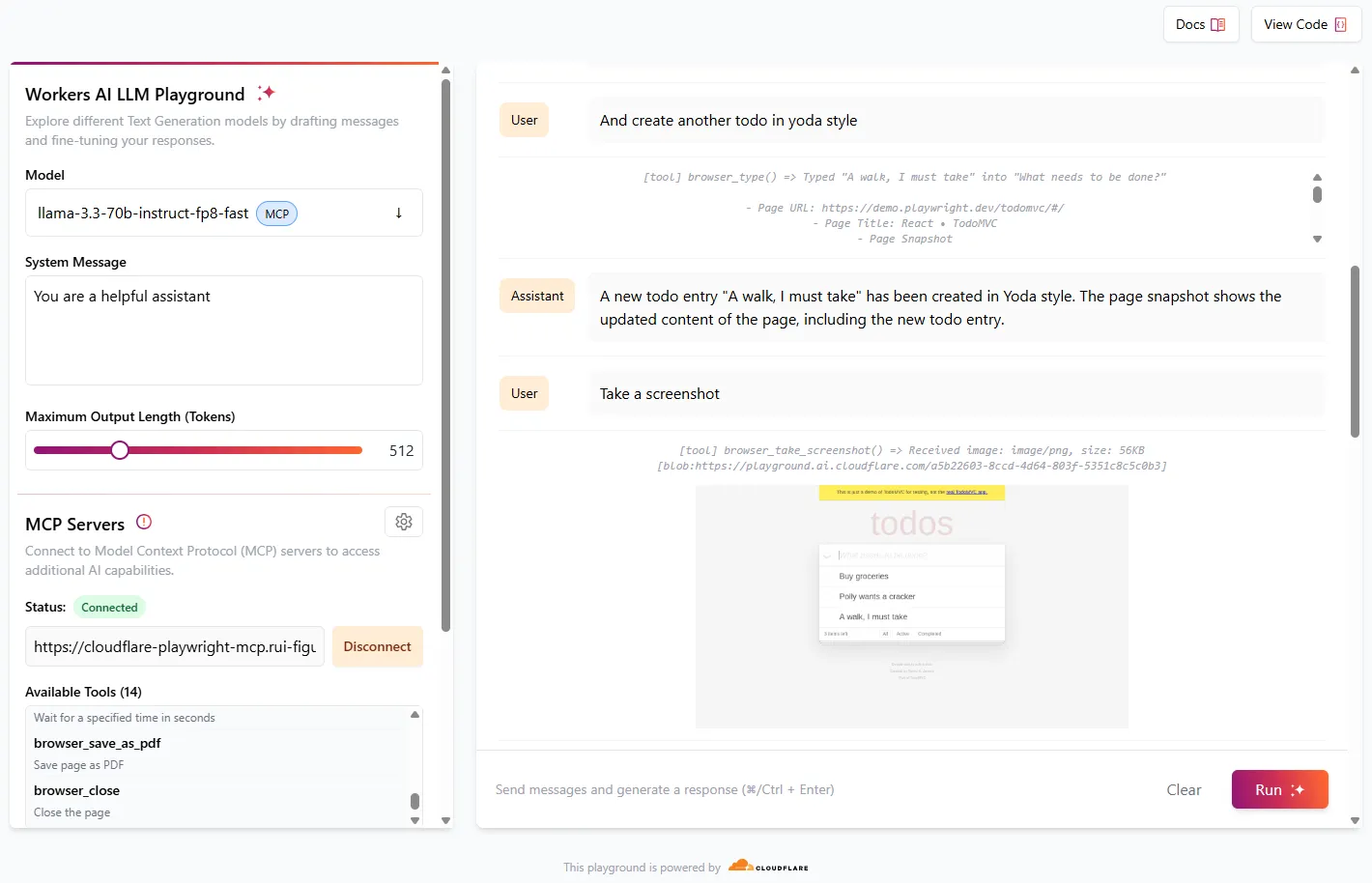
We're excited to share that you can now use the Playwright MCP ↗ server with Browser Rendering.
Once you deploy the server, you can use any MCP client with it to interact with Browser Rendering. This allows you to run AI models that can automate browser tasks, such as taking screenshots, filling out forms, or scraping data.
Cloudflare for SaaS ↗ allows you to extend the benefits of Cloudflare to your customers via their own custom or vanity domains. Now, the limit for custom hostnames ↗ on a Cloudflare for SaaS Pay-as-you-go plan has been raised from 5,000 custom hostnames to 50,000 custom hostnames.
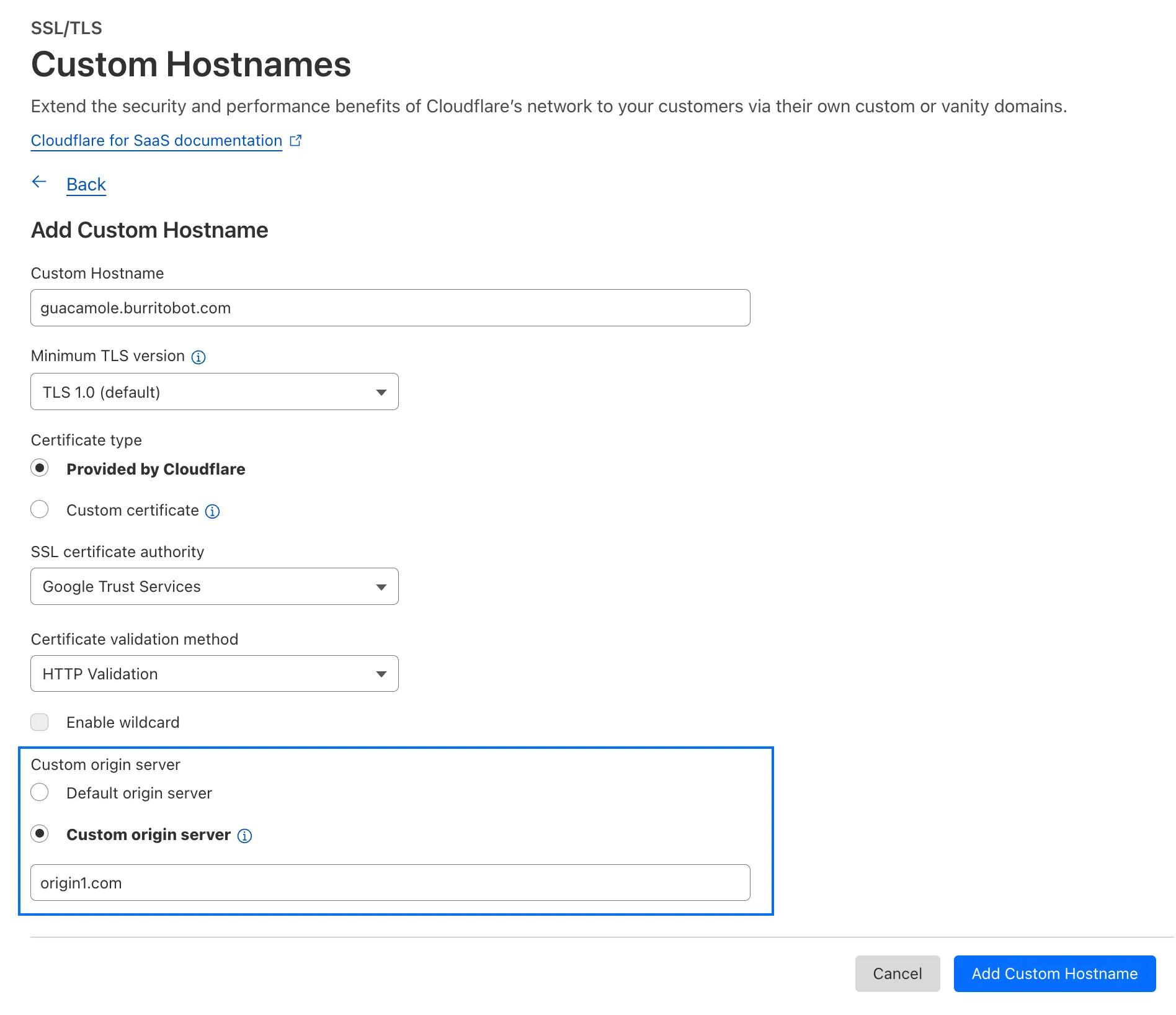
With custom origin server -- previously an enterprise-only feature -- you can route traffic from one or more custom hostnames somewhere other than your default proxy fallback. Custom origin server ↗ is now available to Cloudflare for SaaS customers on Free, Pro, and Business plans.
You can enable custom origin server on a per-custom hostname basis via the API ↗ or the UI:
All Cloudflare One Gateway users can now use Protocol detection logging and filtering, including those on Pay-as-you-go and Free plans.
With Protocol Detection, admins can identify and enforce policies on traffic proxied through Gateway based on the underlying network protocol (for example, HTTP, TLS, or SSH), enabling more granular traffic control and security visibility no matter your plan tier.
This feature is available to enable in your account network settings for all accounts. For more information on using Protocol Detection, refer to the Protocol detection documentation.
This week’s roundup covers nine vulnerabilities, including six critical RCEs and one dangerous file upload. Affected platforms span cloud services, CI/CD pipelines, CMSs, and enterprise backup systems. Several are now addressed by updated WAF managed rulesets.
Key Findings
Ingress-Nginx (CVE-2025-1098): Unauthenticated RCE via unsafe annotation handling. Impacts Kubernetes clusters.
Ivanti EPMM (CVE-2025-4428, 4427): Auth bypass allows full access to mobile device management.
Vercel (CVE-2025-32421): Information leak via misconfigured APIs. Useful for attacker recon.
Impact
These vulnerabilities expose critical components across Kubernetes, CI/CD pipelines, and enterprise systems to severe threats including unauthenticated remote code execution, authentication bypass, and information leaks. High-impact flaws in Ingress-Nginx, Craft CMS, F5 BIG-IP, and NAKIVO Backup enable full system compromise, while SAP NetWeaver and AJ-Report allow remote shell deployment and template-based attacks. Ivanti EPMM’s auth bypass further risks unauthorized control over mobile device fleets.
GitHub Actions and Vercel introduce supply chain and reconnaissance risks, allowing malicious workflow inputs and data exposure that aid in targeted exploitation. Organizations should prioritize immediate patching, enhance monitoring, and deploy updated WAF and IDS signatures to defend against likely active exploitation.
We’ve launched two powerful new tools to make the GraphQL Analytics API more accessible:
GraphQL API Explorer
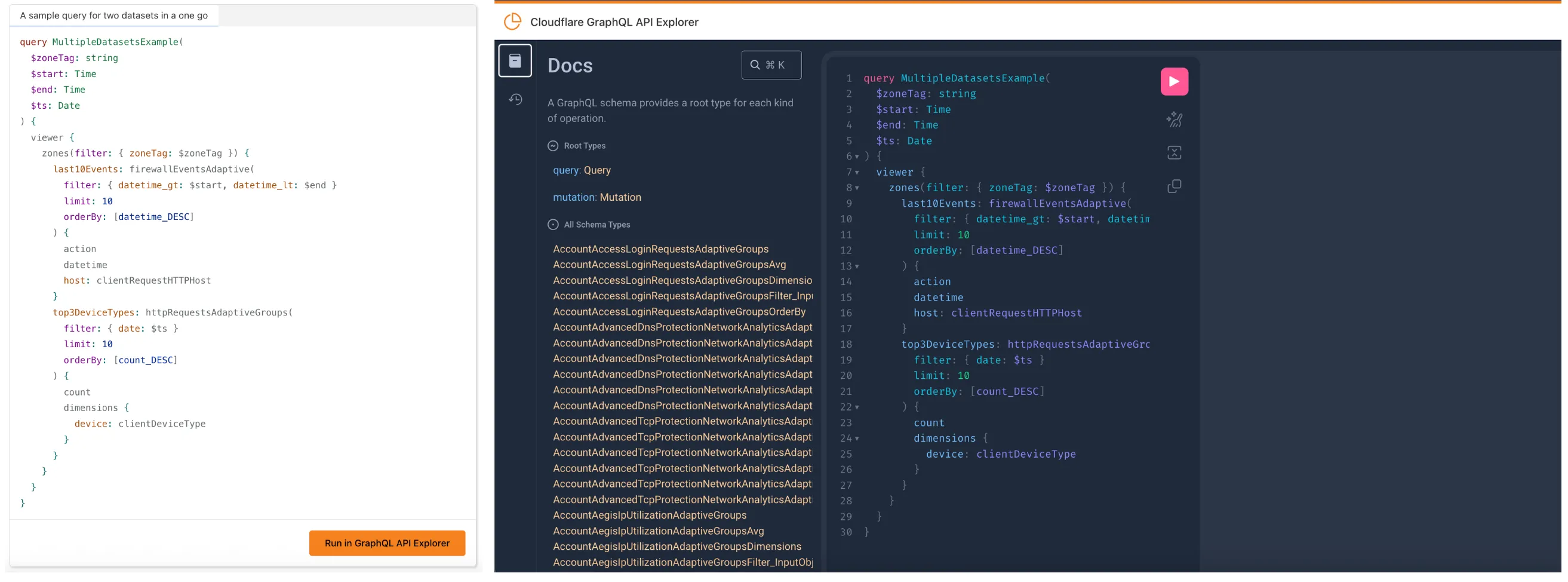
The new GraphQL API Explorer ↗ helps you build, test, and run queries directly in your browser. Features include:
In-browser schema documentation to browse available datasets and fields
Interactive query editor with autocomplete and inline documentation
A "Run in GraphQL API Explorer" button to execute example queries from our docs
Seamless OAuth authentication — no manual setup required
GraphQL Model Context Protocol (MCP) Server
MCP Servers let you use natural language tools like Claude to generate structured queries against your data. See our blog post ↗ for details on how they work and which servers are available. The new GraphQL MCP server ↗ helps you discover and generate useful queries for the GraphQL Analytics API. With this server, you can:
Explore what data is available to query
Generate and refine queries using natural language, with one-click links to run them in the API Explorer
Build dashboards and visualizations from structured query outputs
Example prompts include:
“Show me HTTP traffic for the last 7 days for example.com”
“What GraphQL node returns firewall events?”
“Can you generate a link to the Cloudflare GraphQL API Explorer with a pre-populated query and variables?”
We’re continuing to expand these tools, and your feedback helps shape what’s next. Explore the documentation to learn more and get started.
In Cloudflare Workers, you can now attach an event listener to Request objects, using the signal property ↗. This allows you to perform tasks when the request to your Worker is canceled by the client. To use this feature, you must set the enable_request_signal compatibility flag.
You can use a listener to perform cleanup tasks or write to logs before your Worker's invocation ends. For example, if you run the Worker below, and then abort the request from the client, a log will be written:
index.jsjs
export default { async fetch(request, env, ctx) { // This sets up an event listener that will be called if the client disconnects from your // worker. request.signal.addEventListener("abort", () => { console.log("The request was aborted!"); }); const { readable, writable } = new IdentityTransformStream(); sendPing(writable); return new Response(readable, { headers: { "Content-Type": "text/plain" }, }); },};async function sendPing(writable) { const writer = writable.getWriter(); const enc = new TextEncoder(); for (;;) { // Send 'ping' every second to keep the connection alive await writer.write(enc.encode("ping\r\n")); await scheduler.wait(1000); }}
index.tsts
export default { async fetch(request, env, ctx): Promise<Response> { // This sets up an event listener that will be called if the client disconnects from your // worker. request.signal.addEventListener('abort', () => { console.log('The request was aborted!'); }); const { readable, writable } = new IdentityTransformStream(); sendPing(writable); return new Response(readable, { headers: { 'Content-Type': 'text/plain' } }); },} satisfies ExportedHandler<Env>;async function sendPing(writable: WritableStream): Promise<void> { const writer = writable.getWriter(); const enc = new TextEncoder(); for (;;) { // Send 'ping' every second to keep the connection alive await writer.write(enc.encode('ping\r\n')); await scheduler.wait(1000); }}
Earlier this year, we announced the launch of the new Terraform v5 Provider. Unlike the earlier Terraform providers, v5 is automatically generated based on the OpenAPI Schemas for our REST APIs. Since launch, we have seen an unexpectedly high number of issues ↗ reported by customers. These issues currently impact about 15% of resources. We have been working diligently to address these issues across the company, and have released the v5.5.0 release which includes a number of bug fixes. Please keep an eye on this changelog for more information about upcoming releases.
Changes
Broad fixes across resources with recurring diffs, including, but not limited to:
cloudflare_zero_trust_gateway_policy
cloudflare_zero_trust_access_application
cloudflare_zero_trust_tunnel_cloudflared_route
cloudflare_zone_setting
cloudflare_ruleset
cloudflare_page_rule
Zone settings can be re-applied without client errors
Page rules conversion errors are fixed
Failure to apply changes to cloudflare_zero_trust_tunnel_cloudflared_route
Other bug fixes
For a more detailed look at all of the changes, see the changelog ↗ in GitHub.
If you have an unaddressed issue with the provider, we encourage you to check the open issues ↗ and open a new one if one does not already exist for what you are experiencing.
Upgrading
If you are evaluating a move from v4 to v5, please make use of the migration guide ↗. We have provided automated migration scripts using Grit which simplify the transition, although these do not support implementations which use Terraform modules, so customers making use of modules need to migrate manually. Please make use of terraform plan to test your changes before applying, and let us know if you encounter any additional issues by reporting to our GitHub repository ↗.
This week's analysis covers four vulnerabilities, with three rated critical due to their Remote Code Execution (RCE) potential. One targets a high-traffic frontend platform, while another targets a popular content management system. These detections are now part of the Cloudflare Managed Ruleset in Block mode.
Key Findings
Commvault Command Center (CVE-2025-34028) exposes an unauthenticated RCE via insecure command injection paths in the web UI. This is critical due to its use in enterprise backup environments.
BentoML (CVE-2025-27520) reveals an exploitable vector where serialized payloads in model deployment APIs can lead to arbitrary command execution. This targets modern AI/ML infrastructure.
Craft CMS (CVE-2024-56145) allows RCE through template injection in unauthenticated endpoints. It poses a significant risk for content-heavy websites with plugin extensions.
Apache HTTP Server (CVE-2024-38475) discloses sensitive server config data due to misconfigured
mod_proxy behavior. While not RCE, this is useful for pre-attack recon.
Impact
These newly detected vulnerabilities introduce critical risk across modern web stacks, AI infrastructure, and content platforms: unauthenticated RCEs in Commvault, BentoML, and Craft CMS enable full system compromise with minimal attacker effort.
Apache HTTPD information leak can support targeted reconnaissance, increasing the success rate of follow-up exploits. Organizations using these platforms should prioritize patching and monitor for indicators of exploitation using updated WAF detection rules.
Ruleset
Rule ID
Legacy Rule ID
Description
Previous Action
New Action
Comments
Cloudflare Managed Ruleset
100745
Apache HTTP Server - Information Disclosure - CVE:CVE-2024-38475
Log
Block
This is a New Detection
Cloudflare Managed Ruleset
100747
Commvault Command Center - Remote Code Execution - CVE:CVE-2025-34028
42 new applications have been added for Zero Trust support within the Application Library and Gateway policy enforcement, giving you the ability to investigate or apply inline policies to these applications.
33 of the 42 applications are Artificial Intelligence applications. The others are Human Resources (2 applications), Development (2 applications), Productivity (2 applications), Sales & Marketing, Public Cloud, and Security.
To view all available applications, log in to your Cloudflare Zero Trust dashboard ↗, navigate to the App Library under My Team.
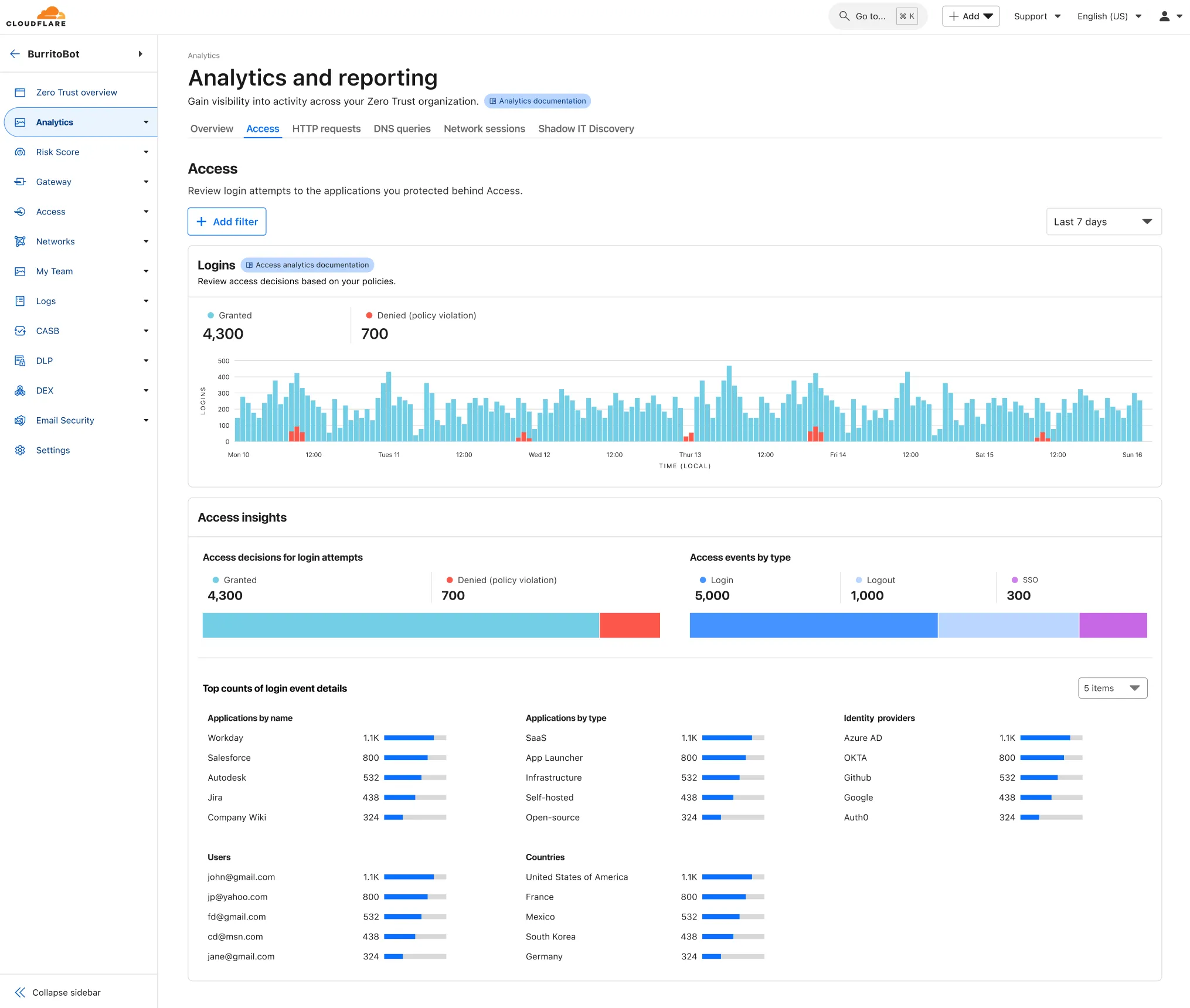
A new Access Analytics dashboard is now available to all Cloudflare One customers. Customers can apply and combine multiple filters to dive into specific slices of their Access metrics. These filters include:
You can now create Durable Objects using
Python Workers. A Durable Object is a special kind of
Cloudflare Worker which uniquely combines compute with storage, enabling stateful
long-running applications which run close to your users. For more info see
here.
You can define a Durable Object in Python in a similar way to JavaScript:
You can now safely open email attachments to view and investigate them.
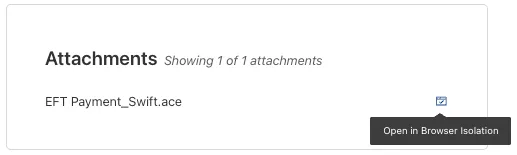
What this means is that messages now have a Attachments section. Here, you can view processed attachments and their classifications (for example, Malicious, Suspicious, Encrypted). Next to each attachment, a Browser Isolation icon allows your team to safely open the file in a clientless, isolated browser with no risk to the analyst or your environment.
To use this feature, you must:
Turn on Allow users to open a remote browser without the device client in your Zero Trust settings.
Some attachment types may not render in Browser Isolation. If there is a file type that you would like to be opened with Browser Isolation, reach out to your Cloudflare contact.
This feature is available across these Email security packages:
Hyperdrive has been approved for FedRAMP Authorization and is now available in the FedRAMP Marketplace ↗.
FedRAMP is a U.S. government program that provides standardized assessment and authorization for cloud products and services. As a result of this product update,
Hyperdrive has been approved as an authorized service to be used by U.S. federal agencies at the Moderate Impact level.
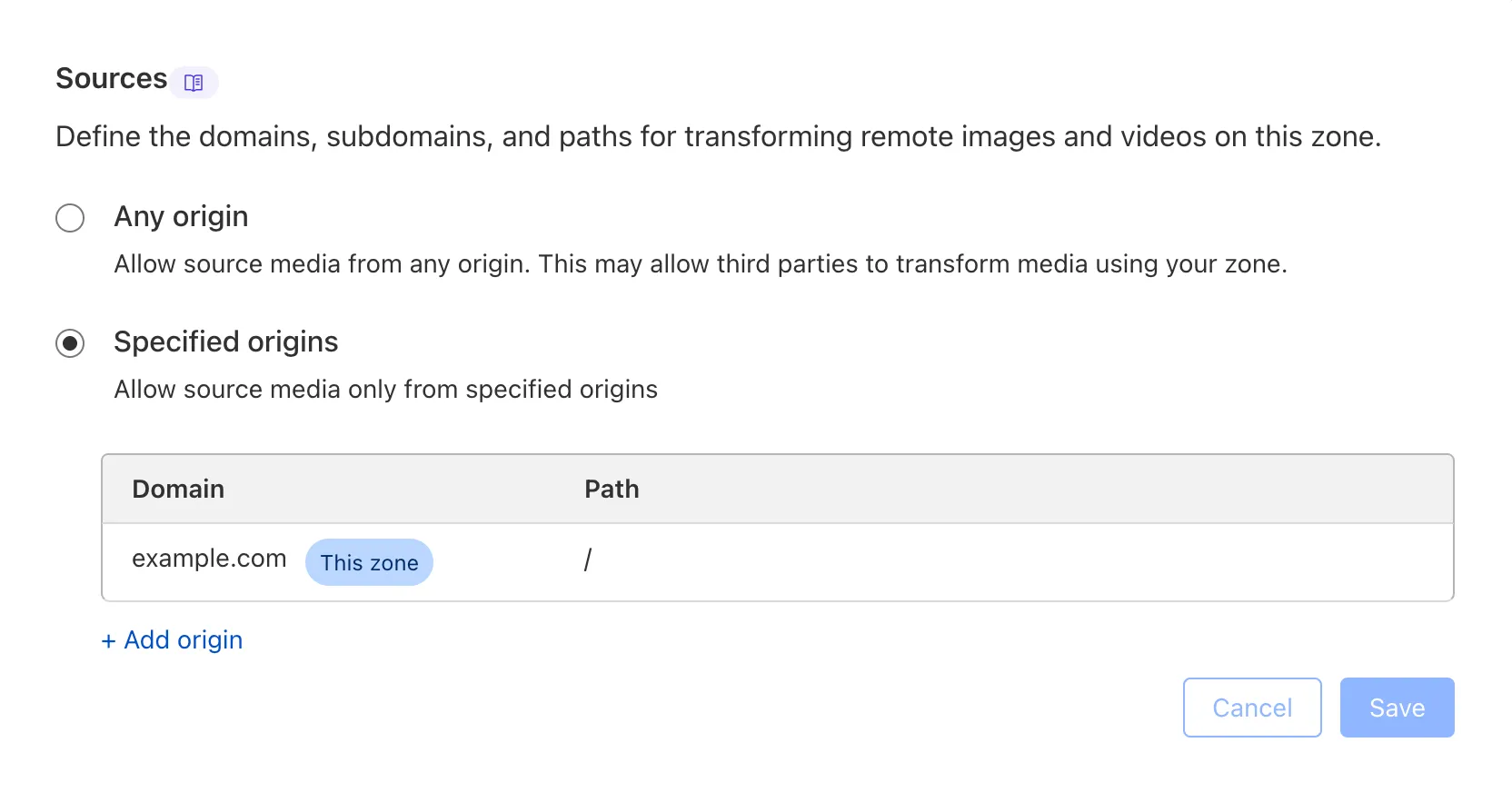
We are adding source origin restrictions to
the Media Transformations beta. This allows customers to restrict what sources
can be used to fetch images and video for transformations. This feature is the
same as --- and uses the same settings as ---
Image Transformations sources.
When transformations is first enabled, the default setting only allows
transformations on images and media from the same website or domain being used to make
the transformation request. In other words, by default, requests to
example.com/cdn-cgi/media can only reference originals on example.com.
Adding access to other sources, or allowing any source,
is easy to do
in the Transformations tab under Stream. Click each domain enabled for
Transformations and set its sources list to match the needs of your content. The
user making this change will need permission to edit zone settings.
Remote Browser Isolation (RBI) now supports SAML HTTP-POST bindings, enabling seamless authentication for SSO-enabled applications that rely on POST-based SAML responses from Identity Providers (IdPs) within a Remote Browser Isolation session. This update resolves a previous limitation that caused 405 errors during login and improves compatibility with multi-factor authentication (MFA) flows.
With expanded support for major IdPs like Okta and Azure AD, this enhancement delivers a more consistent and user-friendly experience across authentication workflows. Learn how to set up Remote Browser Isolation.
You can now create DNS policies to manage outbound traffic for an expanded list of applications.
This update adds support for 273 new applications, giving you more control over your organization's outbound traffic.
With this update, you can:
Create DNS policies for a wider range of applications
Manage outbound traffic more effectively
Improve your organization's security and compliance posture
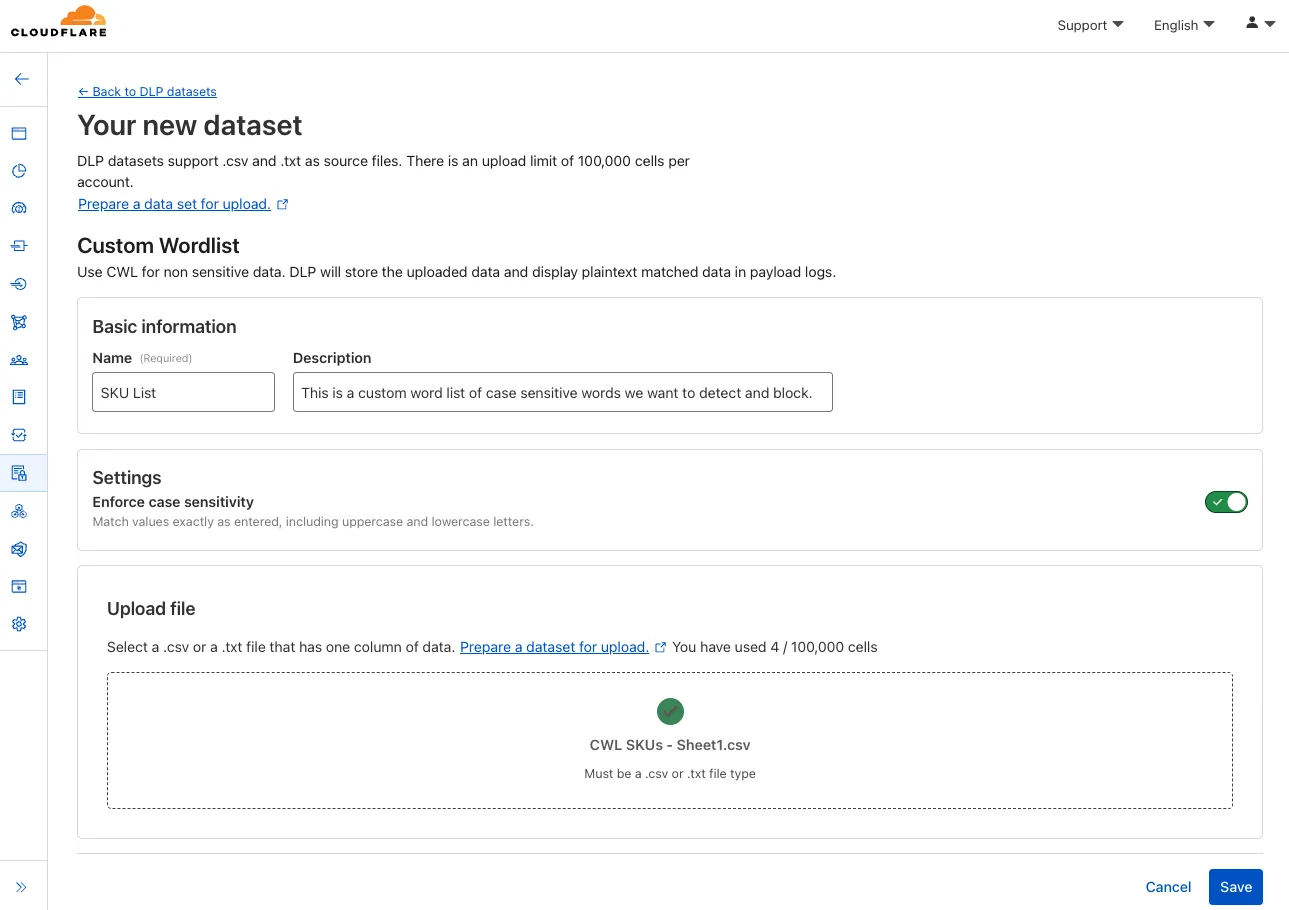
You can now configure custom word lists to enforce case sensitivity. This setting supports flexibility where needed and aims to reduce false positives where letter casing is critical.
You can now publish messages to Cloudflare Queues directly via HTTP from any service or programming language that supports sending HTTP requests. Previously, publishing to queues was only possible from within Cloudflare Workers. You can already consume from queues via Workers or HTTP pull consumers, and now publishing is just as flexible.
Publishing via HTTP requires a Cloudflare API token with Queues Edit permissions for authentication. Here's a simple example:
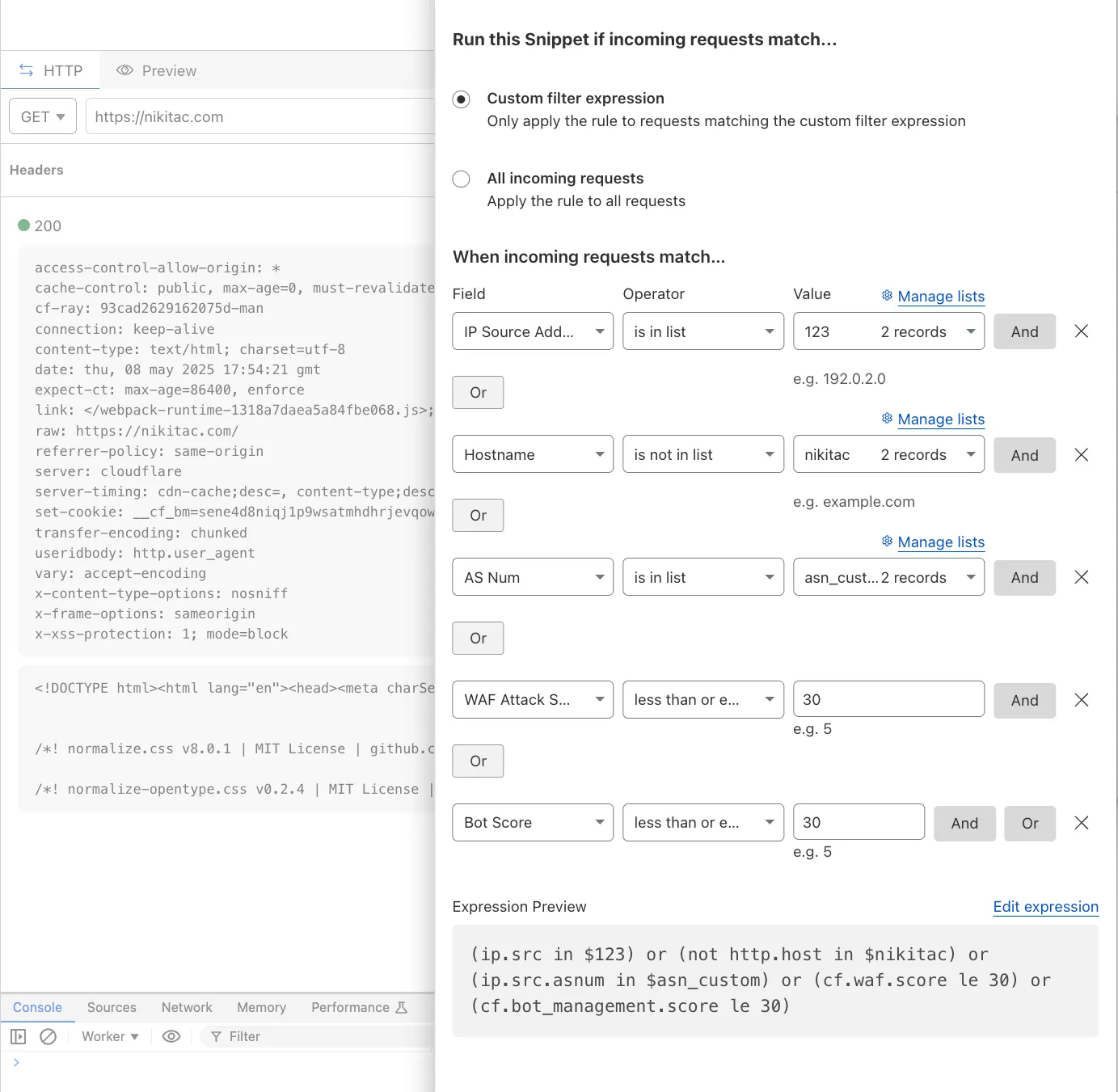
You can now use IP, Autonomous System (AS), and Hostname custom lists to route traffic to Snippets and Cloud Connector, giving you greater precision and control over how you match and process requests at the edge.
In Snippets, you can now also match on Bot Score and WAF Attack Score, unlocking smarter edge logic for everything from request filtering and mitigation to tarpitting and logging.
What’s new:
Custom lists matching – Snippets and Cloud Connector now support user-created IP, AS, and Hostname lists via dashboard or Lists API. Great for shared logic across zones.
Bot Score and WAF Attack Score – Use Cloudflare’s intelligent traffic signals to detect bots or attacks and take advanced, tailored actions with just a few lines of code.
These enhancements unlock new possibilities for building smarter traffic workflows with minimal code and maximum efficiency.
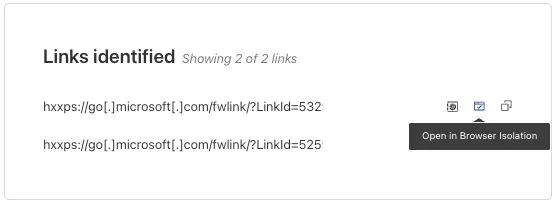
You can now safely open links in emails to view and investigate them.
From Investigation, go to View details, and look for the Links identified section. Next to each link, the Cloudflare dashboard will display an Open in Browser Isolation icon which allows your team to safely open the link in a clientless, isolated browser with no risk to the analyst or your environment. Refer to Open links to learn more about this feature.
To use this feature, you must:
Turn on Allow users to open a remote browser without the device client in your Zero Trust settings.
Enterprise customers can now choose the geographic location from which a URL scan is performed — either via Security Center in the Cloudflare dashboard or via the URL Scanner API.
This feature gives security teams greater insight into how a website behaves across different regions, helping uncover targeted, location-specific threats.
What’s new:
Location Picker: Select a location for the scan via Security Center → Investigate in the dashboard or through the API.
Region-aware scanning: Understand how content changes by location — useful for detecting regionally tailored attacks.
Default behavior: If no location is set, scans default to the user’s current geographic region.
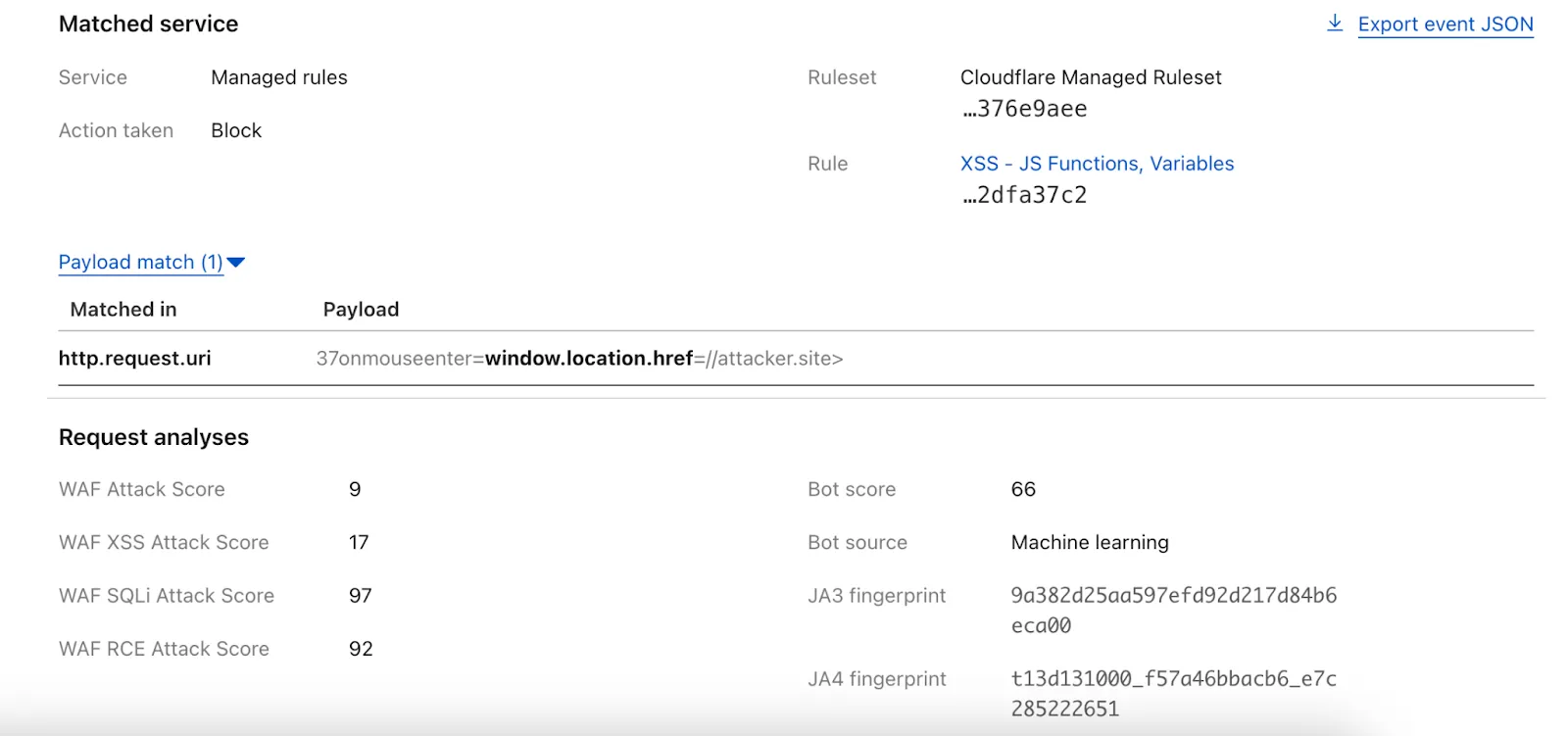
We have upgraded WAF Payload Logging to enhance rule diagnostics and usability:
Targeted logging: Logs now capture only the specific portions of requests that triggered WAF rules, rather than entire request segments.
Visual highlighting: Matched content is visually highlighted in the UI for faster identification.
Enhanced context: Logs now include surrounding context to make diagnostics more effective.
Payload Logging is available to all Enterprise customers. If you have not used Payload Logging before, check how you can get started.
Note: The structure of the encrypted_matched_data field in Logpush has changed from Map<Field, Value> to Map<Field, {Before: bytes, Content: Value, After: bytes}>. If you rely on this field in your Logpush jobs, you should review and update your processing logic accordingly.