

The Honeycomb Pages Plugin automatically sends traces to Honeycomb for analysis and observability.
									npm
									 i @cloudflare/pages-plugin-honeycomb
									yarn
									 add @cloudflare/pages-plugin-honeycomb
									pnpm
									 add @cloudflare/pages-plugin-honeycomb
									bun
									 add @cloudflare/pages-plugin-honeycomb
The following usage example uses environment variables you will need to set in your Pages project settings.
import honeycombPlugin from "@cloudflare/pages-plugin-honeycomb";

export const onRequest: PagesFunction<{
	HONEYCOMB_API_KEY: string;
	HONEYCOMB_DATASET: string;
}> = (context) => {
	return honeycombPlugin({
		apiKey: context.env.HONEYCOMB_API_KEY,
		dataset: context.env.HONEYCOMB_DATASET,
	})(context);
};
Alternatively, you can hard-code (not advisable for API key) your settings the following way:
import honeycombPlugin from "@cloudflare/pages-plugin-honeycomb";

export const onRequest = honeycombPlugin({
	apiKey: "YOUR_HONEYCOMB_API_KEY",
	dataset: "YOUR_HONEYCOMB_DATASET_NAME",
});
This Plugin is based on the @cloudflare/workers-honeycomb-logger and accepts the same configuration options ↗.
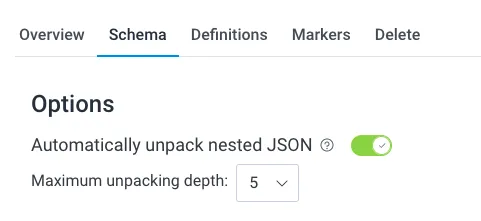
Ensure that you enable the option to Automatically unpack nested JSON and set the Maximum unpacking depth to 5 in your Honeycomb dataset settings.
data.honeycomb.tracer has two methods for attaching additional information about a given trace:
data.honeycomb.tracer.logwhich takes a single argument, aString.data.honeycomb.tracer.addDatawhich takes a single argument, an object of arbitrary data.
More information about these methods can be seen on @cloudflare/workers-honeycomb-logger's documentation ↗.
For example, if you wanted to use the addData method to attach user information:
import type { PluginData } from "@cloudflare/pages-plugin-honeycomb";

export const onRequest: PagesFunction<unknown, any, PluginData> = async ({
	data,
	next,
	request,
}) => {
	// Authenticate the user from the request and extract user's email address
	const email = await getEmailFromRequest(request);

	data.honeycomb.tracer.addData({ email });

	return next();
};