Four new fields are now available on request.cf.tlsClientAuth in Workers for requests that include a mutual TLS (mTLS) client certificate. These fields encode the client certificate and its intermediate chain in RFC 9440 ↗ format — the same standard format used by the Client-Cert and Client-Cert-Chain HTTP headers — so your Worker can forward them directly to your origin without any custom parsing or encoding logic.
New fields
Field
Type
Description
certRFC9440
String
The client leaf certificate in RFC 9440 format (:base64-DER:). Empty if no client certificate was presented.
certRFC9440TooLarge
Boolean
true if the leaf certificate exceeded 10 KB and was omitted from certRFC9440.
certChainRFC9440
String
The intermediate certificate chain in RFC 9440 format as a comma-separated list. Empty if no intermediates were sent or if the chain exceeded 16 KB.
certChainRFC9440TooLarge
Boolean
true if the intermediate chain exceeded 16 KB and was omitted from certChainRFC9440.
Example: forwarding client certificate headers to your origin
export default { async fetch(request) { const tls = request.cf.tlsClientAuth; // Only forward if cert was verified and chain is complete if (!tls || !tls.certVerified || tls.certRevoked || tls.certChainRFC9440TooLarge) { return new Response("Unauthorized", { status: 401 }); } const headers = new Headers(request.headers); headers.set("Client-Cert", tls.certRFC9440); headers.set("Client-Cert-Chain", tls.certChainRFC9440); return fetch(new Request(request, { headers })); },};
Containers and Sandboxes now support connecting directly to Workers over HTTP. This allows you to call Workers
functions and bindings, like KV or R2, from within the container at specific hostnames.
Run Worker code
Define an outbound handler to capture any HTTP request or use outboundByHost to capture requests to individual hostnames and IPs.
export class MyApp extends Sandbox {}MyApp.outbound = async (request, env, ctx) => { // you can run arbitrary functions defined in your Worker on any HTTP request return await someWorkersFunction(request.body);};MyApp.outboundByHost = { "my.worker": async (request, env, ctx) => { return await anotherFunction(request.body); },};
In this example, requests from the container to http://my.worker will run the function defined within outboundByHost,
and any other HTTP requests will run the outbound handler. These handlers run entirely inside the Workers runtime,
outside of the container sandbox.
Access Workers bindings
Each handler has access to env, so it can call any binding set in Wrangler config.
Code inside the container makes a standard HTTP request to that hostname and the outbound Worker translates it into a binding call.
export class MyApp extends Sandbox {}MyApp.outboundByHost = { "my.kv": async (request, env, ctx) => { const key = new URL(request.url).pathname.slice(1); const value = await env.KV.get(key); return new Response(value ?? "", { status: value ? 200 : 404 }); }, "my.r2": async (request, env, ctx) => { const key = new URL(request.url).pathname.slice(1); const object = await env.BUCKET.get(key); return new Response(object?.body ?? "", { status: object ? 200 : 404 }); },};
Now, from inside the container sandbox, curl http://my.kv/some-key will access Workers KV and curl http://my.r2/some-object will access R2.
Access Durable Object state
Use ctx.containerId to reference the container's automatically provisioned Durable Object.
ctx.id.jurisdiction inside a Durable Object now reports the jurisdiction the object was created in — for example "eu" when accessed through env.MY_DURABLE_OBJECT.jurisdiction("eu") — so you can make region-aware decisions without passing the jurisdiction through method arguments or persisting it in storage. For the full list of ID-construction paths that preserve jurisdiction, refer to the Durable Object ID documentation.
export class RegionalRoom extends DurableObject { async fetch(request) { // "eu" when accessed through env.MY_DURABLE_OBJECT.jurisdiction("eu") const region = this.ctx.id.jurisdiction; return new Response(`Hello from ${region ?? "the default region"}!`); }}// Workerexport default { async fetch(request, env) { const stub = env.MY_DURABLE_OBJECT.jurisdiction("eu").getByName("general"); return stub.fetch(request); },};
ctx.id.jurisdiction is undefined for Durable Objects that were not created in a jurisdiction-restricted namespace. Alarms scheduled before 2026-03-15 also do not have jurisdiction stored; to backfill the value, reschedule the alarm from a fetch() or RPC handler.
The new secrets configuration property lets you declare the secret names your Worker requires in your Wrangler configuration file. Required secrets are validated during local development and deploy, and used as the source of truth for type generation.
When secrets is defined, wrangler dev and vite dev load only the keys listed in secrets.required from .dev.vars or .env/process.env. Additional keys in those files are excluded. If any required secrets are missing, a warning is logged listing the missing names.
Type generation
wrangler types generates typed bindings from secrets.required instead of inferring names from .dev.vars or .env. This lets you run type generation in CI or other environments where those files are not present. Per-environment secrets are supported — the aggregated Env type marks secrets that only appear in some environments as optional.
Deploy
wrangler deploy and wrangler versions upload validate that all secrets in secrets.required are configured on the Worker before the operation succeeds. If any required secrets are missing, the command fails with an error listing which secrets need to be set.
Containers now support Docker Hub ↗ images. You can use a fully qualified Docker Hub image reference in your Wrangler configuration ↗ instead of first pushing the image to Cloudflare Registry.
Dynamic Workers are now in open beta ↗ for all paid Workers users. You can now have a Worker spin up other Workers, called Dynamic Workers, at runtime to execute code on-demand in a secure, sandboxed environment. Dynamic Workers start in milliseconds, making them well suited for fast, secure code execution at scale.
Use Dynamic Workers for
Code Mode: LLMs are trained to write code. Run tool-calling logic written in code instead of stepping through many tool calls, which can save up to 80% in inference tokens and cost.
AI agents executing code: Run code for tasks like data analysis, file transformation, API calls, and chained actions.
Running AI-generated code: Run generated code for prototypes, projects, and automations in a secure, isolated sandboxed environment.
Fast development and previews: Load prototypes, previews, and playgrounds in milliseconds.
Custom automations: Create custom tools on the fly that execute a task, call an integration, or automate a workflow.
Executing Dynamic Workers
Dynamic Workers support two loading modes:
load(code) — for one-time code execution (equivalent to calling get() with a null ID).
get(id, callback) — caches a Dynamic Worker by ID so it can stay warm across requests. Use this when the same code will receive subsequent requests.
export default { async fetch(request, env) { const worker = env.LOADER.load({ compatibilityDate: "2026-01-01", mainModule: "src/index.js", modules: { "src/index.js": ` export default { fetch() { return new Response("Hello from a dynamic Worker"); }, }; `, }, // Block all outbound network access from the Dynamic Worker. globalOutbound: null, }); return worker.getEntrypoint().fetch(request); },};
export default { async fetch(request: Request, env: Env): Promise<Response> { const worker = env.LOADER.load({ compatibilityDate: "2026-01-01", mainModule: "src/index.js", modules: { "src/index.js": ` export default { fetch() { return new Response("Hello from a dynamic Worker"); }, }; `, }, // Block all outbound network access from the Dynamic Worker. globalOutbound: null, }); return worker.getEntrypoint().fetch(request); },};
Helper libraries for Dynamic Workers
Here are 3 new libraries to help you build with Dynamic Workers:
@cloudflare/codemode ↗: Replace individual tool calls with a single code() tool, so LLMs write and execute TypeScript that orchestrates multiple API calls in one pass.
@cloudflare/worker-bundler ↗: Resolve npm dependencies and bundle source files into ready-to-load modules for Dynamic Workers, all at runtime.
@cloudflare/shell ↗: Give your agent a virtual filesystem inside a Dynamic Worker with persistent storage backed by SQLite and R2.
Try it out
Dynamic Workers Starter
Use this starter ↗ to deploy a Worker that can load and execute Dynamic Workers.
Dynamic Workers Playground
Deploy the Dynamic Workers Playground ↗ to write or import code, bundle it at runtime with @cloudflare/worker-bundler, execute it through a Dynamic Worker, and see real-time responses and execution logs.
Dynamic Workers pricing is based on three dimensions: Dynamic Workers created daily, requests, and CPU time.
Included
Additional usage
Dynamic Workers created daily
1,000 unique Dynamic Workers per month
+$0.002 per Dynamic Worker per day
Requests ¹
10 million per month
+$0.30 per million requests
CPU time ¹
30 million CPU milliseconds per month
+$0.02 per million CPU milliseconds
¹ Uses Workers Standard rates and will appear as part of your existing Workers bill, not as separate Dynamic Workers charges.
Note: Dynamic Workers requests and CPU time are already billed as part of your Workers plan and will count toward your Workers requests and CPU usage. The Dynamic Workers created daily charge is not yet active — you will not be billed for the number of Dynamic Workers created at this time. Pricing information is shared in advance so you can estimate future costs.
The latest release of the Agents SDK ↗ exposes agent state as a readable property, prevents duplicate schedule rows across Durable Object restarts, brings full TypeScript inference to AgentClient, and migrates to Zod 4.
Readable state on useAgent and AgentClient
Both useAgent (React) and AgentClient (vanilla JS) now expose a state property that reflects the current agent state. Previously, reading state required manually tracking it through the onStateUpdate callback.
React (useAgent)
const agent = useAgent({ agent: "game-agent", name: "room-123",});// Read state directly — no separate useState + onStateUpdate neededreturn <div>Score: {agent.state?.score}</div>;// Spread for partial updatesagent.setState({ ...agent.state, score: (agent.state?.score ?? 0) + 10 });
const agent = useAgent<GameAgent, GameState>({ agent: "game-agent", name: "room-123",});// Read state directly — no separate useState + onStateUpdate neededreturn <div>Score: {agent.state?.score}</div>;// Spread for partial updatesagent.setState({ ...agent.state, score: (agent.state?.score ?? 0) + 10 });
agent.state is reactive — the component re-renders when state changes from either the server or a client-side setState() call.
State starts as undefined and is populated when the server sends the initial state on connect (from initialState) or when setState() is called. Use optional chaining (agent.state?.field) for safe access. The onStateUpdate callback continues to work as before — the new state property is additive.
Idempotent schedule()
schedule() now supports an idempotent option that deduplicates by (type, callback, payload), preventing duplicate rows from accumulating when called in places that run on every Durable Object restart such as onStart().
Cron schedules are idempotent by default. Calling schedule("0 * * * *", "tick") multiple times with the same callback, expression, and payload returns the existing schedule row instead of creating a new one. Pass { idempotent: false } to override.
Delayed and date-scheduled types support opt-in idempotency:
import { Agent } from "agents";class MyAgent extends Agent { async onStart() { // Safe across restarts — only one row is created await this.schedule(60, "maintenance", undefined, { idempotent: true }); }}
import { Agent } from "agents";class MyAgent extends Agent { async onStart() { // Safe across restarts — only one row is created await this.schedule(60, "maintenance", undefined, { idempotent: true }); }}
Two new warnings help catch common foot-guns:
Calling schedule() inside onStart() without { idempotent: true } emits a console.warn with actionable guidance (once per callback; skipped for cron and when idempotent is set explicitly).
If an alarm cycle processes 10 or more stale one-shot rows for the same callback, the SDK emits a console.warn and a schedule:duplicate_warning diagnostics channel event.
Typed AgentClient with call inference and stub proxy
AgentClient now accepts an optional agent type parameter for full type inference on RPC calls, matching the typed experience already available with useAgent.
const client = new AgentClient({ agent: "my-agent", host: window.location.host,});// Typed call — method name autocompletes, args and return type inferredconst value = await client.call("getValue");// Typed stub — direct RPC-style proxyawait client.stub.getValue();await client.stub.add(1, 2);
const client = new AgentClient<MyAgent>({ agent: "my-agent", host: window.location.host,});// Typed call — method name autocompletes, args and return type inferredconst value = await client.call("getValue");// Typed stub — direct RPC-style proxyawait client.stub.getValue();await client.stub.add(1, 2);
State is automatically inferred from the agent type, so onStateUpdate is also typed:
const client = new AgentClient({ agent: "my-agent", host: window.location.host, onStateUpdate: (state) => { // state is typed as MyAgent's state type },});
const client = new AgentClient<MyAgent>({ agent: "my-agent", host: window.location.host, onStateUpdate: (state) => { // state is typed as MyAgent's state type },});
Existing untyped usage continues to work without changes. The RPC type utilities (AgentMethods, AgentStub, RPCMethods) are now exported from agents/client for advanced typing scenarios.
agents, @cloudflare/ai-chat, and @cloudflare/codemode now require zod ^4.0.0. Zod v3 is no longer supported.
@cloudflare/ai-chat fixes
Turn serialization — onChatMessage() and _reply() work is now queued so user requests, tool continuations, and saveMessages() never stream concurrently.
Duplicate messages on stop — Clicking stop during an active stream no longer splits the assistant message into two entries.
Duplicate messages after tool calls — Orphaned client IDs no longer leak into persistent storage.
keepAlive() and keepAliveWhile() are no longer experimental
keepAlive() now uses a lightweight in-memory ref count instead of schedule rows. Multiple concurrent callers share a single alarm cycle. The @experimental tag has been removed from both keepAlive() and keepAliveWhile().
@cloudflare/codemode: TanStack AI integration
A new entry point @cloudflare/codemode/tanstack-ai adds support for TanStack AI's ↗chat() as an alternative to the Vercel AI SDK's streamText():
AI Search now offers new REST API endpoints for search and chat that use an OpenAI compatible format. This means you can use the familiar messages array structure that works with existing OpenAI SDKs and tools. The messages array also lets you pass previous messages within a session, so the model can maintain context across multiple turns.
Endpoint
Path
Chat Completions
POST /accounts/{account_id}/ai-search/instances/{name}/chat/completions
Search
POST /accounts/{account_id}/ai-search/instances/{name}/search
Here is an example request to the Chat Completions endpoint using the new messages array format:
curl https://api.cloudflare.com/client/v4/accounts/{ACCOUNT_ID}/ai-search/instances/{NAME}/chat/completions \
  -H "Content-Type: application/json" \
  -H "Authorization: Bearer {API_TOKEN}" \
  -d '{
    "messages": [
      {
        "role": "system",
        "content": "You are a helpful documentation assistant."
      },
      {
        "role": "user",
        "content": "How do I get started?"
      }
    ]
  }'
If you are using the previous AutoRAG API endpoints (/autorag/rags/), we recommend migrating to the new endpoints. The previous AutoRAG API endpoints will continue to be fully supported.
Select your instance, and turn on Public Endpoint in Settings.
For more details, refer to Public endpoint configuration.
UI snippets
UI snippets are pre-built search and chat components you can embed in your website. Visit search.ai.cloudflare.com ↗ to configure and preview components for your AI Search instance.
AI Search now supports custom metadata filtering, allowing you to define your own metadata fields and filter search results based on attributes like category, version, or any custom field you define.
Define a custom metadata schema
You can define up to 5 custom metadata fields per AI Search instance. Each field has a name and data type (text, number, or boolean):
R2 SQL now supports an expanded SQL grammar so you can write richer analytical queries without exporting data. This release adds CASE expressions, column aliases, arithmetic in clauses, 163 scalar functions, 33 aggregate functions, EXPLAIN, Common Table Expressions (CTEs),and full struct/array/map access. R2 SQL is Cloudflare's serverless, distributed, analytics query engine for querying Apache Iceberg ↗ tables stored in R2 Data Catalog. This page documents the supported SQL syntax.
Highlights
Column aliases — SELECT col AS alias now works in all clauses
CASE expressions — conditional logic directly in SQL (searched and simple forms)
Scalar functions — 163 new functions across math, string, datetime, regex, crypto, encoding, and type inspection categories
Aggregate functions — statistical (variance, stddev, correlation, regression), bitwise, boolean, and positional aggregates join the existing basic and approximate functions
Complex types — query struct fields with bracket notation, use 46 array functions, and extract map keys/values
Common table expressions (CTEs) — use WITH ... AS to define named temporary result sets. Chained CTEs are supported. All CTEs must reference the same single table.
Full expression support — arithmetic, type casting (CAST, TRY_CAST, :: shorthand), and EXTRACT in SELECT, WHERE, GROUP BY, HAVING, and ORDER BY
Examples
CASE expressions with statistical aggregates
SELECT source, CASE WHEN AVG(price) > 30 THEN 'premium' WHEN AVG(price) > 10 THEN 'mid-tier' ELSE 'budget' END AS tier, round(stddev(price), 2) AS price_volatility, approx_percentile_cont(price, 0.95) AS p95_priceFROM my_namespace.sales_dataGROUP BY source
Struct and array access
SELECT product_name, pricing['price'] AS price, array_to_string(tags, ', ') AS tag_listFROM my_namespace.productsWHERE array_has(tags, 'Action')ORDER BY pricing['price'] DESCLIMIT 10
Chained CTEs with time-series analysis
WITH monthly AS ( SELECT date_trunc('month', sale_timestamp) AS month, department, COUNT(*) AS transactions, round(AVG(total_amount), 2) AS avg_amount FROM my_namespace.sales_data WHERE sale_timestamp BETWEEN '2025-01-01T00:00:00Z' AND '2025-12-31T23:59:59Z' GROUP BY date_trunc('month', sale_timestamp), department),ranked AS ( SELECT month, department, transactions, avg_amount, CASE WHEN avg_amount > 1000 THEN 'high-value' WHEN avg_amount > 500 THEN 'mid-value' ELSE 'standard' END AS tier FROM monthly WHERE transactions > 100)SELECT * FROM rankedORDER BY month, avg_amount DESC

In the Cloudflare One dashboard, the overview page for a specific Cloudflare Tunnel now shows all replicas of that tunnel and supports streaming logs from multiple replicas at once.
Previously, you could only stream logs from one replica at a time. With this update:
Replicas on the tunnel overview — All active replicas for the selected tunnel now appear on that tunnel's overview page under Connectors. Select any replica to stream its logs.
Multi-connector log streaming — Stream logs from multiple replicas simultaneously, making it easier to correlate events across your infrastructure during debugging or incident response. To try it out, log in to Cloudflare One ↗ and go to Networks > Connectors > Cloudflare Tunnels. Select View logs next to the tunnel you want to monitor.
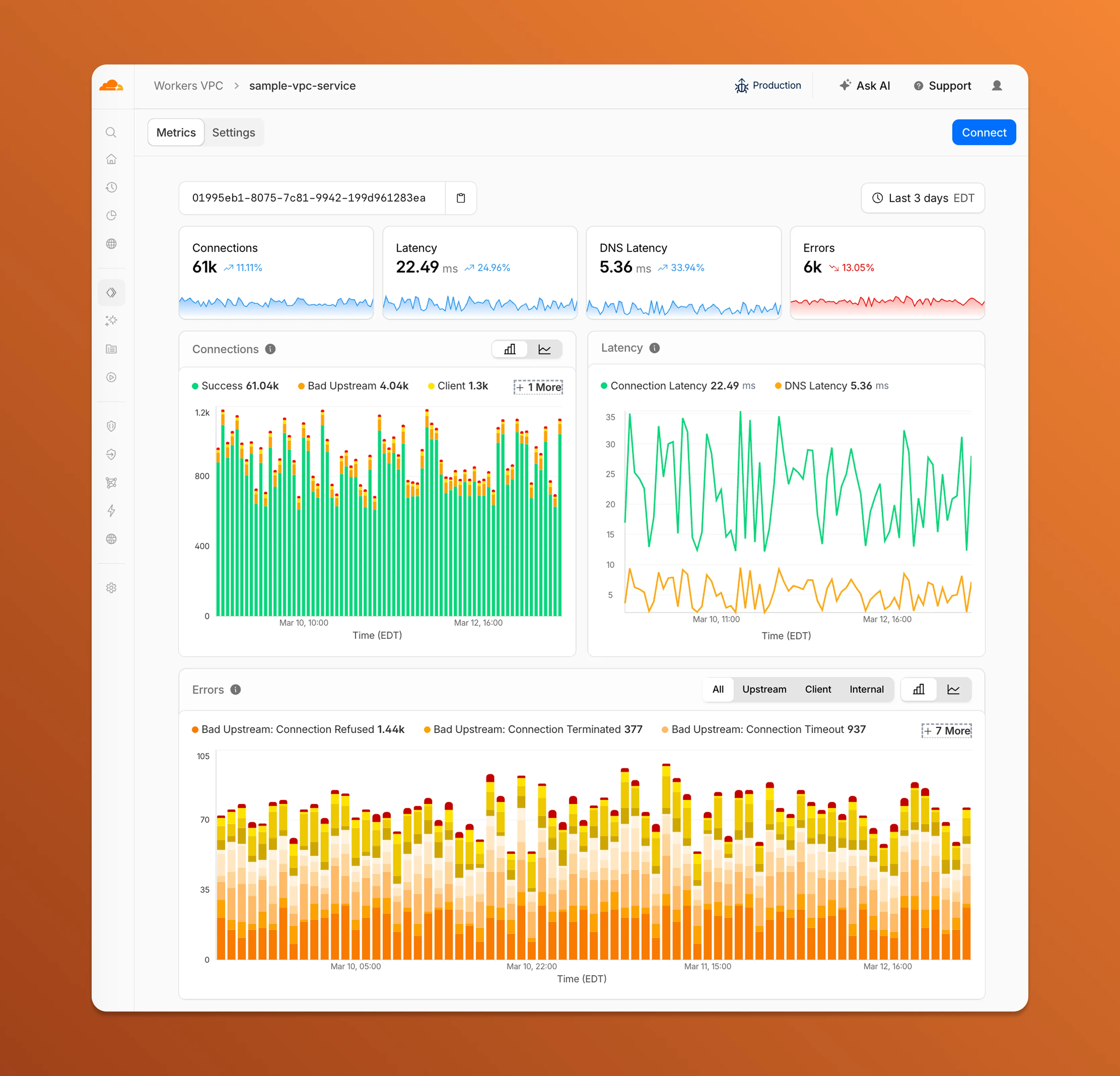
Each VPC Service now has a Metrics tab so you can monitor connection health and debug failures without leaving the dashboard.
Connections — See successful and failed connections over time, broken down by what is responsible: your origin (Bad Upstream), your configuration (Client), or Cloudflare (Internal).
Latency — Track connection and DNS resolution latency trends.
Errors — Drill into specific error codes grouped by category, with filters to isolate upstream, client, or internal failures.
You can also view and edit your VPC Service configuration, host details, and port assignments from the Settings tab.
For a full list of error codes and what they mean, refer to Troubleshooting.
Hyperdrive now supports custom TLS/SSL certificates for MySQL databases, bringing the same certificate options previously available for PostgreSQL to MySQL connections.
You can now configure:
Server certificate verification with VERIFY_CA or VERIFY_IDENTITY SSL modes to verify that your MySQL database server's certificate is signed by the expected certificate authority (CA).
Client certificates (mTLS) for Hyperdrive to authenticate itself to your MySQL database with credentials beyond username and password.
Create a Hyperdrive configuration with custom certificates for MySQL:
# Upload a CA certificatenpx wrangler cert upload certificate-authority --ca-cert your-ca-cert.pem --name your-custom-ca-name# Create a Hyperdrive with VERIFY_IDENTITY modenpx wrangler hyperdrive create your-hyperdrive-config \ --connection-string="mysql://user:password@hostname:port/database" \ --ca-certificate-id <CA_CERT_ID> \ --sslmode VERIFY_IDENTITY
You can now manage Cloudflare Tunnels directly from Wrangler, the CLI for the Cloudflare Developer Platform. The new wrangler tunnel commands let you create, run, and manage tunnels without leaving your terminal.
Available commands:
wrangler tunnel create — Create a new remotely managed tunnel.
wrangler tunnel list — List all tunnels in your account.
wrangler tunnel info — Display details about a specific tunnel.
wrangler tunnel delete — Delete a tunnel.
wrangler tunnel run — Run a tunnel using the cloudflared daemon.
wrangler tunnel quick-start — Start a free, temporary tunnel without an account using Quick Tunnels.
Wrangler handles downloading and managing the cloudflared binary automatically. On first use, you will be prompted to download cloudflared to a local cache directory.
These commands are currently experimental and may change without notice.
Workers AI is officially in the big models game. @cf/moonshotai/kimi-k2.5 is the first frontier-scale open-source model on our AI inference platform — a large model with a full 256k context window, multi-turn tool calling, vision inputs, and structured outputs. By bringing a frontier-scale model directly onto the Cloudflare Developer Platform, you can now run the entire agent lifecycle on a single, unified platform.
The model has proven to be a fast, efficient alternative to larger proprietary models without sacrificing quality. As AI adoption increases, the volume of inference is skyrocketing — now you can access frontier intelligence at a fraction of the cost.
Key capabilities
256,000 token context window for retaining full conversation history, tool definitions, and entire codebases across long-running agent sessions
Multi-turn tool calling for building agents that invoke tools across multiple conversation turns
Vision inputs for processing images alongside text
Structured outputs with JSON mode and JSON Schema support for reliable downstream parsing
Function calling for integrating external tools and APIs into agent workflows
Prefix caching and session affinity
When an agent sends a new prompt, it resends all previous prompts, tools, and context from the session. The delta between consecutive requests is usually just a few new lines of input. Prefix caching avoids reprocessing the shared context, saving time and compute from the prefill stage. This means faster Time to First Token (TTFT) and higher Tokens Per Second (TPS) throughput.
Workers AI has done prefix caching, but we are now surfacing cached tokens as a usage metric and offering a discount on cached tokens compared to input tokens (pricing is listed on the model page).
curl -X POST \
  "https://api.cloudflare.com/client/v4/accounts/{account_id}/ai/run/@cf/moonshotai/kimi-k2.5" \
  -H "Authorization: Bearer {api_token}" \
  -H "Content-Type: application/json" \
  -H "x-session-affinity: ses_12345678" \
  -d '{
    "messages": [
      {
        "role": "system",
        "content": "You are a helpful assistant."
      },
      {
        "role": "user",
        "content": "What is prefix caching and why does it matter?"
      }
    ],
    "max_tokens": 2400,
    "stream": true
  }'
Some clients like OpenCode ↗ implement session affinity automatically. The Agents SDK ↗ starter also sets up the wiring for you.
Redesigned asynchronous API
For volumes of requests that exceed synchronous rate limits, you can submit batches of inferences to be completed asynchronously. We have revamped the Asynchronous Batch API with a pull-based system that processes queued requests as soon as capacity is available. With internal testing, async requests usually execute within 5 minutes, but this depends on live traffic.
The async API is the best way to avoid capacity errors in durable workflows. It is ideal for use cases that are not real-time, such as code scanning agents or research agents.
To use the asynchronous API, pass queueRequest: true:
// 1. Push a batch of requests into the queueconst res = await env.AI.run( "@cf/moonshotai/kimi-k2.5", { requests: [ { messages: [{ role: "user", content: "Tell me a joke" }], }, { messages: [{ role: "user", content: "Explain the Pythagoras theorem" }], }, ], }, { queueRequest: true },);// 2. Grab the request IDconst requestId = res.request_id;// 3. Poll for the resultconst result = await env.AI.run("@cf/moonshotai/kimi-k2.5", { request_id: requestId,});if (result.status === "queued" || result.status === "running") { // Retry by polling again} else { return Response.json(result);}
You can also set up event notifications to know when inference is complete instead of polling.
You can now use a Workers binding to transform videos with Media Transformations. This allows you to resize, crop, extract frames, and extract audio from videos stored anywhere, even in private locations like R2 buckets.
The Media Transformations binding is useful when you want to:
Transform videos stored in private or protected sources
Optimize videos and store the output directly back to R2 for re-use
Extract still frames for classification or description with Workers AI
Extract audio tracks for transcription using Workers AI
To get started, add the Media binding to your Wrangler configuration:
The latest releases of @cloudflare/codemode ↗ add a new MCP barrel export, remove ai and zod as required peer dependencies from the main entry point, and give you more control over the sandbox.
New @cloudflare/codemode/mcp export
A new @cloudflare/codemode/mcp entry point provides two functions that wrap MCP servers with Code Mode:
codeMcpServer({ server, executor }) — wraps an existing MCP server with a single code tool where each upstream tool becomes a typed codemode.* method.
openApiMcpServer({ spec, executor, request }) — creates search and execute MCP tools from an OpenAPI spec with host-side request proxying and automatic $ref resolution.
import { codeMcpServer } from "@cloudflare/codemode/mcp";import { DynamicWorkerExecutor } from "@cloudflare/codemode";const executor = new DynamicWorkerExecutor({ loader: env.LOADER });// Wrap an existing MCP server — all its tools become// typed methods the LLM can call from generated codeconst server = await codeMcpServer({ server: upstreamMcp, executor });
import { codeMcpServer } from "@cloudflare/codemode/mcp";import { DynamicWorkerExecutor } from "@cloudflare/codemode";const executor = new DynamicWorkerExecutor({ loader: env.LOADER });// Wrap an existing MCP server — all its tools become// typed methods the LLM can call from generated codeconst server = await codeMcpServer({ server: upstreamMcp, executor });
Zero-dependency main entry point
Breaking change in v0.2.0:generateTypes and the ToolDescriptor / ToolDescriptors types have moved to @cloudflare/codemode/ai:
// Beforeimport { generateTypes } from "@cloudflare/codemode";// Afterimport { generateTypes } from "@cloudflare/codemode/ai";
// Beforeimport { generateTypes } from "@cloudflare/codemode";// Afterimport { generateTypes } from "@cloudflare/codemode/ai";
The main entry point (@cloudflare/codemode) no longer requires the ai or zod peer dependencies. It now exports:
Export
Description
sanitizeToolName
Sanitize tool names into valid JS identifiers
normalizeCode
Normalize LLM-generated code into async arrow functions
generateTypesFromJsonSchema
Generate TypeScript type definitions from plain JSON Schema
jsonSchemaToType
Convert a single JSON Schema to a TypeScript type string
DynamicWorkerExecutor
Sandboxed code execution via Dynamic Worker Loader
ToolDispatcher
RPC target for dispatching tool calls from sandbox to host
The ai and zod peer dependencies are now optional — only required when importing from @cloudflare/codemode/ai.
Custom sandbox modules
DynamicWorkerExecutor now accepts an optional modules option to inject custom ES modules into the sandbox:
const executor = new DynamicWorkerExecutor({ loader: env.LOADER, modules: { "utils.js": `export function add(a, b) { return a + b; }`, },});// Sandbox code can then: import { add } from "utils.js"
const executor = new DynamicWorkerExecutor({ loader: env.LOADER, modules: { "utils.js": `export function add(a, b) { return a + b; }`, },});// Sandbox code can then: import { add } from "utils.js"
Internal normalization and sanitization
DynamicWorkerExecutor now normalizes code and sanitizes tool names internally. You no longer need to call normalizeCode() or sanitizeToolName() before passing code and functions to execute().
AI Gateway now supports the cf-aig-collect-log-payload header, which controls whether request and response bodies are stored in logs. By default, this header is set to true and payloads are stored alongside metadata. Set this header to false to skip payload storage while still logging metadata such as token counts, model, provider, status code, cost, and duration.
This is useful when you need usage metrics but do not want to persist sensitive prompt or response data.
curl https://gateway.ai.cloudflare.com/v1/$ACCOUNT_ID/$GATEWAY_ID/openai/chat/completions \
  --header "Authorization: Bearer $TOKEN" \
  --header 'Content-Type: application/json' \
  --header 'cf-aig-collect-log-payload: false' \
  --data '{
    "model": "gpt-4o-mini",
    "messages": [
      {
        "role": "user",
        "content": "What is the email address and phone number of user123?"
      }
    ]
  }'
You can now set topK up to 50 when a Vectorize query returns values or full metadata. This raises the previous limit of 20 for queries that use returnValues: true or returnMetadata: "all".
Use the higher limit when you need more matches in a single query response without dropping values or metadata. Refer to the Vectorize API reference for query options and current topK limits.
When your Worker accesses a Durable Object via idFromName() or getByName(), the same name is now available on ctx.id.name inside the object — no need to pass it through method arguments or persist it in storage. This brings the runtime behavior in line with the Workers runtime types.
This is especially useful for alarms, where there is no calling client to pass the name as an argument. When an alarm handler runs, ctx.id.name will hold the same name the object was originally accessed with.
import { DurableObject } from "cloudflare:workers";export class ChatRoom extends DurableObject { async getRoomName() { // ctx.id.name returns the name passed to getByName() or idFromName() return this.ctx.id.name; }}// Workerexport default { async fetch(request, env) { const stub = env.CHAT_ROOM.getByName("general"); const roomName = await stub.getRoomName(); return new Response(`Welcome to ${roomName}!`); },};
ctx.id.name is undefined in the following cases:
For Durable Objects created with newUniqueId().
When accessed via idFromString(), even if the ID was originally created from a name.
This works the same way in local development with wrangler dev as it does in production. Run npm update wrangler to ensure you are on a version with this support.
You can now SSH into running Container instances using Wrangler. This is useful for debugging, inspecting running processes, or executing one-off commands inside a Container.
To connect, enable wrangler_ssh in your Container configuration and add your ssh-ed25519 public key to authorized_keys:
A new wrangler containers instances command lists all instances for a given Container application. This mirrors the instances view in the Cloudflare dashboard.
The command displays each instance's ID, name, state, location, version, and creation time:
wrangler containers instances <APPLICATION_ID>
Use the --json flag for machine-readable output, which is also the default format in non-interactive environments such as CI pipelines.
We're excited to partner with NVIDIA to bring @cf/nvidia/nemotron-3-120b-a12b to Workers AI. NVIDIA Nemotron 3 Super is a Mixture-of-Experts (MoE) model with a hybrid Mamba-transformer architecture, 120B total parameters, and 12B active parameters per forward pass.
The model is optimized for running many collaborating agents per application. It delivers high accuracy for reasoning, tool calling, and instruction following across complex multi-step tasks.
Key capabilities:
Hybrid Mamba-transformer architecture delivers over 50% higher token generation throughput compared to leading open models, reducing latency for real-world applications
Tool calling support for building AI agents that invoke tools across multiple conversation turns
Multi-Token Prediction (MTP) accelerates long-form text generation by predicting several future tokens simultaneously in a single forward pass
32,000 token context window for retaining conversation history and plan states across multi-step agent workflows