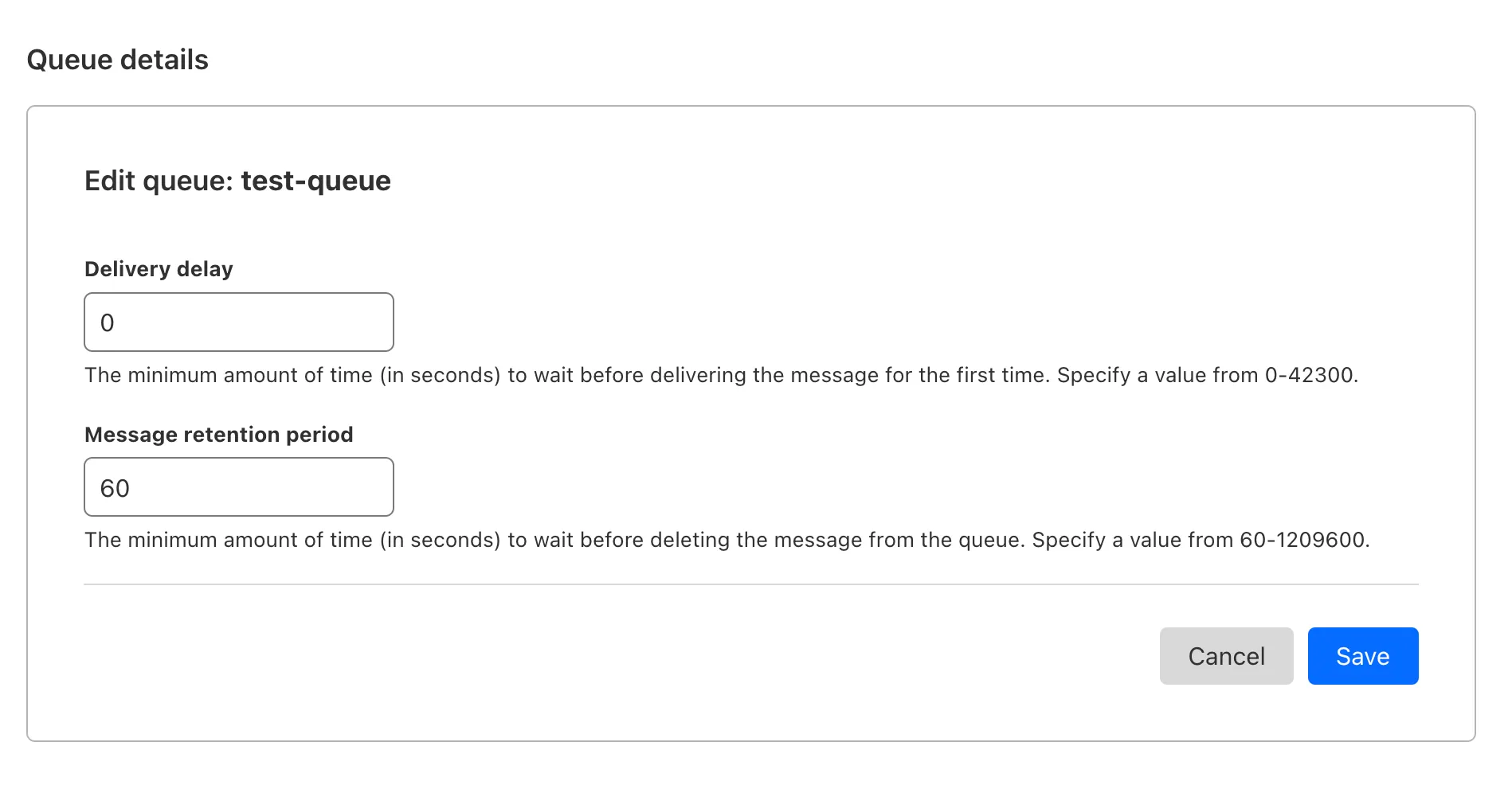
You can now customize a queue's message retention period, from a minimum of 60 seconds to a maximum of 14 days. Previously, it was fixed to the default of 4 days.
You can customize the retention period on the settings page for your queue, or using Wrangler:
You can use this prompt with your favorite AI model, including Claude 3.5 Sonnet, OpenAI's o3-mini, Gemini 2.0 Flash, or Llama 3.3 on Workers AI. Models with large context windows will allow you to paste the prompt directly: provide your own prompt within the <user_prompt></user_prompt> tags.
{paste_prompt_here}<user_prompt>user: Build an AI agent using Cloudflare Workflows. The Workflow should run when a new GitHub issue is opened on a specific project with the label 'help' or 'bug', and attempt to help the user troubleshoot the issue by calling the OpenAI API with the issue title and description, and a clear, structured prompt that asks the model to suggest 1-3 possible solutions to the issue. Any code snippets should be formatted in Markdown code blocks. Documentation and sources should be referenced at the bottom of the response. The agent should then post the response to the GitHub issue. The agent should run as the provided GitHub bot account.</user_prompt>
This prompt is still experimental, but we encourage you to try it out and provide feedback ↗.
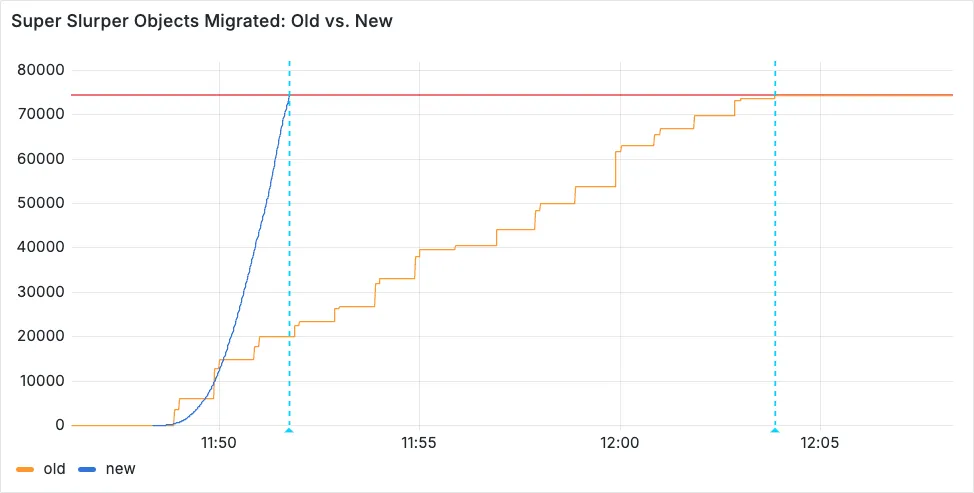
Super Slurper now transfers data from cloud object storage providers like AWS S3 and Google Cloud Storage to Cloudflare R2 up to 5x faster than it did before.
We moved from a centralized service to a distributed system built on the Cloudflare Developer Platform — using Cloudflare Workers, Durable Objects, and Queues — to both improve performance and increase system concurrency capabilities (and we'll share more details about how we did it soon!)
Time to copy 75,000 objects from AWS S3 to R2 decreased from 15 minutes 30 seconds (old) to 3 minutes 25 seconds (after performance improvements)
For more information on Super Slurper and how to migrate data from existing object storage to R2, refer to our documentation.
Previously, all viewers watched "the live edge," or the latest content of the
broadcast, synchronously. If a viewer paused for more than a few seconds,
the player would automatically "catch up" when playback started again. Seeking
through the broadcast was only available once the recording was available after
it concluded.
Starting today, customers can make a small adjustment to the player
embed or manifest URL to enable the DVR experience for their viewers. By
offering this feature as an opt-in adjustment, our customers are empowered to
pick the best experiences for their applications.
When building a player embed code or manifest URL, just add dvrEnabled=true as
a query parameter. There are some things to be aware of when using this option.
For more information, refer to DVR for Live.
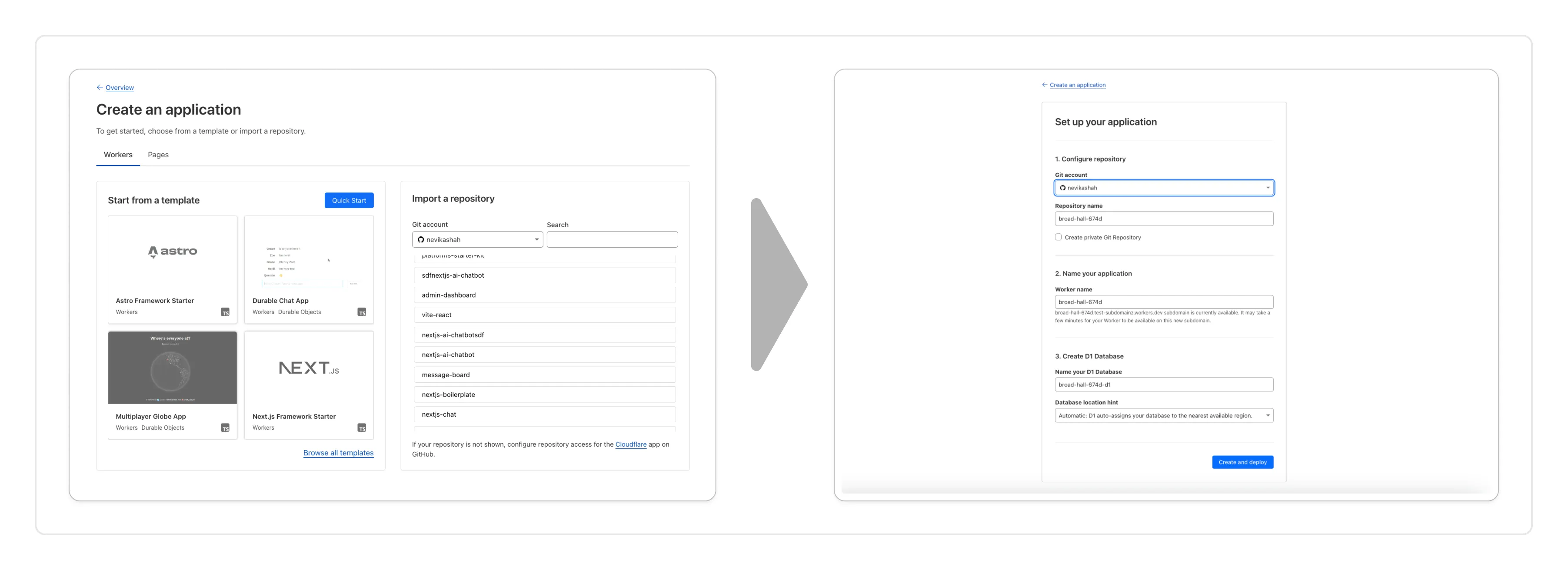
Importing a Git repository: Choose an existing Git repo on your GitHub/GitLab account and set up Workers Builds to deploy your Worker.
Deploying a template with Git: Choose from a brand new selection of production ready examples ↗ to help you get started with popular frameworks like Astro ↗, Remix ↗ and Next ↗ or build stateful applications with Cloudflare resources like D1 databases, Workers AI or Durable Objects! When you're ready to deploy, Cloudflare will set up your project by cloning the template to your GitHub/GitLab account, provisioning any required resources and deploying your Worker.
With every push to your chosen branch, Cloudflare will automatically build and deploy your Worker.
These new features are available today in the Cloudflare dashboard to a subset of Cloudflare customers, and will be coming to all customers in the next few weeks. Don't see it in your dashboard, but want early access? Add your Cloudflare Account ID to this form ↗.
AI Gateway adds additional ways to handle requests - Request Timeouts and Request Retries, making it easier to keep your applications responsive and reliable.
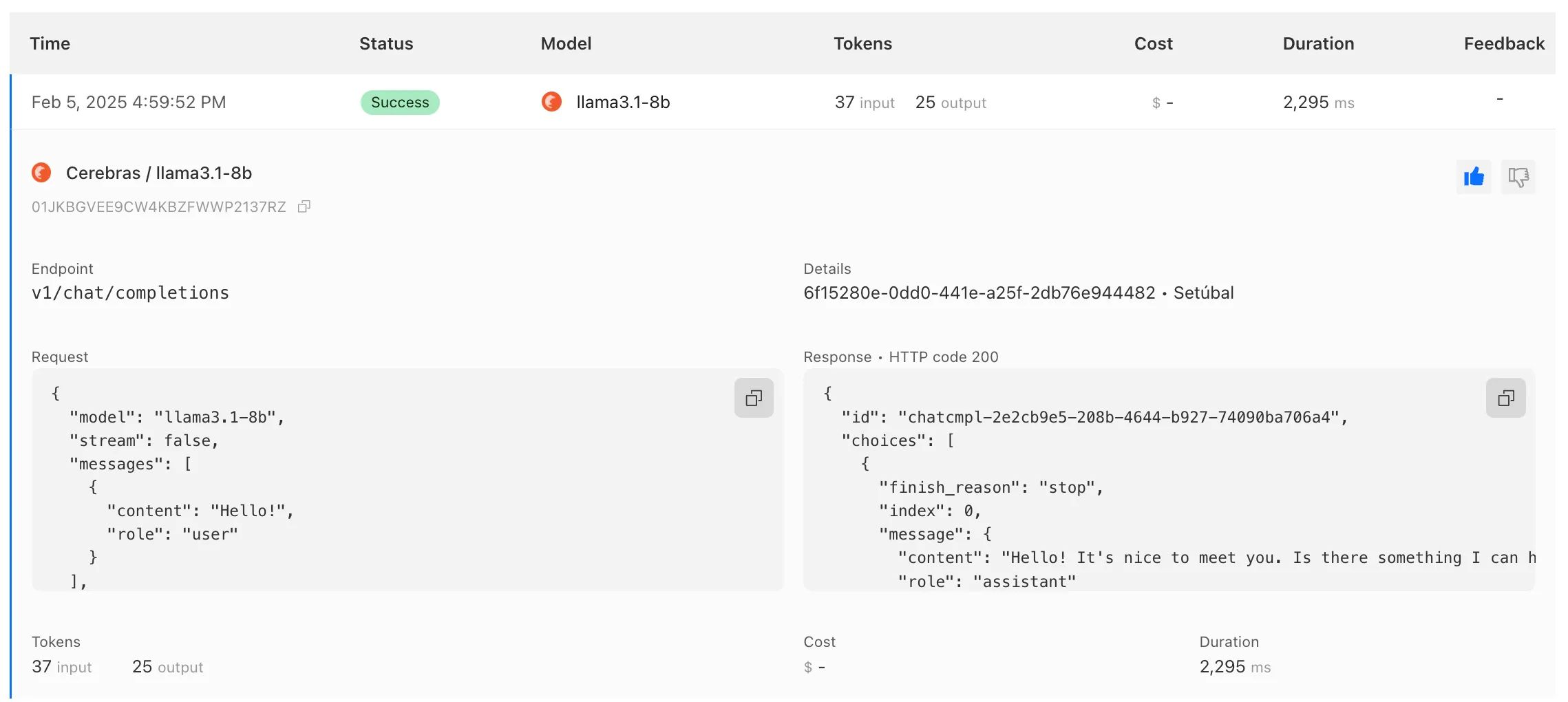
AI Gateway has added three new providers: Cartesia, Cerebras, and ElevenLabs, giving you more even more options for providers you can use through AI Gateway. Here's a brief overview of each:
Cartesia provides text-to-speech models that produce natural-sounding speech with low latency.
Cerebras delivers low-latency AI inference to Meta's Llama 3.1 8B and Llama 3.3 70B models.
ElevenLabs offers text-to-speech models with human-like voices in 32 languages.
To get started with AI Gateway, just update the base URL. Here's how you can send a request to Cerebras using cURL:
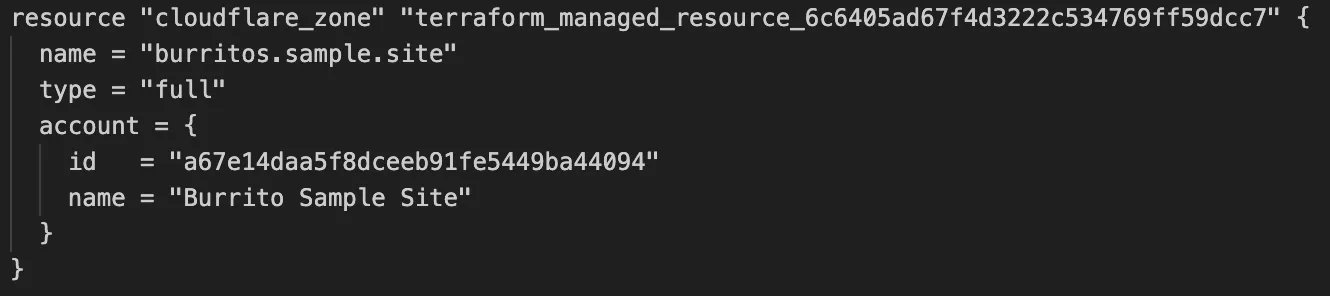
Cloudflare's v5 Terraform Provider is now generally available. With this release, Terraform resources are now automatically generated based on OpenAPI Schemas. This change brings alignment across our SDKs, API documentation, and now Terraform Provider. The new provider boosts coverage by increasing support for API properties to 100%, adding 25% more resources, and more than 200 additional data sources. Going forward, this will also reduce the barriers to bringing more resources into Terraform across the broader Cloudflare API. This is a small, but important step to making more of our platform manageable through GitOps, making it easier for you to manage Cloudflare just like you do your other infrastructure.
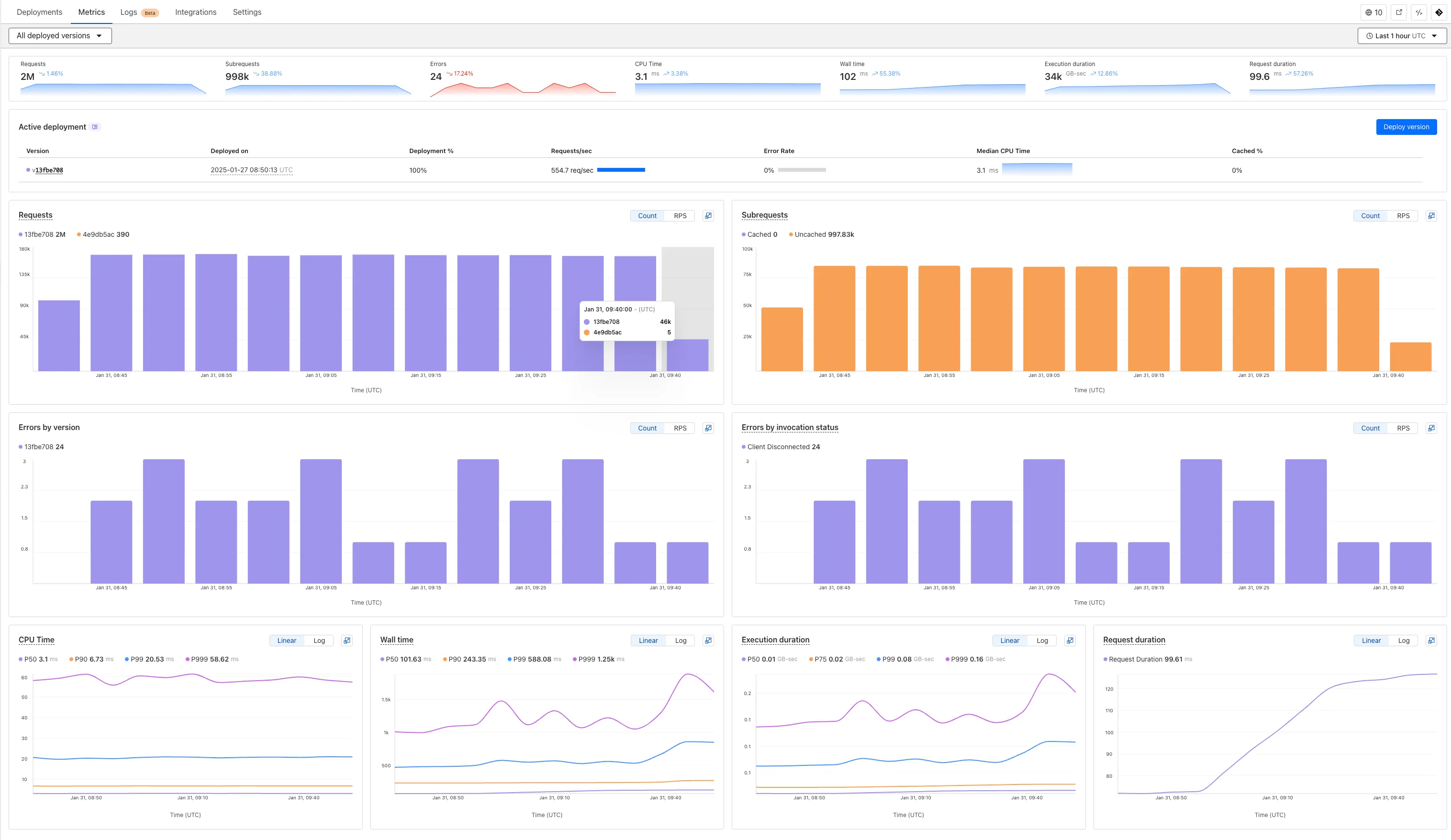
Now you can easily compare metrics across Worker versions, understand the current state of a gradual deployment, and review key Workers metrics in a single view. This new interface enables you to:
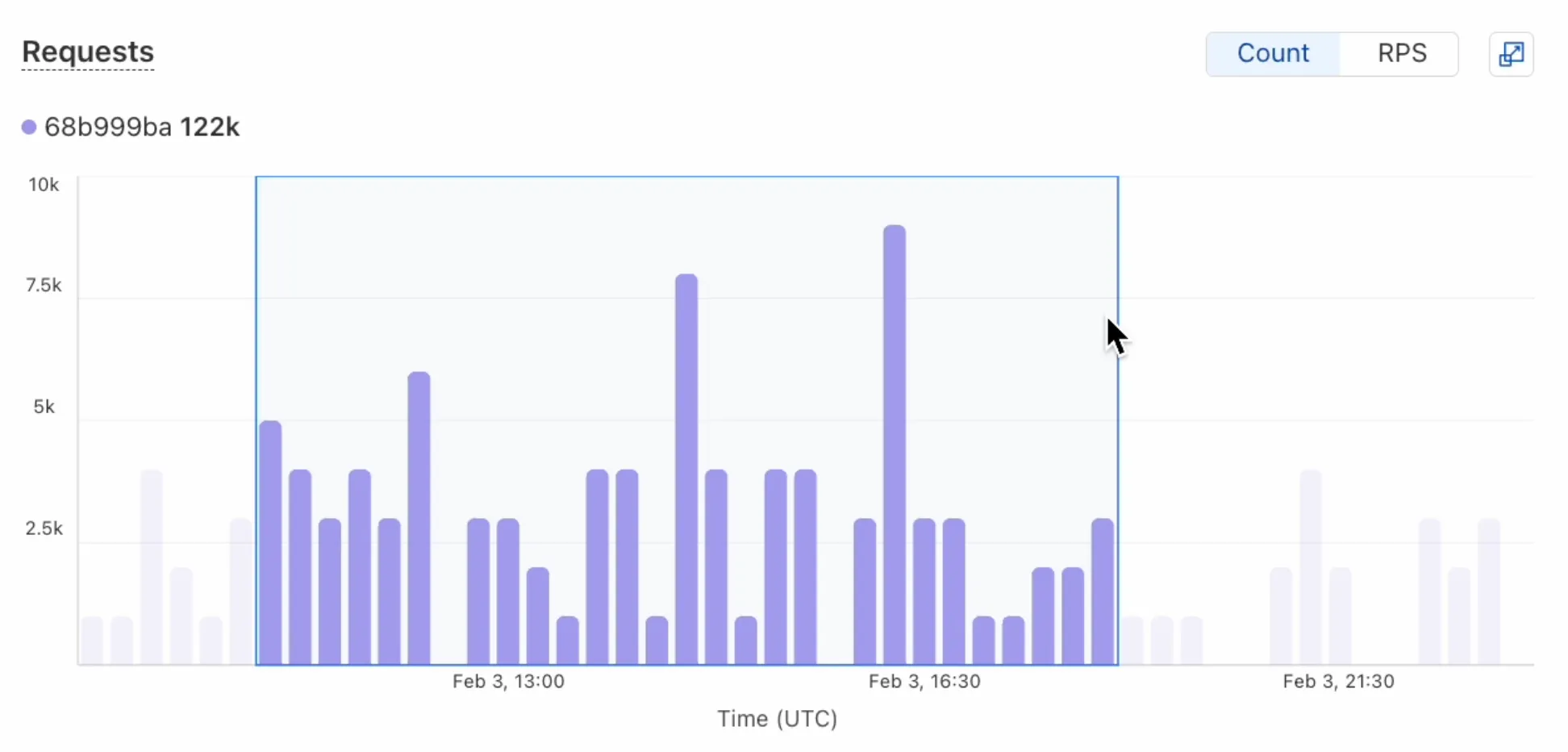
Drag-and-select using a graphical timepicker for precise metric selection.
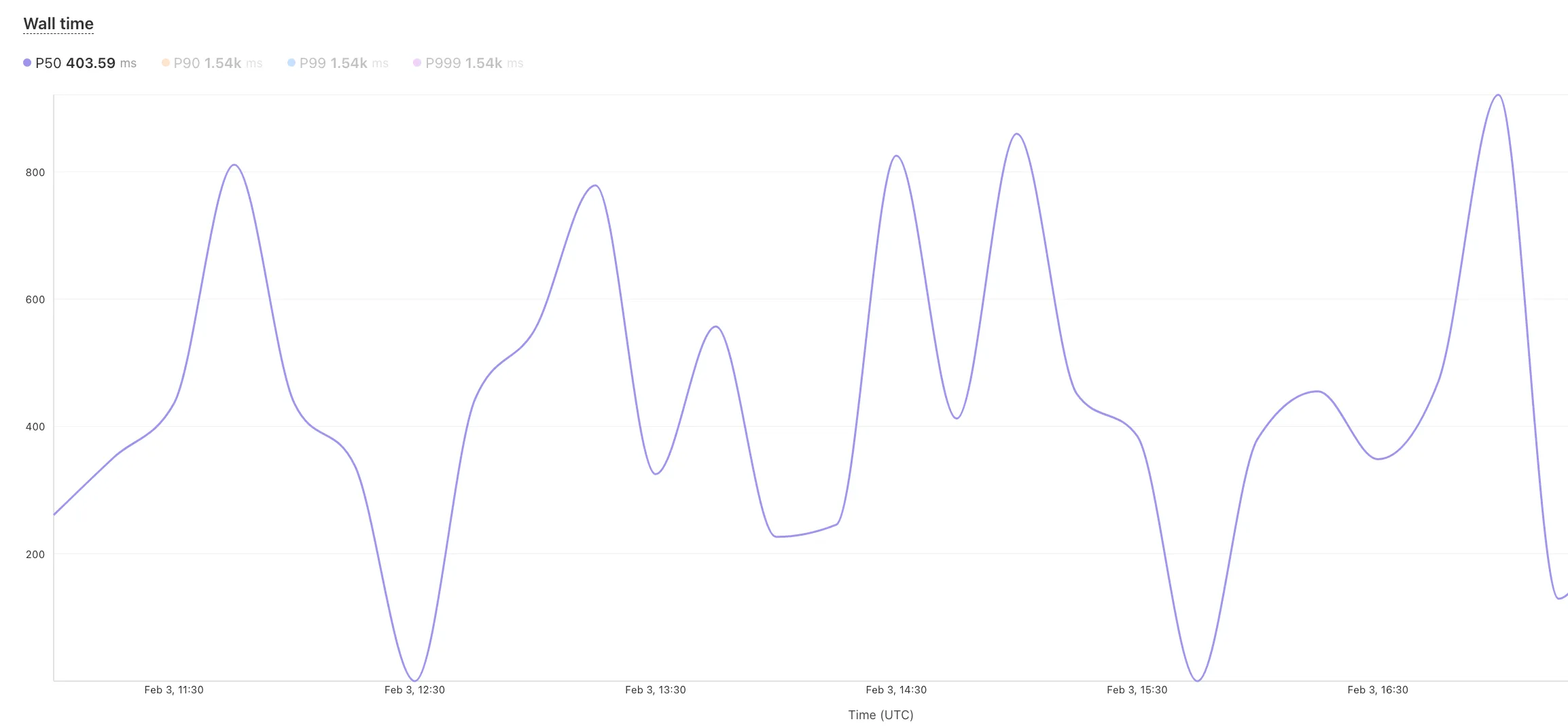
Use histograms to visualize cumulative metrics, allowing you to bucket and compare rates over time.
Focus on Worker versions by directly interacting with the version numbers in the legend.
Monitor and compare active gradual deployments.
Track error rates across versions with grouping both by version and by invocation status.
Workers for Platforms customers can now attach static assets (HTML, CSS, JavaScript, images) directly to User Workers, removing the need to host separate infrastructure to serve the assets.
This allows your platform to serve entire front-end applications from Cloudflare's global edge, utilizing caching for fast load times, while supporting dynamic logic within the same Worker. Cloudflare automatically scales its infrastructure to handle high traffic volumes, enabling you to focus on building features without managing servers.
What you can build
Static Sites: Host and serve HTML, CSS, JavaScript, and media files directly from Cloudflare's network, ensuring fast loading times worldwide. This is ideal for blogs, landing pages, and documentation sites because static assets can be efficiently cached and delivered closer to the user, reducing latency and enhancing the overall user experience.
Full-Stack Applications: Combine asset hosting with Cloudflare Workers to power dynamic, interactive applications. If you're an e-commerce platform, you can serve your customers' product pages and run inventory checks from within the same Worker.
Get Started:
Upload static assets using the Workers for Platforms API or Wrangler. For more information, visit our Workers for Platforms documentation. ↗
This can be helpful in a variety of situations. For instance, you may have a Worker in front of an origin,
and want to replace an element with content from a different source. Prior to this change, you would have to load
all of the content from the upstream URL and convert it into a string before replacing the element. This slowed
down overall response times.
Now, you can pass the Response object directly into the replace method, and HTMLRewriter will immediately
start replacing the content as it is streamed in. This makes responses faster.
index.jsjs
class ElementRewriter { async element(element) { // able to replace elements while streaming content // the fetched body is not buffered into memory as part // of the replace let res = await fetch("https://upstream-content-provider.example"); element.replace(res); }}export default { async fetch(request, env, ctx) { let response = await fetch("https://site-to-replace.com"); return new HTMLRewriter() .on("[data-to-replace]", new ElementRewriter()) .transform(response); },};
index.tsts
class ElementRewriter { async element(element: any) { // able to replace elements while streaming content // the fetched body is not buffered into memory as part // of the replace let res = await fetch('https://upstream-content-provider.example'); element.replace(res); }}export default { async fetch(request, env, ctx): Promise<Response> { let response = await fetch('https://site-to-replace.com'); return new HTMLRewriter().on('[data-to-replace]', new ElementRewriter()).transform(response); },} satisfies ExportedHandler<Env>;
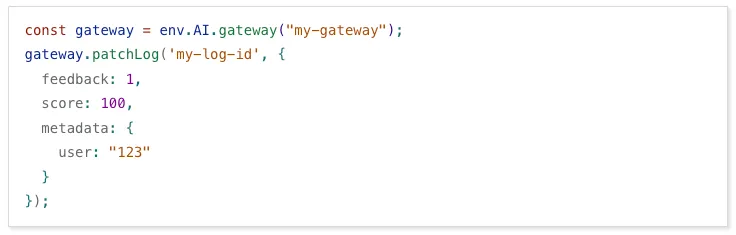
We have released new Workers bindings API methods, allowing you to connect Workers applications to AI Gateway directly. These methods simplify how Workers calls AI services behind your AI Gateway configurations, removing the need to use the REST API and manually authenticate.
Stream's generated captions
leverage Workers AI to automatically transcribe audio and provide captions to
the player experience. We have added support for these languages:
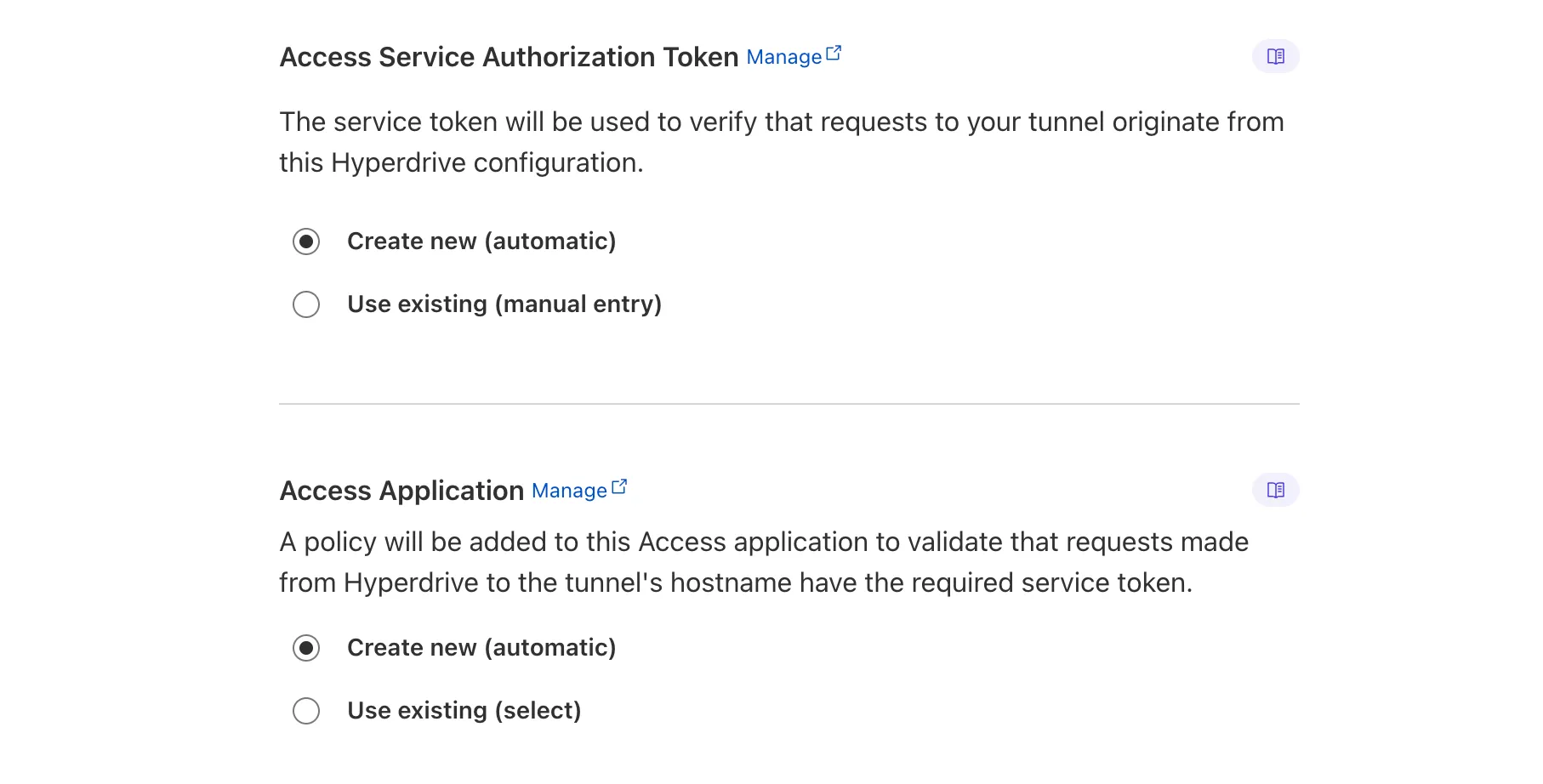
Hyperdrive now automatically configures your Cloudflare Tunnel to connect to your private database.
When creating a Hyperdrive configuration for a private database, you only need to provide your database credentials and set up a Cloudflare Tunnel within the private network where your database is accessible. Hyperdrive will automatically create the Cloudflare Access, Service Token, and Policies needed to secure and restrict your Cloudflare Tunnel to the Hyperdrive configuration.
To create a Hyperdrive for a private database, you can follow the Hyperdrive documentation. You can still manually create the Cloudflare Access, Service Token, and Policies if you prefer.
This feature is available from the Cloudflare dashboard.
You can now have up to 1000 Workers KV namespaces per account.
Workers KV namespace limits were increased from 200 to 1000 for all accounts. Higher limits for Workers KV namespaces enable better organization of key-value data, such as by category, tenant, or environment.
import dns from "node:dns";let response = await dns.promises.resolve4("cloudflare.com", "NS");
index.tsts
import dns from 'node:dns';let response = await dns.promises.resolve4('cloudflare.com', 'NS');
All node:dns functions are available, except lookup, lookupService, and resolve which throw "Not implemented" errors when called.
node:timers
You can use node:timers ↗ to schedule functions to be called at some future period of time.
This includes setTimeout ↗ for calling a function after a delay,
setInterval ↗ for calling a function repeatedly,
and setImmediate ↗ for calling a function in the next iteration of the event loop.
Workflows (beta) now allows you to define up to 1024 steps. sleep steps do not count against this limit.
We've also added:
instanceId as property to the WorkflowEvent type, allowing you to retrieve the current instance ID from within a running Workflow instance
Improved queueing logic for Workflow instances beyond the current maximum concurrent instances, reducing the cases where instances are stuck in the queued state.
Support for pause and resume for Workflow instances in a queued state.
We're continuing to work on increases to the number of concurrent Workflow instances, steps, and support for a new waitForEvent API over the coming weeks.
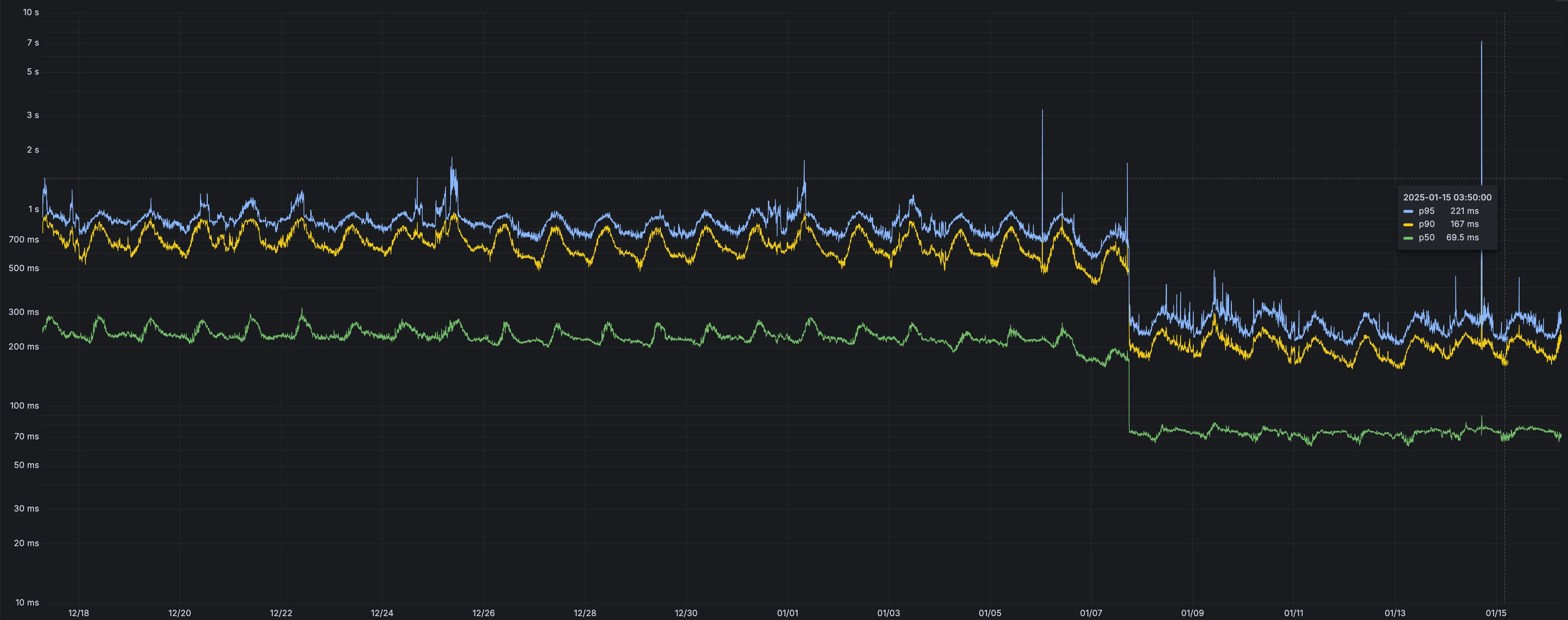
Users making D1 requests via the Workers API can see up to a 60% end-to-end latency improvement due to the removal of redundant network round trips needed for each request to a D1 database.
p50, p90, and p95 request latency aggregated across entire D1 service. These latencies are a reference point and should not be viewed as your exact workload improvement.
This performance improvement benefits all D1 Worker API traffic, especially cross-region requests where network latency is an outsized latency factor. For example, a user in Europe talking to a database in North America. D1 location hints can be used to influence the geographic location of a database.
For more details on how D1 removed redundant round trips, see the D1 specific release note entry.
AI Gateway now supports DeepSeek, including their cutting-edge DeepSeek-V3 model. With this addition, you have even more flexibility to manage and optimize your AI workloads using AI Gateway. Whether you're leveraging DeepSeek or other providers, like OpenAI, Anthropic, or Workers AI, AI Gateway empowers you to:
Monitor: Gain actionable insights with analytics and logs.
Control: Implement caching, rate limiting, and fallbacks.
Optimize: Improve performance with feedback and evaluations.
To get started, simply update the base URL of your DeepSeek API calls to route through AI Gateway. Here's how you can send a request using cURL:
Workers Builds, the integrated CI/CD system for Workers (currently in beta), now lets you cache artifacts across builds, speeding up build jobs by eliminating repeated work, such as downloading dependencies at the start of each build.
Build Caching: Cache dependencies and build outputs between builds with a shared project-wide cache, ensuring faster builds for the entire team.
Build Watch Paths: Define paths to include or exclude from the build process, ideal for monorepos to target only the files that need to be rebuilt per Workers project.
To get started, select your Worker on the Cloudflare dashboard ↗ then go to Settings > Builds, and connect a GitHub or GitLab repository. Once connected, you'll see options to configure Build Caching and Build Watch Paths.
Hyperdrive now caches queries in all Cloudflare locations, decreasing cache hit latency by up to 90%.
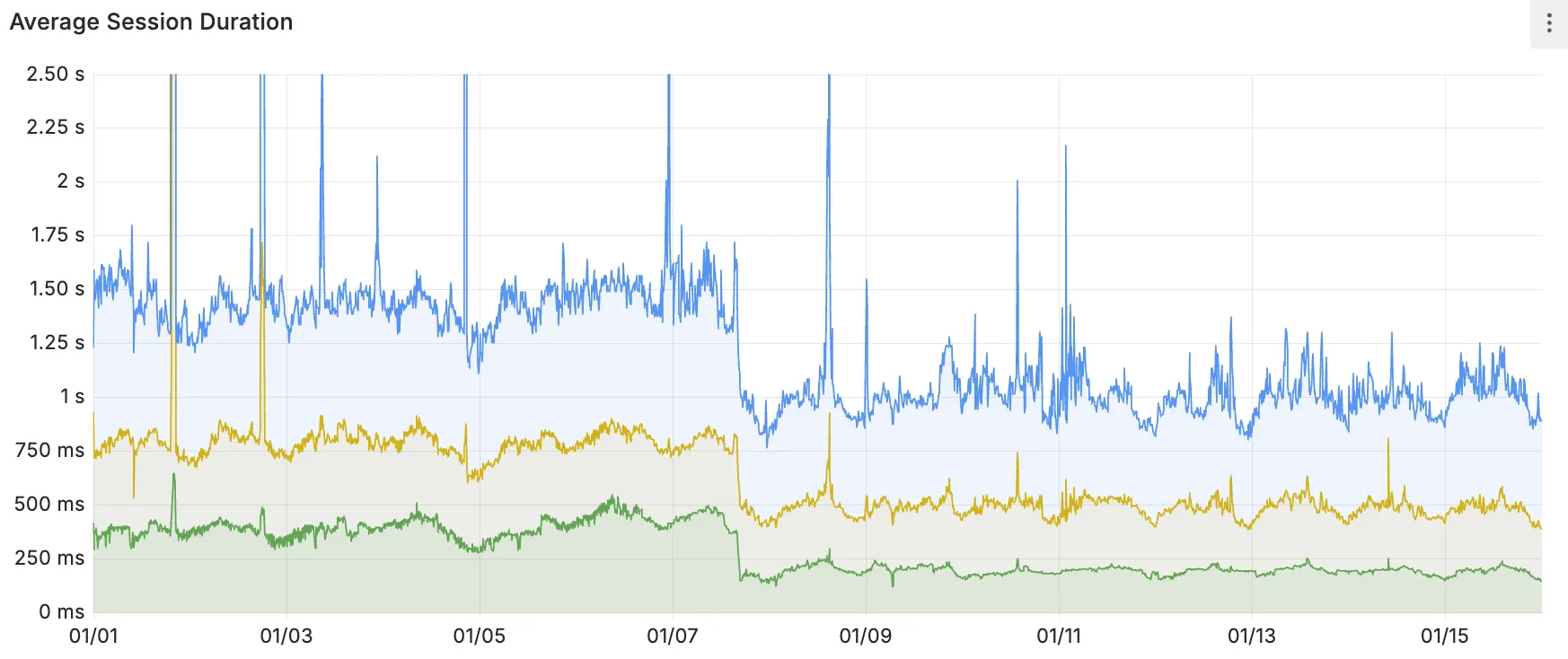
When you make a query to your database and Hyperdrive has cached the query results, Hyperdrive will now return the results from the nearest cache. By caching data closer to your users, the latency for cache hits reduces by up to 90%.
This reduction in cache hit latency is reflected in a reduction of the session duration for all queries (cached and uncached) from Cloudflare Workers to Hyperdrive, as illustrated below.
P50, P75, and P90 Hyperdrive session latency for all client connection sessions (both cached and uncached queries) for Hyperdrive configurations with caching enabled during the rollout period.
This performance improvement is applied to all new and existing Hyperdrive configurations that have caching enabled.
For more details on how Hyperdrive performs query caching, refer to the Hyperdrive documentation.
When you set the value to no-store on a subrequest made from a Worker, the Cloudflare Workers runtime will not check whether a match exists in the cache, and not add the response to the cache, even if the response includes directives in the Cache-Control HTTP header that otherwise indicate that the response is cacheable.
This increases compatibility with NPM packages and JavaScript frameworks that rely on setting the cache property, which is a cross-platform standard part of the Request interface. Previously, if you set the cache property on Request, the Workers runtime threw an exception.
If you've tried to use @planetscale/database, redis-js, stytch-node, supabase, axiom-js or have seen the error message The cache field on RequestInitializerDict is not implemented in fetch — you should try again, making sure that the Compatibility Date of your Worker is set to on or after 2024-11-11, or the cache_option_enabled compatibility flag is enabled for your Worker.
Workflows is now in open beta, and available to any developer a free or paid Workers plan.
Workflows allow you to build multi-step applications that can automatically retry, persist state and run for minutes, hours, days, or weeks. Workflows introduces a programming model that makes it easier to build reliable, long-running tasks, observe as they progress, and programmatically trigger instances based on events across your services.
Get started
You can get started with Workflows by following our get started guide and/or using npm create cloudflare to pull down the starter project: