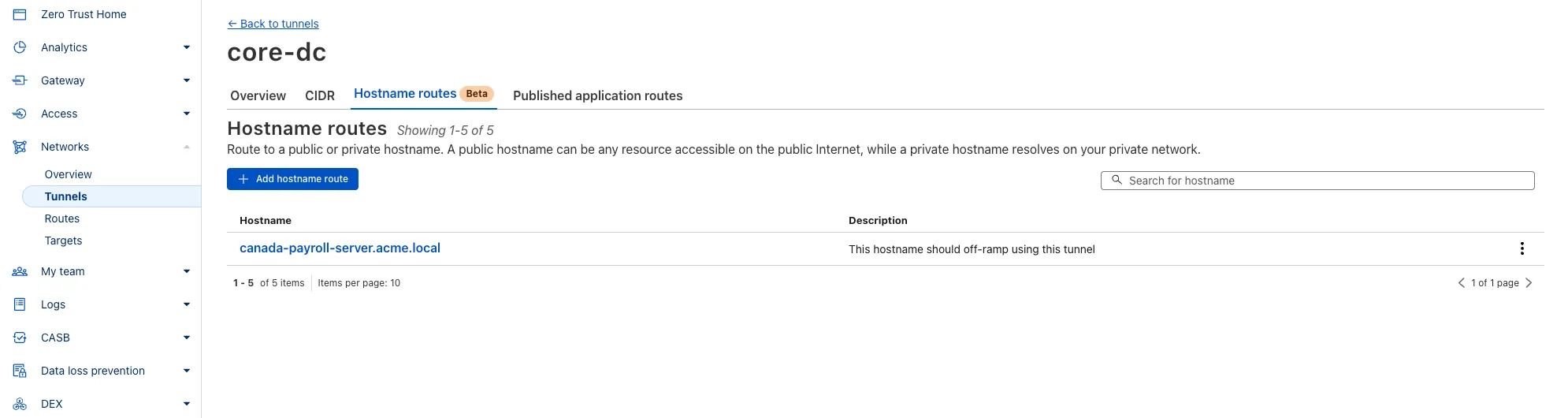
You can now route private traffic to Cloudflare Tunnel based on a hostname or domain, moving beyond the limitations of IP-based routing. This new capability is free for all Cloudflare One customers.
Previously, Tunnel routes could only be defined by IP address or CIDR range. This created a challenge for modern applications with dynamic or ephemeral IP addresses, often forcing administrators to maintain complex and brittle IP lists.
What’s new:
Hostname & Domain Routing: Create routes for individual hostnames (e.g., payroll.acme.local) or entire domains (e.g., *.acme.local) and direct their traffic to a specific Tunnel.
Simplified Zero Trust Policies: Build resilient policies in Cloudflare Access and Gateway using stable hostnames, making it dramatically easier to apply per-resource authorization for your private applications.
Precise Egress Control: Route traffic for public hostnames (e.g., bank.example.com) through a specific Tunnel to enforce a dedicated source IP, solving the IP allowlist problem for third-party services.
No More IP Lists: This feature makes the workaround of maintaining dynamic IP Lists for Tunnel connections obsolete.
We recently increased the available disk space from 8 GB to 20 GB for all plans. Building on that improvement, we’re now doubling the CPU power available for paid plans — from 2 vCPU to 4 vCPU.
These changes continue our focus on making Workers Builds faster and more reliable.
Metric
Free Plan
Paid Plans
CPU
2 vCPU
4 vCPU
Performance Improvements
Fast build times: Even single-threaded workloads benefit from having more vCPUs
2x faster multi-threaded builds: Tools like esbuild ↗ and webpack ↗ can now utilize additional cores, delivering near-linear performance scaling
All other build limits — including memory, build minutes, and timeout remain unchanged.
To prevent the accidental exposure of applications, we've updated how Worker preview URLs (<PREVIEW>-<WORKER_NAME>.<SUBDOMAIN>.workers.dev) are handled. We made this change to ensure preview URLs are only active when intentionally configured, improving the default security posture of your Workers.
One-Time Update for Workers with workers.dev Disabled
We performed a one-time update to disable preview URLs for existing Workers where the workers.dev subdomain was also disabled.
Because preview URLs were historically enabled by default, users who had intentionally disabled their workers.dev route may not have realized their Worker was still accessible at a separate preview URL. This update was performed to ensure that using a preview URL is always an intentional, opt-in choice.
If your Worker was affected, its preview URL (<PREVIEW>-<WORKER_NAME>.<SUBDOMAIN>.workers.dev) will now direct to an informational page explaining this change.
How to Re-enable Your Preview URL
If your preview URL was disabled, you can re-enable it via the Cloudflare dashboard by navigating to your Worker's Settings page and toggling on the Preview URL.
Alternatively, you can use Wrangler by adding the preview_urls = true setting to your Wrangler file and redeploying the Worker.
{ "preview_urls": true}
preview_urls = true
Note: You can set preview_urls = true with any Wrangler version that supports the preview URL flag (v3.91.0+). However, we recommend updating to v4.34.0 or newer, as this version defaults preview_urls to false, ensuring preview URLs are always enabled by explicit choice.
Three months ago we announced the public beta of remote bindings for local development. Now, we're excited to say that it's available for everyone in Wrangler, Vite, and Vitest without using an experimental flag!
With remote bindings, you can now connect to deployed resources like R2 buckets and D1 databases while running Worker code on your local machine. This means you can test your local code changes against real data and services, without the overhead of deploying for each iteration.
Example configuration
To enable remote bindings, add "remote" : true to each binding that you want to rely on a remote resource running on Cloudflare:
{ "name": "my-worker", // Set this to today's date "compatibility_date": "2026-07-20", "r2_buckets": [ { "bucket_name": "screenshots-bucket", "binding": "screenshots_bucket", "remote": true, }, ],}
name = "my-worker"# Set this to today's datecompatibility_date = "2026-07-20"[[r2_buckets]]bucket_name = "screenshots-bucket"binding = "screenshots_bucket"remote = true
When remote bindings are configured, your Worker still executes locally, but all binding calls are proxied to the deployed resource that runs on Cloudflare's network.
D1 now detects read-only queries and automatically attempts up to two retries to execute those queries in the event of failures with retryable errors. You can access the number of execution attempts in the returned response metadata property total_attempts.
At the moment, only read-only queries are retried, that is, queries containing only the following SQLite keywords: SELECT, EXPLAIN, WITH. Queries containing any SQLite keyword ↗ that leads to database writes are not retried.
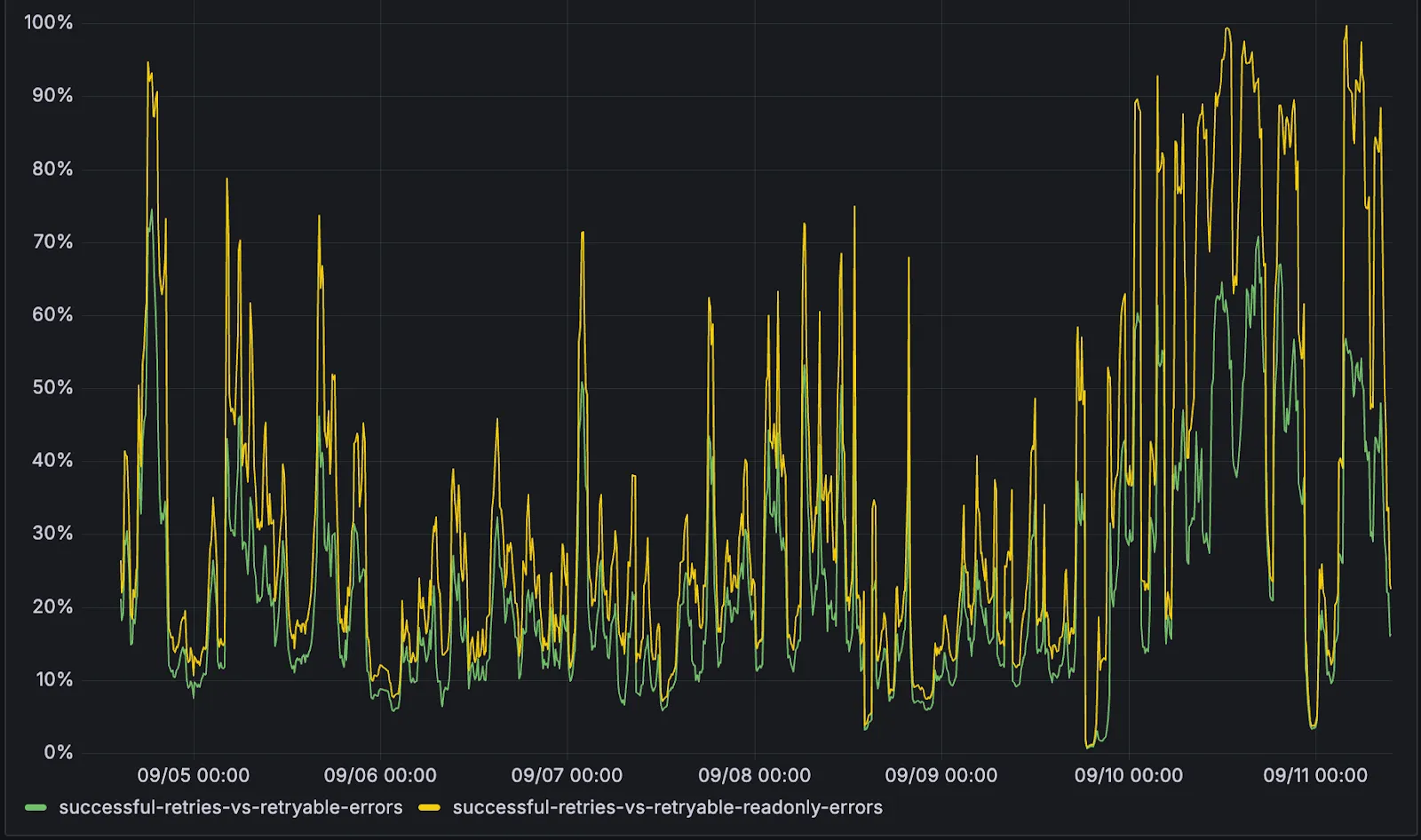
The retry success ratio among read-only retryable errors varies from 5% all the way up to 95%, depending on the underlying error and its duration (like network errors or other internal errors).
The retry success ratio among all retryable errors is lower, indicating that there are write-queries that could be retried. Therefore, we recommend D1 users to continue applying retries in their own code for queries that are not read-only but are idempotent according to the business logic of the application.
D1 ensures that any retry attempt does not cause database writes, making the automatic retries safe from side-effects, even if a query causing changes slips through the read-only detection. D1 achieves this by checking for modifications after every query execution, and if any write occurred due to a retry attempt, the query is rolled back.
The read-only query detection heuristics are simple for now, and there is room for improvement to capture more cases of queries that can be retried, so this is just the beginning.
We've shipped a new release for the Agents SDK ↗ bringing full compatibility with AI SDK v5 ↗ and introducing automatic message migration that handles all legacy formats transparently.
This release includes improved streaming and tool support, tool confirmation detection (for "human in the loop" systems), enhanced React hooks with automatic tool resolution, improved error handling for streaming responses, and seamless migration utilities that work behind the scenes.
This makes it ideal for building production AI chat interfaces with Cloudflare Workers AI models, agent workflows, human-in-the-loop systems, or any application requiring reliable message handling across SDK versions — all while maintaining backward compatibility.
Additionally, we've updated workers-ai-provider v2.0.0, the official provider for Cloudflare Workers AI models, to be compatible with AI SDK v5.
useAgentChat(options)
Creates a new chat interface with enhanced v5 capabilities.
Seamless integration with Cloudflare Workers AI models through the updated workers-ai-provider v2.0.0.
Model Setup with Workers AI
Use Cloudflare Workers AI models directly in your agent workflows:
import { createWorkersAI } from "workers-ai-provider";import { useAgentChat } from "agents/ai-react";// Create Workers AI model (v2.0.0 - same API, enhanced v5 internals)const model = createWorkersAI({ binding: env.AI,})("@cf/meta/llama-3.2-3b-instruct");
Enhanced File and Image Support
Workers AI models now support v5 file handling with automatic conversion:
// Send images and files to Workers AI modelssendMessage({ role: "user", parts: [ { type: "text", text: "Analyze this image:" }, { type: "file", data: imageBuffer, mediaType: "image/jpeg", }, ],});// Workers AI provider automatically converts to proper format
Streaming with Workers AI
Enhanced streaming support with automatic warning detection:
// Streaming with Workers AI modelsconst result = await streamText({ model: createWorkersAI({ binding: env.AI })("@cf/meta/llama-3.2-3b-instruct"), messages, onChunk: (chunk) => { // Enhanced streaming with warning handling console.log(chunk); },});
Import Updates
Update your imports to use the new v5 types:
// Before (AI SDK v4)import type { Message } from "ai";import { useChat } from "ai/react";// After (AI SDK v5)import type { UIMessage } from "ai";// or alias for compatibilityimport type { UIMessage as Message } from "ai";import { useChat } from "@ai-sdk/react";
We've updated our "Built with Cloudflare" button to make it easier to share that you're building on Cloudflare with the world. Embed it in your project's README, blog post, or wherever you want to let people know.
Deploying static site to Workers is now easier. When you run wrangler deploy [directory] or wrangler deploy --assets [directory] without an existing configuration file, Wrangler CLI now guides you through the deployment process with interactive prompts.
Before and after
Before: Required remembering multiple flags and parameters
After: Simple directory deployment with guided setup
wrangler deploy dist# Interactive prompts handle the rest as shown in the example flow below
What's new
Interactive prompts for missing configuration:
Wrangler detects when you're trying to deploy a directory of static assets
Prompts you to confirm the deployment type
Asks for a project name (with smart defaults)
Automatically sets the compatibility date to today
Automatic configuration generation:
Creates a wrangler.jsonc file with your deployment settings
Stores your choices for future deployments
Eliminates the need to remember complex command-line flags
Example workflow
# Deploy your built static sitewrangler deploy dist# Wrangler will prompt:✔ It looks like you are trying to deploy a directory of static assets only. Is this correct? … yes✔ What do you want to name your project? … my-astro-site# Automatically generates a wrangler.jsonc file and adds it to your project:{ "name": "my-astro-site", "compatibility_date": "2025-09-09", "assets": { "directory": "dist" }}# Next time you run wrangler deploy, this will use the configuration in your newly generated wrangler.jsonc filewrangler deploy
Requirements
You must use Wrangler version 4.24.4 or later in order to use this feature
We're excited to be a launch partner alongside Google ↗ to bring their newest embedding model, EmbeddingGemma, to Workers AI that delivers best-in-class performance for its size, enabling RAG and semantic search use cases.
@cf/google/embeddinggemma-300m is a 300M parameter embedding model from Google, built from Gemma 3 and the same research used to create Gemini models. This multilingual model supports 100+ languages, making it ideal for RAG systems, semantic search, content classification, and clustering tasks.
Using EmbeddingGemma in AI Search:
Now you can leverage EmbeddingGemma directly through AI Search for your RAG pipelines. EmbeddingGemma's multilingual capabilities make it perfect for global applications that need to understand and retrieve content across different languages with exceptional accuracy.
To use EmbeddingGemma for your AI Search projects:
You can now upload up to 100,000 static assets per Worker version
Paid and Workers for Platforms users can now upload up to 100,000 static assets per Worker version, a 5x increase from the previous limit of 20,000.
Customers on the free plan still have the same limit as before — 20,000 static assets per version of your Worker
The individual file size limit of 25 MiB remains unchanged for all customers.
This increase allows you to build larger applications with more static assets without hitting limits.
Wrangler
To take advantage of the increased limits, you must use Wrangler version 4.34.0 or higher.
Earlier versions of Wrangler will continue to enforce the previous 20,000 file limit.
You can now manage Workers, Versions, and Deployments as separate resources with a new, resource-oriented API (Beta).
This new API is supported in the Cloudflare Terraform provider ↗ and the Cloudflare Typescript SDK ↗, allowing platform teams to manage a Worker's infrastructure in Terraform, while development teams handle code deployments from a separate repository or workflow. We also designed this API with AI agents in mind, as a clear, predictable structure is essential for them to reliably build, test, and deploy applications.
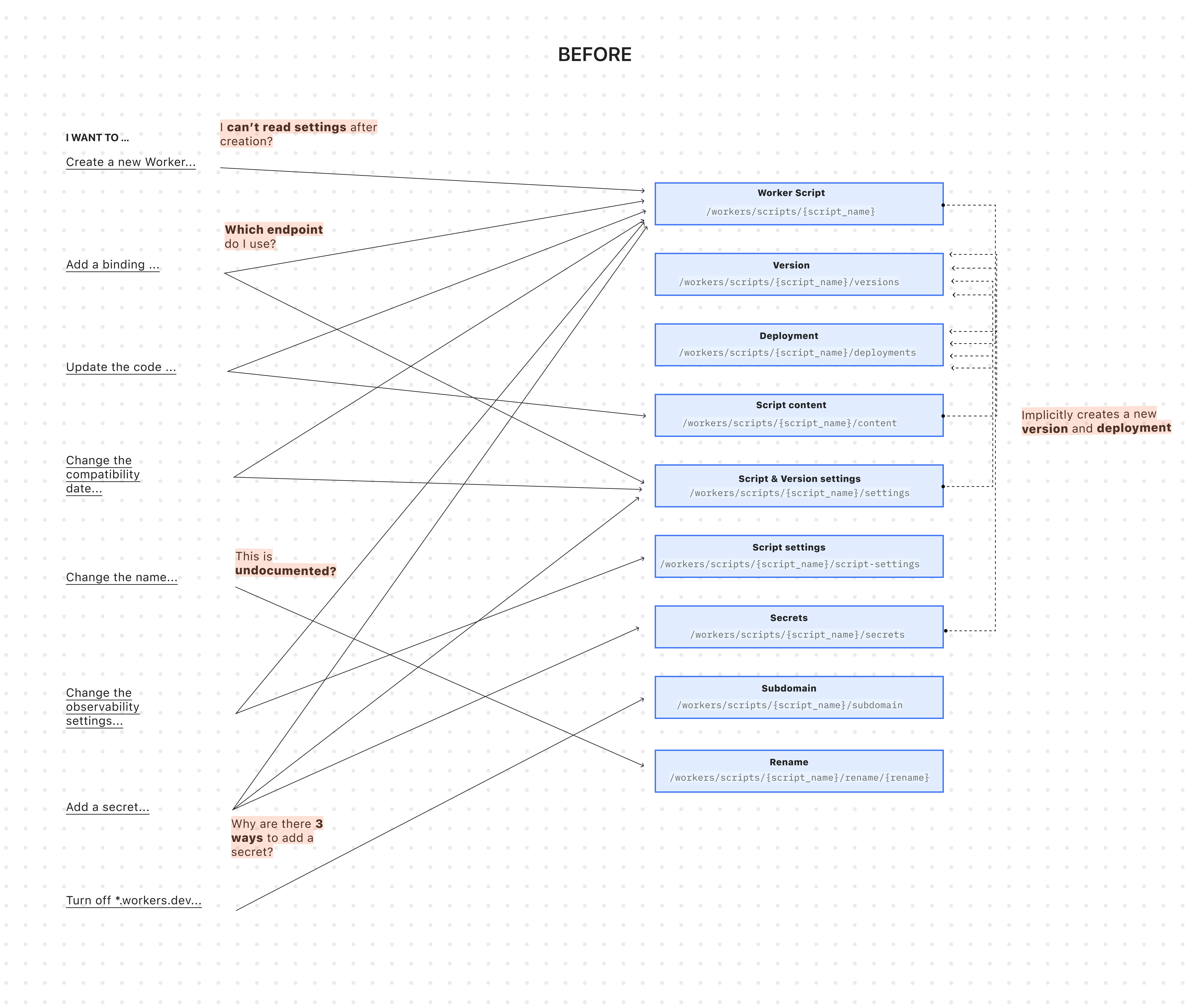
This API worked for creating a basic Worker, uploading all of its code, and deploying it immediately — but came with challenges:
A Worker couldn't exist without code: To create a Worker, you had to upload its code in the same API request. This meant platform teams couldn't provision Workers with the proper settings, and then hand them off to development teams to deploy the actual code.
Several endpoints implicitly created deployments: Simple updates like adding a secret or changing a script's content would implicitly create a new version and immediately deploy it.
Updating a setting was confusing: Configuration was scattered across eight endpoints with overlapping responsibilities. This ambiguity made it difficult for human developers (and even more so for AI agents) to reliably update a Worker via API.
Scripts used names as primary identifiers: This meant simple renames could turn into a risky migration, requiring you to create a brand new Worker and update every reference. If you were using Terraform, this could inadvertently destroy your Worker altogether.
After: Three resources with clear boundaries
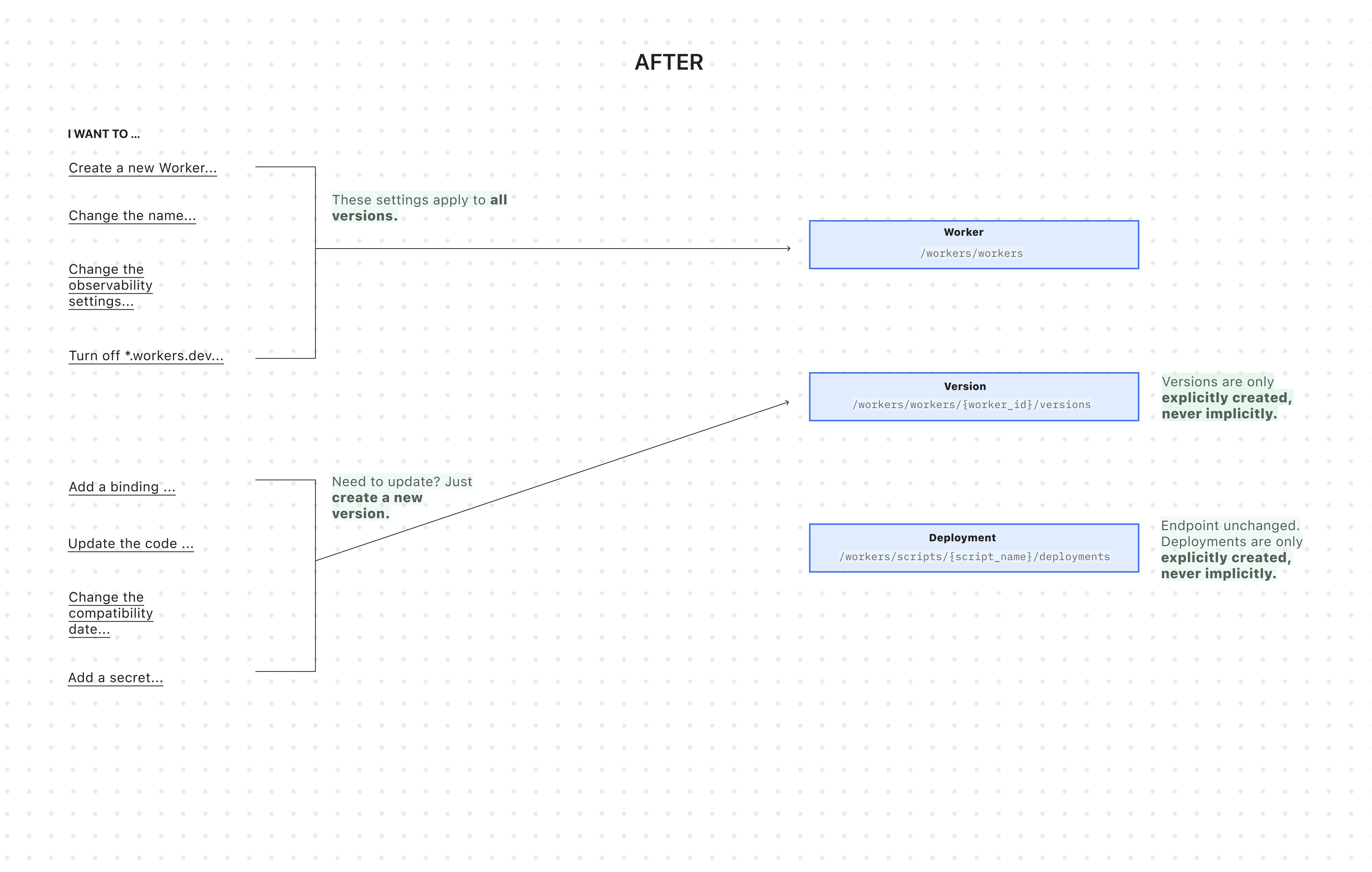
The new API introduces cleaner resource management with three core resources: Worker, Versions, and Deployment.
All endpoints now use simple JSON payloads, with script content embedded as base64-encoded strings -- a more consistent and reliable approach than the previous multipart/form-data format.
Worker: The parent resource representing your application. It has a stable UUID and holds persistent settings like name, tags, and logpush. You can now create a Worker to establish its identity and settings before any code is uploaded.
Version: An immutable snapshot of your code and its specific configuration, like bindings and compatibility_date. Creating a new version is a safe action that doesn't affect live traffic.
Deployment: An explicit action that directs traffic to a specific version.
Why this matters
You can now create Workers before uploading code
Workers are now standalone resources that can be created and configured without any code. Platform teams can provision Workers with the right settings, then hand them off to development teams for implementation.
Example: Typescript SDK
// Step 1: Platform team creates the Worker resource (no code needed)const worker = await client.workers.beta.workers.create({ name: "payment-service", account_id: "...", observability: { enabled: true, },});// Step 2: Development team adds code and creates a version laterconst version = await client.workers.beta.workers.versions.create(worker.id, { account_id: "...", main_module: "worker.js", compatibility_date: "$today", bindings: [ /*...*/ ], modules: [ { name: "worker.js", content_type: "application/javascript+module", content_base64: Buffer.from(scriptContent).toString("base64"), }, ],});// Step 3: Deploy explicitly when readyconst deployment = await client.workers.scripts.deployments.create(worker.name, { account_id: "...", strategy: "percentage", versions: [ { percentage: 100, version_id: version.id, }, ],});
Example: Terraform
If you use Terraform, you can now declare the Worker in your Terraform configuration and manage configuration outside of Terraform in your Worker's wrangler.jsonc file and deploy code changes using Wrangler.
resource "cloudflare_worker" "my_worker" { account_id = "..." name = "my-important-service"}# Manage Versions and Deployments here or outside of Terraform# resource "cloudflare_worker_version" "my_worker_version" {}# resource "cloudflare_workers_deployment" "my_worker_deployment" {}
Deployments are always explicit, never implicit
Creating a version and deploying it are now always explicit, separate actions - never implicit side effects. To update version-specific settings (like bindings), you create a new version with those changes. The existing deployed version remains unchanged until you explicitly deploy the new one.
# Step 1: Create a new version with updated settings (doesn't affect live traffic)POST /workers/workers/{id}/versions{ "compatibility_date": "$today", "bindings": [ { "name": "MY_NEW_ENV_VAR", "text": "new_value", "type": "plain_text" } ], "modules": [...]}# Step 2: Explicitly deploy when ready (now affects live traffic)POST /workers/scripts/{script_name}/deployments{ "strategy": "percentage", "versions": [ { "percentage": 100, "version_id": "new_version_id" } ]}
Settings are clearly organized by scope
Configuration is now logically divided: Worker settings (like name and tags) persist across all versions, while Version settings (like bindings and compatibility_date) are specific to each code snapshot.
# Version settings (the "code")POST /workers/workers/{id}/versions{ "compatibility_date": "$today", "bindings": [...], "modules": [...]}
/workers API endpoints now support UUIDs (in addition to names)
The /workers/workers/ path now supports addressing a Worker by both its immutable UUID and its mutable name.
# Both work for the same WorkerGET /workers/workers/29494978e03748669e8effb243cf2515 # UUID (stable for automation)GET /workers/workers/payment-service # Name (convenient for humans)
This dual approach means:
Developers can use readable names for debugging.
Automation can rely on stable UUIDs to prevent errors when Workers are renamed.
Terraform can rename Workers without destroying and recreating them.
The pre-existing Workers REST API remains fully supported. Once the new API exits beta, we'll provide a migration timeline with ample notice and comprehensive migration guides.
Existing Terraform resources and SDK methods will continue to be fully supported through the current major version.
While the Deployments API currently remains on the /scripts/ endpoint, we plan to introduce a new Deployments endpoint under /workers/ to match the new API structure.
Starting December 1, 2025, list endpoints for the Cloudflare Tunnel API and Zero Trust Networks API will no longer return deleted tunnels, routes, subnets and virtual networks by default. This change makes the API behavior more intuitive by only returning active resources unless otherwise specified.
No action is required if you already explicitly set is_deleted=false or if you only need to list active resources.
The default behavior of the is_deleted query parameter will be updated.
Scenario
Previous behavior (before December 1, 2025)
New behavior (from December 1, 2025)
is_deleted parameter is omitted
Returns active & deleted tunnels, routes, subnets and virtual networks
Returns only active tunnels, routes, subnets and virtual networks
Action required
If you need to retrieve deleted (or all) resources, please update your API calls to explicitly include the is_deleted parameter before December 1, 2025.
To get a list of only deleted resources, you must now explicitly add the is_deleted=true query parameter to your request:
# Example: Get ONLY deleted Tunnelscurl "https://api.cloudflare.com/client/v4/accounts/$ACCOUNT_ID/tunnels?is_deleted=true" \ -H "Authorization: Bearer $API_TOKEN"# Example: Get ONLY deleted Virtual Networkscurl "https://api.cloudflare.com/client/v4/accounts/$ACCOUNT_ID/teamnet/virtual_networks?is_deleted=true" \ -H "Authorization: Bearer $API_TOKEN"
Following this change, retrieving a complete list of both active and deleted resources will require two separate API calls: one to get active items (by omitting the parameter or using is_deleted=false) and one to get deleted items (is_deleted=true).
Why we’re making this change
This update is based on user feedback and aims to:
Create a more intuitive default: Aligning with common API design principles where list operations return only active resources by default.
Reduce unexpected results: Prevents users from accidentally operating on deleted resources that were returned unexpectedly.
Improve performance: For most users, the default query result will now be smaller and more relevant.
Earlier this year, we announced the launch of the new Terraform v5 Provider. We are aware of the high number of issues ↗ reported by the Cloudflare community related to the v5 release. We have committed to releasing improvements on a 2 week cadence to ensure its stability and reliability, including the v5.9 release. We have also pivoted from an issue-to-issue approach to a resource-per-resource approach - we will be focusing on specific resources for every release, stabilizing the release, and closing all associated bugs with that resource before moving onto resolving migration issues.
Thank you for continuing to raise issues. We triage them weekly and they help make our products stronger.
This release includes a new resource, cloudflare_snippet, which replaces cloudflare_snippets. cloudflare_snippet is now considered deprecated but can still be used. Please utilize cloudflare_snippet as soon as possible.
Changes
Resources stabilized:
cloudflare_zone_setting
cloudflare_worker_script
cloudflare_worker_route
tiered_cache
NEW resource cloudflare_snippet which should be used in place of cloudflare_snippets. cloudflare_snippets is now deprecated. This enables the management of Cloudflare's snippet functionality through Terraform.
DNS Record Improvements: Enhanced handling of DNS record drift detection
Load Balancer Fixes: Resolved created_on field inconsistencies and improved pool configuration handling
Bot Management: Enhanced auto-update model state consistency and fight mode configurations
Other bug fixes
For a more detailed look at all of the changes, refer to the
changelog ↗ in GitHub.
If you have an unaddressed issue with the provider, we encourage you to check the open issues ↗ and open a new issue if one does not already exist for what you are experiencing.
Upgrading
We suggest holding off on migration to v5 while we work on stabilization. This help will you avoid any blocking issues while the Terraform resources are actively being stabilized.
If you'd like more information on migrating from v4 to v5, please make use of the migration guide ↗. We have provided automated migration scripts using Grit which simplify the transition. These do not support implementations which use Terraform modules, so customers making use of modules need to migrate manually. Please make use of terraform plan to test
your changes before applying, and let us know if you encounter any additional issues by reporting to our GitHub repository ↗.
New state-of-the-art models have landed on Workers AI! This time, we're introducing new partner models trained by our friends at Deepgram ↗ and Leonardo ↗, hosted on Workers AI infrastructure.
As well, we're introuding a new turn detection model that enables you to detect when someone is done speaking — useful for building voice agents!
Read the blog ↗ for more details and check out some of the new models on our platform:
@cf/deepgram/aura-1 is a text-to-speech model that allows you to input text and have it come to life in a customizable voice
@cf/deepgram/nova-3 is speech-to-text model that transcribes multilingual audio at a blazingly fast speed
@cf/leonardo/lucid-origin is a text-to-image model that generates images with sharp graphic design, stunning full-HD renders, or highly specific creative direction
@cf/leonardo/phoenix-1.0 is a text-to-image model with exceptional prompt adherence and coherent text
You can filter out new partner models with the Partner capability on our Models page.
As well, we're introducing WebSocket support for some of our audio models, which you can filter though the Realtime capability on our Models page. WebSockets allows you to create a bi-directional connection to our inference server with low latency — perfect for those that are building voice agents.
An example python snippet on how to use WebSockets with our new Aura model:
import jsonimport osimport asyncioimport websocketsuri = f"wss://api.cloudflare.com/client/v4/accounts/{ACCOUNT_ID}/ai/run/@cf/deepgram/aura-1"input = [ "Line one, out of three lines that will be provided to the aura model.", "Line two, out of three lines that will be provided to the aura model.", "Line three, out of three lines that will be provided to the aura model. This is a last line.",]async def text_to_speech(): async with websockets.connect(uri, additional_headers={"Authorization": os.getenv("CF_TOKEN")}) as websocket: print("connection established") for line in input: print(f"sending `{line}`") await websocket.send(json.dumps({"type": "Speak", "text": line})) print("line was sent, flushing") await websocket.send(json.dumps({"type": "Flush"})) print("flushed, recving") resp = await websocket.recv() print(f"response received {resp}")if __name__ == "__main__": asyncio.run(text_to_speech())
You can now list all vector identifiers in a Vectorize index using the new list-vectors operation. This enables bulk operations, auditing, and data migration workflows through paginated requests that maintain snapshot consistency.
The operation is available via Wrangler CLI and REST API. Refer to the list-vectors best practices guide for detailed usage guidance.
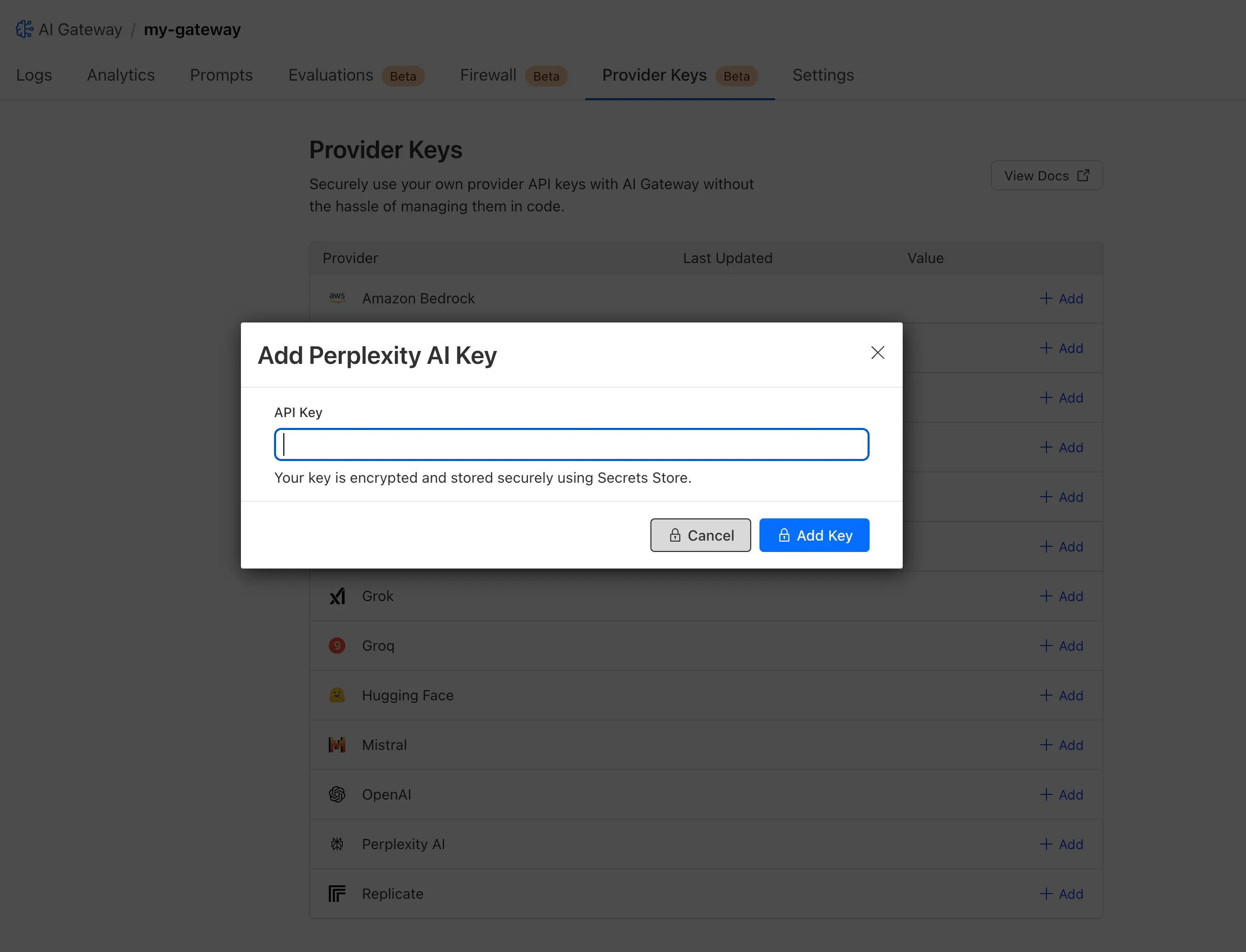
Cloudflare Secrets Store is now integrated with AI Gateway, allowing you to store, manage, and deploy your AI provider keys in a secure and seamless configuration through Bring Your Own Key ↗. Instead of passing your AI provider keys directly in every request header, you can centrally manage each key with Secrets Store and deploy in your gateway configuration using only a reference, rather than passing the value in plain text.
You can now create a secret directly from your AI Gateway in the dashboard ↗ by navigating into your gateway -> Provider Keys -> Add.
JavaScript asset responses have been updated to use the text/javascript Content-Type header instead of application/javascript. While both MIME types are widely supported by browsers, the HTML Living Standard explicitly recommends text/javascript as the preferred type going forward.
This change improves:
Standards alignment: Ensures consistency with the HTML spec and modern web platform guidance.
Interoperability: Some developer tools, validators, and proxies expect text/javascript and may warn or behave inconsistently with application/javascript.
Future-proofing: By following the spec-preferred MIME type, we reduce the risk of deprecation warnings or unexpected behavior in evolving browser environments.
Consistency: Most frameworks, CDNs, and hosting providers now default to text/javascript, so this change matches common ecosystem practice.
Because all major browsers accept both MIME types, this update is backwards compatible and should not cause breakage.
Users will see this change on the next deployment of their assets.
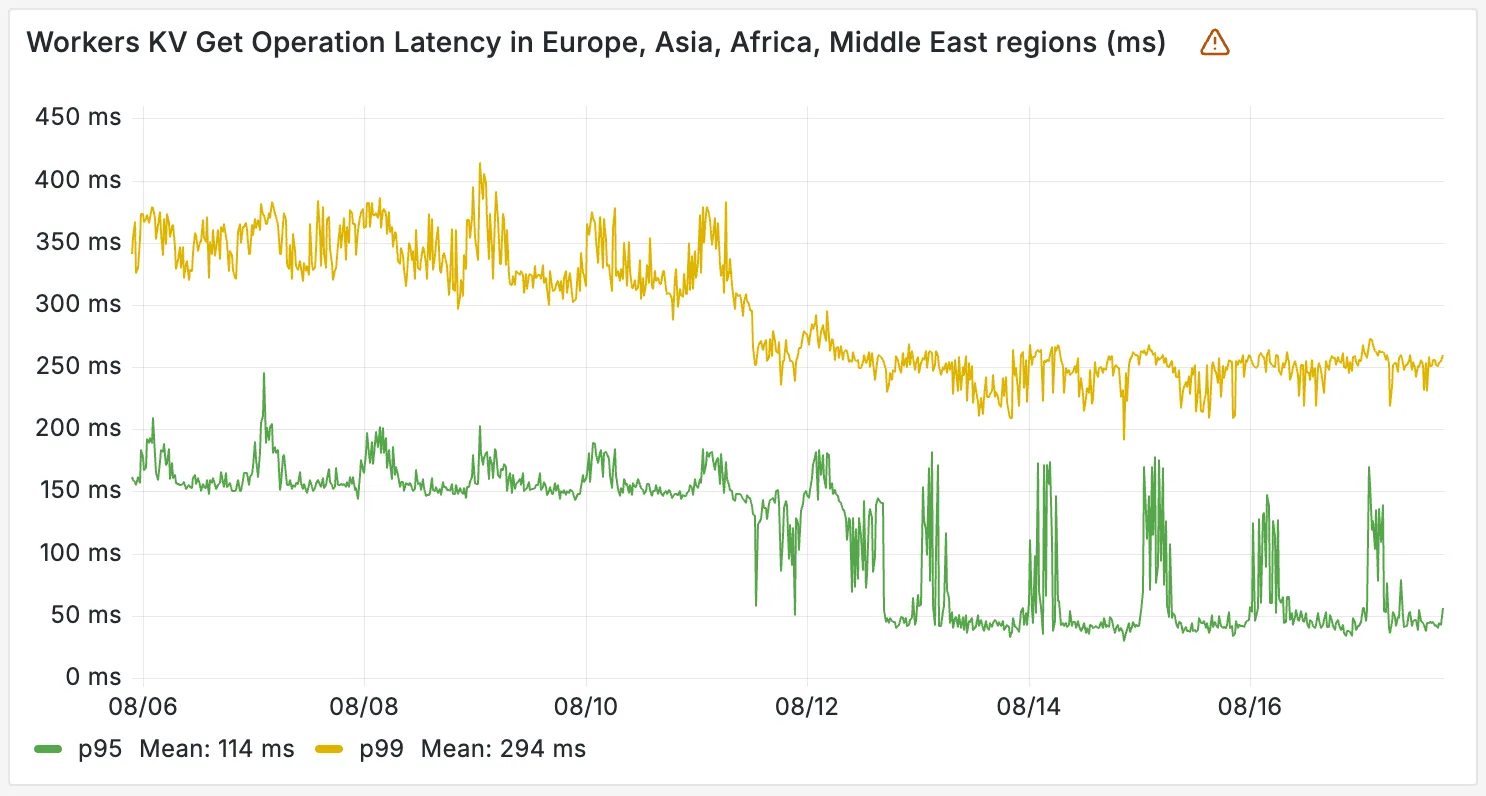
Workers KV has completed rolling out performance improvements across all KV namespaces, providing a significant latency reduction on read operations for all KV users. This is due to architectural changes to KV's underlying storage infrastructure, which introduces a new metadata later and substantially improves redundancy.
Performance improvements
The new hybrid architecture delivers substantial latency reductions throughout Europe, Asia, Middle East, Africa regions. Over the past 2 weeks, we have observed the following:
p95 latency: Reduced from ~150ms to ~50ms (67% decrease)
p99 latency: Reduced from ~350ms to ~250ms (29% decrease)
You can now build Workflows using Python. With Python Workflows, you get automatic retries, state persistence, and the ability to run multi-step operations that can span minutes, hours, or weeks using Python’s familiar syntax and the Python Workers runtime.
Python Workflows use the same step-based execution model as JavaScript Workflows, but with Python syntax and access to Python’s ecosystem. Python Workflows also enable DAG (Directed Acyclic Graph) workflows, where you can define complex dependencies between steps using the depends parameter.
Here’s a simple example:
from workers import Response, WorkflowEntrypointclass PythonWorkflowStarter(WorkflowEntrypoint): async def run(self, event, step): @step.do("my first step") async def my_first_step(): # do some work return "Hello Python!" await my_first_step() await step.sleep("my-sleep-step", "10 seconds") @step.do("my second step") async def my_second_step(): # do some more work return "Hello again!" await my_second_step()class Default(WorkerEntrypoint): async def fetch(self, request): await self.env.MY_WORKFLOW.create() return Response("Hello Workflow creation!")
Python Workflows support the same core capabilities as JavaScript Workflows, including sleep scheduling, event-driven workflows, and built-in error handling with configurable retry policies.
You can now create a client (a Durable Object stub) to a Durable Object with the new getByName method, removing the need to convert Durable Object names to IDs and then create a stub.
// Before: (1) translate name to ID then (2) get a client const objectId = env.MY_DURABLE_OBJECT.idFromName("foo"); // or .newUniqueId()const stub = env.MY_DURABLE_OBJECT.get(objectId); // Now: retrieve client to Durable Object directly via its name const stub = env.MY_DURABLE_OBJECT.getByName("foo");// Use client to send request to the remote Durable Objectconst rpcResponse = await stub.sayHello();
Each Durable Object has a globally-unique name, which allows you to send requests to a specific object from anywhere in the world. Thus, a Durable Object can be used to coordinate between multiple clients who need to work together. You can have billions of Durable Objects, providing isolation between application tenants.
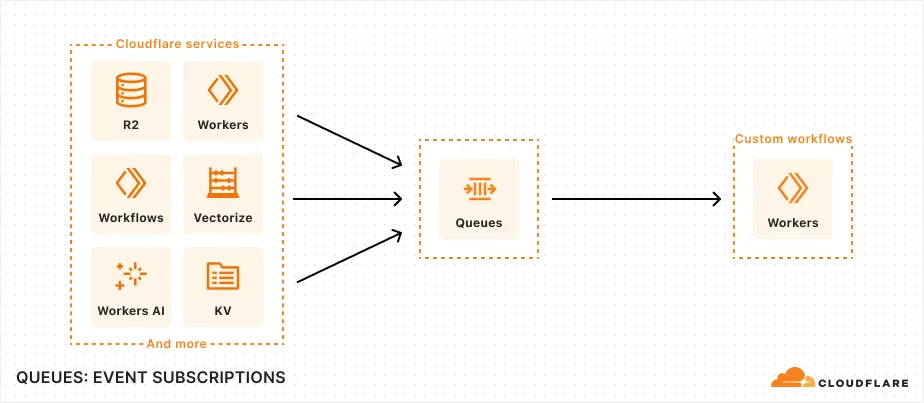
You can now subscribe to events from other Cloudflare services (for example, Workers KV, Workers AI, Workers) and consume those events via Queues, allowing you to build custom workflows, integrations, and logic in response to account activity.
Event subscriptions allow you to receive messages when events occur across your Cloudflare account. Cloudflare products can publish structured events to a queue, which you can then consume with Workers or pull via HTTP from anywhere.
To create a subscription, use the dashboard or Wrangler:
An event is a structured record of something happening in your Cloudflare account – like a Workers AI batch request being queued, a Worker build completing, or an R2 bucket being created. Events follow a consistent structure:
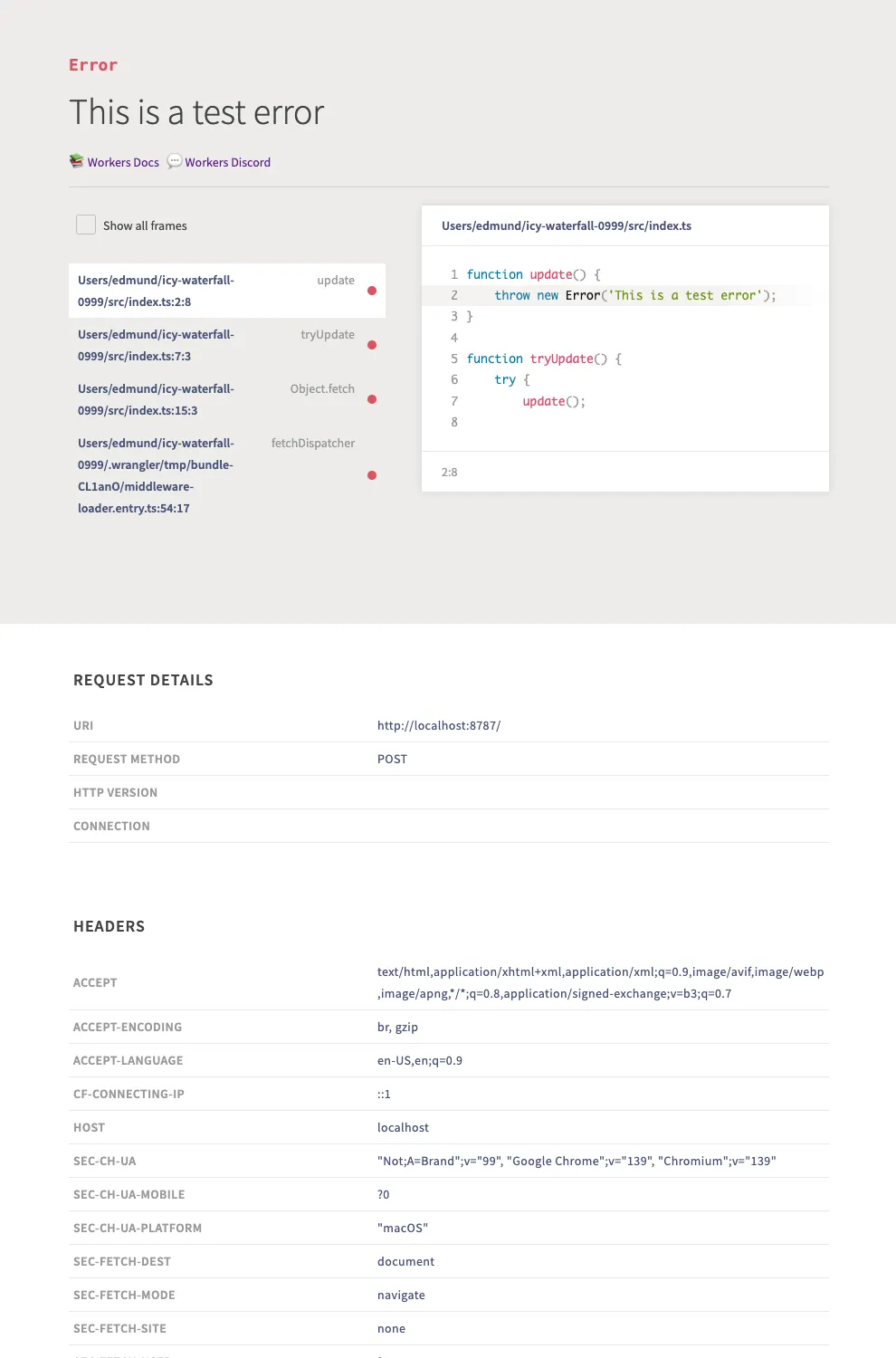
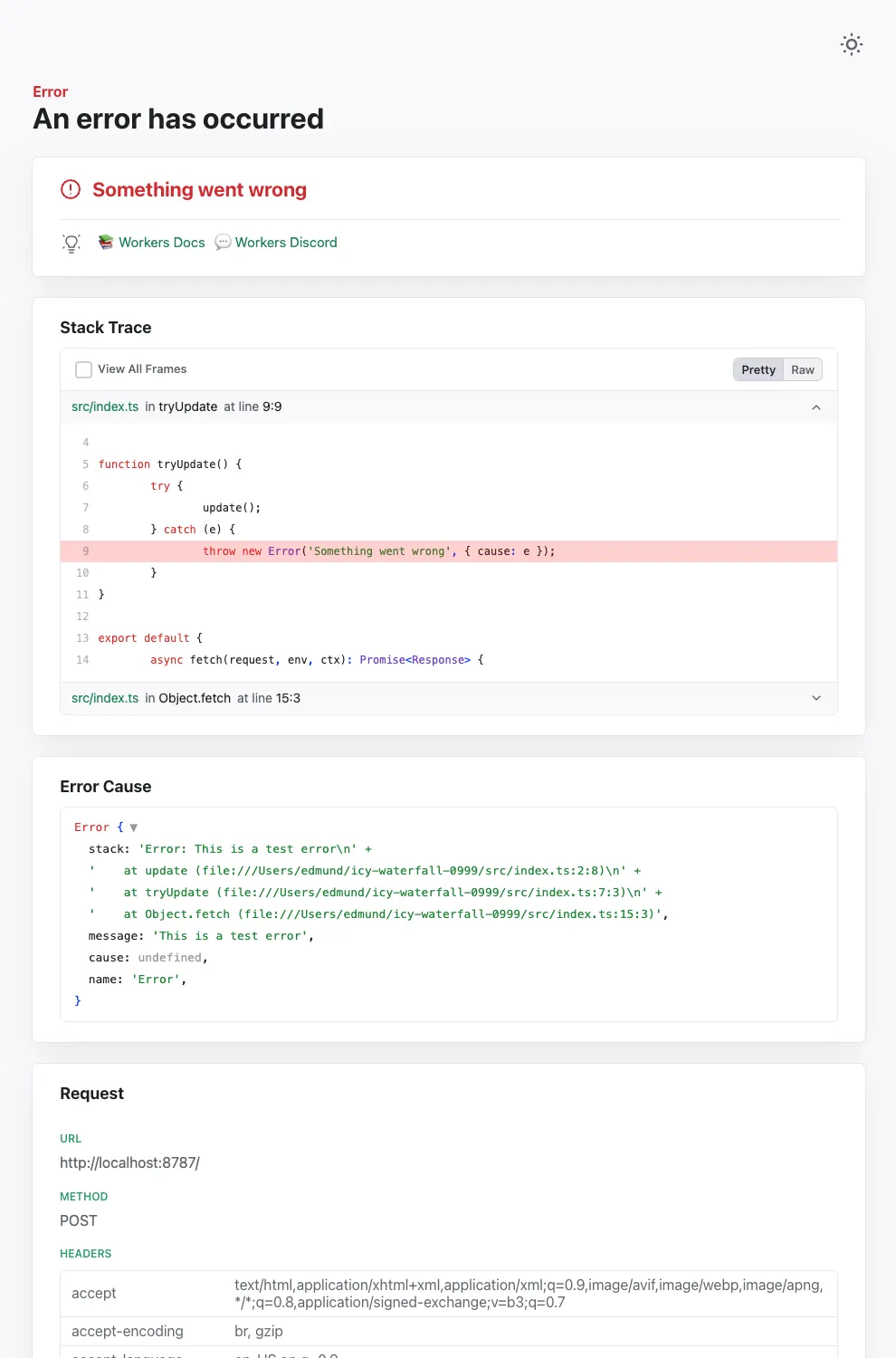
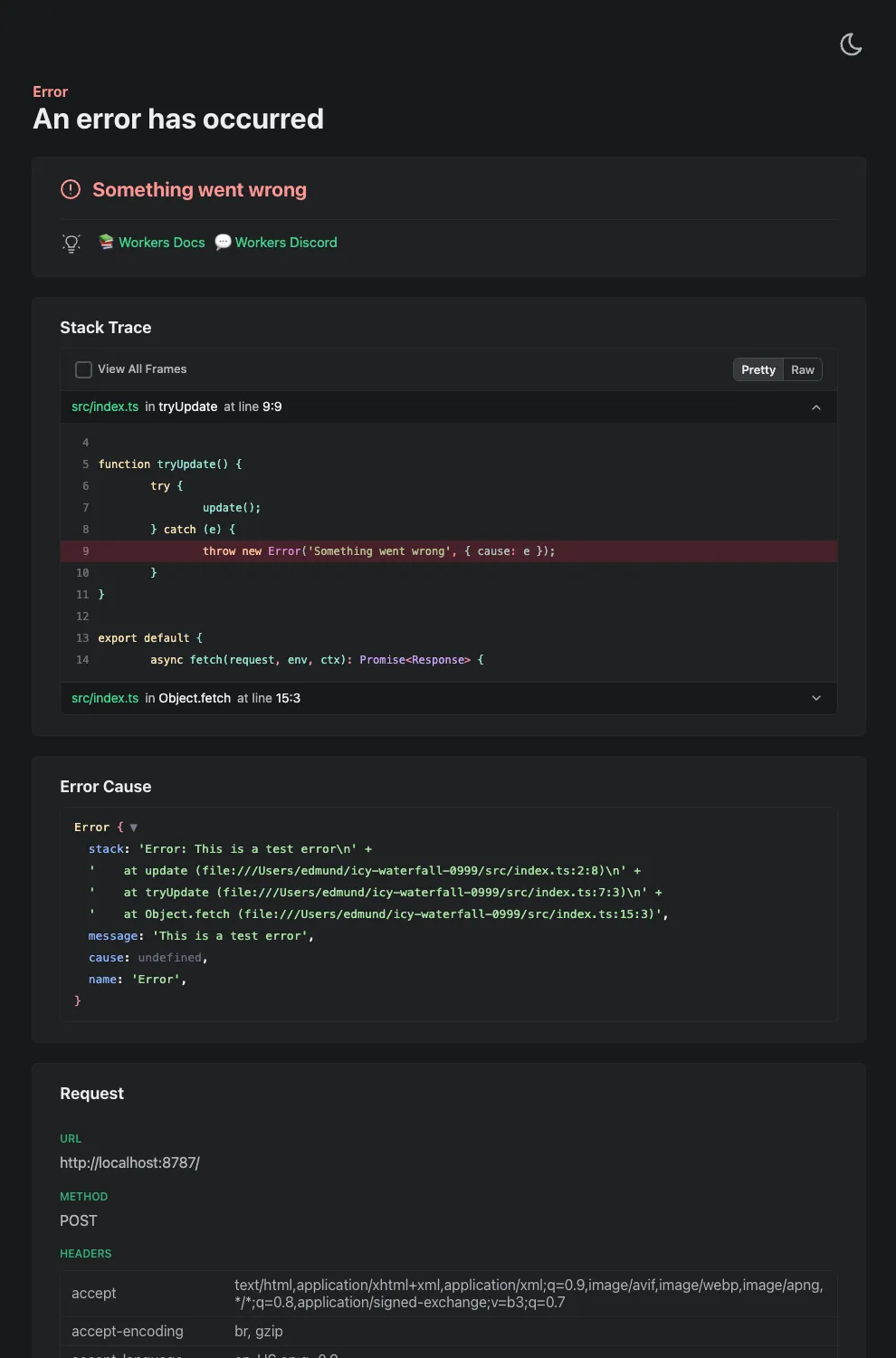
Wrangler's error screen has received several improvements to enhance your debugging experience!
The error screen now features a refreshed design thanks to youch ↗, with support for both light and dark themes, improved source map resolution logic that handles missing source files more reliably, and better error cause display.
Before
After (Light)
After (Dark)
Try it out now with npx wrangler@latest dev in your Workers project.
Earlier this year, we announced the launch of the new Terraform v5 Provider. We are aware of the high number of issues ↗ reported by the Cloudflare Community related to the v5 release. We have committed to releasing improvements on a two week cadence to ensure stability and reliability.
One key change we adopted in recent weeks is a pivot to more comprehensive, test-driven development. We are still evaluating individual issues, but are also investing in much deeper testing to drive our stabilization efforts. We will subsequently be investing in comprehensive migration scripts. As a result, you will see several of the highest traffic APIs have been stabilized in the most recent release, and are supported by comprehensive acceptance tests.
Thank you for continuing to raise issues. We triage them weekly and they help make our products stronger.
If you have an unaddressed issue with the provider, we encourage you to check the open issues ↗ and open a new one if one does not already exist for what you are experiencing.
Upgrading
We suggest holding off on migration to v5 while we work on stabilization. This will help you avoid any blocking issues while the Terraform resources are actively being stabilized.
If you'd like more information on migrating to v5, please make use of the migration guide ↗. We have provided automated migration scripts using Grit which simplify the transition. These migration scripts do not support implementations which use Terraform modules, so customers making use of modules need to migrate manually. Please make use of terraform plan to test your changes before applying, and let us know if you encounter any additional issues by reporting to our GitHub repository ↗.
The node:fs module provides access to a virtual file system in Workers. You can use it to read and write files, create directories, and perform other file system operations.
The virtual file system is ephemeral with each individual request havig its own isolated temporary file space. Files written to the file system will not persist across requests and will not be shared across requests or across different Workers.
Workers running with the nodejs_compat compatibility flag will have access to the node:fs module by default when the compatibility date is set to 2025-09-01 or later. Support for the API can also be enabled using the enable_nodejs_fs_module compatibility flag together with the nodejs_compat flag. The node:fs module can be disabled using the disable_nodejs_fs_module compatibility flag.
import fs from "node:fs";const config = JSON.parse(fs.readFileSync("/bundle/config.json", "utf-8"));export default { async fetch(request) { return new Response(`Config value: ${config.value}`); },};
There are a number of initial limitations to the node:fs implementation:
The glob APIs (e.g. fs.globSync(...)) are not implemented.
The file watching APIs (e.g. fs.watch(...)) are not implemented.
The file timestamps (modified time, access time, etc) are only partially supported. For now, these will always return the Unix epoch.
Refer to the Node.js documentation ↗ for more information on the node:fs module and its APIs.
The Web File System API
The Web File System API provides access to the same virtual file system as the node:fs module, but with a different API surface. The Web File System API is only available in Workers running with the enable_web_file_system compatibility flag. The nodejs_compat compatibility flag is not required to use the Web File System API.
As there are still some parts of the Web File System API that are not fully standardized, there may be some differences between the Workers implementation and the implementations in browsers.



 The new API introduces cleaner resource management with three core resources: