Pular para o conteúdo

Changelog

New updates and improvements at Cloudflare.

Revamped Member Management UI

As Cloudflare's platform has grown, so has the need for precise, role-based access control. We’ve redesigned the Member Management experience in the Dashboard to help administrators more easily discover, assign, and refine permissions for specific principals.

What's New

Refreshed member invite flow

We overhauled the Invite Members UI to simplify inviting users and assigning permissions.

Updated Invite Flow UX

Refreshed Members Overview Page

We've updated the Members Overview Page to clearly display:

  • Member 2FA status
  • Which members hold Super Admin privileges
  • API access settings per member
  • Member onboarding state (accepted vs pending invite)
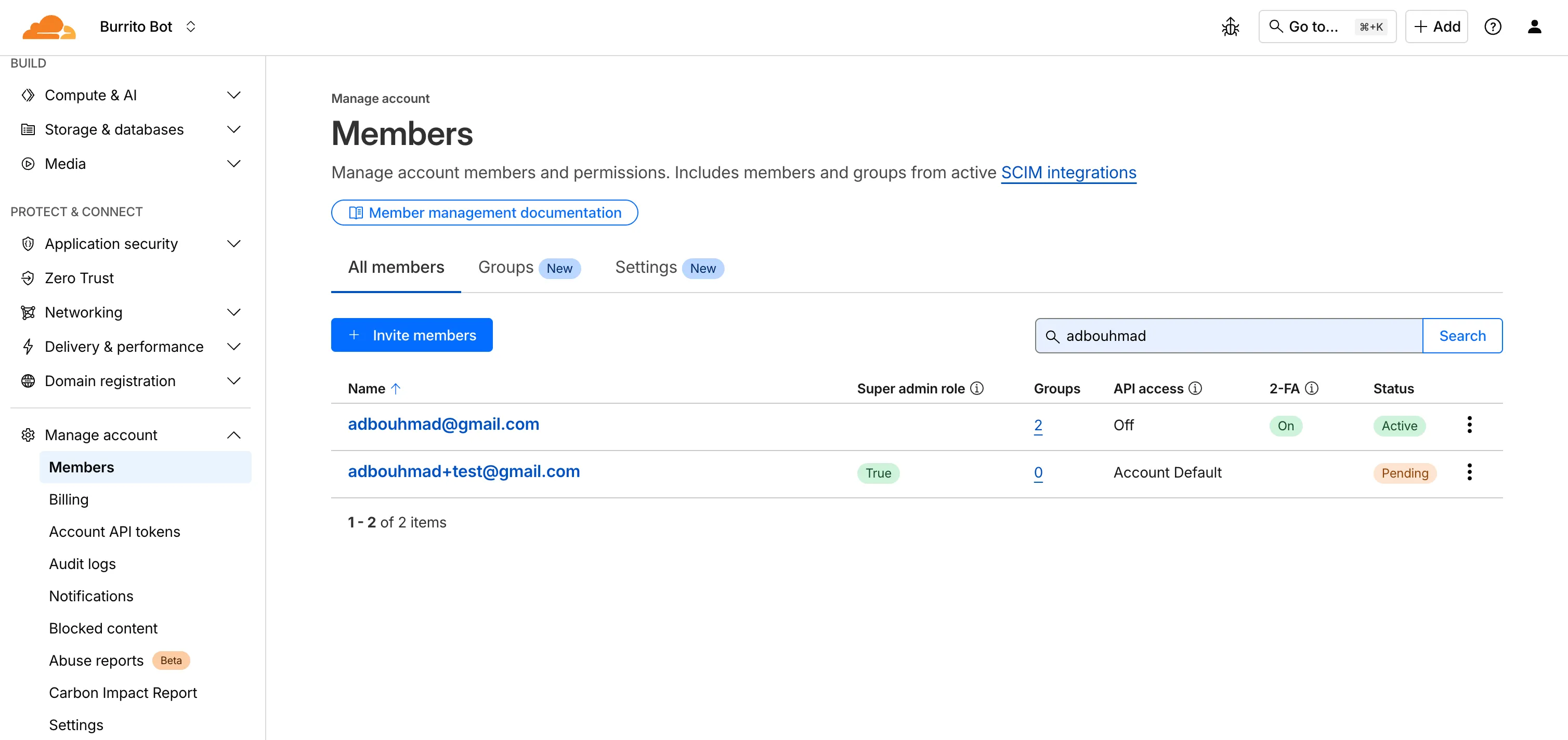
Updated Member Management Overview

New Member Permission Policies Details View

We've created a new member details screen that shows all permission policies associated with a member; including policies inherited from group associations to make it easier for members to understand the effective permissions they have.

Updated Permission Policies Details Screen

Improved Member Permission Workflow

We redesigned the permission management experience to make it faster and easier for administrators to review roles and grant access.

Updated Member Permission Management UX

Account-scoped Policies Restrictions Relaxed

Previously, customers could only associate a single account-scoped policy with a member. We've relaxed this restriction, and now Administrators can now assign multiple account-scoped policies to the same member; bringing policy assignment behavior in-line with user-groups and providing greater flexibility in managing member permissions.
New TCP-based fields available in Rulesets

Build rules based on TCP transport and latency

Cloudflare now provides two new request fields in the Ruleset engine that let you make decisions based on whether a request used TCP and the measured TCP round-trip time between the client and Cloudflare. These fields help you understand protocol usage across your traffic and build policies that respond to network performance. For example, you can distinguish TCP from QUIC traffic or route high latency requests to alternative origins when needed.


New fields

Field Type Description
cf.edge.client_tcp Boolean Indicates whether the request used TCP. A value of true means the client connected using TCP instead of QUIC.
cf.timings.client_tcp_rtt_msec Number Reports the smoothed TCP round-trip time between the client and Cloudflare in milliseconds. For example, a value of 20 indicates roughly twenty milliseconds of RTT.

Example filter expression:

cf.edge.client_tcp && cf.timings.client_tcp_rtt_msec < 100

More information can be found in the Rules language fields reference.

Azure Sentinel Connector

Logpush now supports integration with Microsoft Sentinel.The new Azure Sentinel Connector built on Microsoft’s Codeless Connector Framework (CCF), is now available. This solution replaces the previous Azure Functions-based connector, offering significant improvements in security, data control, and ease of use for customers. Logpush customers can send logs to Azure Blob Storage and configure this new Sentinel Connector to ingest those logs directly into Microsoft Sentinel.

This upgrade significantly streamlines log ingestion, improves security, and provides greater control:

  • Simplified Implementation: Easier for engineering teams to set up and maintain.
  • Cost Control: New support for Data Collection Rules (DCRs) allows you to filter and transform logs at ingestion time, offering potential cost savings.
  • Enhanced Security: CCF provides a higher level of security compared to the older Azure Functions connector.
  • Data Lake Integration: Includes native integration with Data Lake.

Find the new solution here and refer to the Cloudflare's developer documentationfor more information on the connector, including setup steps, supported logs and Microsoft's resources.

New Robots.txt tab for tracking crawler compliance

AI Crawl Control now includes a Robots.txt tab that provides insights into how AI crawlers interact with your robots.txt files.

What's new

The Robots.txt tab allows you to:

  • Monitor the health status of robots.txt files across all your hostnames, including HTTP status codes, and identify hostnames that need a robots.txt file.
  • Track the total number of requests to each robots.txt file, with breakdowns of successful versus unsuccessful requests.
  • Check whether your robots.txt files contain Content Signals directives for AI training, search, and AI input.
  • Identify crawlers that request paths explicitly disallowed by your robots.txt directives, including the crawler name, operator, violated path, specific directive, and violation count.
  • Filter robots.txt request data by crawler, operator, category, and custom time ranges.

Take action

When you identify non-compliant crawlers, you can:

To get started, go to AI Crawl Control > Robots.txt in the Cloudflare dashboard. Learn more in the Track robots.txt documentation.

Increased HTTP header size limit to 128 KB

CDN now supports 128 KB request and response headers 🚀

We're excited to announce a significant increase in the maximum header size supported by Cloudflare's Content Delivery Network (CDN). Cloudflare now supports up to 128 KB for both request and response headers.

Previously, customers were limited to a total of 32 KB for request or response headers, with a maximum of 16 KB per individual header. Larger headers could cause requests to fail with HTTP 413 (Request Header Fields Too Large) errors.


What's new?

  • Support for large headers: You can now utilize much larger headers, whether as a single large header up to 128 KB or split over multiple headers.
  • Reduces 413 and 520 HTTP errors: This change drastically reduces the likelihood of customers encountering HTTP 413 errors from large request headers or HTTP 520 errors caused by oversized response headers, improving the overall reliability of your web applications.
  • Enhanced functionality: This is especially beneficial for applications that rely on:
    • A large number of cookies.
    • Large Content-Security-Policy (CSP) response headers.
    • Advanced use cases with Cloudflare Workers that generate large response headers.

This enhancement improves compatibility with Cloudflare's CDN, enabling more use cases that previously failed due to header size limits.


To learn more and get started, refer to the Cloudflare Fundamentals documentation.

Enhanced AI Crawl Control metrics with new drilldowns and filters

AI Crawl Control now provides enhanced metrics and CSV data exports to help you better understand AI crawler activity across your sites.

What's new

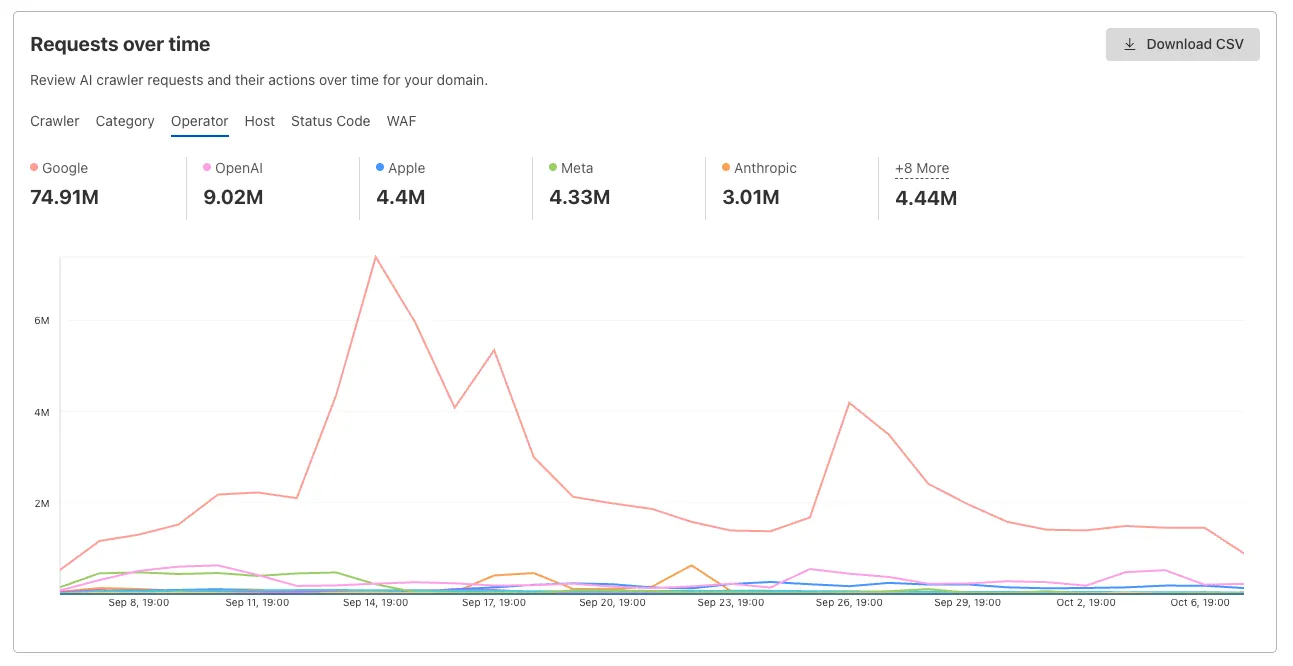
Track crawler requests over time

Visualize crawler activity patterns over time, and group data by different dimensions:

  • By Crawler — Track activity from individual AI crawlers (GPTBot, ClaudeBot, Bytespider)
  • By Category — Analyze crawler purpose or type
  • By Operator — Discover which companies (OpenAI, Anthropic, ByteDance) are crawling your site
  • By Host — Break down activity across multiple subdomains
  • By Status Code — Monitor HTTP response codes to crawlers (200s, 300s, 400s, 500s)
AI Crawl Control requests over time chart with grouping tabs
Interactive chart showing crawler requests over time with filterable dimensions

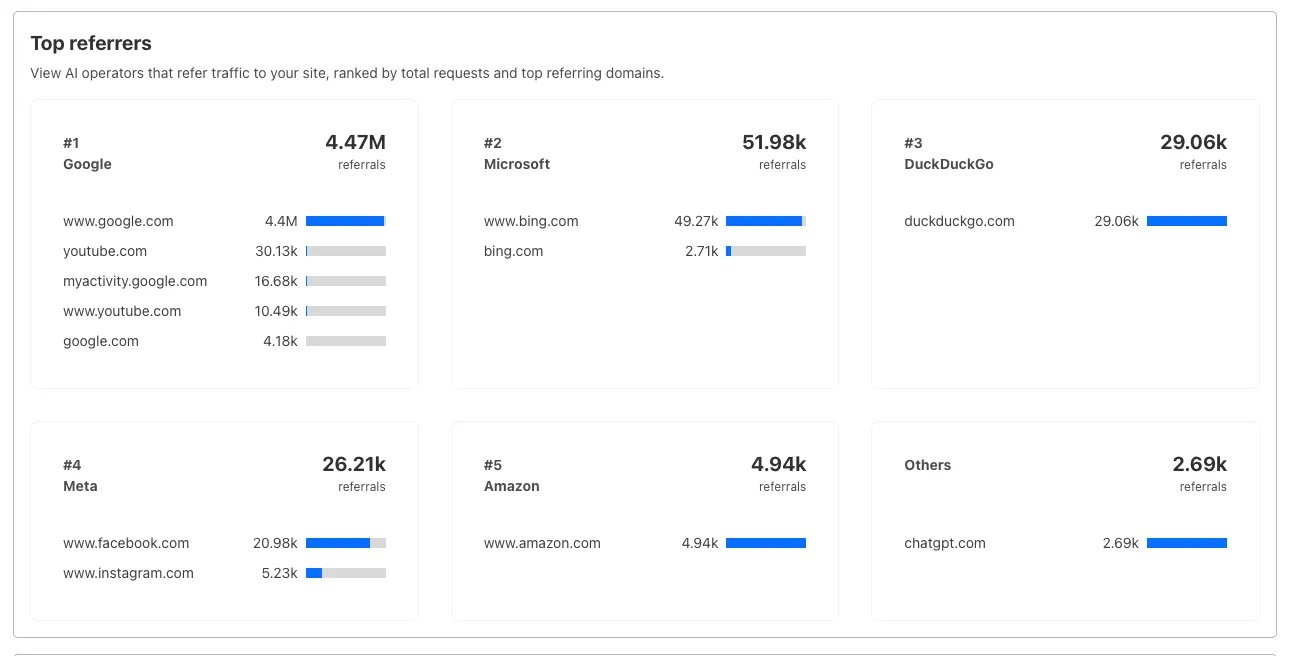
Analyze referrer data (Paid plans)

Identify traffic sources with referrer analytics:

  • View top referrers driving traffic to your site
  • Understand discovery patterns and content popularity from AI operators
AI Crawl Control top referrers breakdown
Bar chart showing top referrers and their respective traffic volumes

Export data

Download your filtered view as a CSV:

  • Includes all applied filters and groupings
  • Useful for custom reporting and deeper analysis

Get started

  1. Log in to the Cloudflare dashboard, and select your account and domain.
  2. Go to AI Crawl Control > Metrics.
  3. Use the grouping tabs to explore different views of your data.
  4. Apply filters to focus on specific crawlers, time ranges, or response codes.
  5. Select Download CSV to export your filtered data for further analysis.

Learn more about AI Crawl Control.

Single sign-on now manageable in the user experience

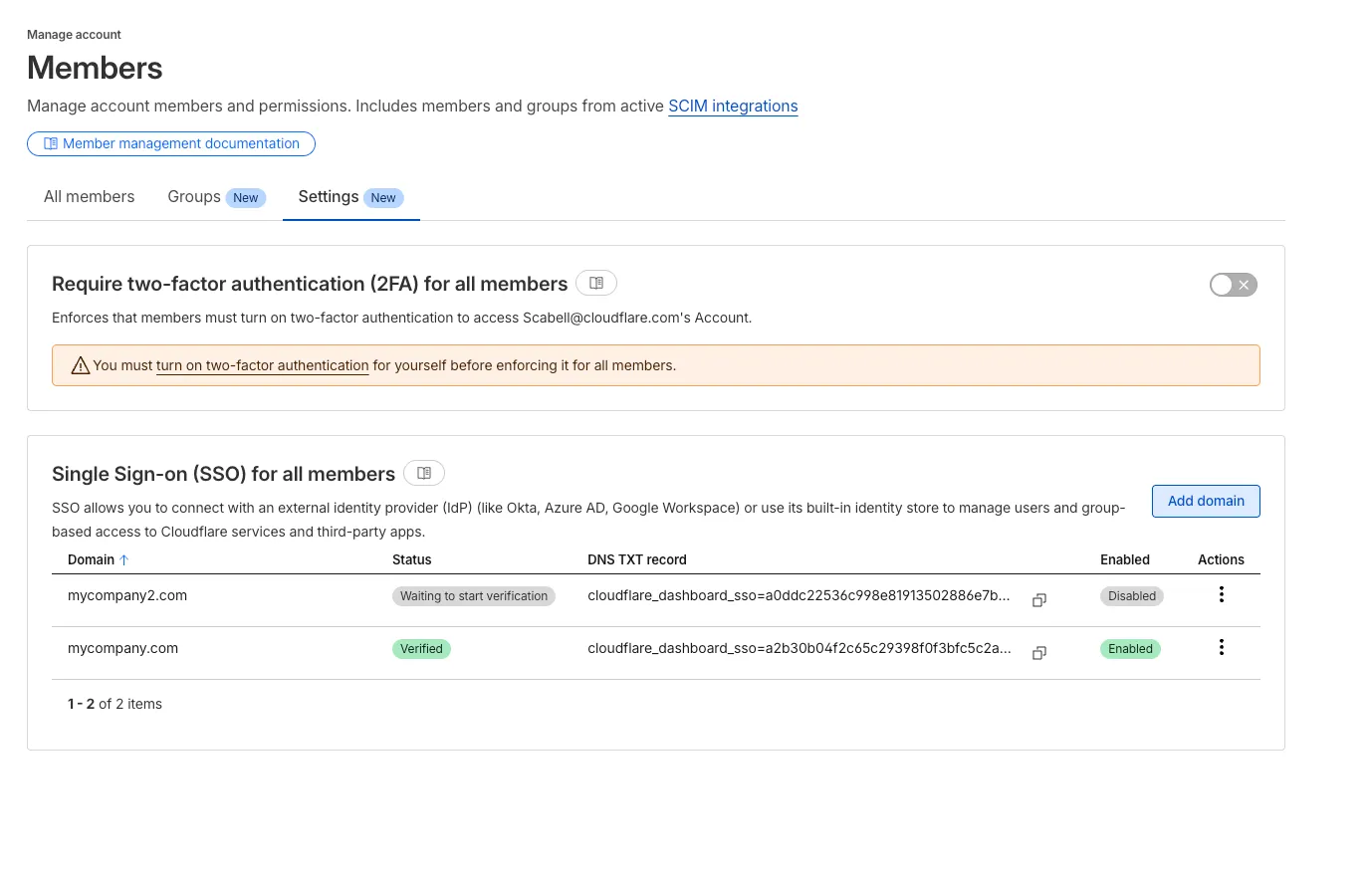
Screenshot of new user experience for managing SSO

During Birthday Week, we announced that single sign-on (SSO) is available for free to everyone who signs in with a custom email domain and maintains a compatible identity provider. SSO minimizes user friction around login and provides the strongest security posture available. At the time, this could only be configured using the API.

Today, we are launching a new user experience which allows users to manage their SSO configuration from within the Cloudflare dashboard. You can access this by going to Manage account > Members > Settings.

For more information

Automated reminders for backup codes

The most common reason users contact Cloudflare support is lost two-factor authentication (2FA) credentials. Cloudflare supports both app-based and hardware keys for 2FA, but you could lose access to your account if you lose these. Over the past few weeks, we have been rolling out email and in-product reminders that remind you to also download backup codes (sometimes called recovery keys) that can get you back into your account in the event you lose your 2FA credentials. Download your backup codes now by logging into Cloudflare, then navigating to Profile > Security & Authentication > Backup codes.

Sign-in security best practices

Cloudflare is critical infrastructure, and you should protect it as such. Please review the following best practices and make sure you are doing your part to secure your account.

  • Use a unique password for every website, including Cloudflare, and store it in a password manager like 1Password or Keeper. These services are cross-platform and simplify the process of managing secure passwords.
  • Use 2FA to make it harder for an attacker to get into your account in the event your password is leaked
  • Store your backup codes securely. A password manager is the best place since it keeps the backup codes encrypted, but you can also print them and put them somewhere safe in your home.
  • If you use an app to manage your 2FA keys, enable cloud backup, so that you don't lose your keys in the event you lose your phone.
  • If you use a custom email domain to sign in, configure SSO.
  • If you use a public email domain like Gmail or Hotmail, you can also use social login with Apple, GitHub, or Google to sign in.
  • If you manage a Cloudflare account for work:
    • Have at least two administrators in case one of them unexpectedly leaves your company
    • Use SCIM to automate permissions management for members in your Cloudflare account

Fine-grained Permissioning for Access for Apps, IdPs, & Targets now in Public Beta

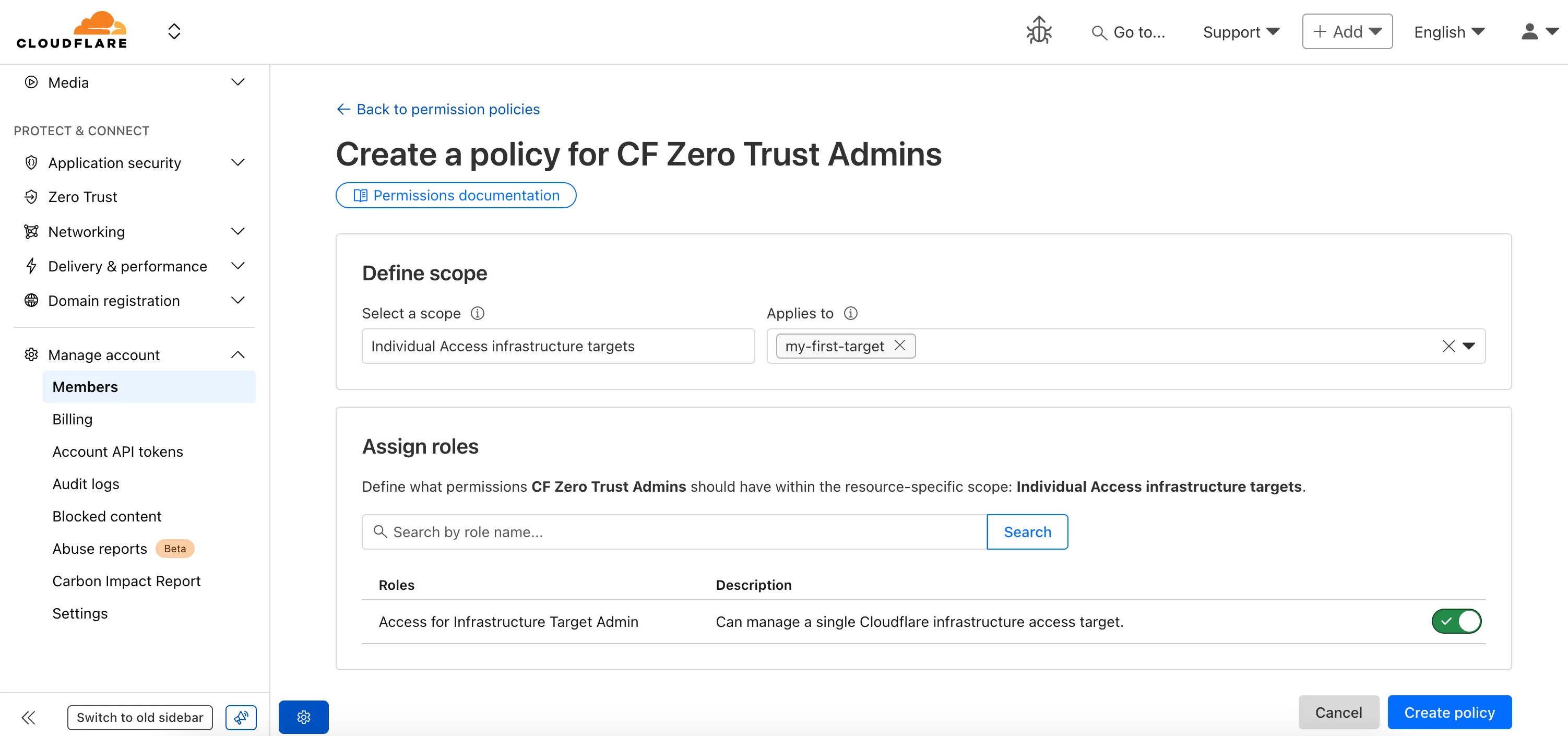
Fine-grained permissions for Access Applications, Identity Providers (IdPs), and Targets is now available in Public Beta. This expands our RBAC model beyond account & zone-scoped roles, enabling administrators to grant permissions scoped to individual resources.

What's New

Updated Permissions Policy UX

For more info:

New Confidence Intervals in GraphQL Analytics API

The GraphQL Analytics API now supports confidence intervals for sum and count fields on adaptive (sampled) datasets. Confidence intervals provide a statistical range around sampled results, helping verify accuracy and quantify uncertainty.

  • Supported datasets: Adaptive (sampled) datasets only.
  • Supported fields: All sum and count fields.
  • Usage: The confidence level must be provided as a decimal between 0 and 1 (e.g. 0.90, 0.95, 0.99).
  • Default: If no confidence level is specified, no intervals are returned.

For examples and more details, see the GraphQL Analytics API documentation.

Return markdown

Users can now specify that they want to retrieve Cloudflare documentation as markdown rather than the previous HTML default. This can significantly reduce token consumption when used alongside Large Language Model (LLM) tools.

curl https://developers.cloudflare.com/workers/ -H 'Accept: text/markdown'  -v

If you maintain your own site and want to adopt this practice using Cloudflare Workers for your own users you can follow the example here.

Sign in with GitHub

Cloudflare has launched sign in with GitHub as a log in option. This feature is available to all users with a verified email address who are not using SSO. To use it, simply click on the Sign in with GitHub button on the dashboard login page. You will be logged in with your primary GitHub email address.

For more information

SSO for all

Single sign-on (SSO) streamlines the process of logging into Cloudflare for Enterprise customers who manage a custom email domain and manage their own identity provider. Instead of managing a password and two-factor authentication credentials directly for Cloudflare, SSO lets you reuse your existing login infrastructure to seamlessly log in. SSO also provides additional security opportunities such as device health checks which are not available natively within Cloudflare.

Historically, SSO was only available for Enterprise accounts. Today, we are announcing that we are making SSO available to all users for free. We have also added the ability to directly manage SSO configurations using the API. This removes the previous requirement to contact support to configure SSO.

For more information

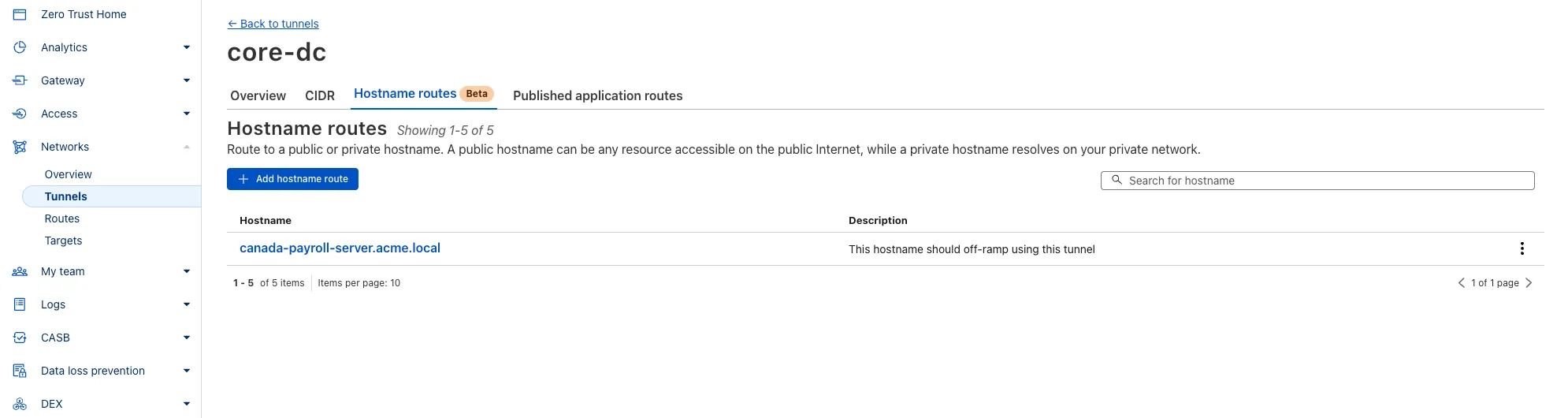
Connect and secure any private or public app by hostname, not IP — with hostname routing for Cloudflare Tunnel

You can now route private traffic to Cloudflare Tunnel based on a hostname or domain, moving beyond the limitations of IP-based routing. This new capability is free for all Cloudflare One customers.

Previously, Tunnel routes could only be defined by IP address or CIDR range. This created a challenge for modern applications with dynamic or ephemeral IP addresses, often forcing administrators to maintain complex and brittle IP lists.

Hostname-based routing in Cloudflare Tunnel

What’s new:

  • Hostname & Domain Routing: Create routes for individual hostnames (e.g., payroll.acme.local) or entire domains (e.g., *.acme.local) and direct their traffic to a specific Tunnel.
  • Simplified Zero Trust Policies: Build resilient policies in Cloudflare Access and Gateway using stable hostnames, making it dramatically easier to apply per-resource authorization for your private applications.
  • Precise Egress Control: Route traffic for public hostnames (e.g., bank.example.com) through a specific Tunnel to enforce a dedicated source IP, solving the IP allowlist problem for third-party services.
  • No More IP Lists: This feature makes the workaround of maintaining dynamic IP Lists for Tunnel connections obsolete.

Get started in the Tunnels section of the Zero Trust dashboard with your first private hostname or public hostname route.

Learn more in our blog post.

Contextual pivots

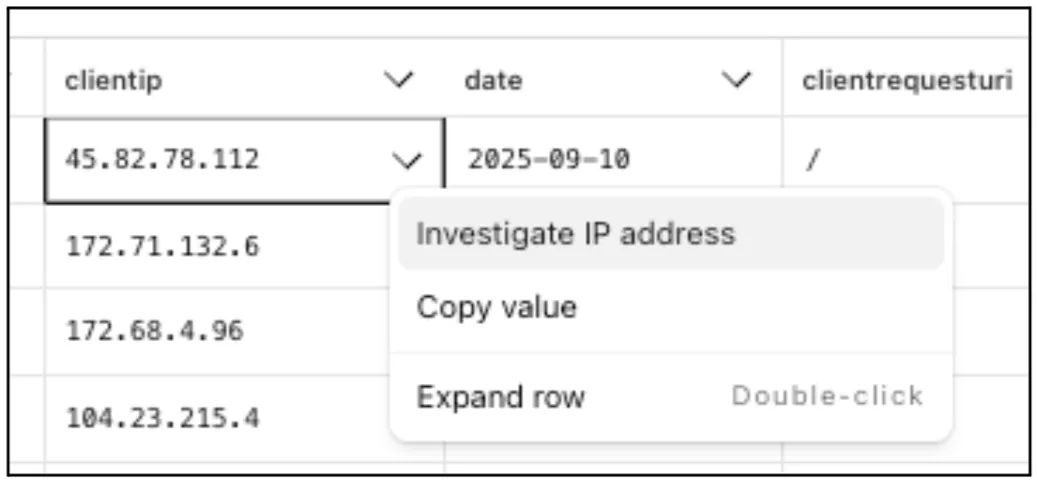
Directly from Log Search results, customers can pivot to other parts of the Cloudflare dashboard to immediately take action as a result of their investigation.

From the http_requests or fw_events dataset results, right click on an IP Address or JA3 Fingerprint to pivot to the Investigate portal to lookup the reputation of an IP address or JA3 fingerprint.

Investigate IP address

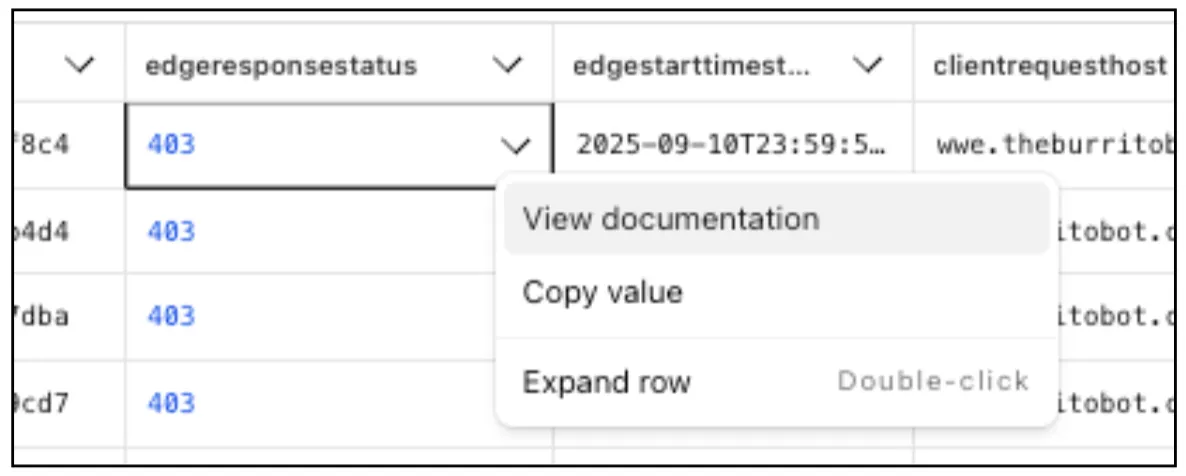
Easily learn about error codes by linking directly to our documentation from the EdgeResponseStatus or OriginResponseStatus fields.

View documentation

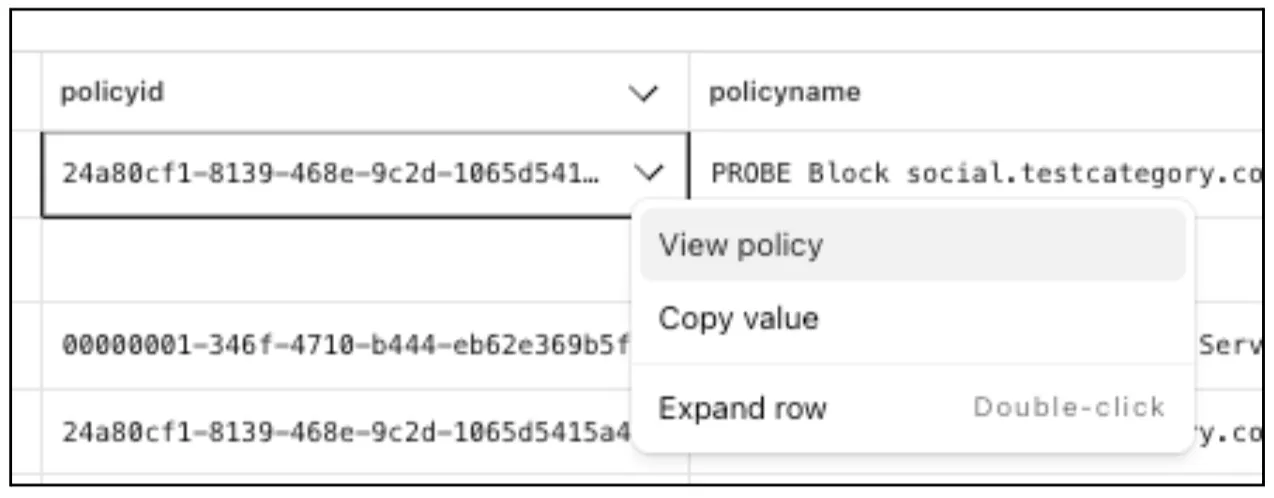
From the gateway_http dataset, click on a policyid to link directly to the Zero Trust dashboard to review or make changes to a specific Gateway policy.

View policy

New results table view

The results table view of Log Search has been updated with additional functionality and a more streamlined user experience. Users can now easily:

  • Remove/add columns.
  • Resize columns.
  • Sort columns.
  • Copy values from any field.
New results table view

Reminders about two-factor authentication backup codes

Two-factor authentication is the best way to help protect your account from account takeovers, but if you lose your second factor, you could be locked out of your account. Lock outs are one of the top reasons customers contact Cloudflare support, and our policies often don't allow us to bypass two-factor authentication for customers that are locked out. Today we are releasing an improvement where Cloudflare will periodically remind you to securely save your backup codes so you don't get locked out in the future.

For more information

Introducing new headers for rate limiting on Cloudflare's API

Cloudflare's API now supports rate limiting headers using the pattern developed by the IETF draft on rate limiting. This allows API consumers to know how many more calls are left until the rate limit is reached, as well as how long you will need to wait until more capacity is available.

Our SDKs automatically work with these new headers, backing off when rate limits are approached. There is no action required for users of the latest Cloudflare SDKs to take advantage of this.

As always, if you need any help with rate limits, please contact Support.

Changes

New Headers

Headers that are always returned:

  • Ratelimit: List of service limit items, composed of the limit name, the remaining quota (r) and the time next window resets (t). For example: "default";r=50;t=30
  • Ratelimit-Policy: List of quota policy items, composed of the policy name, the total quota (q) and the time window the quota applies to (w). For example: "burst";q=100;w=60

Returned only when a rate limit has been reached (error code: 429):

  • Retry-After: Number of Seconds until more capacity is available, rounded up

SDK Back offs

  • All of Cloudflare's latest SDKs will automatically respond to the headers, instituting a backoff when limits are approached.

GraphQL and Edge APIs

These new headers and back offs are only available for Cloudflare REST APIs, and will not affect GraphQL.

For more information

Cloudflare Tunnel and Networks API will no longer return deleted resources by default starting December 1, 2025

Starting December 1, 2025, list endpoints for the Cloudflare Tunnel API and Zero Trust Networks API will no longer return deleted tunnels, routes, subnets and virtual networks by default. This change makes the API behavior more intuitive by only returning active resources unless otherwise specified.

No action is required if you already explicitly set is_deleted=false or if you only need to list active resources.

This change affects the following API endpoints:

What is changing?

The default behavior of the is_deleted query parameter will be updated.

Scenario Previous behavior (before December 1, 2025) New behavior (from December 1, 2025)
is_deleted parameter is omitted Returns active & deleted tunnels, routes, subnets and virtual networks Returns only active tunnels, routes, subnets and virtual networks

Action required

If you need to retrieve deleted (or all) resources, please update your API calls to explicitly include the is_deleted parameter before December 1, 2025.

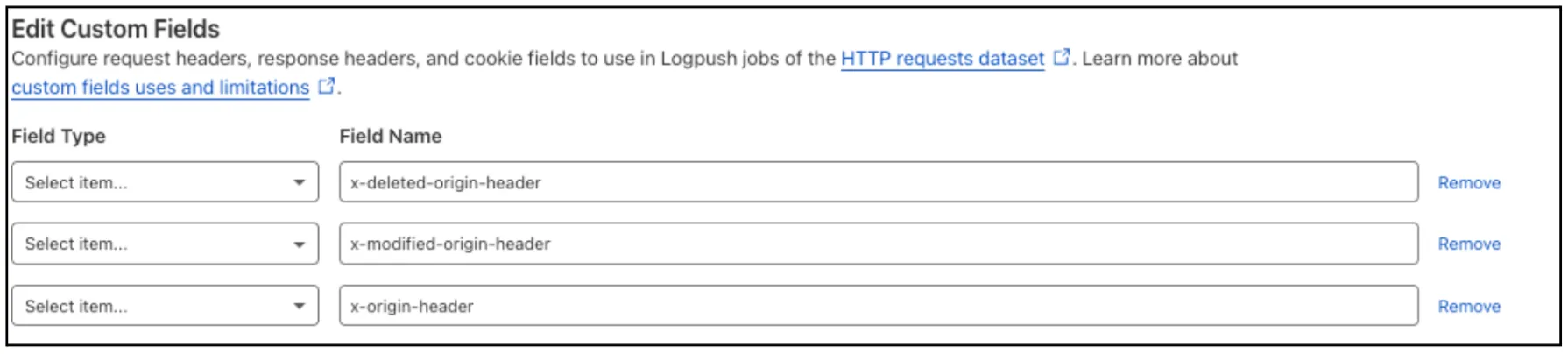
To get a list of only deleted resources, you must now explicitly add the is_deleted=true query parameter to your request:

# Example: Get ONLY deleted Tunnels
curl "https://api.cloudflare.com/client/v4/accounts/$ACCOUNT_ID/tunnels?is_deleted=true" \
     -H "Authorization: Bearer $API_TOKEN"

# Example: Get ONLY deleted Virtual Networks
curl "https://api.cloudflare.com/client/v4/accounts/$ACCOUNT_ID/teamnet/virtual_networks?is_deleted=true" \
     -H "Authorization: Bearer $API_TOKEN"

Following this change, retrieving a complete list of both active and deleted resources will require two separate API calls: one to get active items (by omitting the parameter or using is_deleted=false) and one to get deleted items (is_deleted=true).

Why we’re making this change

This update is based on user feedback and aims to:

  • Create a more intuitive default: Aligning with common API design principles where list operations return only active resources by default.
  • Reduce unexpected results: Prevents users from accidentally operating on deleted resources that were returned unexpectedly.
  • Improve performance: For most users, the default query result will now be smaller and more relevant.

To learn more, please visit the Cloudflare Tunnel API and Zero Trust Networks API documentation.

Terraform v5.9 now available

Earlier this year, we announced the launch of the new Terraform v5 Provider. We are aware of the high number of issues reported by the Cloudflare community related to the v5 release. We have committed to releasing improvements on a 2 week cadence to ensure its stability and reliability, including the v5.9 release. We have also pivoted from an issue-to-issue approach to a resource-per-resource approach - we will be focusing on specific resources for every release, stabilizing the release, and closing all associated bugs with that resource before moving onto resolving migration issues.

Thank you for continuing to raise issues. We triage them weekly and they help make our products stronger.

This release includes a new resource, cloudflare_snippet, which replaces cloudflare_snippets. cloudflare_snippet is now considered deprecated but can still be used. Please utilize cloudflare_snippet as soon as possible.

Changes

  • Resources stabilized:
    • cloudflare_zone_setting
    • cloudflare_worker_script
    • cloudflare_worker_route
    • tiered_cache
  • NEW resource cloudflare_snippet which should be used in place of cloudflare_snippets. cloudflare_snippets is now deprecated. This enables the management of Cloudflare's snippet functionality through Terraform.
  • DNS Record Improvements: Enhanced handling of DNS record drift detection
  • Load Balancer Fixes: Resolved created_on field inconsistencies and improved pool configuration handling
  • Bot Management: Enhanced auto-update model state consistency and fight mode configurations
  • Other bug fixes

For a more detailed look at all of the changes, refer to the changelog in GitHub.

Issues Closed

If you have an unaddressed issue with the provider, we encourage you to check the open issues and open a new issue if one does not already exist for what you are experiencing.

Upgrading

We suggest holding off on migration to v5 while we work on stabilization. This help will you avoid any blocking issues while the Terraform resources are actively being stabilized.

If you'd like more information on migrating from v4 to v5, please make use of the migration guide. We have provided automated migration scripts using Grit which simplify the transition. These do not support implementations which use Terraform modules, so customers making use of modules need to migrate manually. Please make use of terraform plan to test your changes before applying, and let us know if you encounter any additional issues by reporting to our GitHub repository.

For more info

Enhanced crawler insights and custom 402 responses

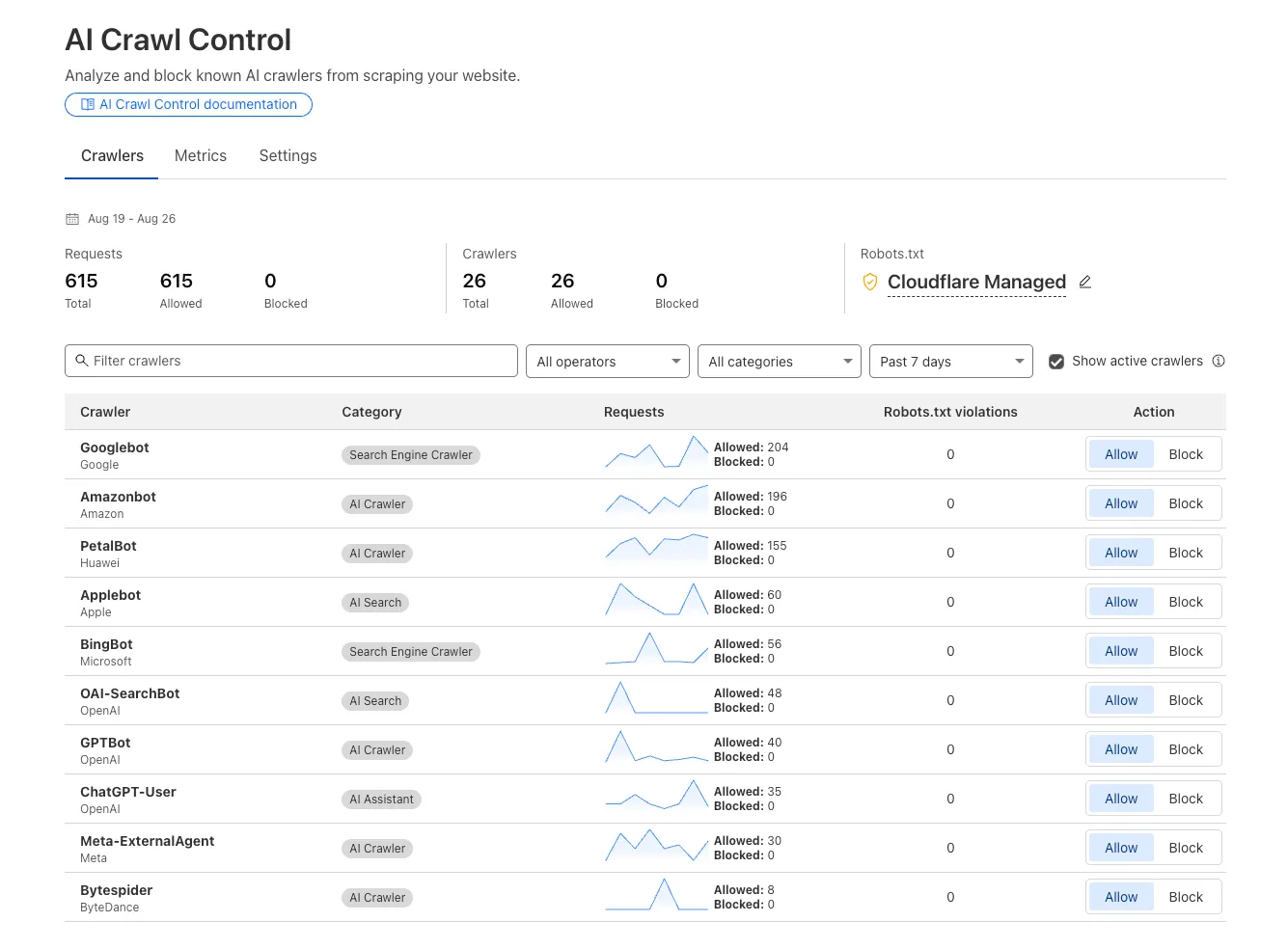
We improved AI crawler management with detailed analytics and introduced custom HTTP 402 responses for blocked crawlers. AI Audit has been renamed to AI Crawl Control and is now generally available.

Enhanced Crawlers tab:

  • View total allowed and blocked requests for each AI crawler
  • Trend charts show crawler activity over your selected time range per crawler
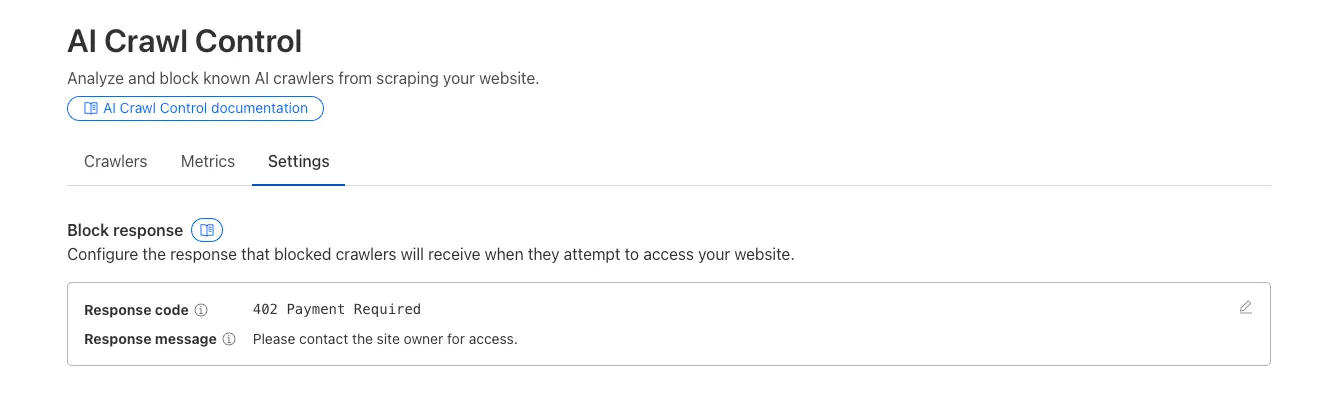
Updated AI Crawl Control table showing request counts and trend charts

Custom block responses (paid plans): You can now return HTTP 402 "Payment Required" responses when blocking AI crawlers, enabling direct communication with crawler operators about licensing terms.

For users on paid plans, when blocking AI crawlers you can configure:

  • Response code: Choose between 403 Forbidden or 402 Payment Required
  • Response body: Add a custom message with your licensing contact information
AI Crawl Control block response configuration interface

Example 402 response:

HTTP 402 Payment Required
Date: Mon, 24 Aug 2025 12:56:49 GMT
Content-type: application/json
Server: cloudflare
Cf-Ray: 967e8da599d0c3fa-EWR
Cf-Team: 2902f6db750000c3fa1e2ef400000001

{
  "message": "Please contact the site owner for access."
}

Dedicated Egress IP for Logpush

Cloudflare Logpush can now deliver logs from using fixed, dedicated egress IPs. By routing Logpush traffic through a Cloudflare zone enabled with Aegis IP, your log destination only needs to allow Aegis IPs making setup more secure.

Highlights:

  • Fixed egress IPs ensure your destination only accepts traffic from known addresses.
  • Works with any supported Logpush destination.
  • Recommended to use a dedicated zone as a proxy for easier management.

To get started, work with your Cloudflare account team to provision Aegis IPs, then configure your Logpush job to deliver logs through the proxy zone. For full setup instructions, refer to the Logpush documentation.

Extended retention

Customers can now rely on Log Explorer to meet their log retention compliance requirements.

Contract customers can choose to store their logs in Log Explorer for up to two years, at an additional cost of $0.10 per GB per month. Customers interested in this feature can contact their account team to have it added to their contract.