Markdown for Agents now preserves security- and cache-relevant response headers from your origin when converting HTML to Markdown:
Markdown for Agents preserves security headers such as Strict-Transport-Security (HSTS), Content-Security-Policy (CSP), X-Frame-Options, Set-Cookie, and CORS headers (for example, Access-Control-Allow-Origin) on the converted response.
Caching headers (Cache-Control, Expires, Age) continue to pass through.
Your origin's Content Signals ↗ policy is now authoritative. If your origin sets a content-signal header, Markdown for Agents preserves it. When the origin does not send one, Cloudflare adds the default Content-Signal: ai-train=yes, search=yes, ai-input=yes.
This release also fixes relative link resolution for directory-style base URLs (those ending in a trailing slash). Previously, relative links such as ../page/ could resolve one path segment too high and return a 404. Links are now resolved correctly per RFC 3986 ↗.
On October 5, 2026, two changes take effect across the Zero Trust Networks API and Cloudflare Tunnel API: the CIDR-encoded route endpoints are removed, and tunnel list and get responses no longer include the connections field. If you manage private network routes or read tunnel connection details through the API, cloudflared, Terraform, or another integration, review the changes in the following sections and migrate before the removal date.
Route endpoints
The CIDR-encoded route endpoints are deprecated in favor of the standard, route_id-based endpoints that already exist today. Both sets of endpoints route a private network through Cloudflare Tunnel or Cloudflare Mesh (the API still refers to Mesh nodes as warp_connector) — only the request shape changes.
Capture each route's route_id by calling List tunnel routes, or read it from the response the first time you create a route with the replacement endpoint.
Update any scripts, backend services, or CI/CD pipelines that call the CIDR-encoded endpoints directly.
If you manage routes with the cloudflared tunnel route ip add | delete commands, upgrade cloudflared to the latest version ↗.
# Before: create a route by URL-encoding the CIDR into the pathcurl https://api.cloudflare.com/client/v4/accounts/$ACCOUNT_ID/teamnet/routes/network/172.16.0.0%2F16 \ -H 'Content-Type: application/json' \ -H "Authorization: Bearer $CLOUDFLARE_API_TOKEN" \ -d '{"tunnel_id": "'$TUNNEL_ID'", "comment": "Example comment for this route."}'# After: create a route with the network in the request bodycurl https://api.cloudflare.com/client/v4/accounts/$ACCOUNT_ID/teamnet/routes \ -H 'Content-Type: application/json' \ -H "Authorization: Bearer $CLOUDFLARE_API_TOKEN" \ -d '{"network": "172.16.0.0/16", "tunnel_id": "'$TUNNEL_ID'", "comment": "Example comment for this route."}'# After: update or delete a route using its route_idcurl -X PATCH https://api.cloudflare.com/client/v4/accounts/$ACCOUNT_ID/teamnet/routes/$ROUTE_ID \ -H 'Content-Type: application/json' \ -H "Authorization: Bearer $CLOUDFLARE_API_TOKEN" \ -d '{"comment": "Updated comment for this route."}'curl -X DELETE https://api.cloudflare.com/client/v4/accounts/$ACCOUNT_ID/teamnet/routes/$ROUTE_ID \ -H "Authorization: Bearer $CLOUDFLARE_API_TOKEN"
Cloudflare Tunnel and Cloudflare Mesh connections
Starting the same day, the connections array is removed from list and get responses for Cloudflare Tunnel and Cloudflare Mesh nodes (the cfd_tunnel and warp_connector API resources). Query the dedicated connections endpoint instead of reading the field off the tunnel or node object.
Update any dashboards, monitoring scripts, or automation that parses connections from the tunnel list or get response. cloudflared and the Cloudflare Terraform provider do not read this field, so no changes are required on their side for this part of the update.
Why we are making these changes
Smaller, faster responses. Cloudflare Tunnel and Cloudflare Mesh nodes with many connections no longer inflate every list and get call — connection detail is only fetched when you need it.
A single way to identify a route. Consolidating on route_id removes the need to URL-encode CIDR ranges into the path and matches how every other resource in the Zero Trust Networks API is addressed.
Consistency across the API. Both changes align these endpoints with Cloudflare's standard REST conventions for resource identifiers and nested detail endpoints.
Enterprise customers can now push per-connection WebSocket analytics to any Logpush destination using the new websocket_analytics dataset. Each log record is emitted when a WebSocket connection closes and includes fields that were previously only available to Cloudflare engineers via internal tooling.
Key fields include:
ConnectionCloseReason — why the connection ended: peerReset, peerNoError, timedOut, upstreamReset, protocolViolation, unspecifiedError, or none.
ConnectionCloseSource — which side initiated the close: upstream, downstream, me, or both.
ConnectionTransportCloseCode — the TLS alert code or TCP-level close code for additional precision.
RayID — correlate WebSocket connection events with your existing HTTP Request logs.
The dataset also includes directional byte counts (BytesSentClient, BytesReceivedClient, BytesSentOrigin, BytesReceivedOrigin), connection timestamps, client IP, colo code, and request metadata from the original WebSocket upgrade.
This data lets you build alerts on connection close patterns — for example, detecting spikes in TCP resets (ConnectionCloseReason == "peerReset") grouped by host and data center — directly in your existing log analysis tools.
You can now assign granular, resource-scoped roles for Cloudflare Gateway firewall policies and Zero Trust lists. Administrators can delegate access to specific policy types or list management without granting account-wide or product-wide control.
Can view and edit all Gateway firewall policies, including DNS, HTTP, and Network policies.
Zero Trust Gateway DNS Policies Admin
Can view and edit Gateway DNS policies.
Zero Trust Gateway HTTP Policies Admin
Can view and edit Gateway HTTP policies.
Zero Trust Gateway Network Policies Admin
Can view and edit Gateway Network policies.
Zero Trust Gateway Egress Policies Admin
Can view and edit Gateway Egress policies.
Zero Trust Gateway Resolver Policies Admin
Can view and edit Gateway Resolver policies.
Zero Trust Gateway Policies Admin
Can view and edit all Gateway policies.
Zero Trust Gateway Policies Read
Can view all Gateway policies.
Zero Trust Gateway Read Only
Can view all Gateway resources.
Zero Trust DNS Locations Admin
Can view and edit DNS locations.
Zero Trust Proxy Endpoints Admin
Can view and edit Gateway Proxy Endpoints.
Zero Trust Account Lists Admin
Can view and edit all Gateway and Access lists.
Zero Trust Account Lists Read
Can view all Gateway and Access lists.
These roles allow you to:
Grant a network engineer write access to Network policies only, without exposing DNS or HTTP policy configuration.
Allow a security analyst to view all Gateway policies in read-only mode for auditing purposes.
Delegate list management to a team that maintains block and allow lists without giving them access to policy configuration.
You can also now assign Resource-scoped roles. These roles are complementary to existing account-level roles, and allow you to grant access to a specific resource, like an individual Gateway policy or Cloudflare One list. Existing account-level roles continue to work. A member with the Cloudflare Gateway or Cloudflare Zero Trust role retains full access to all Gateway resources. This ensures backward compatibility for existing automation and API tokens.
Cloudflare Logpush now supports firewall events as an account-scoped dataset. Configure a single Logpush job at the account level to receive firewall events for every zone in the account, instead of creating and maintaining a separate job per zone.
The dataset includes a new ZoneName field so you can identify which zone each event came from when consuming logs in your downstream pipeline.
What's available
A new account-scoped firewall_events dataset, configurable via the Logpush API or the Cloudflare dashboard.
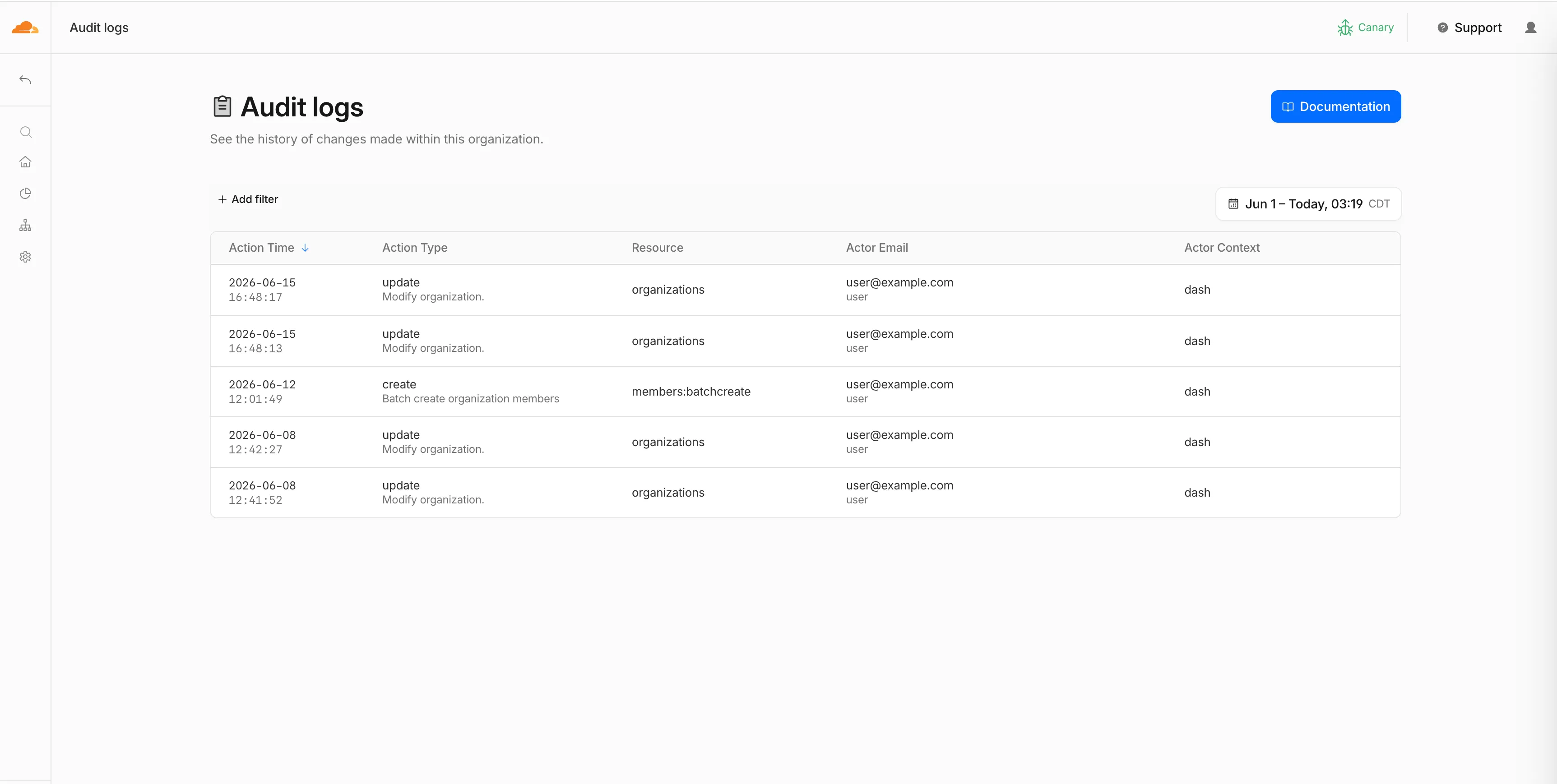
You can now, as an Organization Super Administrator, view organization-level audit logs in the Cloudflare dashboard, in addition to the existing API access.
Organization audit logs help you monitor activity across your organization. You can see who performed an action, what changed, when it happened, how it was performed, and whether it succeeded or failed.
You can filter and search logs by actor, action, result, resource, request details, and timestamp. Use these logs to troubleshoot changes, investigate unexpected access, and support security or compliance workflows.
If you are viewing account-level audit logs and the account belongs to an organization where you are an Organization Super Administrator, select View Organization Audit Logs to open the parent organization's audit logs.
To get started, go to Organizations, select your organization, then go to Manage Organization > Audit Logs.
WebSocket Analytics: A new dataset with fields including BytesReceivedClient, BytesReceivedOrigin, BytesSentClient, BytesSentOrigin, ClientASN, ClientIP, ClientRequestHost, ClientRequestPath, ClientRequestUserAgent, ColoCode, ConnectionCloseReason, ConnectionCloseSource, ConnectionID, ConnectionTransportCloseCode, EdgeEndTimestamp, EdgeStartTimestamp, and RayID.
Updated fields in existing datasets
Firewall events (added): ZoneName. The Firewall events dataset is now also available for account-scope Logpush, in addition to the existing zone scope.
Email Security Alerts (added): BCC, DKIMResult, DMARCPolicy, DMARCResult, and SPFResult.
For the complete field definitions for each dataset, refer to Logpush datasets.

The Routes page in the Cloudflare dashboard now shows the routes across all of your connectors — Cloudflare Mesh and Cloudflare Tunnel routes alongside Cloudflare WAN and Magic Transit static routes — in a single table, instead of a separate routes view per product.
From the unified Routes page you can:
Visualize your network with an interactive map that shows how your destinations flow through to your connectors — including equal-cost multi-path (ECMP) routes where the same prefix is served by several connectors. Select a node to filter the table down to the routes behind it.
See every route in one table, with its destination, type, connector, priority, and source, and filter or sort to find what you need.
Create, edit, and delete routes of any supported type without leaving the page. When adding a Cloudflare WAN or Magic Transit static route, you now pick the next hop by connector name instead of typing its IP.
Your existing routes, APIs, and configurations are unchanged — this is a dashboard experience that brings them together in one place. Learn how to add routes and manage virtual networks.
Cloudflare's Terraform v5 Provider makes it easy for developers to manage their Cloudflare infrastructure using a configuration as code approach. It releases every 2-3 weeks ↗ to ensure that you can always manage the latest features in the platform. This week, we launched Terraform v5.20.0, which adds 24 new resources, bumps the underlying Go SDK to cloudflare-go v7, and includes a range of bug fixes and state upgraders based on community feedback.
New resources
cloudflare_ai_search_namespace: Manage AI Search namespaces
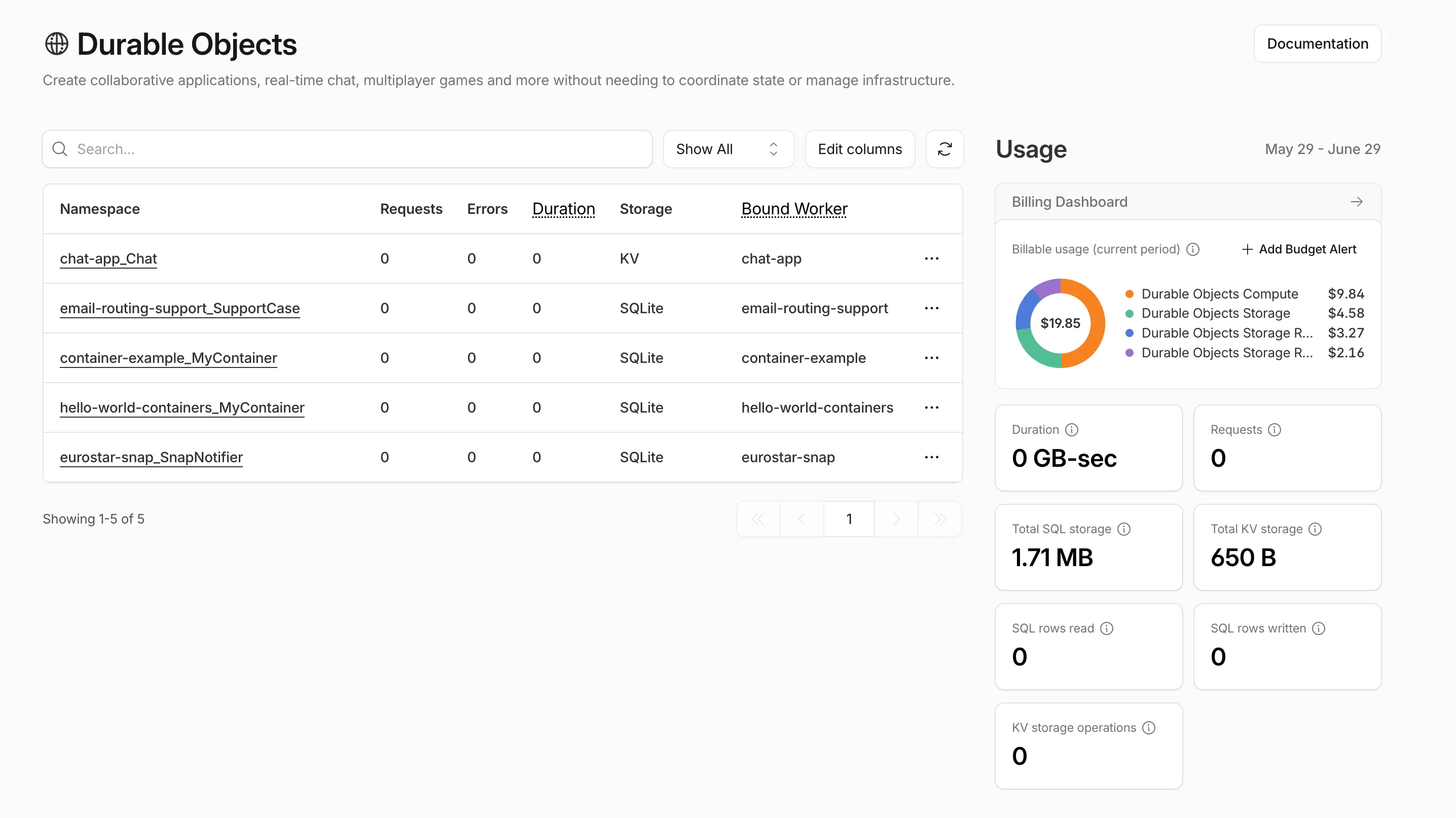
Pay-as-you-go customers can now view billable usage and create budget alerts directly from the product overview pages for Workers & Pages, D1, R2, Workers KV, Queues, Vectorize, Durable Objects, and Containers. A new sidebar widget shows current-period spend and the billing cycle date range, alongside a button to create a budget alert.
The widget pulls from the same data as the Billable Usage dashboard and aligns to your billing cycle (or the current day on Free plans), so the numbers match your invoice. Enterprise contract accounts are not yet supported.
Selecting Create budget alert opens the budget alert flow inline so you can set a dollar threshold in the same place you are reviewing usage. Budget alerts apply to your total account-level spend across all products, not just the product page you create them from.
Today we are launching self-managed OAuth, enabling developers to build third-party applications that integrate with Cloudflare via OAuth. This provides a more secure, user-friendly, and manageable alternative to API tokens.
OAuth lets third-party applications act on behalf of a user to access their Cloudflare account. For example, after a user grants consent, Wrangler can deploy Workers into that account.
What is new
Cloudflare Developers can now create and manage their own OAuth applications to integrate with Cloudflare.
Create an application
To create an application, go to Manage account > OAuth clients in your account on the Cloudflare dashboard.
If you have used an API token to call Cloudflare APIs, OAuth client scopes will look familiar. Select only the scopes your application needs during application creation, and include that scope list when sending users to Cloudflare for consent.
Users can review the requested scopes before they consent.
Apps for both private and public use
Applications start with private visibility. Private applications can only be used by members of the account where the application was created.
To make an application available to any Cloudflare user, complete the prerequisites for public visibility.
Before an application can be made public, you must verify the client domain. Domain verification helps users confirm that the application owner controls the domain shown on the consent page.
After verification, users see a verified badge on the consent page.
Turnstile Events: A new dataset with fields including ASN, Action, BrowserMajor, BrowserName, ClientIP, CountryCode, EventType, Hostname, OSMajor, OSName, Sitekey, Timestamp, and UserAgent.
For the complete field definitions for each dataset, refer to Logpush datasets.

Starting with cloudflared version 2026.5.2 ↗, Cloudflare Tunnel automates the entire connectivity pre-checks workflow directly inside the binary. Previously, customers had to install dig and netcat and run those commands by hand to verify their environment. Now cloudflared does it natively at startup — and surfaces actionable remediation when something is blocked.
On every cloudflared tunnel run (and cloudflared tunnel diag), the binary now natively checks:
DNS resolution — region1.v2.argotunnel.com and region2.v2.argotunnel.com resolve to valid Cloudflare IPs.
Transport connectivity — outbound UDP (QUIC) and TCP (HTTP/2) on port 7844.
Management API — outbound TCP/443 to api.cloudflare.com for software updates.
Results are printed in a scannable CLI table with three states:
✅ Pass — the check succeeded.
⚠️ Warn — a non-blocking issue, for example the Management API is unreachable so automatic updates will not work, but the tunnel will still come up.
❌ Fail — a blocking issue, with a specific remediation hint (for example, Allow outbound UDP on port 7844).
If DNS is unresolvable, or both UDP and TCP fail on port 7844, cloudflared exits early with the failure rather than looping on opaque failed to dial errors.
Pre-checks now run automatically on every start, which also catches regressions like overnight firewall policy changes — no need to remember to rerun the troubleshooting guide.
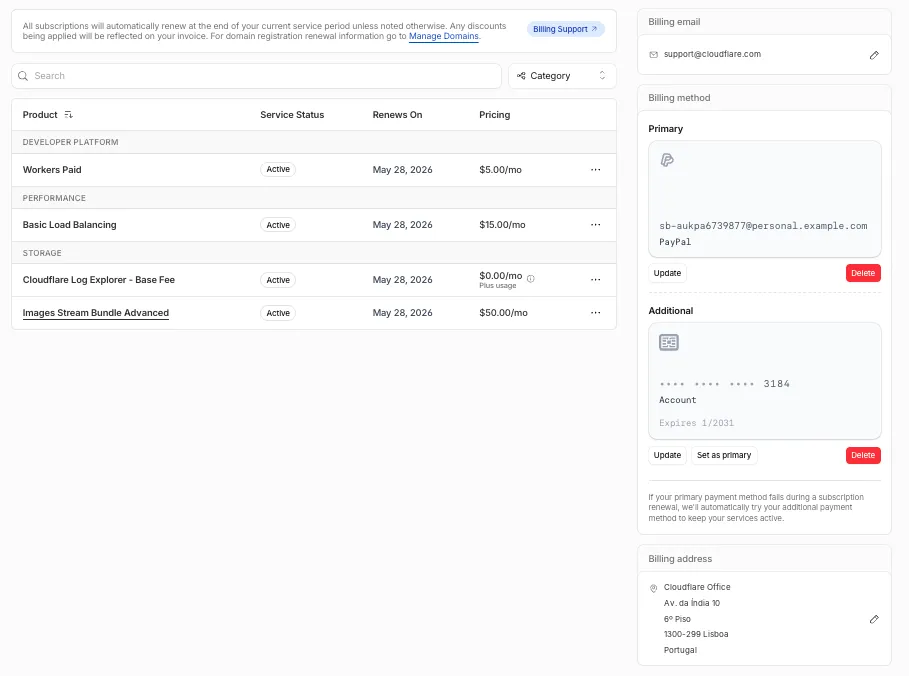
The Billing Profile now has a modern UI and a single space that unifies billing information, payment method management and an enhanced subscriptions view under a single Subscriptions tab.
What changed
The Subscriptions tab brings billing information, payment method management, and your subscriptions together in one place. The payment management and Pay overdue balances flows now use the latest checkout as product purchase flows, so you can pay with Apple Pay, Google Pay, Link, and Instant Bank Payments via Link alongside cards and PayPal.
New cards complete 3D Secure authentication when the issuer requires it — for example, the EU under PSD2 and India under RBI.
For details, refer to the Billing Home documentation.
You can now scope Cloudflare permissions to individual Cloudflare Tunnel instances and Cloudflare Mesh nodes. Administrators can delegate access to specific Tunnels or Mesh nodes without granting account-wide control over private networking.
Grant a read-only role on a single Cloudflare Tunnel instance to a support operator for log streaming and diagnostics — without exposing other Tunnels or destructive actions.
Grant a write role on a specific Cloudflare Mesh node to an application team — without giving them access to the rest of your private network.
Scope a single policy to one or many Tunnels and Mesh nodes at once.
How it works
Granular permissions are a parallel layer to existing account-level roles — they do not replace them.
Existing account-level roles continue to work. A member with Cloudflare Access or Cloudflare Zero Trust retains write access to every Tunnel and Mesh node in the account. This ensures backward compatibility for existing automation and tokens.
Granular permissions are additive. For any API request on a specific Tunnel or Mesh node, access is granted if the principal has either the account-level role or a granular permission for that resource.
Resource enumeration is authorization-aware. Listing endpoints (GET /accounts/{id}/cfd_tunnel, GET /accounts/{id}/warp_connector) return only the resources the principal has at least read access to.
You can now navigate, switch context, and take common actions in the Cloudflare dashboard without leaving your keyboard. Press ? anywhere to see the full list. Keyboard shortcuts can be disabled by visiting your profile settings ↗.
Navigate
Shortcut
Action
g h
Go to Home
g a
Go to account overview
g z
Go to zone overview
g p
Go to your profile
g w
Go to Workers & Pages
g o
Go to Zero Trust
g b
Go to billing
g 1 – g 5
Go to a recent or pinned item (by position in sidebar)
This is a major version release that includes breaking changes to three packages: ai_search, email_security, and workers. These changes reflect upstream API specification updates that improve type correctness and consistency.
Please ensure you read through the list of changes below before moving to this version - this will help you understand any down or upstream issues it may cause to your environments.
Breaking Changes
See the v7.0.0 Migration Guide ↗ for before/after code examples and actions needed for each change.
AI Search - SearchForAgents Metadata Removed
The SearchForAgents nested type has been removed from all instance metadata structs. This field is no longer part of the API specification.
The Investigate.Get, Investigate.Move.New, and Investigate.Reclassify.New methods now use investigateID instead of postfixID as the path parameter name.
The observability telemetry filter parameter types have been restructured to support nested filter groups. New discriminated union types replace the previous flat filter arrays:
ObservabilityTelemetryKeysParams.Filters now accepts FiltersObjectFilterUnion (was []interface\{\})
ObservabilityTelemetryQueryParams.Parameters.Filters now accepts FiltersObjectFilterUnion
ObservabilityTelemetryValuesParams.Filters now accepts FiltersObjectFilterUnion
New types include FiltersObjectFiltersObject (for group filters with FilterCombination) and FiltersWorkersObservabilityFilterLeaf (for leaf filters with typed Operation, Type, and Value fields).
This is a major release of the Cloudflare Python SDK. It drops support for Python 3.8, adds 11 new API services, introduces optional aiohttp backend support for improved async concurrency, and includes hundreds of type and method updates across the entire API surface.
Please review the breaking changes below before upgrading. A migration guide is available at v5.0.0 Migration Guide ↗.
Breaking Changes
Python 3.8 is no longer supported. The minimum required version is now Python 3.9.
typing-extensions minimum version bumped from >=4.10 to >=4.14.
The following resources have breaking changes. See the v5.0.0 Migration Guide ↗ for detailed migration instructions.
abusereports
acm.totaltls
apigateway.configurations
cloudforceone.threatevents
d1.database
intel.indicatorfeeds
logpush.edge
origintlsclientauth.hostnames
queues.consumers
radar.bgp
rulesets.rules
schemavalidation.schemas
snippets
zerotrust.dlp
zerotrust.networks
Features
aiohttp Backend Support
The async client now supports an optional aiohttp HTTP backend for improved concurrency performance. Install with pip install cloudflare[aiohttp] and use DefaultAioHttpClient() as the http_client parameter.
Python 3.13 and 3.14 Support
Python 3.13 and 3.14 are now tested and supported.
New Services
The following top-level resources are new in this release:
Resource
Client Path
Description
AI Search
aisearch
AI-powered search capabilities
Connectivity
connectivity
Connectivity testing and diagnostics
Email Sending
email_sending
Email send and send_raw endpoints
Fraud
fraud
Fraud detection and prevention
Google Tag Gateway
google_tag_gateway
Google Tag Gateway management
Organizations
organizations
Organization audit logs and management
R2 Data Catalog
r2_data_catalog
R2 Data Catalog operations
Realtime Kit
realtime_kit
Realtime communication (Calls/TURN)
Resource Tagging
resource_tagging
Resource tagging and labeling
Token Validation
token_validation
Token validation configuration and rules
Vulnerability Scanner
vulnerability_scanner
Vulnerability scanning, credential sets, and target environments
New Endpoints on Existing Services
api_gateway: Labels endpoints
billing: Billable usage PayGo endpoint
brand_protection: v2 endpoints
browser_rendering: DevTools methods
cache: Origin cloud regions resource
custom_origin_trust_store: Custom origin trust store
dns: dns_records/usage endpoints
email_security: Phishguard reports endpoint
iam: User groups and user group members resources
radar: Botnet Threat Feed and Post-Quantum endpoints
workers: Observability Destinations resources
zero_trust: Access Users, DEX rules, Device IP Profile, Device Subnet, WARP Connector connections and failover, WARP Subnet, Gateway PAC files
zones: Zone environments endpoints
Bug Fixes
Fixed polymorphic_serialization parameter in model_dump overrides
Added BaseModel base to response SchemaFieldStruct/SchemaFieldList stubs in Pipelines
Added missing model_rebuild/update_forward_refs for SharedEntryCustomEntry classes in DLP
Made RunQueryParametersNeedleValue a BaseModel with arbitrary_types_allowed in Workers
Removed duplicate notification_url field in webhook response types for Stream
Resolved pre-existing codegen type errors
Fixed type: ignore[call-arg] placement for mypy compatibility in Radar
Deprecations
Resources with @deprecated annotations on some methods include: accounts, addressing, ai-gateway, aisearch, api-gateway, billing, cloudforce-one, dns, email-routing, email-security, filters, firewall, images, intel, kv, logpush, origin-tls-client-auth, pages, pipelines, radar, rate-limits, registrar, rulesets, ssl, user, workers, workers-for-platforms, zero-trust, zones
This is a major version release of the Cloudflare TypeScript SDK. It includes 11 entirely new top-level API resources, new sub-resources and methods across 50+ existing resources, SDK infrastructure improvements, and breaking changes to the generated API surface from the v5.x line.
Please ensure you read through the list of changes below before moving to this version - this will help you understand any down or upstream issues it may cause to your environments.
Breaking Changes
SDK Infrastructure
Retry-After handling changed: The SDK now respects any server-specified Retry-After value for rate-limited requests. Previously, values over 60 seconds were ignored and a default backoff was used instead.
Empty response handling: Responses with content-length: 0 now return undefined instead of attempting to parse the body.
Environment variable reading: Empty string env vars (for example, CLOUDFLARE_API_TOKEN="") are now treated as unset.
Path query parameter merging: URL search params embedded in endpoint paths are now extracted and merged into the query object.
Removed Endpoints (17)
17 HTTP endpoints were removed from the SDK, affecting abuse-reports, cloudforce-one, dlp/profiles/predefined, email-security/investigate, email-security/settings, and intel/ip-list.
Method Signature Changes
client.ai.toMarkdown.transform(file, \{ ...params \}) -> client.ai.toMarkdown.transform(\{ ...params \}) -- file moved from positional arg into params body
client.radar.ai.toMarkdown.create(body, \{ ...params \}) -> client.radar.ai.toMarkdown.create(\{ ...params \}) -- body moved from positional arg into params
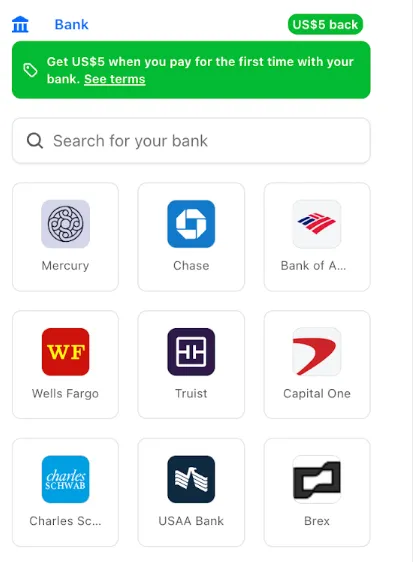
Link ↗ now supports bank account payments in addition to cards. If you have a bank account saved in Link, it appears as a payment option at checkout. If not, you can connect one during the checkout flow.
How to use it
During checkout, select your bank account from your saved Link payment methods.
Confirm the payment.
After your first Link authentication, your bank account is available for future purchases without re-entering details.
Who is eligible
Instant Bank Payments via Link is available to US-based self-serve accounts across all Cloudflare products. Your existing cards remain available at checkout.
Bank-based Link payments appear in your billing history with the payment method shown as link and last four digits as 0000. For details, refer to the Instant Bank Payments via Link documentation.
The Support button in the dashboard global navigation header now takes you directly to the Cloudflare Support Portal ↗, eliminating the previous dropdown menu.
This change ensures that when you need help, you spend less time navigating the UI and more time getting the answers you need.
What changed?
Previous behavior: Selecting ? Support opened a dropdown menu with various links (Help Center, Cloudflare Community, etc.).
New behavior: Selecting Support immediately redirects your current tab to the Support Portal.