Cloudflare-generated 5xx error responses now return structured JSON and Markdown when agents request them, matching the format already available for 1xxx errors. Responses follow RFC 9457 (Problem Details for HTTP APIs) ↗ and include a Retry-After HTTP header on retryable codes.
Changes
5xx coverage. Ten Cloudflare-generated error codes (500, 502, 504, 520-526) now serve structured responses. These are errors Cloudflare itself generates when it cannot reach or understand the origin server. Origin-generated 5xx responses that Cloudflare passes through are not affected.
Fault attribution. The error_category field tells agents where the fault lies:
origin (502, 504, 520-524) — the origin server is responsible. Transient; retry with the backoff in retry_after.
cloudflare (500) — Cloudflare's fault, not the website or the request. Short retry.
ssl (525, 526) — the origin's TLS configuration is broken. Do not retry.
Retry-After header. Retryable codes (500, 502, 504, 520-524) include a Retry-After HTTP header matching the retry_after body field. Non-retryable codes (525, 526) do not include the header.
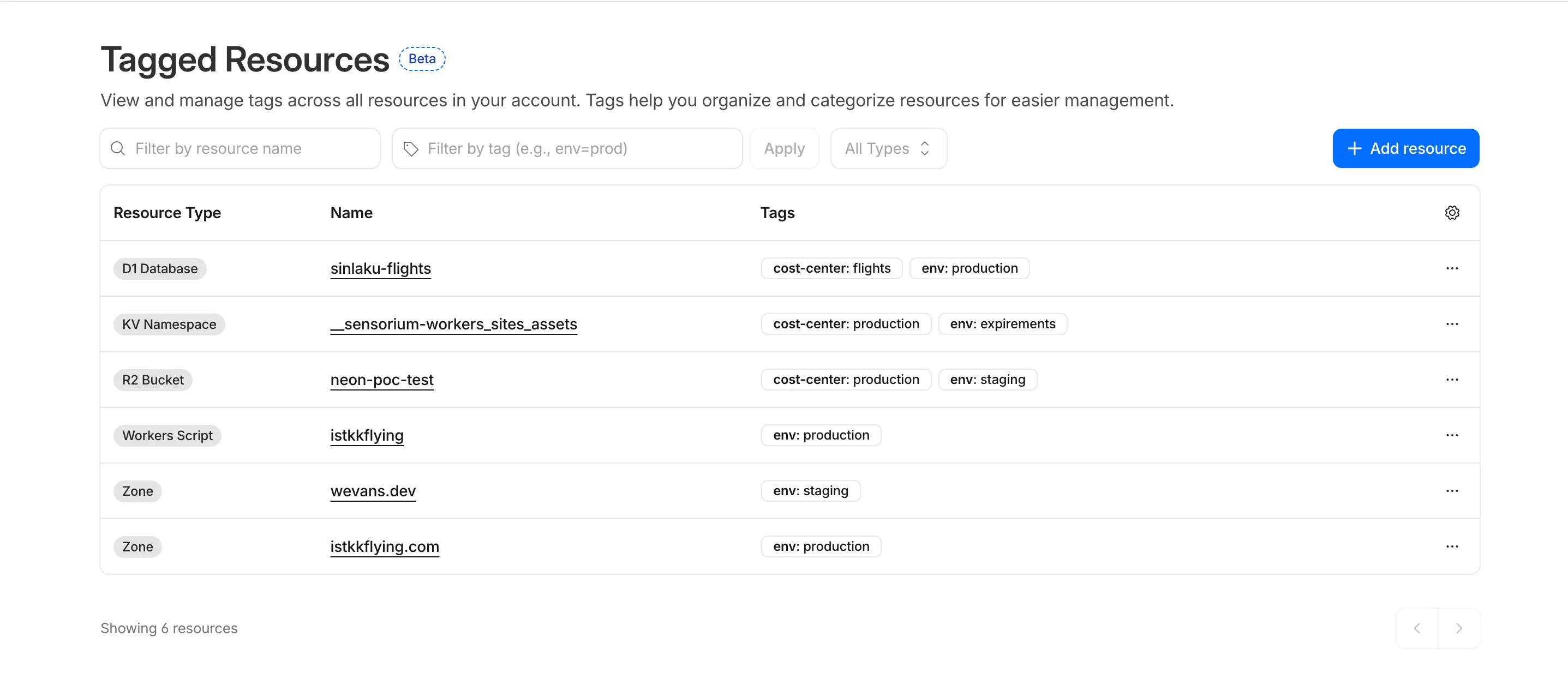
Resource Tagging is now in public beta and rolling out to all Cloudflare accounts over the coming days. You can attach custom key-value metadata to your Cloudflare resources and query across your entire account to find what you need.
What's included
Broad resource type support — Tag zones, custom hostnames, Cloudflare Tunnels, Workers, D1 databases, R2 buckets, KV namespaces, Durable Object namespaces, Queues, Stream videos, Images, Access applications, Gateway rules, AI Gateways, and more. Refer to the full list of supported resource types.
Powerful filtering — Query tagged resources using AND/OR logic, negation, and key-only matching. Combine up to 20 filters per query to build precise resource views.
Account and zone-level endpoints — Full CRUD operations across both scopes.
Token-based authentication — Tagging supports Account Owned Tokens that persist independently of individual users, so your automation keeps running through credential rotations and team changes.
Flexible role support — Super Administrators, Workers Admins, and Tag Admins can all manage tags.
API-first by design
The API is the primary interface for Resource Tagging and the recommended path for all workflows — scripting tag assignments, building CI/CD pipelines, or integrating with your infrastructure-as-code toolchain.
Dashboard UI
You can also view and manage tagged resources directly in the Cloudflare dashboard. Navigate to Manage Account > Resource Tagging to see all tagged resources across your account, filter by resource name or tag, and add or edit tags inline.
What's coming next
In future releases, expect support for additional resource types across the Cloudflare platform, tag-based access control policies for scoping user permissions to tagged resources, billing and usage attribution by tag for breaking down costs by team, project, or environment, and Terraform provider support for managing tags declaratively.
Current limitations
PUT replaces all tags on a resource (no partial update). Use the GET, merge, PUT workflow to modify individual tags safely.
DELETE removes all tags from a resource. To remove a single tag, PUT the remaining tags back.
Querying tags for a resource that has never been tagged returns 500 instead of 404. This is a known beta limitation.
Terraform Provider v5.19.0 introduces 14 new resources spanning AI Gateway, Pipelines, R2 Data Catalog, User Groups, Vulnerability Scanner, Workers Observability, and Zero Trust capabilities. This release significantly improves the v4 to v5 migration experience with automatic state upgraders for 26 resources, working seamlessly with the new tf-migrate CLI tool ↗ to automate resource renames, attribute updates, and moved block generation. Together, these enhancements reduce manual migration effort and minimize risk when upgrading from v4 to v5.
Note:cmd/migrate is deprecated in favor of tf-migrate and will be removed in a future release (#7062 ↗)
New Resources
cloudflare_ai_gateway: Manage AI Gateway instances
We're excited to announce tf-migrate, a purpose-built CLI tool that simplifies migrating from Cloudflare Terraform Provider v4 to v5.
v5 is stable and ready for production
Terraform Provider v5 is stable and actively receiving updates. We encourage all users to migrate to v5 to take advantage of ongoing enhancements and new capabilities.
Cloudflare uses tf-migrate to migrate our own infrastructure — the same tool we're providing to the community — ensuring the best possible migration experience.
What tf-migrate does
tf-migrate automates the tedious and error-prone parts of the v4 to v5 migration process:
Resource type renames – Automatically updates cloudflare_record → cloudflare_dns_record, cloudflare_access_application → cloudflare_zero_trust_access_application, and 40+ other renamed resources
Attribute transformations – Updates field names (e.g., value → content for DNS records) and restructures nested blocks
Moved block generation – Creates Terraform 1.8+ moved blocks to prevent resource replacements and ensure zero-downtime migrations
Cross-file reference updates – Automatically finds and updates all references to renamed resources across your entire configuration
Dry-run mode – Preview all changes before applying them to ensure safety
Combined with the automatic state upgraders introduced in v5.19+, tf-migrate eliminates the manual work and risk that previously made v5 migrations challenging. Tf-migrate operates directly on the config, and the built-in state upgraders handle the rest.
Supported resources
Tf-migrate currently supports the most common Terraform resources our customers use. We are actively working to expand coverage, with the most commonly used resources prioritized first.
For the complete list of supported resources and their migration status, refer to the v5 Stabilization Tracker ↗. This list is updated regularly as additional resources are stabilized and migration support is added.
Resources not yet supported by tf-migrate will need to be migrated manually using the version 5 upgrade guide ↗. The upgrade guide provides step-by-step instructions for handling resource renames, attribute changes, and state migrations.
We have been releasing Betas over the past month and a half while testing this tool. See the full changelog of those Betas here: tf-migrate releases ↗.
Audit Logs v2 now supports organization-level audit logs. Org Admins can retrieve audit events for actions performed at the organization level via the Audit Logs v2 API.
To retrieve organization-level audit logs, use the following endpoint:
GET https://api.cloudflare.com/client/v4/organizations/{organization_id}/logs/audit
This release covers user-initiated actions performed through organization-level APIs. Audit logs for system-initiated actions, a dashboard UI, and Logpush support for organizations will be added in future releases.
In this release, you'll see a number of breaking changes. This is primarily due to changes in OpenAPI definitions, which our libraries are based off of, and codegen updates that we rely on to read those OpenAPI definitions and produce our SDK libraries.
Please ensure you read through the list of changes below before moving to this version - this will help you understand any down or upstream issues it may cause to your environments.
Breaking Changes
See the v6.10.0 Migration Guide ↗ for before/after code examples and actions needed for each change.
Abuse Reports - Registrar WHOIS Report Field Removals
Several fields have been removed from AbuseReportNewParamsBodyAbuseReportsRegistrarWhoisReportRegWhoRequest:
RegWhoGoodFaithAffirmation
RegWhoLawfulProcessingAgreement
RegWhoLegalBasis
RegWhoRequestType
RegWhoRequestedDataElements
AI Search - Instance Params Restructured
The InstanceNewParams and InstanceUpdateParams types have been significantly restructured. Many fields have been moved or removed:
InstanceSearchParams.Messages field removed along with InstanceSearchParamsMessage and InstanceSearchParamsMessagesRole types
AI Search - InstanceItem Service Removed
The InstanceItemService type has been removed. The items sub-resource at client.AISearch.Instances.Items no longer exists in the non-namespace path. Use client.AISearch.Namespaces.Instances.Items instead.
AI Search - Token Types Removed
The following types have been removed from the ai_search package:
Email Security - Investigate Move Return Type Change
The Investigate.Move.New() method now returns a raw slice instead of a paginated wrapper:
New() returns *[]InvestigateMoveNewResponse instead of *pagination.SinglePage[InvestigateMoveNewResponse]
NewAutoPaging() method removed
Hyperdrive - Config Params Restructured
The ConfigEditParams type lost its MTLS and Name fields. The HyperdriveMTLSParam type lost MTLS and Host fields. The Host field on origin config changed from param.Field[string] to a plain string.
IAM - UserGroupMember Params and Return Types Changed
The UserGroupMemberNewParams struct has been restructured and the New() method now returns a paginated response:
UserGroupMemberNewParams.Body renamed to UserGroupMemberNewParams.Members
UserGroupMemberNewParamsBody renamed to UserGroupMemberNewParamsMember
UserGroupMemberUpdateParams.Body renamed to UserGroupMemberUpdateParams.Members
UserGroupMemberUpdateParamsBody renamed to UserGroupMemberUpdateParamsMember
UserGroups.Members.New() returns *pagination.SinglePage[UserGroupMemberNewResponse] instead of *UserGroupMemberNewResponse
IAM - UserGroup List Direction Type Changed
The UserGroupListParams.Direction field changed from param.Field[string] to param.Field[UserGroupListParamsDirection] (typed enum with asc/desc values).
Pipelines - Delete Methods Now Return Typed Responses
Several delete methods across Pipelines now return typed responses instead of bare error:
Pipelines.DeleteV1() returns (*PipelineDeleteV1Response, error) instead of error
Pipelines.Sinks.Delete() returns (*SinkDeleteResponse, error) instead of error
Pipelines.Streams.Delete() returns (*StreamDeleteResponse, error) instead of error
Queues - Message Response Types Removed
The following response envelope types have been removed:
MessageBulkPushResponseSuccess
MessagePushResponseSuccess
MessageAckResponse fields RetryCount and Warnings removed
Secrets Store - Pagination Wrapper Removal and Type Changes
Methods now return direct types instead of SinglePage wrappers, and several internal types have been removed. Associated AutoPaging methods have also been removed:
Stores.New() returns *StoreNewResponse instead of *pagination.SinglePage[StoreNewResponse]
Stores.NewAutoPaging() method removed
Stores.Secrets.BulkDelete() returns *StoreSecretBulkDeleteResponse instead of *pagination.SinglePage[StoreSecretBulkDeleteResponse]
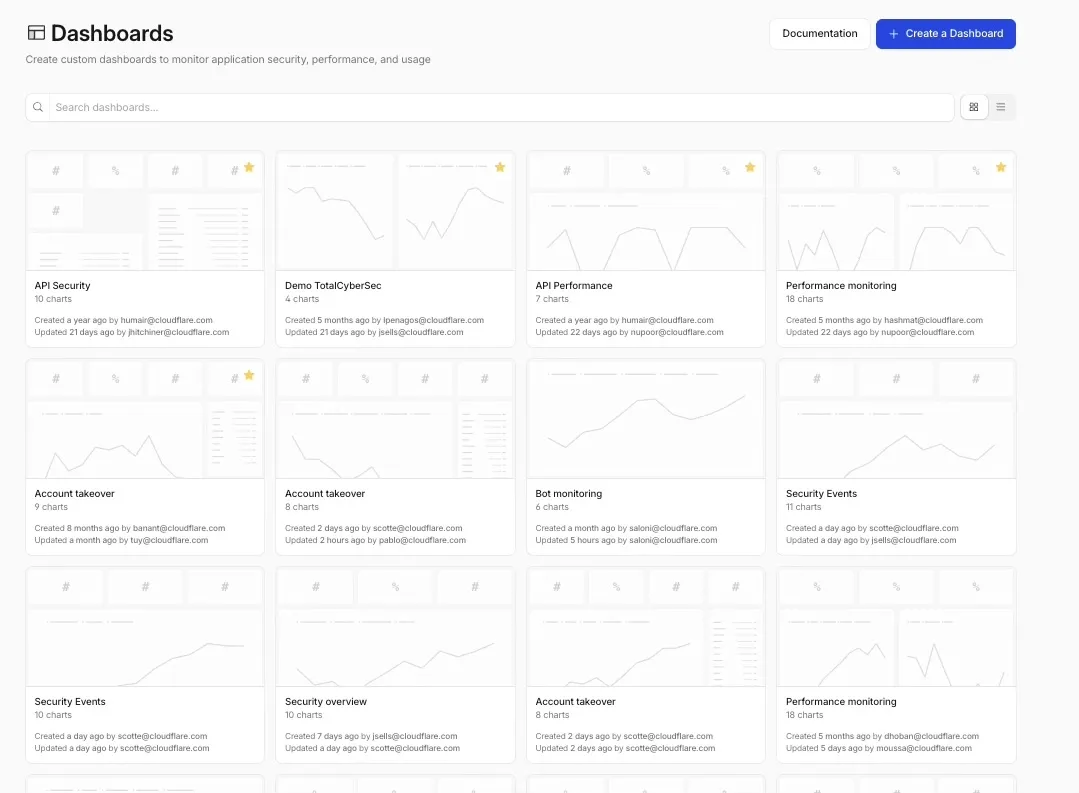
Custom Dashboards are now available to all Cloudflare customers. Build personalized views that highlight the metrics most critical to your infrastructure and security posture, moving beyond standard product dashboards.
This update significantly expands the data available for visualization. Build charts based on any of the 100+ datasets available via the Cloudflare GraphQL API, covering everything from WAF events and Workers metrics to Load Balancing and Zero Trust logs.
Log Explorer integration
For Log Explorer customers, you can now turn raw log queries directly into dashboard charts. When you identify a specific pattern or spike while investigating logs, save that query as a visualization to monitor those signals in real-time without leaving the dashboard.
Key benefits
Unified visibility: Consolidate signals from different Cloudflare products (for example, HTTP Traffic and R2 Storage) into a single view.
Flexible monitoring: Create charts that focus on specific status codes, ASN regions, or security actions that matter to your business.
Expanded limits: Log Explorer customers can create up to 100 dashboards (up from 25 for standard customers).
Pay-as-you-go customers can now monitor usage-based costs and configure spend alerts through two new features: the Billable Usage dashboard and Budget alerts.
Billable Usage dashboard
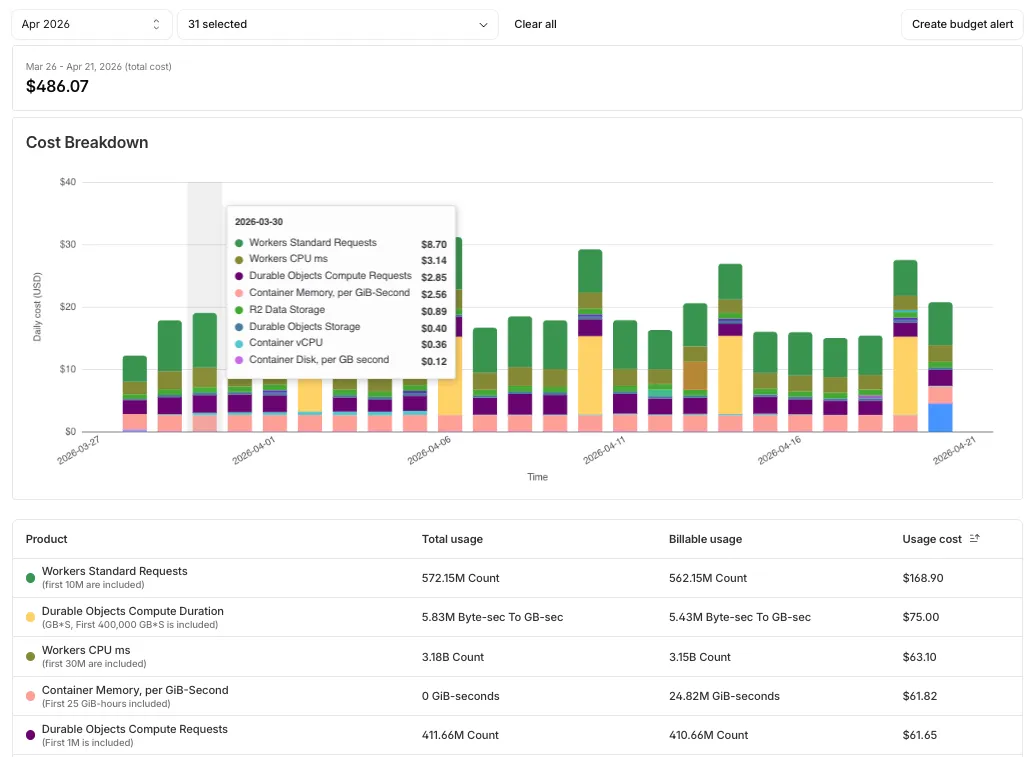
The Billable Usage dashboard provides daily visibility into usage-based costs across your Cloudflare account. The data comes from the same system that generates your monthly invoice, so the figures match your bill.
The dashboard displays:
A bar chart showing daily usage charges for your billing period
A sortable table breaking down usage by product, including total usage, billable usage, and cumulative costs
Ability to view previous billing periods
Usage data aligns to your billing cycle, not the calendar month. The total usage cost shown at the end of a completed billing period matches the usage overage charges on your corresponding invoice.
To access the dashboard, go to Manage Account > Billing > Billable Usage.
Budget alerts
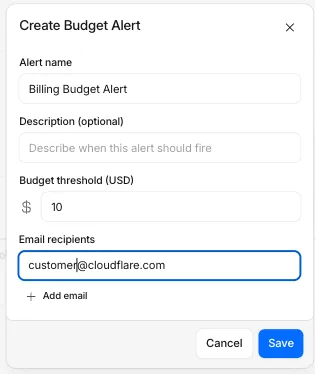
Budget alerts allow you to set dollar-based thresholds for your account-level usage spend. You receive an email notification when your projected monthly spend reaches your configured threshold, giving you proactive visibility into your bill before month-end.
To configure a budget alert:
Go to Manage Account > Billing > Billable Usage.
Select Set Budget Alert.
Enter a budget threshold amount greater than $0.
Select Create.
Alternatively, configure alerts via Notifications > Add > Budget Alert.
You can create multiple budget alerts at different dollar amounts. The notifications system automatically deduplicates alerts if multiple thresholds trigger at the same time. Budget alerts are calculated daily based on your usage trends and fire once per billing cycle when your projected spend first crosses your threshold.
Both features are available to Pay-as-you-go accounts with usage-based products (Workers, R2, Images, etc.). Enterprise contract accounts are not supported.
When a Cloudflare Worker intercepts a visitor request, it can dispatch additional outbound fetch calls called subrequests. By default, each subrequest generates its own log entry in Logpush, resulting in multiple log lines per visitor request. With subrequest merging enabled, subrequest data is embedded as a nested array field on the parent log record instead.
What's new
New subrequest_merging field on Logpush jobs — Set "merge_subrequests": true when creating or updating an http_requests Logpush job to enable the feature.
New Subrequests log field — When subrequest merging is enabled, a Subrequests field (array\<object\>) is added to each parent request log record. Each element in the array contains the standard http_requests fields for that subrequest.
Limitations
Applies to the http_requests (zone-scoped) dataset only.
A maximum of 50 subrequests are merged per parent request. Subrequests beyond this limit are passed through unmodified as individual log entries.
Subrequests must complete within 5 minutes of the visitor request. Subrequests that exceed this window are passed through unmodified.
Subrequests that do not qualify appear as separate log entries — no data is lost.
Subrequest merging is being gradually rolled out and is not yet available on all zones. Contact your account team for concerns or to ensure it is enabled for your zone.
Logpush has traditionally been great at delivering Cloudflare logs to a variety of destinations in JSON format. While JSON is flexible and easily readable, it can be inefficient to store and query at scale.
With this release, you can now send your logs directly to Pipelines to ingest, transform, and store your logs in R2 as Parquet files or Apache Iceberg tables managed by R2 Data Catalog. This makes the data footprint more compact and more efficient at querying your logs instantly with R2 SQL or any other query engine that supports Apache Iceberg or Parquet.
Transform logs before storage
Pipelines SQL runs on each log record in-flight, so you can reshape your data before it is written. For example, you can drop noisy fields, redact sensitive values, or derive new columns:
INSERT INTO http_logs_sinkSELECT ClientIP, EdgeResponseStatus, to_timestamp_micros(EdgeStartTimestamp) AS event_time, upper(ClientRequestMethod) AS method, sha256(ClientIP) AS hashed_ipFROM http_logs_streamWHERE EdgeResponseStatus >= 400;
Pipelines SQL supports string functions, regex, hashing, JSON extraction, timestamp conversion, conditional expressions, and more. For the full list, refer to the Pipelines SQL reference.
Cloudflare's network now supports redirecting verified AI training crawlers to canonical URLs when they request deprecated or duplicate pages. When enabled via AI Crawl Control > Quick Actions, AI training crawlers that request a page with a canonical tag pointing elsewhere receive a 301 redirect to the canonical version. Humans, search engine crawlers, and AI Search agents continue to see the original page normally.
This feature leverages your existing <link rel="canonical"> tags. No additional configuration required beyond enabling the toggle. Available on Pro, Business, and Enterprise plans at no additional cost.
AI Crawl Control now includes new tools to help you prepare your site for the agentic Internet—a web where AI agents are first-class citizens that discover and interact with content differently than human visitors.
Content Format insights
The Metrics tab now includes a Content Format chart showing what content types AI systems request versus what your origin serves. Understanding these patterns helps you optimize content delivery for both human and agent consumption.
Directives tab (formerly Robots.txt)
The Robots.txt tab has been renamed to Directives and now includes a link to check your site's Agent Readiness ↗ score.
OAuth allows third-party applications to access your Cloudflare account on your behalf — like when Wrangler deploys Workers or when monitoring tools read your analytics. You now have granular control over which accounts these applications can access, plus the ability to revoke access anytime.
What's new
Choose which accounts to authorize
When authorizing an OAuth application, you can now select specific accounts instead of granting access to all your accounts:
Account-by-account selection — Choose exactly which accounts the application can access
"All accounts" option — Still available for trusted tools like Wrangler
This gives you precise control who can access your data.
Clear consent screens
The OAuth consent screen now shows:
What the application can access — Explicit list of permissions being requested
Who created the application — Application owner and contact information
Which accounts you're authorizing — Checkboxes for account selection
Revoke access anytime
Manage authorized OAuth applications from your profile:
See all connected apps — View every OAuth application with access to your accounts
Review permissions and scope — Check what each application can do and which accounts it can access
Revoke instantly — Remove access with one click when you no longer need it
To manage your OAuth applications, navigate to Profile > Access Management > Connected Applications ↗.
Why this matters
These updates give you:
Granular control — Authorize apps per-account instead of all-or-nothing
Transparency — Know exactly what you're authorizing before you consent
Security — Limit blast radius by restricting access to only necessary accounts
Easy cleanup — Revoke access when applications are no longer needed
You can now configure Logpush jobs to Google BigQuery directly from the Cloudflare dashboard, in addition to the existing API-based setup.
Previously, setting up a BigQuery Logpush destination required using the Logpush API. Now you can create and manage BigQuery Logpush jobs from the Logpush page in the Cloudflare dashboard by selecting Google BigQuery as the destination and entering your Google Cloud project ID, dataset ID, table ID, and service account credentials.
Cloudflare API tokens now include identifiable patterns that enable secret scanning tools to automatically detect them when leaked in code repositories, configuration files, or other public locations.
What changed
API tokens generated by Cloudflare now follow a standardized format that secret scanning tools can recognize. When a Cloudflare token is accidentally committed to GitHub, GitLab, or another platform with secret scanning enabled, the tool will flag it and alert you.
Why this matters
Leaked credentials are a common security risk. By making Cloudflare tokens detectable by scanning tools, you can:
Detect leaks faster — Get notified immediately when a token is exposed.
Reduce risk window — Exposed tokens are deactivated immediately, before they can be exploited.
Redesigned "Get Help" Portal for faster, personalized help
Cloudflare has officially launched a redesigned "Get Help" Support Portal to eliminate friction and get you to a resolution faster. Previously, navigating support meant clicking through multiple tiles, categorizing your own technical issues across 50+ conditional fields, and translating your problem into Cloudflare's internal taxonomy.
The new experience replaces that complexity with a personalized front door built around your specific account plan. Whether you are under a DDoS attack or have a simple billing question, the portal now presents a single, clean page that surfaces the direct paths available to you — such as "Ask AI", "Chat with a human", or "Community" — without the manual triage.
What's New
One Page, Clear Choices: No more navigating a grid of overlapping categories. The portal now uses action cards tailored to your plan (Free, Pro, Business, or Enterprise), ensuring you only see the support channels you can actually use.
A Radically Simpler Support Form: We've reduced the ticket submission process from four+ screens and 50+ fields to a single screen with five critical inputs. You describe the issue in your own words, and our backend handles the categorization.
AI-Driven Triage: Using Cloudflare Workers AI ↗ and Vectorize ↗, the portal now automatically generates case subjects and predicts product categories.
Moving complexity to the backend
Behind the scenes, we've moved the complexity from the user to our own developer stack. When you describe an issue, we use semantic embeddings to capture intent rather than just keywords.
By leveraging case-based reasoning, our system compares your request against millions of resolved cases to route your inquiry to the specialist best equipped to help. This ensures that while the front-end experience is simpler for you, the back-end routing is more accurate than ever.
We're announcing the public beta of Organizations for enterprise customers, a new top-level Cloudflare container that lets Cloudflare customers manage multiple accounts, members, analytics, and shared policies from one centralized location.
What's New
Organizations [BETA]: Organizations are a new top-level container for centrally managing multiple accounts. Each Organization supports up to 500 accounts and 5000 zones, giving larger teams a single place to administer resources at scale.
Self-serve onboarding: Enterprise customers can create an Organization in the dashboard and assign accounts where they are already Super Administrators.
Centralized Account Management: At launch, every Organization member has the Organization Super Admin role. Organization Super Admins can invite other users and manage any child account under the Organization implicitly.
Shared policies: Share WAF or Gateway policies across multiple accounts within your Organization to simplify centralized policy management.
Implicit access: Members of an Organization automatically receive Super Administrator permissions across child accounts, removing the need for explicit membership on each account. Additional Org-level roles will be available over the course of the year.
Unified analytics: View, filter, and download aggregate HTTP analytics across all Organization child accounts from a single dashboard for centralized visibility into traffic patterns and security events.
Terraform provider support: Manage Organizations with infrastructure as code from day one. Provision organizations, assign accounts, and configure settings programmatically with the Cloudflare Terraform provider ↗.
Shared policies: Share WAF or Gateway policies across multiple accounts within your Organization to simplify centralized policy management.
Cloudflare Logpush now supports BigQuery as a native destination.
Logs from Cloudflare can be sent to Google Cloud BigQuery ↗ via Logpush. The destination can be configured through the Logpush UI in the Cloudflare dashboard or by using the Logpush API.
Two new fields are now available in rule expressions that surface Layer 4 transport telemetry from the client connection. Together with the existing cf.timings.client_tcp_rtt_msec field, these fields give you a complete picture of connection quality for both TCP and QUIC traffic — enabling transport-aware rules without requiring any client-side changes.
Previously, QUIC RTT and delivery rate data was only available via the Server-Timing: cfL4 response header. These new fields make the same data available directly in rule expressions, so you can use them in Transform Rules, WAF Custom Rules, and other phases that support dynamic fields.
New fields
Field
Type
Description
cf.timings.client_quic_rtt_msec
Integer
The smoothed QUIC round-trip time (RTT) between Cloudflare and the client in milliseconds. Only populated for QUIC (HTTP/3) connections. Returns 0 for TCP connections.
cf.edge.l4.delivery_rate
Integer
The most recent data delivery rate estimate for the client connection, in bytes per second. Returns 0 when L4 statistics are not available for the request.
Example: Route slow connections to a lightweight origin
Use a request header transform rule to tag requests from high-latency connections, so your origin can serve a lighter page variant:
Rule expression:
cf.timings.client_tcp_rtt_msec > 200 or cf.timings.client_quic_rtt_msec > 200
Header modifications:
Operation
Header name
Value
Set
X-High-Latency
true
Example: Match low-bandwidth connections
cf.edge.l4.delivery_rate > 0 and cf.edge.l4.delivery_rate < 100000
Logpush now supports higher-precision timestamp formats for log output. You can configure jobs to output timestamps at millisecond or nanosecond precision. This is available in both the Logpush UI in the Cloudflare dashboard and the Logpush API.
To use the new formats, set timestamp_format in your Logpush job's output_options:
rfc3339ms — 2024-02-17T23:52:01.123Z
rfc3339ns — 2024-02-17T23:52:01.123456789Z
Default timestamp formats apply unless explicitly set. The dashboard defaults to rfc3339 and the API defaults to unixnano.
Cloudflare now exposes four new fields in the Transform Rules phase that encode client certificate data in RFC 9440 ↗ format. Previously, forwarding client certificate information to your origin required custom parsing of PEM-encoded fields or non-standard HTTP header formats. These new fields produce output in the standardized Client-Cert and Client-Cert-Chain header format defined by RFC 9440, so your origin can consume them directly without any additional decoding logic.
Each certificate is DER-encoded, Base64-encoded, and wrapped in colons. For example, :MIIDsT...Vw==:. A chain of intermediates is expressed as a comma-separated list of such values.
New fields
Field
Type
Description
cf.tls_client_auth.cert_rfc9440
String
The client leaf certificate in RFC 9440 format. Empty if no client certificate was presented.
cf.tls_client_auth.cert_rfc9440_too_large
Boolean
true if the leaf certificate exceeded 10 KB and was omitted. In practice this will almost always be false.
cf.tls_client_auth.cert_chain_rfc9440
String
The intermediate certificate chain in RFC 9440 format as a comma-separated list. Empty if no intermediate certificates were sent or if the chain exceeded 16 KB.
cf.tls_client_auth.cert_chain_rfc9440_too_large
Boolean
true if the intermediate chain exceeded 16 KB and was omitted.
The chain encoding follows the same ordering as the TLS handshake: the certificate closest to the leaf appears first, working up toward the trust anchor. The root certificate is not included.
Example: Forwarding client certificate headers to your origin server
Add a request header transform rule to set the Client-Cert and Client-Cert-Chain headers on requests forwarded to your origin server. For example, to forward headers for verified, non-revoked certificates:
Rule expression:
cf.tls_client_auth.cert_verified and not cf.tls_client_auth.cert_revoked
Header modifications:
Operation
Header name
Value
Set
Client-Cert
cf.tls_client_auth.cert_rfc9440
Set
Client-Cert-Chain
cf.tls_client_auth.cert_chain_rfc9440
To get the most out of these fields, upload your client CA certificate to Cloudflare so that Cloudflare validates the client certificate at the edge and populates cf.tls_client_auth.cert_verified and cf.tls_client_auth.cert_revoked.
AI Crawl Control now supports extending the underlying WAF rule with custom modifications. Any changes you make directly in the WAF custom rules editor — such as adding path-based exceptions, extra user agents, or additional expression clauses — are preserved when you update crawler actions in AI Crawl Control.
If the WAF rule expression has been modified in a way AI Crawl Control cannot parse, a warning banner appears on the Crawlers page with a link to view the rule directly in WAF.