Pular para o conteúdo

Changelog

New updates and improvements at Cloudflare.

Request timeouts and retries with AI Gateway

AI Gateway adds additional ways to handle requests - Request Timeouts and Request Retries, making it easier to keep your applications responsive and reliable.

Timeouts and retries can be used on both the Universal Endpoint or directly to a supported provider.

Request timeouts A request timeout allows you to trigger fallbacks or a retry if a provider takes too long to respond.

To set a request timeout directly to a provider, add a cf-aig-request-timeout header.

Provider-specific endpoint examplebash
curl https://gateway.ai.cloudflare.com/v1/{account_id}/{gateway_id}/workers-ai/@cf/meta/llama-3.1-8b-instruct \
 --header 'Authorization: Bearer {cf_api_token}' \
 --header 'Content-Type: application/json' \
 --header 'cf-aig-request-timeout: 5000'
 --data '{"prompt": "What is Cloudflare?"}'

Request retries A request retry automatically retries failed requests, so you can recover from temporary issues without intervening.

To set up request retries directly to a provider, add the following headers:

  • cf-aig-max-attempts (number)
  • cf-aig-retry-delay (number)
  • cf-aig-backoff ("constant" | "linear" | "exponential)
AI Gateway adds Cerebras, ElevenLabs, and Cartesia as new providers

AI Gateway has added three new providers: Cartesia, Cerebras, and ElevenLabs, giving you more even more options for providers you can use through AI Gateway. Here's a brief overview of each:

  • Cartesia provides text-to-speech models that produce natural-sounding speech with low latency.
  • Cerebras delivers low-latency AI inference to Meta's Llama 3.1 8B and Llama 3.3 70B models.
  • ElevenLabs offers text-to-speech models with human-like voices in 32 languages.
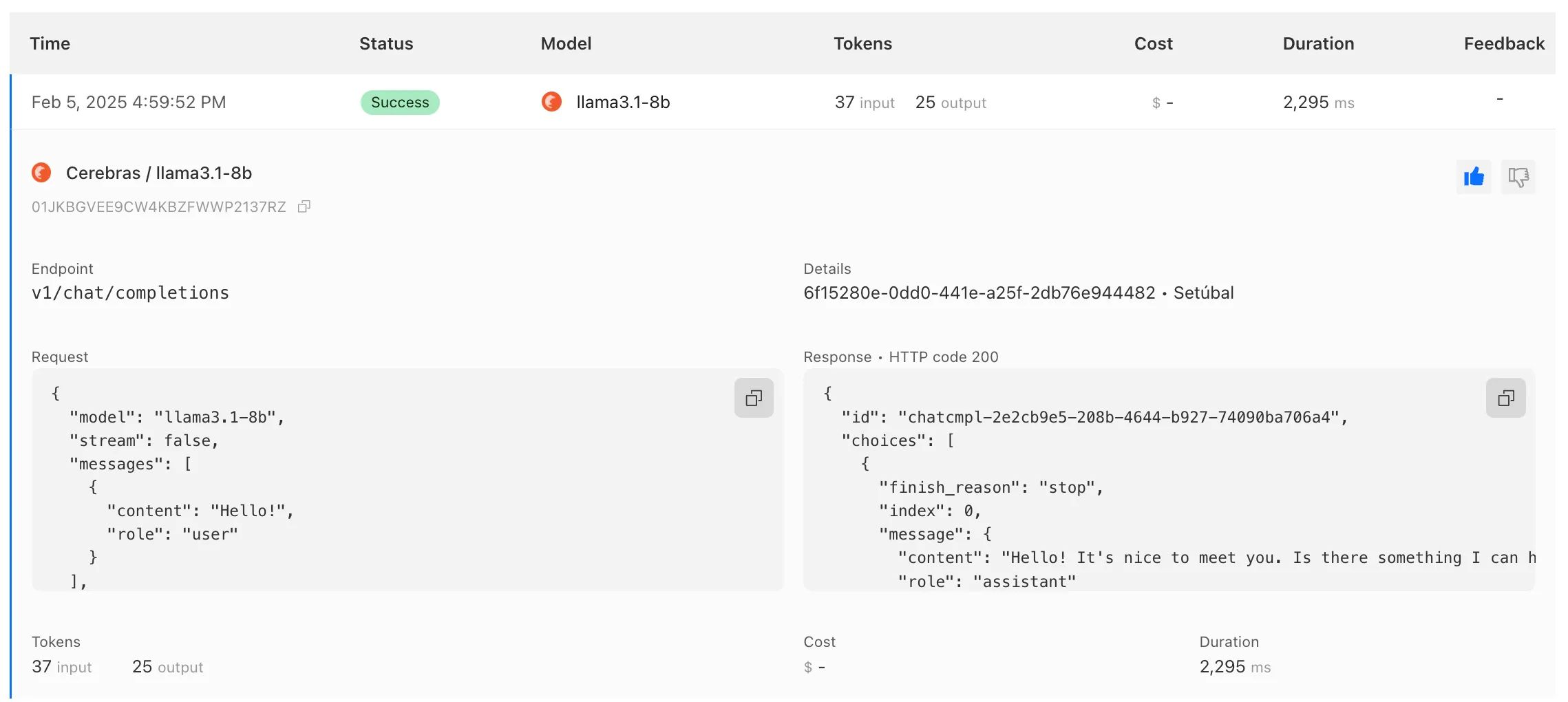
Example of Cerebras log in AI Gateway

To get started with AI Gateway, just update the base URL. Here's how you can send a request to Cerebras using cURL:

Example fetch requestbash
curl -X POST https://gateway.ai.cloudflare.com/v1/ACCOUNT_TAG/GATEWAY/cerebras/chat/completions \
 --header 'content-type: application/json' \
 --header 'Authorization: Bearer CEREBRAS_TOKEN' \
 --data '{
    "model": "llama-3.3-70b",
    "messages": [
        {
            "role": "user",
            "content": "What is Cloudflare?"
        }
    ]
}'

Fight CSAM More Easily Than Ever

You can now implement our child safety tooling, the CSAM Scanning Tool, more easily. Instead of requiring external reporting credentials, you only need a verified email address for notifications to onboard. This change makes the tool more accessible to a wider range of customers.

How It Works

When enabled, the tool automatically hashes images for enabled websites as they enter the Cloudflare cache. These hashes are then checked against a database of known abusive images.

  • Potential match detected?
    • The content URL is blocked, and
    • Cloudflare will notify you about the found matches via the provided email address.

Updated Service-Specific Terms

We have also made updates to our Service-Specific Terms to reflect these changes.

Expanded AI insights in Cloudflare Radar

Radar has expanded its AI insights with new API endpoints for Internet services rankings, robots.txt analysis, and AI inference data.

Internet services ranking

Radar now provides rankings for Internet services, including Generative AI platforms, based on anonymized 1.1.1.1 resolver data. Previously limited to the annual Year in Review, these insights are now available daily via the API, through the following endpoints:

Robots.txt

Radar now analyzes robots.txt files from the top 10,000 domains, identifying AI bot access rules. AI-focused user agents from ai.robots.txt are categorized as:

  • Fully allowed/disallowed if directives apply to all paths (*).
  • Partially allowed/disallowed if restrictions apply to specific paths.

These insights are now available weekly via the API, through the following endpoints:

Workers AI

Radar now provides insights into public AI inference models from Workers AI, tracking usage trends across models and tasks. These insights are now available via the API, through the following endpoints:

Learn more about the new Radar AI insights in our blog post.

Block files that are password-protected, compressed, or otherwise unscannable.

Gateway HTTP policies can now block files that are password-protected, compressed, or otherwise unscannable.

These unscannable files are now matched with the Download and Upload File Types traffic selectors for HTTP policies:

  • Password-protected Microsoft Office document
  • Password-protected PDF
  • Password-protected ZIP archive
  • Unscannable ZIP archive

To get started inspecting and modifying behavior based on these and other rules, refer to HTTP filtering.

Terraform v5 Provider is now generally available

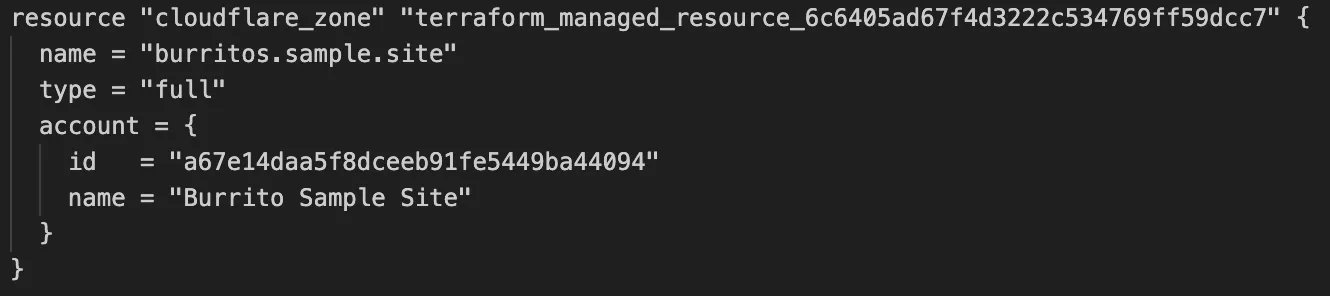
Screenshot of Terraform defining a Zone

Cloudflare's v5 Terraform Provider is now generally available. With this release, Terraform resources are now automatically generated based on OpenAPI Schemas. This change brings alignment across our SDKs, API documentation, and now Terraform Provider. The new provider boosts coverage by increasing support for API properties to 100%, adding 25% more resources, and more than 200 additional data sources. Going forward, this will also reduce the barriers to bringing more resources into Terraform across the broader Cloudflare API. This is a small, but important step to making more of our platform manageable through GitOps, making it easier for you to manage Cloudflare just like you do your other infrastructure.

The Cloudflare Terraform Provider v5 is a ground-up rewrite of the provider and introduces breaking changes for some resource types. Please refer to the upgrade guide for best practices, or the blog post on automatically generating Cloudflare's Terraform Provider for more information about the approach.

For more info

Revamped Workers Metrics

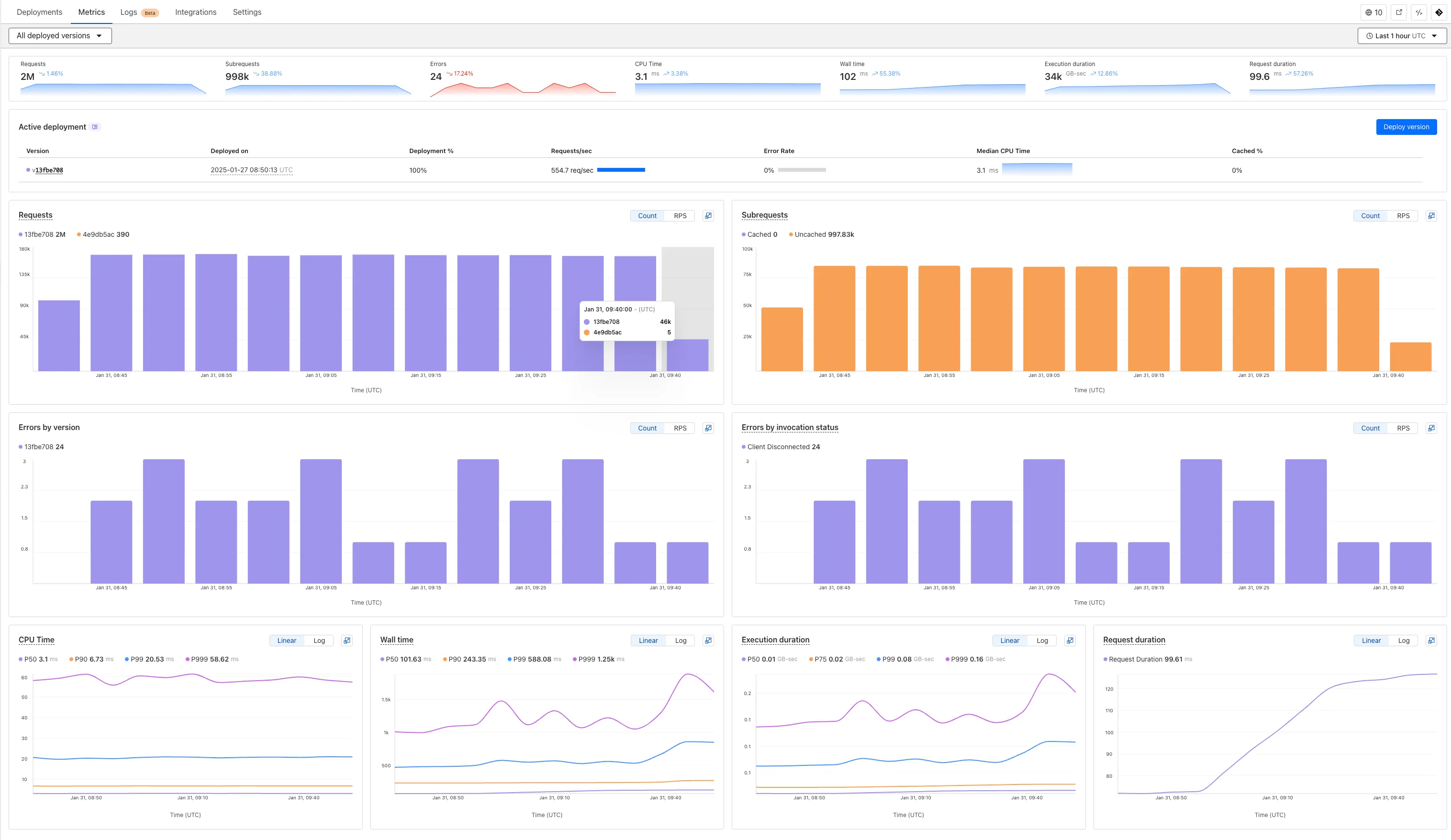
We've revamped the Workers Metrics dashboard.

Workers Metrics dashboard

Now you can easily compare metrics across Worker versions, understand the current state of a gradual deployment, and review key Workers metrics in a single view. This new interface enables you to:

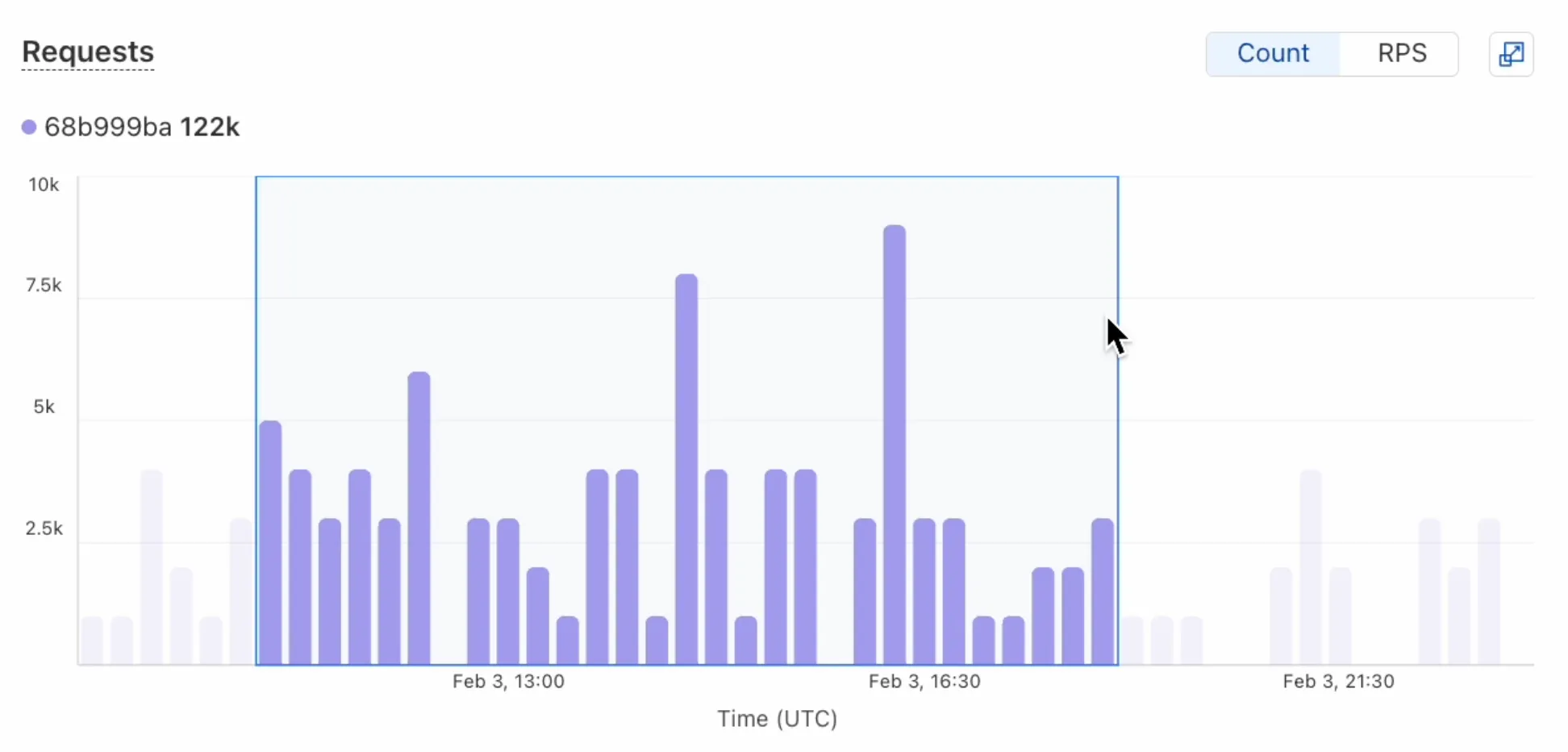
  • Drag-and-select using a graphical timepicker for precise metric selection.
Workers Metrics graphical timepicker
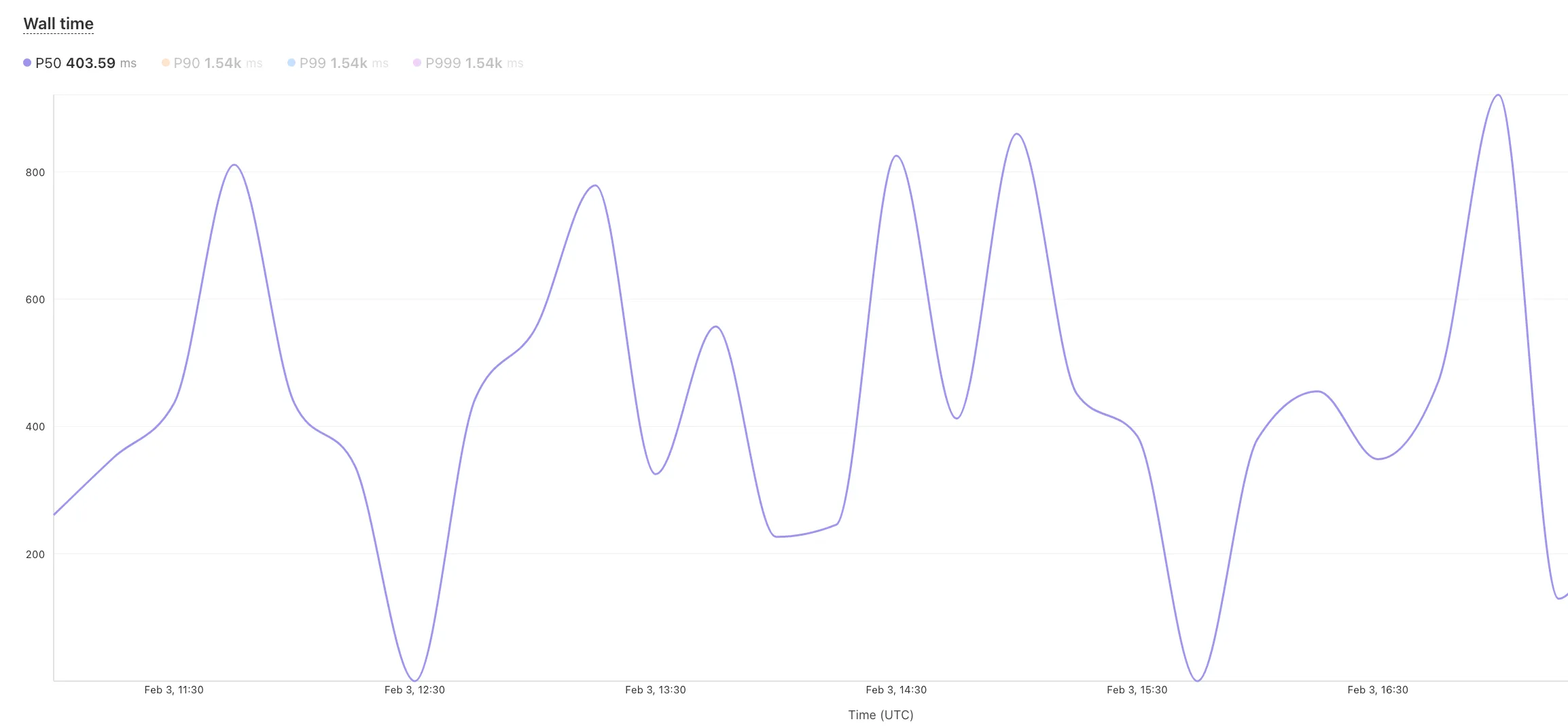
  • Use histograms to visualize cumulative metrics, allowing you to bucket and compare rates over time.
  • Focus on Worker versions by directly interacting with the version numbers in the legend.
Workers Metrics legend selector
  • Monitor and compare active gradual deployments.
  • Track error rates across versions with grouping both by version and by invocation status.
  • Measure how Smart Placement improves request duration.

Learn more about metrics.

Removed unused meta fields from DNS records

Cloudflare is removing five fields from the meta object of DNS records. These fields have been unused for more than a year and are no longer set on new records. This change may take up to four weeks to fully roll out.

The affected fields are:

  • the auto_added boolean
  • the managed_by_apps boolean and corresponding apps_install_id
  • the managed_by_argo_tunnel boolean and corresponding argo_tunnel_id

An example record returned from the API would now look like the following:

Updated API Responsejson
{
	"result": {
		"id": "<ID>",
		"zone_id": "<ZONE_ID>",
		"zone_name": "example.com",
		"name": "www.example.com",
		"type": "A",
		"content": "192.0.2.1",
		"proxiable": true,
		"proxied": false,
		"ttl": 1,
		"locked": false,
		"meta": {
			"auto_added": false,
			"managed_by_apps": false,
			"managed_by_argo_tunnel": false,
			"source": "primary"
		},
		"comment": null,
		"tags": [],
		"created_on": "2025-03-17T20:37:05.368097Z",
		"modified_on": "2025-03-17T20:37:05.368097Z"
	},
	"success": true,
	"errors": [],
	"messages": []
}

For more guidance, refer to Manage DNS records.

Workers for Platforms now supports Static Assets

Workers for Platforms customers can now attach static assets (HTML, CSS, JavaScript, images) directly to User Workers, removing the need to host separate infrastructure to serve the assets.

This allows your platform to serve entire front-end applications from Cloudflare's global edge, utilizing caching for fast load times, while supporting dynamic logic within the same Worker. Cloudflare automatically scales its infrastructure to handle high traffic volumes, enabling you to focus on building features without managing servers.

What you can build

Static Sites: Host and serve HTML, CSS, JavaScript, and media files directly from Cloudflare's network, ensuring fast loading times worldwide. This is ideal for blogs, landing pages, and documentation sites because static assets can be efficiently cached and delivered closer to the user, reducing latency and enhancing the overall user experience.

Full-Stack Applications: Combine asset hosting with Cloudflare Workers to power dynamic, interactive applications. If you're an e-commerce platform, you can serve your customers' product pages and run inventory checks from within the same Worker.

index.jsjs
export default {
	async fetch(request, env) {
		const url = new URL(request.url);

		// Check real-time inventory
		if (url.pathname === "/api/inventory/check") {
			const product = url.searchParams.get("product");
			const inventory = await env.INVENTORY_KV.get(product);
			return new Response(inventory);
		}

		// Serve static assets (HTML, CSS, images)
		return env.ASSETS.fetch(request);
	},
};
index.tsts
export default {
  async fetch(request, env) {
    const url = new URL(request.url);

    // Check real-time inventory
    if (url.pathname === '/api/inventory/check') {
      const product = url.searchParams.get('product');
      const inventory = await env.INVENTORY_KV.get(product);
      return new Response(inventory);
    }

    // Serve static assets (HTML, CSS, images)
    return env.ASSETS.fetch(request);
  }
};

Get Started: Upload static assets using the Workers for Platforms API or Wrangler. For more information, visit our Workers for Platforms documentation.

Transform HTML quickly with streaming content

You can now transform HTML elements with streamed content using HTMLRewriter.

Methods like replace, append, and prepend now accept Response and ReadableStream values as Content.

This can be helpful in a variety of situations. For instance, you may have a Worker in front of an origin, and want to replace an element with content from a different source. Prior to this change, you would have to load all of the content from the upstream URL and convert it into a string before replacing the element. This slowed down overall response times.

Now, you can pass the Response object directly into the replace method, and HTMLRewriter will immediately start replacing the content as it is streamed in. This makes responses faster.

index.jsjs
class ElementRewriter {
	async element(element) {
		// able to replace elements while streaming content
		// the fetched body is not buffered into memory as part
		// of the replace
		let res = await fetch("https://upstream-content-provider.example");
		element.replace(res);
	}
}

export default {
	async fetch(request, env, ctx) {
		let response = await fetch("https://site-to-replace.com");
		return new HTMLRewriter()
			.on("[data-to-replace]", new ElementRewriter())
			.transform(response);
	},
};
index.tsts
class ElementRewriter {
	async element(element: any) {
		// able to replace elements while streaming content
		// the fetched body is not buffered into memory as part
		// of the replace
		let res = await fetch('https://upstream-content-provider.example');
		element.replace(res);
	}
}

export default {
	async fetch(request, env, ctx): Promise<Response> {
		let response = await fetch('https://site-to-replace.com');
		return new HTMLRewriter().on('[data-to-replace]', new ElementRewriter()).transform(response);
	},
} satisfies ExportedHandler<Env>;

For more information, see the HTMLRewriter documentation.

AI Gateway Introduces New Worker Binding Methods

We have released new Workers bindings API methods, allowing you to connect Workers applications to AI Gateway directly. These methods simplify how Workers calls AI services behind your AI Gateway configurations, removing the need to use the REST API and manually authenticate.

To add an AI binding to your Worker, include the following in your Wrangler configuration file:

Add an AI binding to your Worker.

With the new AI Gateway binding methods, you can now:

  • Send feedback and update metadata with patchLog.
  • Retrieve detailed log information using getLog.
  • Execute universal requests to any AI Gateway provider with run.

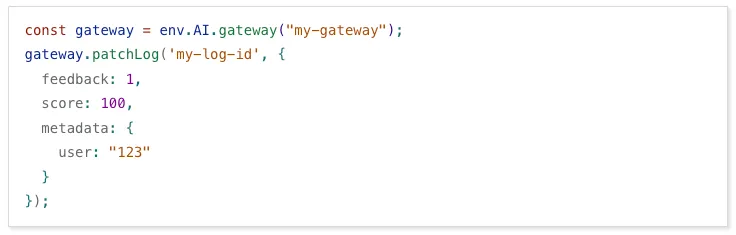
For example, to send feedback and update metadata using patchLog:

Send feedback and update metadata using patchLog:

Increased Browser Rendering limits!

Browser Rendering now supports 10 concurrent browser instances per account and 10 new instances per minute, up from the previous limits of 2.

This allows you to launch more browser tasks from Cloudflare Workers.

To manage concurrent browser sessions, you can use Queues or Workflows:

index.jsjs
export default {
	async queue(batch, env) {
		for (const message of batch.messages) {
			const browser = await puppeteer.launch(env.BROWSER);
			const page = await browser.newPage();

			try {
				await page.goto(message.url, {
					waitUntil: message.waitUntil,
				});
				// Process page...
			} finally {
				await browser.close();
			}
		}
	},
};
index.tsts
interface QueueMessage {
	url: string;
	waitUntil: number;
}

export interface Env {
	BROWSER_QUEUE: Queue<QueueMessage>;
	BROWSER: Fetcher;
}

export default {
	async queue(batch: MessageBatch<QueueMessage>, env: Env): Promise<void> {
		for (const message of batch.messages) {
			const browser = await puppeteer.launch(env.BROWSER);
			const page = await browser.newPage();

			try {
				await page.goto(message.url, {
					waitUntil: message.waitUntil,
				});
				// Process page...
			} finally {
				await browser.close();
			}
		}
	},
};

New Snippets Code Editor

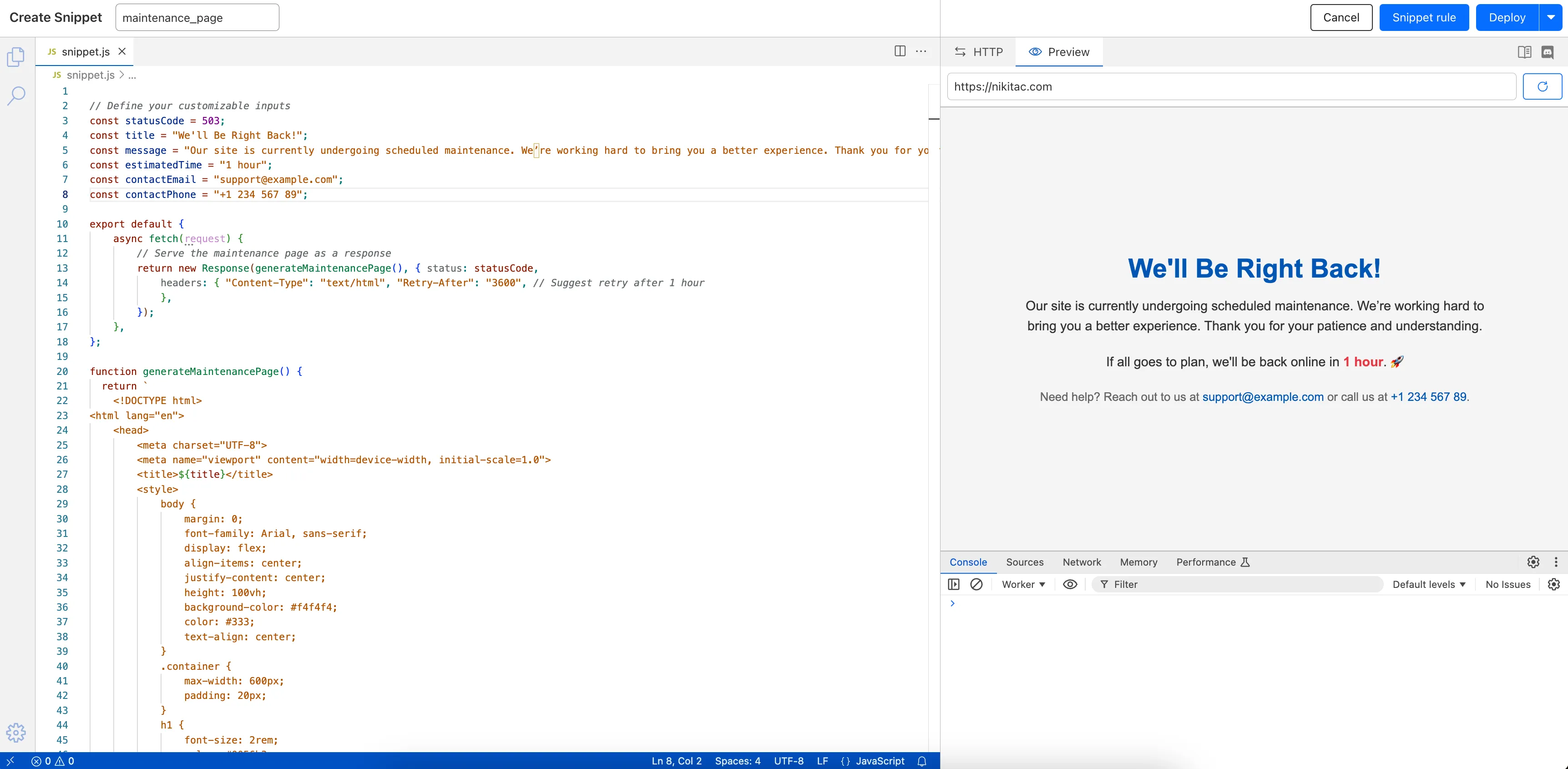
The new Snippets code editor lets you edit Snippet code and rule in one place, making it easier to test and deploy changes without switching between pages.

New Snippets code editor

What’s new:

  • Single-page editing for code and rule – No need to jump between screens.
  • Auto-complete & syntax highlighting – Get suggestions and avoid mistakes.
  • Code formatting & refactoring – Write cleaner, more readable code.

Try it now in Rules > Snippets.

Automatic configuration for private databases on Hyperdrive

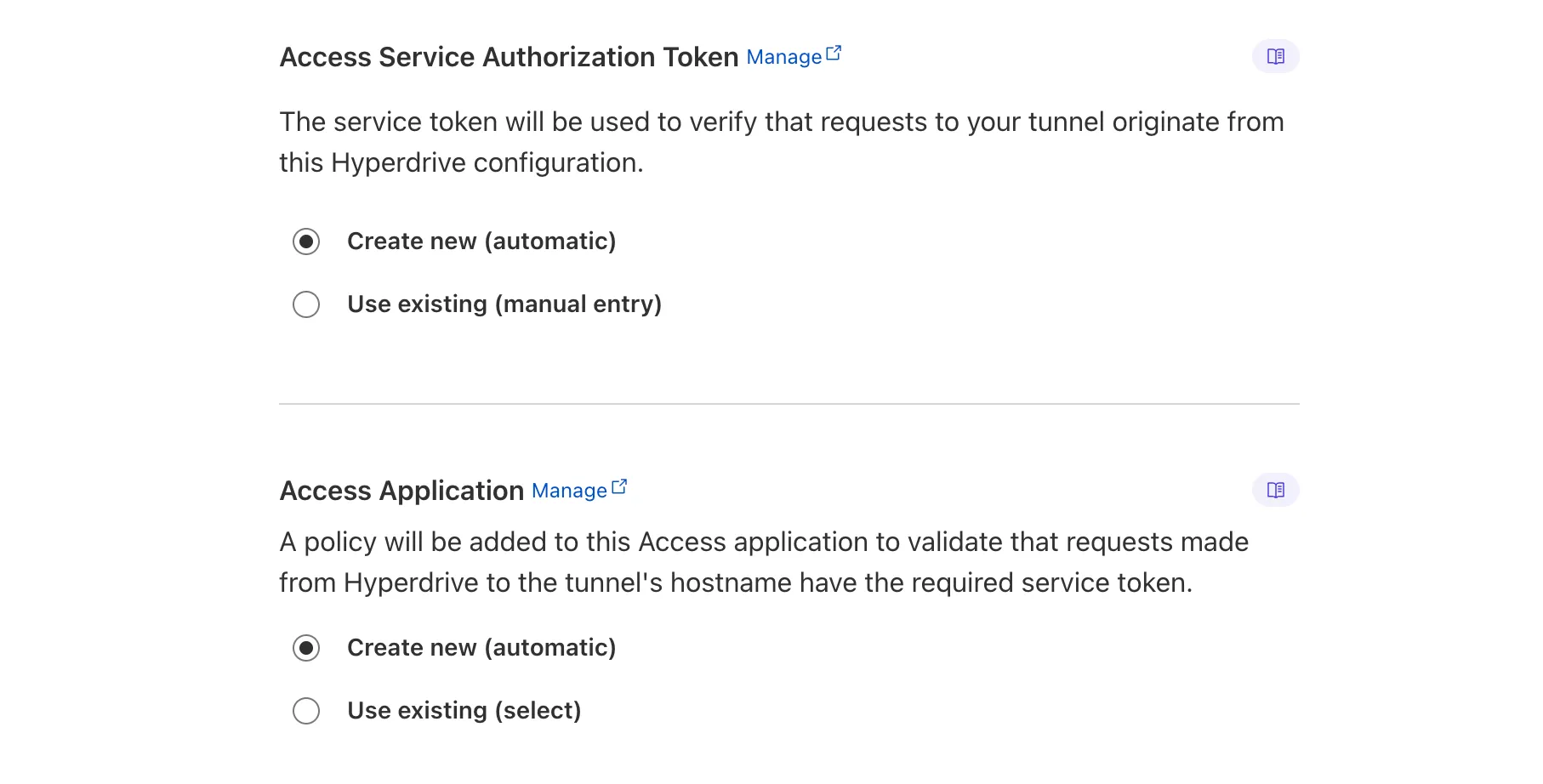
Hyperdrive now automatically configures your Cloudflare Tunnel to connect to your private database.

Automatic configuration of Cloudflare Access and Service Token in the Cloudflare dashboard for Hyperdrive.

When creating a Hyperdrive configuration for a private database, you only need to provide your database credentials and set up a Cloudflare Tunnel within the private network where your database is accessible. Hyperdrive will automatically create the Cloudflare Access, Service Token, and Policies needed to secure and restrict your Cloudflare Tunnel to the Hyperdrive configuration.

To create a Hyperdrive for a private database, you can follow the Hyperdrive documentation. You can still manually create the Cloudflare Access, Service Token, and Policies if you prefer.

This feature is available from the Cloudflare dashboard.

Workers KV namespace limits increased to 1000

You can now have up to 1000 Workers KV namespaces per account.

Workers KV namespace limits were increased from 200 to 1000 for all accounts. Higher limits for Workers KV namespaces enable better organization of key-value data, such as by category, tenant, or environment.

Consult the Workers KV limits documentation for the rest of the limits. This increased limit is available for both the Free and Paid Workers plans.

Support for Node.js DNS, Net, and Timer APIs in Workers

When using a Worker with the nodejs_compat compatibility flag enabled, you can now use the following Node.js APIs:

node:net

You can use node:net to create a direct connection to servers via a TCP sockets with net.Socket.

index.jsjs
import net from "node:net";

const exampleIP = "127.0.0.1";

export default {
	async fetch(req) {
		const socket = new net.Socket();
		socket.connect(4000, exampleIP, function () {
			console.log("Connected");
		});

		socket.write("Hello, Server!");
		socket.end();

		return new Response("Wrote to server", { status: 200 });
	},
};
index.tsts
import net from "node:net";

const exampleIP = "127.0.0.1";

export default {
  async fetch(req): Promise<Response> {
    const socket = new net.Socket();
    socket.connect(4000, exampleIP, function () {
      console.log("Connected");
    });

    socket.write("Hello, Server!");
    socket.end();

    return new Response("Wrote to server", { status: 200 });
  },
} satisfies ExportedHandler;

Additionally, you can now use other APIs including net.BlockList and net.SocketAddress.

Note that net.Server is not supported.

node:dns

You can use node:dns for name resolution via DNS over HTTPS using Cloudflare DNS at 1.1.1.1.

index.jsjs
import dns from "node:dns";

let response = await dns.promises.resolve4("cloudflare.com", "NS");
index.tsts
import dns from 'node:dns';

let response = await dns.promises.resolve4('cloudflare.com', 'NS');

All node:dns functions are available, except lookup, lookupService, and resolve which throw "Not implemented" errors when called.

node:timers

You can use node:timers to schedule functions to be called at some future period of time.

This includes setTimeout for calling a function after a delay, setInterval for calling a function repeatedly, and setImmediate for calling a function in the next iteration of the event loop.

index.jsjs
import timers from "node:timers";

console.log("first");
timers.setTimeout(() => {
	console.log("last");
}, 10);

timers.setTimeout(() => {
	console.log("next");
});
index.tsts
import timers from "node:timers";

console.log("first");
timers.setTimeout(() => {
  console.log("last");
}, 10);

timers.setTimeout(() => {
  console.log("next");
});

WAF Release - 2025-01-21

RulesetRule IDLegacy Rule IDDescriptionPrevious ActionNew ActionComments
Cloudflare Managed Ruleset 100303Command Injection - NslookupLogBlock

This was released as

Cloudflare Managed Ruleset 100534Web Shell ActivityLogBlock

This was released as

Increased Workflows limits and improved instance queueing.

Workflows (beta) now allows you to define up to 1024 steps. sleep steps do not count against this limit.

We've also added:

  • instanceId as property to the WorkflowEvent type, allowing you to retrieve the current instance ID from within a running Workflow instance
  • Improved queueing logic for Workflow instances beyond the current maximum concurrent instances, reducing the cases where instances are stuck in the queued state.
  • Support for pause and resume for Workflow instances in a queued state.

We're continuing to work on increases to the number of concurrent Workflow instances, steps, and support for a new waitForEvent API over the coming weeks.

WAF Release - 2025-01-13

RulesetRule IDLegacy Rule IDDescriptionPrevious ActionNew ActionComments
Cloudflare Managed Ruleset 100704

Cleo Harmony - Auth Bypass - CVE:CVE-2024-55956, CVE:CVE-2024-55953

LogBlockNew Detection
Cloudflare Managed Ruleset 100705Sentry - SSRFLogBlockNew Detection
Cloudflare Managed Ruleset 100706Apache Struts - Remote Code Execution - CVE:CVE-2024-53677LogBlockNew Detection
Cloudflare Managed Ruleset 100707

FortiWLM - Remote Code Execution - CVE:CVE-2023-48782, CVE:CVE-2023-34993, CVE:CVE-2023-34990

LogBlockNew Detection
Cloudflare Managed Ruleset 100007C_BETACommand Injection - Common Attack CommandsDisabled

New Rules Overview Interface

Rules Overview gives you a single page to manage all your Cloudflare Rules.

What you can do:

  • See all your rules in one place – No more clicking around.
  • Find rules faster – Search by name.
  • Understand execution order – See how rules run in sequence.
  • Debug easily – Use Trace without switching tabs.

Check it out in Rules > Overview.

Smart Tiered Cache optimizes Load Balancing Pools

You can now achieve higher cache hit rates and reduce origin load when using Load Balancing with Smart Tiered Cache. Cloudflare automatically selects a single, optimal tiered data center for all origins in your Load Balancing Pool.

How it works

When you use Load Balancing with Smart Tiered Cache, Cloudflare analyzes performance metrics across your pool's origins and automatically selects the optimal Upper Tier data center for the entire pool. This means:

  • Consistent cache location: All origins in the pool share the same Upper Tier cache.
  • Higher HIT rates: Requests for the same content hit the cache more frequently.
  • Reduced origin requests: Fewer requests reach your origin servers.
  • Improved performance: Faster response times for cache HITs.

Example workflow

Load Balancing Pool: api-pool
├── Origin 1: api-1.example.com
├── Origin 2: api-2.example.com
└── Origin 3: api-3.example.com

Selected Upper Tier: [Optimal data center based on pool performance]

Get started

To get started, enable Smart Tiered Cache on your zone and configure your Load Balancing Pool.