Workers AI is excited to add 4 new models to the catalog, including 2 brand new classes of models with a text-to-speech and reranker model. Introducing:
@cf/baai/bge-m3 - a multi-lingual embeddings model that supports over 100 languages. It can also simultaneously perform dense retrieval, multi-vector retrieval, and sparse retrieval, with the ability to process inputs of different granularities.
@cf/baai/bge-reranker-base - our first reranker model! Rerankers are a type of text classification model that takes a query and context, and outputs a similarity score between the two. When used in RAG systems, you can use a reranker after the initial vector search to find the most relevant documents to return to a user by reranking the outputs.
@cf/openai/whisper-large-v3-turbo - a faster, more accurate speech-to-text model. This model was added earlier but is graduating out of beta with pricing included today.
@cf/myshell-ai/melotts - our first text-to-speech model that allows users to generate an MP3 with voice audio from inputted text.
You can now access bindings
from anywhere in your Worker by importing the env object from cloudflare:workers.
Previously, env could only be accessed during a request. This meant that
bindings could not be used in the top-level context of a Worker.
Now, you can import env and access bindings such as secrets
or environment variables in the
initial setup for your Worker:
import { env } from "cloudflare:workers";import ApiClient from "example-api-client";// API_KEY and LOG_LEVEL now usable in top-level scopeconst apiClient = ApiClient.new({ apiKey: env.API_KEY });const LOG_LEVEL = env.LOG_LEVEL || "info";export default { fetch(req) { // you can use apiClient or LOG_LEVEL, configured before any request is handled },};
Additionally, env was normally accessed as a argument to a Worker's entrypoint handler,
such as fetch.
This meant that if you needed to access a binding from a deeply nested function,
you had to pass env as an argument through many functions to get it to the
right spot. This could be cumbersome in complex codebases.
Now, you can access the bindings from anywhere in your codebase
without passing env as an argument:
// helpers.jsimport { env } from "cloudflare:workers";// env is *not* an argument to this functionexport async function getValue(key) { let prefix = env.KV_PREFIX; return await env.KV.get(`${prefix}-${key}`);}
You can now retry your Cloudflare Pages and Workers builds directly from GitHub. No need to switch to the Cloudflare Dashboard for a simple retry!
Let\u2019s say you push a commit, but your build fails due to a spurious error like a network timeout. Instead of going to the Cloudflare Dashboard to manually retry, you can now rerun the build with just a few clicks inside GitHub, keeping you inside your workflow.
For Pages and Workers projects connected to a GitHub repository:
When a build fails, go to your GitHub repository or pull request
Select the failed Check Run for the build
Select "Details" on the Check Run
Select "Rerun" to trigger a retry build for that commit
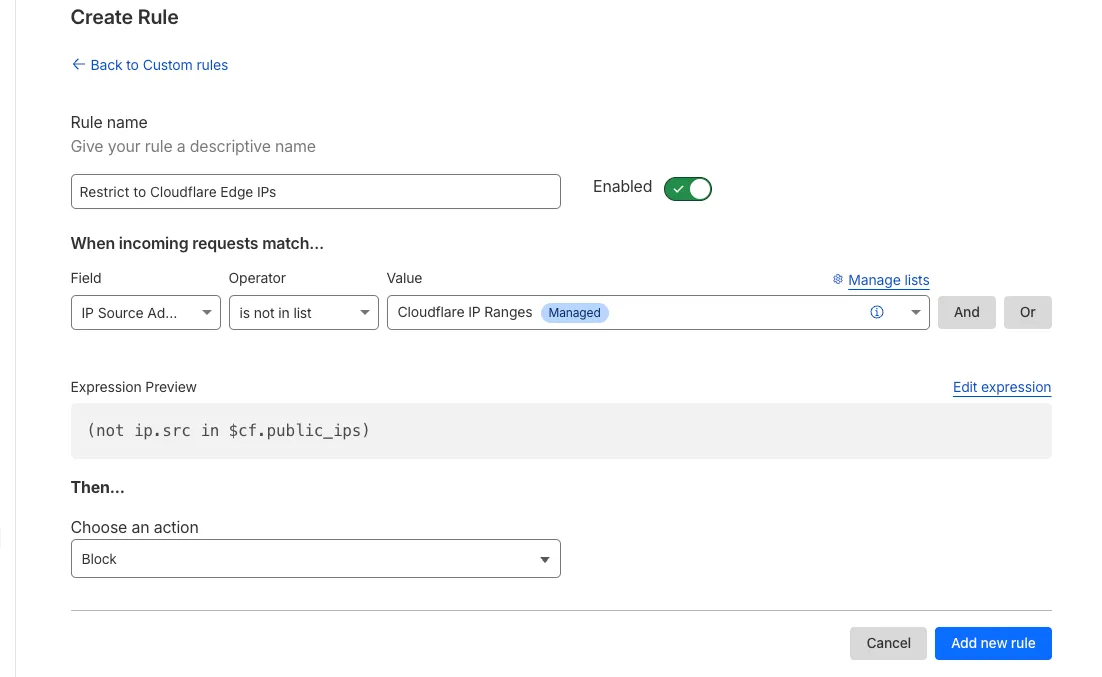
Magic Firewall now supports a new managed list of Cloudflare IP ranges. This list is available as an option when creating a Magic Firewall policy based on IP source/destination addresses. When selecting "is in list" or "is not in list", the option "Cloudflare IP Ranges" will appear in the dropdown menu.
This list is based on the IPs listed in the Cloudflare IP ranges ↗.
Updates to this managed list are applied automatically.
Note: IP Lists require a Cloudflare Advanced Network Firewall subscription. For more details about Cloudflare Network Firewall plans, refer to Plans.
We've released the next major version of Wrangler, the CLI for Cloudflare Workers — wrangler@4.0.0. Wrangler v4 is a major release focused on updates to underlying systems and dependencies, along with improvements to keep Wrangler commands consistent and clear.
You can run the following command to install it in your projects:
									npm
									 i wrangler@latest
									yarn
									 add wrangler@latest
									pnpm
									 add wrangler@latest
									bun
									 add wrangler@latest
Unlike previous major versions of Wrangler, which were foundational rewrites ↗ and rearchitectures ↗ — Version 4 of Wrangler includes a much smaller set of changes. If you use Wrangler today, your workflow is very unlikely to change.
Going forward, we'll continue supporting Wrangler v3 with bug fixes and security updates until Q1 2026, and with critical security updates until Q1 2027, at which point it will be out of support.
You can now debug your Workers tests with our Vitest integration by running the following command:
vitest --inspect --no-file-parallelism
Attach a debugger to the port 9229 and you can start stepping through your Workers tests. This is available with @cloudflare/vitest-pool-workers v0.7.5 or later.
We’re removing some of the restrictions in Email Routing so that AI Agents and task automation can better handle email workflows, including how Workers can reply to incoming emails.
It's now possible to keep a threaded email conversation with an Email Worker script as long as:
The email can only be replied to once in the same EmailMessage event.
The recipient in the reply must match the incoming sender.
The outgoing sender domain must match the same domain that received the email.
Every time an email passes through Email Routing or another MTA, an entry is added to the References list. We stop accepting replies to emails with more than 100 References entries to prevent abuse or accidental loops.
Here's an example of a Worker responding to Emails using a Workers AI model:
AI model responding to emailsts
import PostalMime from "postal-mime";import { createMimeMessage } from "mimetext";import { EmailMessage } from "cloudflare:email";export default { async email(message, env, ctx) { const email = await PostalMime.parse(message.raw); const res = await env.AI.run("@cf/meta/llama-2-7b-chat-fp16", { messages: [ { role: "user", content: email.text ?? "", }, ], }); // message-id is generated by mimetext const response = createMimeMessage(); response.setHeader("In-Reply-To", message.headers.get("Message-ID")!); response.setSender("agent@example.com"); response.setRecipient(message.from); response.setSubject("Llama response"); response.addMessage({ contentType: "text/plain", data: res instanceof ReadableStream ? await new Response(res).text() : res.response!, }); const replyMessage = new EmailMessage( "<email>", message.from, response.asRaw(), ); await message.reply(replyMessage); },} satisfies ExportedHandler<Env>;
In Node.js, environment variables are exposed via the global process.env object. Some libraries
assume that this object will be populated, and many developers may be used to accessing variables
in this way.
Previously, the process.env object was always empty unless written to in Worker code. This could
cause unexpected errors or friction when developing Workers using code previously written for Node.js.
To opt-in to the new process.env behaviour now, add the nodejs_compat_populate_process_env compatibility flag to your
wrangler.json configuration:
{
	// Rest of your configuration
	// Add "nodejs_compat_populate_process_env" to your compatibility_flags array
	"compatibility_flags": ["nodejs_compat", "nodejs_compat_populate_process_env"],
	// Rest of your configuration
After April 1, 2025, populating process.env will become the default behavior when both nodejs_compat is enabled and
your Worker's compatibility_date is after "2025-04-01".

Digital Experience Monitoring (DEX) provides visibility into device, network, and application performance across your Cloudflare SASE deployment. The latest release of the Cloudflare One agent (v2025.1.861) now includes device endpoint monitoring capabilities
to provide deeper visibility into end-user device performance which can be analyzed directly from the dashboard.
Device health metrics are now automatically collected, allowing administrators to:
View the last network a user was connected to
Monitor CPU and RAM utilization on devices
Identify resource-intensive processes running on endpoints
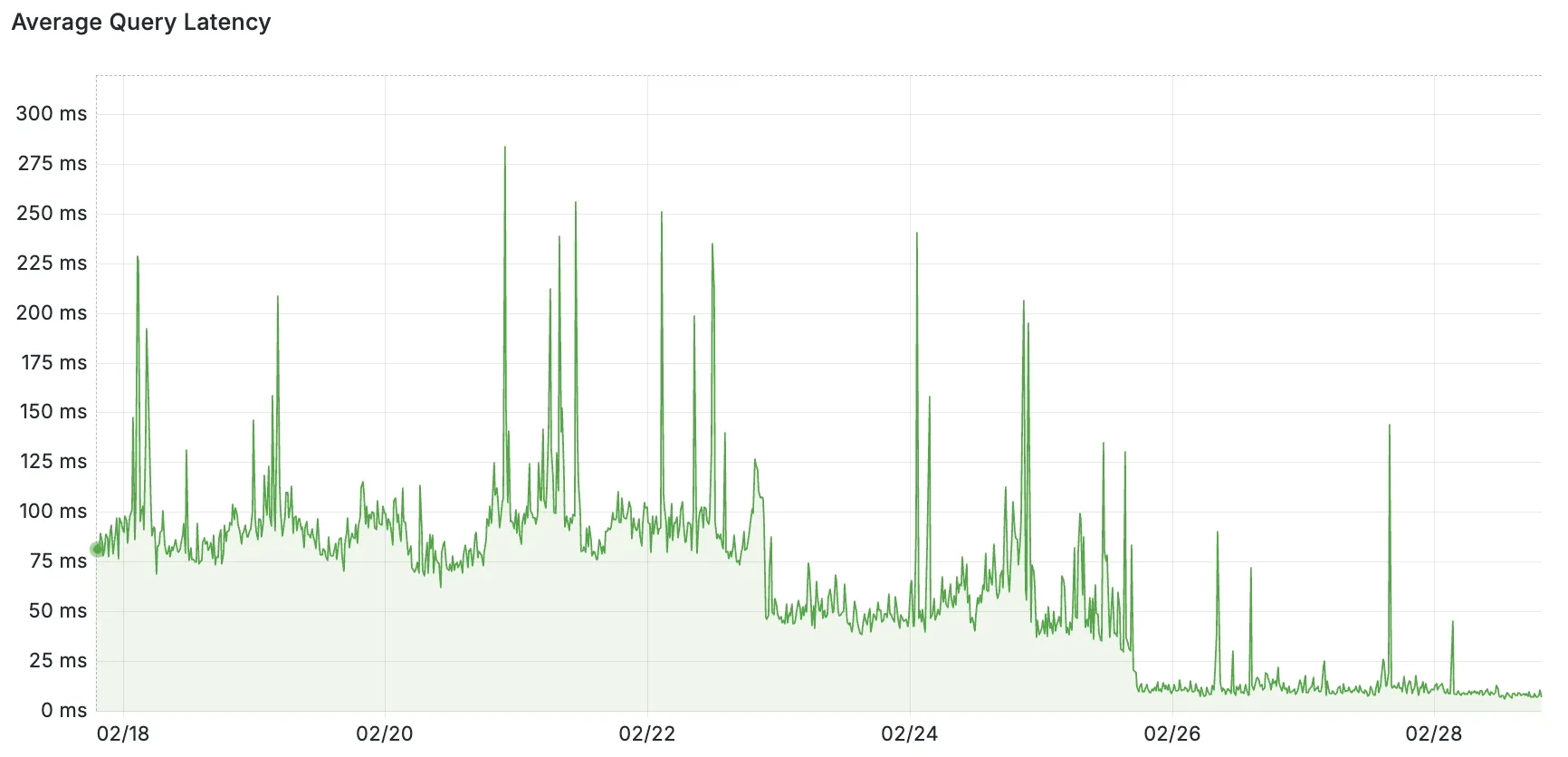
Hyperdrive now pools database connections in one or more regions close to your database. This means that your uncached queries and new database connections have up to 90% less latency as measured from connection pools.
By improving placement of Hyperdrive database connection pools, Workers' Smart Placement is now more effective when used with Hyperdrive, ensuring that your Worker can be placed as close to your database as possible.
With this update, Hyperdrive also uses Cloudflare's standard IP address ranges ↗ to connect to your database. This enables you to configure the firewall policies (IP access control lists) of your database to only allow access from Cloudflare and Hyperdrive.
Added new records to the leaked credentials database. The record sources are: Have I Been Pwned (HIBP) database, RockYou 2024 dataset, and another third-party database.
We’ve streamlined the Logpush setup process by integrating R2 bucket creation directly into the Logpush workflow!
Now, you no longer need to navigate multiple pages to manually create an R2 bucket or copy credentials. With this update, you can seamlessly configure a Logpush job to R2 in just one click, reducing friction and making setup faster and easier.
This enhancement makes it easier for customers to adopt Logpush and R2.
You can now use bucket locks to set retention policies on your R2 buckets (or specific prefixes within your buckets) for a specified period — or indefinitely. This can help ensure compliance by protecting important data from accidental or malicious deletion.
Locks give you a few ways to ensure your objects are retained (not deleted or overwritten). You can:
Lock objects for a specific duration, for example 90 days.
Lock objects until a certain date, for example January 1, 2030.
Lock objects indefinitely, until the lock is explicitly removed.
Buckets can have up to 1,000 bucket lock rules. Each rule specifies which objects it covers (via prefix) and how long those objects must remain retained.
Here are a couple of examples showing how you can configure bucket lock rules using Wrangler:
Ensure all objects in a bucket are retained for at least 180 days
Today, we are thrilled to announce Media Transformations, a new service that
brings the magic of Image Transformations to
short-form video files, wherever they are stored!
For customers with a huge volume of short video — generative AI output,
e-commerce product videos, social media clips, or short marketing content —
uploading those assets to Stream is not always practical. Sometimes, the
greatest friction to getting started was the thought of all that migrating.
Customers want a simpler solution that retains their current storage strategy to
deliver small, optimized MP4 files. Now you can do that with Media
Transformations.
To transform a video or image,
enable transformations for your
zone, then make a simple request with a specially formatted URL. The result is
an MP4 that can be used in an HTML video element without a player library.
If your zone already has Image Transformations enabled, then it is ready to
optimize videos with Media Transformations, too.
For example, we have a short video of the mobile in Austin's office. The
original is nearly 30 megabytes and wider than necessary for this layout.
Consider a simple width adjustment:
The result is less than 3 megabytes, properly sized, and delivered dynamically
so that customers do not have to manage the creation and storage of these
transformed assets.
With these enhanced logs, administrators can gain visibility into end user behavior in the remote browser and track blocked data extraction attempts, along with the websites that triggered them, in an isolated session.
Access for SaaS applications now include more configuration options to support a wider array of SaaS applications.
SAML and OIDC Field Additions
OIDC apps now include:
Group Filtering via RegEx
OIDC Claim mapping from an IdP
OIDC token lifetime control
Advanced OIDC auth flows including hybrid and implicit flows
SAML apps now include improved SAML attribute mapping from an IdP.
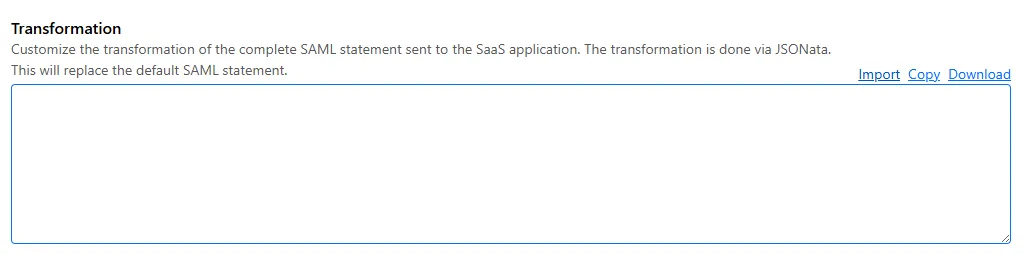
SAML transformations
SAML identities sent to Access applications can be fully customized using JSONata expressions. This allows admins to configure the precise identity SAML statement sent to a SaaS application.
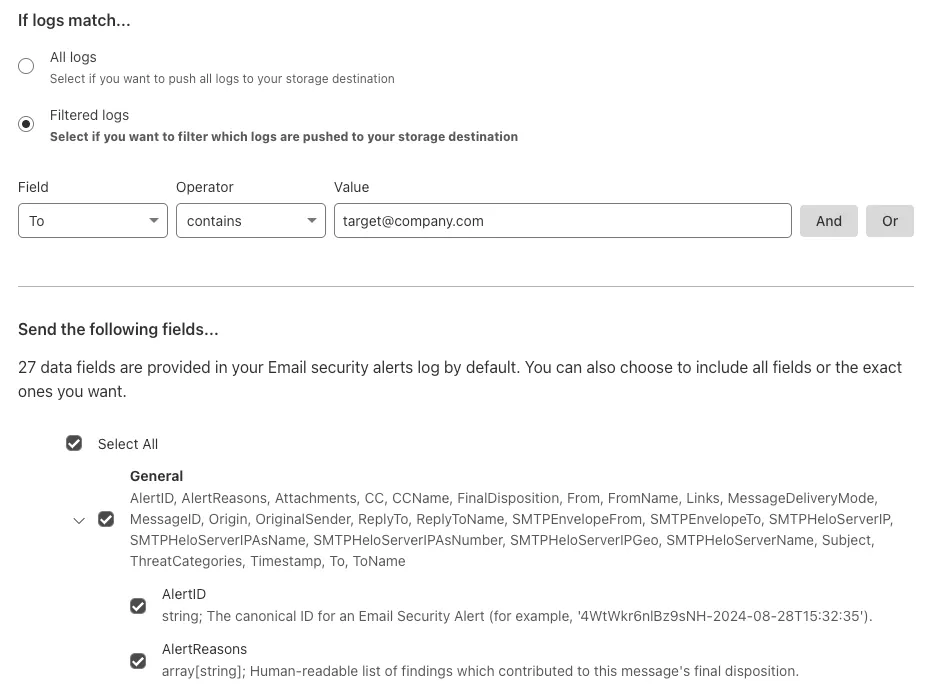
You can now send detection logs to an endpoint of your choice with Cloudflare Logpush.
Filter logs matching specific criteria you have set and select from over 25 fields you want to send. When creating a new Logpush job, remember to select Email security alerts as the dataset.
We've released a release candidate of the next major version of Wrangler, the CLI for Cloudflare Workers — wrangler@4.0.0-rc.0.
You can run the following command to install it and be one of the first to try it out:
									npm
									 i wrangler@v4-rc
									yarn
									 add wrangler@v4-rc
									pnpm
									 add wrangler@v4-rc
									bun
									 add wrangler@v4-rc
Unlike previous major versions of Wrangler, which were foundational rewrites ↗ and rearchitectures ↗ — Version 4 of Wrangler includes a much smaller set of changes. If you use Wrangler today, your workflow is very unlikely to change. Before we release Wrangler v4 and advance past the release candidate stage, we'll share a detailed migration guide in the Workers developer docs. But for the vast majority of cases, you won't need to do anything to migrate — things will just work as they do today. We are sharing this release candidate in advance of the official release of v4, so that you can try it out early and share feedback.
New JavaScript language features that you can now use with Wrangler v4
Version 4 of Wrangler updates the version of esbuild ↗ that Wrangler uses internally, allowing you to use modern JavaScript language features, including:
The using keyword from Explicit Resource Management
function sendEmail(id, message) { using user = await env.USER_SERVICE.findUser(id); await user.sendEmail(message); // user[Symbol.dispose]() is implicitly called at the end of the scope.}
Import attributes
Import attributes ↗ allow you to denote the type or other attributes of the module that your code imports. For example, you can import a JSON module, using the following syntax:
import data from "./data.json" with { type: "json" };
Other changes
--local is now the default for all CLI commands
All commands that access resources (for example, wrangler kv, wrangler r2, wrangler d1) now access local datastores by default, ensuring consistent behavior.
Clearer policy for the minimum required version of Node.js required to run Wrangler
Moving forward, the active, maintenance, and current versions of Node.js ↗ will be officially supported by Wrangler. This means the minimum officially supported version of Node.js you must have installed for Wrangler v4 will be Node.js v18 or later. This policy mirrors how many other packages and CLIs support older versions of Node.js, and ensures that as long as you are using a version of Node.js that the Node.js project itself supports, this will be supported by Wrangler as well.
Features previously deprecated in Wrangler v3 are now removed in Wrangler v4
All previously deprecated features in Wrangler v2 ↗ and in Wrangler v3 ↗ have now been removed. Additionally, the following features that were deprecated during the Wrangler v3 release have been removed:
Legacy Assets (using wrangler dev/deploy --legacy-assets or the legacy_assets config file property). Instead, we recommend you migrate to Workers assets ↗.
Legacy Node.js compatibility (using wrangler dev/deploy --node-compat or the node_compat config file property). Instead, use the nodejs_compat compatibility flag ↗. This includes the functionality from legacy node_compat polyfills and natively implemented Node.js APIs.
wrangler version. Instead, use wrangler --version to check the current version of Wrangler.
getBindingsProxy() (via import { getBindingsProxy } from "wrangler"). Instead, use the getPlatformProxy() API ↗, which takes exactly the same arguments.
We've released a new REST API for Browser Rendering in open beta, making interacting with browsers easier than ever. This new API provides endpoints for common browser actions, with more to be added in the future.
With the REST API you can:
Capture screenshots – Use /screenshot to take a screenshot of a webpage from provided URL or HTML.
Generate PDFs – Use /pdf to convert web pages into PDFs.
Extract HTML content – Use /content to retrieve the full HTML from a page.
Snapshot (HTML + Screenshot) – Use /snapshot to capture both the page's HTML and a screenshot in one request
Scrape Web Elements – Use /scrape to extract specific elements from a page.
Radar has expanded its DNS insights, providing visibility into aggregated traffic and usage trends observed by our 1.1.1.1 DNS resolver.
In addition to global, location, and ASN traffic trends, we are also providing perspectives on protocol usage, query/response characteristics, and DNSSEC usage.
Previously limited to the top locations and ASes endpoints, we have now introduced the following endpoints: