You can now specify the number of connections your Hyperdrive configuration uses to connect to your origin database.
All configurations have a minimum of 5 connections. The maximum connection count for a Hyperdrive configuration depends on the Hyperdrive limits of your Workers plan.
This feature allows you to right-size your connection pool based on your database capacity and application requirements. You can configure connection counts through the Cloudflare dashboard or API.
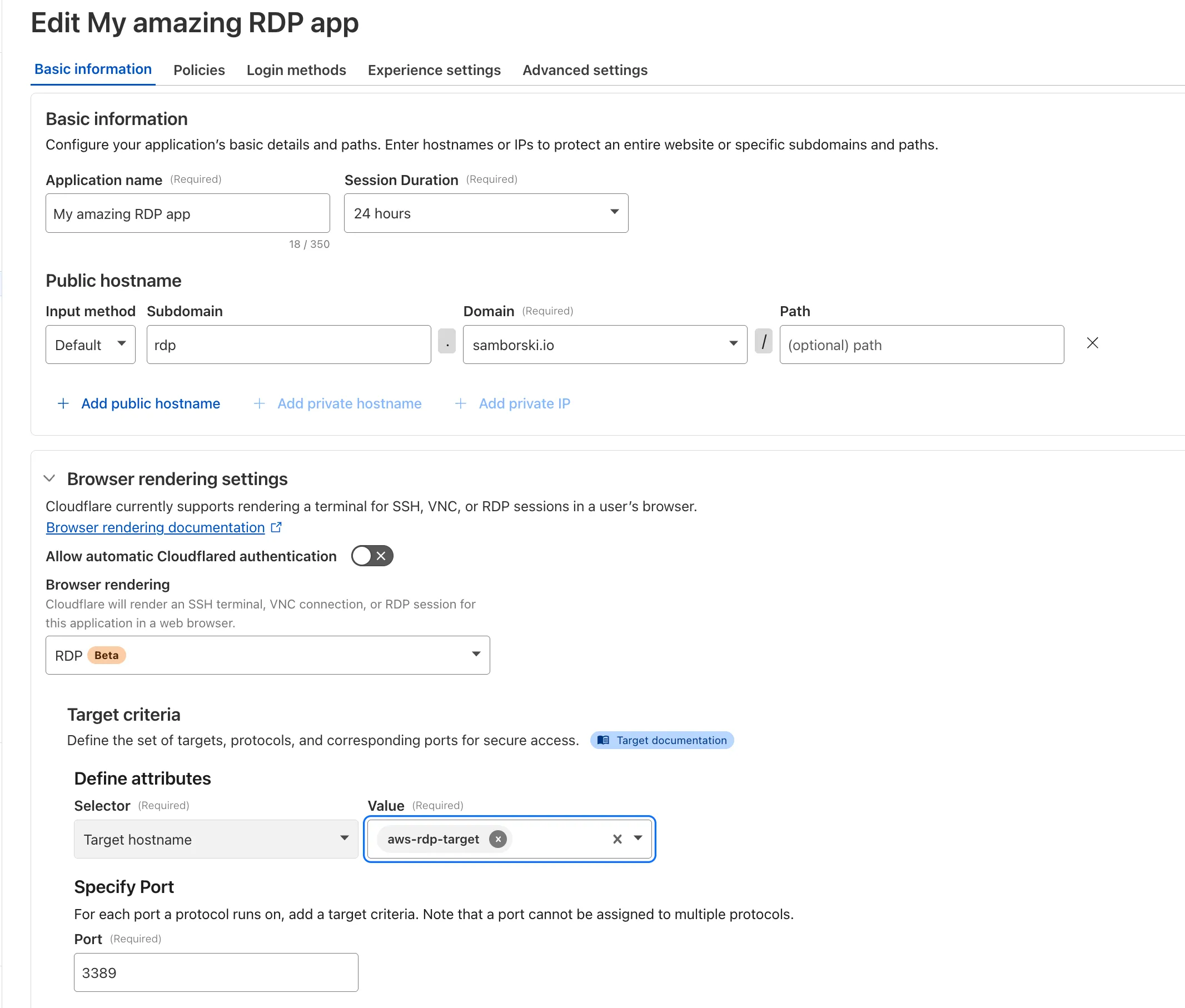
Browser-based RDP with Cloudflare Access is now available in open beta for all Cloudflare customers. It enables secure, remote Windows server access without VPNs or RDP clients.
With browser-based RDP, you can:
Control how users authenticate to internal RDP resources with single sign-on (SSO), multi-factor authentication (MFA), and granular access policies.
Record who is accessing which servers and when to support regulatory compliance requirements and to gain greater visibility in the event of a security event.
Eliminate the need to install and manage software on user devices. You will only need a web browser.
Reduce your attack surface by keeping your RDP servers off the public Internet and protecting them from common threats like credential stuffing or brute-force attacks.
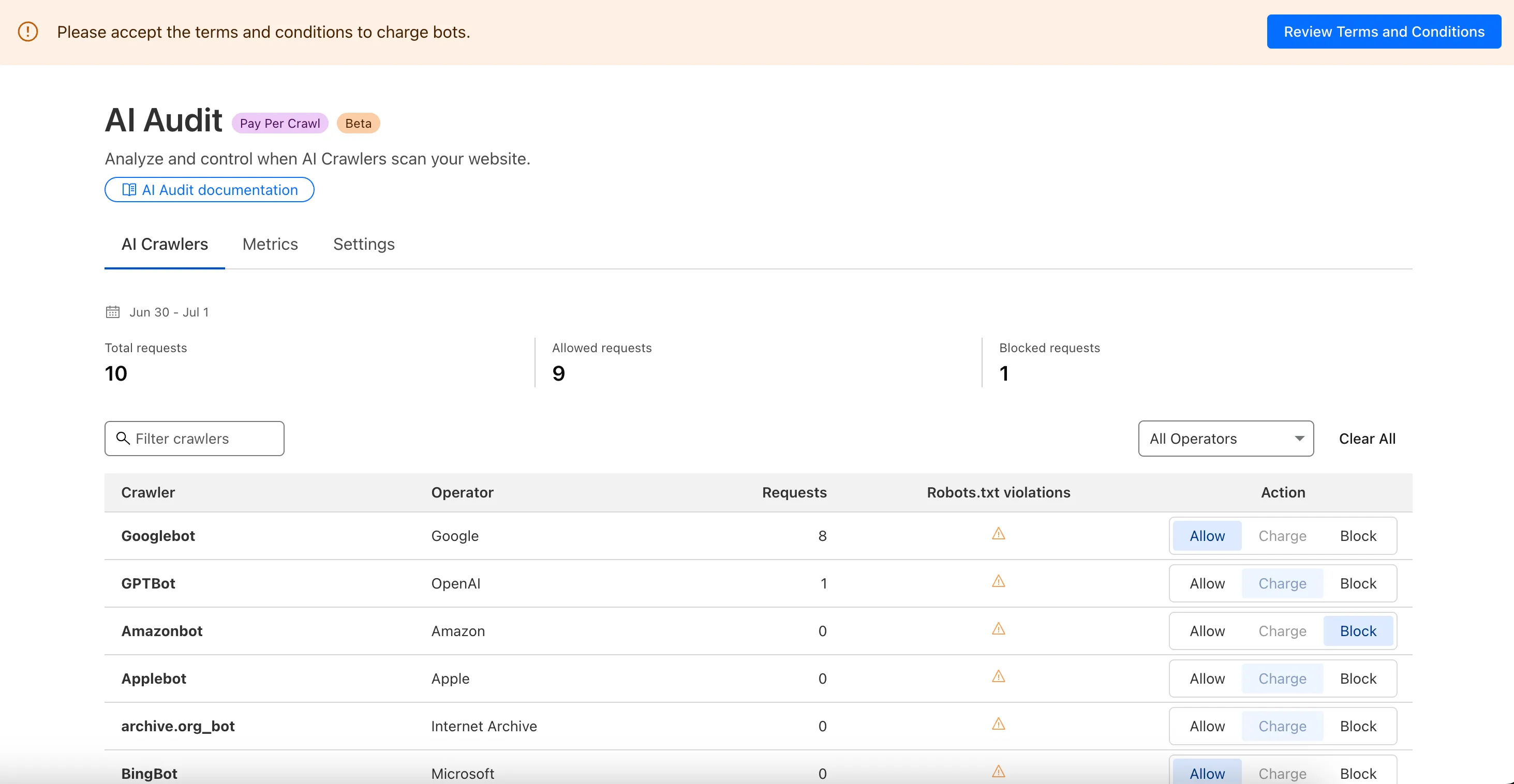
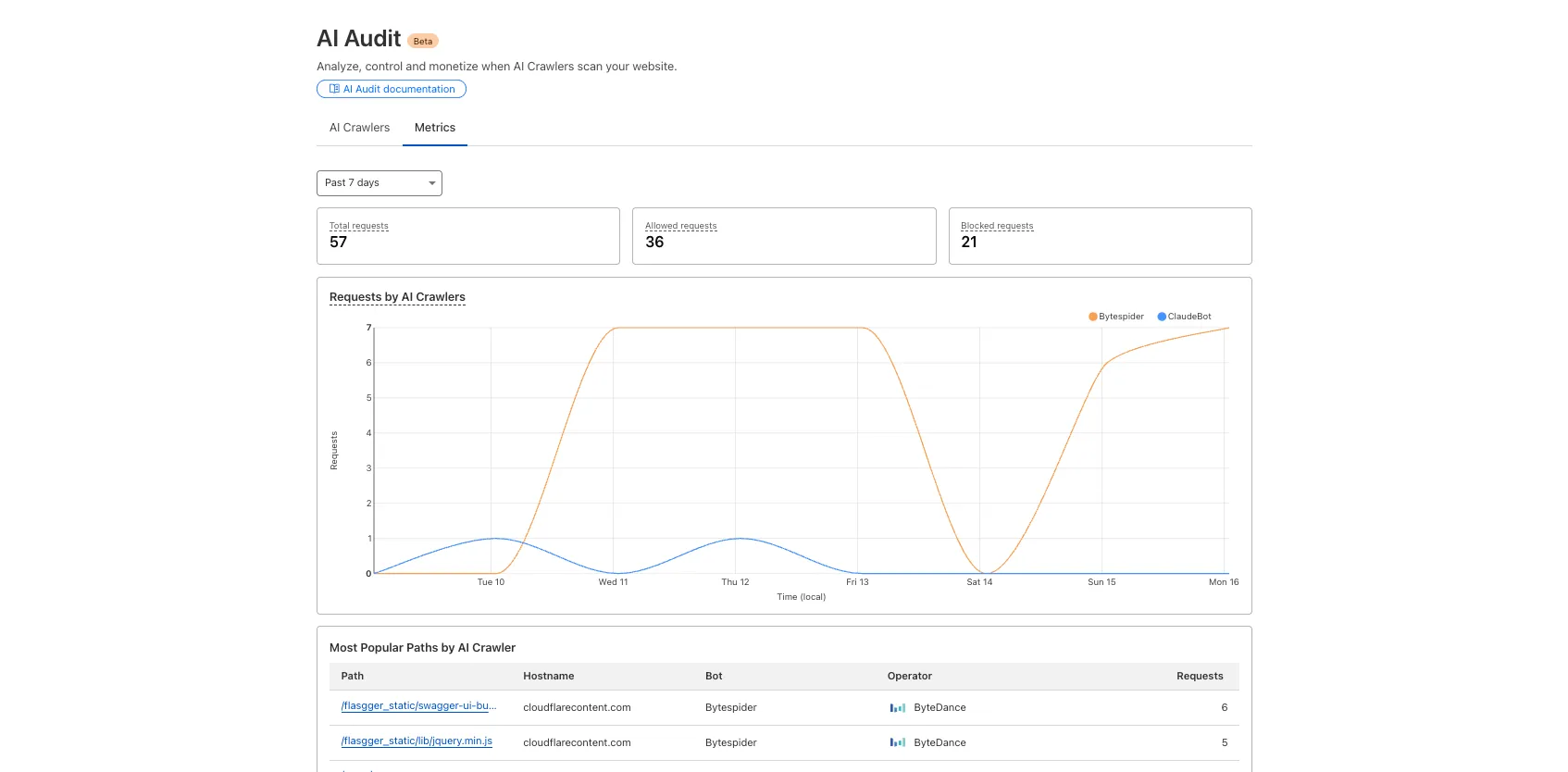
We are introducing a new feature of AI Crawl Control — Pay Per Crawl. Pay Per Crawl enables site owners to require payment from AI crawlers every time the crawlers access their content, thereby fostering a fairer Internet by enabling site owners to control and monetize how their content gets used by AI.
For Site Owners:
Set pricing and select which crawlers to charge for content access
Manage payments via Stripe
Monitor analytics on successful content deliveries
For AI Crawler Owners:
Use HTTP headers to request and accept pricing
Receive clear confirmations on charges for accessed content
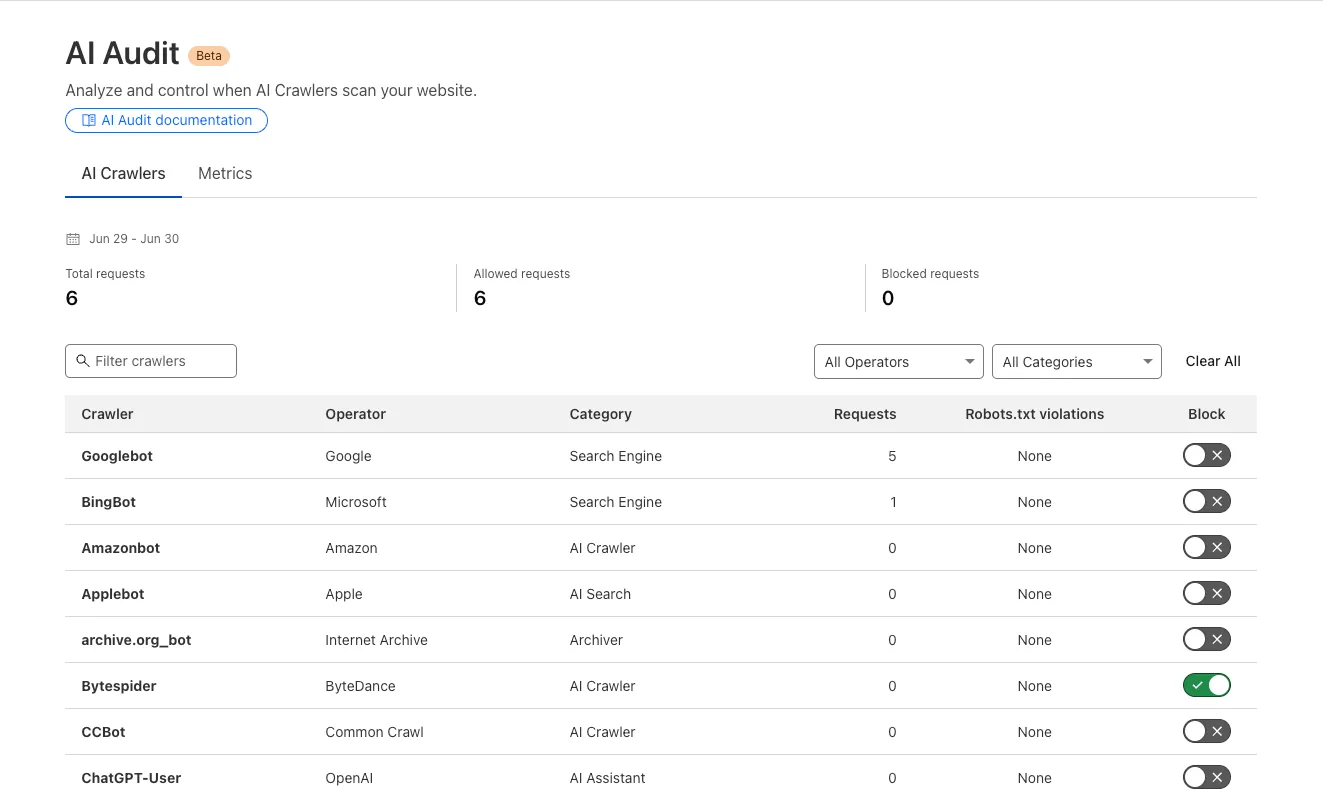
These endpoints support filtering and breakdowns by:
bot: Bot name.
bot_operator: The organization or entity operating the bot.
bot_category: Classification of bot type.
The previously available verified_bots endpoints have now been deprecated in favor of this set of bot insights APIs.
While current data still focuses on verified bots, we plan to expand support for unverified bot traffic in the future.
Learn more about the new Radar bot and crawler insights in our blog post ↗.
You can now use any of Vite's static asset handling ↗ features in your Worker as well as in your frontend.
These include importing assets as URLs, importing as strings and importing from the public directory as well as inlining assets.
Additionally, assets imported as URLs in your Worker are now automatically moved to the client build output.
Here is an example that fetches an imported asset using the assets binding and modifies the response.
// Import the asset URL// This returns the resolved path in development and productionimport myImage from "./my-image.png";export default { async fetch(request, env) { // Fetch the asset using the binding const response = await env.ASSETS.fetch(new URL(myImage, request.url)); // Create a new `Response` object that can be modified const modifiedResponse = new Response(response.body, response); // Add an additional header modifiedResponse.headers.append("my-header", "imported-asset"); // Return the modified response return modifiedResponse; },};
Refer to Static Assets in the Cloudflare Vite plugin docs for more info.
A new GA release for the Android Cloudflare One Agent is now available in the Google Play Store ↗. This release
contains improvements and new exciting features, including post-quantum cryptography.
By tunneling your corporate network traffic over Cloudflare, you can now gain the immediate protection of post-quantum cryptography ↗ without needing to upgrade any of your individual corporate applications or systems.
Changes and improvements
QLogs are now disabled by default and can be enabled in the app by turning on Enable qlogs under Settings > Advanced > Diagnostics > Debug Logs. The QLog setting from previous releases will no longer be respected.
DNS over HTTPS traffic is now included in the WARP tunnel by default.
The WARP client now applies post-quantum cryptography ↗ end-to-end on enabled devices accessing resources behind a Cloudflare Tunnel. This feature can be enabled by MDM.
Fixed an issue that caused WARP connection failures on ChromeOS devices.
A new GA release for the iOS Cloudflare One Agent is now available in the iOS App Store ↗. This release
contains improvements and new exciting features, including post-quantum cryptography.
By tunneling your corporate network traffic over Cloudflare, you can now gain the immediate protection of post-quantum cryptography ↗ without needing to upgrade any of your individual corporate applications or systems.
Changes and improvements
QLogs are now disabled by default and can be enabled in the app by turning on Enable qlogs under Settings > Advanced > Diagnostics > Debug Logs. The QLog setting from previous releases will no longer be respected.
DNS over HTTPS traffic is now included in the WARP tunnel by default.
The WARP client now applies post-quantum cryptography ↗ end-to-end on enabled devices accessing resources behind a Cloudflare Tunnel. This feature can be enabled by MDM.
The Email Routing platform supports SPF ↗ records and DKIM (DomainKeys Identified Mail) ↗ signatures and
honors these protocols when the sending domain has them configured. However, if the sending domain doesn't implement them,
we still forward the emails to upstream mailbox providers.
Starting on July 3, 2025, we will require all emails to be authenticated using at least one of the protocols, SPF or DKIM, to
forward them. We also strongly recommend that all senders implement the DMARC protocol.
If you are using a Worker with an Email trigger to receive email messages and forward them upstream, you will need to handle the case where
the forward action may fail due to missing authentication on the incoming email.
SPAM has been a long-standing issue with email. By enforcing mail authentication, we will increase the efficiency of identifying abusive senders and blocking
bad emails.
If you're an email server delivering emails to large mailbox providers, it's likely you already use these protocols; otherwise, please ensure
you have them properly configured.
Magic Transit customers can now configure AS prepending on their BYOIP prefixes advertised at the Cloudflare edge. This allows for smoother traffic migration and minimizes packet loss when changing providers.
AS prepending makes the Cloudflare route less preferred by increasing the AS path length. You can use this to gradually shift traffic away from Cloudflare before withdrawing a prefix, avoiding abrupt routing changes.
Prepending can be configured via the API or through BGP community values when peering with the Magic Transit routing table. For more information, refer to Advertise prefixes.
Now, you can use remote bindings with your Next.js applications through the @opennextjs/cloudflare adaptor ↗ by enabling the experimental feature in your next.config.ts:
Then, all you have to do is specify which bindings you want connected to the deployed resource on your Cloudflare account via the experimental_remote flag in your binding definition:
You can then run next dev to start a local development session (or start a preview with opennextjs-cloudflare preview), and all requests to env.MY_BUCKET will be proxied to the remote testing-bucket — rather than the default local binding simulations.
Remote bindings & ISR
Remote bindings are also used during the build process, which comes with significant benefits for pages using Incremental Static Regeneration (ISR) ↗. During the build step for an ISR page, your server executes the page's code just as it would for normal user requests. If a page needs data to display (like fetching user info from KV), those requests are actually made. The server then uses this fetched data to render the final HTML.
Data fetching is a critical part of this process, as the finished HTML is only as good as the data it was built with. If the build process can't fetch real data, you end up with a pre-rendered page that's empty or incomplete.
With remote bindings support in OpenNext, your pre-rendered pages are built with real data from the start. The build process uses any configured remote bindings, and any data fetching occurs against the deployed resources on your Cloudflare account.
Workers can now talk to each other across separate dev commands using service bindings and tail consumers, whether started with vite dev or wrangler dev.
Simply start each Worker in its own terminal:
# Terminal 1vite dev# Terminal 2wrangler dev
This is useful when different teams maintain different Workers, or when each Worker has its own build setup or tooling.
AI is supercharging app development for everyone, but we need a safe way to run untrusted, LLM-written code. We’re introducing Sandboxes ↗, which let your Worker run actual processes in a secure, container-based environment.
exec(command: string, args: string[], options?: { stream?: boolean }):Execute a command in the sandbox.
gitCheckout(repoUrl: string, options: { branch?: string; targetDir?: string; stream?: boolean }): Checkout a git repository in the sandbox.
mkdir(path: string, options: { recursive?: boolean; stream?: boolean }): Create a directory in the sandbox.
writeFile(path: string, content: string, options: { encoding?: string; stream?: boolean }): Write content to a file in the sandbox.
readFile(path: string, options: { encoding?: string; stream?: boolean }): Read content from a file in the sandbox.
deleteFile(path: string, options?: { stream?: boolean }): Delete a file from the sandbox.
renameFile(oldPath: string, newPath: string, options?: { stream?: boolean }): Rename a file in the sandbox.
moveFile(sourcePath: string, destinationPath: string, options?: { stream?: boolean }): Move a file from one location to another in the sandbox.
ping(): Ping the sandbox.
Sandboxes are still experimental. We're using them to explore how isolated, container-like workloads might scale on Cloudflare — and to help define the developer experience around them.
You can try it today from your Worker, with just a few lines of code. Let us know what you build.
The @cloudflare/actors library is a new SDK for Durable Objects and provides a powerful set of abstractions for building real-time, interactive, and multiplayer applications on top of Durable Objects. With beta usage and feedback, @cloudflare/actors will become the recommended way to build on Durable Objects and draws upon Cloudflare's experience building products/features on Durable Objects.
The name "actors" originates from the actor programming model, which closely ties to how Durable Objects are modelled.
The @cloudflare/actors library includes:
Storage helpers for querying embeddeded, per-object SQLite storage
Storage helpers for managing SQL schema migrations
Alarm helpers for scheduling multiple alarms provided a date, delay in seconds, or cron expression
Actor class for using Durable Objects with a defined pattern
Durable Objects Workers API ↗ is always available for your application as needed
Storage and alarm helper methods can be combined with any Javascript class ↗ that defines your Durable Object, i.e, ones that extend DurableObject including the Actor class.
import { Storage } from "@cloudflare/actors/storage";export class ChatRoom extends DurableObject<Env> { storage: Storage; constructor(ctx: DurableObjectState, env: Env) { super(ctx, env) this.storage = new Storage(ctx.storage); this.storage.migrations = [{ idMonotonicInc: 1, description: "Create users table", sql: "CREATE TABLE IF NOT EXISTS users (id INTEGER PRIMARY KEY)" }] } async fetch(request: Request): Promise<Response> { // Run migrations before executing SQL query await this.storage.runMigrations(); // Query with SQL template let userId = new URL(request.url).searchParams.get("userId"); const query = this.storage.sql`SELECT * FROM users WHERE id = ${userId};` return new Response(`${JSON.stringify(query)}`); }}
@cloudflare/actors library introduces the Actor class pattern. Actor lets you access Durable Objects without writing the Worker that communicates with your Durable Object (the Worker is created for you). By default, requests are routed to a Durable Object named "default".
export class MyActor extends Actor<Env> { async fetch(request: Request): Promise<Response> { return new Response('Hello, World!') }}export default handler(MyActor);
You can route to different Durable Objects by name within your Actor class using nameFromRequest ↗.
export class MyActor extends Actor<Env> { static nameFromRequest(request: Request): string { let url = new URL(request.url); return url.searchParams.get("userId") ?? "foo"; } async fetch(request: Request): Promise<Response> { return new Response(`Actor identifier (Durable Object name): ${this.identifier}`); }}export default handler(MyActor);
For more examples, check out the library README ↗. @cloudflare/actors library is a place for more helpers and built-in patterns, like retry handling and Websocket-based applications, to reduce development overhead for common Durable Objects functionality. Please share feedback and what more you would like to see on our Discord channel ↗.
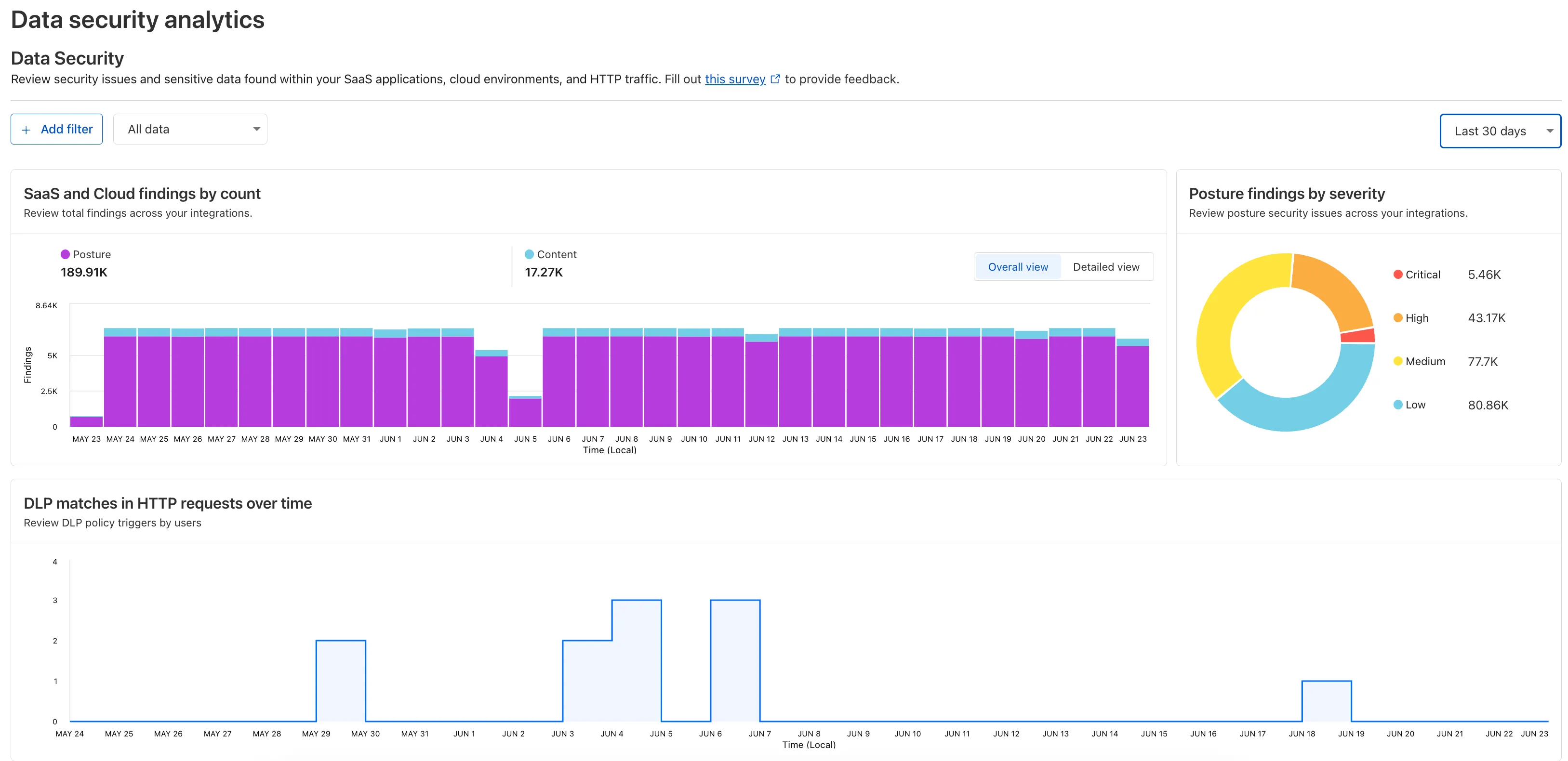
Zero Trust now includes Data security analytics, providing you with unprecedented visibility into your organization sensitive data.
The new dashboard includes:
Sensitive Data Movement Over Time:
See patterns and trends in how sensitive data moves across your environment. This helps understand where data is flowing and identify common paths.
Sensitive Data at Rest in SaaS & Cloud:
View an inventory of sensitive data stored within your corporate SaaS applications (for example, Google Drive, Microsoft 365) and cloud accounts (such as AWS S3).
DLP Policy Activity:
Identify which of your Data Loss Prevention (DLP) policies are being triggered most often.
See which specific users are responsible for triggering DLP policies.
To access the new dashboard, log in to Cloudflare One ↗ and go to Insights on the sidebar.
We're announcing the GA of User Groups for Cloudflare Dashboard and System for Cross Domain Identity Management (SCIM) User Groups, strengthening our RBAC capabilities with stable, production-ready primitives for managing access at scale.
What's New
User Groups [GA]: User Groups are a new Cloudflare IAM primitive that enable administrators to create collections of account members that are treated equally from an access control perspective. User Groups can be assigned permission policies, with individual members in the group inheriting all permissions granted to the User Group. User Groups can be created manually or via our APIs.
SCIM User Groups [GA]: Centralize & simplify your user and group management at scale by syncing memberships directly from your upstream identity provider (like Okta or Entra ID) to the Cloudflare Platform. This ensures Cloudflare stays in sync with your identity provider, letting you apply Permission Policies to those synced groups directly within the Cloudflare Dashboard.
Stability & Scale:
These features have undergone extensive testing during the Public Beta period and are now ready for production use across enterprises of all sizes.
Customers using Cloudflare Network Interconnect with the v1 dataplane can now subscribe to maintenance alert emails. These alerts notify you of planned maintenance windows that may affect your CNI circuits.
We’ve increased the total allowed size of blob fields on data points written to Workers Analytics Engine from 5 KB to 16 KB.
This change gives you more flexibility when logging rich observability data — such as base64-encoded payloads, AI inference traces, or custom metadata — without hitting request size limits.
export default { async fetch(request, env) { env.analyticsDataset.writeDataPoint({ // The sum of all of the blob's sizes can now be 16 KB blobs: [ // The URL of the request to the Worker request.url, // Some metadata about your application you'd like to store JSON.stringify(metadata), // The version of your Worker this datapoint was collected from env.versionMetadata.tag, ], indexes: ["sample-index"], }); },};
worker.tsts
export default { async fetch(request, env) { env.analyticsDataset.writeDataPoint({ // The sum of all of the blob's sizes can now be 16 KB blobs: [ // The URL of the request to the Worker request.url, // Some metadata about your application you'd like to store JSON.stringify(metadata), // The version of your Worker this datapoint was collected from env.versionMetadata.tag, ], indexes: ["sample-index"], }); }};
In AutoRAG, you can now view your object's custom metadata in the response from /search and /ai-search, and optionally add a context field in the custom metadata of an object to provide additional guidance for AI-generated answers.
You can add custom metadata to an object when uploading it to your R2 bucket.
Object's custom metadata in search responses
When you run a search, AutoRAG now returns any custom metadata associated with the object. This metadata appears in the response inside attributes then file , and can be used for downstream processing.
For example, the attributes section of your search response may look like:
{ "attributes": { "timestamp": 1750001460000, "folder": "docs/", "filename": "launch-checklist.md", "file": { "url": "https://wiki.company.com/docs/launch-checklist", "context": "A checklist for internal launch readiness, including legal, engineering, and marketing steps." } }}
Add a context field to guide LLM answers
When you include a custom metadata field named context, AutoRAG attaches that value to each chunk of the file. When you run an /ai-search query, this context is passed to the LLM and can be used as additional input when generating an answer.
We recommend using the context field to describe supplemental information you want the LLM to consider, such as a summary of the document or a source URL. If you have several different metadata attributes, you can join them together however you choose within the context string.
For example:
{ "context": "summary: 'Checklist for internal product launch readiness, including legal, engineering, and marketing steps.'; url: 'https://wiki.company.com/docs/launch-checklist'"}
This gives you more control over how your content is interpreted, without requiring you to modify the original contents of the file.
In AutoRAG, you can now filter by an object's file name using the filename attribute, giving you more control over which files are searched for a given query.
This is useful when your application has already determined which files should be searched. For example, you might query a PostgreSQL database to get a list of files a user has access to based on their permissions, and then use that list to limit what AutoRAG retrieves.
For example, your search query may look like:
const response = await env.AI.autorag("my-autorag").search({ query: "what is the project deadline?", filters: { type: "eq", key: "filename", value: "project-alpha-roadmap.md", },});
This allows you to connect your application logic with AutoRAG's retrieval process, making it easy to control what gets searched without needing to reindex or modify your data.
This allows users to query DNS analytics across multiple zones in their account, by using the accounts filter.
Here is an example to retrieve the most recent DNS queries across all zones in your account that resulted in an NXDOMAIN response over a given time frame. Please replace a30f822fcd7c401984bf85d8f2a5111c with your actual account ID.
GraphQL example for account-level DNS analyticsgraphql
We've simplified the programmatic deployment of Workers via our Cloudflare SDKs. This update abstracts away the low-level complexities of the multipart/form-data upload process, allowing you to focus on your code while we handle the deployment mechanics.
Previously, deploying a Worker programmatically required manually constructing a multipart/form-data HTTP request, packaging your code and a separate metadata.json file. This was more complicated and verbose, and prone to formatting errors.
For example, here's how you would upload a Worker script previously with cURL:
With the new SDK interface, you can now define your entire Worker configuration using a single, structured object.
This approach allows you to specify metadata like main_module, bindings, and compatibility_date as clearer properties directly alongside your script content. Our SDK takes this logical object and automatically constructs the complex multipart/form-data API request behind the scenes.
Fixed the cloudflare_workers_script ↗ resource in Terraform, which previously was producing a diff even when there were no changes. Now, your terraform plan outputs will be cleaner and more reliable.
Fixed the cloudflare_workers_for_platforms_dispatch_namespace ↗, where the provider would attempt to recreate the namespace on a terraform apply. The resource now correctly reads its remote state, ensuring stability for production environments and CI/CD workflows.
The cloudflare_workers_route ↗ resource now allows for the script property to be empty, null, or omitted to indicate that pattern should be negated for all scripts (see routes docs). You can now reserve a pattern or temporarily disable a Worker on a route without deleting the route definition itself.
Using primary_location_hint in the cloudflare_d1_database ↗ resource will no longer always try to recreate. You can now safely change the location hint for a D1 database without causing a destructive operation.
Gateway will now evaluate Network (Layer 4) policiesbeforeHTTP (Layer 7) policies. This change preserves your existing security posture and does not affect which traffic is filtered — but it may impact how notifications are displayed to end users.
This change will roll out progressively between July 14–18, 2025. If you use HTTP policies, we recommend reviewing your configuration ahead of rollout to ensure the user experience remains consistent.
Updated order of enforcement
Previous order:
DNS policies
HTTP policies
Network policies
New order:
DNS policies
Network policies
HTTP policies
Action required: Review your Gateway HTTP policies
This change may affect block notifications. For example:
You have an HTTP policy to block example.com and display a block page.
You also have a Network policy to block example.com silently (no client notification).
With the new order, the Network policy will trigger first — and the user will no longer see the HTTP block page.
To ensure users still receive a block notification, you can:
Add a client notification to your Network policy, or
Use only the HTTP policy for that domain.
Why we’re making this change
This update is based on user feedback and aims to:
Create a more intuitive model by evaluating network-level policies before application-level policies.
Minimize 526 connection errors by verifying the network path to an origin before attempting to establish a decrypted TLS connection.
Log Explorer is now GA, providing native observability and forensics for traffic flowing through Cloudflare.
Search and analyze your logs, natively in the Cloudflare dashboard. These logs are also stored in Cloudflare's network, eliminating many of the costs associated with other log providers.
With Log Explorer, you can now:
Monitor security and performance issues with custom dashboards – use natural language to define charts for measuring response time, error rates, top statistics and more.
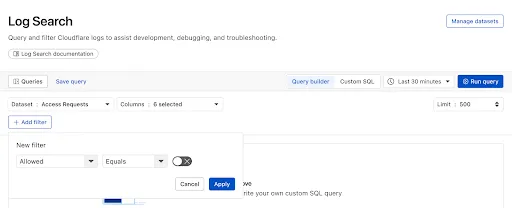
Investigate and troubleshoot issues with Log Search – use data type-aware search filters or custom sql to investigate detailed logs.
Save time and collaborate with saved queries – save Log Search queries for repeated use or sharing with other users in your account.
Access Log Explorer at the account and zone level – easily find Log Explorer at the account and zone level for querying any dataset.
Today we announced the public beta ↗ of remote bindings for local development. With remote bindings, you can now connect to deployed resources like R2 buckets and D1 databases while running Worker code on your local machine. This means you can test your local code changes against real data and services, without the overhead of deploying for each iteration.
Example configuration
To enable remote mode, add "experimental_remote" : true to each binding that you want to rely on a remote resource running on Cloudflare:
{ "name": "my-worker", // Set this to today's date "compatibility_date": "2026-07-20", "r2_buckets": [ { "bucket_name": "screenshots-bucket", "binding": "screenshots_bucket", "experimental_remote": true, }, ],}
name = "my-worker"# Set this to today's datecompatibility_date = "2026-07-20"[[r2_buckets]]bucket_name = "screenshots-bucket"binding = "screenshots_bucket"experimental_remote = true
When remote bindings are configured, your Worker still executes locally, but all binding calls are proxied to the deployed resource that runs on Cloudflare's network.
You can try out remote bindings for local development today with:
Wrangler v4.20.3: Use the wrangler dev --x-remote-bindings command.
The Cloudflare Vite Plugin: Refer to the documentation for how to enable in your Vite config.
The Cloudflare Vitest Plugin: Refer to the documentation for how to enable in your Vitest config.
Have feedback?
Join the discussion in our beta announcement ↗ to share feedback or report any issues.