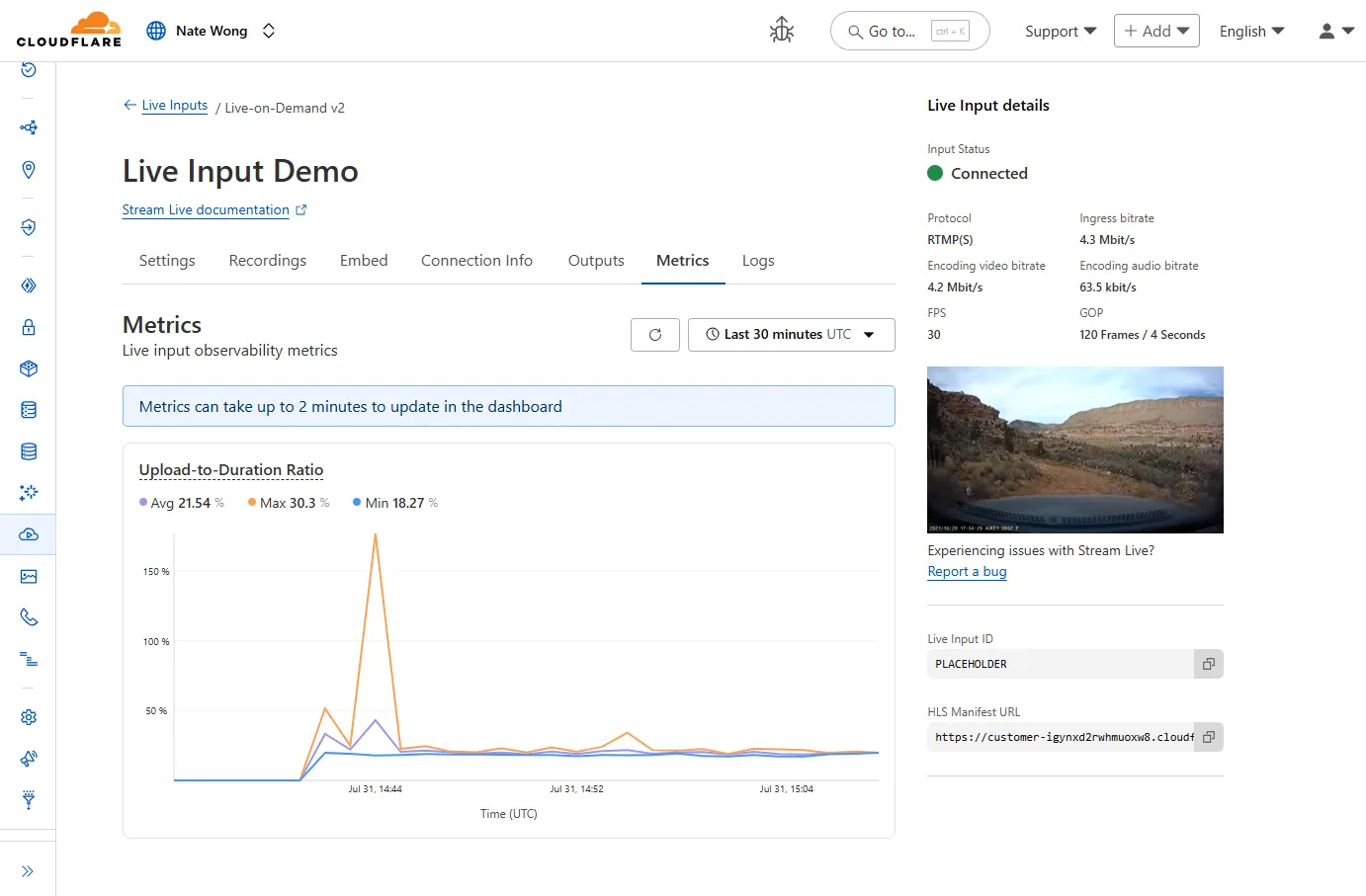
New information about broadcast metrics and events is now available in
Cloudflare Stream in the Live Input details of the Dashboard.
You can now easily understand broadcast-side health and performance with new
observability, which can help when troubleshooting common issues, particularly
for new customers who are just getting started, and platform customers who may
have limited visibility into how their end-users configure their encoders.
To get started, start a live stream (just getting started?), then visit the Live Input details page in Dash.
See our new live Troubleshooting guide
to learn what these metrics mean and how to use them to address common broadcast
issues.
You can now import waitUntil from cloudflare:workers to extend your Worker's execution beyond the request lifecycle from anywhere in your code.
Previously, waitUntil could only be accessed through the execution context (ctx) parameter passed to your Worker's handler functions. This meant that if you needed to schedule background tasks from deeply nested functions or utility modules, you had to pass the ctx object through multiple function calls to access waitUntil.
Now, you can import waitUntil directly and use it anywhere in your Worker without needing to pass ctx as a parameter:
import { waitUntil } from "cloudflare:workers";export function trackAnalytics(eventData) { const analyticsPromise = fetch("https://analytics.example.com/track", { method: "POST", body: JSON.stringify(eventData), }); // Extend execution to ensure analytics tracking completes waitUntil(analyticsPromise);}
This is particularly useful when you want to:
Schedule background tasks from utility functions or modules
Extend execution for analytics, logging, or cleanup operations
Avoid passing the execution context through multiple layers of function calls
import { waitUntil } from "cloudflare:workers";export default { async fetch(request, env, ctx) { // Background task that should complete even after response is sent cleanupTempData(env.KV_NAMESPACE); return new Response("Hello, World!"); }};function cleanupTempData(kvNamespace) { // This function can now use waitUntil without needing ctx const deletePromise = kvNamespace.delete("temp-key"); waitUntil(deletePromise);}
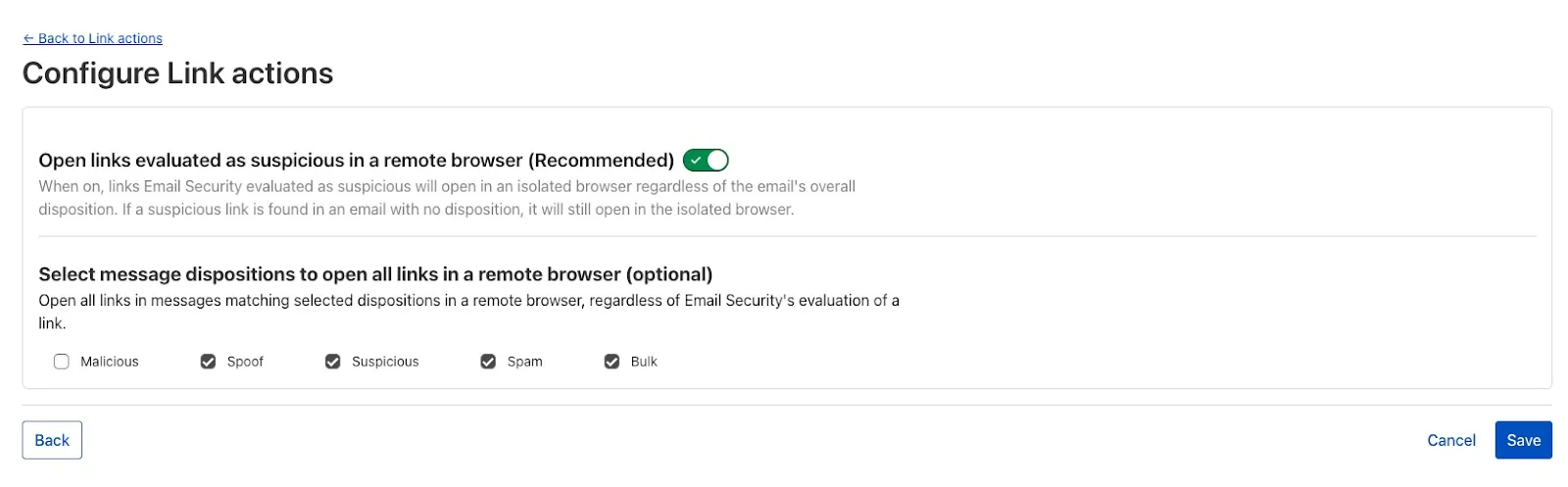
When you deploy MX or Inline, not only can you apply email link isolation to suspicious links in all emails (including benign), you can now also apply email link isolation to all links of a specified disposition. This provides more flexibility in controlling user actions within emails.
For example, you may want to deliver suspicious messages but isolate the links found within them so that users who choose to interact with the links will not accidentally expose your organization to threats. This means your end users are more secure than ever before.
To isolate all links within a message based on the disposition, select Settings > Link Actions > View and select Configure. As with other other links you isolate, an interstitial will be provided to warn users that this site has been isolated and the link will be recrawled live to evaluate if there are any changes in our threat intel. Learn more about this feature on Configure link actions ↗.
This feature is available across these Email security packages:
This week’s highlight focuses on two critical vulnerabilities affecting key infrastructure and enterprise content management platforms. Both flaws present significant remote code execution risks that can be exploited with minimal or no user interaction.
Key Findings
Squid (≤6.3) — CVE-2025-54574: A heap buffer overflow occurs when processing Uniform Resource Names (URNs). This vulnerability may allow remote attackers to execute arbitrary code on the server. The issue has been resolved in version 6.4.
Adobe AEM (≤6.5.23) — CVE-2025-54253: Due to a misconfiguration, attackers can achieve remote code execution without requiring any user interaction, posing a severe threat to affected deployments.
Impact
Both vulnerabilities expose critical attack vectors that can lead to full server compromise. The Squid heap buffer overflow allows remote code execution by crafting malicious URNs, which can lead to server takeover or denial of service. Given Squid’s widespread use as a caching proxy, this flaw could be exploited to disrupt network traffic or gain footholds inside secure environments.
Adobe AEM’s remote code execution vulnerability enables attackers to run arbitrary code on the content management server without any user involvement. This puts sensitive content, application integrity, and the underlying infrastructure at extreme risk. Exploitation could lead to data theft, defacement, or persistent backdoor installation.
These findings reinforce the urgency of updating to the patched versions — Squid 6.4 and Adobe AEM 6.5.24 or later — and reviewing configurations to prevent exploitation.
Ruleset
Rule ID
Legacy Rule ID
Description
Previous Action
New Action
Comments
Cloudflare Managed Ruleset
100844
Adobe Experience Manager Forms - Remote Code Execution - CVE:CVE-2025-54253
By setting the value of the cache property to no-cache, you can force Cloudflare's
cache to revalidate its contents with the origin when
making subrequests from Cloudflare Workers.
When no-cache is set, the Worker request will first look for a match in Cloudflare's cache, then:
If there is a match, a conditional request is sent to the origin, regardless of whether or not the match is fresh or stale. If the resource has not changed, the
cached version is returned. If the resource has changed, it will be downloaded from the origin, updated in the cache, and returned.
If there is no match, Workers will make a standard request to the origin and cache the response.
This increases compatibility with NPM packages and JavaScript frameworks that rely on setting the
cache property, which is a cross-platform standard part
of the Request interface. Previously, if you set the cache
property on Request to 'no-cache', the Workers runtime threw an exception.
Cloudflare Load Balancing Monitors support loading and applying settings for a specific zone to monitoring requests to origin endpoints. This feature has been migrated to new infrastructure to improve reliability, performance, and accuracy.
All zone monitors have been tested against the new infrastructure. There should be no change to health monitoring results of currently healthy and active pools. Newly created or re-enabled pools may need validation of their monitor zone settings before being introduced to service, especially regarding correct application of mTLS.
What you can expect:
More reliable application of zone settings to monitoring requests, including
Authenticated Origin Pulls
Aegis Egress IP Pools
Argo Smart Routing
HTTP/2 to Origin
Improved support and bug fixes for retries, redirects, and proxied origin resolution
Improved performance and reliability of monitoring requests within the Cloudflare network
Unrelated CDN or WAF configuration changes should have no risk of impact to pool health
Radar now introduces Certificate Transparency (CT) insights, providing visibility into certificate issuance trends based on Certificate Transparency logs currently monitored by Cloudflare.
The following API endpoints are now available:
/ct/timeseries: Retrieves certificate issuance time series.
The latest releases of @cloudflare/agents ↗ brings major improvements to MCP transport protocols support and agents connectivity. Key updates include:
MCP elicitation support
MCP servers can now request user input during tool execution, enabling interactive workflows like confirmations, forms, and multi-step processes. This feature uses durable storage to preserve elicitation state even during agent hibernation, ensuring seamless user interactions across agent lifecycle events.
// Request user confirmation via elicitationconst confirmation = await this.elicitInput({ message: `Are you sure you want to increment the counter by ${amount}?`, requestedSchema: { type: "object", properties: { confirmed: { type: "boolean", title: "Confirm increment", description: "Check to confirm the increment", }, }, required: ["confirmed"], },});
Check out our demo ↗ to see elicitation in action.
HTTP streamable transport for MCP
MCP now supports HTTP streamable transport which is recommended over SSE. This transport type offers:
Better performance: More efficient data streaming and reduced overhead
Improved reliability: Enhanced connection stability and error recover- Automatic fallback: If streamable transport is not available, it gracefully falls back to SSE
The SDK automatically selects the best available transport method, gracefully falling back from streamable-http to SSE when needed.
Enhanced MCP connectivity
Significant improvements to MCP server connections and transport reliability:
Auto transport selection: Automatically determines the best transport method, falling back from streamable-http to SSE as needed
Improved error handling: Better connection state management and error reporting for MCP servers
Reliable prop updates: Centralized agent property updates ensure consistency across different contexts
Lightweight .queue for fast task deferral
You can use .queue() to enqueue background work — ideal for tasks like processing user messages, sending notifications etc.
class MyAgent extends Agent { doSomethingExpensive(payload) { // a long running process that you want to run in the background } queueSomething() { await this.queue("doSomethingExpensive", somePayload); // this will NOT block further execution, and runs in the background await this.queue("doSomethingExpensive", someOtherPayload); // the callback will NOT run until the previous callback is complete // ... call as many times as you want }}
Want to try it yourself? Just define a method like processMessage in your agent, and you’re ready to scale.
New email adapter
Want to build an AI agent that can receive and respond to emails automatically? With the new email adapter and onEmail lifecycle method, now you can.
export class EmailAgent extends Agent { async onEmail(email: AgentEmail) { const raw = await email.getRaw(); const parsed = await PostalMime.parse(raw); // create a response based on the email contents // and then send a reply await this.replyToEmail(email, { fromName: "Email Agent", body: `Thanks for your email! You've sent us "${parsed.subject}". We'll process it shortly.`, }); }}
Custom methods are now automatically wrapped with the agent's context, so calling getCurrentAgent() should work regardless of where in an agent's lifecycle it's called. Previously this would not work on RPC calls, but now just works out of the box.
export class MyAgent extends Agent { async suggestReply(message) { // getCurrentAgent() now correctly works, even when called inside an RPC method const { agent } = getCurrentAgent()!; return generateText({ prompt: `Suggest a reply to: "${message}" from "${agent.name}"`, tools: [replyWithEmoji], }); }}
We’ve shipped a major release for the @cloudflare/sandbox ↗ SDK, turning it into a full-featured, container-based execution platform that runs securely on Cloudflare Workers.
This update adds live streaming of output, persistent Python and JavaScript code interpreters with rich output support (charts, tables, HTML, JSON), file system access, Git operations, full background process control, and the ability to expose running services via public URLs.
This makes it ideal for building AI agents, CI runners, cloud REPLs, data analysis pipelines, or full developer tools — all without managing infrastructure.
Code interpreter (Python, JS, TS)
Create persistent code contexts with support for rich visual + structured outputs.
createCodeContext(options)
Creates a new code execution context with persistent state.
Sandboxes are still experimental. We're using them to explore how isolated, container-like workloads might scale on Cloudflare — and to help define the developer experience around them.
We're thrilled to be a Day 0 partner with OpenAI ↗ to bring their latest open models ↗ to Workers AI, including support for Responses API, Code Interpreter, and Web Search (coming soon).
Get started with the new models at @cf/openai/gpt-oss-120b and @cf/openai/gpt-oss-20b.
Check out the blog ↗ for more details about the new models, and the gpt-oss-120b and gpt-oss-20b model pages for more information about pricing and context windows.
Responses API
If you call the model through:
Workers Binding, it will accept/return Responses API – env.AI.run(“@cf/openai/gpt-oss-120b”)
REST API on /run endpoint, it will accept/return Responses API – https://api.cloudflare.com/client/v4/accounts/<account_id>/ai/run/@cf/openai/gpt-oss-120b
REST API on new /responses endpoint, it will accept/return Responses API – https://api.cloudflare.com/client/v4/accounts/<account_id>/ai/v1/responses
REST API for OpenAI Compatible endpoint, it will return Chat Completions (coming soon) – https://api.cloudflare.com/client/v4/accounts/<account_id>/ai/v1/chat/completions
The model is natively trained to support stateful code execution, and we've implemented support for this feature using our Sandbox SDK ↗ and Containers ↗. Cloudflare's Developer Platform is uniquely positioned to support this feature, so we're very excited to bring our products together to support this new use case.
Web Search (coming soon)
We are working to implement Web Search for the model, where users can bring their own Exa API Key so the model can browse the Internet.
As part of the ongoing open beta for Workers Builds, we’ve increased the available disk space for builds from 8 GB to 20 GB for both Free and Paid plans.
This provides more space for larger projects, dependencies, and build artifacts while improving overall build reliability.
Metric
Free Plan
Paid Plans
Disk Space
20 GB
20 GB
All other build limits — including CPU, memory, build minutes, and timeout remain unchanged.
This week's highlight focuses on a series of significant vulnerabilities identified across widely adopted web platforms, from enterprise-grade CMS to essential backend administration tools. The findings reveal multiple vectors for attack, including critical flaws that allow for full server compromise and others that enable targeted attacks against users.
Key Findings
Sitecore (CVE-2025-34509, CVE-2025-34510, CVE-2025-34511): A hardcoded credential allows remote attackers to access administrative APIs. Once authenticated, they can exploit an additional vulnerability to upload arbitrary files, leading to remote code execution.
Grafana (CVE-2025-4123): A cross-site scripting (XSS) vulnerability allows an attacker to redirect users to a malicious website, which can then execute arbitrary JavaScript in the victim's browser.
LaRecipe (CVE-2025-53833): Through Server-Side Template Injection, attackers can execute arbitrary commands on the server, potentially access sensitive environment variables, and escalate access depending on server configuration.
CentOS WebPanel (CVE-2025-48703): A command injection vulnerability could allow a remote attacker to execute arbitrary commands on the server.
WordPress (CVE-2023-5561): This vulnerability allows unauthenticated attackers to determine the email addresses of users who have published public posts on an affected website.
WordPress Plugin - WPBookit (CVE-2025-6058): A missing file type validation allows unauthenticated attackers to upload arbitrary files to the server, creating the potential for remote code execution.
WordPress Theme - Motors (CVE-2025-4322): Due to improper identity validation, an unauthenticated attacker can change the passwords of arbitrary users, including administrators, to gain access to their accounts.
Impact
These vulnerabilities pose a multi-layered threat to widely adopted web technologies, ranging from enterprise-grade platforms like Sitecore to everyday solutions such as WordPress, and backend tools like CentOS WebPanel. The most severe risks originate in remote code execution (RCE) flaws found in Sitecore, CentOS WebPanel, LaRecipe, and the WPBookit plugin. These allow attackers to bypass security controls and gain deep access to the server, enabling them to steal sensitive data, deface websites, install persistent malware, or use the compromised server as a launchpad for further attacks.
The privilege escalation vulnerability is the Motors theme, which allows for a complete administrative account takeover on WordPress sites. This effectively hands control of the application to an attacker, who can then manipulate content, exfiltrate user data, and alter site functionality without needing to breach the server itself.
The Grafana cross-site scripting (XSS) flaw can be used to hijack authenticated user sessions or steal credentials, turning a trusted user's browser into an attack vector.
Meanwhile, the information disclosure flaw in WordPress core provides attackers with valid user emails, fueling targeted phishing campaigns that aim to secure the same account access achievable through the other exploits.
Earlier this year, we announced the launch of the new Terraform v5 Provider. We are aware of the high number of issues ↗ reported by the Cloudflare community related to the v5 release. We have committed to releasing improvements on a 2 week cadeance to ensure it's stability and reliability. We have also pivoted from an issue-to-issue approach to a resource-per-resource approach - we will be focusing on specific resources for every release, stabilizing the release and closing all associated bugs with that resource before moving onto resolving migration issues.
Thank you for continuing to raise issues. We triage them weekly and they help make our products stronger.
Changes
Resources stabilized:
cloudflare_custom_pages
cloudflare_page_rule
cloudflare_dns_record
cloudflare_argo_tiered_caching
Addressed chronic drift issues in cloudflare_logpush_job, cloudflare_zero_trust_dns_location, cloudflare_ruleset & cloudflare_api_token
cloudflare_zone_subscription returns expected values rate_plan.id from former versions
cloudflare_workers_script can now successfully be destroyed with bindings & migration for Durable Objects now recorded in tfstate
Ability to configure add_headers under cloudflare_zero_trust_gateway_policy
Other bug fixes
For a more detailed look at all of the changes, see the changelog ↗ in GitHub.
If you have an unaddressed issue with the provider, we encourage you to check the open issues ↗ and open a new one if one does not already exist for what you are experiencing.
Upgrading
We suggest holding off on migration to v5 while we work on stabilization. This help will you avoid any blocking issues while the Terraform resources are actively being stabilized.
If you'd like more information on migrating from v4 to v5, please make use of the migration guide ↗. We have provided automated migration scripts using Grit which simplify the transition, although these do not support implementations which use Terraform modules, so customers making use of modules need to migrate manually. Please make use of terraform plan to test your changes before applying, and let us know if you encounter any additional issues by reporting to our GitHub repository ↗.
You can now configure and run Containers alongside your Worker during local development when using the Cloudflare Vite plugin. Previously, you could only develop locally when using Wrangler as your local development server.
Configuration
You can simply configure your Worker and your Container(s) in your Wrangler configuration file:
Once your Worker and Containers are configured, you can access the Container instances from your Worker code:
import { Container, getContainer } from "@cloudflare/containers";export class MyContainer extends Container { defaultPort = 4000; // Port the container is listening on sleepAfter = "10m"; // Stop the instance if requests not sent for 10 minutes}async fetch(request, env) { const { "session-id": sessionId } = await request.json(); // Get the container instance for the given session ID const containerInstance = getContainer(env.MY_CONTAINER, sessionId) // Pass the request to the container instance on its default port return containerInstance.fetch(request);}
Local development
To develop your Worker locally, start a local dev server by running
The Cloudflare Terraform provider resources for Cloudflare WAN tunnels and routes now support Terraform provider version 5. Customers using infrastructure-as-code workflows can manage their tunnel and route configuration with the latest provider version.
Today, we are excited to announce that all Magic Transit and Magic WAN customers with CMB EU (Customer Metadata Boundary - Europe) enabled in their account will be able to access GRE, IPsec, and CNI health check and traffic volume data in the Cloudflare dashboard and via API.
This ensures that all Magic Transit and Magic WAN customers with CMB EU enabled will be able to access all Magic Transit and Magic WAN features.
Specifically, these two GraphQL endpoints are now compatible with CMB EU:
Define environment variables and secrets store bindings in your Wrangler configuration file as normal:
{ "name": "my-worker", "main": "./src/index.ts", // Set this to today's date "compatibility_date": "2026-07-20", "vars": { "API_HOST": "https://example.com", }, "secrets_store_secrets": [ { "binding": "API_KEY", "store_id": "demo", "secret_name": "api-key" } ]}
name = "my-worker"main = "./src/index.ts"# Set this to today's datecompatibility_date = "2026-07-20"[vars]API_HOST = "https://example.com"[[secrets_store_secrets]]binding = "API_KEY"store_id = "demo"secret_name = "api-key"
Add secrets to a .dev.vars.example or .env.example file:
.dev.vars.exampleini
COOKIE_SIGNING_KEY=my-secret # comment
And optionally, you can add a description for these bindings in your template's package.json to help users understand how to configure each value:
package.jsonjson
{ "name": "my-worker", "private": true, "cloudflare": { "bindings": { "API_KEY": { "description": "Select your company's API key for connecting to the example service." }, "COOKIE_SIGNING_KEY": { "description": "Generate a random string using `openssl rand -hex 32`." } } }}
These secrets and environment variables will be presented to users in the dashboard as they deploy this template, allowing them to configure each value. Additional information about creating templates and Deploy to Cloudflare buttons can be found in our documentation.
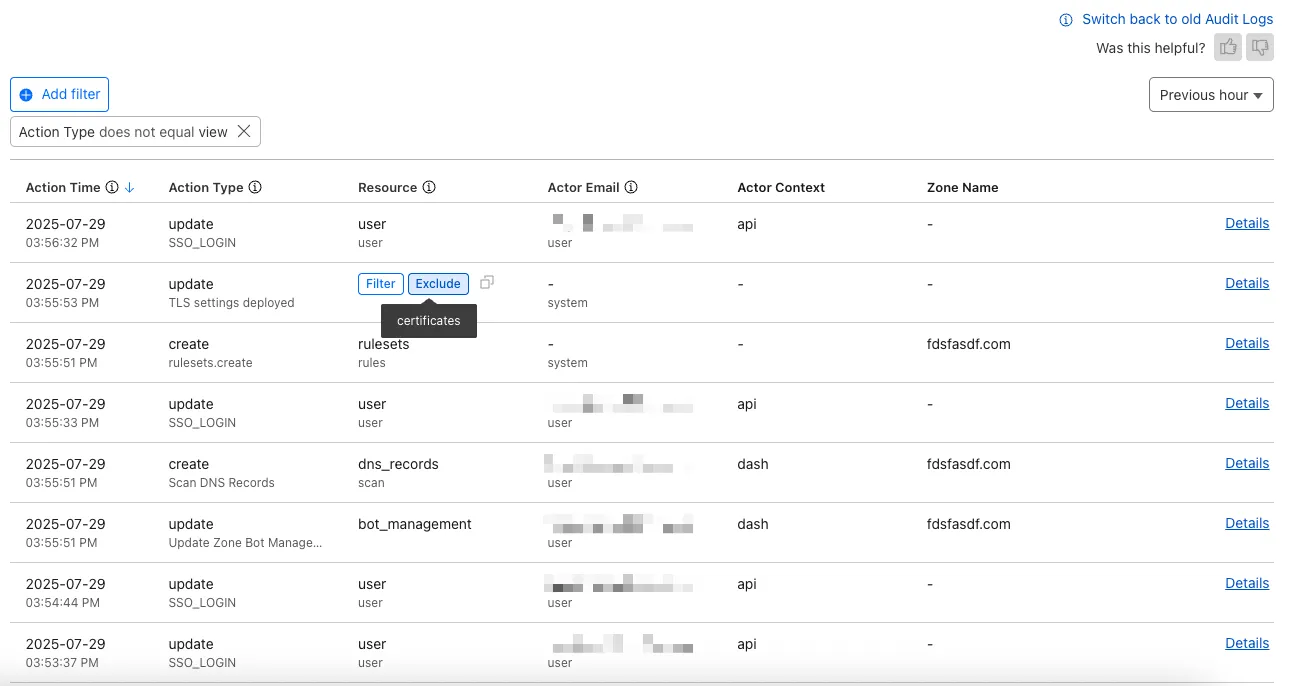
The Audit Logs v2 UI is now available to all Cloudflare customers in Beta. This release builds on the public Beta of the Audit Logs v2 API and introduces a redesigned user interface with powerful new capabilities to make it easier to investigate account activity.
Enabling the new UI
To try the new user interface, go to Manage Account > Audit Logs. The previous version of Audit Logs remains available and can be re-enabled at any time using the Switch back to old Audit Logs link in the banner at the top of the page.
New Features:
Advanced Filtering: Filter logs by actor, resource, method, and more for faster insights.
On-hover filter controls: Easily include or exclude values in queries by hovering over fields within a log entry.
Detailed Log Sidebar: View rich context for each log entry without leaving the main view.
JSON Log View: Inspect the raw log data in a structured JSON format.
Custom Time Ranges: Define your own time windows to view historical activity.
Infinite Scroll: Seamlessly browse logs without clicking through pages.
A small number of audit logs may currently be unavailable in Audit Logs v2. In some cases, certain fields such as actor information may be missing in certain audit logs. We are actively working to improve coverage and completeness for General Availability.
Export to CSV is not supported in the new UI.
We are actively refining the Audit Logs v2 experience and welcome your feedback. You can share overall feedback by clicking the thumbs up or thumbs down icons at the top of the page, or provide feedback on specific audit log entries using the thumbs icons next to each audit log line or by filling out our feedback form ↗.
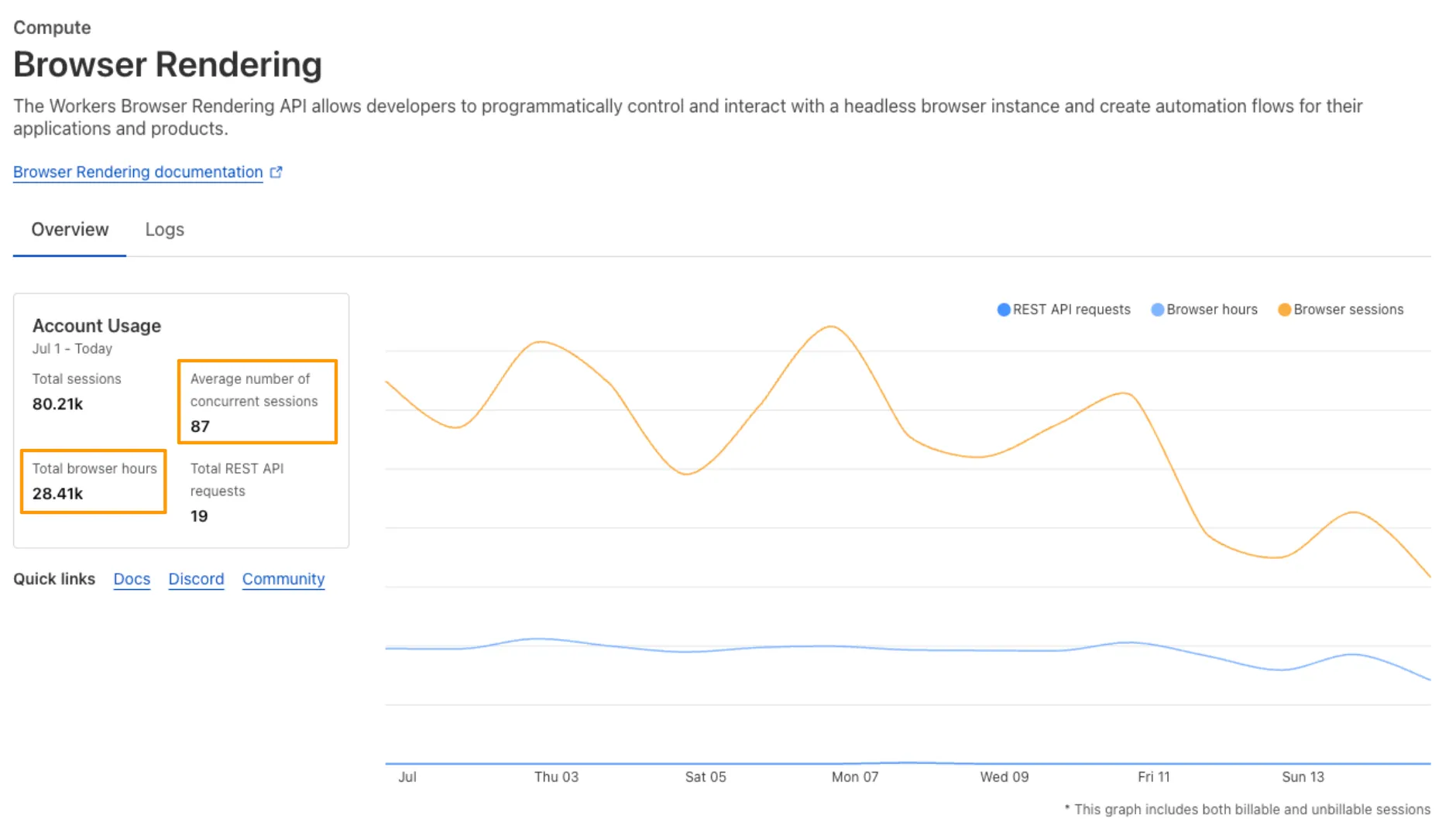
We’ve launched pricing for Browser Rendering, including a free tier and a pay-as-you-go model that scales with your needs. Starting August 20, 2025, Cloudflare will begin billing for Browser Rendering.
There are two ways to use Browser Rendering. Depending on the method you use, here’s how billing will work:
REST API: Charged for Duration only ($/browser hour)
Browser Sessions: Charged for both Duration and Concurrency ($/browser hour and # of concurrent browsers)
Included usage and pricing by plan
Plan
Included duration
Included concurrency
Price (beyond included)
Workers Free
10 minutes per day
3 concurrent browsers
N/A
Workers Paid
10 hours per month
10 concurrent browsers (averaged monthly)
1. REST API: 0.09 per additional browser hour <br />**2. Workers Bindings**: 0.09 per additional browser hour $2.00 per additional concurrent browser
What you need to know:
Workers Free Plan: 10 minutes of browser usage per day with 3 concurrent browsers at no charge.
Workers Paid Plan: 10 hours of browser usage per month with 10 concurrent browsers (averaged monthly) at no charge. Additional usage is charged as shown above.
If you've been using Browser Rendering and do not wish to incur charges, ensure your usage stays within your plan's included usage. To estimate costs, take a look at these example pricing scenarios.
We have introduced a new Security Threat category called Scam. Relevant domains are marked with the Scam category. Scam typically refers to fraudulent websites and schemes designed to trick victims into giving away money or personal information.
This week’s update spotlights several vulnerabilities across Apache Tomcat, MongoDB, and Fortinet FortiWeb. Several flaws related with a memory leak in Apache Tomcat can lead to a denial-of-service attack. Additionally, a code injection flaw in MongoDB's Mongoose library allows attackers to bypass security controls to access restricted data.
Key Findings
Fortinet FortiWeb (CVE-2025-25257): An improper neutralization of special elements used in a SQL command vulnerability in Fortinet FortiWeb versions allows an unauthenticated attacker to execute unauthorized SQL code or commands.
Apache Tomcat (CVE-2025-31650): A improper Input Validation vulnerability in Apache Tomcat that could create memory leak when incorrect error handling for some invalid HTTP priority headers resulted in incomplete clean-up of the failed request.
MongoDB (CVE-2024-53900, CVE:CVE-2025-23061): Improper use of $where in match and a nested $where filter with a populate() match in Mongoose can lead to search injection.
Impact
These vulnerabilities target user-facing components, web application servers, and back-end databases. A SQL injection flaw in Fortinet FortiWeb can lead to data theft or system compromise. A separate issue in Apache Tomcat involves a memory leak from improper input validation, which could be exploited for a denial-of-service (DoS) attack. Finally, a vulnerability in MongoDB's Mongoose library allows attackers to bypass security filters and access unauthorized data through malicious search queries.
This release contains minor fixes and improvements.
Changes and improvements
Improvements to better manage multi-user pre-login registrations.
Fixed an issue preventing devices from reaching split-tunneled traffic even when WARP was disconnected.
Fix to prevent WARP from re-enabling its firewall rules after a user-initiated disconnect.
Improvement to managed network detection checks for faster switching between managed networks.
Known issues
For Windows 11 24H2 users, Microsoft has confirmed a regression that may lead to performance issues like mouse lag, audio cracking, or other slowdowns. Cloudflare recommends users experiencing these issues upgrade to a minimum Windows 11 24H2 version KB5062553 or higher for resolution.
Devices using WARP client 2025.4.929.0 and up may experience Local Domain Fallback failures if a fallback server has not been configured. To configure a fallback server, refer to Route traffic to fallback server.
Devices with KB5055523 installed may receive a warning about Win32/ClickFix.ABA being present in the installer. To resolve this false positive, update Microsoft Security Intelligence to version 1.429.19.0 or later.
DNS resolution may be broken when the following conditions are all true:
WARP is in Secure Web Gateway without DNS filtering (tunnel-only) mode.
A custom DNS server address is configured on the primary network adapter.
The custom DNS server address on the primary network adapter is changed while WARP is connected.
To work around this issue, reconnect the WARP client by toggling off and back on.
This release contains minor fixes and improvements.
Changes and improvements
Fixed an issue preventing devices from reaching split-tunneled traffic even when WARP was disconnected.
Fix to prevent WARP from re-enabling its firewall rules after a user-initiated disconnect.
Improvement to managed network detection checks for faster switching between managed networks.
Known issues
macOS Sequoia: Due to changes Apple introduced in macOS 15.0.x, the WARP client may not behave as expected. Cloudflare recommends the use of macOS 15.4 or later.
Devices using WARP client 2025.4.929.0 and up may experience Local Domain Fallback failures if a fallback server has not been configured. To configure a fallback server, refer to Route traffic to fallback server.
This release contains minor fixes and improvements.
Changes and improvements
WARP proxy mode now uses the operating system's DNS settings. Changes made to system DNS settings while in proxy mode require the client to be turned off then back on to take effect.
Changes to the SCCM VPN boundary support feature to no longer restart the SMS Agent Host (ccmexec.exe) service.
Fixed an issue affecting clients in Split Tunnel Include mode, where access to split-tunneled traffic was blocked after reconnecting the client.
Known issues
For Windows 11 24H2 users, Microsoft has confirmed a regression that may lead to performance issues like mouse lag, audio cracking, or other slowdowns. Cloudflare recommends users experiencing these issues upgrade to a minimum Windows 11 24H2 version KB5062553 or higher for resolution.
Devices using WARP client 2025.4.929.0 and up may experience Local Domain Fallback failures if a fallback server has not been configured. To configure a fallback server, refer to Route traffic to fallback server.
Devices with KB5055523 installed may receive a warning about Win32/ClickFix.ABA being present in the installer. To resolve this false positive, update Microsoft Security Intelligence to version 1.429.19.0 or later.
DNS resolution may be broken when the following conditions are all true:
WARP is in Secure Web Gateway without DNS filtering (tunnel-only) mode.
A custom DNS server address is configured on the primary network adapter.
The custom DNS server address on the primary network adapter is changed while WARP is connected.
To work around this issue, reconnect the WARP client by toggling off and back on.