

Pular para o conteúdo

Changelog

New updates and improvements at Cloudflare.

Workflows now supports delay functions when retrying

With Workflows, you can configure built-in retry behavior for each step. Previously, you could configure step retries with fixed delay durations, such as seconds, minutes, or hours, and backoff strategies such as constant, linear, or exponential.

Step retries now support dynamic delay functions. Instead of choosing only a base delay and backoff strategy, pass a function to retries.delay and calculate the next delay from the failed attempt and thrown error.

This is useful when retries should depend on the failure. Your Workflow may need to wait longer after a rate-limit error, but retry sooner after a short network failure. The delay function can also accommodate provider guidance if, for example, a downstream API returns a Retry-After value in its error messaging.

await step.do(
	"sync customer",
	{
		retries: {
			limit: 5,
			delay: ({ ctx, error }) => {
				if (error.message.includes("rate limit")) {
					return `${ctx.attempt * 30} seconds`;
				}

				return "10 seconds";
			},
		},
	},
	async () => {
		await syncCustomer();
	},
);
await step.do(
	"sync customer",
	{
		retries: {
			limit: 5,
			delay: ({ ctx, error }) => {
				if (error.message.includes("rate limit")) {
					return `${ctx.attempt * 30} seconds`;
				}

				return "10 seconds";
			},
		},
	},
	async () => {
		await syncCustomer();
	},
);

Dynamic delay functions can return a duration string, a number, or a promise that resolves to a duration. Use them to add adaptive retry behavior without writing separate queue or scheduling logic. For more information, refer to Sleeping and retrying.
Workflows pricing adds per-step billing. Step and storage billing to start no earlier than August 10, 2026.

Workflows pricing now includes per-step billing. Requests and CPU time billing have been enabled since the initial public beta and is not changing.

Workflows adds step billing

A step is each unit of work executed by a Workflow, including step operations such as sleeping or waiting for events.

You can query Workflows analytics, including stepCount for a Workflow instance, with the GraphQL Analytics API.

Steps and storage billing to take effect August 10th, 2026

Starting no earlier than August 10th, 2026, Cloudflare will begin billing for step and storage usage on Workers Paid plans.

Storage pricing has been published since Workflows became generally available and is not changing. Storage is measured as persisted Workflow state in GB-months.

Dimension Workers Free Workers Paid
Steps 3,000 included per day 500,000 included per month, then $0.80 per additional 100,000 steps
Storage 1 GB-month included 1 GB-month included, then $0.20 per additional GB-month

Developers on the Workers Free plan will not be charged for steps or storage beyond the included amounts.

Cloudflare will not bill step and storage usage before August 10, 2026.

You can review Workflows usage in the Cloudflare dashboard before this change takes effect. To reduce costs, consider reducing the number of steps per Workflow or improving the memory efficiency of your stored state.

Refer to the Workflows pricing page for full details.

Workflows rollback handlers now include step context

Workflows makes it easier to build reliable multi-step applications that can recover when downstream systems fail. Rollback handlers now receive the original step context via a ctx object for the step being rolled back. This includes ctx.step.name, ctx.step.count, ctx.attempt, and the step config with defaults applied.

The step configuration includes the retry and timeout settings used for that step, so you can customize your step recovery logic according to those fields.

await step.do(
	"create charge",
	async () => {
		const charge = await createCharge();
		return { chargeId: charge.id };
	},
	{
		rollback: async ({ ctx, output, error }) => {
			// `output` is the value returned by the step being rolled back.
			const { chargeId } = output as { chargeId: string };
			await refundCharge(chargeId, {
				// `ctx` is the original step context, including step name, count, attempt, and config.
				reason: `${ctx.step.name}: ${error.message}`,
			});
		},
		rollbackConfig: {
			// `rollbackConfig` controls retries and timeout for the rollback handler.
			retries: { limit: 3, delay: "30 seconds", backoff: "linear" },
			timeout: "5 minutes",
		},
	},
);

Refer to rollback options to learn more.

Rollback support now available in Workflows

Workflows now supports saga-style rollbacks, allowing you to add compensating logic to each step.do() in case of downstream failures. If the instance fails, the rollback handlers will execute in reverse step-start order.

This is useful for multi-step operations that touch external systems, such as inventory reservations, payment authorization, ticket creation, or infrastructure provisioning. Instead of writing all cleanup logic in a top-level catch, you can keep each compensating action next to the step it undoes.

Rollback handlers support their own retry and timeout configuration, and Workflows now exposes rollback outcomes in instance status responses. Workflows analytics also emits rollback lifecycle events, making it easier to distinguish a forward execution failure from a rollback failure when debugging production workflows.

await step.do(
	"provision resource",
	async () => {
		const resource = await provisionResource();
		return { resourceId: resource.id };
	},
	{
		rollback: async ({ output }) => {
			const { resourceId } = output;
			await deleteResource(resourceId);
		},
		rollbackConfig: {
			retries: { limit: 3, delay: "15 seconds", backoff: "linear" },
			timeout: "2 minutes",
		},
	},
);
await step.do(
	"provision resource",
	async () => {
		const resource = await provisionResource();
		return { resourceId: resource.id };
	},
	{
		rollback: async ({ output }) => {
			const { resourceId } = output as { resourceId: string };
			await deleteResource(resourceId);
		},
		rollbackConfig: {
			retries: { limit: 3, delay: "15 seconds", backoff: "linear" },
			timeout: "2 minutes",
		},
	},
);

Refer to rollback options to learn more.

Schedule Workflow instances directly from your Workflow binding

You can now attach cron schedules directly to a Workflow binding in wrangler.jsonc. Each scheduled run creates a new Workflow instance automatically, so you do not need to define a separate Worker with a scheduled handler just to trigger your Workflow on an interval.

For example, you can configure hourly, every-15-minute, or weekday schedules on the same Workflow:

{
	"workflows": [
		{
			"name": "my-scheduled-workflow",
			"binding": "MY_WORKFLOW",
			"class_name": "MyScheduledWorkflow",
			"schedules": ["0 * * * *", "*/15 * * * *", "0 9 * * MON-FRI"],
		},
	],
}

Cron workloads get all the same benefits of Workflows with built-in retries, multi-step durable execution, and configurable timeouts of Workflows.

import {
	WorkflowEntrypoint,
	WorkflowEvent,
	WorkflowStep,
} from "cloudflare:workers";

// Runs automatically on each cron schedule defined for the MY_WORKFLOW binding in wrangler.jsonc.
export class MyScheduledWorkflow extends WorkflowEntrypoint<Env> {
	async run(event: WorkflowEvent, step: WorkflowStep) {
		const data = await step.do("fetch source data", async () => {
			return await fetchSourceData();
		});

		// If this step fails, only this step is retried with the custom logic below
		await step.do(
			"process and store results",
			{
				retries: { limit: 5, delay: "30 seconds", backoff: "exponential" },
				timeout: "10 minutes",
			},
			async () => {
				await processAndStore(data);
			},
		);
	}
}

This makes it easier to build recurring, scheduled jobs such as database backups, invoice generation, report aggregation, and cleanup tasks without wiring up a separate Cron Trigger entrypoint.

For more information, refer to Trigger Workflows.

Run Workflows inside Dynamic Workers with the @cloudflare/dynamic-workflows library

You can now use @cloudflare/dynamic-workflows to run a Workflow inside a Dynamic Worker, ensuring durable execution for code that is loaded at runtime.

The Worker Loader loads Dynamic Workers on demand, which previously made durability challenging. Even within a Dynamic Worker, a Workflow might sleep for hours or days between steps, and by the time it resumes, the original Dynamic Worker code would no longer be in memory.

The library solves this by tagging each Workflow instance with metadata that identifies which Dynamic Worker to load — for example, a tenant ID — then reloading the matching Dynamic Worker through the Worker Loader whenever a Workflow awakens.

Because Dynamic Workers are created on-demand, you do not have to register each Workflow up front or manage them individually. Load the Workflow code in the Dynamic Worker when it is needed, and the Workflows engine handles persistence and retries behind the scenes. Your Workflow code itself is unaffected by the routing and behaves as normal.

This unlocks patterns where the Workflow code itself is dynamic. For example, this is useful with:

  • SaaS platforms where each tenant defines their own automation, such as onboarding sequences, approval chains, or billing retry logic.
  • AI agent frameworks where agents generate and execute multi-step plans at runtime, surviving restarts and waiting for human approval between tool calls.
  • Multi-tenant job systems where each customer submits their own processing logic and every step persists progress and retries on failure.
import {
	createDynamicWorkflowEntrypoint,
	DynamicWorkflowBinding,
	wrapWorkflowBinding,
	type WorkflowRunner,
} from "@cloudflare/dynamic-workflows";

export { DynamicWorkflowBinding };

interface Env {
	WORKFLOWS: Workflow;
	LOADER: WorkerLoader;
}

function loadTenant(env: Env, tenantId: string) {
	return env.LOADER.get(tenantId, async () => ({
		compatibilityDate: "2026-01-01",
		mainModule: "index.js",
		modules: { "index.js": await fetchTenantCode(tenantId) },
		// The Dynamic Worker uses this exactly like a real Workflow binding;
		// every create() is tagged with { tenantId } automatically.
		env: { WORKFLOWS: wrapWorkflowBinding({ tenantId }) },
	}));
}

// The entrypoint name must match `class_name` in the workflows binding of your Wrangler config file.
export const DynamicWorkflow = createDynamicWorkflowEntrypoint<Env>(
	async ({ env, metadata }) => {
		const stub = loadTenant(env, metadata.tenantId as string);
		return stub.getEntrypoint("TenantWorkflow") as unknown as WorkflowRunner;
	},
);

export default {
	fetch(request: Request, env: Env) {
		const tenantId = request.headers.get("x-tenant-id")!;
		return loadTenant(env, tenantId).getEntrypoint().fetch(request);
	},
};

For a full walkthrough, refer to the Dynamic Workflows guide.

Additional step context and ReadableStream support now available in Workflows step.do()

Workflows now provides additional context inside step.do() callbacks and supports returning ReadableStream to handle larger step outputs.

Step context properties

The step.do() callback receives a context object with new properties alongside attempt:

  • step.name — The name passed to step.do()
  • step.count — How many times a step with that name has been invoked in this instance (1-indexed)
    • Useful when running the same step in a loop.
  • config — The resolved step configuration, including timeout and retries with defaults applied
type ResolvedStepConfig = {
	retries: {
		limit: number;
		delay: WorkflowDelayDuration | number;
		backoff?: "constant" | "linear" | "exponential";
	};
	timeout: WorkflowTimeoutDuration | number;
};

type WorkflowStepContext = {
	step: {
		name: string;
		count: number;
	};
	attempt: number;
	config: ResolvedStepConfig;
};

ReadableStream support in step.do()

Steps can now return a ReadableStream directly. Although non-stream step outputs are limited to 1 MiB, streamed outputs support much larger payloads.

const largePayload = await step.do("fetch-large-file", async () => {
	const object = await env.MY_BUCKET.get("large-file.bin");
	return object.body;
});

Note that streamed outputs are still considered part of the Workflow instance storage limit.

Increased concurrency, creation rate, and queued instance limits for Workflows instances

Workflows limits have been raised to the following:

Limit Previous New
Concurrent instances (running in parallel) 10,000 50,000
Instance creation rate (per account) 100/second per account 300/second per account, 100/second per workflow
Queued instances per Workflow 1 1 million 2 million

These increases apply to all users on the Workers Paid plan. Refer to the Workflows limits documentation for more details.

Footnotes

  1. Queued instances are instances that have been created or awoken and are waiting for a concurrency slot.

All Wrangler commands for Workflows now support local development

All wrangler workflows commands now accept a --local flag to target a Workflow running in a local wrangler dev session instead of the production API.

You can now manage the full Workflow lifecycle locally, including triggering Workflows, listing instances, pausing, resuming, restarting, terminating, and sending events:

npx wrangler workflows list --local
npx wrangler workflows trigger my-workflow --local
npx wrangler workflows instances list my-workflow --local
npx wrangler workflows instances pause my-workflow <INSTANCE_ID> --local
npx wrangler workflows instances send-event my-workflow <INSTANCE_ID> --type my-event --local

All commands also accept --port to target a specific wrangler dev session (defaults to 8787).

For more information, refer to Workflows local development.

Workflow instances now support pause(), resume(), restart(), and terminate() methods in local development

Workflow instance methods pause(), resume(), restart(), and terminate() are now available in local development when using wrangler dev.

You can now test the full Workflow instance lifecycle locally:

const instance = await env.MY_WORKFLOW.create({
	id: "my-instance-id",
});

await instance.pause(); // pauses a running workflow instance
await instance.resume(); // resumes a paused instance
await instance.restart(); // restarts the instance from the beginning
await instance.terminate(); // terminates the instance immediately

Workflow steps now expose retry attempt number via step context

Cloudflare Workflows allows you to configure specific retry logic for each step in your workflow execution. Now, you can access which retry attempt is currently executing for calls to step.do():

await step.do("my-step", async (ctx) => {
	// ctx.attempt is 1 on first try, 2 on first retry, etc.
	console.log(`Attempt ${ctx.attempt}`);
});

You can use the step context for improved logging & observability, progressive backoff, or conditional logic in your workflow definition.

Note that the current attempt number is 1-indexed. For more information on retry behavior, refer to Sleeping and Retrying.

Workflows step limit increased to 25,000 steps per instance

Each Workflow on Workers Paid now supports 10,000 steps by default, configurable up to 25,000 steps in your wrangler.jsonc file:

{
	"workflows": [
		{
			"name": "my-workflow",
			"binding": "MY_WORKFLOW",
			"class_name": "MyWorkflow",
			"limits": {
				"steps": 25000
			}
		}
	]
}

Previously, each instance was limited to 1,024 steps. Now, Workflows can support more complex, long-running executions without the additional complexity of recursive or child workflow calls.

Note that the maximum persisted state limit per Workflow instance remains 100 MB for Workers Free and 1 GB for Workers Paid. Refer to Workflows limits for more information.

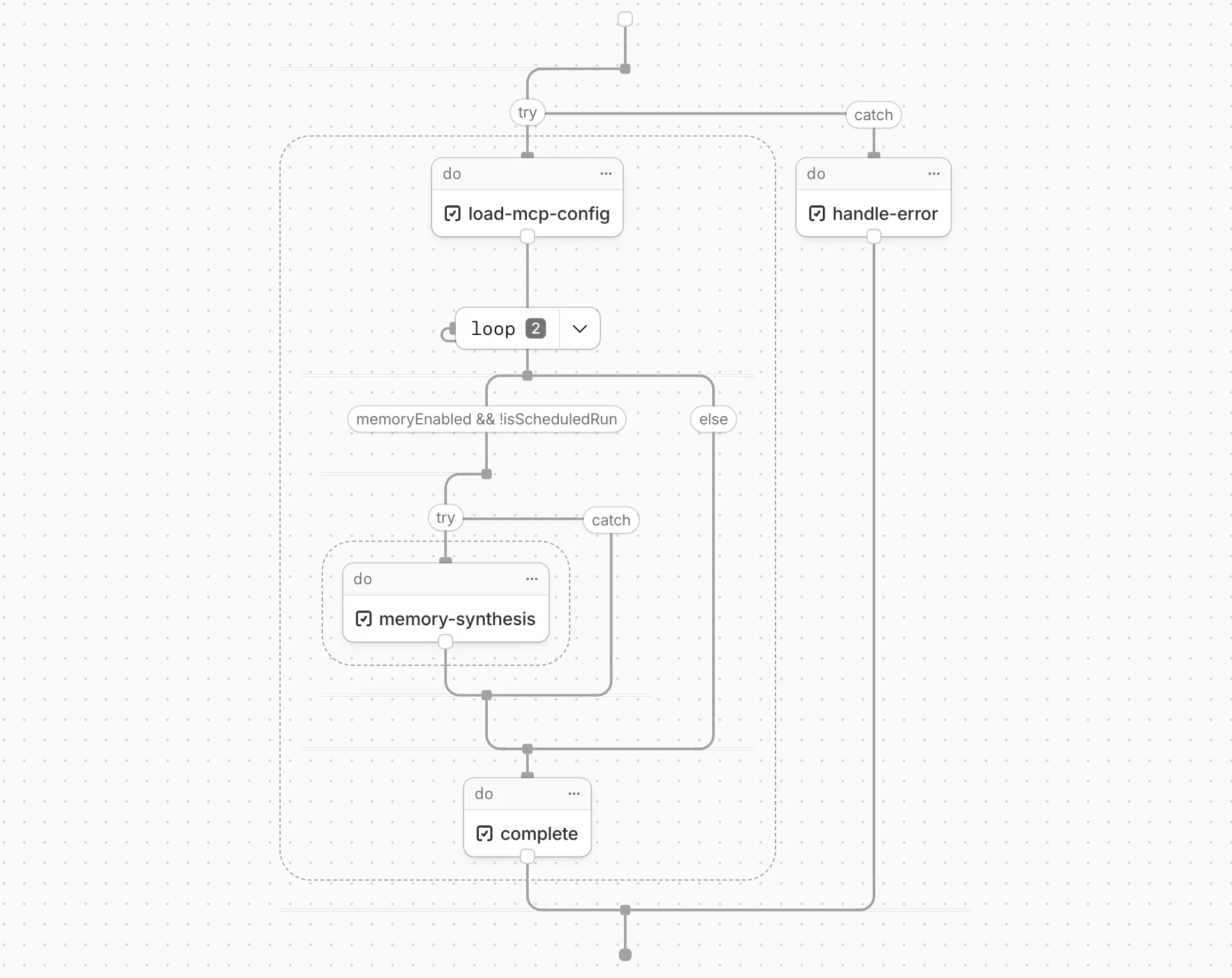
Visualize your Workflows in the Cloudflare dashboard

Cloudflare Workflows now automatically generates visual diagrams from your code

Your Workflow is parsed to provide a visual map of the Workflow structure, allowing you to:

  • Understand how steps connect and execute
  • Visualize loops and nested logic
  • Follow branching paths for conditional logic
Example diagram

You can collapse loops and nested logic to see the high-level flow, or expand them to see every step.

Workflow diagrams are available in beta for all JavaScript and TypeScript Workflows. Find your Workflows in the Cloudflare dashboard to see their diagrams.

Agents SDK v0.3.7: Workflows integration, synchronous state, and scheduleEvery()

The latest release of the Agents SDK brings first-class support for Cloudflare Workflows, synchronous state management, and new scheduling capabilities.

Cloudflare Workflows integration

Agents excel at real-time communication and state management. Workflows excel at durable execution. Together, they enable powerful patterns where Agents handle WebSocket connections while Workflows handle long-running tasks, retries, and human-in-the-loop flows.

Use the new AgentWorkflow class to define workflows with typed access to your Agent:

import { AgentWorkflow } from "agents/workflows";

export class ProcessingWorkflow extends AgentWorkflow {
	async run(event, step) {
		// Call Agent methods via RPC
		await this.agent.updateStatus(event.payload.taskId, "processing");

		// Non-durable: progress reporting to clients
		await this.reportProgress({ step: "process", percent: 0.5 });
		this.broadcastToClients({ type: "update", taskId: event.payload.taskId });

		// Durable via step: idempotent, won't repeat on retry
		await step.mergeAgentState({ taskProgress: 0.5 });

		const result = await step.do("process", async () => {
			return processData(event.payload.data);
		});

		await step.reportComplete(result);
		return result;
	}
}
import { AgentWorkflow } from "agents/workflows";
import type { AgentWorkflowEvent, AgentWorkflowStep } from "agents/workflows";

export class ProcessingWorkflow extends AgentWorkflow<MyAgent, TaskParams> {
	async run(event: AgentWorkflowEvent<TaskParams>, step: AgentWorkflowStep) {
		// Call Agent methods via RPC
		await this.agent.updateStatus(event.payload.taskId, "processing");

		// Non-durable: progress reporting to clients
		await this.reportProgress({ step: "process", percent: 0.5 });
		this.broadcastToClients({ type: "update", taskId: event.payload.taskId });

		// Durable via step: idempotent, won't repeat on retry
		await step.mergeAgentState({ taskProgress: 0.5 });

		const result = await step.do("process", async () => {
			return processData(event.payload.data);
		});

		await step.reportComplete(result);
		return result;
	}
}

Start workflows from your Agent with runWorkflow() and handle lifecycle events:

export class MyAgent extends Agent {
	async startTask(taskId, data) {
		const instanceId = await this.runWorkflow("PROCESSING_WORKFLOW", {
			taskId,
			data,
		});
		return { instanceId };
	}

	async onWorkflowProgress(workflowName, instanceId, progress) {
		this.broadcast(JSON.stringify({ type: "progress", progress }));
	}

	async onWorkflowComplete(workflowName, instanceId, result) {
		console.log(`Workflow ${instanceId} completed`);
	}

	async onWorkflowError(workflowName, instanceId, error) {
		console.error(`Workflow ${instanceId} failed:`, error);
	}
}
export class MyAgent extends Agent {
	async startTask(taskId: string, data: string) {
		const instanceId = await this.runWorkflow("PROCESSING_WORKFLOW", {
			taskId,
			data,
		});
		return { instanceId };
	}

	async onWorkflowProgress(
		workflowName: string,
		instanceId: string,
		progress: unknown,
	) {
		this.broadcast(JSON.stringify({ type: "progress", progress }));
	}

	async onWorkflowComplete(
		workflowName: string,
		instanceId: string,
		result?: unknown,
	) {
		console.log(`Workflow ${instanceId} completed`);
	}

	async onWorkflowError(
		workflowName: string,
		instanceId: string,
		error: unknown,
	) {
		console.error(`Workflow ${instanceId} failed:`, error);
	}
}

Key workflow methods on your Agent:

  • runWorkflow(workflowName, params, options?) — Start a workflow with optional metadata
  • getWorkflow(workflowId) / getWorkflows(criteria?) — Query workflows with cursor-based pagination
  • approveWorkflow(workflowId) / rejectWorkflow(workflowId) — Human-in-the-loop approval flows
  • pauseWorkflow(), resumeWorkflow(), terminateWorkflow() — Workflow control

Synchronous setState()

State updates are now synchronous with a new validateStateChange() validation hook:

export class MyAgent extends Agent {
	validateStateChange(oldState, newState) {
		// Return false to reject the change
		if (newState.count < 0) return false;
		// Return modified state to transform
		return { ...newState, lastUpdated: Date.now() };
	}
}
export class MyAgent extends Agent<Env, State> {
	validateStateChange(oldState: State, newState: State): State | false {
		// Return false to reject the change
		if (newState.count < 0) return false;
		// Return modified state to transform
		return { ...newState, lastUpdated: Date.now() };
	}
}

scheduleEvery() for recurring tasks

The new scheduleEvery() method enables fixed-interval recurring tasks with built-in overlap prevention:

// Run every 5 minutes
await this.scheduleEvery("syncData", 5 * 60 * 1000, { source: "api" });
// Run every 5 minutes
await this.scheduleEvery("syncData", 5 * 60 * 1000, { source: "api" });

Callable system improvements

  • Client-side RPC timeout — Set timeouts on callable method invocations
  • StreamingResponse.error(message) — Graceful stream error signaling
  • getCallableMethods() — Introspection API for discovering callable methods
  • Connection close handling — Pending calls are automatically rejected on disconnect
await agent.call("method", [args], {
	timeout: 5000,
	stream: { onChunk, onDone, onError },
});
await agent.call("method", [args], {
	timeout: 5000,
	stream: { onChunk, onDone, onError },
});

Email and routing enhancements

Secure email reply routing — Email replies are now secured with HMAC-SHA256 signed headers, preventing unauthorized routing of emails to agent instances.

Routing improvements:

  • basePath option to bypass default URL construction for custom routing
  • Server-sent identity — Agents send name and agent type on connect
  • New onIdentity and onIdentityChange callbacks on the client
const agent = useAgent({
	basePath: "user",
	onIdentity: (name, agentType) => console.log(`Connected to ${name}`),
});
const agent = useAgent({
	basePath: "user",
	onIdentity: (name, agentType) => console.log(`Connected to ${name}`),
});

Upgrade

To update to the latest version:

npm i agents@latest

For the complete Workflows API reference and patterns, see Run Workflows.

Increased Workflows instance and concurrency limits

We've raised the Cloudflare Workflows account-level limits for all accounts on the Workers paid plan:

  • Instance creation rate increased from 100 workflow instances per 10 seconds to 100 instances per second
  • Concurrency limit increased from 4,500 to 10,000 workflow instances per account

These increases mean you can create new instances up to 10x faster, and have more workflow instances concurrently executing. To learn more and get started with Workflows, refer to the getting started guide.

If your application requires a higher limit, fill out the Limit Increase Request Form or contact your account team. Please refer to Workflows pricing for more information.

Build durable multi-step applications in Python with Workflows (now in beta)

You can now build Workflows using Python. With Python Workflows, you get automatic retries, state persistence, and the ability to run multi-step operations that can span minutes, hours, or weeks using Python’s familiar syntax and the Python Workers runtime.

Python Workflows use the same step-based execution model as JavaScript Workflows, but with Python syntax and access to Python’s ecosystem. Python Workflows also enable DAG (Directed Acyclic Graph) workflows, where you can define complex dependencies between steps using the depends parameter.

Here’s a simple example:

from workers import Response, WorkflowEntrypoint

class PythonWorkflowStarter(WorkflowEntrypoint):
    async def run(self, event, step):
        @step.do("my first step")
        async def my_first_step():
            # do some work
            return "Hello Python!"

        await my_first_step()

        await step.sleep("my-sleep-step", "10 seconds")

        @step.do("my second step")
        async def my_second_step():
            # do some more work
            return "Hello again!"

        await my_second_step()

class Default(WorkerEntrypoint):
    async def fetch(self, request):
        await self.env.MY_WORKFLOW.create()
        return Response("Hello Workflow creation!")

Python Workflows support the same core capabilities as JavaScript Workflows, including sleep scheduling, event-driven workflows, and built-in error handling with configurable retry policies.

To learn more and get started, refer to Python Workflows documentation.

Run AI-generated code on-demand with Code Sandboxes (new)

AI is supercharging app development for everyone, but we need a safe way to run untrusted, LLM-written code. We’re introducing Sandboxes, which let your Worker run actual processes in a secure, container-based environment.

import { getSandbox } from "@cloudflare/sandbox";
export { Sandbox } from "@cloudflare/sandbox";

export default {
	async fetch(request: Request, env: Env) {
		const sandbox = getSandbox(env.Sandbox, "my-sandbox");
		return sandbox.exec("ls", ["-la"]);
	},
};

Methods

  • exec(command: string, args: string[], options?: { stream?: boolean }):Execute a command in the sandbox.
  • gitCheckout(repoUrl: string, options: { branch?: string; targetDir?: string; stream?: boolean }): Checkout a git repository in the sandbox.
  • mkdir(path: string, options: { recursive?: boolean; stream?: boolean }): Create a directory in the sandbox.
  • writeFile(path: string, content: string, options: { encoding?: string; stream?: boolean }): Write content to a file in the sandbox.
  • readFile(path: string, options: { encoding?: string; stream?: boolean }): Read content from a file in the sandbox.
  • deleteFile(path: string, options?: { stream?: boolean }): Delete a file from the sandbox.
  • renameFile(oldPath: string, newPath: string, options?: { stream?: boolean }): Rename a file in the sandbox.
  • moveFile(sourcePath: string, destinationPath: string, options?: { stream?: boolean }): Move a file from one location to another in the sandbox.
  • ping(): Ping the sandbox.

Sandboxes are still experimental. We're using them to explore how isolated, container-like workloads might scale on Cloudflare — and to help define the developer experience around them.

You can try it today from your Worker, with just a few lines of code. Let us know what you build.

Workflows is now Generally Available

Workflows is now Generally Available (or "GA"): in short, it's ready for production workloads. Alongside marking Workflows as GA, we've introduced a number of changes during the beta period, including:

  • A new waitForEvent API that allows a Workflow to wait for an event to occur before continuing execution.
  • Increased concurrency: you can run up to 4,500 Workflow instances concurrently — and this will continue to grow.
  • Improved observability, including new CPU time metrics that allow you to better understand which Workflow instances are consuming the most resources and/or contributing to your bill.
  • Support for vitest for testing Workflows locally and in CI/CD pipelines.

Workflows also supports the new increased CPU limits that apply to Workers, allowing you to run more CPU-intensive tasks (up to 5 minutes of CPU time per instance), not including the time spent waiting on network calls, AI models, or other I/O bound tasks.

Human-in-the-loop

The new step.waitForEvent API allows a Workflow instance to wait on events and data, enabling human-in-the-the-loop interactions, such as approving or rejecting a request, directly handling webhooks from other systems, or pushing event data to a Workflow while it's running.

Because Workflows are just code, you can conditionally execute code based on the result of a waitForEvent call, and/or call waitForEvent multiple times in a single Workflow based on what the Workflow needs.

For example, if you wanted to implement a human-in-the-loop approval process, you could use waitForEvent to wait for a user to approve or reject a request, and then conditionally execute code based on the result.

import {
	WorkflowEntrypoint,
	WorkflowStep,
	WorkflowEvent,
} from "cloudflare:workers";

export class MyWorkflow extends WorkflowEntrypoint {
	async run(event, step) {
		// Other steps in your Workflow
		let stripeEvent = await step.waitForEvent(
			"receive invoice paid webhook from Stripe",
			{ type: "stripe-webhook", timeout: "1 hour" },
		);
		// Rest of your Workflow
	}
}
import { WorkflowEntrypoint, WorkflowStep, WorkflowEvent } from "cloudflare:workers";

export class MyWorkflow extends WorkflowEntrypoint<Env, Params> {
	async run(event: WorkflowEvent<Params>, step: WorkflowStep) {
		// Other steps in your Workflow
		let stripeEvent = await step.waitForEvent<IncomingStripeWebhook>("receive invoice paid webhook from Stripe", { type: "stripe-webhook", timeout: "1 hour" })
		// Rest of your Workflow
	}
}

You can then send a Workflow an event from an external service via HTTP or from within a Worker using the Workers API for Workflows:

export default {
	async fetch(req, env) {
		const instanceId = new URL(req.url).searchParams.get("instanceId");
		const webhookPayload = await req.json();

		let instance = await env.MY_WORKFLOW.get(instanceId);
		// Send our event, with `type` matching the event type defined in
		// our step.waitForEvent call
		await instance.sendEvent({
			type: "stripe-webhook",
			payload: webhookPayload,
		});

		return Response.json({
			status: await instance.status(),
		});
	},
};
export default {
  async fetch(req: Request, env: Env) {
    const instanceId = new URL(req.url).searchParams.get("instanceId")
    const webhookPayload = await req.json<Payload>()

    let instance = await env.MY_WORKFLOW.get(instanceId);
    // Send our event, with `type` matching the event type defined in
    // our step.waitForEvent call
    await instance.sendEvent({type: "stripe-webhook", payload: webhookPayload})

    return Response.json({
      status: await instance.status(),
    });
  },
};

Read the GA announcement blog to learn more about what landed as part of the Workflows GA.

Build AI Agents with Example Prompts

We've added an example prompt to help you get started with building AI agents and applications on Cloudflare Workers, including Workflows, Durable Objects, and Workers KV.

You can use this prompt with your favorite AI model, including Claude 3.5 Sonnet, OpenAI's o3-mini, Gemini 2.0 Flash, or Llama 3.3 on Workers AI. Models with large context windows will allow you to paste the prompt directly: provide your own prompt within the <user_prompt></user_prompt> tags.

{paste_prompt_here}
<user_prompt>
user: Build an AI agent using Cloudflare Workflows. The Workflow should run when a new GitHub issue is opened on a specific project with the label 'help' or 'bug', and attempt to help the user troubleshoot the issue by calling the OpenAI API with the issue title and description, and a clear, structured prompt that asks the model to suggest 1-3 possible solutions to the issue. Any code snippets should be formatted in Markdown code blocks. Documentation and sources should be referenced at the bottom of the response. The agent should then post the response to the GitHub issue. The agent should run as the provided GitHub bot account.
</user_prompt>

This prompt is still experimental, but we encourage you to try it out and provide feedback.

Increased Workflows limits and improved instance queueing.

Workflows (beta) now allows you to define up to 1024 steps. sleep steps do not count against this limit.

We've also added:

  • instanceId as property to the WorkflowEvent type, allowing you to retrieve the current instance ID from within a running Workflow instance
  • Improved queueing logic for Workflow instances beyond the current maximum concurrent instances, reducing the cases where instances are stuck in the queued state.
  • Support for pause and resume for Workflow instances in a queued state.

We're continuing to work on increases to the number of concurrent Workflow instances, steps, and support for a new waitForEvent API over the coming weeks.

Workflows is now in open beta

Workflows is now in open beta, and available to any developer a free or paid Workers plan.

Workflows allow you to build multi-step applications that can automatically retry, persist state and run for minutes, hours, days, or weeks. Workflows introduces a programming model that makes it easier to build reliable, long-running tasks, observe as they progress, and programmatically trigger instances based on events across your services.

Get started

You can get started with Workflows by following our get started guide and/or using npm create cloudflare to pull down the starter project:

npm create cloudflare@latest workflows-starter -- --template "cloudflare/workflows-starter"

You can open the src/index.ts file, extend it, and use wrangler deploy to deploy your first Workflow. From there, you can: