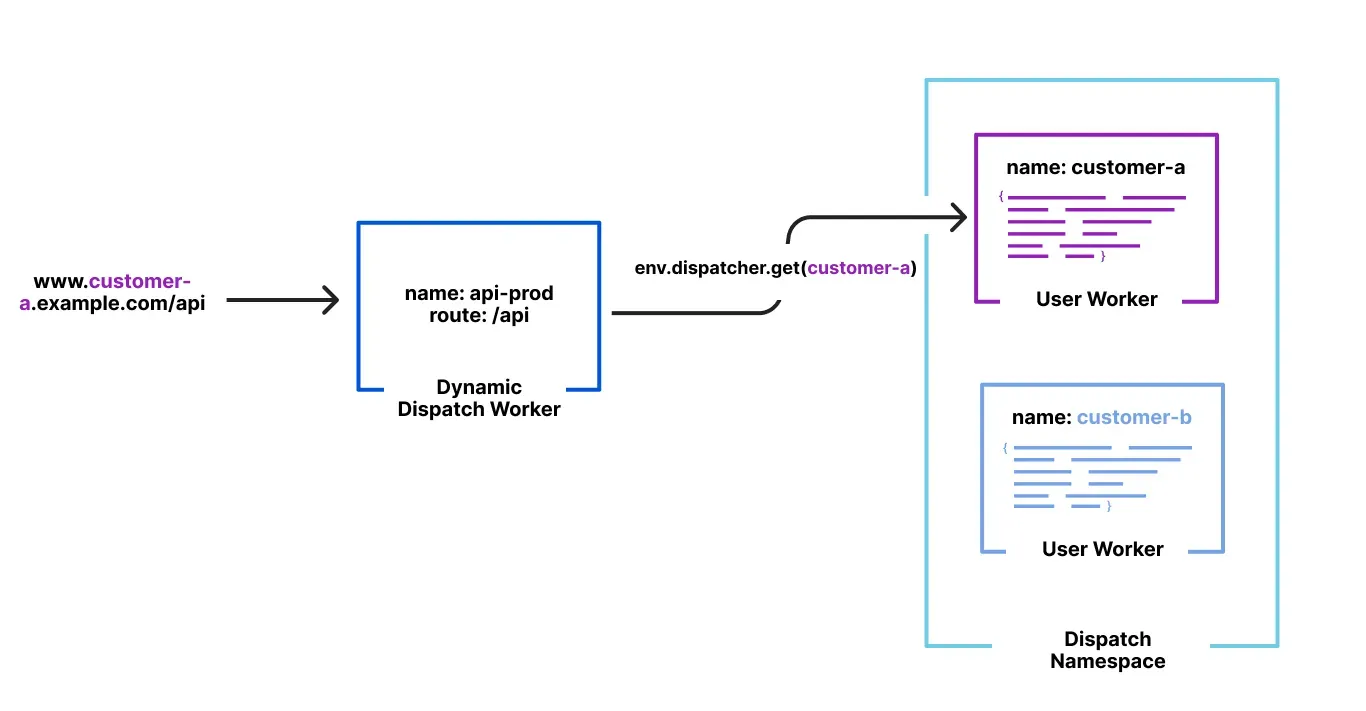
Workers for Platforms lets you build multi-tenant platforms on Cloudflare Workers, allowing your end users to deploy and run their own code on your platform. It's designed for anyone building an AI vibe coding platform, e-commerce platform, website builder, or any product that needs to securely execute user-generated code at scale.
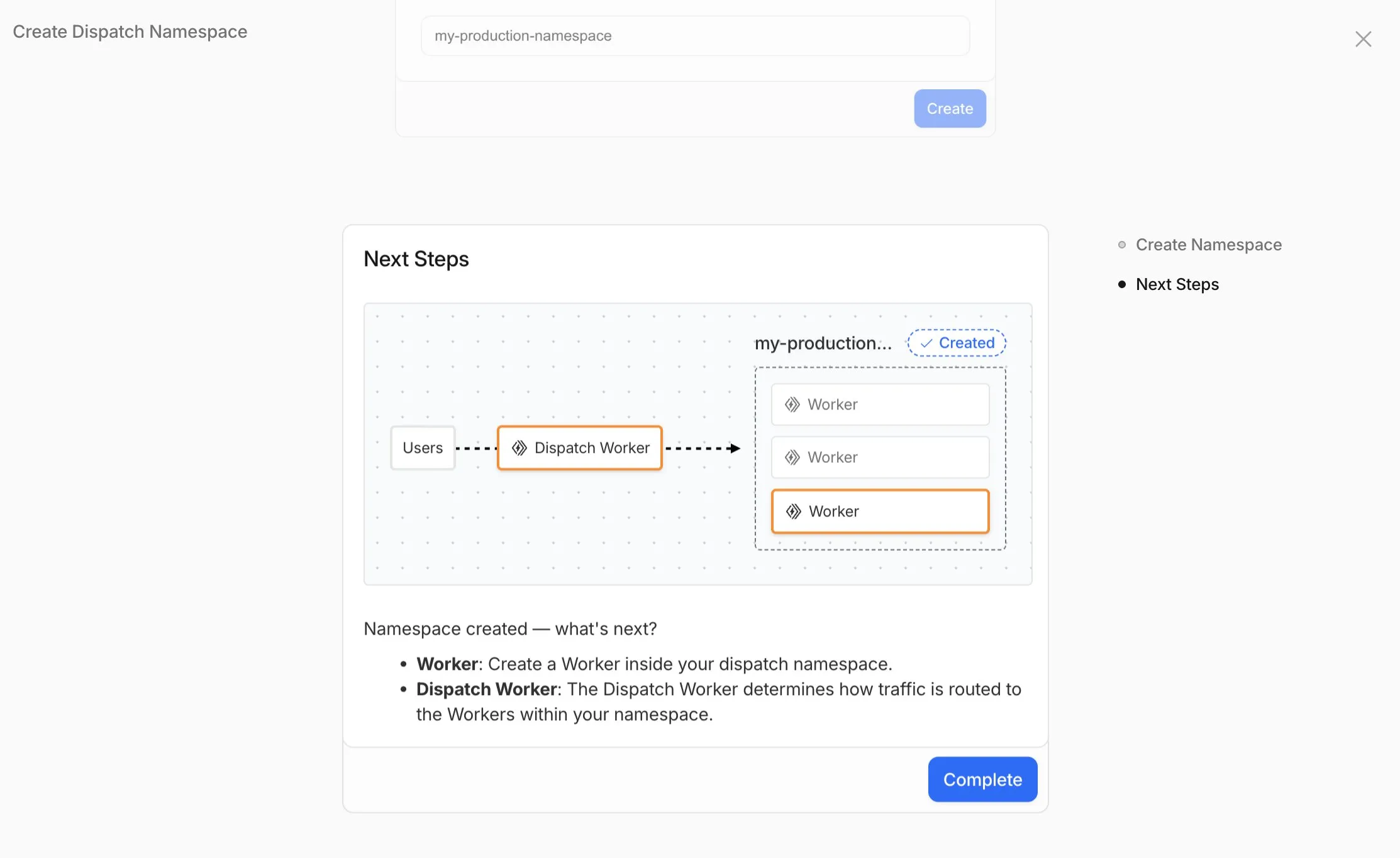
Previously, setting up Workers for Platforms required using the API. Now, the Workers for Platforms UI supports namespace creation, dispatch worker templates, and tag management, making it easier for Workers for Platforms customers to build and manage multi-tenant platforms directly from the Cloudflare dashboard.
Key improvements
Namespace Management: You can now create and configure dispatch namespaces directly within the dashboard to start a new platform setup.
Dispatch Worker Templates: New Dispatch Worker templates allow you to quickly define how traffic is routed to individual Workers within your namespace. Refer to the Dynamic Dispatch documentation for more examples.
Tag Management: You can now set and update tags on User Workers, making it easier to group and manage your Workers.
Binding Visibility:Bindings attached to User Workers are now visible directly within the User Worker view.
Deploy Vibe Coding Platform in one-click: Deploy a reference implementation of an AI vibe coding platform directly from the dashboard. Powered by the Cloudflare's VibeSDK ↗, this starter kit integrates with Workers for Platforms to handle the deployment of AI-generated projects at scale.
To get started, go to Workers for Platforms under Compute & AI in the Cloudflare dashboard ↗.
You can now upload up to 100,000 static assets per Worker version
Paid and Workers for Platforms users can now upload up to 100,000 static assets per Worker version, a 5x increase from the previous limit of 20,000.
Customers on the free plan still have the same limit as before — 20,000 static assets per version of your Worker
The individual file size limit of 25 MiB remains unchanged for all customers.
This increase allows you to build larger applications with more static assets without hitting limits.
Wrangler
To take advantage of the increased limits, you must use Wrangler version 4.34.0 or higher.
Earlier versions of Wrangler will continue to enforce the previous 20,000 file limit.
We've simplified the programmatic deployment of Workers via our Cloudflare SDKs. This update abstracts away the low-level complexities of the multipart/form-data upload process, allowing you to focus on your code while we handle the deployment mechanics.
Previously, deploying a Worker programmatically required manually constructing a multipart/form-data HTTP request, packaging your code and a separate metadata.json file. This was more complicated and verbose, and prone to formatting errors.
For example, here's how you would upload a Worker script previously with cURL:
With the new SDK interface, you can now define your entire Worker configuration using a single, structured object.
This approach allows you to specify metadata like main_module, bindings, and compatibility_date as clearer properties directly alongside your script content. Our SDK takes this logical object and automatically constructs the complex multipart/form-data API request behind the scenes.
Fixed the cloudflare_workers_script ↗ resource in Terraform, which previously was producing a diff even when there were no changes. Now, your terraform plan outputs will be cleaner and more reliable.
Fixed the cloudflare_workers_for_platforms_dispatch_namespace ↗, where the provider would attempt to recreate the namespace on a terraform apply. The resource now correctly reads its remote state, ensuring stability for production environments and CI/CD workflows.
The cloudflare_workers_route ↗ resource now allows for the script property to be empty, null, or omitted to indicate that pattern should be negated for all scripts (see routes docs). You can now reserve a pattern or temporarily disable a Worker on a route without deleting the route definition itself.
Using primary_location_hint in the cloudflare_d1_database ↗ resource will no longer always try to recreate. You can now safely change the location hint for a D1 database without causing a destructive operation.
Previously, a request to the Workers Create Route API always returned null for "script" and an empty string for "pattern" even if the request was successful.
The Workers and Workers for Platforms secrets APIs are now properly documented in the Cloudflare OpenAPI docs. Previously, these endpoints were not publicly documented, leaving users confused on how to directly manage their secrets via the API. Now, you can find the proper endpoints in our public documentation, as well as in our API Library SDKs such as cloudflare-typescript ↗ (>4.2.0) and cloudflare-python ↗ (>4.1.0).
Note the cloudflare_workers_secret and cloudflare_workers_for_platforms_script_secretTerraform resources ↗ are being removed in a future release. This resource is not recommended for managing secrets. Users should instead use the:
Secrets Store with the "Secrets Store Secret" binding on Workers and Workers for Platforms Script Upload
Previously, when a new User Worker was uploaded, there was a short delay before it became available for dispatch. This meant that even though an API request could return a 200 OK response, the script might not yet be ready to handle requests, causing unexpected failures for platforms that immediately dispatch to new Workers.
With this update, first-time uploads of User Workers are now deployed synchronously. A 200 OK response guarantees the script is fully provisioned and ready to handle traffic immediately, ensuring more predictable deployments and reducing errors.
Workers for Platforms customers can now attach static assets (HTML, CSS, JavaScript, images) directly to User Workers, removing the need to host separate infrastructure to serve the assets.
This allows your platform to serve entire front-end applications from Cloudflare's global edge, utilizing caching for fast load times, while supporting dynamic logic within the same Worker. Cloudflare automatically scales its infrastructure to handle high traffic volumes, enabling you to focus on building features without managing servers.
What you can build
Static Sites: Host and serve HTML, CSS, JavaScript, and media files directly from Cloudflare's network, ensuring fast loading times worldwide. This is ideal for blogs, landing pages, and documentation sites because static assets can be efficiently cached and delivered closer to the user, reducing latency and enhancing the overall user experience.
Full-Stack Applications: Combine asset hosting with Cloudflare Workers to power dynamic, interactive applications. If you're an e-commerce platform, you can serve your customers' product pages and run inventory checks from within the same Worker.
Get Started:
Upload static assets using the Workers for Platforms API or Wrangler. For more information, visit our Workers for Platforms documentation. ↗