Workers AI Markdown conversion (toMarkdown) now supports .gif and .bmp image files, in addition to the JPEG, PNG, WebP, and SVG formats already supported.
GIF and BMP files run through the same image pipeline as other formats. Each image is resized if needed (and for animated GIFs, only the first frame is used), then passed to an object-detection model to identify what it contains. Those detected objects prompt a vision model that writes a natural-language description of the image, which becomes searchable, machine-readable Markdown.
AI Search uses toMarkdown automatically to process the files it ingests, so any .gif and .bmp files are included the next time your index syncs, with no configuration changes required. This helps when your content mixes formats, for example a support knowledge base full of screenshots or an archive of BMP scans.
Partnering with Moondream ↗ to bring their latest model @cf/moondream/moondream3.1-9B-A2B to Workers AI. Moondream 3.1 is a fast vision language model built on a mixture-of-experts architecture with 9B total parameters and 2B active, delivering frontier-level visual reasoning while retaining fast, cost-efficient inference.
Moondream 3.1 is designed for real-world vision tasks, with a 32K token context window for handling complex queries and structured outputs.
Key capabilities
Query — ask open-ended questions about an image, with an optional reasoning parameter
Caption — generate short, normal, or long descriptions of an image
Point — return coordinates for objects matching a target phrase
Detect — return bounding boxes for objects matching a target phrase
Real-time vision at the edge
Vision workloads like live camera feeds, robotics, content moderation, and interactive agents need answers in milliseconds, not seconds. Moondream 3.1's small active footprint (2B active parameters) pairs well with Workers AI's serverless, globally distributed inference: requests run close to your users, and streaming responses start returning tokens almost immediately.
In our testing, first tokens streamed back in roughly 20–30 ms, and results were fast across every task. The example end-to-end times below (client-observed median, including network round trip) are for a simple, single-subject image. Actual latency depends heavily on the image and how much detail you ask for.
Task
End-to-end (p50)
query
~770 ms
caption
~480 ms
point
~145 ms
detect
~160 ms
At these speeds you can call the model inline while handling a request rather than pushing the work to a background queue or a separate service. That opens up use cases where a slow response breaks the experience: moderating user-uploaded images before they are stored, locating an object in a video frame to drive a live overlay, extracting fields from a document during a form submission, or letting an agent inspect a screenshot and decide its next step within a single turn.
Get started
Use Moondream 3.1 through the Workers AI binding (env.AI.run()) or the REST API at /ai/run. You can also use AI Gateway with these endpoints.
We are excited to announce GLM-5.2 on Workers AI, Z.ai's flagship agentic coding model.
@cf/zai-org/glm-5.2 is a text generation model built for agentic coding workflows. With function calling and reasoning support, it can handle long codebases, multi-step planning, and tool-augmented agents.
Key features and use cases:
Agentic coding: Designed for autonomous coding tasks, long-horizon planning, and complex software engineering workflows
Large context window: GLM-5.2 supports up to a 1,048,576 token context window. Workers AI is launching the model with a 262,144 token context window and plans to increase this in the future
Function calling: Build agents that invoke tools and APIs across multiple conversation turns
Reasoning: Tackles complex problem-solving and step-by-step reasoning tasks
Use GLM-5.2 through the Workers AI binding (env.AI.run()), the REST API at /run or /v1/chat/completions, or AI Gateway.
@cf/moonshotai/kimi-k2.7-code is now available on Workers AI. Kimi K2.7 Code is a code-optimized variant of the Kimi K2 family, built on a Mixture-of-Experts architecture with 1T total parameters and 32B active per token.
Improved coding and agent performance
K2.7 Code delivers meaningful gains over K2.6 on coding and agentic benchmarks:
+21.8% on Kimi Code Bench v2
+11.0% on Program Bench
+31.5% on MLS Bench Lite
Reasoning efficiency
K2.7 Code uses 30% fewer reasoning tokens compared to K2.6, reducing overthinking and lowering inference cost for reasoning-heavy workloads.
Key capabilities
262.1k token context window for retaining full conversation history, tool definitions, and codebases across long-running agent sessions
Long-horizon coding with improved instruction following and higher end-to-end coding task success rates
Vision inputs for processing images alongside text
Thinking mode with configurable reasoning depth via chat_template_kwargs.thinking
Multi-turn tool calling for building agents that invoke tools across multiple conversation turns
Structured outputs with JSON schema support
Differences from Kimi K2.6
If you are migrating from Kimi K2.6, note the following:
K2.7 Code is optimized for coding tasks with improved benchmark performance and reasoning efficiency
Cached input token pricing is 0.19 per M tokens (vs 0.16 for K2.6)
API usage is identical — no parameter changes required
Get started
Use Kimi K2.7 Code through the Workers AI binding (env.AI.run()), the REST API at /ai/run, or the OpenAI-compatible endpoint at /v1/chat/completions. You can also use AI Gateway with any of these endpoints.
We are refreshing the Workers AI model catalog to make room for newer releases. Please update your apps to remove references to the models listed below before the deprecation date.
Recommended replacements
@cf/zai-org/glm-4.7-flash — fast multilingual model with multi-turn tool calling and coding capabilities.
We originally stated Kimi K2.5 would be deprecated on May 10, 2026, however we have extended the deprecation date to May 30, 2026. Requests will be automatically aliased to Kimi K2.6 on May 30, 2026, which has a higher price. Please review the @cf/moonshotai/kimi-k2.6 pricing and model capabilities prior to May 30, 2026 to ensure that the model suits your needs.
The -fast and -lora variants of models will remain active, including:
@cf/meta/llama-3.3-70b-instruct-fp8-fast
@cf/meta/llama-3.1-8b-instruct-fast
@cf/google/gemma-7b-it-lora
@cf/google/gemma-2b-it-lora
@cf/mistral/mistral-7b-instruct-v0.2-lora
@cf/meta-llama/llama-2-7b-chat-hf-lora
LoRA models may be deprecated in the future. We will be adding more LoRA capabilities to the catalog, and will communicate when new LoRA models come online to give users time to train new LoRAs before we deprecate old ones.
@cf/moonshotai/kimi-k2.6 is now available on Workers AI, in partnership with Moonshot AI for Day 0 support. Kimi K2.6 is a native multimodal agentic model from Moonshot AI that advances practical capabilities in long-horizon coding, coding-driven design, proactive autonomous execution, and swarm-based task orchestration.
Built on a Mixture-of-Experts architecture with 1T total parameters and 32B active per token, Kimi K2.6 delivers frontier-scale intelligence with efficient inference. It scores competitively against GPT-5.4 and Claude Opus 4.6 on agentic and coding benchmarks, including BrowseComp (83.2), SWE-Bench Verified (80.2), and Terminal-Bench 2.0 (66.7).
Key capabilities
262.1k token context window for retaining full conversation history, tool definitions, and codebases across long-running agent sessions
Long-horizon coding with significant improvements on complex, end-to-end coding tasks across languages including Rust, Go, and Python
Coding-driven design that transforms simple prompts and visual inputs into production-ready interfaces and full-stack workflows
Agent swarm orchestration scaling horizontally to 300 sub-agents executing 4,000 coordinated steps for complex autonomous tasks
Vision inputs for processing images alongside text
Thinking mode with configurable reasoning depth
Multi-turn tool calling for building agents that invoke tools across multiple conversation turns
Differences from Kimi K2.5
If you are migrating from Kimi K2.5, note the following API changes:
K2.6 uses chat_template_kwargs.thinking to control reasoning, replacing chat_template_kwargs.enable_thinking
K2.6 returns reasoning content in the reasoning field, replacing reasoning_content
Get started
Use Kimi K2.6 through the Workers AI binding (env.AI.run()), the REST API at /ai/run, or the OpenAI-compatible endpoint at /v1/chat/completions. You can also use AI Gateway with any of these endpoints.
We are partnering with Google to bring @cf/google/gemma-4-26b-a4b-it to Workers AI. Gemma 4 26B A4B is a Mixture-of-Experts (MoE) model built from Gemini 3 research, with 26B total parameters and only 4B active per forward pass. By activating a small subset of parameters during inference, the model runs almost as fast as a 4B-parameter model while delivering the quality of a much larger one.
Gemma 4 is Google's most capable family of open models, designed to maximize intelligence-per-parameter.
Key capabilities
Mixture-of-Experts architecture with 8 active experts out of 128 total (plus 1 shared expert), delivering frontier-level performance at a fraction of the compute cost of dense models
256,000 token context window for retaining full conversation history, tool definitions, and long documents across extended sessions
Built-in thinking mode that lets the model reason step-by-step before answering, improving accuracy on complex tasks
Vision understanding for object detection, document and PDF parsing, screen and UI understanding, chart comprehension, OCR (including multilingual), and handwriting recognition, with support for variable aspect ratios and resolutions
Function calling with native support for structured tool use, enabling agentic workflows and multi-step planning
Multilingual with out-of-the-box support for 35+ languages, pre-trained on 140+ languages
Coding for code generation, completion, and correction
Workers AI is officially in the big models game. @cf/moonshotai/kimi-k2.5 is the first frontier-scale open-source model on our AI inference platform — a large model with a full 256k context window, multi-turn tool calling, vision inputs, and structured outputs. By bringing a frontier-scale model directly onto the Cloudflare Developer Platform, you can now run the entire agent lifecycle on a single, unified platform.
The model has proven to be a fast, efficient alternative to larger proprietary models without sacrificing quality. As AI adoption increases, the volume of inference is skyrocketing — now you can access frontier intelligence at a fraction of the cost.
Key capabilities
256,000 token context window for retaining full conversation history, tool definitions, and entire codebases across long-running agent sessions
Multi-turn tool calling for building agents that invoke tools across multiple conversation turns
Vision inputs for processing images alongside text
Structured outputs with JSON mode and JSON Schema support for reliable downstream parsing
Function calling for integrating external tools and APIs into agent workflows
Prefix caching and session affinity
When an agent sends a new prompt, it resends all previous prompts, tools, and context from the session. The delta between consecutive requests is usually just a few new lines of input. Prefix caching avoids reprocessing the shared context, saving time and compute from the prefill stage. This means faster Time to First Token (TTFT) and higher Tokens Per Second (TPS) throughput.
Workers AI has done prefix caching, but we are now surfacing cached tokens as a usage metric and offering a discount on cached tokens compared to input tokens (pricing is listed on the model page).
curl -X POST \
  "https://api.cloudflare.com/client/v4/accounts/{account_id}/ai/run/@cf/moonshotai/kimi-k2.5" \
  -H "Authorization: Bearer {api_token}" \
  -H "Content-Type: application/json" \
  -H "x-session-affinity: ses_12345678" \
  -d '{
    "messages": [
      {
        "role": "system",
        "content": "You are a helpful assistant."
      },
      {
        "role": "user",
        "content": "What is prefix caching and why does it matter?"
      }
    ],
    "max_tokens": 2400,
    "stream": true
  }'
Some clients like OpenCode ↗ implement session affinity automatically. The Agents SDK ↗ starter also sets up the wiring for you.
Redesigned asynchronous API
For volumes of requests that exceed synchronous rate limits, you can submit batches of inferences to be completed asynchronously. We have revamped the Asynchronous Batch API with a pull-based system that processes queued requests as soon as capacity is available. With internal testing, async requests usually execute within 5 minutes, but this depends on live traffic.
The async API is the best way to avoid capacity errors in durable workflows. It is ideal for use cases that are not real-time, such as code scanning agents or research agents.
To use the asynchronous API, pass queueRequest: true:
// 1. Push a batch of requests into the queueconst res = await env.AI.run( "@cf/moonshotai/kimi-k2.5", { requests: [ { messages: [{ role: "user", content: "Tell me a joke" }], }, { messages: [{ role: "user", content: "Explain the Pythagoras theorem" }], }, ], }, { queueRequest: true },);// 2. Grab the request IDconst requestId = res.request_id;// 3. Poll for the resultconst result = await env.AI.run("@cf/moonshotai/kimi-k2.5", { request_id: requestId,});if (result.status === "queued" || result.status === "running") { // Retry by polling again} else { return Response.json(result);}
You can also set up event notifications to know when inference is complete instead of polling.
We're excited to partner with NVIDIA to bring @cf/nvidia/nemotron-3-120b-a12b to Workers AI. NVIDIA Nemotron 3 Super is a Mixture-of-Experts (MoE) model with a hybrid Mamba-transformer architecture, 120B total parameters, and 12B active parameters per forward pass.
The model is optimized for running many collaborating agents per application. It delivers high accuracy for reasoning, tool calling, and instruction following across complex multi-step tasks.
Key capabilities:
Hybrid Mamba-transformer architecture delivers over 50% higher token generation throughput compared to leading open models, reducing latency for real-world applications
Tool calling support for building AI agents that invoke tools across multiple conversation turns
Multi-Token Prediction (MTP) accelerates long-form text generation by predicting several future tokens simultaneously in a single forward pass
32,000 token context window for retaining conversation history and plan states across multi-step agent workflows
During a meeting, participant audio is routed through AI Gateway to Nova-3 on Workers AI — so transcription runs on Cloudflare's network end-to-end, reducing latency compared to routing through external speech-to-text services.
Set the language when creating a meeting via ai_config.transcription.language:
Supported languages include English, Spanish, French, German, Hindi, Russian, Portuguese, Japanese, Italian, and Dutch — with regional variants like en-AU, en-GB, en-IN, en-NZ, es-419, fr-CA, de-CH, pt-BR, and pt-PT. Use multi for automatic multilingual detection.
If you are building voice agents or real-time translation workflows, your agent can now transcribe in the caller's language natively — no extra services or routing logic needed.
Workers AI and AI Gateway have received a series of dashboard improvements to help you get started faster and manage your AI workloads more easily.
Navigation and discoverability
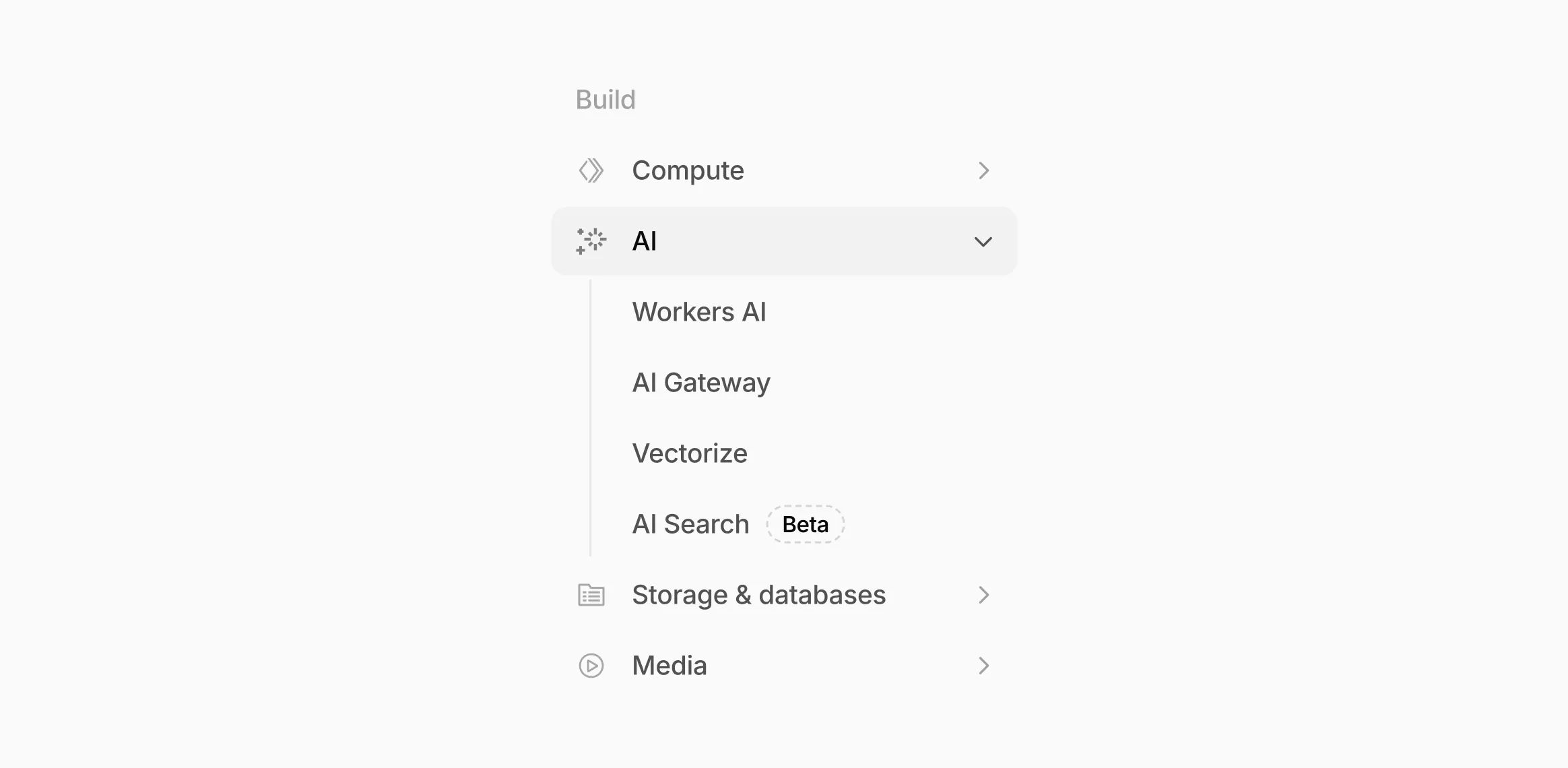
AI now has its own top-level section in the Cloudflare dashboard sidebar, so you can find AI features without digging through menus.
The new top-level AI section in the dashboard sidebar.
Onboarding and getting started
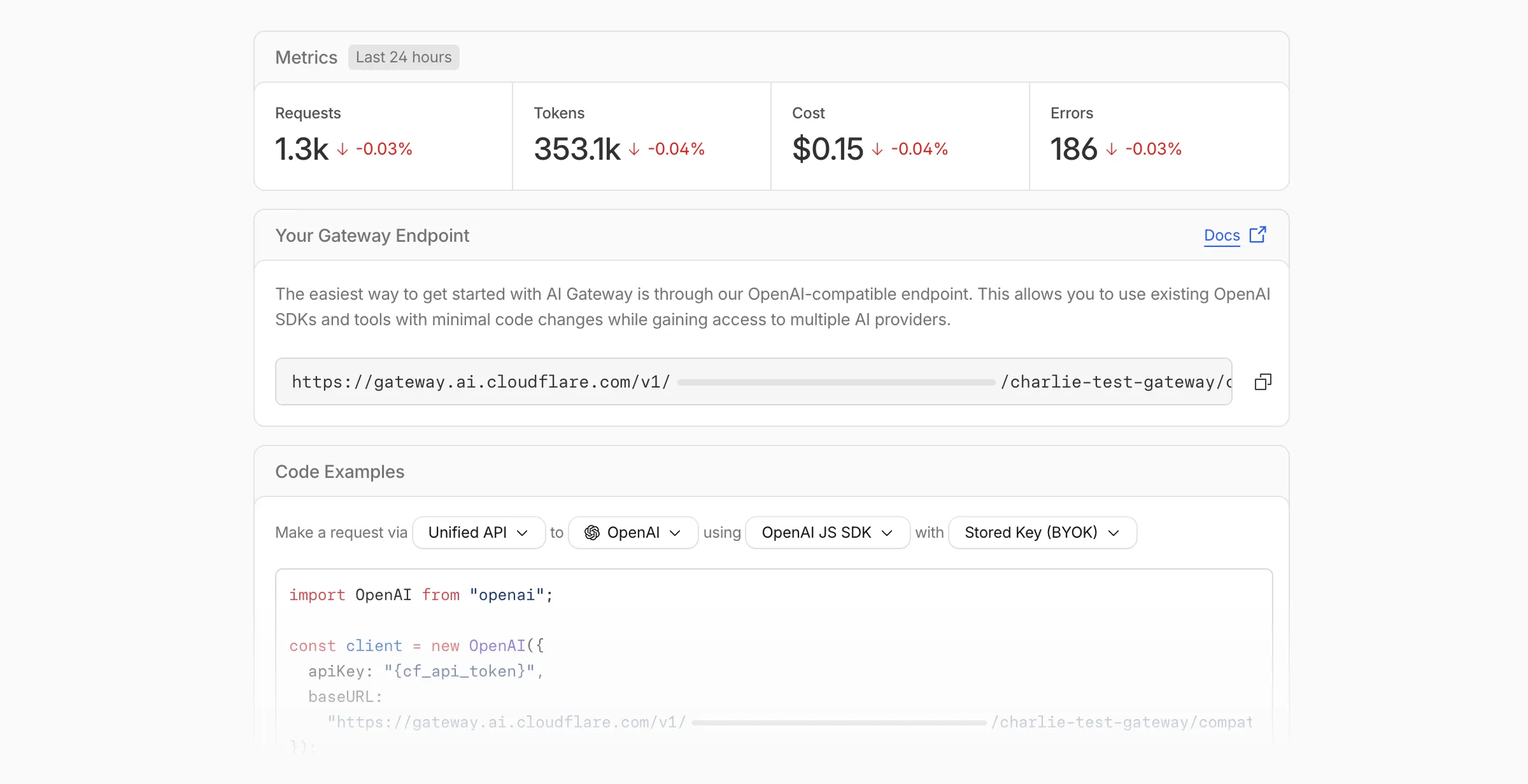
Getting started with AI Gateway is now simpler. When you create your first gateway, we now show your gateway's OpenAI-compatible endpoint and step-by-step guidance to help you configure it. The Playground also includes helpful prompts, and usage pages have clear next steps if you have not made any requests yet.
The first-run setup experience for new gateways.
We've also combined the previously separate code example sections into one view with dropdown selectors for API type, provider, SDK, and authentication method so you can now customize the exact code snippet you need from one place.
Dynamic Routing
The route builder is now more performant and responsive.
You can now copy route names to your clipboard with a single click.
Code examples use the Universal Endpoint format, making it easier to integrate routes into your application.
Observability and analytics
Small monetary values now display correctly in cost analytics charts, so you can accurately track spending at any scale.
Accessibility
Improvements to keyboard navigation within the AI Gateway, specifically when exploring usage by provider.
Improvements to sorting and filtering components on the Workers AI models page.
We're excited to announce GLM-4.7-Flash on Workers AI, a fast and efficient text generation model optimized for multilingual dialogue and instruction-following tasks, along with the brand-new @cloudflare/tanstack-ai ↗ package and workers-ai-provider v3.1.1 ↗.
You can now run AI agents entirely on Cloudflare. With GLM-4.7-Flash's multi-turn tool calling support, plus full compatibility with TanStack AI and the Vercel AI SDK, you have everything you need to build agentic applications that run completely at the edge.
GLM-4.7-Flash — Multilingual Text Generation Model
@cf/zai-org/glm-4.7-flash is a multilingual model with a 131,072 token context window, making it ideal for long-form content generation, complex reasoning tasks, and multilingual applications.
Key Features and Use Cases:
Multi-turn Tool Calling for Agents: Build AI agents that can call functions and tools across multiple conversation turns
Multilingual Support: Built to handle content generation in multiple languages effectively
Large Context Window: 131,072 tokens for long-form writing, complex reasoning, and processing long documents
Fast Inference: Optimized for low-latency responses in chatbots and virtual assistants
Instruction Following: Excellent at following complex instructions for code generation and structured tasks
@cloudflare/tanstack-ai v0.1.1 — TanStack AI adapters for Workers AI and AI Gateway
We've released @cloudflare/tanstack-ai, a new package that brings Workers AI and AI Gateway support to TanStack AI ↗. This provides a framework-agnostic alternative for developers who prefer TanStack's approach to building AI applications.
Workers AI adapters support four configuration modes — plain binding (env.AI), plain REST, AI Gateway binding (env.AI.gateway(id)), and AI Gateway REST — across all capabilities:
Chat (createWorkersAiChat) — Streaming chat completions with tool calling, structured output, and reasoning text streaming.
Summarization (createWorkersAiSummarize) — Text summarization.
AI Gateway adapters route requests from third-party providers — OpenAI, Anthropic, Gemini, Grok, and OpenRouter — through Cloudflare AI Gateway for caching, rate limiting, and unified billing.
To get started:
npm install @cloudflare/tanstack-ai @tanstack/ai
workers-ai-provider v3.1.1 — transcription, speech, reranking, and reliability
The Workers AI provider for the Vercel AI SDK ↗ now supports three new capabilities beyond chat and image generation:
Transcription (provider.transcription(model)) — Speech-to-text with automatic handling of model-specific input formats across binding and REST paths.
Text-to-speech (provider.speech(model)) — Audio generation with support for voice and speed options.
Reranking (provider.reranking(model)) — Document reranking for RAG pipelines and search result ordering.
import { createWorkersAI } from "workers-ai-provider";import { experimental_transcribe, experimental_generateSpeech, rerank,} from "ai";const workersai = createWorkersAI({ binding: env.AI });const transcript = await experimental_transcribe({ model: workersai.transcription("@cf/openai/whisper-large-v3-turbo"), audio: audioData, mediaType: "audio/wav",});const speech = await experimental_generateSpeech({ model: workersai.speech("@cf/deepgram/aura-1"), text: "Hello world", voice: "asteria",});const ranked = await rerank({ model: workersai.reranking("@cf/baai/bge-reranker-base"), query: "What is machine learning?", documents: ["ML is a branch of AI.", "The weather is sunny."],});
This release also includes a comprehensive reliability overhaul (v3.0.5):
Fixed streaming — Responses now stream token-by-token instead of buffering all chunks, using a proper TransformStream pipeline with backpressure.
Fixed tool calling — Resolved issues with tool call ID sanitization, conversation history preservation, and a heuristic that silently fell back to non-streaming mode when tools were defined.
Premature stream termination detection — Streams that end unexpectedly now report finishReason: "error" instead of silently reporting "stop".
AI Search support — Added createAISearch as the canonical export (renamed from AutoRAG). createAutoRAG still works with a deprecation warning.
We have partnered with Black Forest Labs (BFL) again to bring their optimized FLUX.2 [klein] 9B model to Workers AI. This distilled model offers enhanced quality compared to the 4B variant, while maintaining cost-effective pricing. With a fixed 4-step inference process, Klein 9B is ideal for rapid prototyping and real-time applications where both speed and quality matter.
The model hosted on Workers AI is optimized for speed with a fixed 4-step inference process and supports up to 4 image inputs. Since this is a distilled model, the steps parameter is fixed at 4 and cannot be adjusted. Like FLUX.2 [dev] and FLUX.2 [klein] 4B, this image model uses multipart form data inputs, even if you just have a prompt.
With the REST API, the multipart form data input looks like this:
curl --request POST \
  --url 'https://api.cloudflare.com/client/v4/accounts/{ACCOUNT}/ai/run/@cf/black-forest-labs/flux-2-klein-9b' \
  --header 'Authorization: Bearer {TOKEN}' \
  --header 'Content-Type: multipart/form-data' \
  --form 'prompt=a sunset at the alps' \
  --form width=1024 \
  --form height=1024
With the Workers AI binding, you can use it as such:
const form = new FormData();form.append("prompt", "a sunset with a dog");form.append("width", "1024");form.append("height", "1024");// FormData doesn't expose its serialized body or boundary. Passing it to a// Request (or Response) constructor serializes it and generates the Content-Type// header with the boundary, which is required for the server to parse the multipart fields.const formResponse = new Response(form);const formStream = formResponse.body;const formContentType = formResponse.headers.get('content-type');const resp = await env.AI.run("@cf/black-forest-labs/flux-2-klein-9b", { multipart: { body: formStream, contentType: formContentType, },});
The parameters you can send to the model are detailed here:
JSON Schema for ModelRequired Parameters
prompt (string) - Text description of the image to generate
Optional Parameters
input_image_0 (string) - Binary image
input_image_1 (string) - Binary image
input_image_2 (string) - Binary image
input_image_3 (string) - Binary image
guidance (float) - Guidance scale for generation. Higher values follow the prompt more closely
width (integer) - Width of the image, default 1024 Range: 256-1920
height (integer) - Height of the image, default 768 Range: 256-1920
seed (integer) - Seed for reproducibility
Note: Since this is a distilled model, the steps parameter is fixed at 4 and cannot be adjusted.
Multi-reference images
The FLUX.2 klein-9b model supports generating images based on reference images, just like FLUX.2 [dev] and FLUX.2 [klein] 4B. You can use this feature to apply the style of one image to another, add a new character to an image, or iterate on past generated images. You would use it with the same multipart form data structure, with the input images in binary. The model supports up to 4 input images.
For the prompt, you can reference the images based on the index, like take the subject of image 1 and style it like image 0 or even use natural language like place the dog beside the woman.
You must name the input parameter as input_image_0, input_image_1, input_image_2, input_image_3 for it to work correctly. All input images must be smaller than 512x512.
curl --request POST \
  --url 'https://api.cloudflare.com/client/v4/accounts/{ACCOUNT}/ai/run/@cf/black-forest-labs/flux-2-klein-9b' \
  --header 'Authorization: Bearer {TOKEN}' \
  --header 'Content-Type: multipart/form-data' \
  --form 'prompt=take the subject of image 1 and style it like image 0' \
  --form input_image_0=@/Users/johndoe/Desktop/icedoutkeanu.png \
  --form input_image_1=@/Users/johndoe/Desktop/me.png \
  --form width=1024 \
  --form height=1024
Through Workers AI Binding:
//helper function to convert ReadableStream to Blobasync function streamToBlob(stream: ReadableStream, contentType: string): Promise<Blob> { const reader = stream.getReader(); const chunks = []; while (true) { const { done, value } = await reader.read(); if (done) break; chunks.push(value); } return new Blob(chunks, { type: contentType });}const image0 = await fetch("http://image-url");const image1 = await fetch("http://image-url");const form = new FormData();const image_blob0 = await streamToBlob(image0.body, "image/png");const image_blob1 = await streamToBlob(image1.body, "image/png");form.append('input_image_0', image_blob0)form.append('input_image_1', image_blob1)form.append('prompt', 'take the subject of image 1 and style it like image 0')// FormData doesn't expose its serialized body or boundary. Passing it to a// Request (or Response) constructor serializes it and generates the Content-Type// header with the boundary, which is required for the server to parse the multipart fields.const formResponse = new Response(form);const formStream = formResponse.body;const formContentType = formResponse.headers.get('content-type');const resp = await env.AI.run("@cf/black-forest-labs/flux-2-klein-9b", { multipart: { body: formStream, contentType: formContentType }})
We've partnered with Black Forest Labs (BFL) again to bring their optimized FLUX.2 [klein] 4B model to Workers AI! This distilled model offers faster generation and cost-effective pricing, while maintaining great output quality. With a fixed 4-step inference process, Klein 4B is ideal for rapid prototyping and real-time applications where speed matters.
The model hosted on Workers AI is optimized for speed with a fixed 4-step inference process and supports up to 4 image inputs. Since this is a distilled model, the steps parameter is fixed at 4 and cannot be adjusted. Like FLUX.2 [dev], this image model uses multipart form data inputs, even if you just have a prompt.
With the REST API, the multipart form data input looks like this:
curl --request POST \
  --url 'https://api.cloudflare.com/client/v4/accounts/{ACCOUNT}/ai/run/@cf/black-forest-labs/flux-2-klein-4b' \
  --header 'Authorization: Bearer {TOKEN}' \
  --header 'Content-Type: multipart/form-data' \
  --form 'prompt=a sunset at the alps' \
  --form width=1024 \
  --form height=1024
With the Workers AI binding, you can use it as such:
const form = new FormData();form.append("prompt", "a sunset with a dog");form.append("width", "1024");form.append("height", "1024");// FormData doesn't expose its serialized body or boundary. Passing it to a// Request (or Response) constructor serializes it and generates the Content-Type// header with the boundary, which is required for the server to parse the multipart fields.const formResponse = new Response(form);const formStream = formResponse.body;const formContentType = formResponse.headers.get('content-type');const resp = await env.AI.run("@cf/black-forest-labs/flux-2-klein-4b", { multipart: { body: formStream, contentType: formContentType, },});
The parameters you can send to the model are detailed here:
JSON Schema for ModelRequired Parameters
prompt (string) - Text description of the image to generate
Optional Parameters
input_image_0 (string) - Binary image
input_image_1 (string) - Binary image
input_image_2 (string) - Binary image
input_image_3 (string) - Binary image
guidance (float) - Guidance scale for generation. Higher values follow the prompt more closely
width (integer) - Width of the image, default 1024 Range: 256-1920
height (integer) - Height of the image, default 768 Range: 256-1920
seed (integer) - Seed for reproducibility
Note: Since this is a distilled model, the steps parameter is fixed at 4 and cannot be adjusted.
## Multi-Reference ImagesThe FLUX.2 klein-4b model supports generating images based on reference images, just like FLUX.2 [dev]. You can use this feature to apply the style of one image to another, add a new character to an image, or iterate on past generated images. You would use it with the same multipart form data structure, with the input images in binary. The model supports up to 4 input images.For the prompt, you can reference the images based on the index, like `take the subject of image 1 and style it like image 0` or even use natural language like `place the dog beside the woman`.Note: you have to name the input parameter as `input_image_0`, `input_image_1`, `input_image_2`, `input_image_3` for it to work correctly. All input images must be smaller than 512x512.```bashcurl --request POST \ --url 'https://api.cloudflare.com/client/v4/accounts/{ACCOUNT}/ai/run/@cf/black-forest-labs/flux-2-klein-4b' \ --header 'Authorization: Bearer {TOKEN}' \ --header 'Content-Type: multipart/form-data' \ --form 'prompt=take the subject of image 1 and style it like image 0' \ --form input_image_0=@/Users/johndoe/Desktop/icedoutkeanu.png \ --form input_image_1=@/Users/johndoe/Desktop/me.png \ --form width=1024 \ --form height=1024
Through Workers AI Binding:
//helper function to convert ReadableStream to Blobasync function streamToBlob(stream: ReadableStream, contentType: string): Promise<Blob> { const reader = stream.getReader(); const chunks = []; while (true) { const { done, value } = await reader.read(); if (done) break; chunks.push(value); } return new Blob(chunks, { type: contentType });}const image0 = await fetch("http://image-url");const image1 = await fetch("http://image-url");const form = new FormData();const image_blob0 = await streamToBlob(image0.body, "image/png");const image_blob1 = await streamToBlob(image1.body, "image/png");form.append('input_image_0', image_blob0)form.append('input_image_1', image_blob1)form.append('prompt', 'take the subject of image 1 and style it like image 0')// FormData doesn't expose its serialized body or boundary. Passing it to a// Request (or Response) constructor serializes it and generates the Content-Type// header with the boundary, which is required for the server to parse the multipart fields.const formResponse = new Response(form);const formStream = formResponse.body;const formContentType = formResponse.headers.get('content-type');const resp = await env.AI.run("@cf/black-forest-labs/flux-2-klein-4b", { multipart: { body: formStream, contentType: formContentType }})
We've partnered with Black Forest Labs (BFL) to bring their latest FLUX.2 [dev] model to Workers AI! This model excels in generating high-fidelity images with physical world grounding, multi-language support, and digital asset creation. You can also create specific super images with granular controls like JSON prompting.
Pricing documentation is available on the model page or pricing page. Note, we expect to drop pricing in the next few days after iterating on the model performance.
Workers AI Platform specifics
The model hosted on Workers AI is able to support up to 4 image inputs (512x512 per input image). Note, this image model is one of the most powerful in the catalog and is expected to be slower than the other image models we currently support. One catch to look out for is that this model takes multipart form data inputs, even if you just have a prompt.
With the REST API, the multipart form data input looks like this:
curl --request POST \
  --url 'https://api.cloudflare.com/client/v4/accounts/{ACCOUNT}/ai/run/@cf/black-forest-labs/flux-2-dev' \
  --header 'Authorization: Bearer {TOKEN}' \
  --header 'Content-Type: multipart/form-data' \
  --form 'prompt=a sunset at the alps' \
  --form steps=25
  --form width=1024
  --form height=1024
With the Workers AI binding, you can use it as such:
const form = new FormData();form.append('prompt', 'a sunset with a dog');form.append('width', '1024');form.append('height', '1024');//this dummy request is temporary hack//we're pushing a change to address this soonconst formRequest = new Request('http://dummy', { method: 'POST', body: form});const formStream = formRequest.body;const formContentType = formRequest.headers.get('content-type') || 'multipart/form-data';const resp = await env.AI.run("@cf/black-forest-labs/flux-2-dev", { multipart: { body: formStream, contentType: formContentType }});
The parameters you can send to the model are detailed here:
JSON Schema for ModelRequired Parameters
prompt (string) - Text description of the image to generate
Optional Parameters
input_image_0 (string) - Binary image
input_image_1 (string) - Binary image
input_image_2 (string) - Binary image
input_image_3 (string) - Binary image
steps (integer) - Number of inference steps. Higher values may improve quality but increase generation time
guidance (float) - Guidance scale for generation. Higher values follow the prompt more closely
width (integer) - Width of the image, default 1024 Range: 256-1920
height (integer) - Height of the image, default 768 Range: 256-1920
seed (integer) - Seed for reproducibility
## Multi-Reference ImagesThe FLUX.2 model is great at generating images based on reference images. You can use this feature to apply the style of one image to another, add a new character to an image, or iterate on past generate images. You would use it with the same multipart form data structure, with the input images in binary.For the prompt, you can reference the images based on the index, like `take the subject of image 1 and style it like image 0` or even use natural language like `place the dog beside the woman`.Note: you have to name the input parameter as `input_image_0`, `input_image_1`, `input_image_2` for it to work correctly. All input images must be smaller than 512x512.```bashcurl --request POST \ --url 'https://api.cloudflare.com/client/v4/accounts/{ACCOUNT}/ai/run/@cf/black-forest-labs/flux-2-dev' \ --header 'Authorization: Bearer {TOKEN}' \ --header 'Content-Type: multipart/form-data' \ --form 'prompt=take the subject of image 1 and style it like image 0' \ --form input_image_0=@/Users/johndoe/Desktop/icedoutkeanu.png \ --form input_image_1=@/Users/johndoe/Desktop/me.png \ --form steps=25 --form width=1024 --form height=1024
Through Workers AI Binding:
//helper function to convert ReadableStream to Blobasync function streamToBlob(stream: ReadableStream, contentType: string): Promise<Blob> { const reader = stream.getReader(); const chunks = []; while (true) { const { done, value } = await reader.read(); if (done) break; chunks.push(value); } return new Blob(chunks, { type: contentType });}const image0 = await fetch("http://image-url");const image1 = await fetch("http://image-url");const form = new FormData();const image_blob0 = await streamToBlob(image0.body, "image/png");const image_blob1 = await streamToBlob(image1.body, "image/png");form.append('input_image_0', image_blob0)form.append('input_image_1', image_blob1)form.append('prompt', 'take the subject of image 1and style it like image 0')//this dummy request is temporary hack//we're pushing a change to address this soonconst formRequest = new Request('http://dummy', { method: 'POST', body: form});const formStream = formRequest.body;const formContentType = formRequest.headers.get('content-type') || 'multipart/form-data';const resp = await env.AI.run("@cf/black-forest-labs/flux-2-dev", { multipart: { body: form, contentType: "multipart/form-data" }})
JSON Prompting
The model supports prompting in JSON to get more granular control over images. You would pass the JSON as the value of the 'prompt' field in the multipart form data. See the JSON schema below on the base parameters you can pass to the model.
Deepgram's newest Flux model @cf/deepgram/flux is now available on Workers AI, hosted directly on Cloudflare's infrastructure. We're excited to be a launch partner with Deepgram and offer their new Speech Recognition model built specifically for enabling voice agents. Check out Deepgram's blog ↗ for more details on the release.
The Flux model can be used in conjunction with Deepgram's speech-to-text model @cf/deepgram/nova-3 and text-to-speech model @cf/deepgram/aura-1 to build end-to-end voice agents. Having Deepgram on Workers AI takes advantage of our edge GPU infrastructure, for ultra low latency voice AI applications.
Promotional Pricing
For the month of October 2025, Deepgram's Flux model will be free to use on Workers AI. Official pricing will be announced soon and charged after the promotional pricing period ends on October 31, 2025. Check out the model page for pricing details in the future.
Example Usage
The new Flux model is WebSocket only as it requires live bi-directional streaming in order to recognize speech activity.
Create a worker that establishes a websocket connection with @cf/deepgram/flux
Write a client script to connect to your worker and start sending random audio bytes to it
const ws = new WebSocket('wss://<your-worker-url.com>');ws.onopen = () => { console.log('Connected to WebSocket'); // Generate and send random audio bytes // You can replace this part with a function // that reads from your mic or other audio source const audioData = generateRandomAudio(); ws.send(audioData); console.log('Audio data sent');};ws.onmessage = (event) => { // Transcription will be received here // Add your custom logic to parse the data console.log('Received:', event.data);};ws.onerror = (error) => { console.error('WebSocket error:', error);};ws.onclose = () => { console.log('WebSocket closed');};// Generate random audio data (1 second of noise at 44.1kHz, mono)function generateRandomAudio() { const sampleRate = 44100; const duration = 1; const numSamples = sampleRate * duration; const buffer = new ArrayBuffer(numSamples * 2); const view = new Int16Array(buffer); for (let i = 0; i < numSamples; i++) { view[i] = Math.floor(Math.random() * 65536 - 32768); } return buffer;}
We're excited to be a launch partner alongside Google ↗ to bring their newest embedding model, EmbeddingGemma, to Workers AI that delivers best-in-class performance for its size, enabling RAG and semantic search use cases.
@cf/google/embeddinggemma-300m is a 300M parameter embedding model from Google, built from Gemma 3 and the same research used to create Gemini models. This multilingual model supports 100+ languages, making it ideal for RAG systems, semantic search, content classification, and clustering tasks.
Using EmbeddingGemma in AI Search:
Now you can leverage EmbeddingGemma directly through AI Search for your RAG pipelines. EmbeddingGemma's multilingual capabilities make it perfect for global applications that need to understand and retrieve content across different languages with exceptional accuracy.
To use EmbeddingGemma for your AI Search projects:
New state-of-the-art models have landed on Workers AI! This time, we're introducing new partner models trained by our friends at Deepgram ↗ and Leonardo ↗, hosted on Workers AI infrastructure.
As well, we're introuding a new turn detection model that enables you to detect when someone is done speaking — useful for building voice agents!
Read the blog ↗ for more details and check out some of the new models on our platform:
@cf/deepgram/aura-1 is a text-to-speech model that allows you to input text and have it come to life in a customizable voice
@cf/deepgram/nova-3 is speech-to-text model that transcribes multilingual audio at a blazingly fast speed
@cf/leonardo/lucid-origin is a text-to-image model that generates images with sharp graphic design, stunning full-HD renders, or highly specific creative direction
@cf/leonardo/phoenix-1.0 is a text-to-image model with exceptional prompt adherence and coherent text
You can filter out new partner models with the Partner capability on our Models page.
As well, we're introducing WebSocket support for some of our audio models, which you can filter though the Realtime capability on our Models page. WebSockets allows you to create a bi-directional connection to our inference server with low latency — perfect for those that are building voice agents.
An example python snippet on how to use WebSockets with our new Aura model:
import jsonimport osimport asyncioimport websocketsuri = f"wss://api.cloudflare.com/client/v4/accounts/{ACCOUNT_ID}/ai/run/@cf/deepgram/aura-1"input = [ "Line one, out of three lines that will be provided to the aura model.", "Line two, out of three lines that will be provided to the aura model.", "Line three, out of three lines that will be provided to the aura model. This is a last line.",]async def text_to_speech(): async with websockets.connect(uri, additional_headers={"Authorization": os.getenv("CF_TOKEN")}) as websocket: print("connection established") for line in input: print(f"sending `{line}`") await websocket.send(json.dumps({"type": "Speak", "text": line})) print("line was sent, flushing") await websocket.send(json.dumps({"type": "Flush"})) print("flushed, recving") resp = await websocket.recv() print(f"response received {resp}")if __name__ == "__main__": asyncio.run(text_to_speech())
We're thrilled to be a Day 0 partner with OpenAI ↗ to bring their latest open models ↗ to Workers AI, including support for Responses API, Code Interpreter, and Web Search (coming soon).
Get started with the new models at @cf/openai/gpt-oss-120b and @cf/openai/gpt-oss-20b.
Check out the blog ↗ for more details about the new models, and the gpt-oss-120b and gpt-oss-20b model pages for more information about pricing and context windows.
Responses API
If you call the model through:
Workers Binding, it will accept/return Responses API – env.AI.run(“@cf/openai/gpt-oss-120b”)
REST API on /run endpoint, it will accept/return Responses API – https://api.cloudflare.com/client/v4/accounts/<account_id>/ai/run/@cf/openai/gpt-oss-120b
REST API on new /responses endpoint, it will accept/return Responses API – https://api.cloudflare.com/client/v4/accounts/<account_id>/ai/v1/responses
REST API for OpenAI Compatible endpoint, it will return Chat Completions (coming soon) – https://api.cloudflare.com/client/v4/accounts/<account_id>/ai/v1/chat/completions
The model is natively trained to support stateful code execution, and we've implemented support for this feature using our Sandbox SDK ↗ and Containers ↗. Cloudflare's Developer Platform is uniquely positioned to support this feature, so we're very excited to bring our products together to support this new use case.
Web Search (coming soon)
We are working to implement Web Search for the model, where users can bring their own Exa API Key so the model can browse the Internet.
Happy Developer Week 2025! Workers AI is excited to announce a couple of new features and improvements available today. Check out our blog ↗ for all the announcement details.
Faster inference + New models
We’re rolling out some in-place improvements to our models that can help speed up inference by 2-4x! Users of the models below will enjoy an automatic speed boost starting today:
@cf/meta/llama-3.3-70b-instruct-fp8-fast gets a speed boost of 2-4x, leveraging techniques like speculative decoding, prefix caching, and an updated inference backend.
With the bge models, we’re also announcing a new parameter called pooling which can take cls or mean as options. We highly recommend using pooling: cls which will help generate more accurate embeddings. However, embeddings generated with cls pooling are not backwards compatible with mean pooling. For this to not be a breaking change, the default remains as mean pooling. Please specify pooling: cls to enjoy more accurate embeddings going forward.
We’re also excited to launch a few new models in our catalog to help round out your experience with Workers AI. We’ll be deprecating some older models in the future, so stay tuned for a deprecation announcement. Today’s new models include:
@cf/mistralai/mistral-small-3.1-24b-instruct: a 24B parameter model achieving state-of-the-art capabilities comparable to larger models, with support for vision and tool calling.
@cf/google/gemma-3-12b-it: well-suited for a variety of text generation and image understanding tasks, including question answering, summarization and reasoning, with a 128K context window, and multilingual support in over 140 languages.
@cf/qwen/qwq-32b: a medium-sized reasoning model, which is capable of achieving competitive performance against state-of-the-art reasoning models, e.g., DeepSeek-R1, o1-mini.
Introducing a new batch inference feature that allows you to send us an array of requests, which we will fulfill as fast as possible and send them back as an array. This is really helpful for large workloads such as summarization, embeddings, etc. where you don’t have a human-in-the-loop. Using the batch API will guarantee that your requests are fulfilled eventually, rather than erroring out if we don’t have enough capacity at a given time.
Check out the tutorial to get started! Models that support batch inference today include:
We’ve upgraded our LoRA experience to include 8 newer models, and can support ranks of up to 32 with a 300MB safetensors file limit (previously limited to rank of 8 and 100MB safetensors) Check out our LoRAs page to get started. Models that support LoRAs now include:
Document conversion plays an important role when designing and developing AI applications and agents. Workers AI now provides the toMarkdown utility method that developers can use to for quick, easy, and convenient conversion and summary of documents in multiple formats to Markdown language.
You can call this new tool using a binding by calling env.AI.toMarkdown() or the using the REST API endpoint.
In this example, we fetch a PDF document and an image from R2 and feed them both to env.AI.toMarkdown(). The result is a list of converted documents. Workers AI models are used automatically to detect and summarize the image.
[ { "name": "somatosensory.pdf", "mimeType": "application/pdf", "format": "markdown", "tokens": 0, "data": "# somatosensory.pdf\n## Metadata\n- PDFFormatVersion=1.4\n- IsLinearized=false\n- IsAcroFormPresent=false\n- IsXFAPresent=false\n- IsCollectionPresent=false\n- IsSignaturesPresent=false\n- Producer=Prince 20150210 (www.princexml.com)\n- Title=Anatomy of the Somatosensory System\n\n## Contents\n### Page 1\nThis is a sample document to showcase..." }, { "name": "cat.jpeg", "mimeType": "image/jpeg", "format": "markdown", "tokens": 0, "data": "The image is a close-up photograph of Grumpy Cat, a cat with a distinctive grumpy expression and piercing blue eyes. The cat has a brown face with a white stripe down its nose, and its ears are pointed upright. Its fur is light brown and darker around the face, with a pink nose and mouth. The cat's eyes are blue and slanted downward, giving it a perpetually grumpy appearance. The background is blurred, but it appears to be a dark brown color. Overall, the image is a humorous and iconic representation of the popular internet meme character, Grumpy Cat. The cat's facial expression and posture convey a sense of displeasure or annoyance, making it a relatable and entertaining image for many people." }]
See Markdown Conversion for more information on supported formats, REST API and pricing.
Workers AI is excited to add 4 new models to the catalog, including 2 brand new classes of models with a text-to-speech and reranker model. Introducing:
@cf/baai/bge-m3 - a multi-lingual embeddings model that supports over 100 languages. It can also simultaneously perform dense retrieval, multi-vector retrieval, and sparse retrieval, with the ability to process inputs of different granularities.
@cf/baai/bge-reranker-base - our first reranker model! Rerankers are a type of text classification model that takes a query and context, and outputs a similarity score between the two. When used in RAG systems, you can use a reranker after the initial vector search to find the most relevant documents to return to a user by reranking the outputs.
@cf/openai/whisper-large-v3-turbo - a faster, more accurate speech-to-text model. This model was added earlier but is graduating out of beta with pricing included today.
@cf/myshell-ai/melotts - our first text-to-speech model that allows users to generate an MP3 with voice audio from inputted text.


 The new top-level AI section in the dashboard sidebar.
 The first-run setup experience for new gateways.