Pular para o conteúdo

Changelog

New updates and improvements at Cloudflare.

Internal DNS is now generally available

Internal DNS is now generally available. Internal DNS provides authoritative and recursive DNS for private networks on the same global network and control plane you already use for public DNS, Zero Trust, and application services.

Why it matters

  • Consolidate DNS operations. Public and private DNS run on one platform, with one API, one audit trail, and one place to set policy.
  • Simplify split-horizon DNS. Internal and external resolution are defined as separate views over shared zones, managed from a single control plane — so there is no drift to chase down.
  • Extend Zero Trust to DNS. Resolver policies decide which users and devices resolve against which view, enforced by the same Gateway that already governs the rest of your traffic.

Setting up Internal DNS takes three steps: create a zone, create a view, and define a resolver policy.

POST /zones
{
  "account": {
    "id": "<ACCOUNT_ID>"
  },
  "name": "corp.internal",
  "type": "internal"
}

Internal DNS is included with Cloudflare Gateway for Enterprise customers. To get started, refer to the Internal DNS documentation.
New permissions and roles for Gateway policies and lists

You can now assign granular, resource-scoped roles for Cloudflare Gateway firewall policies and Zero Trust lists. Administrators can delegate access to specific policy types or list management without granting account-wide or product-wide control.

What is new

When you add a member or create a permission policy, the following resource-scoped roles are now available:

Role Description
Zero Trust Gateway Firewall Policies Admin Can view and edit all Gateway firewall policies, including DNS, HTTP, and Network policies.
Zero Trust Gateway DNS Policies Admin Can view and edit Gateway DNS policies.
Zero Trust Gateway HTTP Policies Admin Can view and edit Gateway HTTP policies.
Zero Trust Gateway Network Policies Admin Can view and edit Gateway Network policies.
Zero Trust Gateway Egress Policies Admin Can view and edit Gateway Egress policies.
Zero Trust Gateway Resolver Policies Admin Can view and edit Gateway Resolver policies.
Zero Trust Gateway Policies Admin Can view and edit all Gateway policies.
Zero Trust Gateway Policies Read Can view all Gateway policies.
Zero Trust Gateway Read Only Can view all Gateway resources.
Zero Trust DNS Locations Admin Can view and edit DNS locations.
Zero Trust Proxy Endpoints Admin Can view and edit Gateway Proxy Endpoints.
Zero Trust Account Lists Admin Can view and edit all Gateway and Access lists.
Zero Trust Account Lists Read Can view all Gateway and Access lists.

These roles allow you to:

  • Grant a network engineer write access to Network policies only, without exposing DNS or HTTP policy configuration.
  • Allow a security analyst to view all Gateway policies in read-only mode for auditing purposes.
  • Delegate list management to a team that maintains block and allow lists without giving them access to policy configuration.

You can also now assign Resource-scoped roles. These roles are complementary to existing account-level roles, and allow you to grant access to a specific resource, like an individual Gateway policy or Cloudflare One list. Existing account-level roles continue to work. A member with the Cloudflare Gateway or Cloudflare Zero Trust role retains full access to all Gateway resources. This ensures backward compatibility for existing automation and API tokens.

Get started

Filter Workers' public Internet traffic using Gateway policies

Workers using a VPC Network binding with network_id: "cf1:network" now egress to public Internet destinations through Cloudflare Gateway. This means your existing Zero Trust traffic policies — DNS, HTTP, Network, and egress — extend to traffic that originates from your Workers, the same way they do for WARP users today.

  1. Calls env.EGRESS.fetch()

  2. VPC binding
  3. Public Internet

    Any public hostname or IP

Gateway logs DNS HTTP Network

What you get by default:

  • Visibility. Worker egress shows up in Gateway DNS, HTTP, and Network logs alongside your other traffic, so you can audit what your Workers are calling and when.
  • Enforcement. Any existing Gateway policy whose selectors match a Worker request will apply — including allow / block lists, DNS category filtering, and HTTP destination rules. If you have already blocked a category for your workforce, your Workers inherit that block.
{
	"vpc_networks": [
		{
			"binding": "EGRESS",
			"network_id": "cf1:network",
			"remote": true,
		},
	],
}
[[vpc_networks]]
binding = "EGRESS"
network_id = "cf1:network"
remote = true
// Egress to a public destination — subject to your Gateway policies and logged
const response = await env.EGRESS.fetch("https://api.example.com/data");
// Egress to a public destination — subject to your Gateway policies and logged
const response = await env.EGRESS.fetch("https://api.example.com/data");

For configuration options, refer to VPC Networks. For policy authoring, refer to Cloudflare Gateway traffic policies.

Write regex using natural language in Cloudflare One

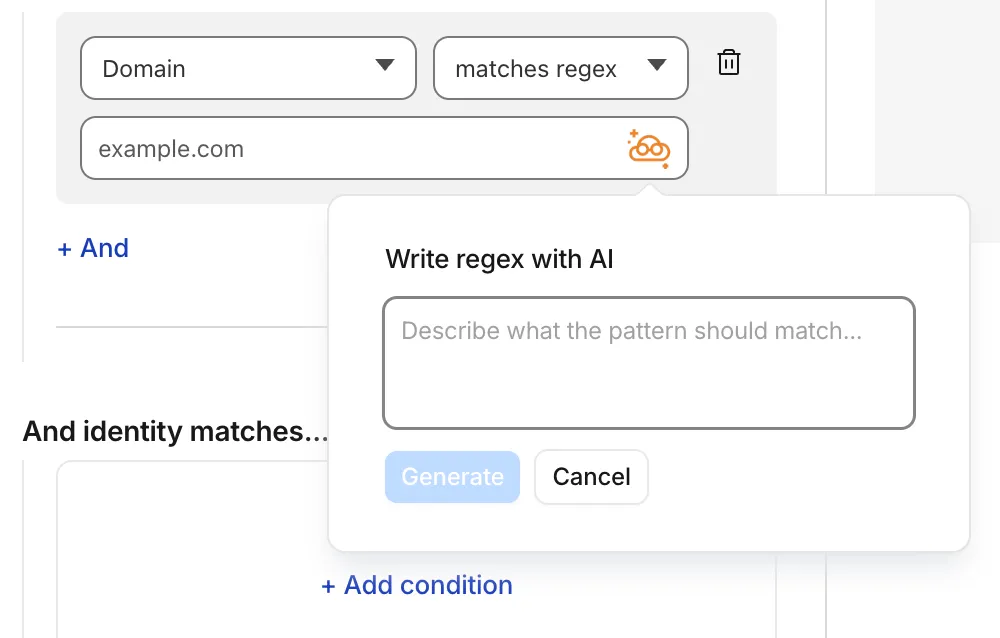
Cloudflare Gateway policy selectors which support regular expressions can now be authored in the dashboard using natural language. When building a policy with a regex-based selector (like matches regex), you can describe what you want to match in plain English and the Cloudflare Agent will generate and validate a corresponding regular expression.

Write policy regex using natural language

To get started, select a regex-compatible selector in the Gateway policy builder and select the icon. You'll see an input field for natural language, such as "any URL starting with /api/v1" or ".com, .net, and .app hosts which contain gooogle in the host."

You can also use the tool to explain existing regular expressions. If a policy already contains a regex pattern, you can instantly generate a plain-language description.

A built-in feedback mechanism allows you to rate each interaction to help improve output quality over time.

For more information, refer to Cloudflare One firewall policies and expect to see the same functionality supported soon in Data loss prevention profiles.

Create Gateway firewall policies with natural language

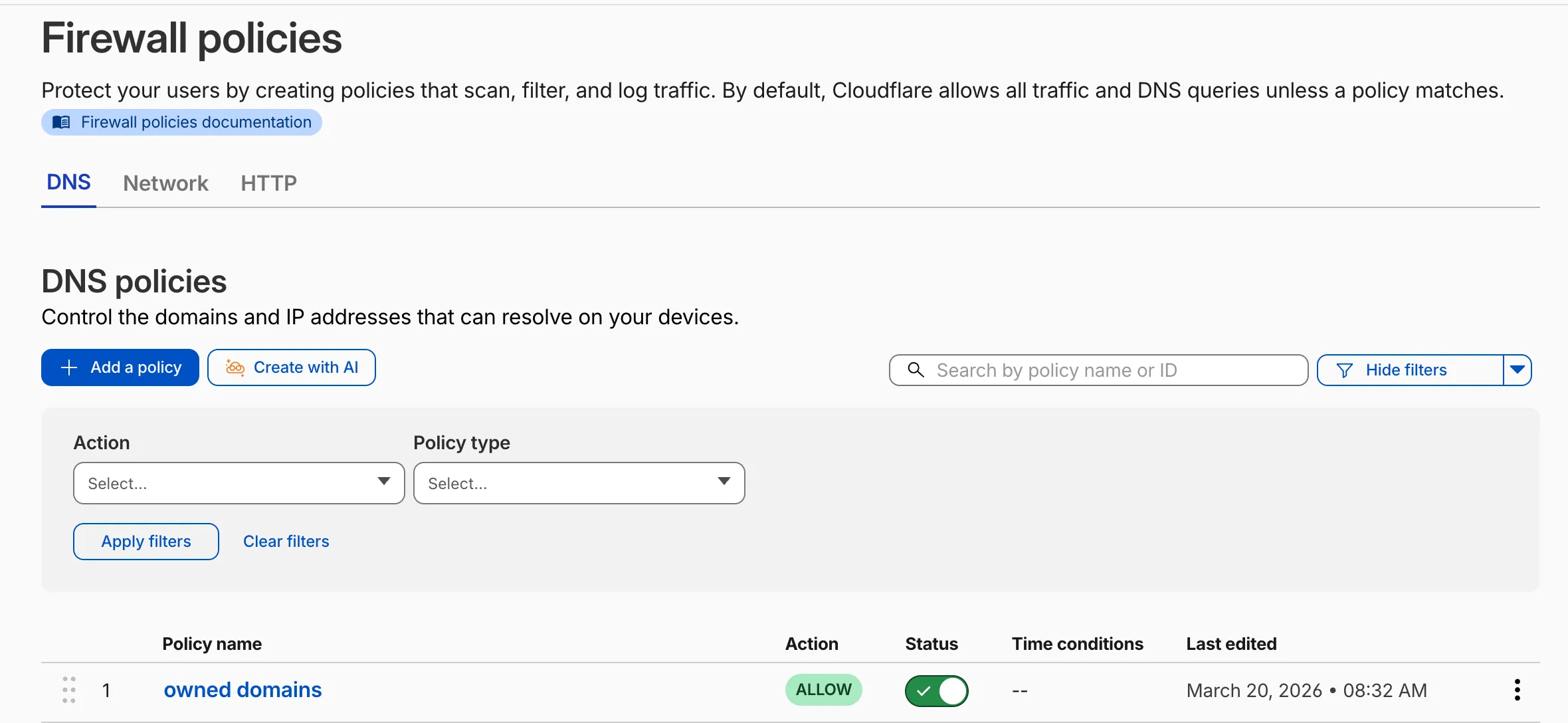
Cloudflare Gateway now supports natural language policy creation for DNS, HTTP, and Network firewall policies. Administrators can describe the outcome they want in plain language, and Cloudflare will generate a complete policy rule that populates the policy builder form.

Create with AI button on the Gateway firewall policies page

To create a policy with natural language, select Create with AI on any Gateway firewall policy tab. Choose a policy type, describe what the policy should do, and a fully configured rule will appear in the policy builder for review. You can edit any field before saving, or re-generate with a different prompt.

The generated policy incorporates your account context - including lists, DLP profiles, applications, and device posture checks - so that references to your existing resources resolve automatically.

A built-in feedback mechanism allows you to rate each generated policy and provide optional comments, which Cloudflare uses to improve output quality over time.

For more information, refer to Gateway firewall policies.

Gateway Authorization Proxy and hosted PAC files are now generally available

The Gateway Authorization Proxy and hosted PAC files are now generally available for all plan types.

Authorization proxy endpoints add an identity-aware option alongside the existing source IP proxy endpoints, using Cloudflare Access authentication to verify who a user is before applying Gateway filtering — without installing the Cloudflare One Client. Cloudflare-hosted PAC files let you create and distribute PAC files directly from Cloudflare One on Cloudflare's global network.

These features are ideal for environments where deploying a device client is not an option, such as virtual desktops (VDI) or compliance-restricted endpoints.

To get started, refer to the proxy endpoints documentation.

Network Session Logs now available for all on-ramps

Zero Trust Network Session Logs are now generated for all traffic proxied through Cloudflare Gateway, regardless of on-ramp type. This includes traffic from proxy endpoints (PAC files) and Browser Isolation egress — on-ramps that previously did not generate session logs.

Customers who already consume the zero_trust_network_sessions dataset via Logpush or Log Explorer may see increased log volume if they use these on-ramps.

For field definitions, refer to Zero Trust Network Session Logs. For traffic analysis, refer to Network session analytics.

Network session analytics dashboard

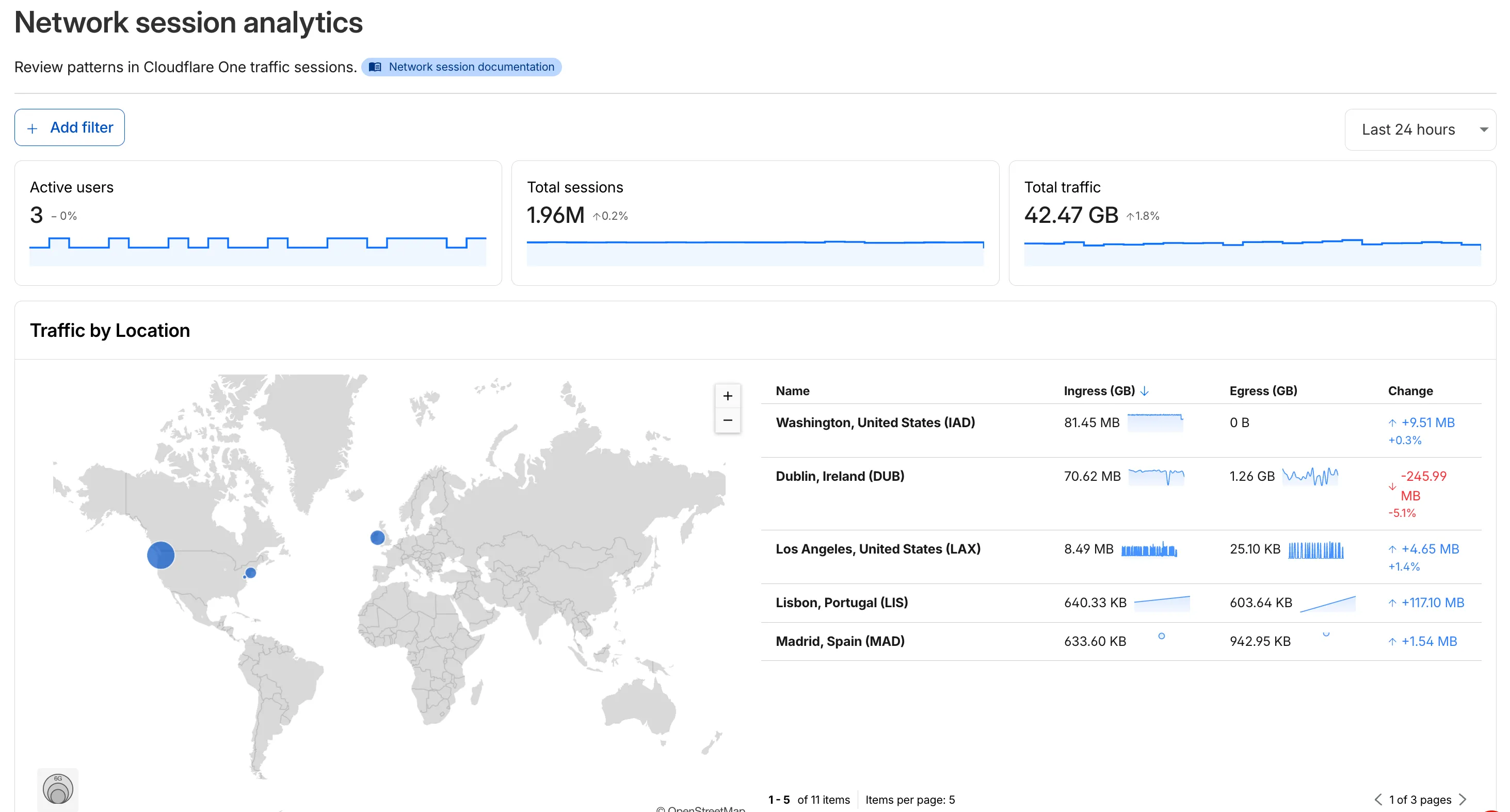
The new Network session analytics dashboard is now available in Cloudflare One. This dashboard provides visibility into your network traffic patterns, helping you understand how traffic flows through your Cloudflare One infrastructure.

Cloudflare One Network Session Analytics

What you can do with Network session analytics

  • Analyze geographic distribution: View a world map showing where your network traffic originates, with a list of top locations by session count.
  • Monitor key metrics: Track session count, total bytes transferred, and unique users.
  • Identify connection issues: Analyze connection close reasons to troubleshoot network problems.
  • Review protocol usage: See which network protocols (TCP, UDP, ICMP) are most used.

Dashboard features

  • Summary metrics: Session count, bytes total, and unique users
  • Traffic by location: World map visualization and location list with top traffic sources
  • Top protocols: Breakdown of TCP, UDP, ICMP, and ICMPv6 traffic
  • Connection close reasons: Insights into why sessions terminated (client closed, origin closed, timeouts, errors)

How to access

  1. Log in to Cloudflare One.
  2. Go to Zero Trust > Insights > Dashboards.
  3. Select Network session analytics.

For more information, refer to the Network session analytics documentation.

Configure how sensitive data appears in DLP payload logs

You can now configure how sensitive data matches are displayed in your DLP payload match logs — giving your incident response team the context they need to validate alerts without compromising your security posture.

To get started, go to the Cloudflare dashboard, select Zero Trust > Data loss prevention > DLP settings and find the Payload log masking card.

Previously, all DLP payload logs used a single masking mode that obscured matched data entirely and hid the original character count, making it difficult to distinguish true positives from false positives. This update introduces three options:

  • Full Mask (default): Masks the match while preserving character count and visual formatting (for example, ***-**-**** for a Social Security Number). This is an improvement over the previous default, which did not preserve character count.
  • Partial Mask: Reveals 25% of the matched content while masking the remainder (for example, ***-**-6789).
  • Clear Text: Stores the full, unmasked violation for deep investigation (for example, 123-45-6789).

Important: The masking level you select is applied at detection time, before the payload is encrypted. This means the chosen format is what your team will see after decrypting the log with your private key — the existing encryption workflow is unchanged.

Applies to all enabled detections: When a masking level other than Full Mask is selected, it applies to all sensitive data matches found within a payload window — not just the match that triggered the policy. Any data matched by your enabled DLP detection entries will be masked at the selected level.

For more information, refer to DLP logging options.

Organizations is now in public beta for enterprises

We're announcing the public beta of Organizations for enterprise customers, a new top-level Cloudflare container that lets Cloudflare customers manage multiple accounts, members, analytics, and shared policies from one centralized location.

What's New

Organizations [BETA]: Organizations are a new top-level container for centrally managing multiple accounts. Each Organization supports up to 500 accounts and 5000 zones, giving larger teams a single place to administer resources at scale.

Self-serve onboarding: Enterprise customers can create an Organization in the dashboard and assign accounts where they are already Super Administrators.

Centralized Account Management: At launch, every Organization member has the Organization Super Admin role. Organization Super Admins can invite other users and manage any child account under the Organization implicitly. Shared policies: Share WAF or Gateway policies across multiple accounts within your Organization to simplify centralized policy management. Implicit access: Members of an Organization automatically receive Super Administrator permissions across child accounts, removing the need for explicit membership on each account. Additional Org-level roles will be available over the course of the year.

Unified analytics: View, filter, and download aggregate HTTP analytics across all Organization child accounts from a single dashboard for centralized visibility into traffic patterns and security events.

Terraform provider support: Manage Organizations with infrastructure as code from day one. Provision organizations, assign accounts, and configure settings programmatically with the Cloudflare Terraform provider.

Shared policies: Share WAF or Gateway policies across multiple accounts within your Organization to simplify centralized policy management.

For more info:

Logs UI refresh

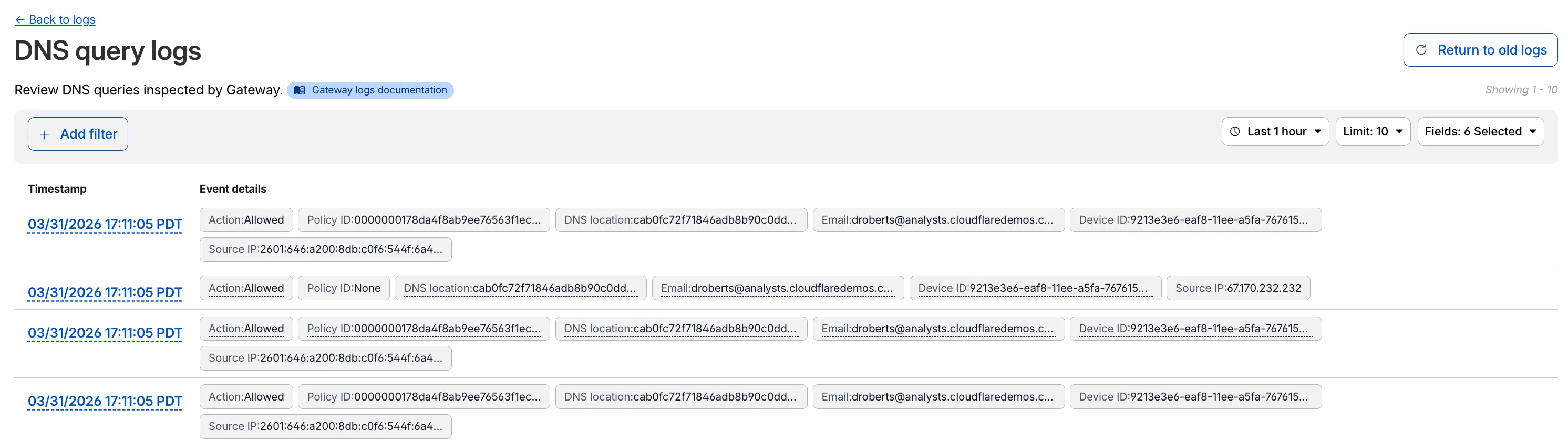
Access authentication logs and Gateway activity logs (DNS, Network, and HTTP) now feature a refreshed user interface that gives you more flexibility when viewing and analyzing your logs.

Screenshot of the new logs UI showing DNS query logs with customizable columns and filtering options

The updated UI includes:

  • Filter by field - Select any field value to add it as a filter and narrow down your results.
  • Customizable fields - Choose which fields to display in the log table. Querying for fewer fields improves log loading performance.
  • View details - Select a timestamp to view the full details of a log entry.
  • Switch to classic view - Return to the previous log viewer interface if needed.

For more information, refer to Access authentication logs and Gateway activity logs.

OIDC Claims filtering now available in Gateway Firewall, Resolver, and Egress policies

Cloudflare Gateway now supports OIDC Claims as a selector in Firewall, Resolver, and Egress policies. Administrators can use custom OIDC claims from their identity provider to build fine-grained, identity-based traffic policies across all Gateway policy types.

With this update, you can:

  • Filter traffic in DNS, HTTP, and Network firewall policies based on OIDC claim values.
  • Apply custom resolver policies to route DNS queries to specific resolvers depending on a user's OIDC claims.
  • Control egress policies to assign dedicated egress IPs based on OIDC claim attributes.

For example, you can create a policy that routes traffic differently for users with department=engineering in their OIDC claims, or restrict access to certain destinations based on a user's role claim.

To get started, configure custom OIDC claims on your identity provider and use the OIDC Claims selector in the Gateway policy builder.

For more information, refer to Identity-based policies.

Gateway Authorization Proxy and hosted PAC files (open beta)

The Gateway Authorization Proxy and PAC file hosting are now in open beta for all plan types.

Previously, proxy endpoints relied on static source IP addresses to authorize traffic, providing no user-level identity in logs or policies. The new authorization proxy replaces IP-based authorization with Cloudflare Access authentication, verifying who a user is before applying Gateway filtering without installing the WARP client.

This is ideal for environments where you cannot deploy a device client, such as virtual desktops (VDI), mergers and acquisitions, or compliance-restricted endpoints.

Key capabilities

  • Identity-aware proxy traffic — Users authenticate through your identity provider (Okta, Microsoft Entra ID, Google Workspace, and others) via Cloudflare Access. Logs now show exactly which user accessed which site, and you can write identity-based policies like "only the Finance team can access this accounting tool."
  • Multiple identity providers — Display one or multiple login methods simultaneously, giving flexibility for organizations managing users across different identity systems.
  • Cloudflare-hosted PAC files — Create and host PAC files directly in Cloudflare One with pre-configured templates for Okta and Azure, hosted at https://pac.cloudflare-gateway.com/<account-id>/<slug> on Cloudflare's global network.
  • Simplified billing — Each user occupies a seat, exactly like they do with the Cloudflare One Client. No new metrics to track.

Get started

  1. In Cloudflare One, go to Networks > Resolvers & Proxies > Proxy endpoints.
  2. Create an authorization proxy endpoint and configure Access policies.
  3. Create a hosted PAC file or write your own.
  4. Configure browsers to use the PAC file URL.
  5. Install the Cloudflare certificate for HTTPS inspection.

For more details, refer to the proxy endpoints documentation and the announcement blog post.

New protocols added for Gateway Protocol Detection (Beta)

Gateway Protocol Detection now supports seven additional protocols in beta:

Protocol Notes
IMAP Internet Message Access Protocol — email retrieval
POP3 Post Office Protocol v3 — email retrieval
SMTP Simple Mail Transfer Protocol — email sending
MYSQL MySQL database wire protocol
RSYNC-DAEMON rsync daemon protocol
LDAP Lightweight Directory Access Protocol
NTP Network Time Protocol

These protocols join the existing set of detected protocols (HTTP, HTTP2, SSH, TLS, DCERPC, MQTT, and TPKT) and can be used with the Detected Protocol selector in Network policies to identify and filter traffic based on the application-layer protocol, without relying on port-based identification.

If protocol detection is enabled on your account, these protocols will automatically be logged when detected in your Gateway network traffic.

For more information on using Protocol Detection, refer to the Protocol detection documentation.

Shadow IT - domain level SaaS analytics

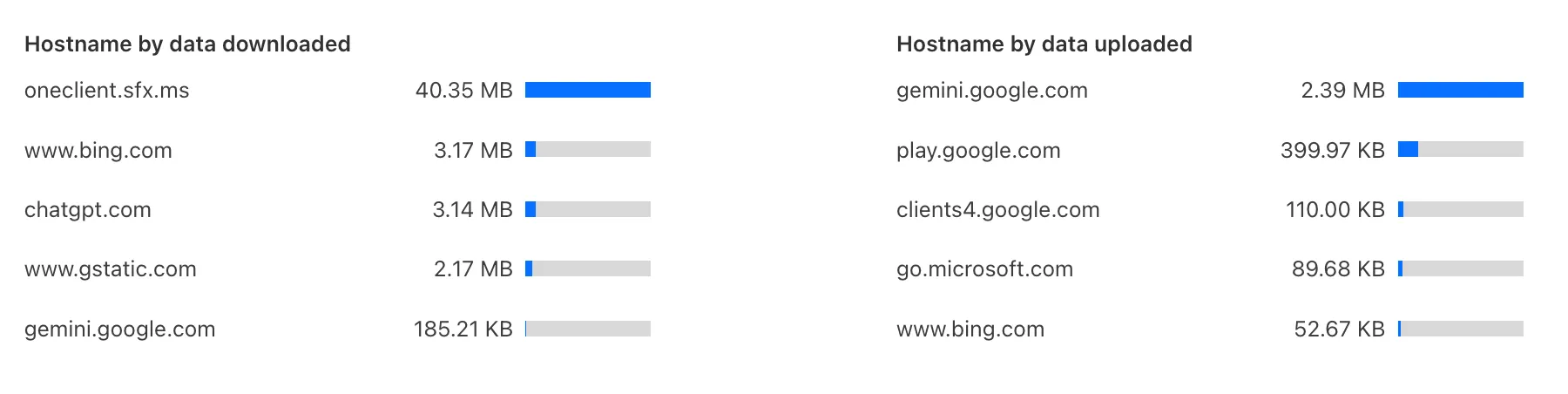
Zero Trust has again upgraded its Shadow IT analytics, providing you with unprecedented visibility into your organizations use of SaaS tools. With this dashboard, you can review who is using an application and volumes of data transfer to the application.

With this update, you can review data transfer metrics at the domain level, rather than just the application level, providing more granular insight into your data transfer patterns.

New Domain Level Metrics

These metrics can be filtered by all available filters on the dashboard, including user, application, or content category.

Both the analytics and policies are accessible in the Cloudflare Zero Trust dashboard, empowering organizations with better visibility and control.

Applications to be remapped to the new categories

We have previously added new application categories to better reflect their content and improve HTTP traffic management: refer to Changelog. While the new categories are live now, we want to ensure you have ample time to review and adjust any existing rules you have configured against old categories. The remapping of existing applications into these new categories will be completed by January 30, 2026. This timeline allows you a dedicated period to:

  • Review the new category structure.
  • Identify any policies you have that target the older categories.
  • Adjust your rules to reference the new, more precise categories before the old mappings change. Once the applications have been fully remapped by January 30, 2026, you might observe some changes in the traffic being mitigated or allowed by your existing policies. We encourage you to use the intervening time to prepare for a smooth transition.

Applications being remappedd

Application Name Existing Category New Category
Google Photos File Sharing Photography & Graphic Design
Flickr File Sharing Photography & Graphic Design
ADP Human Resources Business
Greenhouse Human Resources Business
myCigna Human Resources Health & Fitness
UnitedHealthcare Human Resources Health & Fitness
ZipRecruiter Human Resources Business
Amazon Business Human Resources Business
Jobcenter Human Resources Business
Jobsuche Human Resources Business
Zenjob Human Resources Business
DocuSign Legal Business
Postident Legal Business
Adobe Creative Cloud Productivity Photography & Graphic Design
Airtable Productivity Development
Autodesk Fusion360 Productivity IT Management
Coursera Productivity Education
Microsoft Power BI Productivity Business
Tableau Productivity Business
Duolingo Productivity Education
Adobe Reader Productivity Business
AnpiReport Productivity Travel
ビズリーチ Productivity Business
doda (デューダ) Productivity Business
求人ボックス Productivity Business
マイナビ2026 Productivity Business
Power Apps Productivity Business
RECRUIT AGENT Productivity Business
シフトボード Productivity Business
スタンバイ Productivity Business
Doctolib Productivity Health & Fitness
Miro Productivity Photography & Graphic Design
MyFitnessPal Productivity Health & Fitness
Sentry Mobile Productivity Travel
Slido Productivity Photography & Graphic Design
Arista Networks Productivity IT Management
Atlassian Productivity Business
CoderPad Productivity Business
eAgreements Productivity Business
Vmware Productivity IT Management
Vmware Vcenter Productivity IT Management
AWS Skill Builder Productivity Education
Microsoft Office 365 (GCC) Productivity Business
Microsoft Exchange Online (GCC) Productivity Business
Canva Sales & Marketing Photography & Graphic Design
Instacart Shopping Food & Drink
Wawa Shopping Food & Drink
McDonald's Shopping Food & Drink
Vrbo Shopping Travel
American Airlines Shopping Travel
Booking.com Shopping Travel
Ticketmaster Shopping Entertainment & Events
Airbnb Shopping Travel
DoorDash Shopping Food & Drink
Expedia Shopping Travel
EasyPark Shopping Travel
UEFA Tickets Shopping Entertainment & Events
DHL Express Shopping Business
UPS Shopping Business

For more information on creating HTTP policies, refer to Applications and app types.

New Application Categories added for HTTP Traffic Management

To give you precision and flexibility while creating policies to block unwanted traffic, we are introducing new, more granular application categories in the Gateway product.

We have added the following categories to provide more precise organization and allow for finer-grained policy creation, designed around how users interact with different types of applications:

  • Business
  • Education
  • Entertainment & Events
  • Food & Drink
  • Health & Fitness
  • Lifestyle
  • Navigation
  • Photography & Graphic Design
  • Travel

The new categories are live now, but we are providing a transition period for existing applications to be fully remapped to these new categories.

The full remapping will be completed by January 30, 2026.

We encourage you to use this time to:

  • Review the new category structure.
  • Identify and adjust any existing HTTP policies that reference older categories to ensure a smooth transition.

For more information on creating HTTP policies, refer to Applications and app types.


Schedule DNS policies from the UI

Admins can now create scheduled DNS policies directly from the Zero Trust dashboard, without using the API. You can configure policies to be active during specific, recurring times, such as blocking social media during business hours or gaming sites on school nights.

  • Preset Schedules: Use built-in templates for common scenarios like Business Hours, School Days, Weekends, and more.
  • Custom Schedules: Define your own schedule with specific days and up to three non-overlapping time ranges per day.
  • Timezone Control: Choose to enforce a schedule in a specific timezone (for example, US Eastern) or based on the local time of each user.
  • Combined with Duration: Policies can have both a schedule and a duration. If both are set, the duration's expiration takes precedence.

You can see the flow in the demo GIF:

Schedule DNS policies demo

This update makes time-based DNS policies accessible to all Gateway customers, removing the technical barrier of the API.

New domain categories added

We have added three new domain categories under the Technology parent category, to better reflect online content and improve DNS filtering.

New categories added

Parent ID Parent Name Category ID Category Name
26 Technology 194 Keep Awake Software
26 Technology 192 Remote Access
26 Technology 193 Shareware/Freeware

Refer to Gateway domain categories to learn more.

Application granular controls for operations in SaaS applications

Gateway users can now apply granular controls to their file sharing and AI chat applications through HTTP policies.

The new feature offers two methods of controlling SaaS applications:

  • Application Controls are curated groupings of Operations which provide an easy way for users to achieve a specific outcome. Application Controls may include Upload, Download, Prompt, Voice, and Share depending on the application.
  • Operations are controls aligned to the most granular action a user can take. This provides a fine-grained approach to enforcing policy and generally aligns to the SaaS providers API specifications in naming and function.

Get started using Application Granular Controls and refer to the list of supported applications.

Refine DLP Scans with New Body Phase Selector

You can now more precisely control your HTTP DLP policies by specifying whether to scan the request or response body, helping to reduce false positives and target specific data flows.

In the Gateway HTTP policy builder, you will find a new selector called Body Phase. This allows you to define the direction of traffic the DLP engine will inspect:

  • Request Body: Scans data sent from a user's machine to an upstream service. This is ideal for monitoring data uploads, form submissions, or other user-initiated data exfiltration attempts.
  • Response Body: Scans data sent to a user's machine from an upstream service. Use this to inspect file downloads and website content for sensitive data.

For example, consider a policy that blocks Social Security Numbers (SSNs). Previously, this policy might trigger when a user visits a website that contains example SSNs in its content (the response body). Now, by setting the Body Phase to Request Body, the policy will only trigger if the user attempts to upload or submit an SSN, ignoring the content of the web page itself.

All policies without this selector will continue to scan both request and response bodies to ensure continued protection.

For more information, refer to Gateway HTTP policy selectors.

DNS filtering for private network onramps

Magic WAN and WARP Connector users can now securely route their DNS traffic to the Gateway resolver without exposing traffic to the public Internet.

Routing DNS traffic to the Gateway resolver allows DNS resolution and filtering for traffic coming from private networks while preserving source internal IP visibility. This ensures Magic WAN users have full integration with our Cloudflare One features, including Internal DNS and hostname-based policies.

To configure DNS filtering, change your Magic WAN or WARP Connector DNS settings to use Cloudflare's shared resolver IPs, 172.64.36.1 and 172.64.36.2. Once you configure DNS resolution and filtering, you can use Source Internal IP as a traffic selector in your resolver policies for routing private DNS traffic to your Internal DNS.

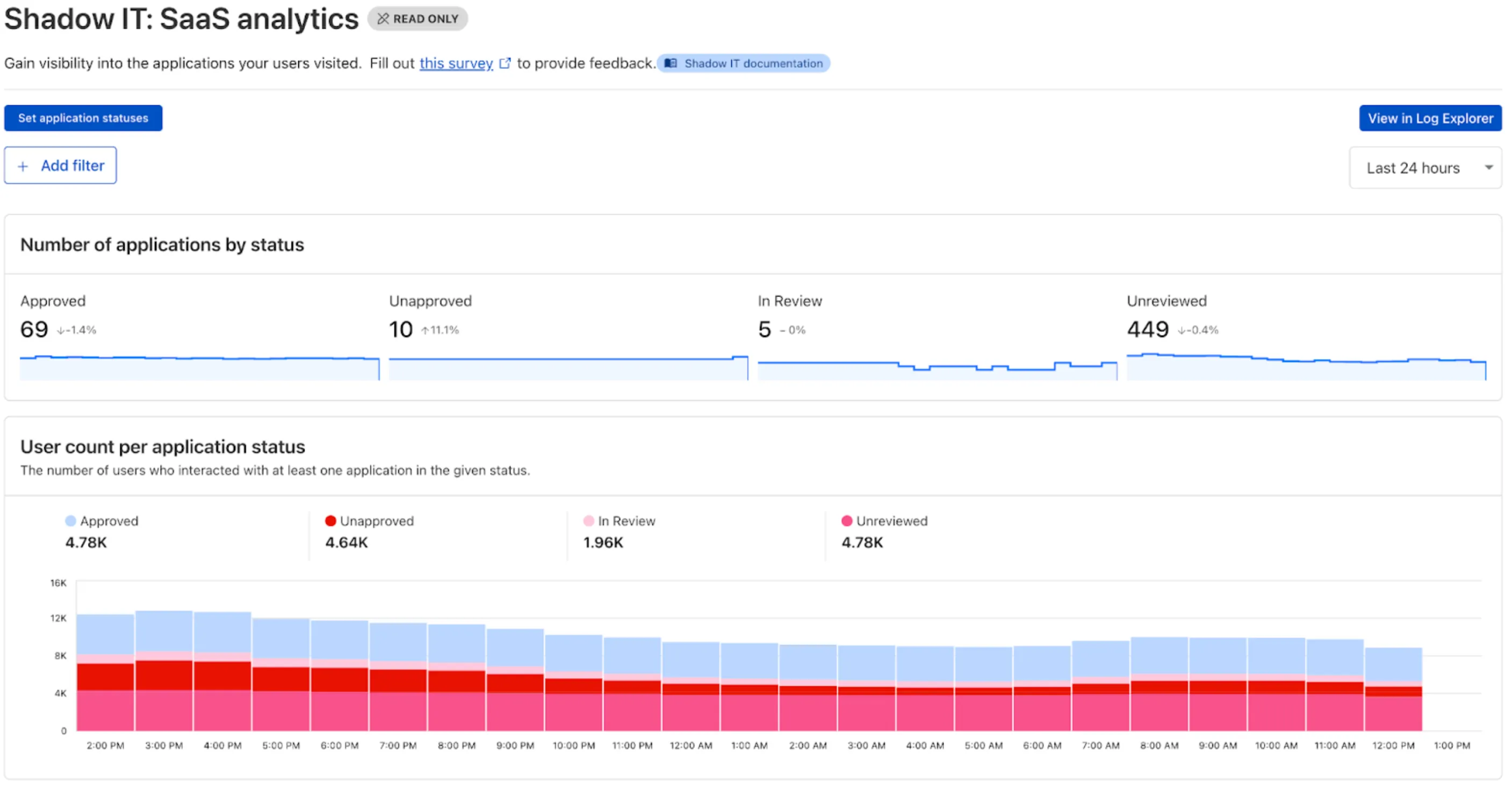
Shadow IT - SaaS analytics dashboard

Zero Trust has significantly upgraded its Shadow IT analytics, providing you with unprecedented visibility into your organizations use of SaaS tools. With this dashboard, you can review who is using an application and volumes of data transfer to the application.

You can review these metrics against application type, such as Artificial Intelligence or Social Media. You can also mark applications with an approval status, including Unreviewed, In Review, Approved, and Unapproved designating how they can be used in your organization.

Cloudflare One Analytics Dashboards

These application statuses can also be used in Gateway HTTP policies, so you can block, isolate, limit uploads and downloads, and more based on the application status.

Both the analytics and policies are accessible in the Cloudflare Zero Trust dashboard, empowering organizations with better visibility and control.

Gateway BYOIP Dedicated Egress IPs now available.

Enterprise Gateway users can now use Bring Your Own IP (BYOIP) for dedicated egress IPs.

Admins can now onboard and use their own IPv4 or IPv6 prefixes to egress traffic from Cloudflare, delivering greater control, flexibility, and compliance for network traffic.

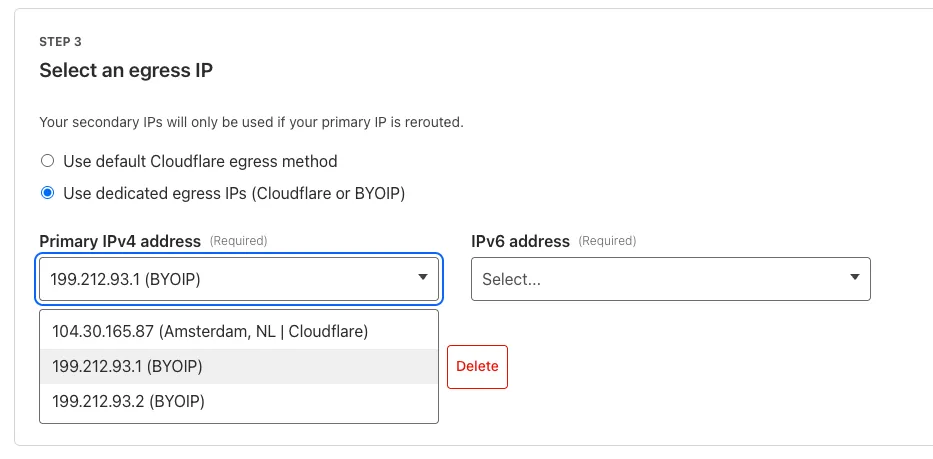
Get started by following the BYOIP onboarding process. Once your IPs are onboarded, go to Gateway > Egress policies and select or create an egress policy. In Select an egress IP, choose Use dedicated egress IPs (Cloudflare or BYOIP), then select your BYOIP address from the dropdown menu.

Screenshot of a dropdown menu adding a BYOIP IPv4 address as a dedicated egress IP in a Gateway egress policy

For more information, refer to BYOIP for dedicated egress IPs.

Scam domain category introduced under Security Threats

We have introduced a new Security Threat category called Scam. Relevant domains are marked with the Scam category. Scam typically refers to fraudulent websites and schemes designed to trick victims into giving away money or personal information.

New category added

Parent ID Parent Name Category ID Category Name
21 Security Threats 191 Scam

Refer to Gateway domain categories to learn more.