AI Gateway logs now capture the user agent of the client that made each request, making it easier to identify which SDK, library, or application sent the traffic flowing through your gateway. For example, you can tell apart requests coming from openai-python versus a custom application or a Cloudflare Worker.
The user agent appears alongside the other details in each log entry, and you can filter logs by user agent (equals, does not equal, or contains) in the dashboard.
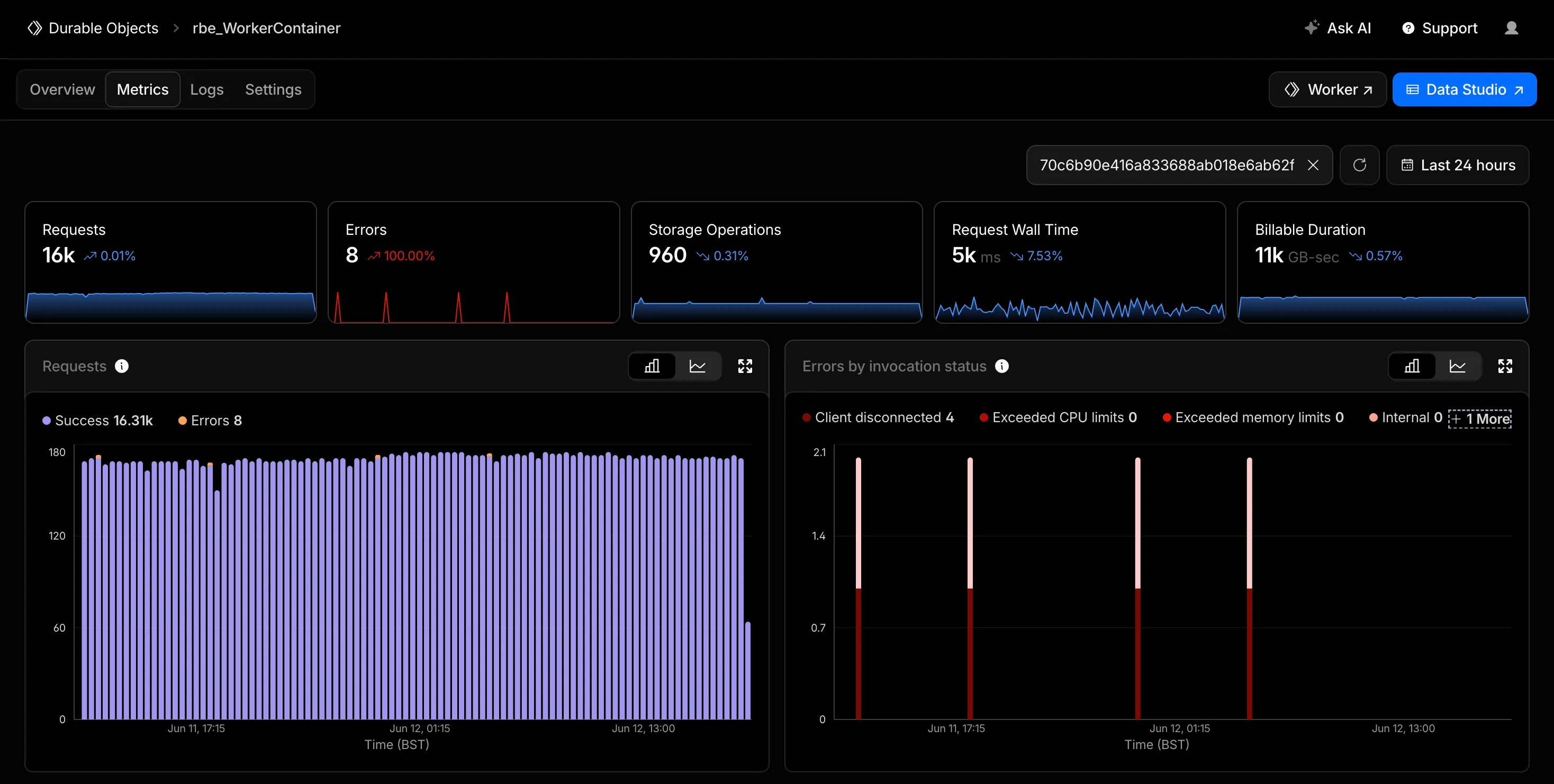
You can now filter the Metrics tab for a Durable Objects namespace by an individual Durable Object's ID or name in the Cloudflare dashboard. Previously, metrics charts only showed aggregate, namespace-level data, making it difficult to isolate the behavior of a specific object.
Start typing an ID or name into the filter and select a match from the autocomplete dropdown. The autocomplete only shows objects with invocations during the selected time range, so an object that does not appear has not been invoked in that window. This does not necessarily mean the object has been deleted. Every chart on the page updates to reflect only the selected object. This makes it easier to identify and investigate a single Durable Object when debugging a high-traffic object, an error spike, or unexpected storage usage. Clear the filter to return to namespace-level metrics.
Metrics are powered by the GraphQL Analytics API, so standard analytics behavior such as ingestion delay and sampling applies.
Cloudflare's Terraform v5 Provider makes it easy for developers to manage their Cloudflare infrastructure using a configuration as code approach. It releases every 2-3 weeks ↗ to ensure that you can always manage the latest features in the platform. This week, we launched Terraform v5.20.0, which adds 24 new resources, bumps the underlying Go SDK to cloudflare-go v7, and includes a range of bug fixes and state upgraders based on community feedback.
New resources
cloudflare_ai_search_namespace: Manage AI Search namespaces
@cf/moonshotai/kimi-k2.7-code is now available on Workers AI. Kimi K2.7 Code is a code-optimized variant of the Kimi K2 family, built on a Mixture-of-Experts architecture with 1T total parameters and 32B active per token.
Improved coding and agent performance
K2.7 Code delivers meaningful gains over K2.6 on coding and agentic benchmarks:
+21.8% on Kimi Code Bench v2
+11.0% on Program Bench
+31.5% on MLS Bench Lite
Reasoning efficiency
K2.7 Code uses 30% fewer reasoning tokens compared to K2.6, reducing overthinking and lowering inference cost for reasoning-heavy workloads.
Key capabilities
262.1k token context window for retaining full conversation history, tool definitions, and codebases across long-running agent sessions
Long-horizon coding with improved instruction following and higher end-to-end coding task success rates
Vision inputs for processing images alongside text
Thinking mode with configurable reasoning depth via chat_template_kwargs.thinking
Multi-turn tool calling for building agents that invoke tools across multiple conversation turns
Structured outputs with JSON schema support
Differences from Kimi K2.6
If you are migrating from Kimi K2.6, note the following:
K2.7 Code is optimized for coding tasks with improved benchmark performance and reasoning efficiency
Cached input token pricing is 0.19 per M tokens (vs 0.16 for K2.6)
API usage is identical — no parameter changes required
Get started
Use Kimi K2.7 Code through the Workers AI binding (env.AI.run()), the REST API at /ai/run, or the OpenAI-compatible endpoint at /v1/chat/completions. You can also use AI Gateway with any of these endpoints.
Browser Run's /snapshot endpoint now supports a formats parameter that lets you return multiple page formats in a single API call. Previously, /snapshot returned only HTML content and a screenshot. You can now also include Markdown and the accessibility tree in the same response.
These formats are particularly useful for AI agent workflows:
Markdown provides a token-efficient representation of page content that LLMs can process directly, without parsing HTML markup.
The accessibility tree provides a structured representation of a page's elements, including roles, labels, and hierarchy, helping LLMs understand page structure and navigate its contents.
The following example returns a screenshot, Markdown, and the accessibility tree in one call:
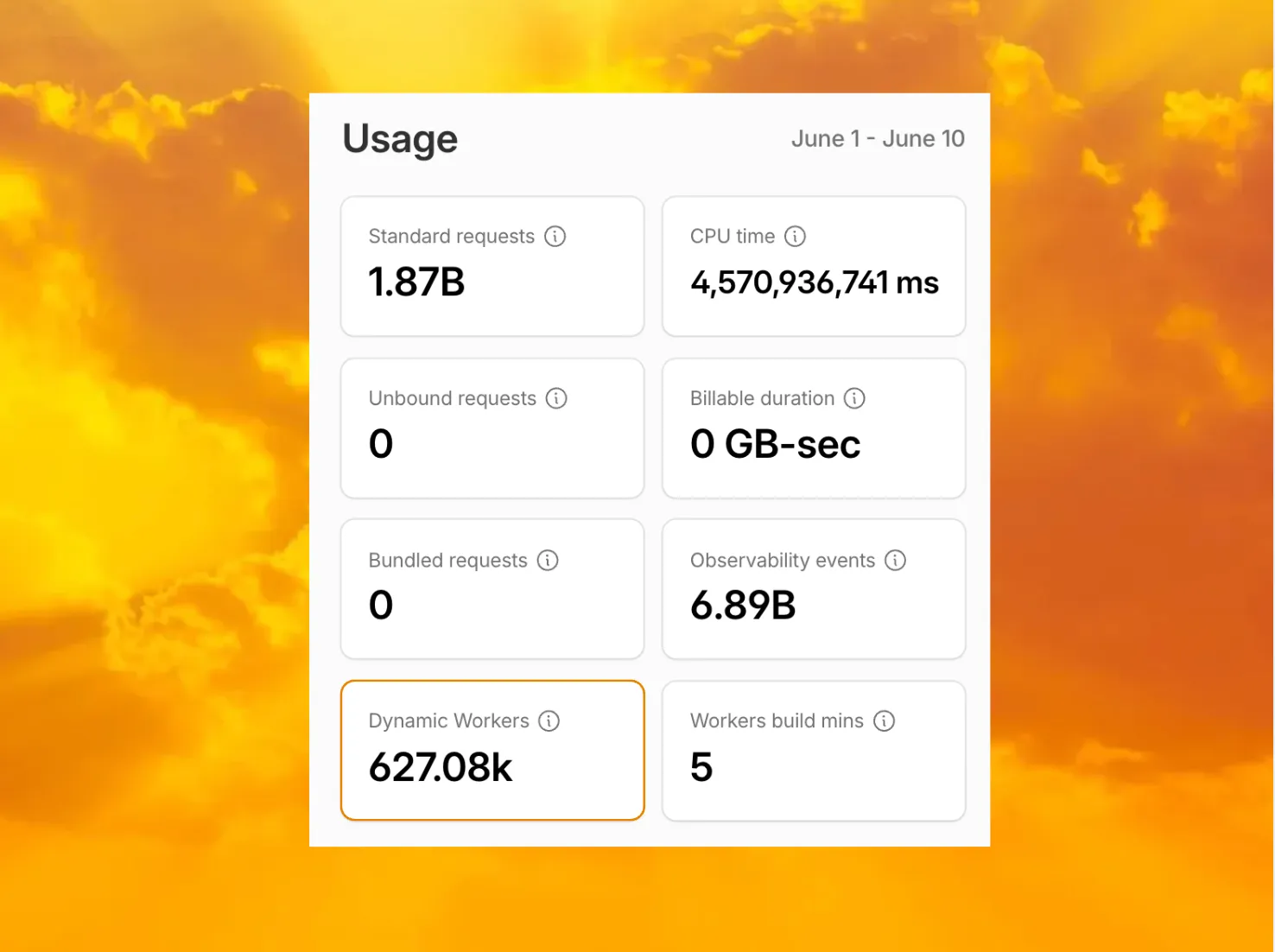
Customers can now view the number of Dynamic Workers invoked during their billing period from the Workers overview page in the Cloudflare dashboard.
This count reflects the number of Dynamic Workers that Cloudflare would bill for during the selected billing period. Dynamic Workers usage data only goes back to June 1, 2026.
You can also query this count through the GraphQL Analytics API by using workersInvocationsByOwnerAndScriptGroups and selecting distinctDynamicWorkerCount:
The Flagship API reference is now available. You can use the Cloudflare API to create and update apps, and to create, update, delete, and list feature flags without using the dashboard.
For example, create a new boolean flag with the API:
To create an API token, go to Account API Tokens ↗ in the Cloudflare dashboard and search for Flagship.
The API reference includes endpoints for Flagship apps, flags, changelog entries, and flag evaluation. Agents can also use the Flagship reference in the Cloudflare skill ↗ to create and manage Flagship resources.
Refer to the Flagship documentation to learn more about evaluating feature flags from your applications.
Use the Images binding to upload, list, retrieve, update, and delete images stored in Images directly from your Worker without managing API tokens or making HTTP requests.
The env.IMAGES.hosted namespace supports the following storage and management operations:
Today we are announcing the deprecation of several features from the Sandbox SDK. The SDK has grown and matured substantially since it first launched. As agent workflows have developed, we have shipped many new features and experiments so developers can easily integrate secure, isolated code execution into their workflows.
We want the SDK to continue providing a stable foundation for agentic workflows while we iterate quickly on the codebase. These deprecated features have either been superseded by newer capabilities or seen low adoption. They will remain in the codebase until July 9, 2026, after which they will no longer be present in future Sandbox SDK versions.
HTTP and WebSocket transports
In April 2026, we released the new RPC transport and deprecated the WebSocket transport. This setting governs how the sandbox container talks to the Workers ecosystem. The RPC transport removes the limitations of both the HTTP and WebSocket transports. As of June 9, 2026, it is the recommended default. HTTP and WebSocket transports will no longer be present in Sandbox SDK versions released after July 9, 2026.
To migrate before July 9, 2026, update the SANDBOX_TRANSPORT variable to rpc or set the transport option when calling getSandbox(). For more information, refer to the transport configuration documentation.
Desktop
The desktop feature landed as a technical demonstration of what can be done with the Sandbox SDK — controlling a full browser environment from within a sandbox. With Cloudflare Browser Run now available, this feature saw very little use. We have removed it in 0.10.2.
Expose ports
We recently released support for Cloudflare Tunnel in the Sandbox SDK. This provides a robust API for exposing services running in your sandbox to the public internet. It fixes issues many were facing with local development and deployment to workers.dev domains. To migrate from exposePort() to tunnels, refer to the tunnels API documentation and the expose services guide.
Default sessions
By default, the exec() method in the Sandbox SDK maintains a default session across all calls, so a cd in one call is honored in the next. This convenience helped developers writing exec statements by hand, but confused agents and caused hard-to-trace bugs. As of 0.10.3, we have introduced the enableDefaultSession flag on the getSandbox() interface to turn this off. Default sessions as a concept — and the flag — will be removed in an upcoming release.
We recommend setting enableDefaultSession: false today and using the sandbox.createSession() API when you need the previous behavior.
Other changes
We are also consolidating all APIs that buffer data to support streaming by default. This includes readFile, writeFile, and exec. The stream equivalents will be removed.
We are exploring moving non-core features like the code interpreter, terminal, and git APIs into helpers. These features will retain their existing APIs, so migration should be simple.
You can now send emails through Cloudflare Email Service using authenticated SMTP submission on smtp.mx.cloudflare.net:465. SMTP joins the REST API and the Workers binding as a third way to send transactional email — useful for existing applications that already speak SMTP and language-native SMTP libraries (Nodemailer, smtplib, PHPMailer, JavaMail).
Setting
Value
Host
smtp.mx.cloudflare.net
Port
465 (implicit TLS)
AUTH
PLAIN or LOGIN
Username
api_token
Password
A Cloudflare API token (account-owned or user-owned) with Email Sending: Edit
Submissions enter the same delivery pipeline as the REST API and Workers binding: identical limits, automatic DKIM and ARC signing, and shared dashboard logs.
R2 SQL now supports set operations (UNION, INTERSECT, EXCEPT) and SELECT DISTINCT, expanding the range of analytical queries you can run directly on Apache Iceberg ↗ tables in R2 Data Catalog.
Set operations
Combine the results of multiple SELECT statements:
UNION — returns all rows from both queries, removing duplicates
UNION ALL — returns all rows from both queries, including duplicates
INTERSECT — returns only rows that appear in both queries
EXCEPT — returns rows from the first query that do not appear in the second
-- Find zones that had either firewall blocks OR high-risk requestsSELECT zone_id FROM my_namespace.firewall_events WHERE action = 'block'UNIONSELECT zone_id FROM my_namespace.http_requests WHERE risk_score > 0.8
-- Find zones with both firewall blocks AND high trafficSELECT zone_id FROM my_namespace.firewall_events WHERE action = 'block'INTERSECTSELECT zone_id FROM my_namespace.http_requestsGROUP BY zone_idHAVING COUNT(*) > 10000
-- Find enterprise zones that have not been compactedSELECT zone_id FROM my_namespace.zones WHERE plan = 'enterprise'EXCEPTSELECT zone_id FROM my_namespace.compaction_history
RealtimeKit lets you build products where people meet over live audio and video — such as HealthTech, EdTech, proctoring, and other real-time platforms — on Cloudflare's global WebRTC infrastructure.
Post-meeting transcription is now Generally Available, so completed RealtimeKit meetings can automatically produce full transcript files after they end. Those transcripts can also power AI-generated summaries for meeting notes, review workflows, and follow-up tasks after the transcript is available.
Post-meeting transcription is a managed service powered by Workers AI using Whisper Large v3 Turbo. RealtimeKit handles transcription processing and can return transcript and summary files through webhooks or the REST API, so you do not need to run your own transcription infrastructure.
Generate transcripts and summaries
To generate a transcript after a meeting ends, set transcribe_on_end: true when creating a meeting. To also generate an AI summary automatically after the transcript is available, set summarize_on_end: true:
When RealtimeKit finishes processing a meeting, it creates download URLs for the transcript and, if summarize_on_end is set, the summary. You can receive those URLs automatically with webhooks, or fetch them later for a specific session with the REST API.
To receive results as soon as they are ready, configure the meeting.transcript and meeting.summary webhook events:
Workflows now supports saga-style rollbacks, allowing you to add compensating logic to each step.do() in case of downstream failures. If the instance fails, the rollback handlers will execute in reverse step-start order.
This is useful for multi-step operations that touch external systems, such as inventory reservations, payment authorization, ticket creation, or infrastructure provisioning. Instead of writing all cleanup logic in a top-level catch, you can keep each compensating action next to the step it undoes.
Rollback handlers support their own retry and timeout configuration, and Workflows now exposes rollback outcomes in instance status responses. Workflows analytics also emits rollback lifecycle events, making it easier to distinguish a forward execution failure from a rollback failure when debugging production workflows.
AI Gateway now supports spend limits — cost-based budgets that track cumulative dollar spend and block requests when the budget is exceeded. Unlike rate limiting, which caps the number of requests, spend limits track actual cost based on token usage and model pricing.
You can scope limits by model, provider, or custom metadata dimensions. For example, give each user a 200/day budget, cap total gateway spend at 10,000/day, or limit a specific model to $50/day per user. Each rule uses a configurable time window with fixed or sliding enforcement.
Spend limits work with both Unified Billing and BYOK requests for models with known pricing.
Workers using a VPC Network binding with network_id: "cf1:network" now egress to public Internet destinations through Cloudflare Gateway. This means your existing Zero Trust traffic policies — DNS, HTTP, Network, and egress — extend to traffic that originates from your Workers, the same way they do for WARP users today.
Visibility. Worker egress shows up in Gateway DNS, HTTP, and Network logs alongside your other traffic, so you can audit what your Workers are calling and when.
Enforcement. Any existing Gateway policy whose selectors match a Worker request will apply — including allow / block lists, DNS category filtering, and HTTP destination rules. If you have already blocked a category for your workforce, your Workers inherit that block.
// Egress to a public destination — subject to your Gateway policies and loggedconst response = await env.EGRESS.fetch("https://api.example.com/data");
// Egress to a public destination — subject to your Gateway policies and loggedconst response = await env.EGRESS.fetch("https://api.example.com/data");
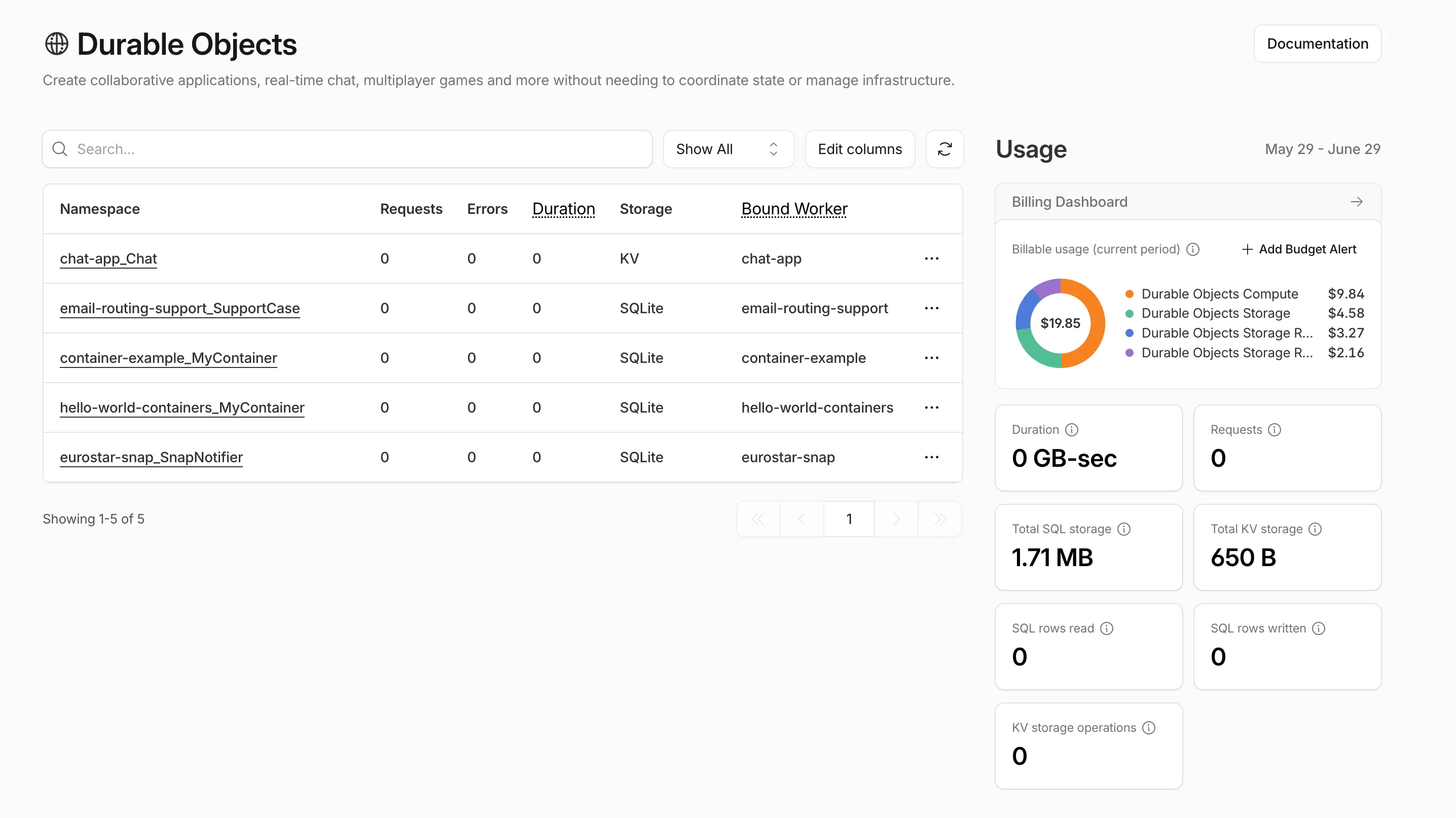
Pay-as-you-go customers can now view billable usage and create budget alerts directly from the product overview pages for Workers & Pages, D1, R2, Workers KV, Queues, Vectorize, Durable Objects, and Containers. A new sidebar widget shows current-period spend and the billing cycle date range, alongside a button to create a budget alert.
The widget pulls from the same data as the Billable Usage dashboard and aligns to your billing cycle (or the current day on Free plans), so the numbers match your invoice. Enterprise contract accounts are not yet supported.
Selecting Create budget alert opens the budget alert flow inline so you can set a dollar threshold in the same place you are reviewing usage. Budget alerts apply to your total account-level spend across all products, not just the product page you create them from.
The pipeline field inside the pipelines binding configuration in your Wrangler configuration file has been renamed to stream. The old field is deprecated but still accepted.
Update your configuration to use stream to avoid the deprecation warning.
Wrangler can now store the OAuth credentials returned by wrangler login in an AES-256-GCM ↗-encrypted file, with the encryption key held in your operating system keychain. The default behavior is unchanged — credentials still live in a plaintext TOML file unless you opt in.
To opt in, run:
npx wrangler login --use-keyring
The choice is persisted across Wrangler invocations. Opt back out with npx wrangler login --no-use-keyring, or override the preference for a single command with the CLOUDFLARE_AUTH_USE_KEYRING environment variable.
wrangler whoami now reports where credentials are stored:
🔐 Credentials are stored in: Encrypted file (~/.config/.wrangler/config/default.enc) with key in macOS Keychain (service=wrangler, account=default)
Per-platform backends:
macOS uses the built-in Keychain via /usr/bin/security.
Linux uses libsecret ↗ via the secret-tool CLI from the libsecret-tools package.
Windows uses Credential Manager via @napi-rs/keyring ↗, installed on-demand the first time you opt in.
Refer to Storing OAuth credentials in the OS keychain for the full details, including the migration behavior on opt-in/opt-out and the CLOUDFLARE_AUTH_USE_KEYRING environment variable.
You can now attach cron schedules directly to a Workflow binding in wrangler.jsonc. Each scheduled run creates a new Workflow instance automatically, so you do not need to define a separate Worker with a scheduled handler just to trigger your Workflow on an interval.
For example, you can configure hourly, every-15-minute, or weekday schedules on the same Workflow:
Cron workloads get all the same benefits of Workflows with built-in retries, multi-step durable execution, and configurable timeouts of Workflows.
import { WorkflowEntrypoint, WorkflowEvent, WorkflowStep,} from "cloudflare:workers";// Runs automatically on each cron schedule defined for the MY_WORKFLOW binding in wrangler.jsonc.export class MyScheduledWorkflow extends WorkflowEntrypoint<Env> { async run(event: WorkflowEvent, step: WorkflowStep) { const data = await step.do("fetch source data", async () => { return await fetchSourceData(); }); // If this step fails, only this step is retried with the custom logic below await step.do( "process and store results", { retries: { limit: 5, delay: "30 seconds", backoff: "exponential" }, timeout: "10 minutes", }, async () => { await processAndStore(data); }, ); }}
This makes it easier to build recurring, scheduled jobs such as database backups, invoice generation, report aggregation, and cleanup tasks without wiring up a separate Cron Trigger entrypoint.
The latest release of the Agents SDK ↗ adds four new ways to build with @cloudflare/think: on-demand Agent Skills, chat messengers (starting with Telegram), declarative scheduled tasks, and durable reasoning steps inside Workflows. This release also significantly hardens durable chat recovery, so turns reliably ride through deploys, evictions, and stalled model streams in production.
Agent Skills (experimental)
Give an agent a catalog of on-demand instructions, resources, and scripts. A skill source adds a catalog to the system prompt, and the model activates a skill only when a task matches — so a large library of capabilities does not bloat every prompt.
import { Think, skills } from "@cloudflare/think";import bundledSkills from "agents:skills";export class SkillsAgent extends Think { getSkills() { return [ bundledSkills, skills.r2(this.env.SKILLS_BUCKET, { prefix: "skills/" }), ]; }}
import { Think, skills } from "@cloudflare/think";import bundledSkills from "agents:skills";export class SkillsAgent extends Think<Env> { getSkills() { return [ bundledSkills, skills.r2(this.env.SKILLS_BUCKET, { prefix: "skills/" }), ]; }}
The agents:skills import bundles a local ./skills directory through the Agents Vite plugin (one directory per skill, each with a SKILL.md). Skills can also load from R2 or a manifest. When skills are available, Think exposes activate_skill, read_skill_resource, and an optional run_skill_script tool. Skill loading is resilient: a duplicate or failing source is skipped with a warning instead of breaking the agent.
Agent Skills are experimental, and script execution in particular is early. The API may change in a future release. We would love your feedback — tell us what you are building and what is missing in the Agents repository ↗.
Messengers
Connect a Think agent directly to a chat platform. Think owns the webhook route, conversation routing, durable reply fiber, and streamed delivery back to the provider. Telegram ships as the first provider.
import { Think } from "@cloudflare/think";import { defineMessengers, ThinkMessengerStateAgent,} from "@cloudflare/think/messengers";import telegramMessenger from "@cloudflare/think/messengers/telegram";export { ThinkMessengerStateAgent };export class SupportAgent extends Think { getMessengers() { return defineMessengers({ telegram: telegramMessenger({ token: this.env.TELEGRAM_BOT_TOKEN, userName: "support_bot", secretToken: this.env.TELEGRAM_WEBHOOK_SECRET_TOKEN, }), }); }}
import { Think } from "@cloudflare/think";import { defineMessengers, ThinkMessengerStateAgent,} from "@cloudflare/think/messengers";import telegramMessenger from "@cloudflare/think/messengers/telegram";export { ThinkMessengerStateAgent };export class SupportAgent extends Think<Env> { getMessengers() { return defineMessengers({ telegram: telegramMessenger({ token: this.env.TELEGRAM_BOT_TOKEN, userName: "support_bot", secretToken: this.env.TELEGRAM_WEBHOOK_SECRET_TOKEN, }), }); }}
Each Chat SDK thread maps to its own Think sub-agent by default, so group chats and direct messages do not share memory. Multiple bots, custom conversation routing, and custom providers are all supported.
Scheduled tasks
Declare recurring, timezone-aware prompts and handlers with a typed domain-specific language (DSL). Think reconciles the declarations on startup and re-arms the next occurrence after each run, backed by durable idempotent submissions.
import { Think, defineScheduledTasks } from "@cloudflare/think";export class DigestAgent extends Think { getScheduledTasks() { return defineScheduledTasks({ weeklyCommitReport: { schedule: "every week on monday at 09:00", prompt: "Compile my GitHub commits for the last week and summarize them.", }, workout: { schedule: "every day at 08:00 in Europe/London", prompt: "Start my workout.", }, }); }}
import { Think, defineScheduledTasks } from "@cloudflare/think";export class DigestAgent extends Think<Env> { getScheduledTasks() { return defineScheduledTasks({ weeklyCommitReport: { schedule: "every week on monday at 09:00", prompt: "Compile my GitHub commits for the last week and summarize them.", }, workout: { schedule: "every day at 08:00 in Europe/London", prompt: "Start my workout.", }, }); }}
Think Workflows
Run a model-driven reasoning step inside a Cloudflare Workflow with ThinkWorkflow and step.prompt(), with durable typed structured output, long waits, and approval gates.
import { z } from "zod";import { ThinkWorkflow } from "@cloudflare/think/workflows";import type { ThinkWorkflowStep } from "@cloudflare/think/workflows";import type { AgentWorkflowEvent } from "agents/workflows";const draftSchema = z.object({ title: z.string(), summary: z.string(), labels: z.array(z.string()),});export class TriageWorkflow extends ThinkWorkflow<TriageAgent, Params> { async run(event: AgentWorkflowEvent<Params>, step: ThinkWorkflowStep) { const draft = await step.prompt("triage-issue", { prompt: `Triage issue #${event.payload.issueNumber}`, output: draftSchema, timeout: "3 days", }); await step.do("apply-labels", async () => { await this.agent.applyLabels(draft.labels); }); }}
Production hardening for durable chat recovery
Durable chat turns have always been designed to survive a mid-turn deploy or Durable Object eviction. This release is a major hardening pass on that machinery for production.
Better recovery during deploys. Turns now ride through continuous deploys and evictions without losing completed work or re-running tools that already ran.
A live "recovering…" signal.useAgentChat exposes a new isRecovering flag, so a recovering turn shows progress instead of looking frozen. Most UIs render isStreaming || isRecovering as "busy".
Stalled streams recover. Set chatStreamStallTimeoutMs to route a hung provider stream into the same recovery path instead of leaving an infinite spinner.
Sub-agents re-attach. On parent recovery, an in-flight agentTool() child is re-attached to its result rather than abandoned and re-run, so long-running children no longer lose work under deploys.
MCP transport improvements
Resumable streams — In-flight tool calls over Server-Sent Events (SSE) survive a dropped connection. Clients reconnect with Last-Event-ID and replay anything they missed.
Readable server IDs — addMcpServer accepts an optional id, so tools surface as readable keys (for example tool_github_create_pull_request) instead of opaque connection IDs.
Better handling of concurrent requests — Overlapping JSON-RPC requests are now correctly correlated to their responses across the HTTP and RPC transports.
Other improvements
Compaction — A Session's tokenCounter now also drives the compaction boundary decision ("what to compress"), not just the fire/no-fire trigger.
@cloudflare/worker-bundler — Adds a virtualModules option to createWorker to provide in-memory module source during bundling.
Client-tool continuations — Parallel tool results now coalesce into a single continuation, immediate resume requests attach to the pending continuation, and server-side needsApproval continuations resume reliably after approval.
Upgrade
To update to the latest version:
									npm
									 i agents@latest @cloudflare/think@latest @cloudflare/ai-chat@latest
Sandboxes can expose a service running inside the container on a public preview URL through the sandbox.tunnels namespace. The SDK uses cloudflared inside the sandbox so you can share a running service without configuring exposePort() or a custom domain.
By default, sandbox.tunnels.get(port) creates a quick tunnel ↗ on a zero-config *.trycloudflare.com URL — no Cloudflare account, DNS record, or custom domain required. This is perfect for quick development and for .workers.dev deployments.
For more control you can create a named tunnel through sandbox.tunnels.get(port, { name }). A named tunnel binds a hostname (<name>.<your-zone>) backed by a Cloudflare Tunnel and a CNAME record on your zone resulting in something like https://my-app-preview.example.com ↗.
Unlike quick tunnels, which generate a new random URL each time, a named tunnel produces a persistent URL that survives container restarts. This makes named tunnels suitable for production use cases where you want control over the tunnel and it's origin.
Calling sandbox.destroy() tears down the Cloudflare Tunnel and the associated DNS record alongside the container, so you do not leave dangling tunnels or records behind.
You can now point wrangler d1 migrations apply at a nested migrations layout — such as the one produced by Drizzle ↗ (migrations/0001_init/migration.sql) — using the new migrations_pattern D1 binding config:
migrations_pattern is a glob (relative to your Wrangler config file) used to discover migration files. It defaults to ${migrations_dir}/*.sql, so existing projects keep working unchanged. Each migration's name is recorded in the migrations table as a path relative to migrations_dir.
When you use the WebSocket adapter to stream WebRTC media to a WebSocket endpoint, the adapter now auto-reconnects and buffers audio and video after brief endpoint disconnects or restarts.
Streaming WebRTC media to WebSocket endpoints
Many teams also use Realtime SFU as the media layer for backend applications, such as transcription, recording, note-taking, and agentic media-processing services. These systems often need to consume live WebRTC audio or video from the SFU in backend infrastructure, including Durable Objects, Workers, Containers, or external services, without running a WebRTC client themselves.
When you use the WebSocket adapter in Stream mode (egress) to send live audio or video from the SFU to your own WebSocket endpoint, the SFU now automatically reconnects after brief endpoint disconnects or restarts. This is especially helpful for long-running media pipelines where the WebSocket endpoint may briefly restart while a recording, transcription, or live analysis job is still in progress.
Previously, a brief disconnect from your WebSocket endpoint could close the adapter and require your application to recreate it before media could resume. Now, the SFU retries the same endpoint for up to 5 seconds with no API change required. If the endpoint comes back within that window, audio and video delivery resumes automatically.
The reconnect behavior also includes live-first media buffering, so brief interruptions reduce media loss without replaying stale video.
Reconnect behavior
During reconnect:
Audio uses a short bounded backlog to reduce audible loss. If the interruption lasts longer than the backlog can cover, older audio may be dropped.