You can now set topK up to 50 when a Vectorize query returns values or full metadata. This raises the previous limit of 20 for queries that use returnValues: true or returnMetadata: "all".
Use the higher limit when you need more matches in a single query response without dropping values or metadata. Refer to the Vectorize API reference for query options and current topK limits.
We're excited to partner with NVIDIA to bring @cf/nvidia/nemotron-3-120b-a12b to Workers AI. NVIDIA Nemotron 3 Super is a Mixture-of-Experts (MoE) model with a hybrid Mamba-transformer architecture, 120B total parameters, and 12B active parameters per forward pass.
The model is optimized for running many collaborating agents per application. It delivers high accuracy for reasoning, tool calling, and instruction following across complex multi-step tasks.
Key capabilities:
Hybrid Mamba-transformer architecture delivers over 50% higher token generation throughput compared to leading open models, reducing latency for real-world applications
Tool calling support for building AI agents that invoke tools across multiple conversation turns
Multi-Token Prediction (MTP) accelerates long-form text generation by predicting several future tokens simultaneously in a single forward pass
32,000 token context window for retaining conversation history and plan states across multi-step agent workflows
Edit: this post has been edited to clarify crawling behavior with respect to site guidance.
You can now crawl an entire website with a single API call using Browser Rendering's new /crawl endpoint, available in open beta. Submit a starting URL, and pages are automatically discovered, rendered in a headless browser, and returned in multiple formats, including HTML, Markdown, and structured JSON. The endpoint is a verified bot (intermediary agent) that respects robots.txt and AI Crawl Control ↗ by default, making it easy for developers to comply with website rules, and making it less likely for crawlers to ignore web-owner guidance. This is great for training models, building RAG pipelines, and researching or monitoring content across a site.
Crawl jobs run asynchronously. You submit a URL, receive a job ID, and check back for results as pages are processed.
Multiple output formats - Return crawled content as HTML, Markdown, and structured JSON (powered by Workers AI)
Crawl scope controls - Configure crawl depth, page limits, and wildcard patterns to include or exclude specific URL paths
Automatic page discovery - Discovers URLs from sitemaps, page links, or both
Incremental crawling - Use modifiedSince and maxAge to skip pages that haven't changed or were recently fetched, saving time and cost on repeated crawls
Static mode - Set render: false to fetch static HTML without spinning up a browser, for faster crawling of static sites
Well-behaved bot - Honors robots.txt directives, including crawl-delay
Available on both the Workers Free and Paid plans.
Note: the /crawl endpoint cannot bypass Cloudflare bot detection or captchas, and self-identifies as a bot.
During a meeting, participant audio is routed through AI Gateway to Nova-3 on Workers AI — so transcription runs on Cloudflare's network end-to-end, reducing latency compared to routing through external speech-to-text services.
Set the language when creating a meeting via ai_config.transcription.language:
Supported languages include English, Spanish, French, German, Hindi, Russian, Portuguese, Japanese, Italian, and Dutch — with regional variants like en-AU, en-GB, en-IN, en-NZ, es-419, fr-CA, de-CH, pt-BR, and pt-PT. Use multi for automatic multilingual detection.
If you are building voice agents or real-time translation workflows, your agent can now transcribe in the caller's language natively — no extra services or routing logic needed.
Browser Rendering REST API rate limits for Workers Paid plans have been increased from 3 requests per second (180/min) to 10 requests per second (600/min). No action is needed to benefit from the higher limit.
The REST API lets you perform common browser tasks with a single API call, and you can now do it at a higher rate.
Sandboxes now support real-time filesystem watching via sandbox.watch(). The method returns a Server-Sent Events ↗ stream backed by native inotify, so your Worker receives create, modify, delete, and move events as they happen inside the container.
sandbox.watch(path, options)
Pass a directory path and optional filters. The returned stream is a standard ReadableStream you can proxy directly to a browser client or consume server-side.
// Stream events to a browser clientconst stream = await sandbox.watch("/workspace/src", { recursive: true, include: ["*.ts", "*.js"],});return new Response(stream, { headers: { "Content-Type": "text/event-stream" },});
// Stream events to a browser clientconst stream = await sandbox.watch("/workspace/src", { recursive: true, include: ["*.ts", "*.js"],});return new Response(stream, { headers: { "Content-Type": "text/event-stream" },});
Server-side consumption with parseSSEStream
Use parseSSEStream to iterate over events inside a Worker without forwarding them to a client.
import { parseSSEStream } from "@cloudflare/sandbox";import type { FileWatchSSEEvent } from "@cloudflare/sandbox";const stream = await sandbox.watch("/workspace/src", { recursive: true });for await (const event of parseSSEStream<FileWatchSSEEvent>(stream)) { console.log(event.type, event.path);}
Each event includes a type field (create, modify, delete, or move) and the affected path. Move events also include a from field with the original path.
Options
Option
Type
Description
recursive
boolean
Watch subdirectories. Defaults to false.
include
string[]
Glob patterns to filter events. Omit to receive all events.
The latest release of the Agents SDK ↗ rewrites observability from scratch with diagnostics_channel, adds keepAlive() to prevent Durable Object eviction during long-running work, and introduces waitForMcpConnections so MCP tools are always available when onChatMessage runs.
Observability rewrite
The previous observability system used console.log() with a custom Observability.emit() interface. v0.7.0 replaces it with structured events published to diagnostics channels — silent by default, zero overhead when nobody is listening.
Every event has a type, payload, and timestamp. Events are routed to seven named channels:
Use the typed subscribe() helper from agents/observability for type-safe access:
import { subscribe } from "agents/observability";const unsub = subscribe("rpc", (event) => { if (event.type === "rpc") { console.log(`RPC call: ${event.payload.method}`); } if (event.type === "rpc:error") { console.error( `RPC failed: ${event.payload.method} — ${event.payload.error}`, ); }});// Clean up when doneunsub();
import { subscribe } from "agents/observability";const unsub = subscribe("rpc", (event) => { if (event.type === "rpc") { console.log(`RPC call: ${event.payload.method}`); } if (event.type === "rpc:error") { console.error( `RPC failed: ${event.payload.method} — ${event.payload.error}`, ); }});// Clean up when doneunsub();
In production, all diagnostics channel messages are automatically forwarded to Tail Workers — no subscription code needed in the agent itself:
export default { async tail(events) { for (const event of events) { for (const msg of event.diagnosticsChannelEvents) { // msg.channel is "agents:rpc", "agents:workflow", etc. console.log(msg.timestamp, msg.channel, msg.message); } } },};
export default { async tail(events) { for (const event of events) { for (const msg of event.diagnosticsChannelEvents) { // msg.channel is "agents:rpc", "agents:workflow", etc. console.log(msg.timestamp, msg.channel, msg.message); } } },};
The custom Observability override interface is still supported for users who need to filter or forward events to external services.
Durable Objects are evicted after a period of inactivity (typically 70-140 seconds with no incoming requests, WebSocket messages, or alarms). During long-running operations — streaming LLM responses, waiting on external APIs, running multi-step computations — the agent can be evicted mid-flight.
keepAlive() prevents this by creating a 30-second heartbeat schedule. The alarm firing resets the inactivity timer. Returns a disposer function that cancels the heartbeat when called.
AIChatAgent now waits for MCP server connections to settle before calling onChatMessage. This ensures this.mcp.getAITools() returns the full set of tools, especially after Durable Object hibernation when connections are being restored in the background.
For lower-level control, call this.mcp.waitForConnections() directly inside onChatMessage instead.
Other improvements
MCP deduplication by name and URL — addMcpServer with HTTP transport now deduplicates on both server name and URL. Calling it with the same name but a different URL creates a new connection. URLs are normalized before comparison (trailing slashes, default ports, hostname case).
callbackHost optional for non-OAuth servers — addMcpServer no longer requires callbackHost when connecting to MCP servers that do not use OAuth.
MCP URL security — Server URLs are validated before connection to prevent SSRF. Private IP ranges, loopback addresses, link-local addresses, and cloud metadata endpoints are blocked.
Custom denial messages — addToolOutput now supports state: "output-error" with errorText for custom denial messages in human-in-the-loop tool approval flows.
requestId in chat options — onChatMessage options now include a requestId for logging and correlating events.
You can now start using AI Gateway with a single API call — no setup required. Use default as your gateway ID, and AI Gateway creates one for you automatically on the first request.
To try it out, create an API token with AI Gateway - Read, AI Gateway - Edit, and Workers AI - Read permissions, then run:
AI Gateway gives you logging, caching, rate limiting, and access to multiple AI providers through a single endpoint. For more information, refer to Get started.
The latest release of the Agents SDK ↗ lets you define an Agent and an McpAgent in the same Worker and connect them over RPC — no HTTP, no network overhead. It also makes OAuth opt-in for simple MCP connections, hardens the schema converter for production workloads, and ships a batch of @cloudflare/ai-chat reliability fixes.
RPC transport for MCP
You can now connect an Agent to an McpAgent in the same Worker using a Durable Object binding instead of an HTTP URL. The connection stays entirely within the Cloudflare runtime — no network round-trips, no serialization overhead.
Pass the Durable Object namespace directly to addMcpServer:
import { Agent } from "agents";export class MyAgent extends Agent { async onStart() { // Connect via DO binding — no HTTP, no network overhead await this.addMcpServer("counter", env.MY_MCP); // With props for per-user context await this.addMcpServer("counter", env.MY_MCP, { props: { userId: "user-123", role: "admin" }, }); }}
import { Agent } from "agents";export class MyAgent extends Agent { async onStart() { // Connect via DO binding — no HTTP, no network overhead await this.addMcpServer("counter", env.MY_MCP); // With props for per-user context await this.addMcpServer("counter", env.MY_MCP, { props: { userId: "user-123", role: "admin" }, }); }}
The addMcpServer method now accepts string | DurableObjectNamespace as the second parameter with full TypeScript overloads, so HTTP and RPC paths are type-safe and cannot be mixed.
Key capabilities:
Hibernation support — RPC connections survive Durable Object hibernation automatically. The binding name and props are persisted to storage and restored on wake-up, matching the behavior of HTTP MCP connections.
Deduplication — Calling addMcpServer with the same server name returns the existing connection instead of creating duplicates. Connection IDs are stable across hibernation restore.
Smaller surface area — The RPC transport internals have been rewritten and reduced from 609 lines to 245 lines. RPCServerTransport now uses JSONRPCMessageSchema from the MCP SDK for validation instead of hand-written checks.
Optional OAuth for MCP connections
addMcpServer() no longer eagerly creates an OAuth provider for every connection. For servers that do not require authentication, a simple call is all you need:
// No callbackHost, no OAuth config — just worksawait this.addMcpServer("my-server", "https://mcp.example.com");
// No callbackHost, no OAuth config — just worksawait this.addMcpServer("my-server", "https://mcp.example.com");
If the server responds with a 401, the SDK throws a clear error: "This MCP server requires OAuth authentication. Provide callbackHost in addMcpServer options to enable the OAuth flow." The restore-from-storage flow also handles missing callback URLs gracefully, skipping auth provider creation for non-OAuth servers.
Hardened JSON Schema to TypeScript converter
The schema converter used by generateTypes() and getAITools() now handles edge cases that previously caused crashes in production:
Depth and circular reference guards — Prevents stack overflows on recursive or deeply nested schemas
Tuple support — prefixItems (JSON Schema 2020-12) and array items (draft-07)
OpenAPI 3.0 nullable: true — Supported across all schema branches
Per-tool error isolation — One malformed schema cannot crash the full pipeline in generateTypes() or getAITools()
Missing inputSchema fallback — getAITools() falls back to { type: "object" } instead of throwing
@cloudflare/ai-chat fixes
Tool denial flow — Denied tool approvals (approved: false) now transition to output-denied with a tool_result, fixing Anthropic provider compatibility. Custom denial messages are supported via state: "output-error" and errorText.
Abort/cancel support — Streaming responses now properly cancel the reader loop when the abort signal fires and send a done signal to the client.
Duplicate message persistence — persistMessages() now reconciles assistant messages by content and order, preventing duplicate rows when clients resend full history.
requestId in OnChatMessageOptions — Handlers can now send properly-tagged error responses for pre-stream failures.
redacted_thinking preservation — The message sanitizer no longer strips Anthropic redacted_thinking blocks.
/get-messages reliability — Endpoint handling moved from a prototype onRequest() override to a constructor wrapper, so it works even when users override onRequest without calling super.onRequest().
Client tool APIs undeprecated — createToolsFromClientSchemas, clientTools, AITool, extractClientToolSchemas, and the tools option on useAgentChat are restored for SDK use cases where tools are defined dynamically at runtime.
jsonSchema initialization — Fixed jsonSchema not initialized error when calling getAITools() in onChatMessage.
Sandboxes now support createBackup() and restoreBackup() methods for creating and restoring point-in-time snapshots of directories.
This allows you to restore environments quickly. For instance, in order to develop in a sandbox, you may need to include a user's codebase and run a build step.
Unfortunately git clone and npm install can take minutes, and you don't want to run these steps every time the user starts their sandbox.
Now, after the initial setup, you can just call createBackup(), then restoreBackup() the next time this environment is needed. This makes it practical to pick up exactly
where a user left off, even after days of inactivity, without repeating expensive setup steps.
const sandbox = getSandbox(env.Sandbox, "my-sandbox");// Make non-trivial changes to the file systemawait sandbox.gitCheckout(endUserRepo, { targetDir: "/workspace" });await sandbox.exec("npm install", { cwd: "/workspace" });// Create a point-in-time backup of the directoryconst backup = await sandbox.createBackup({ dir: "/workspace" });// Store the handle for later useawait env.KV.put(`backup:${userId}`, JSON.stringify(backup));// ... in a future session...// Restore instead of re-cloning and reinstallingawait sandbox.restoreBackup(backup);
Backups are stored in R2 and can take advantage of R2 object lifecycle rules to ensure they do not persist forever.
Key capabilities:
Persist and reuse across sandbox sessions — Easily store backup handles in KV, D1, or Durable Object storage for use in subsequent sessions
Usable across multiple instances — Fork a backup across many sandboxes for parallel work
Named backups — Provide optional human-readable labels for easier management
TTLs — Set time-to-live durations so backups are automatically removed from storage once they are no longer needed
The @cloudflare/codemode ↗ package has been rewritten into a modular, runtime-agnostic SDK.
Code Mode ↗ enables LLMs to write and execute code that orchestrates your tools, instead of calling them one at a time. This can (and does) yield significant token savings, reduces context window pressure and improves overall model performance on a task.
The new Executor interface is runtime agnostic and comes with a prebuilt DynamicWorkerExecutor to run generated code in a Dynamic Worker Loader.
Breaking changes
Removed experimental_codemode() and CodeModeProxy — the package no longer owns an LLM call or model choice
New import path: createCodeTool() is now exported from @cloudflare/codemode/ai
New features
createCodeTool() — Returns a standard AI SDK Tool to use in your AI agents.
Executor interface — Minimal execute(code, fns) contract. Implement for any code sandboxing primitive or runtime.
DynamicWorkerExecutor
Runs code in a Dynamic Worker. It comes with the following features:
Network isolation — fetch() and connect() blocked by default (globalOutbound: null) when using DynamicWorkerExecutor
Console capture — console.log/warn/error captured and returned in ExecuteResult.logs
Execution timeout — Configurable via timeout option (default 30s)
Usage
import { createCodeTool } from "@cloudflare/codemode/ai";import { DynamicWorkerExecutor } from "@cloudflare/codemode";import { streamText } from "ai";const executor = new DynamicWorkerExecutor({ loader: env.LOADER });const codemode = createCodeTool({ tools: myTools, executor });const result = streamText({ model, tools: { codemode }, messages,});
import { createCodeTool } from "@cloudflare/codemode/ai";import { DynamicWorkerExecutor } from "@cloudflare/codemode";import { streamText } from "ai";const executor = new DynamicWorkerExecutor({ loader: env.LOADER });const codemode = createCodeTool({ tools: myTools, executor });const result = streamText({ model, tools: { codemode }, messages,});
Workers AI and AI Gateway have received a series of dashboard improvements to help you get started faster and manage your AI workloads more easily.
Navigation and discoverability
AI now has its own top-level section in the Cloudflare dashboard sidebar, so you can find AI features without digging through menus.
The new top-level AI section in the dashboard sidebar.
Onboarding and getting started
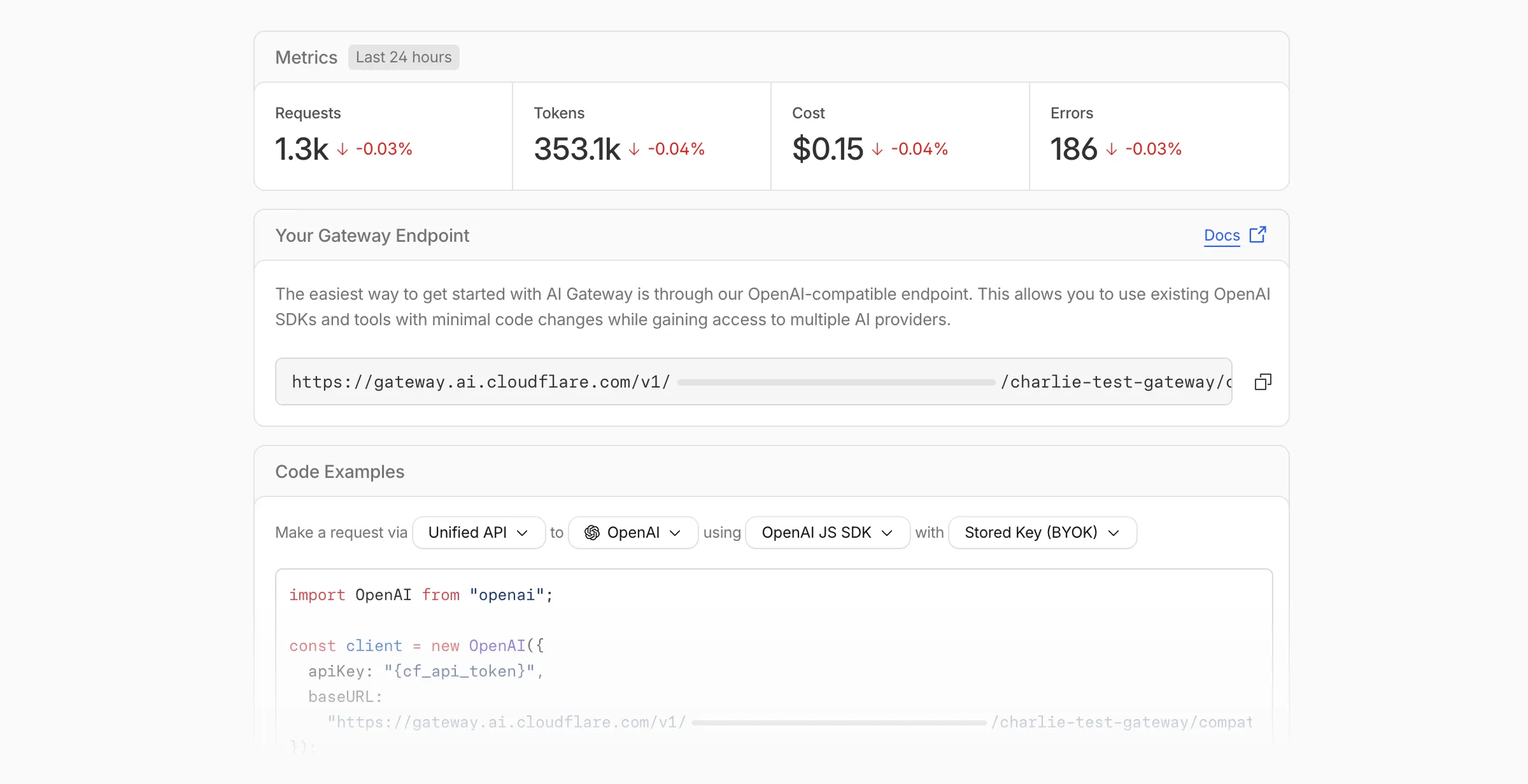
Getting started with AI Gateway is now simpler. When you create your first gateway, we now show your gateway's OpenAI-compatible endpoint and step-by-step guidance to help you configure it. The Playground also includes helpful prompts, and usage pages have clear next steps if you have not made any requests yet.
The first-run setup experience for new gateways.
We've also combined the previously separate code example sections into one view with dropdown selectors for API type, provider, SDK, and authentication method so you can now customize the exact code snippet you need from one place.
Dynamic Routing
The route builder is now more performant and responsive.
You can now copy route names to your clipboard with a single click.
Code examples use the Universal Endpoint format, making it easier to integrate routes into your application.
Observability and analytics
Small monetary values now display correctly in cost analytics charts, so you can accurately track spending at any scale.
Accessibility
Improvements to keyboard navigation within the AI Gateway, specifically when exploring usage by provider.
Improvements to sorting and filtering components on the Workers AI models page.
The latest release of the Agents SDK ↗ adds built-in retry utilities, per-connection protocol message control, and a fully rewritten @cloudflare/ai-chat with data parts, tool approval persistence, and zero breaking changes.
Retry utilities
A new this.retry() method lets you retry any async operation with exponential backoff and jitter. You can pass an optional shouldRetry predicate to bail early on non-retryable errors.
Retry options are validated eagerly at enqueue/schedule time, and invalid values throw immediately. Internal retries have also been added for workflow operations (terminateWorkflow, pauseWorkflow, and others) with Durable Object-aware error detection.
Per-connection protocol message control
Agents automatically send JSON text frames (identity, state, MCP server lists) to every WebSocket connection. You can now suppress these per-connection for clients that cannot handle them — binary-only devices, MQTT clients, or lightweight embedded systems.
Connections with protocol messages disabled still fully participate in RPC and regular messaging. Use isConnectionProtocolEnabled(connection) to check a connection's status at any time. The flag persists across Durable Object hibernation.
The first stable release of @cloudflare/ai-chat ships alongside this release with a major refactor of AIChatAgent internals — new ResumableStream class, WebSocket ChatTransport, and simplified SSE parsing — with zero breaking changes. Existing code using AIChatAgent and useAgentChat works as-is.
Key new features:
Data parts — Attach typed JSON blobs (data-*) to messages alongside text. Supports reconciliation (type+id updates in-place), append, and transient parts (ephemeral via onData callback). See Data parts.
Tool approval persistence — The needsApproval approval UI now survives page refresh and DO hibernation. The streaming message is persisted to SQLite when a tool enters approval-requested state.
maxPersistedMessages — Cap SQLite message storage with automatic oldest-message deletion.
body option on useAgentChat — Send custom data with every request (static or dynamic).
Incremental persistence — Hash-based cache to skip redundant SQL writes.
Row size guard — Automatic two-pass compaction when messages approach the SQLite 2 MB limit.
autoContinueAfterToolResult defaults to true — Client-side tool results and tool approvals now automatically trigger a server continuation, matching server-executed tool behavior. Set autoContinueAfterToolResult: false in useAgentChat to restore the previous behavior.
Notable bug fixes:
Resolved stream resumption race conditions
Resolved an issue where setMessages functional updater sent empty arrays
Resolved an issue where client tool schemas were lost after DO hibernation
Resolved InvalidPromptError after tool approval (approval.id was dropped)
Resolved an issue where message metadata was not propagated on broadcast/resume paths
Resolved an issue where clearAll() did not clear in-memory chunk buffers
Resolved an issue where reasoning-delta silently dropped data when reasoning-start was missed during stream resumption
Synchronous queue and schedule getters
getQueue(), getQueues(), getSchedule(), dequeue(), dequeueAll(), and dequeueAllByCallback() were unnecessarily async despite only performing synchronous SQL operations. They now return values directly instead of wrapping them in Promises. This is backward compatible — existing code using await on these methods will continue to work.
Other improvements
Fix TypeScript "excessively deep" error — A depth counter on CanSerialize and IsSerializableParam types bails out to true after 10 levels of recursion, preventing the "Type instantiation is excessively deep" error with deeply nested types like AI SDK CoreMessage[].
POST SSE keepalive — The POST SSE handler now sends event: ping every 30 seconds to keep the connection alive, matching the existing GET SSE handler behavior. This prevents POST response streams from being silently dropped by proxies during long-running tool calls.
Widened peer dependency ranges — Peer dependency ranges across packages have been widened to prevent cascading major bumps during 0.x minor releases. @cloudflare/ai-chat and @cloudflare/codemode are now marked as optional peer dependencies.
We're excited to announce GLM-4.7-Flash on Workers AI, a fast and efficient text generation model optimized for multilingual dialogue and instruction-following tasks, along with the brand-new @cloudflare/tanstack-ai ↗ package and workers-ai-provider v3.1.1 ↗.
You can now run AI agents entirely on Cloudflare. With GLM-4.7-Flash's multi-turn tool calling support, plus full compatibility with TanStack AI and the Vercel AI SDK, you have everything you need to build agentic applications that run completely at the edge.
GLM-4.7-Flash — Multilingual Text Generation Model
@cf/zai-org/glm-4.7-flash is a multilingual model with a 131,072 token context window, making it ideal for long-form content generation, complex reasoning tasks, and multilingual applications.
Key Features and Use Cases:
Multi-turn Tool Calling for Agents: Build AI agents that can call functions and tools across multiple conversation turns
Multilingual Support: Built to handle content generation in multiple languages effectively
Large Context Window: 131,072 tokens for long-form writing, complex reasoning, and processing long documents
Fast Inference: Optimized for low-latency responses in chatbots and virtual assistants
Instruction Following: Excellent at following complex instructions for code generation and structured tasks
@cloudflare/tanstack-ai v0.1.1 — TanStack AI adapters for Workers AI and AI Gateway
We've released @cloudflare/tanstack-ai, a new package that brings Workers AI and AI Gateway support to TanStack AI ↗. This provides a framework-agnostic alternative for developers who prefer TanStack's approach to building AI applications.
Workers AI adapters support four configuration modes — plain binding (env.AI), plain REST, AI Gateway binding (env.AI.gateway(id)), and AI Gateway REST — across all capabilities:
Chat (createWorkersAiChat) — Streaming chat completions with tool calling, structured output, and reasoning text streaming.
Summarization (createWorkersAiSummarize) — Text summarization.
AI Gateway adapters route requests from third-party providers — OpenAI, Anthropic, Gemini, Grok, and OpenRouter — through Cloudflare AI Gateway for caching, rate limiting, and unified billing.
To get started:
npm install @cloudflare/tanstack-ai @tanstack/ai
workers-ai-provider v3.1.1 — transcription, speech, reranking, and reliability
The Workers AI provider for the Vercel AI SDK ↗ now supports three new capabilities beyond chat and image generation:
Transcription (provider.transcription(model)) — Speech-to-text with automatic handling of model-specific input formats across binding and REST paths.
Text-to-speech (provider.speech(model)) — Audio generation with support for voice and speed options.
Reranking (provider.reranking(model)) — Document reranking for RAG pipelines and search result ordering.
import { createWorkersAI } from "workers-ai-provider";import { experimental_transcribe, experimental_generateSpeech, rerank,} from "ai";const workersai = createWorkersAI({ binding: env.AI });const transcript = await experimental_transcribe({ model: workersai.transcription("@cf/openai/whisper-large-v3-turbo"), audio: audioData, mediaType: "audio/wav",});const speech = await experimental_generateSpeech({ model: workersai.speech("@cf/deepgram/aura-1"), text: "Hello world", voice: "asteria",});const ranked = await rerank({ model: workersai.reranking("@cf/baai/bge-reranker-base"), query: "What is machine learning?", documents: ["ML is a branch of AI.", "The weather is sunny."],});
This release also includes a comprehensive reliability overhaul (v3.0.5):
Fixed streaming — Responses now stream token-by-token instead of buffering all chunks, using a proper TransformStream pipeline with backpressure.
Fixed tool calling — Resolved issues with tool call ID sanitization, conversation history preservation, and a heuristic that silently fell back to non-streaming mode when tools were defined.
Premature stream termination detection — Streams that end unexpectedly now report finishReason: "error" instead of silently reporting "stop".
AI Search support — Added createAISearch as the canonical export (renamed from AutoRAG). createAutoRAG still works with a deprecation warning.
The latest release of the Agents SDK ↗ brings readonly connections, MCP protocol and security improvements, x402 payment protocol v2 migration, and the ability to customize OAuth for MCP server connections.
Readonly connections
Agents can now restrict WebSocket clients to read-only access, preventing them from modifying agent state. This is useful for dashboards, spectator views, or any scenario where clients should observe but not mutate.
New hooks: shouldConnectionBeReadonly, setConnectionReadonly, isConnectionReadonly. Readonly connections block both client-side setState() and mutating @callable() methods, and the readonly flag survives hibernation.
class MyAgent extends Agent { shouldConnectionBeReadonly(connection) { // Make spectators readonly return connection.url.includes("spectator"); }}
class MyAgent extends Agent { shouldConnectionBeReadonly(connection) { // Make spectators readonly return connection.url.includes("spectator"); }}
Custom MCP OAuth providers
The new createMcpOAuthProvider method on the Agent class allows subclasses to override the default OAuth provider used when connecting to MCP servers. This enables custom authentication strategies such as pre-registered client credentials or mTLS, beyond the built-in dynamic client registration.
class MyAgent extends Agent { createMcpOAuthProvider(callbackUrl) { return new MyCustomOAuthProvider(this.ctx.storage, this.name, callbackUrl); }}
class MyAgent extends Agent { createMcpOAuthProvider(callbackUrl: string): AgentMcpOAuthProvider { return new MyCustomOAuthProvider(this.ctx.storage, this.name, callbackUrl); }}
MCP SDK upgrade to 1.26.0
Upgraded the MCP SDK to 1.26.0 to prevent cross-client response leakage. Stateless MCP Servers should now create a new McpServer instance per request instead of sharing a single instance. A guard is added in this version of the MCP SDK which will prevent connection to a Server instance that has already been connected to a transport. Developers will need to modify their code if they declare their McpServer instance as a global variable.
MCP OAuth callback URL security fix
Added callbackPath option to addMcpServer to prevent instance name leakage in MCP OAuth callback URLs. When sendIdentityOnConnect is false, callbackPath is now required — the default callback URL would expose the instance name, undermining the security intent. Also fixes callback request detection to match via the state parameter instead of a loose /callback URL substring check, enabling custom callback paths.
Deprecate onStateUpdate in favor of onStateChanged
onStateChanged is a drop-in rename of onStateUpdate (same signature, same behavior). onStateUpdate still works but emits a one-time console warning per class. validateStateChange rejections now propagate a CF_AGENT_STATE_ERROR message back to the client.
x402 v2 migration
Migrated the x402 MCP payment integration from the legacy x402 package to @x402/core and @x402/evm v2.
Breaking changes for x402 users:
Peer dependencies changed: replace x402 with @x402/core and @x402/evm
PaymentRequirements type now uses v2 fields (e.g. amount instead of maxAmountRequired)
X402ClientConfig.account type changed from viem.Account to ClientEvmSigner (structurally compatible with privateKeyToAccount())
Each session can have its own terminal with an isolated working directory and environment, so users can run separate shells side-by-side in the same container.
// Multiple isolated terminals in the same sandboxconst dev = await sandbox.getSession("dev");return dev.terminal(request);
// Multiple isolated terminals in the same sandboxconst dev = await sandbox.getSession("dev");return dev.terminal(request);
xterm.js addon
The new @cloudflare/sandbox/xterm export provides a SandboxAddon for xterm.js ↗ with automatic reconnection (exponential backoff + jitter), buffered output replay, and resize forwarding.
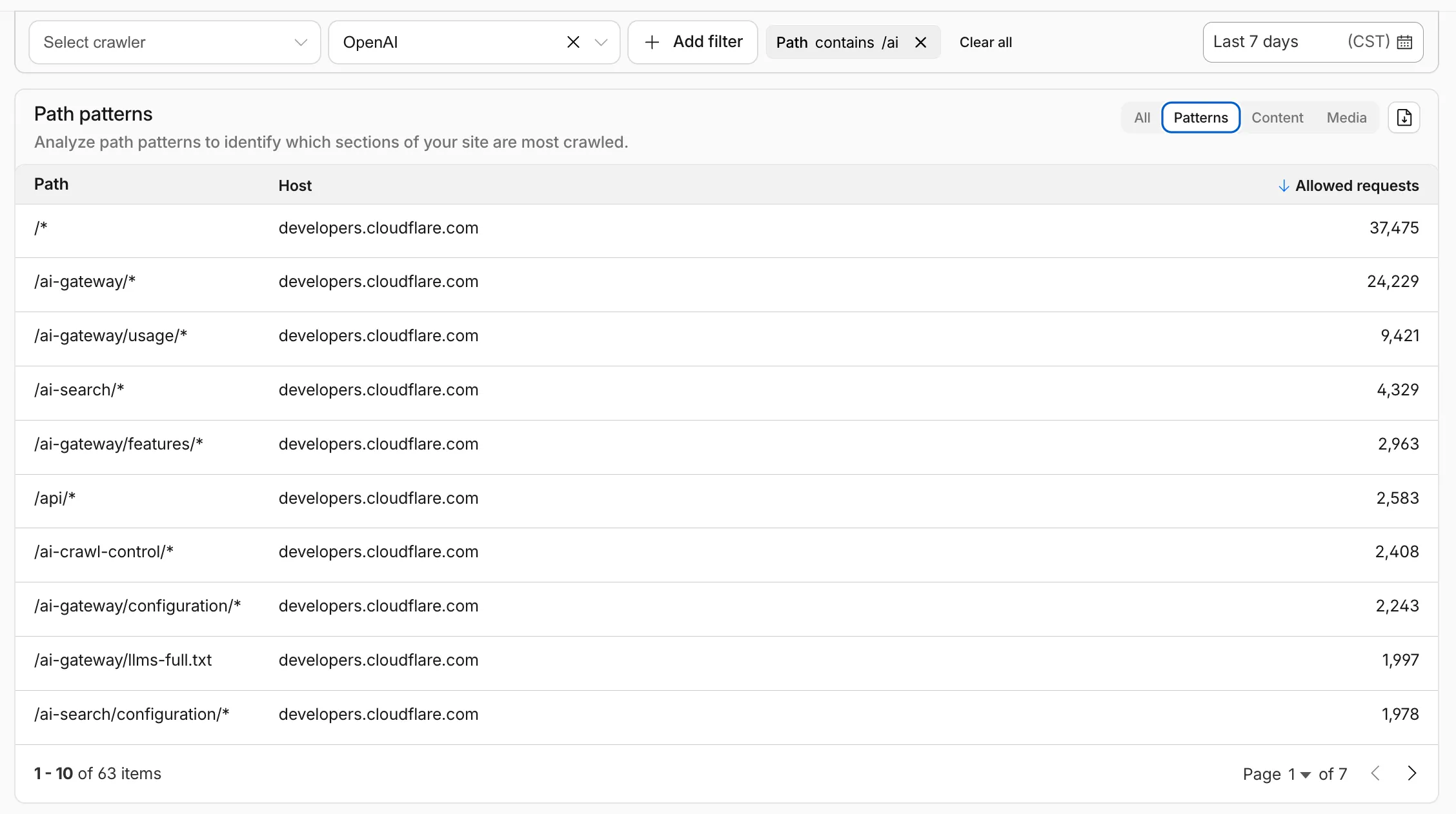
AI Crawl Control metrics have been enhanced with new views, improved filtering, and better data visualization.
Path pattern grouping
In the Metrics tab > Most popular paths table, use the new Patterns tab that groups requests by URI pattern (/blog/*, /api/v1/*, /docs/*) to identify which site areas crawlers target most. Refer to the screenshot above.
Enhanced referral analytics
Destination patterns show which site areas receive AI-driven referral traffic.
In the Metrics tab, a new Referrals over time chart shows trends by operator or source.
Data transfer metrics
In the Metrics tab > Allowed requests over time chart, toggle Bytes to show bandwidth consumption.
In the Crawlers tab, a new Bytes Transferred column shows bandwidth per crawler.
Image exports
Export charts and tables as images for reports and presentations.
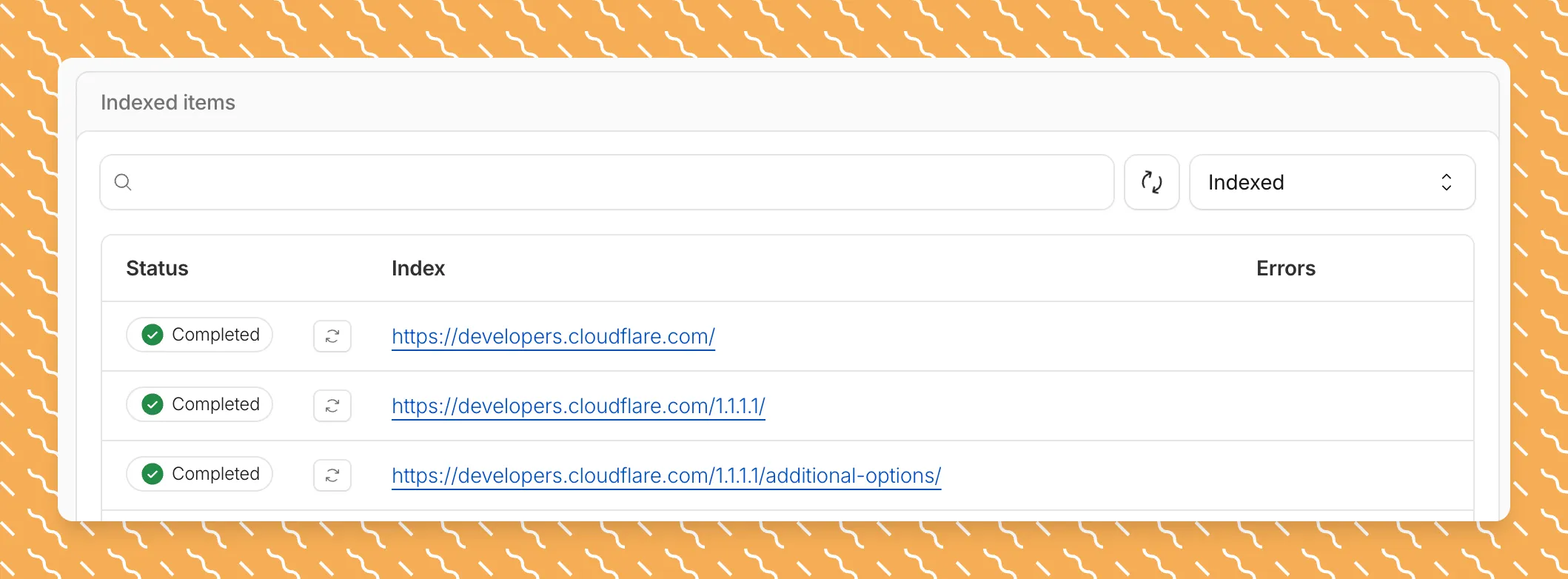
Get your content updates into AI Search faster and avoid a full rescan when you do not need it.
Reindex individual files without a full sync
Updated a file or need to retry one that errored? When you know exactly which file changed, you can now reindex it directly instead of rescanning your entire data source.
Go to Overview > Indexed Items and select the sync icon next to any file to reindex it immediately.
Crawl only the sitemap you need
By default, AI Search crawls all sitemaps listed in your robots.txt, up to the maximum files per index limit. If your site has multiple sitemaps but you only want to index a specific set, you can now specify a single sitemap URL to limit what the crawler visits.
For example, if your robots.txt lists both blog-sitemap.xml and docs-sitemap.xml, you can specify just https://example.com/docs-sitemap.xml to index only your documentation.
Configure your selection anytime in Settings > Parsing options > Specific sitemaps, then trigger a sync to apply the changes.
New reference documentation is now available for AI Crawl Control:
GraphQL API reference — Query examples for crawler requests, top paths, referral traffic, and data transfer. Includes key filters for detection IDs, user agents, and referrer domains.
Bot reference — Detection IDs and user agents for major AI crawlers from OpenAI, Anthropic, Google, Meta, and others.
Worker templates — Deploy the x402 Payment-Gated Proxy to monetize crawler access or charge bots while letting humans through free.
The latest release of the Agents SDK ↗ brings first-class support for Cloudflare Workflows, synchronous state management, and new scheduling capabilities.
Cloudflare Workflows integration
Agents excel at real-time communication and state management. Workflows excel at durable execution. Together, they enable powerful patterns where Agents handle WebSocket connections while Workflows handle long-running tasks, retries, and human-in-the-loop flows.
Use the new AgentWorkflow class to define workflows with typed access to your Agent:
Secure email reply routing — Email replies are now secured with HMAC-SHA256 signed headers, preventing unauthorized routing of emails to agent instances.
Routing improvements:
basePath option to bypass default URL construction for custom routing
Server-sent identity — Agents send name and agent type on connect
New onIdentity and onIdentityChange callbacks on the client
We have partnered with Black Forest Labs (BFL) again to bring their optimized FLUX.2 [klein] 9B model to Workers AI. This distilled model offers enhanced quality compared to the 4B variant, while maintaining cost-effective pricing. With a fixed 4-step inference process, Klein 9B is ideal for rapid prototyping and real-time applications where both speed and quality matter.
The model hosted on Workers AI is optimized for speed with a fixed 4-step inference process and supports up to 4 image inputs. Since this is a distilled model, the steps parameter is fixed at 4 and cannot be adjusted. Like FLUX.2 [dev] and FLUX.2 [klein] 4B, this image model uses multipart form data inputs, even if you just have a prompt.
With the REST API, the multipart form data input looks like this:
curl --request POST \
  --url 'https://api.cloudflare.com/client/v4/accounts/{ACCOUNT}/ai/run/@cf/black-forest-labs/flux-2-klein-9b' \
  --header 'Authorization: Bearer {TOKEN}' \
  --header 'Content-Type: multipart/form-data' \
  --form 'prompt=a sunset at the alps' \
  --form width=1024 \
  --form height=1024
With the Workers AI binding, you can use it as such:
const form = new FormData();form.append("prompt", "a sunset with a dog");form.append("width", "1024");form.append("height", "1024");// FormData doesn't expose its serialized body or boundary. Passing it to a// Request (or Response) constructor serializes it and generates the Content-Type// header with the boundary, which is required for the server to parse the multipart fields.const formResponse = new Response(form);const formStream = formResponse.body;const formContentType = formResponse.headers.get('content-type');const resp = await env.AI.run("@cf/black-forest-labs/flux-2-klein-9b", { multipart: { body: formStream, contentType: formContentType, },});
The parameters you can send to the model are detailed here:
JSON Schema for ModelRequired Parameters
prompt (string) - Text description of the image to generate
Optional Parameters
input_image_0 (string) - Binary image
input_image_1 (string) - Binary image
input_image_2 (string) - Binary image
input_image_3 (string) - Binary image
guidance (float) - Guidance scale for generation. Higher values follow the prompt more closely
width (integer) - Width of the image, default 1024 Range: 256-1920
height (integer) - Height of the image, default 768 Range: 256-1920
seed (integer) - Seed for reproducibility
Note: Since this is a distilled model, the steps parameter is fixed at 4 and cannot be adjusted.
Multi-reference images
The FLUX.2 klein-9b model supports generating images based on reference images, just like FLUX.2 [dev] and FLUX.2 [klein] 4B. You can use this feature to apply the style of one image to another, add a new character to an image, or iterate on past generated images. You would use it with the same multipart form data structure, with the input images in binary. The model supports up to 4 input images.
For the prompt, you can reference the images based on the index, like take the subject of image 1 and style it like image 0 or even use natural language like place the dog beside the woman.
You must name the input parameter as input_image_0, input_image_1, input_image_2, input_image_3 for it to work correctly. All input images must be smaller than 512x512.
curl --request POST \
  --url 'https://api.cloudflare.com/client/v4/accounts/{ACCOUNT}/ai/run/@cf/black-forest-labs/flux-2-klein-9b' \
  --header 'Authorization: Bearer {TOKEN}' \
  --header 'Content-Type: multipart/form-data' \
  --form 'prompt=take the subject of image 1 and style it like image 0' \
  --form input_image_0=@/Users/johndoe/Desktop/icedoutkeanu.png \
  --form input_image_1=@/Users/johndoe/Desktop/me.png \
  --form width=1024 \
  --form height=1024
Through Workers AI Binding:
//helper function to convert ReadableStream to Blobasync function streamToBlob(stream: ReadableStream, contentType: string): Promise<Blob> { const reader = stream.getReader(); const chunks = []; while (true) { const { done, value } = await reader.read(); if (done) break; chunks.push(value); } return new Blob(chunks, { type: contentType });}const image0 = await fetch("http://image-url");const image1 = await fetch("http://image-url");const form = new FormData();const image_blob0 = await streamToBlob(image0.body, "image/png");const image_blob1 = await streamToBlob(image1.body, "image/png");form.append('input_image_0', image_blob0)form.append('input_image_1', image_blob1)form.append('prompt', 'take the subject of image 1 and style it like image 0')// FormData doesn't expose its serialized body or boundary. Passing it to a// Request (or Response) constructor serializes it and generates the Content-Type// header with the boundary, which is required for the server to parse the multipart fields.const formResponse = new Response(form);const formStream = formResponse.body;const formContentType = formResponse.headers.get('content-type');const resp = await env.AI.run("@cf/black-forest-labs/flux-2-klein-9b", { multipart: { body: formStream, contentType: formContentType }})
You can now store up to 10 million vectors in a single Vectorize index, doubling the previous limit of 5 million vectors. This enables larger-scale semantic search, recommendation systems, and retrieval-augmented generation (RAG) applications without splitting data across multiple indexes.
Vectorize continues to support indexes with up to 1,536 dimensions per vector at 32-bit precision. Refer to the Vectorize limits documentation for complete details.
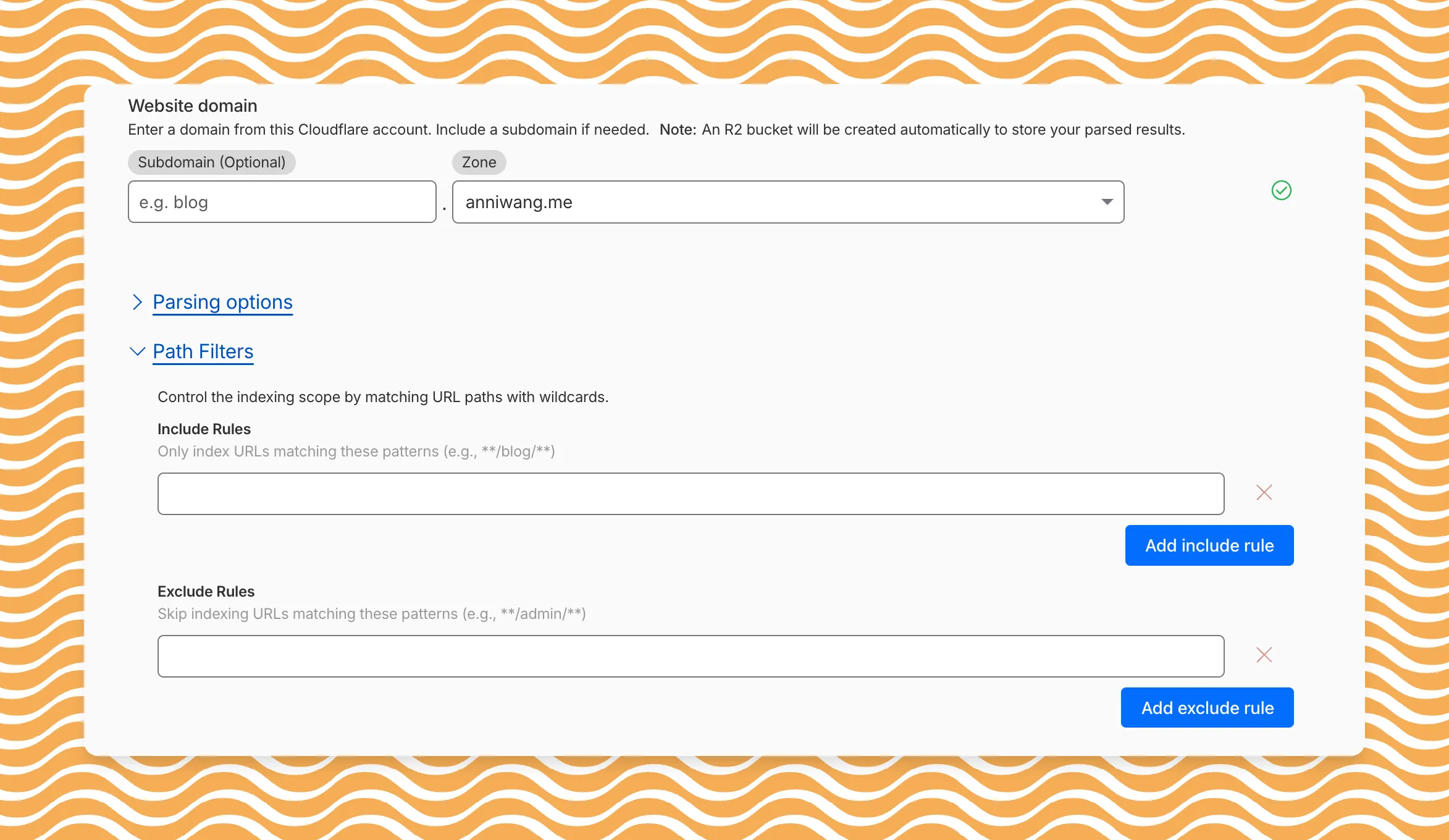
AI Search now includes path filtering for both website and R2 data sources. You can now control which content gets indexed by defining include and exclude rules for paths.
By controlling what gets indexed, you can improve the relevance and quality of your search results. You can also use path filtering to split a single data source across multiple AI Search instances for specialized search experiences.
Path filtering uses micromatch ↗ patterns, so you can use * to match within a directory and ** to match across directories.
Use case
Include
Exclude
Index docs but skip drafts
**/docs/**
**/docs/drafts/**
Keep admin pages out of results
—
**/admin/**
Index only English content
**/en/**
—
Configure path filters when creating a new instance or update them anytime from Settings. Check out path filtering to learn more.
You can now create AI Search instances programmatically using the API. For example, use the API to create instances for each customer in a multi-tenant application or manage AI Search alongside your other infrastructure.
If you have created an AI Search instance via the dashboard before, you already have a service API token registered and can start creating instances programmatically right away. If not, follow the API guide to set up your first instance.
For example, you can now create separate search instances for each language on your website:
for lang in en fr es de; do curl -X POST "https://api.cloudflare.com/client/v4/accounts/$ACCOUNT_ID/ai-search/instances" \ -H "Authorization: Bearer $API_TOKEN" \ -H "Content-Type: application/json" \ --data '{ "id": "docs-'"$lang"'", "type": "web-crawler", "source": "example.com", "source_params": { "path_include": ["**/'"$lang"'/**"] } }'done



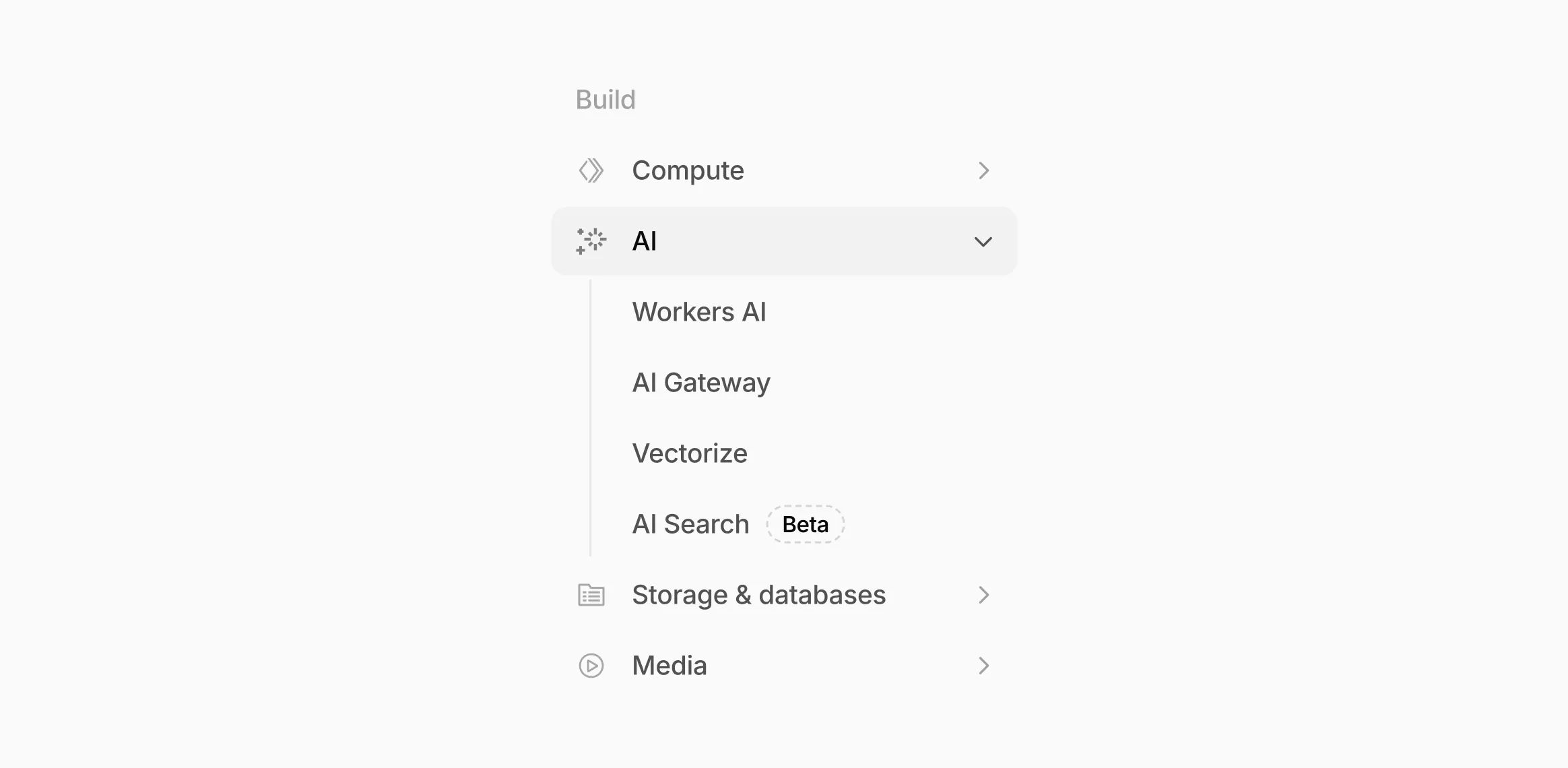 The new top-level AI section in the dashboard sidebar.
 The first-run setup experience for new gateways.