



Codex + Cloudflare
OpenAILightweight open-source terminal agent that reads and writes files, runs commands, and browses the web in a sandbox. Made by OpenAI.
-
Install Codex
Install the Codex CLI. macOS and Linux are fully supported; use WSL2 on Windows. For Homebrew or other install methods, see the Codex CLI setup guide ↗.
npm install -g @openai/codex -
Launch Codex in your project
Start Codex from the root of your project, where
wrangler.jsonclives (if it already exists).codex -
Install the Cloudflare plugin
Inside Codex, run
/plugins, then search for and install Cloudflare. This installs Cloudflare Skills and registers the Cloudflare MCP servers./plugins -
Try a prompt
For example:
Optimize my Worker to serve WebP images with responsive resizing using Cloudflare Images.
-
Download Codex
Follow the download instructions for your operating system at developers.openai.com/codex/app ↗.
-
Install the Cloudflare plugin
In the Codex app, go to Plugins and install Cloudflare.
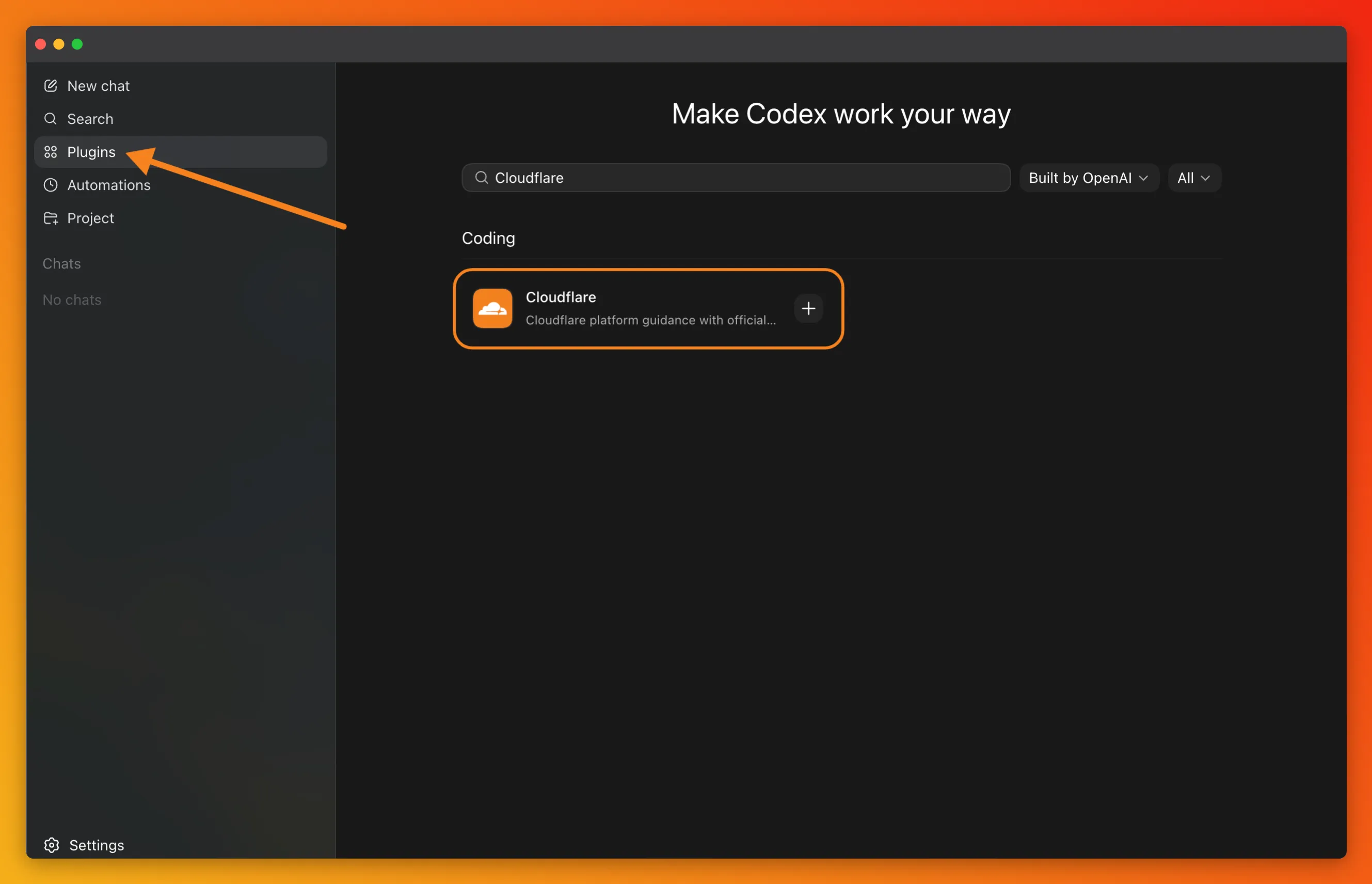
Expand any section to learn more.
Cloudflare Skills
Persistent platform context that teaches the agent how Cloudflare works.
Skills are instructions the agent loads on demand. The cloudflare/skills bundle covers every layer of the platform — so the agent knows your conventions without you re-explaining them.
MCP servers
Live access to the Cloudflare API, docs, and observability.
MCP servers provide typed tools to call into Cloudflare at runtime. There are two options: Code Mode — a single server that covers the entire Cloudflare API (2,500+ endpoints in ~1,000 tokens) — or a set of focused, domain-specific servers hosted in the cloudflare/mcp-server-cloudflare repo. The full catalog is also in the MCP servers for Cloudflare docs.
Wrangler CLI
Local dev, deploys, and Workers-specific commands.
Use Wrangler for local development, deploys,
and product-specific commands like wrangler d1 migrations apply or wrangler tail.
The bundled wrangler Skill teaches the agent when to reach
for it.
Agent-friendly docs
Token-efficient references optimized for agents.
Append /index.md to any Cloudflare docs URL for a clean markdown
version. Every top-level product section also has its own llms.txt — a page index sized for a single context window. A few
useful ones:
- developers.cloudflare.com/llms.txt — directory of every Cloudflare product.
- developers.cloudflare.com/workers/llms.txt
- developers.cloudflare.com/agents/llms.txt
- developers.cloudflare.com/r2/llms.txt
- developers.cloudflare.com/d1/llms.txt
For a full overview of how these docs are structured for agents, refer to the Docs for Agents guide.
- The Cloudflare API MCP server uses Code Mode — Codex writes JavaScript against a typed API to reach any of 2,500+ endpoints in ~1,000 tokens.
- Try the
/cloudflare:build-agentslash command to scaffold a complete Agents SDK project, or/cloudflare:build-mcpfor a remote MCP server. - For more information on installing additional MCP servers, or when to use Code Mode versus traditional MCP servers, refer to the Cloudflare MCP server repository ↗.
Should I use Skills, the MCP server, Wrangler CLI, or all of them?
All three. Skills load Cloudflare knowledge into every Codex session (when
to use Durable Objects, how to structure a Workers project, etc.). The
Cloudflare API MCP server handles platform operations (DNS, WAF, Zero
Trust). Wrangler handles local dev, deploys, and migrations. The bundled
wrangler Skill teaches Codex when to run CLI commands vs. call the MCP
API.
How do I connect Codex to my Cloudflare account?
The first time Codex calls a Cloudflare tool, you will be redirected to authorize via OAuth and choose permissions.
Is Codex open source?
Yes. Codex is open source and available on GitHub at github.com/openai/codex.
MCP server not connecting
Verify the server was added with codex mcp add cloudflare --url https://mcp.cloudflare.com/mcp.
Run codex mcp list to confirm it appears, then use /mcp inside the Codex TUI to check its status.
Getting outdated information about Cloudflare products
Enable the Cloudflare docs MCP server so the agent can fetch
current documentation at runtime. If you prefer not to use the MCP server, point
the agent directly at developers.cloudflare.com/llms.txt for
a directory of every product, or developers.cloudflare.com/<product>/llms.txt
for a product-specific index.
MCP server authentication fails
Remove and re-add the MCP server. Complete the OAuth flow in your browser when prompted.
Cloudflare is not just a deploy target for agents, it is a full stack for building your own.
Stateful AI agents with state, scheduling, RPC, email, streaming chat — and the Code Mode SDK for token-efficient tool use.
Learn more →Ship a remote MCP server on Workers with OAuth, durable state, and streamable HTTP transport.
Learn more →Run open-source LLMs, embedding models, and image models at the edge. Use it as your agent's model provider.
Learn more →Load user-generated code into isolated Workers on demand. The secure sandbox behind Code Mode.
Learn more →

Terminal-based coding agent that understands your codebase, runs commands, edits files, and manages git. Made by Anthropic.


AI-first IDE built on VS Code with multi-file Composer edits and background agents. Made by Cursor.


Editor extension and CLI with agent mode, workspace context, and native PR integration. Made by GitHub.


Open-source terminal agent with a rich TUI that works with 75+ LLMs. Made by Anomaly.


Agentic IDE with Cascade context and Flows for multi-step tasks. Made by Cognition.